Best AI 3D Workflows for Blender in 2027: Five Imports
Five real GLB and OBJ assets tested in Blender 4.5.9 LTS. Compare triangle counts, packed textures and Cycles renders, including a missing-image failure.
All five original generated assets imported into Blender 4.5.9 LTS. Then we imported the same textured OBJ again with its image deliberately missing. Blender still created the mesh and returned FINISHED, but the texture node had no pixels and Cycles rendered the robot magenta. The five originals show how to choose an AI 3D route for a Blender workflow: check what arrives, inspect the imported materials and decide how much geometry and packaging work you can take on.
Key takeaway
- Hunyuan3D 3.1 Pro imported as one GLB with 499,914 triangles and one packed 4096 × 4096 image. Hunyuan Rapid imported with 50,000 triangles and one external image from its OBJ package.
- Rodin 2.5 Fast and Meshy 7.1 multi-image each imported three packed images. The TRELLIS.2 example imported two and rendered, even though its original GLB had a Khronos validator error.
- All five originals created one mesh and one material in this Blender version. Imported scene bounds differed. The measured dimensions are Blender units and were not compared with real object size.
- Keep the complete OBJ, MTL and PNG package. On the missing PNG run, the image reported 0 × 0 pixels and the renderer visibly exposed the failure.
What we imported
We used five originals from earlier experiments, without generating new variants. The Hunyuan Pro and Rapid pair used the same robot image. The Rodin Fast and TRELLIS.2 exports came from the same satchel input in their respective tests. The Meshy multi-image result is a bust from a separate input and test. The mix lets us inspect format, texture packaging and geometry differences. It does not provide a matched ranking of all five routes.
Each original was imported into an empty scene using Blender’s official 4.5.9 LTS Python module. We used the default GLB import operator and the default OBJ import operator, then counted mesh triangles, inspected image nodes and saved a .blend file. We rendered the imported assets in Cycles, using normalized orthographic framing and a consistent lighting rig. Those render settings make the files easier to compare visually. The geometry and object transforms in the import records were measured before framing. Blender glTF import operator · Blender OBJ import operator
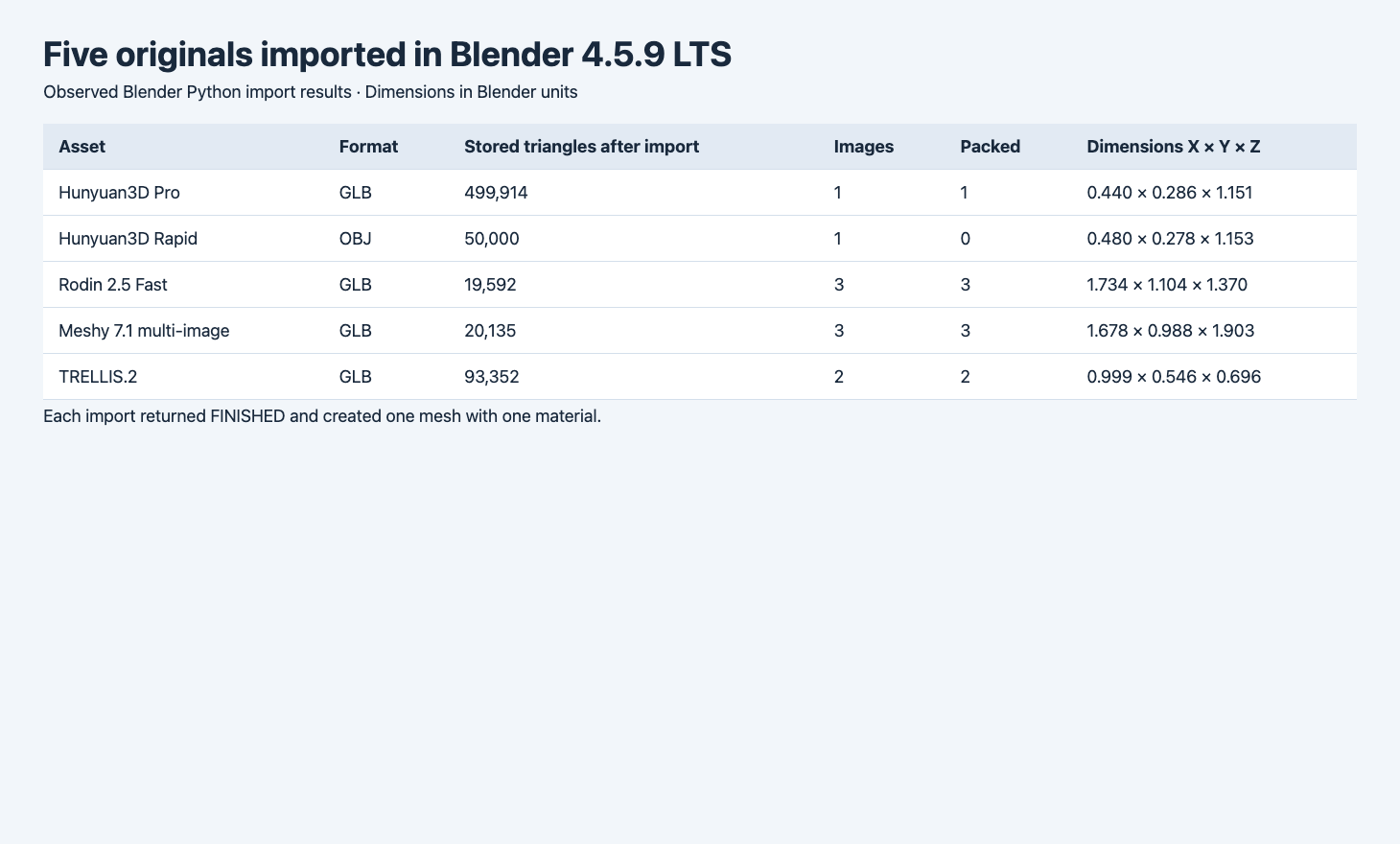
The report uses the actual Blender import results. Scene dimensions are in Blender units. A FINISHED result means the import operator completed.
| Source and input | File or package bytes | Triangles after import | Images found in material nodes | Packed |
|---|---|---|---|---|
| Hunyuan3D Pro GLB, robot | 31,932,256 | 499,914 | 1 | 1 |
| Hunyuan3D Rapid OBJ package, robot | 14,494,820 | 50,000 | 1 | 0 |
| Rodin 2.5 Fast GLB, satchel | 2,006,764 | 19,592 | 3 | 3 |
| TRELLIS.2 GLB, satchel | 4,380,648 | 93,352 | 2 | 2 |
| Meshy 7.1 multi-image GLB, bust | 8,188,512 | 20,135 | 3 | 3 |
The Rapid package total includes the 3,168,367-byte OBJ, 88-byte MTL and 11,326,365-byte image. All five imported triangle counts matched the geometry in the source files. Blender’s image count here is the number of distinct images used by image nodes on the imported material. The packing count refers to Blender’s image datablocks immediately after import. It tells you whether the saved scene can carry the image without a separate texture path.
Hunyuan Pro and Rapid: one container or linked files
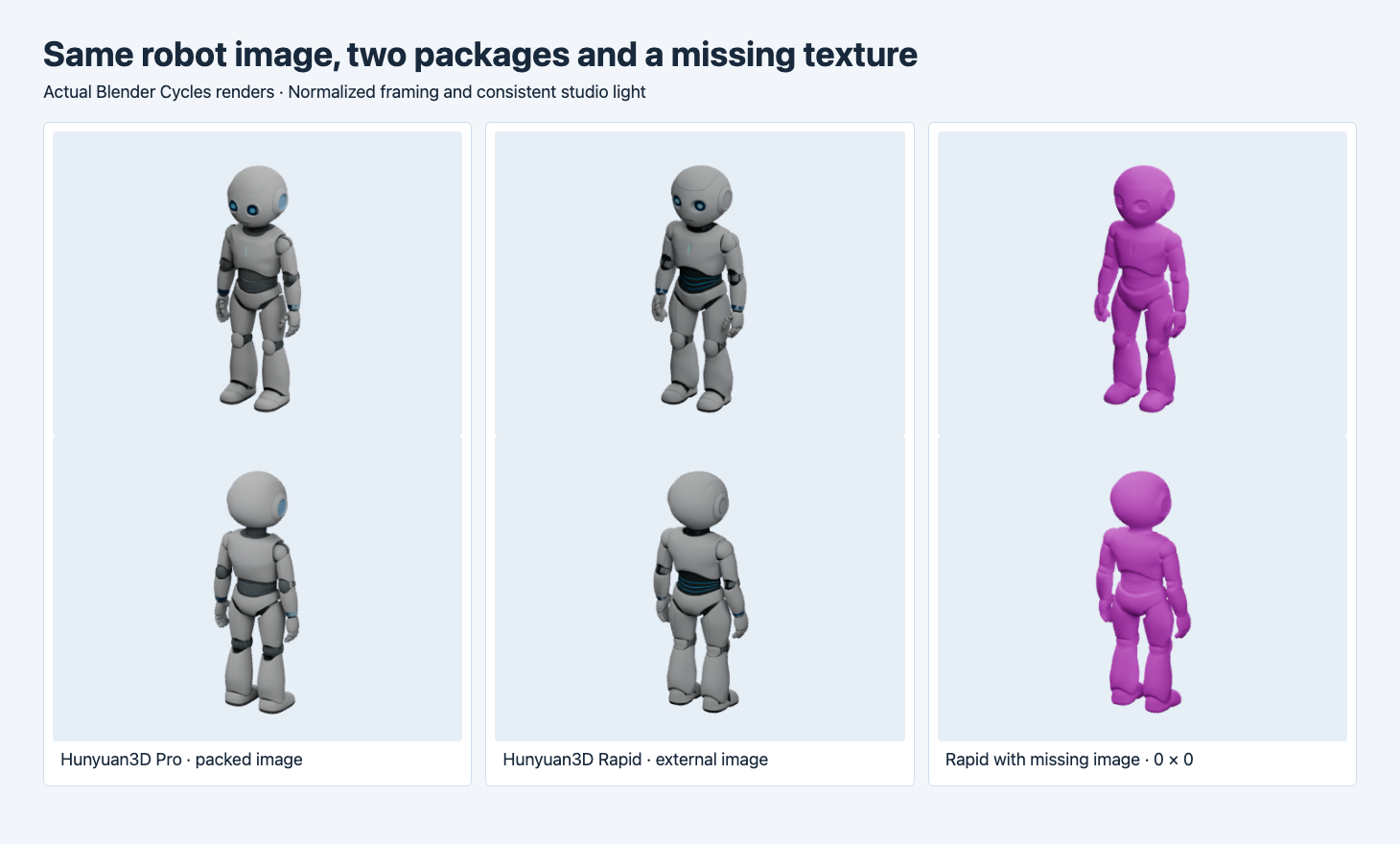
Left is the Pro GLB, center the complete Rapid OBJ package, and right the exact Rapid geometry with the PNG missing. The imported mesh still exists in the right-hand file.
The Pro robot imports a packed 4096 × 4096 image and 499,914 triangles. Its material is visible on both render angles. Rapid has about one tenth as many triangles and still shows the blue accents and gray paneling when the sidecars resolve. The two routes produce different geometry and material details, as the waist and back of the knees show. If your editing work starts with a single self-contained file, the Pro GLB takes fewer packaging steps. If it starts with a lighter mesh and you can track the sidecars, inspect the Rapid package before ruling it out.
For the failure test we copied the same OBJ and MTL into a separate working directory without the PNG. We launched the import from there so Blender could not find the original texture in the working directory. Blender warned that it could not load the file and still returned FINISHED. The image node had width and height zero, no image data and no file at the resolved path. The Cycles result turned magenta. It illustrates why a pipeline should inspect whether image data loads as well as whether a mesh exists.
Keep the material file next to the OBJ as named by mtllib, and use the file name that its map_Kd entry references. In this package that image is texture_20250901.png. After import, use Blender’s packing workflow if the .blend must travel without the original folder. Verify the packed file by opening a copy from a clean directory. You can preserve the untouched source files for future debugging.
Rodin, TRELLIS.2 and Meshy: check the imported material nodes
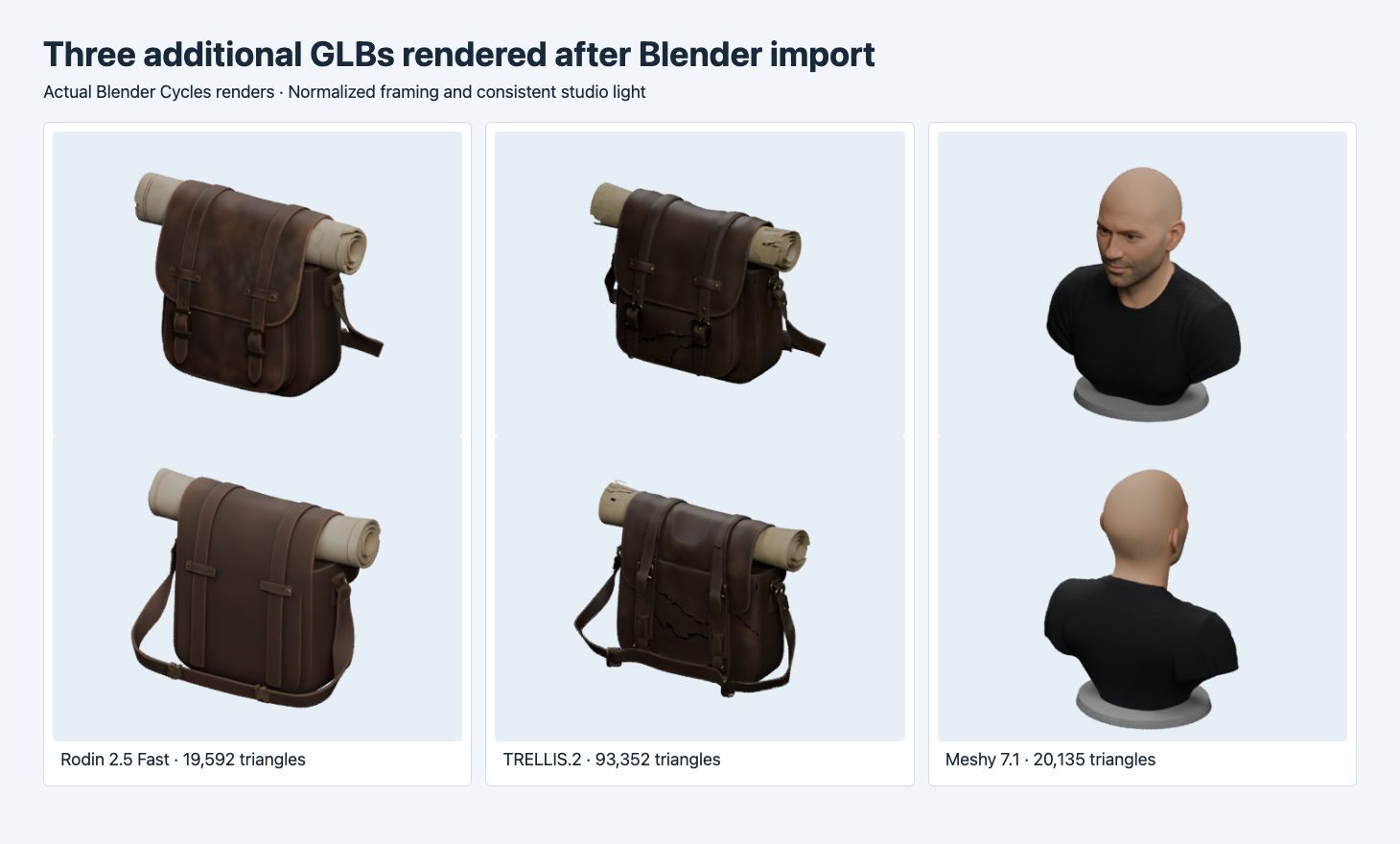
The left and middle columns use the same satchel input. The right column is a separate bust example. Front and rear are rendered with the same rig settings.
The Rodin satchel imported diffuse, ORM and normal image nodes, each with 2048 × 2048 pixels. Diffuse was sRGB, and the ORM and normal images were Non-Color. The TRELLIS.2 satchel imported a base-color and a metallic/roughness image with the same dimensions. Both show recognizable straps and a rolled item. The TRELLIS.2 render has dark irregular marks around the lower front and back. This single render does not establish whether those marks come from geometry, baked appearance or the import. Its original file also reported a non-unit normal error in glTF Validator. Check both the validation result and the imported material before approving it.
The Meshy two-image bust imported a base-color image, a packed data map and a normal image, with the color and data spaces separated in Blender. Its 20,135 triangles remain slightly above the earlier 20,000 request. If a scene has a hard polygon cap, measure after import. For each file, we inspected material node images in Blender. Three images in the imported scene describe the assets in those nodes, without proving texture quality, an exact channel layout in another renderer or physical fidelity.
Evaluate the route inside your project
The two robot imports measure about 1.151 and 1.153 Blender units tall. The Meshy bust measures about 1.903 along Z in the empty scene. The default scene scale length was 1.0, but no physical size was measured for any input. Use an explicit scene unit and a verified reference dimension before placing an asset beside production geometry. Once size and axis are correct, inspect editable topology, UVs, and whether the object needs to be split into parts. The five imports each created one mesh. None was tested for rigging or animation.
Choose one of the actual route examples, such as Hunyuan3D Pro for a packed GLB or Rodin 2.5 Fast to inspect a smaller textured mesh. Import into an empty scene, save the triangle and image counts, and make a render at your production view distance. Move the saved scene to a clean directory and re-open it if you plan to hand it off. If the route returns OBJ, test the complete bundle and a missing sidecar in a throwaway copy. If it returns GLB, pair the import with the GLB intake checks.
Check the package before you automate import
For a batch, report the imported mesh, triangle count and each image node’s dimensions and packed status. Record the exact source path or content hash so you can reproduce an issue. An empty image is a different outcome from a scene with no image node, and those cases call for different checks. Save a small render alongside the machine report, especially when the asset depends on UVs or normals. Recheck after moving the project folder or switching Blender versions.
For a same-source conversion test, see the GLB, FBX, OBJ and STL round trips.
For editing topology on two of these imports, see the same-mesh triangles and quads test.
FAQ
Does the largest GLB give the most editable Blender asset?
The largest file in this sample had the highest triangle count. Its suitability for editing depends on the operation you need. Inspect vertex density, UVs, object boundaries and material nodes before choosing the source.
Why can an OBJ import finish with a pink material?
The mesh can import while an external image path fails. This test produced a zero-pixel texture node. Restore the path and reload or reimport, then confirm the image has valid pixels.
Are packed images enough for a scene handoff?
Packing helps make the images available inside the saved scene. Reopen the .blend from a clean folder and check the renderer, extensions and any other linked libraries your project uses.
Found this useful? Share it