Gaussian Splats vs GLB Meshes From the Same Image
Compare a real 65,536-Gaussian TripoSplat PLY with a Tripo H3.1 GLB using exact file bytes, three-angle renders and mesh structure.
The same stone-house image produced a 4.46 MB Gaussian splat and a 4.31 MB textured mesh. Both show an open arch and tiled roof from the front. Rotate them and the differences are easier to see. The splat keeps more of the dark vegetation and warm shadows in the displayed view, while the mesh gives the arch and side walls explicit surfaces. This test compares the delivered files, a three-angle render and the underlying data so you can decide which format fits a viewer, an editing pipeline or a downstream asset check.
Key takeaway
- TripoSplat’s official public demo returned a binary PLY with 65,536 Gaussians and 4,456,863 bytes. The Tripo H3.1 job through SandBase returned a GLB with 18,459 stored triangles, three embedded images and 4,312,248 bytes.
- The files differ by 144,615 bytes, about 3.35% of the mesh file. At this single setting, choose according to the representation and target viewer before optimizing a modest difference in stored bytes.
- The PLY has Gaussian centers, scales, rotations, opacity and color-related fields, with no face element. The GLB has mesh primitives and material texture references. Their counts measure different things.
- The route to TripoSplat on SandBase returned an upstream 404 in the test. The working PLY came from the model author’s public demo, so this is a same-input representation comparison across two execution environments.
Use one source and identify the two routes
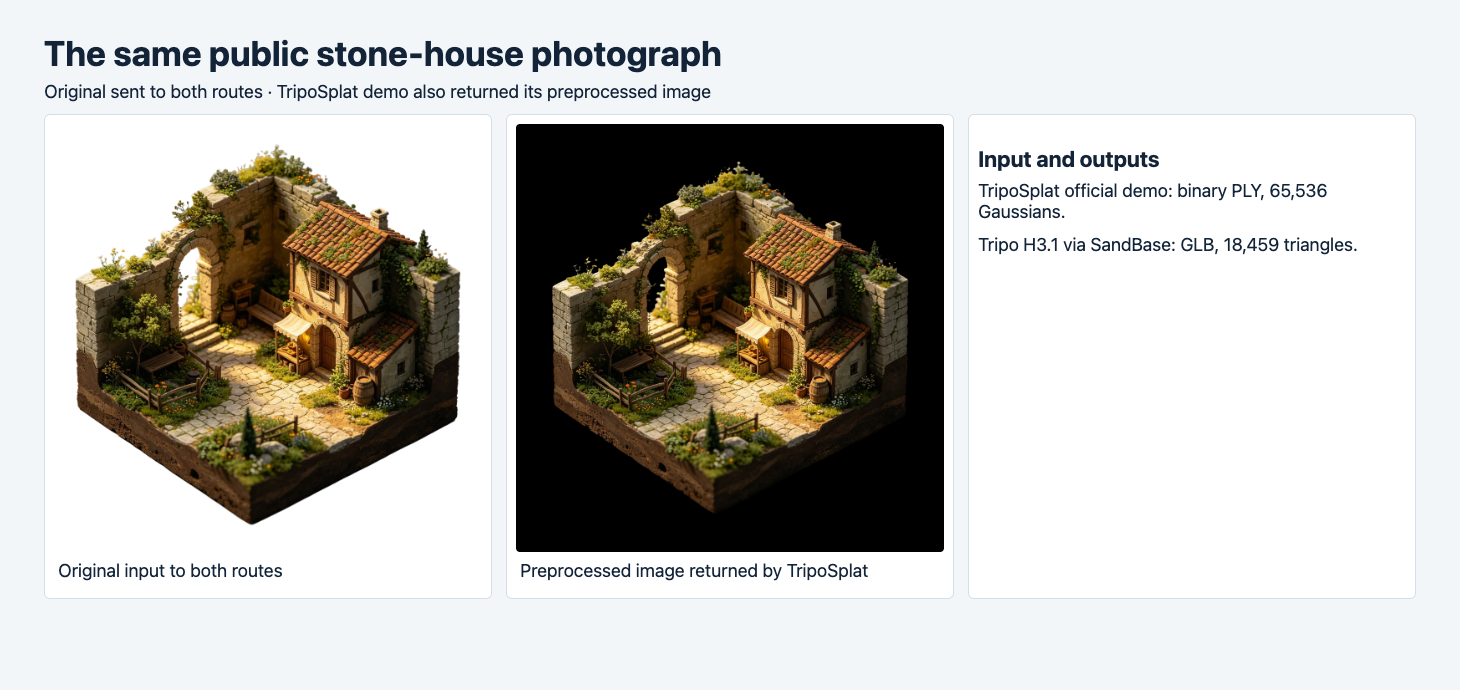
The left image was submitted to both workflows. The center image was returned by the TripoSplat demo after preprocessing. Its dark backdrop is part of that preview.
The input is a public example from the TripoSplat repository. It depicts a stone enclosure with a roof, an arch, a courtyard, thin fence pieces and vegetation. It gives us a mixture of flat walls, openings and irregular edges to inspect. We sent the same example to Tripo H3.1 with a 20,000 face target, textures and PBR enabled and quads off. The generated mesh was a little below the requested cap. On TripoSplat we used the official demo with seed 42, 20 steps, guidance 3 and 65,536 Gaussians, exporting PLY. Both requests used the original image. The preprocessing shown above was returned by the splat workflow. Public example image · TripoSplat demo

The SandBase TripoSplat request was accepted and later reported an upstream application 404. We used the publisher’s demo to obtain an actual PLY for comparison. The mesh job succeeded on SandBase and charged $0.36 for that run. The demo did not supply a comparable billing receipt for the splat. We are comparing two concrete files rather than latency, cost or reliability across services. Provider preprocessing, model configuration and rendering behavior can all affect what you see. Tripo H3.1 image-to-3D · TripoSplat route listing
| Measured property | TripoSplat | Tripo H3.1 |
|---|---|---|
| Execution source | Official public demo | SandBase |
| Downloaded format | Binary little-endian PLY | GLB |
| Stored file bytes | 4,456,863 | 4,312,248 |
| Primary geometry representation | 65,536 Gaussian records | 18,459 triangles counted from mesh indices |
| Embedded texture images | No image payload in this PLY | 3 |
| Structural check | Header and exact payload length | Khronos validator, 0 errors and 1 warning |
The PLY contains 17 float32 properties per Gaussian. Multiplying 65,536 by 17 and by four bytes gives a 4,456,448-byte payload, plus 415 bytes of header. The GLB bundles its JSON chunk, binary geometry buffers and embedded textures. A different Gaussian density or encoding, or a different mesh and texture setting, would change these totals. Measure the exact file you intend to serve. The size of a downloaded asset is also distinct from the decoder’s memory use or the cost of drawing it. TripoSplat export examples · glTF 2.0 specification
Compare the rendered front, side and rear
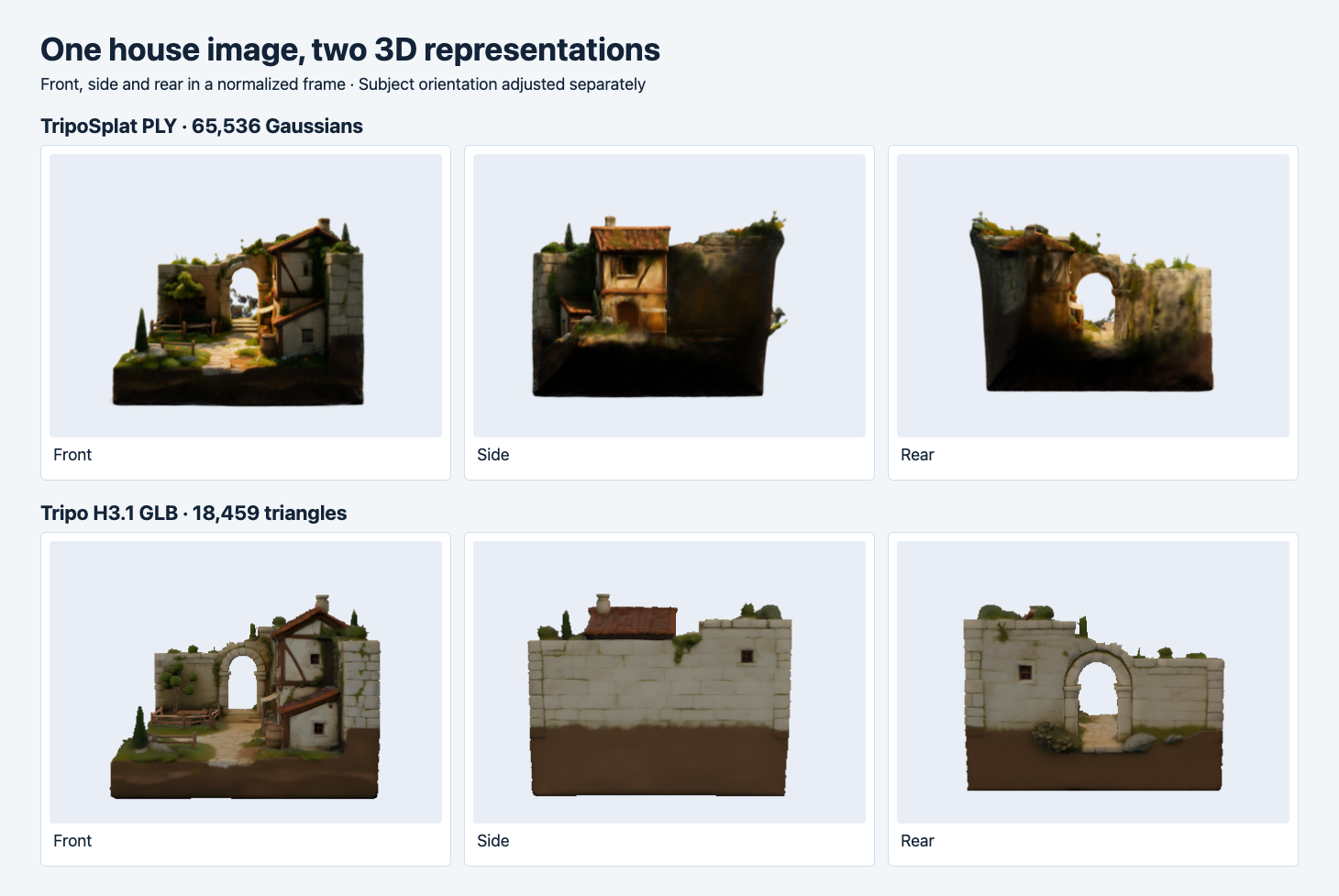
We oriented the subjects independently and normalized framing. Spark renders the PLY and Three.js renders the textured GLB. The mesh has scene lighting, while the splat uses its stored appearance.
At the front, both outputs preserve the main opening, the roof and a visible wall on the right. In the splat the foliage breaks up the boundary along the top. The visible courtyard and building have warmer highlights and deeper shadows. The GLB has a cleaner arch outline in the displayed angle and a fairly regular block texture on the wall. The differences are observations from the renders. The two renderers handle lighting and appearance differently, and the source is an oblique view rather than a calibrated camera reference.
At the side, the splat shows a small roofed façade and a dark wall. The GLB’s displayed side is largely a continuous stone wall with a small opening and the upper roof visible. The rear view reveals additional interpretation in both outputs. The mesh has a continuous pale wall and visible arch, while the splat retains stronger dark areas around the base and richer color variation near the arch and top. The input only shows one angle. Treat the hidden surfaces as generated guesses and use an additional view if their shape matters.
For a browser preview, the rendered result is an early check. Rotate to the actual view range and pause around the roof and arch. If a section vanishes or grows fuzzy at the edge, examine the file using the shipping renderer. For an editing project, inspect the object and material structure in the target tool, then decide whether to split walls, roof or ground into separate pieces. A convincing render alone cannot tell you how editable those parts are.
Inspect the structure behind the two images
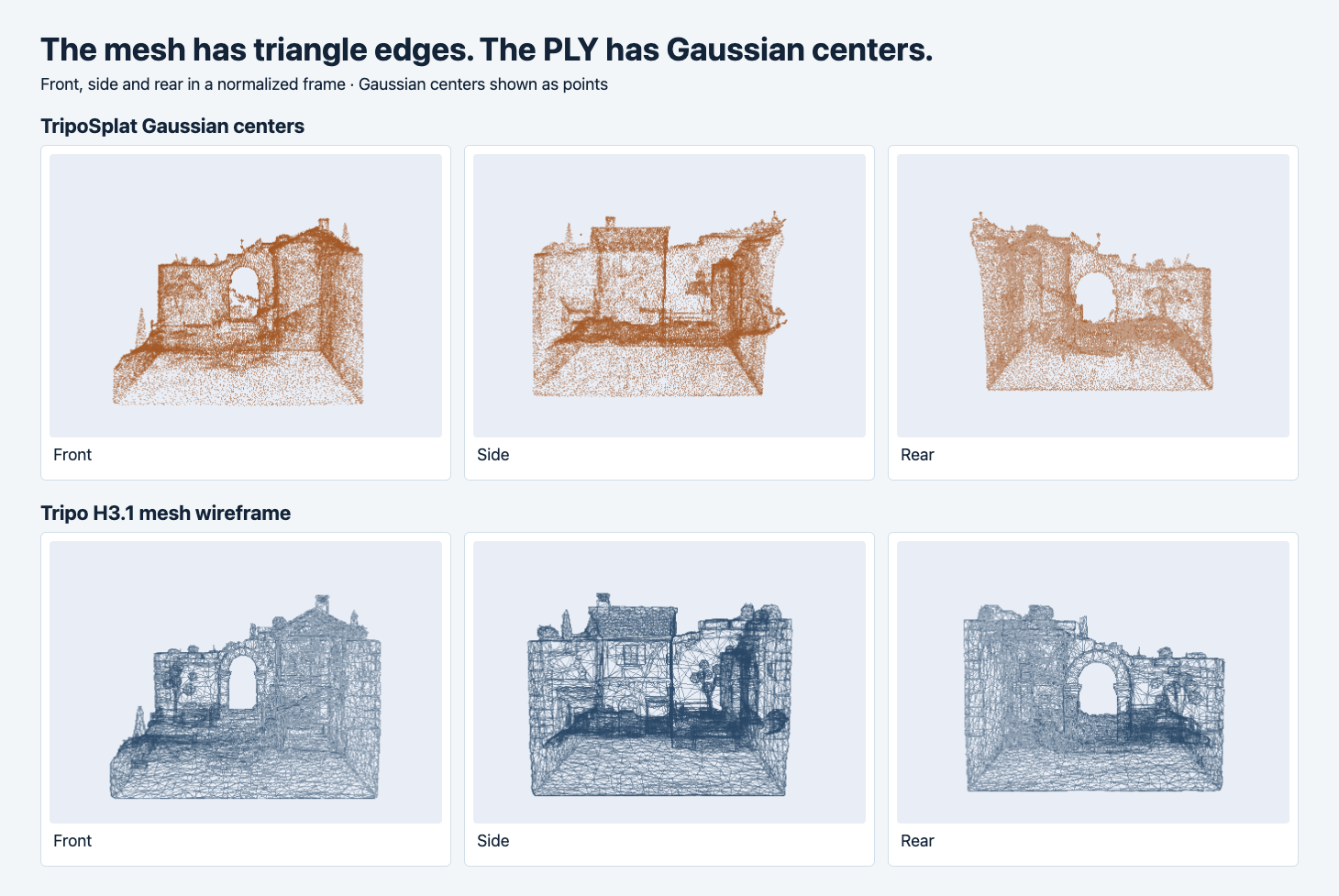
The top row plots the PLY centers as points. It deliberately omits the Gaussian opacity, shape and color used in the color render. The bottom row draws the GLB triangle edges.
A splat renderer uses the Gaussian parameters to project and blend the stored elements. The upper row above plots only the centers, so it is a diagnostic visualization of this file. The lower row shows the connected geometry of the mesh. The arch forms a gap surrounded by explicit triangle boundaries. The file can go into a mesh-oriented workflow where you can inspect topology or build a separate collision shape. The mesh validator reported a tangent-space warning because the normal-mapped primitive has no stored tangents. Check the material in your chosen engine when that warning matters. Spark renderer · Khronos validator issue reference
The PLY count and the GLB triangle count cannot be turned into a ratio of fidelity or speed. Visibility, material complexity, output dimensions and implementation all matter. A conventional point viewer may show only the centers from this PLY. To reproduce the intended appearance, use a Gaussian renderer that understands the stored attributes. A mesh loader can consume the GLB’s indexed primitives and material textures. Both paths need the actual file and a renderer that supports it.
Choose by what the asset needs to do
| Task | First output to evaluate | What to verify |
|---|---|---|
| Orbit a visual reconstruction in a splat-capable viewer | Gaussian PLY | Renderer support, edge stability and hidden-angle appearance |
| Import into a mesh editor or scene with collision and UV work | GLB | Triangle count, material handling and editable part boundaries |
| Show a preview on a constrained phone | Both in their target viewers | Transfer, first usable frame, memory and orbit behavior on the device |
| Print the house or cut the arch geometry | Mesh as a starting point | Scale, closure, thickness and slicing before export |
If the requirement is a rotatable visual preview with the stored appearance, try the PLY in a compatible viewer and rotate beyond the source angle. If you need mesh editing, test the GLB in that editor. If storage is the deciding factor, repeat with the intended output settings. This experiment measured exact bytes for two files and rendered their visible result. It did not measure device performance, watertightness, physical accuracy or every available export setting.
Start from the image-to-3D API selection guide if you need to compare model inputs and delivery formats. For a GLB headed into a product viewer, use the automated intake checks to pair the visual review with file, material and geometry limits. Keep both original exports when you need to compare later. Changing the output settings creates a new file and a new result to verify.
Keep the visual and technical checks together
For a useful acceptance record, save the source image, the exact output bytes or hash, the renderer version and the camera orientations. Record whether the opening stays visible at each view and whether thin features remain where the user needs them. Keep a second neutral representation view alongside the color render. Here the point and wireframe views help locate the arch independently of the shadow and color differences. On an actual delivery, attach any runtime measurements to the exact viewer and device that produced them.
For the same two files in a web UI, see model-viewer and Spark loading, rotation and fallback tests.
FAQ
Can a PLY file also contain a mesh?
Yes. The PLY header describes the elements in that particular file. Inspect it for faces and the vertex properties before deciding which importer to use. This export contains Gaussian parameters and no face element.
Can I use a splat as the collision shape?
A Gaussian renderer draws a visual representation. If the project needs physics, build or import a collision proxy and test it separately. The proxy can be much simpler than the visible asset as long as it handles the interactions your application needs.
Can a GLB and a PLY share the same camera in my app?
They can share a camera after you bring them into a common coordinate system. Record each import’s orientation and scale, then test the same intended viewing angles. Our captures oriented the assets independently and normalized their framing for inspection.
Found this useful? Share it