GLB vs FBX vs OBJ vs STL for AI 3D Assets in 2027
Export one generated 3D mesh to GLB, FBX, OBJ and STL. Compare reimported triangles, UVs, texture loss and actual Blender renders.
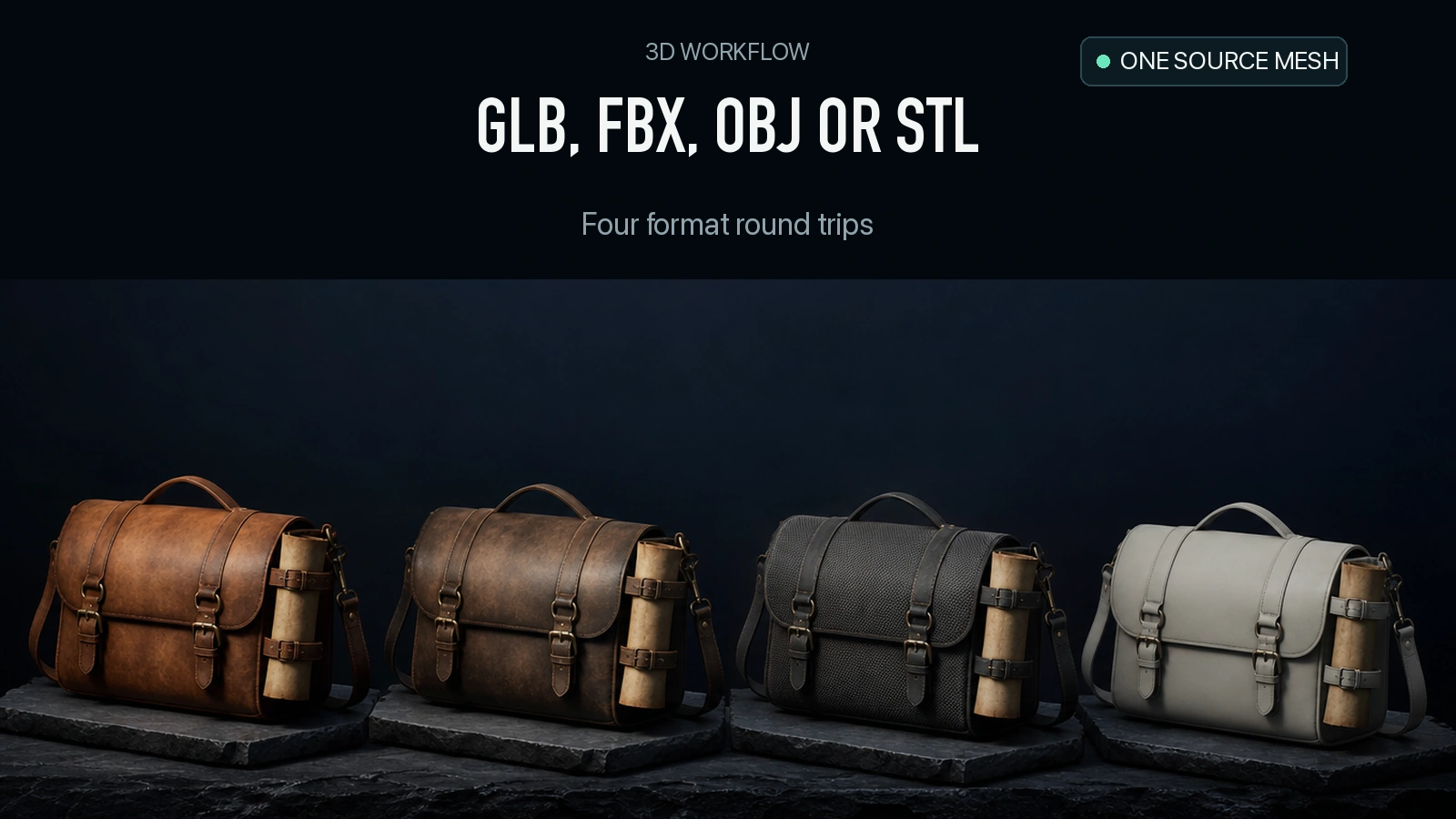
Four exports carried the same 19,592 triangles back into Blender. Their materials came back differently. GLB retained three packed images. FBX retained two and rendered the satchel much darker. The default OBJ returned with a material but no image nodes. STL returned without a material or UVs. If you are choosing a 3D API or an export format in 2027, separate the model’s original delivery from what happens after conversion. This comparison follows one real asset through all four paths and shows an OBJ base-color recovery.
Key takeaway
- Starting from one Rodin 2.5 Fast GLB, we exported GLB, FBX, OBJ and binary STL in Blender 4.5.9 LTS and imported each into an empty scene. All four returned FINISHED and preserved the triangle count.
- GLB was 1,889,192 bytes and retained three packed images. FBX was 1,281,196 bytes with two packed image datablocks. The Blender rendering differed strongly despite both carrying images.
- The default OBJ and its MTL totaled 2,326,950 bytes and returned no mapped image. An explicit base-color link and local PNG restored a 2048 × 2048 texture in a 2,557,944-byte package.
- The binary STL was 979,684 bytes. The test recovered the same triangles and bounds, with no material or UVs. Physical dimensions and printability need separate tests.
Start from one known asset
The source is the 2,006,764-byte Rodin Fast satchel from the Fast and Standard comparison. It arrived as one GLB with one mesh, one material, one UV layer and three embedded images. Blender imported the diffuse, ORM and normal maps. We used this same imported scene for each export and read the resulting file in an empty scene. This workflow measures the conversion and reimport. None of the four local derivatives is represented as a new Rodin API output.
We used Blender’s official 4.5.9 LTS Python module on the same machine for every file. The GLB export used the GLB option. For FBX we selected the COPY path mode with texture embedding. OBJ used material export and COPY path mode. The STL export was binary. Beyond those choices we used the operators’ defaults. These settings matter because a different exporter, an application on the other end, or an edited node graph can carry material information differently. Blender scene export API · Blender file operators
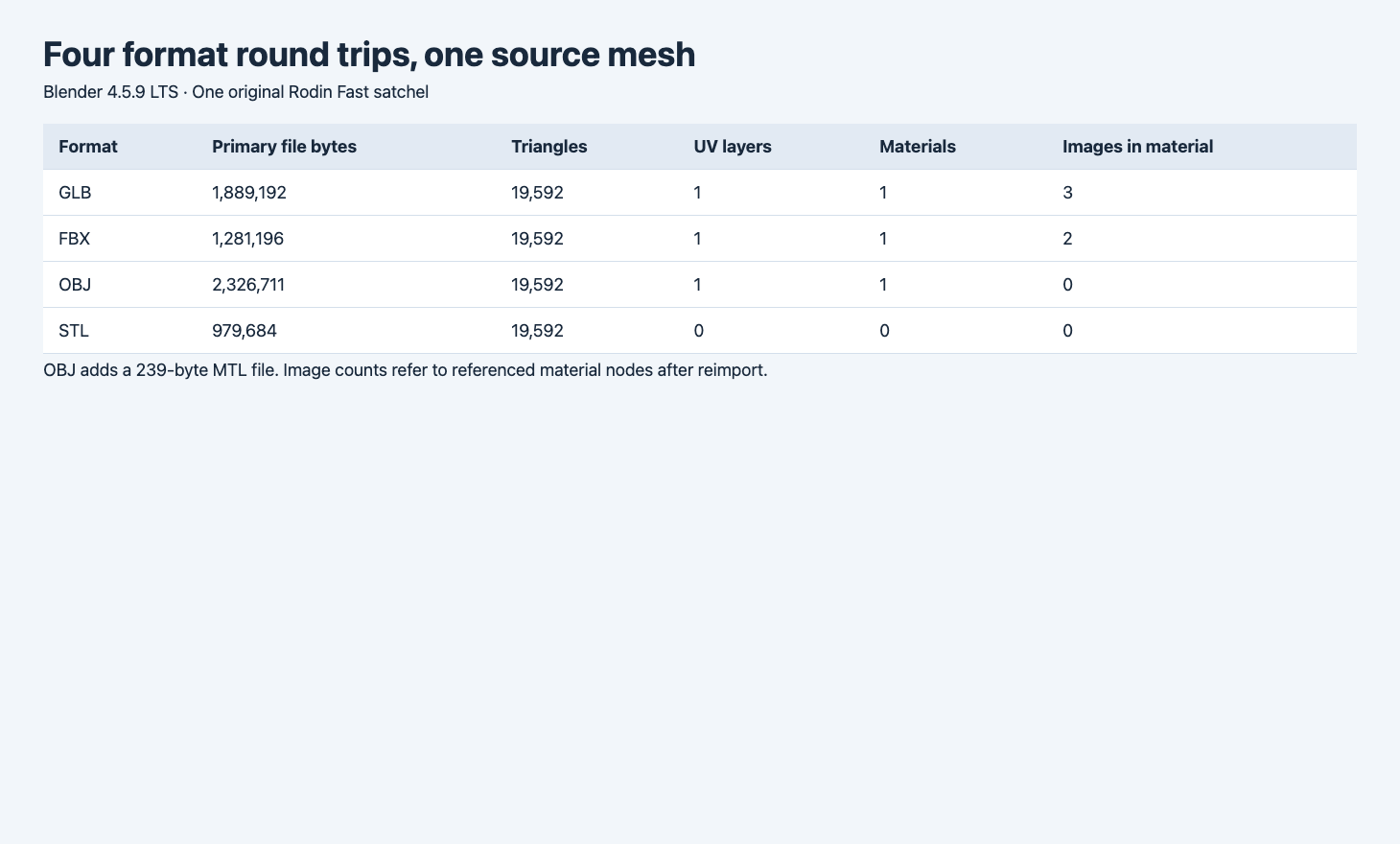
File bytes in the screenshot refer to the primary export. The OBJ package also includes the MTL sidecar.
| Format | Primary file bytes | Package bytes | Triangles | UV layers | Materials | Images in material nodes |
|---|---|---|---|---|---|---|
| GLB | 1,889,192 | 1,889,192 | 19,592 | 1 | 1 | 3 |
| FBX | 1,281,196 | 1,281,196 | 19,592 | 1 | 1 | 2 |
| OBJ | 2,326,711 | 2,326,950 | 19,592 | 1 | 1 | 0 |
| Binary STL | 979,684 | 979,684 | 19,592 | 0 | 0 | 0 |
The source scene spans approximately 1.734 × 1.104 × 1.370 Blender units. Every reimport measured the same dimensions to three decimals. The largest absolute component deviation in the four measured bounding boxes was under 0.000001 Blender units. This comparison checks imported bounds in one tool. The source asset has no measured real-world scale. An STL consumer can interpret the numerical coordinates using different unit assumptions.
Look at the material after reimport
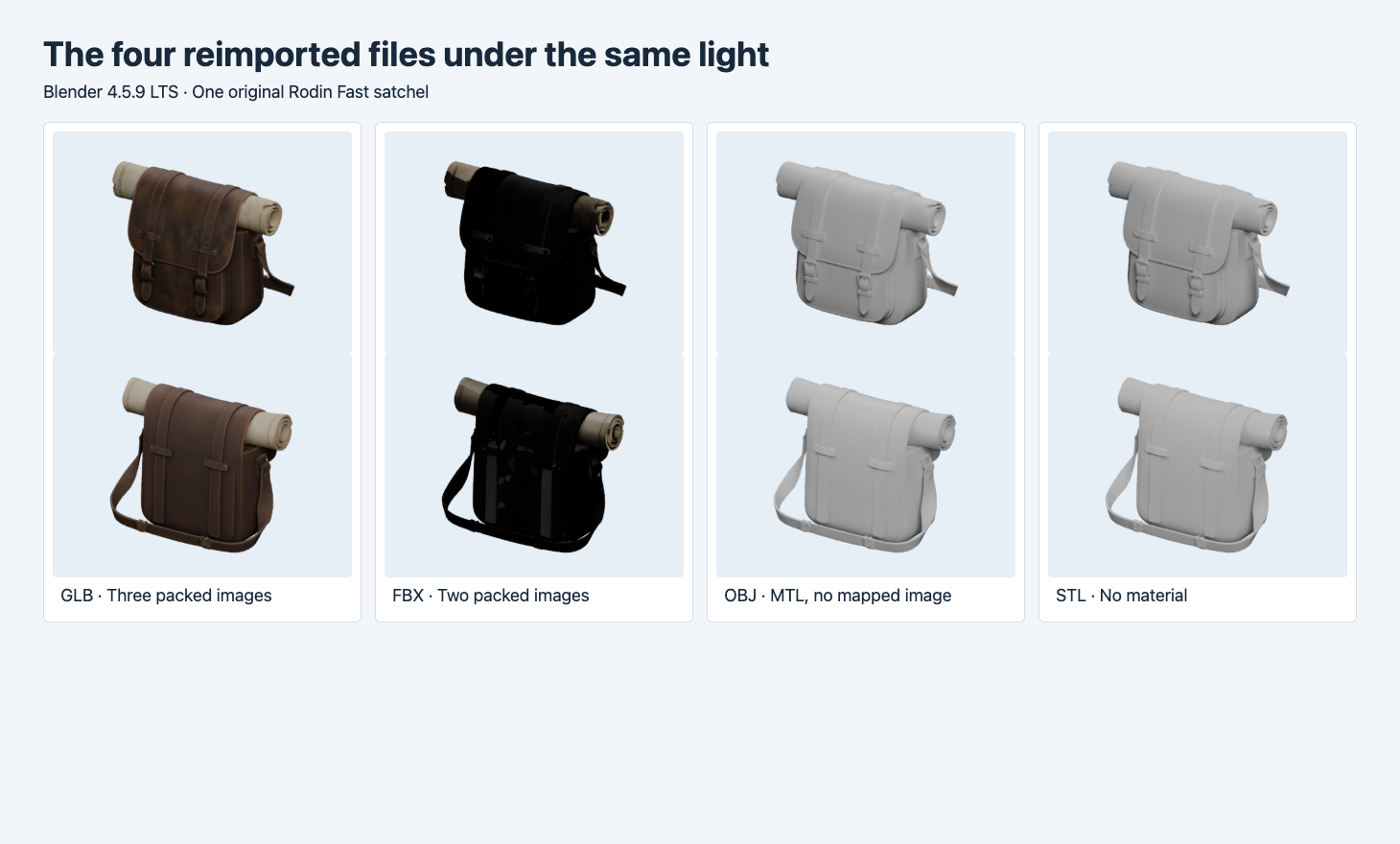
Each column shows two Cycles angles with normalized framing. The file data and lighting were held comparable, with each format’s imported material used as delivered.
GLB keeps the original material structure in this run. Its imported image nodes still reference diffuse, ORM and normal data. The leather and rolled paper remain distinct, and the brown color varies across the body of the bag. GLB is a direct starting point when the receiving viewer needs a single packaged mesh and texture resource. Measure the exact file and validate its extension support in the viewer.
FBX carries a different material result. The importer exposed two packed image datablocks, named diffuse and diffuse.001, while the original had three. The satchel body is much darker in the Cycles render. Those two datablock names do not establish which source payloads were embedded or reinterpreted. If FBX is the project handoff format, inspect the target material graph and verify the scene in its intended renderer. This static satchel does not test FBX animation or bone transfer.
The default OBJ carries geometry and a basic material. Blender reimported one UV layer and one material, but the emitted MTL contained no map_Kd and no image showed up in the reimported material nodes. UV coordinates describe where an image can be sampled. The package still needs an actual image and a resolvable material reference. This is the behavior of our source node graph and export settings. An OBJ pipeline can carry a base-color sidecar, as the next test shows.
The binary STL carries geometry for this workflow. Its reimport contains the same triangle count and no UV or material. The uniform Cycles appearance follows from that. For printing, use the intended unit in the slicer and inspect watertightness, wall thickness and overhangs. None of those criteria is established by the triangle count or file size.
Restore the OBJ base color explicitly
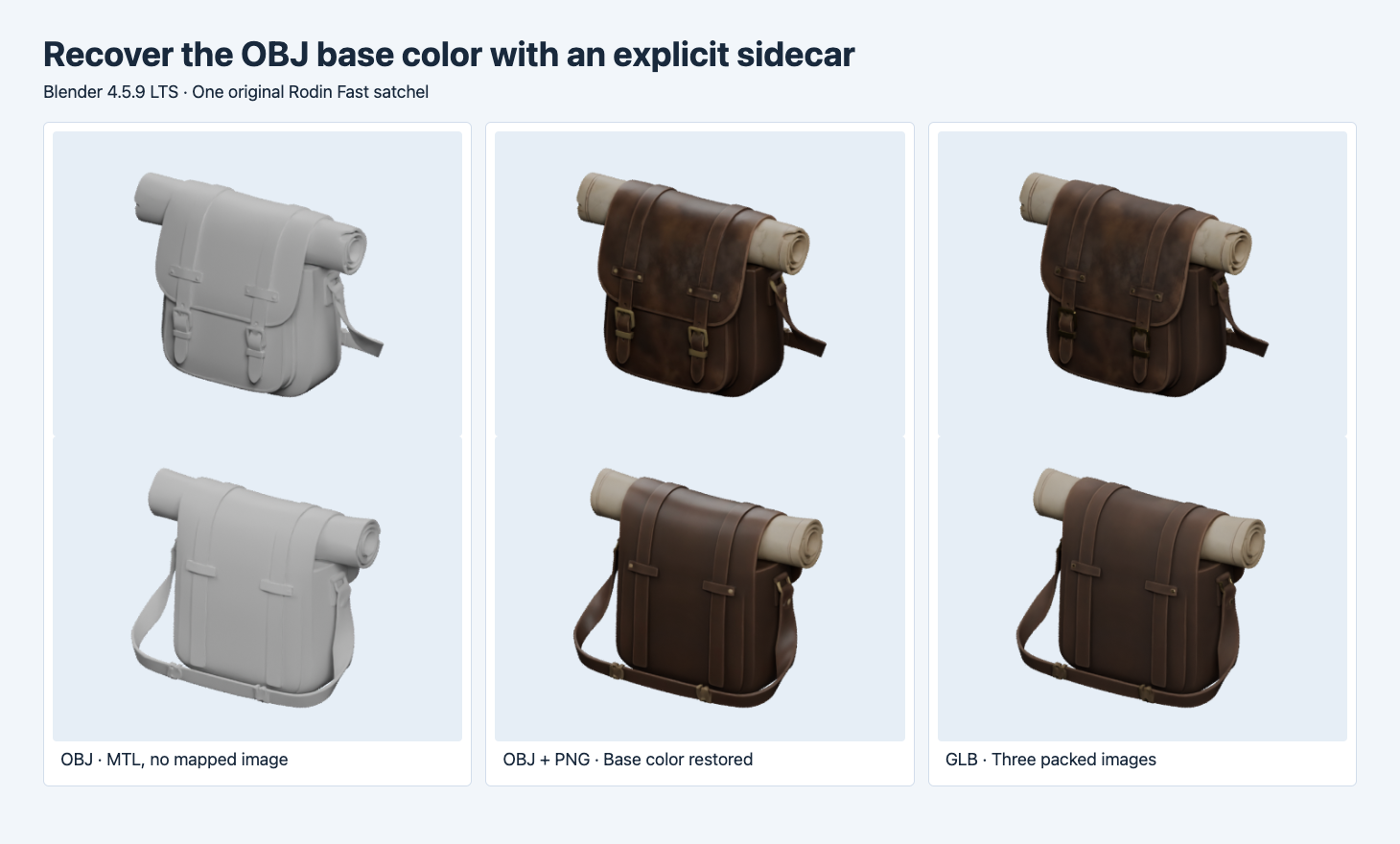
The center column is the explicit OBJ, MTL and PNG package. It restores a base-color image, while the GLB retains the richer original material graph.
We reimported the original GLB in a fresh scene, saved its diffuse image as a PNG, and connected that image’s color directly to the Principled shader’s Base Color input. We exported OBJ with material export and the STRIP path mode, with the texture beside the OBJ and MTL. The resulting MTL included map_Kd satchel-diffuse.png. The new OBJ imported the image at 2048 × 2048. It did not reproduce the GLB material graph, but the Cycles render shows the brown leather and lighter roll again.
The explicit package is 2,326,720 bytes for OBJ, 236 bytes for MTL and 230,988 bytes for the PNG, or 2,557,944 total. If your asset bundle moves between machines, test it from a clean directory with just those files. A copied absolute path can work locally and fail after transfer. Relative references should match the actual delivery structure. The Blender import and missing texture test shows what happens when an expected texture file is unavailable.
Compare API routes by the handoff you need
| Handoff | First format to test | What to verify |
|---|---|---|
| One file for a browser scene | GLB | Texture references, extension support, actual byte and triangle limits |
| A DCC or engine pipeline with an FBX requirement | FBX | Material translation and, for a separate rigged sample, bones and animation |
| A mesh and a readable external material package | OBJ + MTL + images | UVs, sidecar filenames, relative paths and visual check |
| A geometry-only print or machining input | Binary STL | Units, closure, thickness and the slicer result |
Start from an original such as Rodin 2.5 Fast image-to-3D or Hunyuan3D 3.1 Pro image-to-3D. Check the model operation’s documented output, then inspect the returned file. If your receiving tool requires conversion, keep the original and the conversion settings together. Measure each derivative and render it in the destination application. Record a successful import, recognizable materials and correct scale as separate checks. That gives the next person enough detail to repeat a successful delivery.
Verify the handoff in a fresh folder
We copied just the explicit OBJ, MTL and PNG to a new folder and reimported it from there. The material still found its 2048 × 2048 image. For a repeatable check, record the primary file and all sidecar byte sizes, the relative paths, and the image dimensions after import. Run the same check again after sending the package to a collaborator or deployment job. A missing image and a changed material appearance deserve separate notes because they point to different parts of the pipeline.
For a separate STL example at a known 60 mm scale, see the Meshy Relief depth and base thickness test. It measures the plate and raised surface in shared mesh sections.
FAQ
Why is the smallest file not the easiest handoff?
The binary STL is the smallest in this example, and its reimport has no texture or material. Select the package that includes what the receiving workflow needs before optimizing byte size.
Can a textured OBJ carry the same look as a GLB?
An OBJ and MTL can reference an external color image. The explicit package in this test restores the color, but its imported material looks different from the three-map GLB. Test the target exporter and importer with the particular material properties you need.
Did the four formats preserve the same units?
The Blender bounding-box measurements match to three decimals under the tested settings. That verifies the numerical scale in this round trip. A physical or manufacturing handoff still needs a verified reference dimension and the correct units in its receiving tool.
Found this useful? Share it