Best Budget Image-to-3D APIs in 2027: 18 Runs
Three budget image-to-3D APIs tested on the same three images over two rounds. See GLB results, failed assets and actual cost per accepted file.
The cheapest image-to-3D request in this test cost $0.02. It produced an acceptable satchel twice, but its robot had a sheet of geometry behind it and its dog photo lost most of the bench. A $0.10 route delivered two acceptable robots and two satchels. It also missed the full bench twice. Choosing between these routes starts with the parts your asset must preserve, then the cost of every attempt needed to get a file you can use.
Key takeaway
- Three SandBase routes ran on three public images with two seed arguments each on November 14, 2026. All 18 jobs completed, returned textured GLBs, rendered in the test viewer and had zero validator errors.
- Under this prototype rubric, TRELLIS accepted 2 of 6 at $0.06 per accepted asset. Rodin 2.5 Fast accepted 4 of 6 at $0.15, and Hunyuan3D Mini Turbo accepted 4 of 6 at $0.36.
- All three routes passed both satchel attempts. None passed the requirement to preserve the dog and complete bench on either seed.
- Start with TRELLIS for a low-cost isolated prop. Test Rodin Fast when the deliverable needs more of the robot’s shape and a smaller file. Use your own objects before treating the observed pass counts as a budget forecast.
The test and the acceptance rule
The 2027 shortlist uses dated tests from November 14, 2026. It compares three candidates that return a textured GLB from one image. The images are public SandBase examples: a leather satchel, a dog on an openwork bench and a toy robot. Each route ran once per image with seed argument 42 and once with 73. Within an image and route, the settings other than the seed stayed the same. The seeds do not align internal random sampling across models.
The test has an explicit delivery check. The file must render in the same Three.js viewer, be no larger than 5,000,000 bytes and have zero glTF Validator errors. Warnings are recorded and allowed in this browser-prototype rubric. The satchel must show the bag, two buckles, strap and roll. The bench input requires the dog, seat, open backrest and intact visible legs. The robot must have the head, torso and four limbs, with no extraneous sheet obscuring the rear. The rubric was written after inspecting the first round and applied to both rounds. It captures requirements useful to a developer, rather than an independently preregistered benchmark.
Camera positions, lights and background are held constant. Each mesh is normalized by its longest bounding-box dimension. The images let you inspect the delivered geometry at a similar display scale. None of the inputs includes a second view for checking unseen surfaces against the original object. Khronos glTF Validator
| Route | Explicit asset settings | Actual charge per job | Candidate use |
|---|---|---|---|
| TRELLIS | Texture size 2048 | $0.02 | Cheapest first pass for the tested satchel |
| Rodin 2.5 Fast | Low, 20K Triangle, PBR, GLB, HD texture off | $0.10 | Smaller tested satchel and robot files |
| Hunyuan3D Mini Turbo | Textured mesh on | $0.24 | Textured geometry alternative for the two isolated objects |
The Mini Turbo base price on its product page is for a different configuration. The comparison uses the actual $0.24 charge for the textured option on all six jobs. The three routes expose different controls, so this experiment matches the delivery task and shows what each configuration produced. TRELLIS · Rodin Fast · Mini Turbo
A. The satchel passed on all three routes
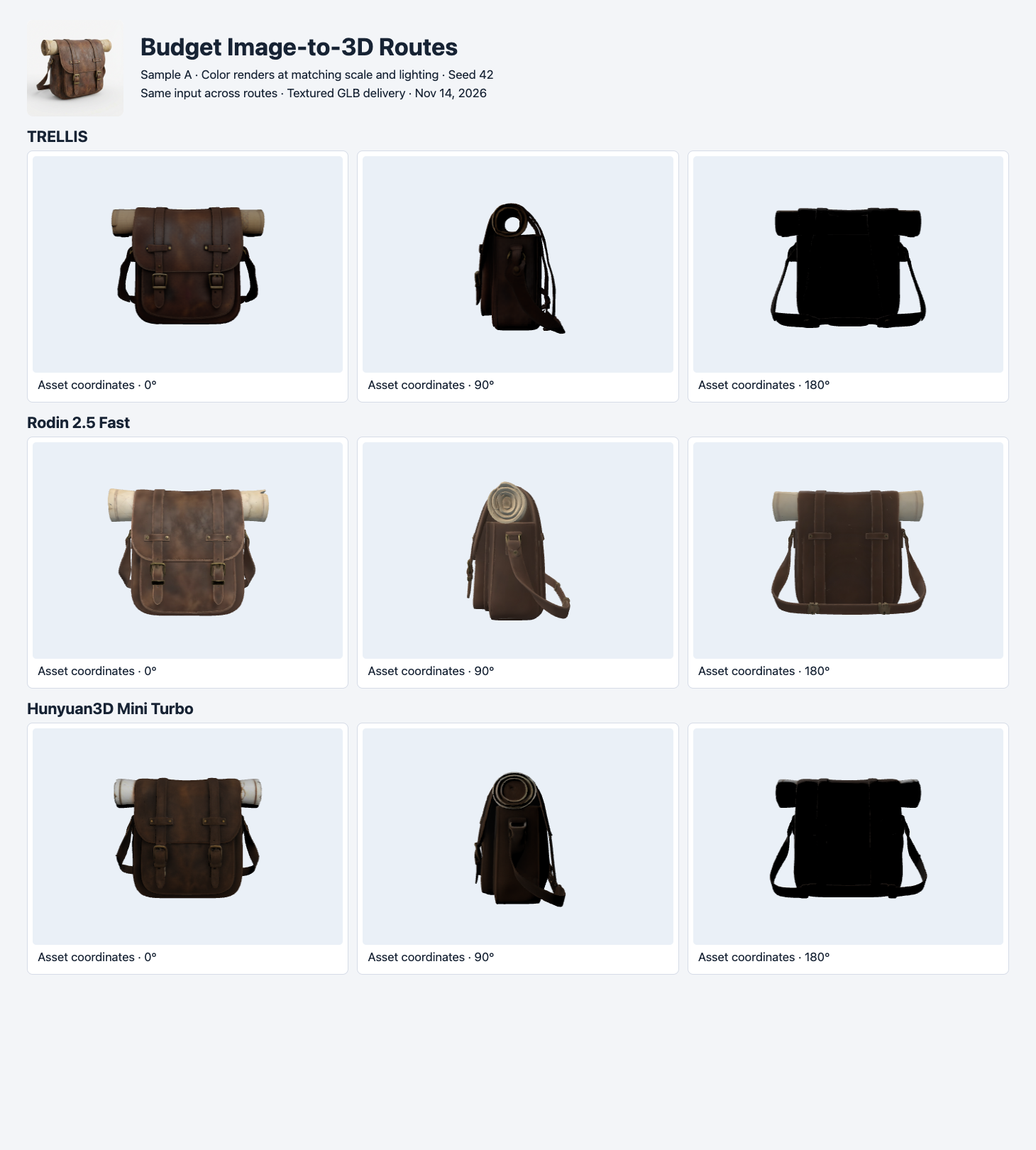
Seed 42. Each row shows an actual GLB at three matched camera positions. The input photo is in the header.
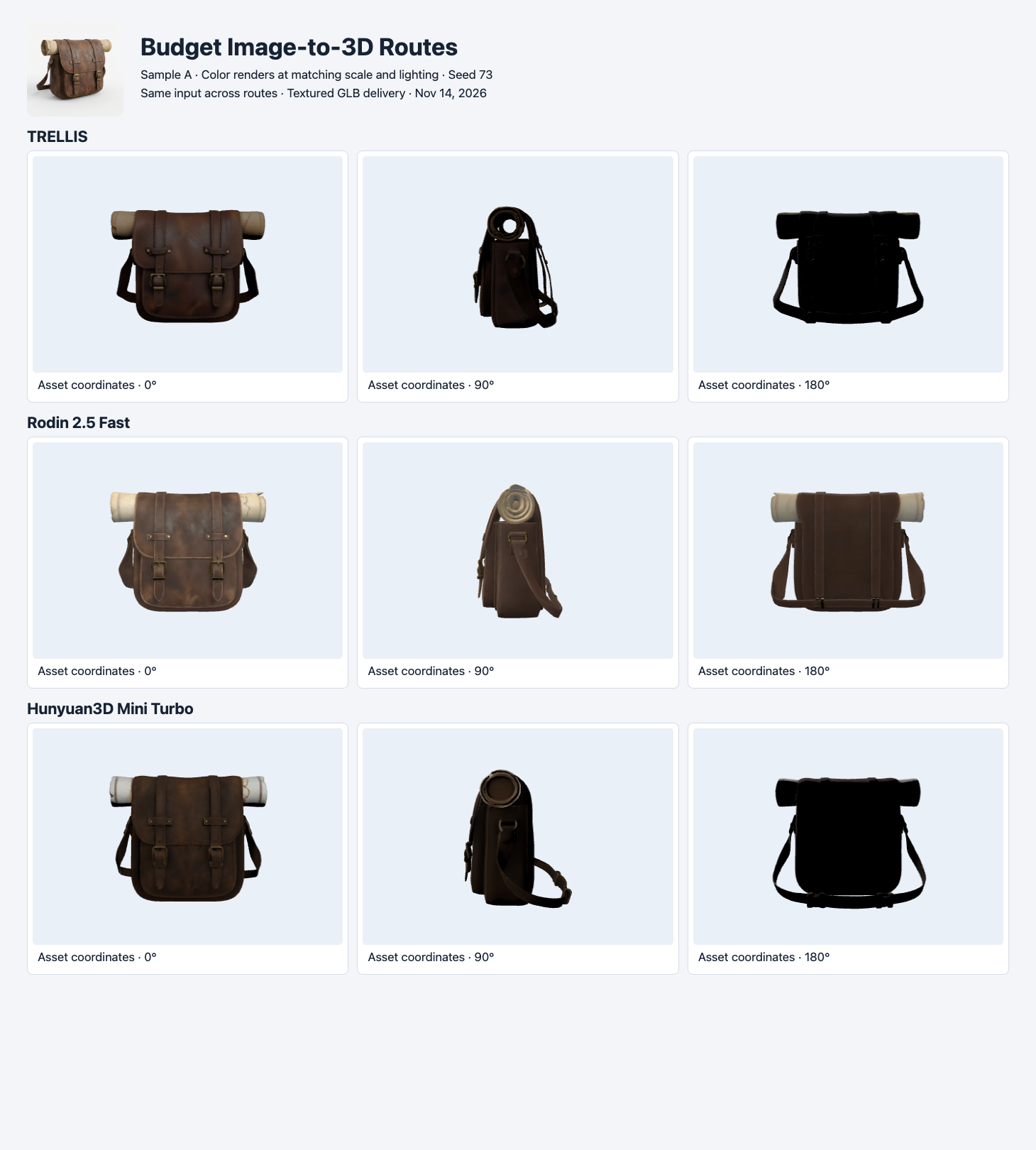
Seed 73. The main parts persist across the second round. TRELLIS and Mini Turbo show darker rear surfaces in this lighting setup.
The front buckles and long strap make the satchel more demanding than a simple block. All six renders preserve those features and the top roll at the display scale used here. TRELLIS has the lowest observed charge. Rodin Fast files are approximately 1.98–2.01 MB, compared with 4.81–4.83 MB for TRELLIS and 4.40–4.65 MB for Mini Turbo. If a project has a 3 MB limit, both Rodin results would fit and neither tested TRELLIS result would. The rubric itself used 5 MB. This example shows how a network requirement can change the ranking even when the scene looks acceptable on all three routes.
Look at the side view before judging the roll. The visible rim, internal recess and strap separate from the bag differently. That can matter in a close-up or an editable asset. The checklist here asks for a recognizable roll and strap in a preview. To order assets by physical fidelity, take a side photo and add a separate check for the opening.
B. A complete job can miss the whole bench
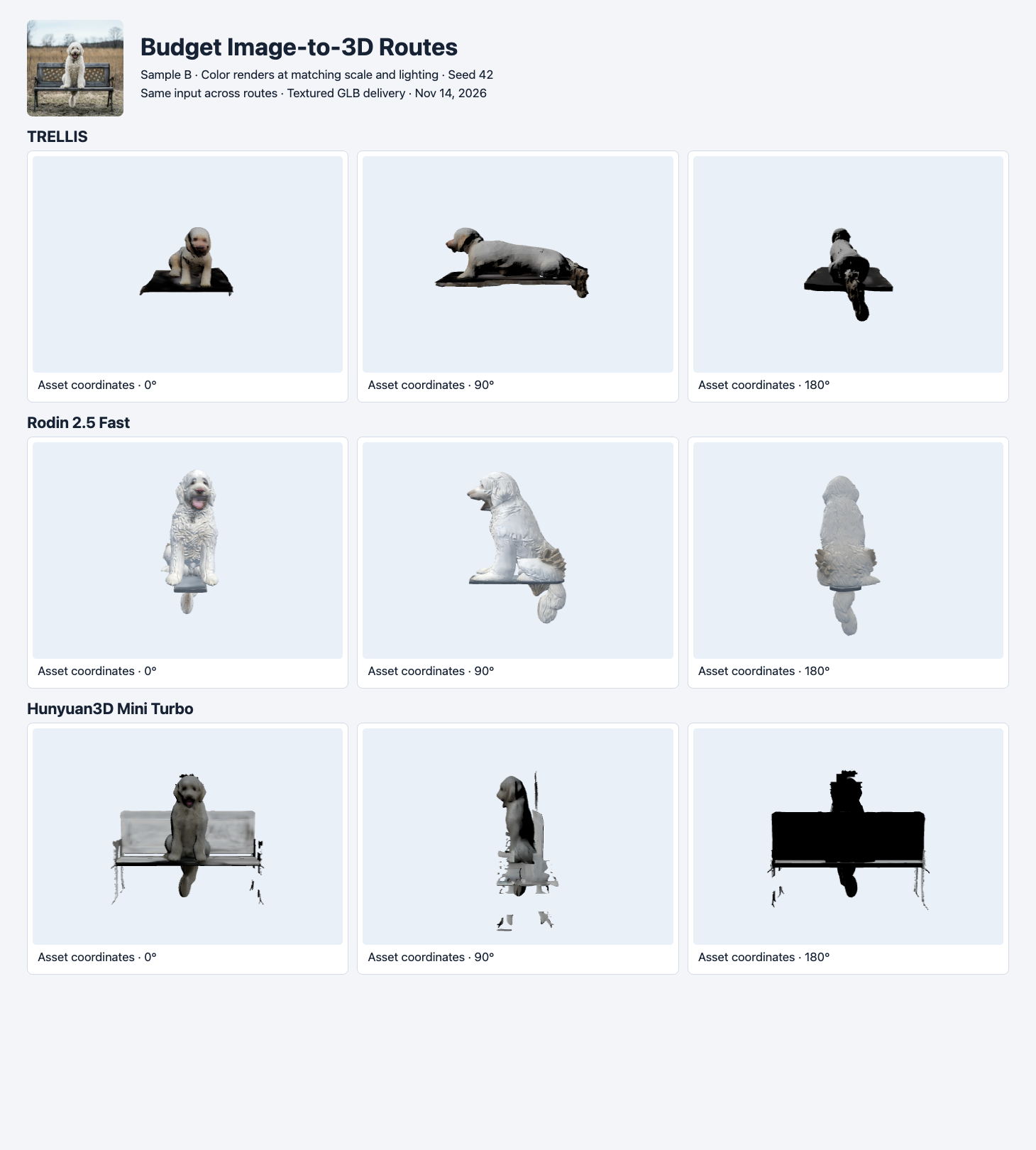
Seed 42. TRELLIS and Rodin Fast preserve the dog with part of a seat. Mini Turbo keeps more of the bench silhouette in this view, but the legs are fragmented.
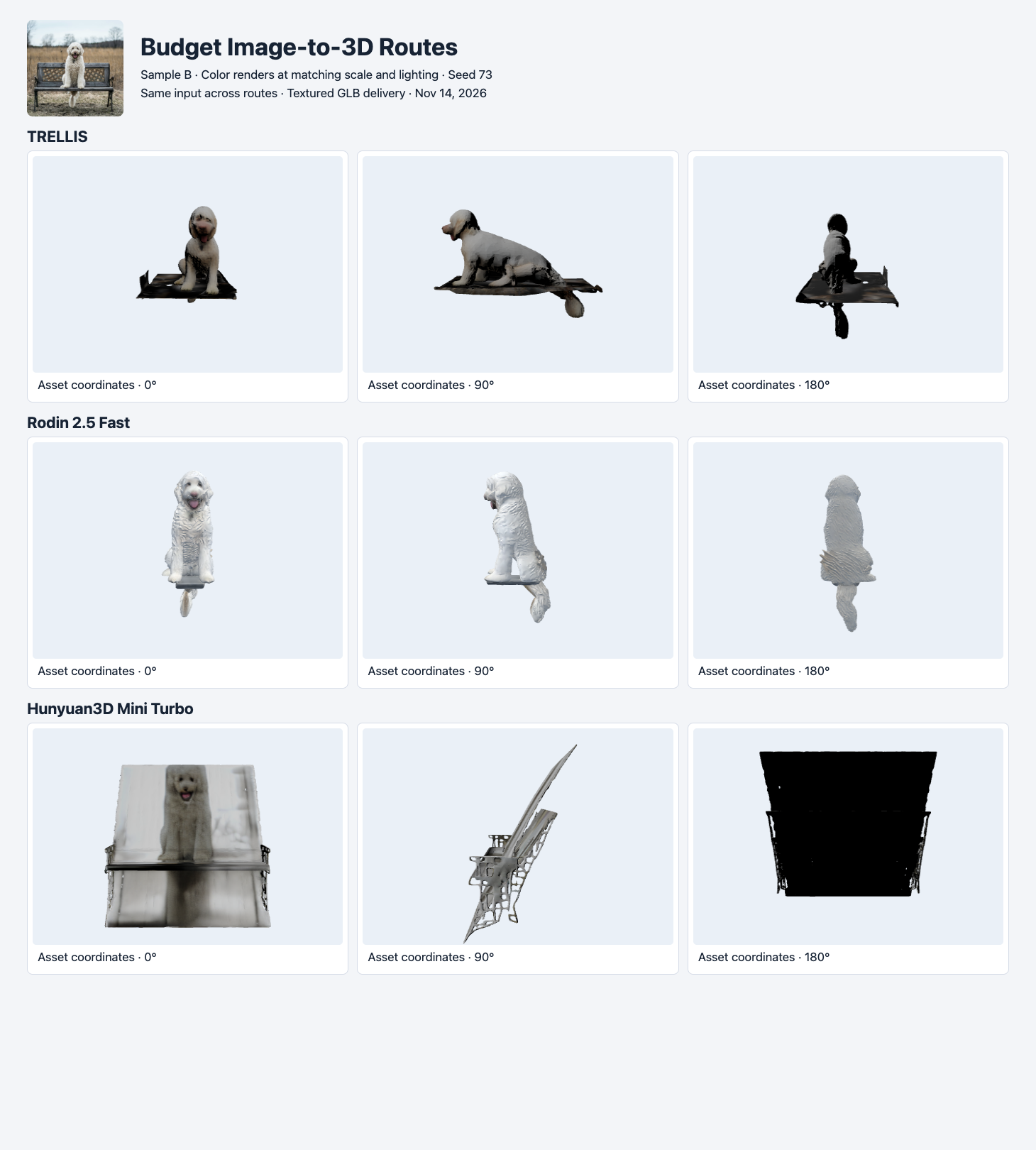
Seed 73. The model rows show different omissions or extra planar geometry. None contains the required intact bench with the dog.
All six files pass the file-size and validator-error checks. The result would look like six successes in a dashboard that only tracks completed jobs. Under the visible-structure rule, all six fail. TRELLIS and Rodin Fast keep the dog and some seat geometry. Mini Turbo’s second result has a large planar area through the scene. A different crop could help for a dog-only deliverable. That would change the task and should get a new row in the experiment log.
This is also a useful point to stop retrying. A third attempt at the same task might succeed, but two attempts already tell the team what to investigate. Photograph the bench in isolation, split dog and bench into separate assets, or compare a route with a different generation configuration. The TRELLIS versus TRELLIS.2 comparison shows a higher-priced route retaining recognizable bench structure on one run with this input.
C. The rear view changes the robot decision
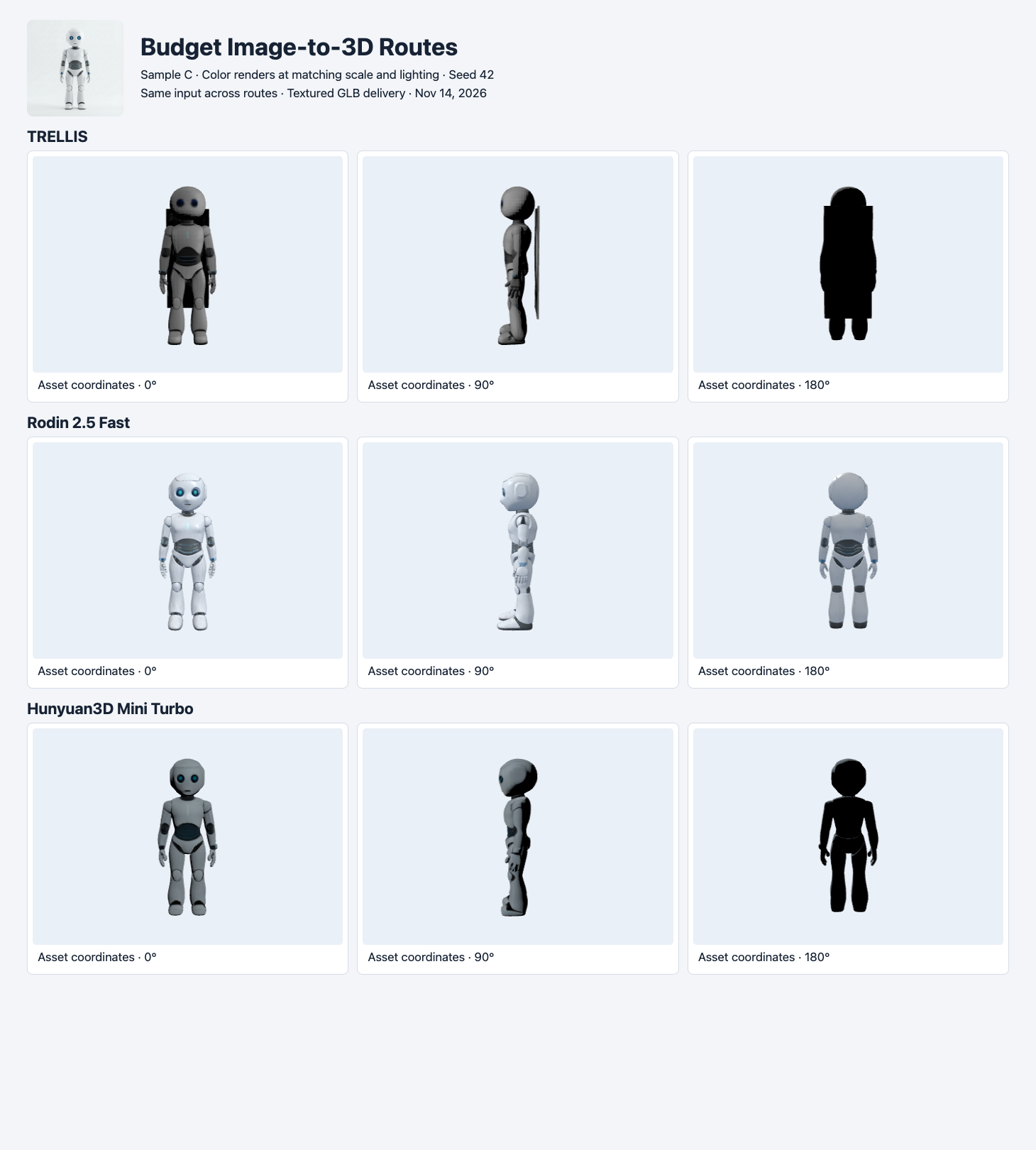
Seed 42. From the front, all three have a recognizable robot. TRELLIS has an additional planar sheet visible from the side and rear.
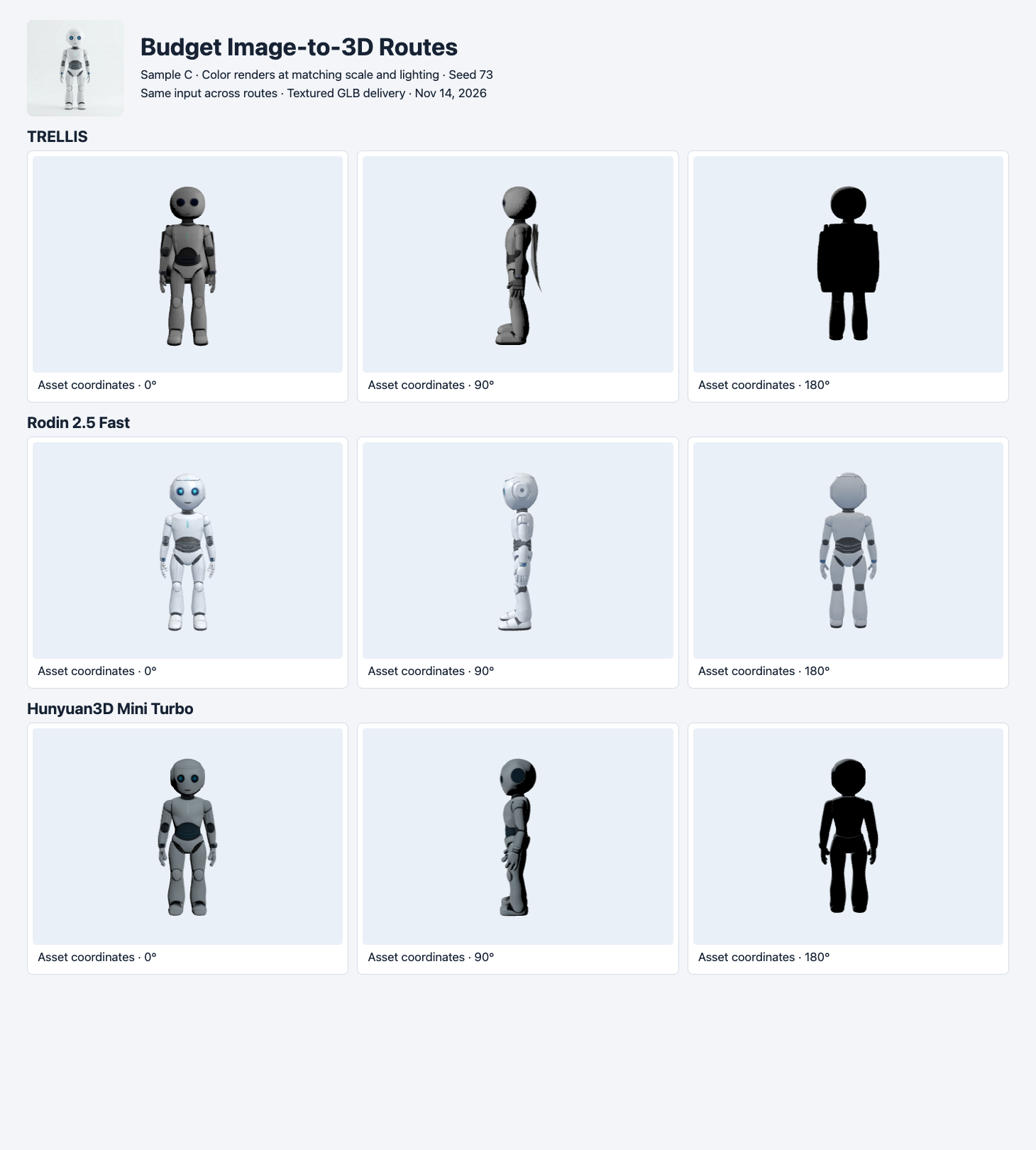
Seed 73. The extra geometry recurs on TRELLIS. The other two preserve the silhouette under this preview rubric.
The robot makes a front-only acceptance test misleading. TRELLIS renders the face and limbs, but the rear sheet appears in both outputs. Rodin Fast and Mini Turbo avoid that obstruction on both seeds, and the four files meet the prototype rules. Mini Turbo uses 40,000 triangles in both robot results. Rodin Fast delivers 19,190 and 19,348 triangles, and is smaller in bytes for both runs. The lower triangle count may help if the renderer is geometry constrained. Actual frame rate on a device was outside the test.
Rodin Fast had one generated tangent-space warning on each GLB. The files still rendered. A project with strict portability or normal-map requirements should run the final export in its target renderer and decide how to handle this warning before accepting the output. The prototype rubric treats the warning as a recorded observation. A stricter rule could change the shortlist.
Actual cost per accepted file
| Route | Completed | Accepted by sample A / B / C | Total charges | Charges per accepted asset |
|---|---|---|---|---|
| TRELLIS | 6/6 | 2 / 0 / 0 | $0.12 | $0.06 |
| Rodin 2.5 Fast | 6/6 | 2 / 0 / 2 | $0.60 | $0.15 |
| Hunyuan3D Mini Turbo | 6/6 | 2 / 0 / 2 | $1.44 | $0.36 |
| Total | 18/18 | 6 / 0 / 4 | $2.16 | $0.216 across all routes |
The denominator is accepted outputs, including both seeds. The numerator includes all generation charges, including failed visual checks. If a route has zero accepted assets for your task, report that result and the total spend. The table does not include labor, storage or post-processing. It also does not estimate production success rates from three handpicked inputs.
For a buyer who only needs simple props, TRELLIS is the first route to try from this shortlist. If the same pipeline includes robot-like objects and a tighter byte budget, Rodin Fast is a useful second trial. Mini Turbo is a separate alternative if an object benefits from its geometry and passes your renderer checks. The long-bench case needs a fresh evaluation with a better input or another route before any of these can be recommended for the full asset.
If you are deciding where to begin, the image-to-3D selection guide connects format, byte budgets and visible-structure checks across the tested routes.
The cost-per-accepted-asset guide breaks the same receipts down by input and provides a runnable calculation.
The SAM 3D Objects and Tripo full-frame/crop test reuses this same dog-and-bench photo to measure object selection and crop artifacts.
Reproduce a first pass
Submit an image URL on the server with your SandBase key. The request below starts a billable TRELLIS task. Save the returned ID and poll the run endpoint. Then download the asset, run a validator, and render three views before marking it accepted.
jq -n --arg image 'https://static.sandbase.ai/examples/trellis/trellis-2/input_image_0.png' \
  '{model:"trellis/trellis",image:$image,texture_size:2048,seed:42}' |
curl --fail-with-body -sS https://api.sandbase.ai/v1/run \
  -H "Authorization: Bearer $SANDBASE_API_KEY" \
  -H 'Content-Type: application/json' --data-binary @-
For the repeat, change the seed to 73 and keep all other fields unchanged. Save a row for both attempts. Write down the geometry and size requirements for your own object before you decide which result passes. A budget guide is useful when it helps you choose the next experiment and understand how a rejected file affects the cost of the asset that ships.
Found this useful? Share it