How to Automate QA for Generated GLB Assets
Test five real generated GLBs with glTF Validator, a triangle budget and visual review. Includes exact failures, screenshots and runnable Node.js code.
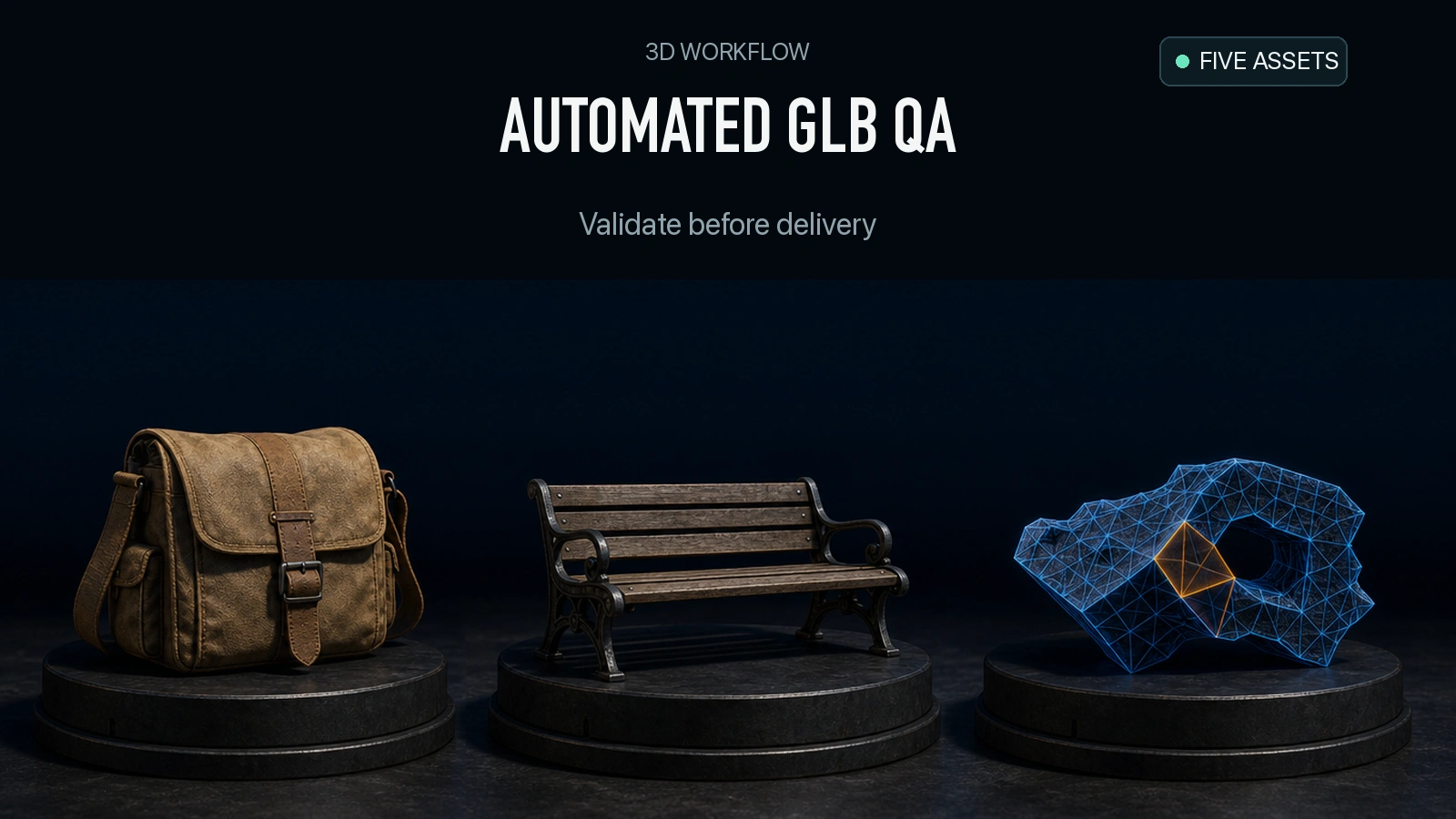
A GLB can render in a browser and still be wrong for the job. In our five-file intake run, the Tripo P2 dog and bench rendered with its backrest and legs, but the file exceeded our 20,000-triangle limit by 794. An earlier TRELLIS file passed the automated checks with room to spare, yet its render showed the dog on a small surface with most of the bench missing. Use the validator, a delivery policy and a visual review together. Each answers a different question about whether the generated asset is ready to use.
Key takeaway
- In this five-file batch, two failed, two needed warning review and one passed the automated intake policy. All five files were under the example 5,000,000-byte cap.
- The TRELLIS.2 satchel failed both validation and geometry. Tripo P2 failed the 20,000-triangle cap on the bench even though its validator reported zero errors.
- The Tripo H3.1 and Rodin Fast bench files were under both caps. Their normal maps still raised a tangent-space warning, which the policy sends to review.
- The original TRELLIS bench passed the machine checks and failed the visual requirement to preserve the bench. An automated pass advances a file to visual review.
Decide what an intake pass means
The script below uses three distinct checks. First it validates the GLB container and asks Khronos glTF Validator to report specification errors and warnings. Second it tests a particular delivery contract: no more than 5 MB and 20,000 stored triangles, with triangle primitives, embedded resources and a declared base-color texture. Finally, a person uses rendered views to check the subject. For the dog and bench, the asset must retain the dog, seat, backrest and legs. That visual checklist lives outside the script.
Set the contract from your application. A web viewer might require one self-contained GLB with color visible in its normal lighting. A neutral clay asset may not need a color texture at all. A configurable renderer may intentionally accept files with external images. The sample script is designed for static, textured, embedded GLB inputs like the five used here. It counts stored triangles across mesh primitives. Counting instances or judging how many triangles a production camera actually draws would require inspecting the scene and renderer too. Khronos glTF specification
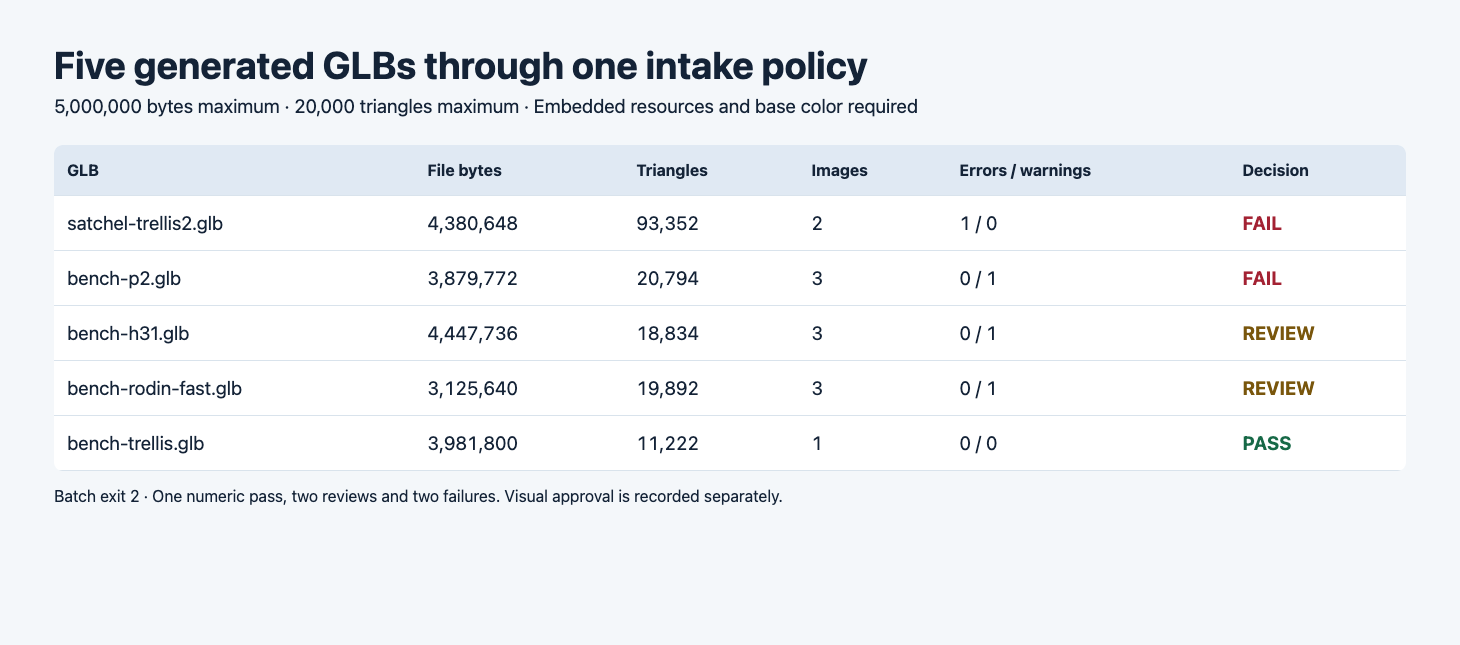
The table was rendered from the actual script output. PASS is the automated result before the visual check.
| File | Bytes | Triangles | Embedded images | Errors / warnings | Intake |
|---|---|---|---|---|---|
| TRELLIS.2 satchel | 4,380,648 | 93,352 | 2 | 1 / 0 | Fail |
| Tripo P2 dog and bench | 3,879,772 | 20,794 | 3 | 0 / 1 | Fail |
| Tripo H3.1 dog and bench | 4,447,736 | 18,834 | 3 | 0 / 1 | Review |
| Rodin 2.5 Fast dog and bench | 3,125,640 | 19,892 | 3 | 0 / 1 | Review |
| TRELLIS dog and bench | 3,981,800 | 11,222 | 1 | 0 / 0 | Pass |
The five GLBs came from the TRELLIS comparison, the Tripo face-limit test and the Rodin Fast and Standard test. The four bench outputs started from the same dog-and-bench photo. The satchel came from a separate input. We ran the same local script on the original returned GLBs for this article. These are deliberately selected cases for exercising failure, review and pass handling. Their proportions say nothing about provider-wide failure rates.
Run the intake script
1. Install the validator
The local run used the Khronos JavaScript package version shown below. Work in a directory containing the input GLBs. The output JSON includes a SHA-256 for each file so you can attach review notes to the exact bytes you validated. Khronos glTF Validator
npm install [email protected]2. Save the policy as qa.mjs
This sample rejects a missing base-color declaration and any external image or buffer. The material checks record the number of declarations. Checking whether every visible primitive uses an acceptable material requires tracing each primitive’s material index and inspecting the render. The warning counts come from the validator’s report totals. Per-issue severity and pointers are retained separately.
import { readFile } from 'node:fs/promises';
import { createHash } from 'node:crypto';
import validator from 'gltf-validator';

const budget = { bytes: 5_000_000, triangles: 20_000 };
const paths = process.argv.slice(2);
if (!paths.length) {
  console.error('Usage: node qa.mjs file.glb [file.glb ...]');
  process.exit(2);
}
const records = [];
for (const path of paths) {
  const record = { path, checks: [] };
  try {
    const data = await readFile(path);
    record.bytes = data.length;
    record.sha256 = createHash('sha256').update(data).digest('hex');
    if (data.length < 28 || data.toString('ascii', 0, 4) !== 'glTF'
        || data.readUInt32LE(4) !== 2 || data.readUInt32LE(8) !== data.length
        || data.readUInt32LE(16) !== 0x4e4f534a
        || data.readUInt32LE(12) > data.length - 20) {
      throw new Error('Invalid GLB v2 header or JSON chunk');
    }
    const report = await validator.validateBytes(data, { uri: path });
    record.validator = {
      errors: report.issues.numErrors,
      warnings: report.issues.numWarnings,
      messages: report.issues.messages.map(({ code, severity, pointer }) => ({ code, severity, pointer })),
    };
    if (record.validator.errors) record.checks.push('VALIDATOR_ERROR');
    const json = JSON.parse(data.toString('utf8', 20, 20 + data.readUInt32LE(12)));
    const primitives = (json.meshes ?? []).flatMap(mesh => mesh.primitives);
    if (!primitives.length || primitives.some(p => (p.mode ?? 4) !== 4)) {
      throw new Error('This policy requires triangle primitives');
    }
    if ((json.images ?? []).some(image => image.bufferView === undefined)
        || (json.buffers ?? []).some(buffer => buffer.uri)) {
      throw new Error('This policy requires embedded buffers and images');
    }
    record.triangles = primitives.reduce((sum, primitive) => {
      const count = json.accessors[primitive.indices ?? primitive.attributes.POSITION].count;
      return sum + count / 3;
    }, 0);
    record.images = json.images?.length ?? 0;
    record.baseColorMaps = (json.materials ?? []).filter(m => m.pbrMetallicRoughness?.baseColorTexture !== undefined).length;
    record.normalMaps = (json.materials ?? []).filter(m => m.normalTexture !== undefined).length;
    if (record.bytes > budget.bytes) record.checks.push('FILE_BYTES_LIMIT');
    if (record.triangles > budget.triangles) record.checks.push('TRIANGLE_LIMIT');
    if (!record.baseColorMaps) record.checks.push('BASE_COLOR_TEXTURE_REQUIRED');
  } catch (error) {
    record.checks.push('UNSUPPORTED_OR_UNREADABLE');
    record.detail = error.message;
  }
  record.status = record.checks.length ? 'fail' : record.validator.warnings ? 'review' : 'pass';
  records.push(record);
}
console.log(JSON.stringify({ budget, records }, null, 2));
if (records.some(record => record.status === 'fail')) process.exitCode = 2;
else if (records.some(record => record.status === 'review')) process.exitCode = 1;
3. Run it against the batch
These filenames are local names for the previously generated samples. Substitute the corresponding paths for your own files. The command prints a machine-readable report even when an asset fails. With the five files above the batch code is 2 because the failures take precedence over warnings.
node qa.mjs satchel-trellis2.glb bench-p2.glb bench-h31.glb bench-rodin-fast.glb bench-trellis.glb > qa-results.json
printf 'Intake exit code: %s\n' "$?"
4. Verify all three exit paths
Run one file per state when you first wire the script into CI. The three single-file invocations below returned 0, 1 and 2 respectively. Capture the exit code and retain the JSON before routing the result. If your shell exits on the first nonzero command, capture the result inside an if/else or temporarily disable that behavior when running these examples.
node qa.mjs bench-trellis.glb > pass.json
printf 'Pass example: %s\n' "$?"
node qa.mjs bench-h31.glb > review.json
printf 'Review example: %s\n' "$?"
node qa.mjs satchel-trellis2.glb > fail.json
printf 'Failure example: %s\n' "$?"
5. Read the policy reason and validator pointer
A single summary string hides useful information. An asset can have a hard budget failure and a material warning at the same time. The example below shows both. In a queue, record the failing rule and the file hash with the issue before generating a new derivative. That makes it possible to rerun the exact check after the asset changes.
node --input-type=module -e '
import { readFileSync } from "node:fs";
const { records } = JSON.parse(readFileSync("qa-results.json", "utf8"));
for (const { path, status, checks, validator } of records) {
  console.log(path, status, checks.join(","));
  for (const { code, pointer } of validator?.messages ?? []) {
    console.log(" ", code, pointer ?? "");
  }
}
'
Use the failure reason to decide what to do next
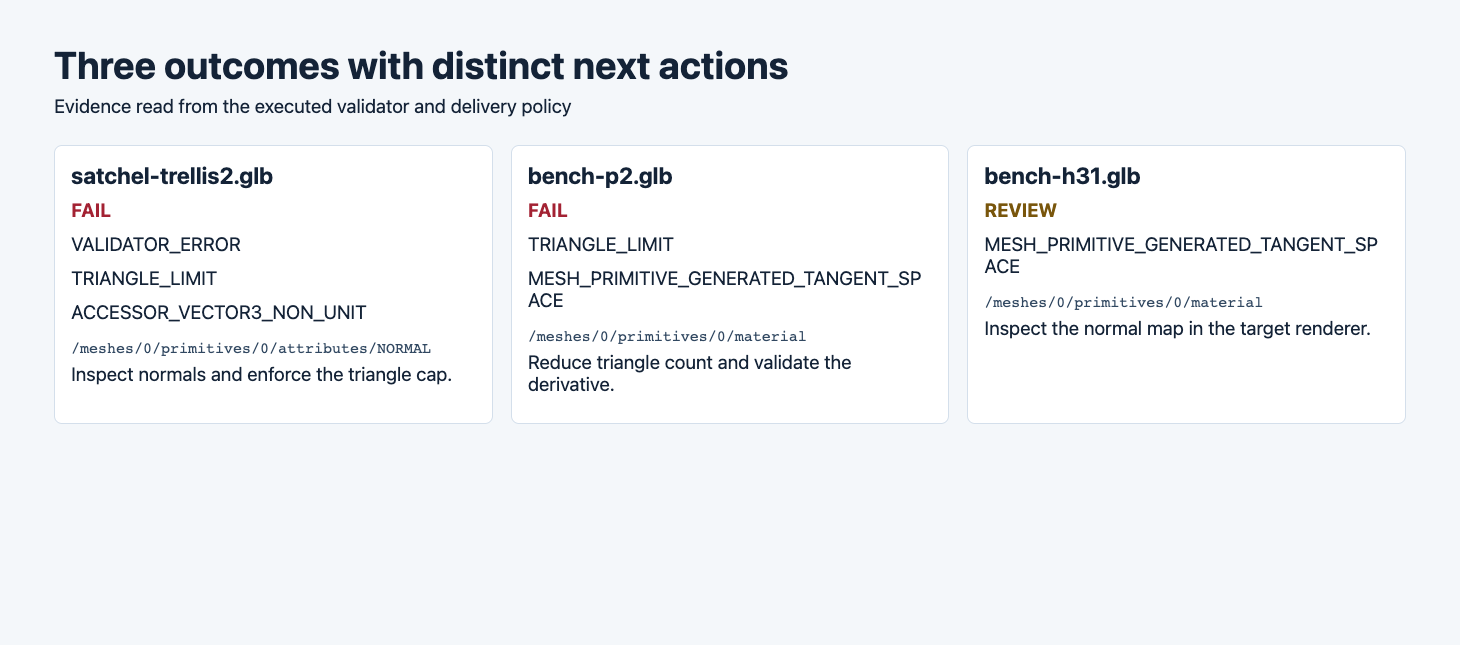
The red decisions include the format or budget reason. The amber decision records the material warning separately.
The satchel needs two changes. The validator reported ACCESSOR_VECTOR3_NON_UNIT at the primitive’s NORMAL accessor. The reported vector length was zero. A zero normal needs investigation or recalculation, and the 93,352 stored triangles also exceed this delivery cap. Keep the original file and rerun validation plus the mesh and material review after any changes. The script did not repair the satchel. Khronos validator issue reference
The P2 bench needs a lower triangle count. Its 20,794 triangles are 3.97% over the 20,000-triangle contract, even with a smaller file than the H3.1 bench. Use the actual file to enforce a strict cap. A request parameter can guide generation, and the exported accessor count gives you the acceptance decision. If you choose to simplify, compare the bench openings and legs at the intended camera distance before approving a derivative. Measured simplify and resize example
The H3.1 and Rodin files need a material review. Both carry MESH_PRIMITIVE_GENERATED_TANGENT_SPACE. The normal maps depend on runtime-generated tangent space for these primitives, which the validator flags as potentially nonportable. Open the file in the shipping viewer and inspect directional highlights and seams. Decide whether to accept the warning for that runtime or require exported tangents and verify the next file.
Compare what the renderer shows
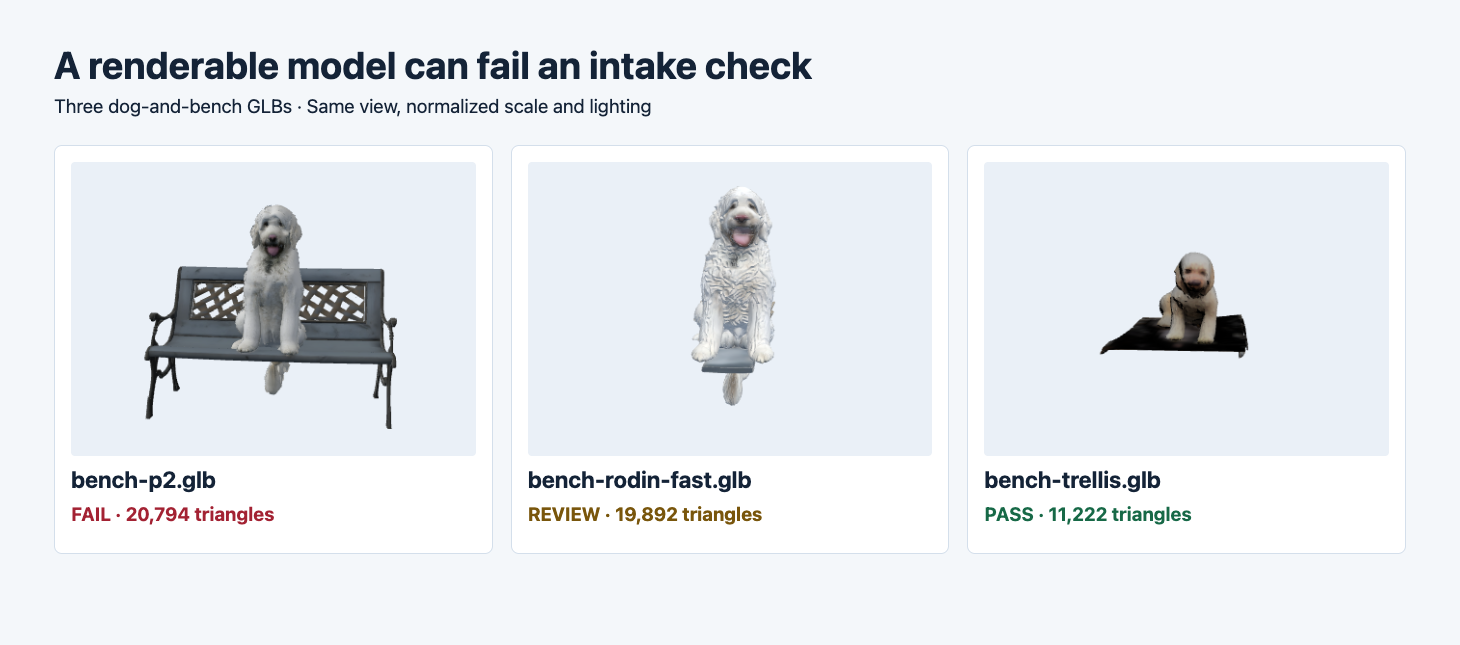
All three were rendered in Three.js with consistent lighting and normalized framing. The labels show the automated intake decision for each original.
The P2 model at left shows a recognizable seat, backrest and legs. The automated cap still fails. The Rodin Fast model in the center shows the dog and a short piece of seat, so a normal-map review alone cannot make it suitable for this brief. The TRELLIS output at right passed the machine checks with a color texture and no validator errors or warnings. It omitted the backrest and legs. Record visual approval separately so this file stays out of any workflow that promises a full dog-and-bench reconstruction.
A useful visual record starts with the source image, a subject-aligned front and side view, and a back view when the asset rotates. Save a crop of the thinnest part or the most important material seam. For the bench, turn around the side to see the legs and rear of the lattice. If the application has a fixed camera, review its actual framing as a second check. This intake script does not estimate visual fidelity, runtime loading performance or mesh suitability for printing.
Try the policy on one real export
Generate one original from TRELLIS.2 image-to-3D or Tripo H3.1 image-to-3D. Run it through the local policy and save the result before opening the viewer. When the contract is exceeded, keep the source and record the failure on its exact hash. When the script passes, use the subject checklist before allowing the asset into the release catalog.
To keep the source files, approvals and derivatives easy to find, see the searchable GLB asset catalog.
If the GLB comes from a background job, see async 3D generation from submission to verified download for the step before intake.
See the zero-normal repair and Blender verification for a measured follow-up on the same TRELLIS.2 satchel.
FAQ
Does a normal map count as a base-color texture?
The script checks distinct material properties. A normal map affects shading, while the base-color texture supplies color. The JSON report exposes both declaration counts. An asset can have a normal map and still fail a policy that requires a base-color texture.
Can I use the same exit codes with CI?
Yes. Capture 0 as ready for visual review, 1 as needing a warning decision and 2 as rejected by the intake rules. Most CI runners treat either nonzero exit as a failed command, so route both cases explicitly and retain the JSON as an artifact.
Should I count every reused mesh more than once?
The sample counts stored primitives once per mesh in the file. If your budget is about rendered work, account for references, visibility and instances in the actual scene. Measure performance in the target application if the cap is tied to a device.
Found this useful? Share it