Rodin 2.5 Fast vs Standard at 20K Triangles
Compare Rodin 2.5 Fast and Standard on two images at the same 20K triangle setting. See real charges, file sizes, PBR maps and rendered results.
Rodin 2.5 Fast and Standard both reconstructed the same leather satchel at roughly 20,000 triangles. Fast cost $0.10 and Standard cost $0.48 in those runs. The shape of the flap, straps and roll stayed recognizable in both exports. On a second photo, neither route retained most of the bench under the dog. The decision here is whether a particular output meets your geometry and delivery requirements, and whether a different configuration is available when it does not.
Key takeaway
- Four SandBase runs on November 14, 2026 used two public images. Each route received the same image per pair, a 20K triangle setting, the Low tier, PBR and GLB output.
- Fast cost $0.10 per run and Standard cost $0.48. All four files landed between 19,592 and 19,892 triangles.
- Both routes retained the satchel’s main parts and omitted most of the bench in the dog photo. The latter is a failure if the deliverable requires the whole bench.
- All four GLBs rendered in Three.js and had zero validator errors. Each had one generated tangent-space warning. Test the normal maps in the production renderer.
Match the options before comparing price
Rodin Standard and Fast can both accept an array of reference images. The current SandBase model pages list one to five images. The test supplied one image per request, so its results are about a single image. The satchel is a relatively isolated prop. The dog and bench form a more complex input, with two recognizable subjects and a partially hidden seat. In both cases, only the visible parts of the input can be checked against the photograph.
The options below describe the settings sent to the two routes, rather than the default configuration on either page. That distinction matters because the default tiers and material choices differ. The higher Standard tiers and extra options were not part of the test. Rodin Standard settings · Rodin Fast settings
| Dimension | Standard | Fast |
|---|---|---|
| Input per request | Same single reference image | Same single reference image |
| Requested tier | Gen-2.5-Low | Gen-2.5-Low |
| Mesh setting | 20K Triangle | 20K Triangle |
| Material selection | PBR | PBR |
| Export requested | GLB | GLB |
| HD texture | Disabled | Disabled |
| Seed argument | 42 | 42 |
| Charge on each tested asset | $0.48 | $0.10 |
| Higher-tier comparison | Additional tiers exposed | Low-tier options on the model page |
The seed is an argument recorded for reproducibility. It does not establish that these endpoints used identical sampling or will reproduce the same geometry across future revisions. The run receipt records the settings and actual charge for each file. The provider’s option labels describe requested outputs. The rows below use counts taken from the delivered files.
The satchel looks similar at this display scale
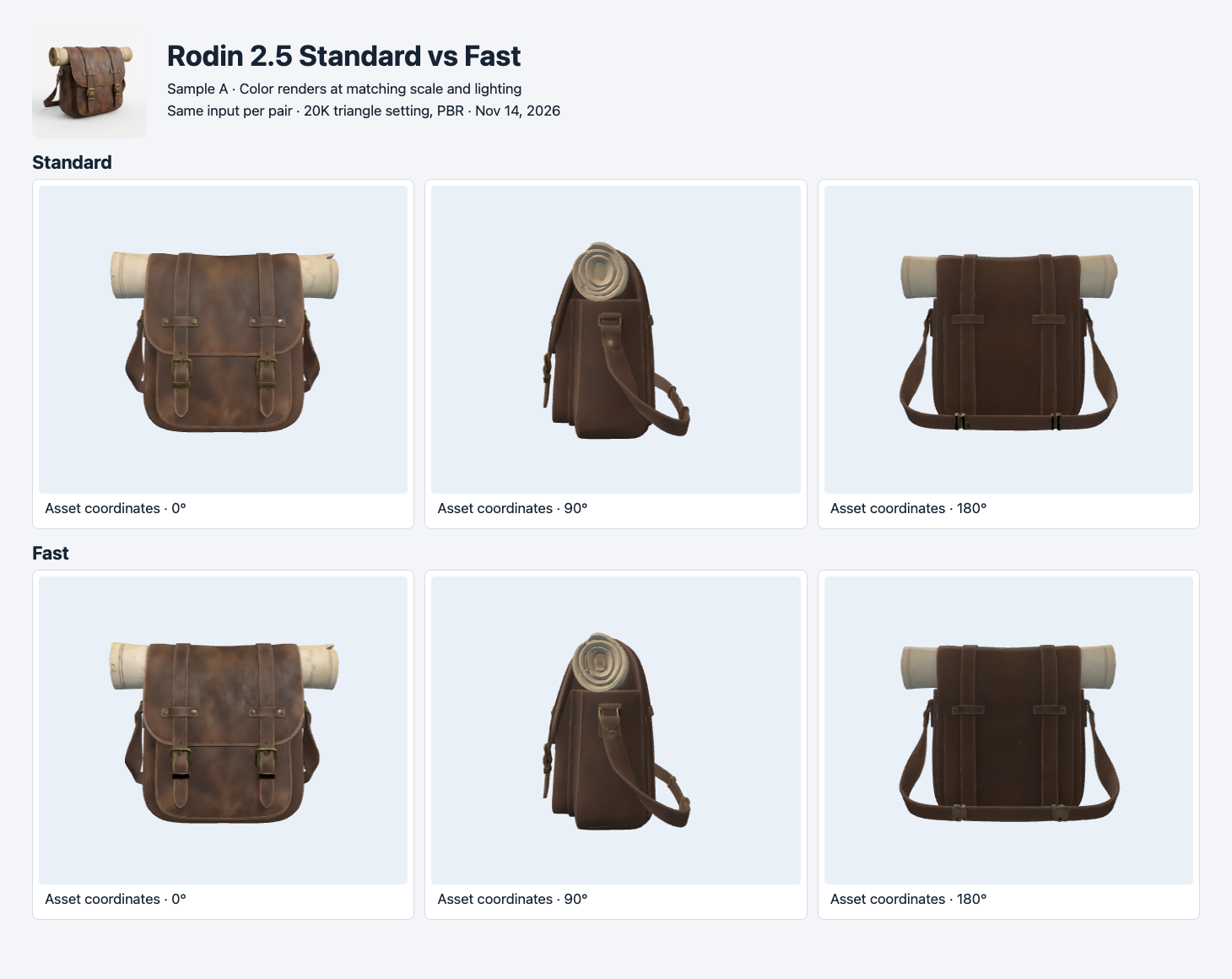
One satchel image went to both routes. Rows show Standard and Fast. Columns use matching camera positions in each exported asset’s coordinates.
Both outputs keep the two front buckles, the shoulder strap, the main compartment and the roll on top. At this scale the shapes are close. The visible differences are mainly around the roll, buckle highlights and shading on the flap. The side and rear views show what each route inferred, with no independent photo to establish which inference is closer. The result supports trying Fast for a small product preview that accepts these visible details. It does not measure equivalence at high zoom or at a different mesh tier.
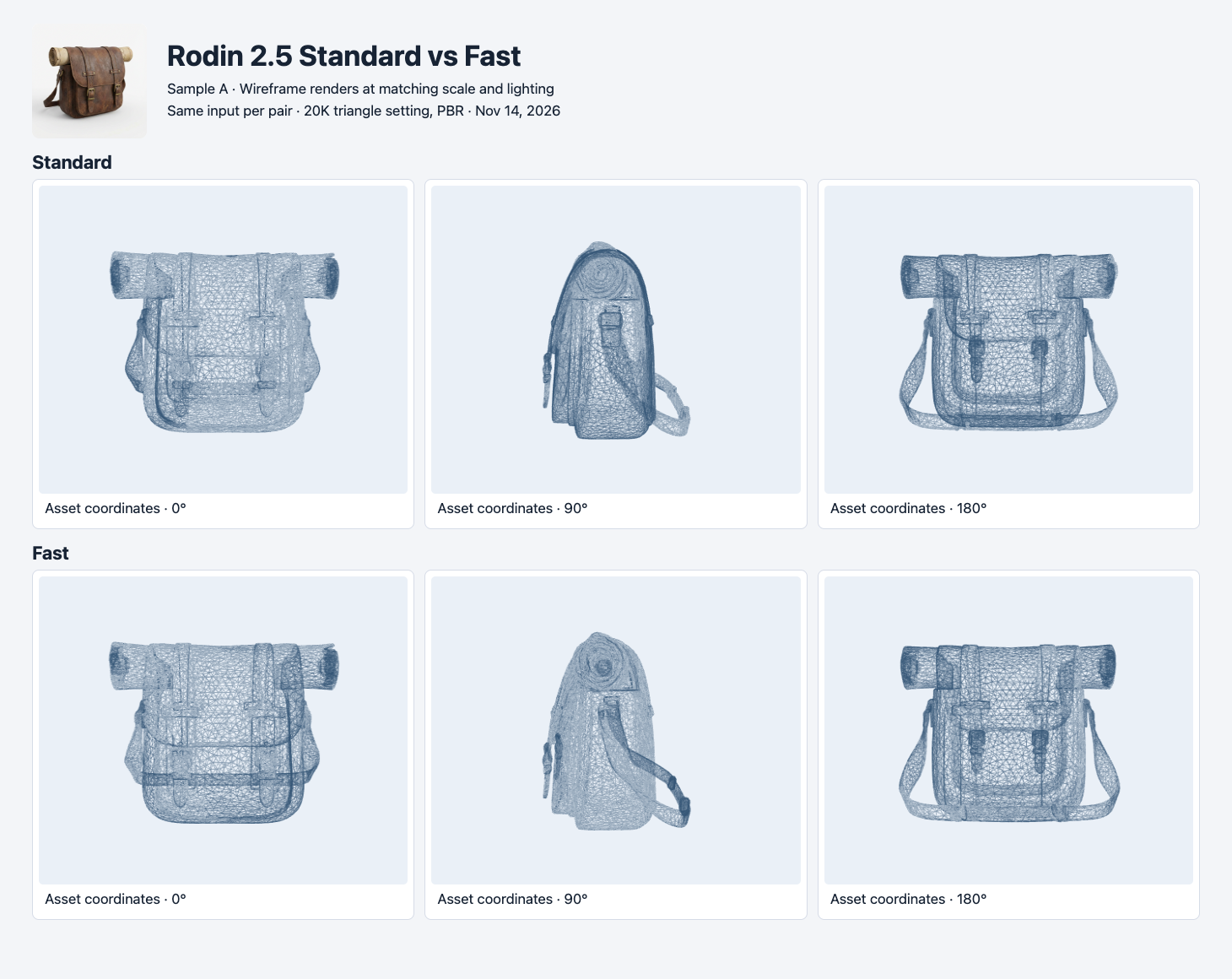
The same satchel meshes are shown without their original materials. The triangle counts in the table are read from GLB accessors.
Standard delivered 19,838 triangles and Fast delivered 19,592. That is 246 triangles apart. Both meshes can be evaluated against a 20K triangle budget without using the setting as a substitute for an actual count. Standard is about 85 KB larger on this sample. On the dog sample, Fast is about 103 KB larger. File size can move in either direction even when both outputs use a similar geometry budget. Check the GLB byte length and the geometry count separately.
Both routes missed the full bench
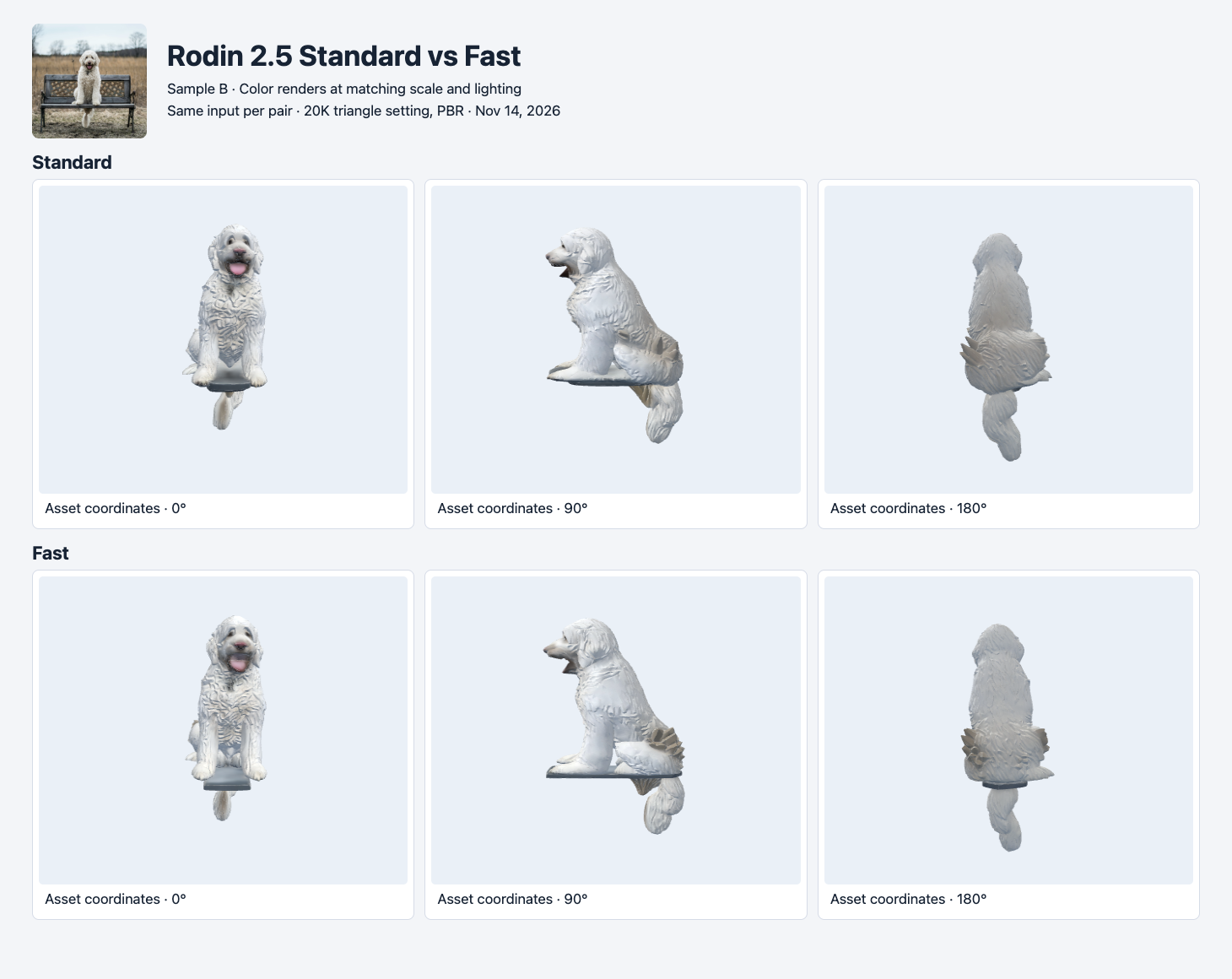
In both rows the dog remains visible and the bench is reduced to a small surface. The input shows a full backrest and legs.
The photo gives a concrete acceptance criterion. If the object is supposed to include a dog sitting on a bench, the legs and backrest need to survive. Both models lost most of those parts. The texture and pose of the dog remain recognizable, so a workflow that needs a dog alone might use a cropped reference and rerun. A workflow that needs the full bench can test a clean image of the bench or try separate assets. The $0.38 extra charge for Standard did not resolve this visible issue under the matched settings.
This sample also shows how to record failures when evaluating a batch. Define the object boundary first. A person who expects just the dog and a person who expects the bench would grade the same mesh differently. For this article, the full scene criterion explains the omission. No attempt was made to reconstruct or score the real dimensions of either subject. The renderer normalizes each export’s longest bounding-box side and uses fixed lighting and camera positions.
Files, PBR and the tangent-space warning
| Sample | Route | GLB bytes | Triangles | Images | Errors / warnings |
|---|---|---|---|---|---|
| Satchel | Standard | 2,091,988 | 19,838 | 3 | 0 / 1 |
| Satchel | Fast | 2,006,764 | 19,592 | 3 | 0 / 1 |
| Dog and bench | Standard | 3,022,912 | 19,644 | 3 | 0 / 1 |
| Dog and bench | Fast | 3,125,640 | 19,892 | 3 | 0 / 1 |
The four GLBs embed base-color, metallic-roughness and normal maps. Khronos glTF Validator reported MESH_PRIMITIVE_GENERATED_TANGENT_SPACE on every file. The primitive lacks an explicit tangent attribute for the material’s normal-map setup, so different rendering implementations may generate tangent space differently. These files rendered with the tested browser loader. For a game or a product viewer, import a sample into your actual runtime and look at fine surfaces from multiple light directions. Keep that check after any mesh or UV changes. Khronos glTF Validator
The experiment did not measure speed. The word Fast names a route. No exact completion time was captured in these receipts. To test latency, record the time from request submission through the first confirmed terminal response for several runs per route. Use the same polling interval and describe the resulting precision. Log downloads separately so a CDN delay does not get attributed to the generation endpoint.
Reproduce the shared 20K configuration
Run the same request with the model ID set to either hyper3d/rodin/2.5/image-to-3d or hyper3d/rodin/2.5/fast/image-to-3d. The command below submits Fast for the satchel sample. Keep the API key on the server and use the returned run ID to poll GET /v1/run/{id} before downloading the result. This starts a billable job.
jq -n --arg image 'https://static.sandbase.ai/examples/trellis/trellis-2/input_image_0.png' \
  '{model:"hyper3d/rodin/2.5/fast/image-to-3d",images:[$image],
    seed:42,tier:"Gen-2.5-Low",quality_mesh_option:"20K Triangle",
    material:"PBR",geometry_file_format:"glb",hd_texture:false}' |
curl --fail-with-body -sS https://api.sandbase.ai/v1/run \
  -H "Authorization: Bearer $SANDBASE_API_KEY" \
  -H 'Content-Type: application/json' --data-binary @-
The dog input was https://static.sandbase.ai/examples/pixal3d/pixal3d/input_image_0.png. Change only the image for the second pair, and keep the result from every attempt. Check the three output images embedded in each GLB and count triangles after download. If export size is part of acceptance, measure the entire file before any conversion and then the exact file your application will serve.
For a second 20K experiment on the same photos, see Tripo P2 vs H3.1. One output exceeded the requested face limit even though it kept the bench structure.
For a cost comparison across more routes and two seeds, see the budget image-to-3D test. Its table counts visually rejected assets as well as completed jobs.
For Auto across every tier and the actual files returned by each format, see the Rodin tier and export guide.
How to choose with a 20K budget
For a delivery check, look at the asset at the final camera distance before comparing closeups. A strap that appears continuous in a thumbnail may separate from the body when the viewer turns the mesh. Record those observations against the requested use. A catalog preview may accept the strap shape, while a product configurator needs a separate editable component with a defined pivot. Both pipelines can start with a 20K mesh, but they have different reasons to reject the result. That distinction is worth recording alongside the API charge.
Try Fast first for a single object that fits the tested configuration. If its silhouette, important details and material survive in your viewer, the $0.10 observed charge gives a useful baseline. At the same observed charges, 100 completed requests would be $10 for Fast and $48 for Standard. Those are generation estimates assuming unchanged settings and prices, with no repair or retries included.
Consider Standard if the shared low setting fails and your project can use a different tier or mesh option. Check the current price for the specific option you intend to test. A higher-cost retry at the same configuration can still omit an object, as the bench illustrates. If the target asset is composed of multiple parts, make the expected output explicit in your acceptance checklist before spending on a larger batch.
A practical pilot can use one isolated object, one object with a thin feature and one complex input. Save the input, file size, validator findings and visible pass or fail for each. Then compare cost per asset that meets your actual threshold. The TRELLIS vs TRELLIS.2 comparison shows how the same two photos behaved under a different set of route and mesh controls.
Found this useful? Share it