Best AI APIs for PBR Texturing in 2027
Compare Hi3D, TRELLIS.2 and Meshy on two matched 3D meshes. See six settled charges, embedded PBR maps, file sizes and renders under two lights.
Meshy 7 Retexture was the only route in our six-job test to deliver a normal map on both assets. Hi3D Texture cost the least per asset at $0.20, while TRELLIS.2 retained the triangle count of both inputs. The packed material maps also differed. Meshy’s base color and normal images were 4096 pixels wide, while its metallic-roughness map was 2048 pixels wide. On the relief mask, TRELLIS.2’s 4096-pixel metallic-roughness image contained an entirely zero blue channel. These differences determine which route belongs in a PBR workflow.
Key takeaway
- Start with Meshy if the contract requires an embedded normal map. Both exports included a 4096 × 4096 normal image. The validator reported a missing tangent-space warning on each, so test the resulting shading in the target renderer.
- Start with Hi3D if cost is the first filter. It settled at $0.20 per job. Its 6,684-triangle robot differed from the 7,245-triangle input, so enforce a geometry check if that matters.
- Start with TRELLIS.2 if keeping the triangle count and receiving a 4K packed map matter together. Both counts matched their sources. The mask’s packed map had roughness variation and a zero metallic channel, so examine the image values as well as the slot.
- Use a reference image, an alternate light, and file-level checks. All six GLBs were valid with zero errors. They delivered different image sizes, channel content and native bounds.
Match the input geometry within each asset
On November 14, 2026 we compared three SandBase texturing routes. For the mask, we reused the geometry-only GLB and public mask reference from the Hi3D and TRELLIS.2 comparison. The GLB had 500,000 triangles and no UVs. We retained both original texturing results and submitted the same source GLB and reference image to Meshy. For the robot, we reused the geometry-only 7,245-triangle Hunyuan Low GLB from the Hunyuan and Tripo remesh comparison and the public reference image that originally drove its reconstruction. Each of the three routes received the same robot geometry and image. The robot also started without UVs.
We used Hi3D Texture with version hitem3dv1.5, resolution 1536 and GLB export. TRELLIS.2 Retexture used internal resolution 1024, texture size 4096 and seed 42. Meshy 7 Retexture used enable_pbr: true, enable_original_uv: false and texture_resolution: "4k". The settings use different schemas. We held the mesh and reference fixed within each asset and measured the actual output images, which lets us compare the files an integration would receive.
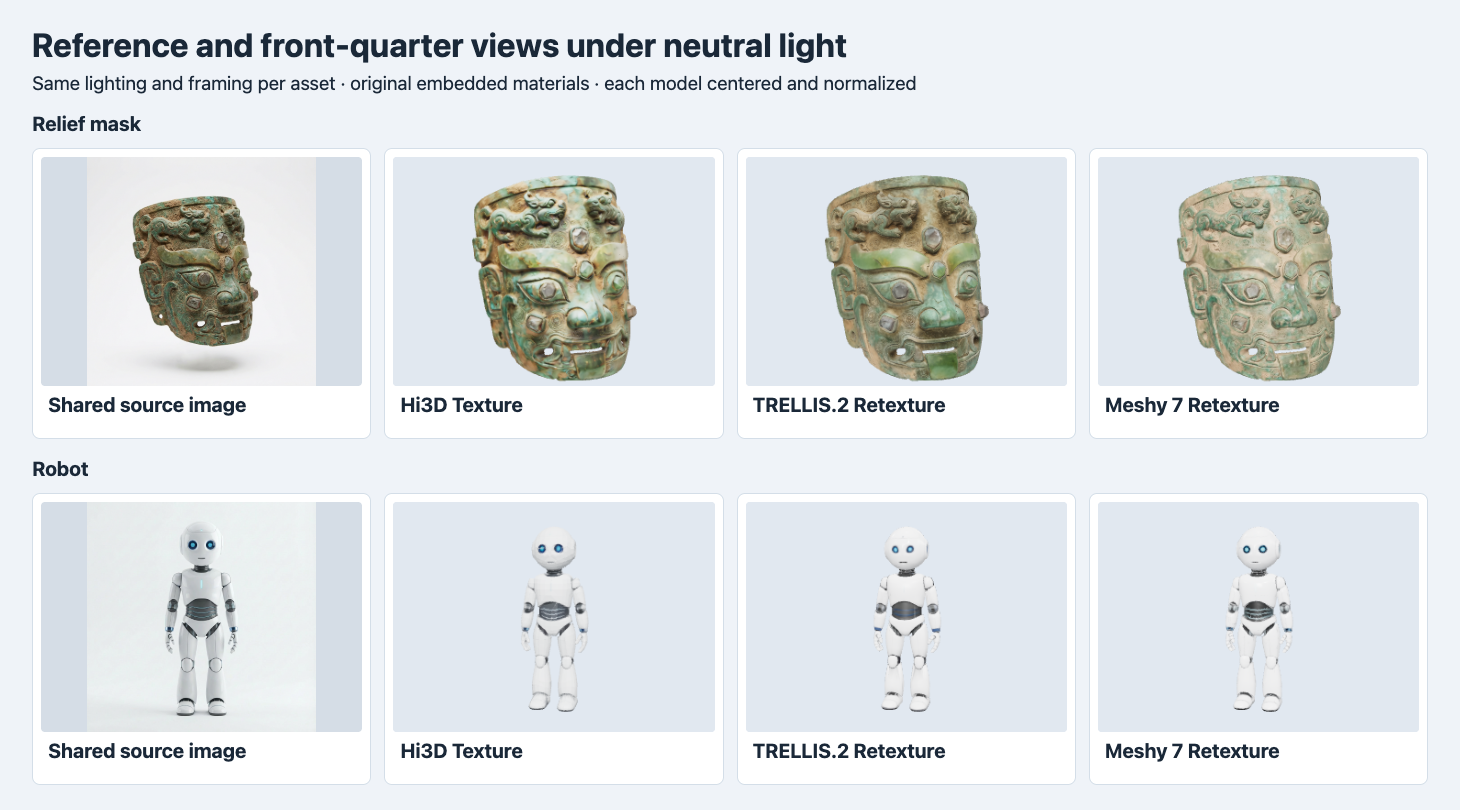
The two rows are a relief mask and a robot. Renders use the original materials, a common camera and lights within each row, and independent centering and scale normalization.
All three mask outputs retain the visible openings and the bronze-green palette, with differences around the brow and chin. Hi3D shows a brighter warm relief in the front-quarter view. The TRELLIS.2 mask has broad saturated green patches around the brow and lower edge. Meshy’s front is paler and shows a fine mottled pattern. On the robot, all three keep the blue eyes and a dark waist. The blue line details and dark joints differ. Those are observations in a fixed display setup with one reference image per asset. We have no scanned surfaces or calibrated material measurements to grade physical fidelity.
Compare the files and costs
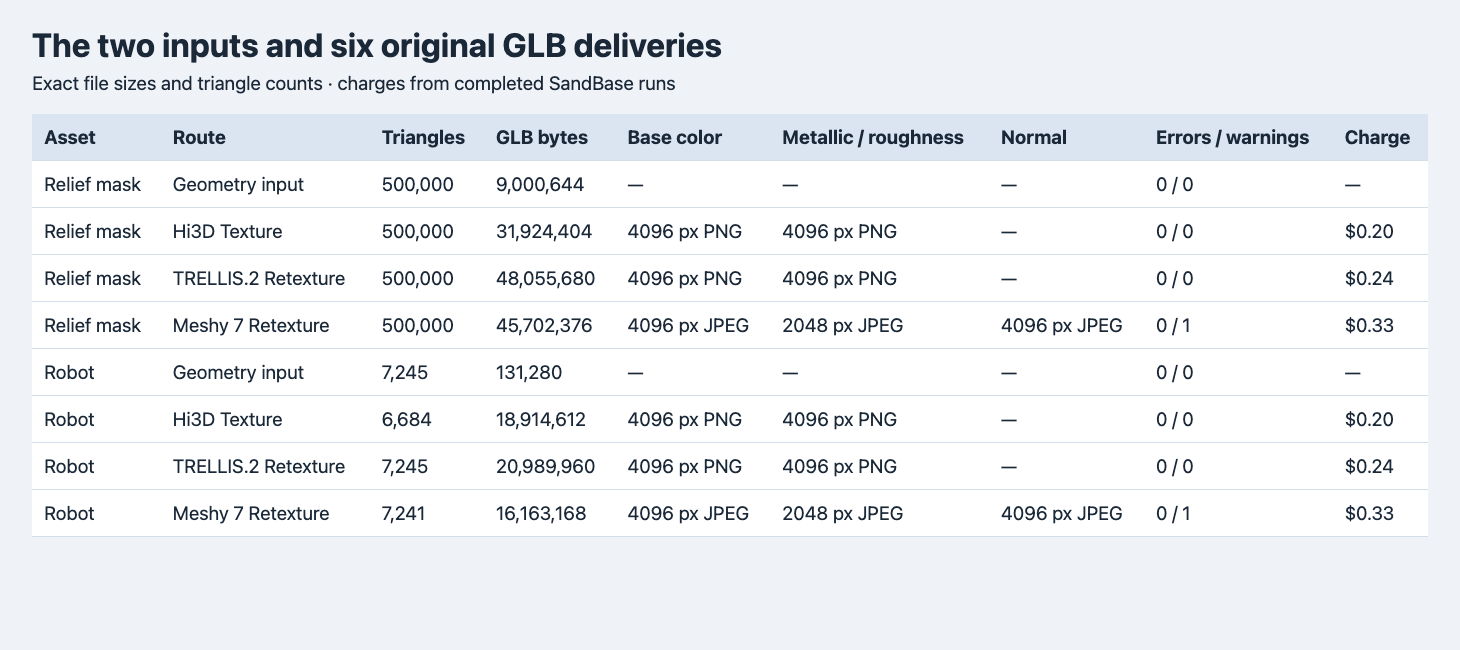
Charges refer to individual texturing jobs. The geometry rows are reused inputs. Both Meshy rows reported one validator warning.
| Asset | Route | Triangles | Original GLB bytes | Charge |
|---|---|---|---|---|
| Mask | Input | 500,000 | 9,000,644 | — |
| Mask | Hi3D | 500,000 | 31,924,404 | $0.20 |
| Mask | TRELLIS.2 | 500,000 | 48,055,680 | $0.24 |
| Mask | Meshy | 500,000 | 45,702,376 | $0.33 |
| Robot | Input | 7,245 | 131,280 | — |
| Robot | Hi3D | 6,684 | 18,914,612 | $0.20 |
| Robot | TRELLIS.2 | 7,245 | 20,989,960 | $0.24 |
| Robot | Meshy | 7,241 | 16,163,168 | $0.33 |
The six texturing jobs settled at $1.54 total, excluding source generation, remesh, storage and delivery. Hi3D produced the smallest mask GLB. Meshy produced the smallest robot GLB despite including one more image. The image codecs, dimensions, UV layouts and geometry payload all affect file size. On the robot, Meshy’s three image payloads total 15,883,031 bytes out of the 16,163,168-byte GLB. To decide where to reduce download size, first measure how much of the file belongs to textures. GPU memory and frame rate depend on the imported format and engine settings and were not measured.
Triangle counts tell only part of the geometry story. The longest Blender world-space bound of the mask source was 0.924032 coordinate units. Hi3D matched it, TRELLIS.2 was close to 1.0, and Meshy was 2.0. The robot input measured about 1.001953 units, Hi3D matched it, TRELLIS.2 was close to 1.0, and Meshy was 2.0. We did not assign a physical unit to the modeled subject. The figures center and normalize each output for appearance comparisons, so they cannot show those differences. If the asset already fits a scene or has sockets, use a scale and attachment-point check on the delivered file.
After centering and longest-side normalization, a Blender vertex-to-surface sample put the robot’s source-to-Hi3D p95 at 0.224% of the normalized longest side. The opposite direction was effectively zero at the displayed precision. This is consistent with areas of the source having fewer nearby corresponding surfaces in the output. It is a sampled distance on one robot, with no topology or vertex identity guarantee.
Inspect what is inside the PBR textures
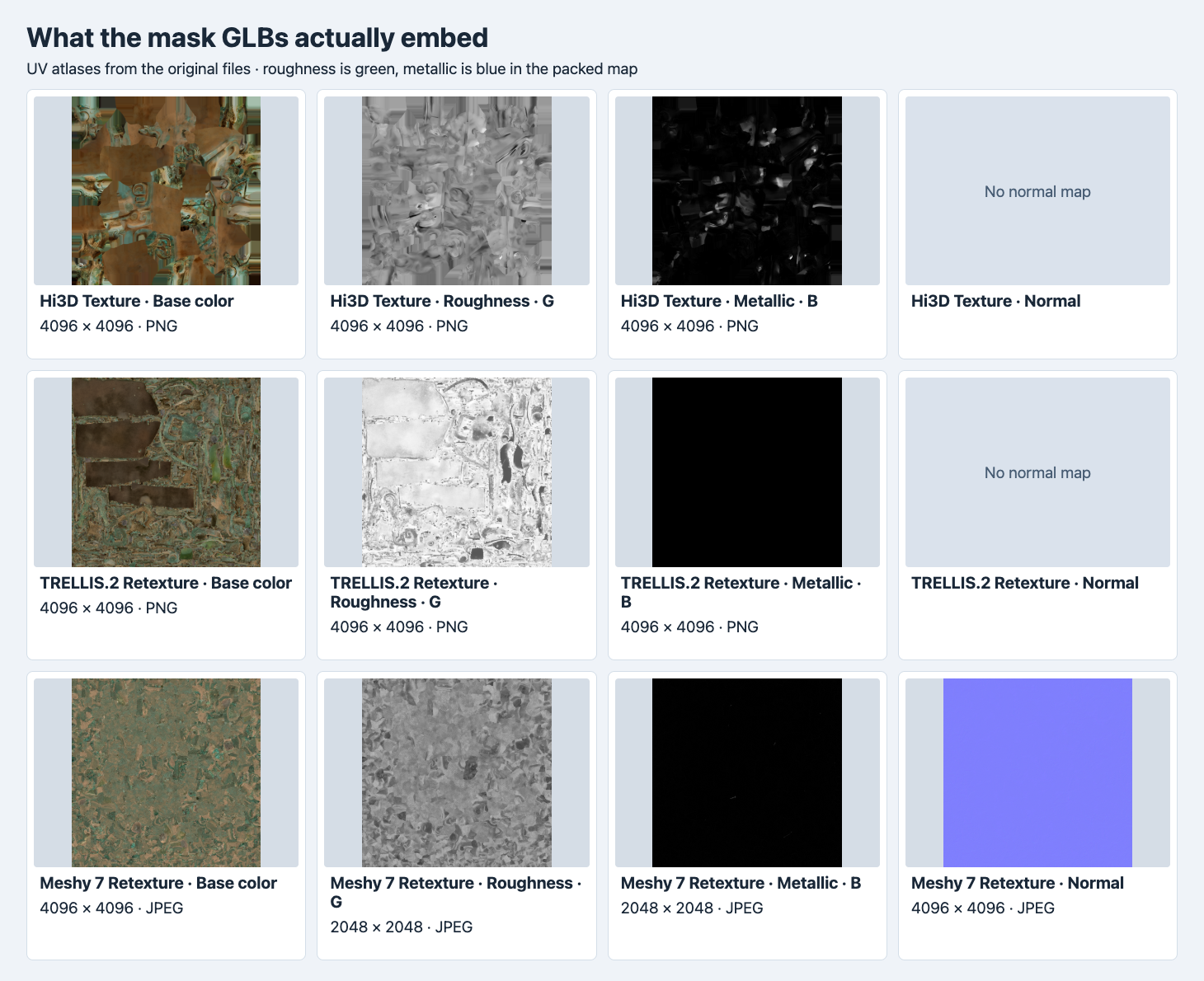
The roughness and metallic panels display separate channels of each original packed image. The map previews are scaled to fit, and the labels give the original dimensions and encoding.
All six original outputs use a base color map and a packed metallic-roughness map. Hi3D and TRELLIS.2 embed both as 4096 × 4096 PNG. Meshy embeds 4096 × 4096 JPEG base color and normal images, plus a 2048 × 2048 JPEG for the packed map. In glTF, roughness samples the green channel and metallic samples the blue channel of that packed texture, in linear space. Inspect each channel on its own because the same file can carry useful data for only one of them. glTF 2.0 metallic-roughness specification
The TRELLIS.2 mask’s blue channel was zero at all 16,777,216 decoded texels, while its robot’s blue channel reached 255. The robot is a useful reminder that the mask’s behavior is asset-specific. Hi3D’s mask blue channel spans 0 to 255 and Meshy’s spans 0 to 104. These are decoded image values across the entire atlas, including space the mesh may not sample. Neither the maximum value nor the fraction of zero texels measures the surface area intended to look metallic. For a metal part with a strict appearance target, sample the intended UV region and examine how its highlights respond to light.
Meshy’s validator warning was MESH_PRIMITIVE_GENERATED_TANGENT_SPACE on each asset. The texture is present, but no tangent attribute is supplied in these files. A renderer may generate a tangent frame, and its choice can affect shading around UV seams. When delivering to multiple engines, inspect the normal map under a moving light, then check any tangent generation or rebake against the original map convention.
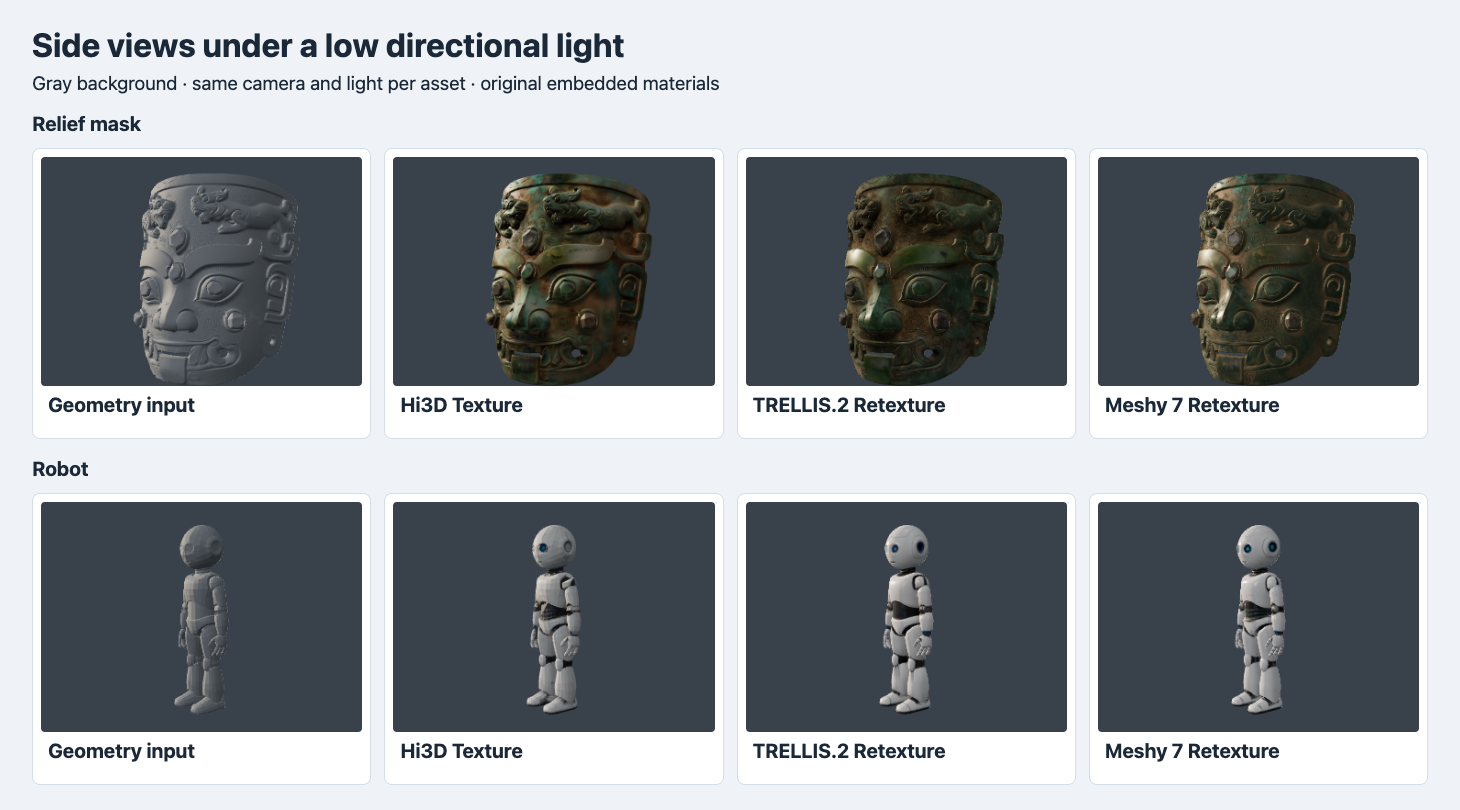
The gray input in each row uses a neutral override. The other panels show the original textured files under a low directional light. This view changes both the light and camera from the front-quarter figure.
The directional-light view makes the bright relief around the mask brow and nose easier to inspect. The robot’s side silhouette makes the dark joint transitions easier to see. The environment and camera are held constant within each asset and board. Comparing different routes in the same row is informative. Comparing the two boards cannot isolate the effect of roughness or normal maps because both light and camera changed.
Reproduce a short acceptance test
For the first pass, give each candidate a geometry-only GLB and a single image that represent your material problem. Save the source file hash and original bounds. Send the desired job to POST https://api.sandbase.ai/v1/run with a server-side bearer token, then use the returned ID to check GET /v1/run/{id}. This is the Meshy request shape used on the two examples, with placeholder asset URLs. Each call can incur a charge.
{
  "model": "meshy/7.0/retexture",
  "model_url": "https://example.com/assets/geometry.glb",
  "image_style_url": "https://example.com/assets/reference.png",
  "enable_original_uv": false,
  "enable_pbr": true,
  "texture_resolution": "4k"
}
Set acceptance criteria before inspecting outputs. A pipeline that requires a normal image should check the material reference and the decoded map. A pipeline with an existing collision mesh should verify bounds, scale and the surfaces around known attachments. A team with a byte cap should measure the original GLB and any runtime derivative separately. For the final comparison, render the candidate and source reference in one neutral view and a common grazing-light view. Keep a close crop of the one region you would reject if the map or mesh changes.
The same textured Hi3D mask was also the input to our Hi3D Multicolor palette test, which checks the actual vertex colors and their surface coverage.
FAQ
Does a 4K request make every map 4K?
Meshy returned 4K base color and normal images and a 2K packed metallic-roughness map in both trials. Read each embedded image’s dimensions when the delivery specification sets a minimum per map.
Which route should I use for a new asset?
Choose by the first requirement that rules out a delivery. Here, the normal-map requirement favored Meshy, the lowest observed charge favored Hi3D, and matching both triangle counts favored TRELLIS.2. Test the material and mesh of your own asset before committing to a batch.
SandBase ran and billed the texture jobs. The measurements and screenshots come from the original downloaded GLBs. The cover is illustrative.
Found this useful? Share it