Tripo H3.1 vs Meshy 7.1: One Image or Two?
Four image-to-3D runs compare single and two-view Tripo H3.1 and Meshy 7.1, with actual cost, GLB size and a held-out reference.
Adding a second photo changed both Tripo H3.1 and Meshy 7.1 exports in this test. It changed their file sizes, too. The Meshy two-view GLB was about 2.67 MB smaller than its single-image counterpart, but both remained above the requested 20,000 triangles. On Tripo, the second view changed the profile and the shape of the stand, with a much smaller size difference. A second image is another constraint for the model. It does not remove the need to check what comes out.
Key takeaway
- Four requests on November 14, 2026 used the same public bust image. The two-view routes also received one side image of the same bust. A photo from the other side was held out for inspection.
- Tripo cost $0.36 per completed request, and Meshy cost $1.44, for both the single and two-view configurations. The four calls totaled $3.60.
- Tripo delivered 19,180 and 19,032 triangles. Meshy delivered 20,266 and 20,135 with the same requested 20,000 target. All four GLBs rendered and had zero validator errors and one warning each.
- The two-view results changed visible details on one sample. The held-out photo helps inspect shape and the stand, but the camera and lighting are not calibrated for numerical accuracy claims.
Give the multi-view route a genuinely different angle
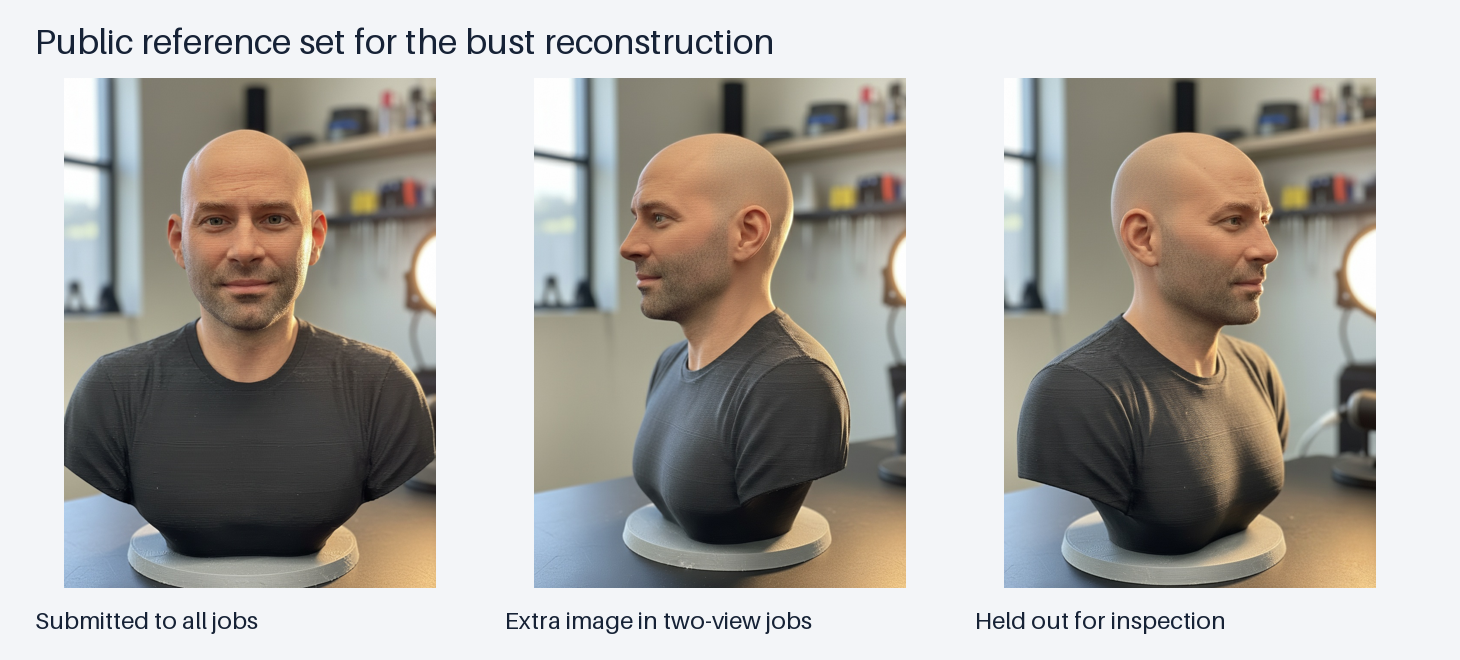
Public reference images from the Rodin example. The front appears in every request. The center image is the extra input for the two-view requests. The right image was reserved for inspection.
The object is a printed-looking head-and-shoulder bust on a round stand. Its sides show the outline of the nose, chin, shirt and rear shoulder. The single-image requests received the front photo only. The two-view requests received that same front photo followed by the side image. The third image shows the opposite oblique side and went to neither provider. The photos share a subject, but they were not calibrated as an exact stereo pair.
On Tripo, the multi-view route documents an ordered array starting with front and left. On Meshy, the multi-image route accepts multiple photographs of the same object. Keep a fixed front image while comparing. If the second image changes the object’s pose, material or the part being shown, it can become a new source of ambiguity. In this test the original example set supplied compatible subject views. Tripo multiview parameters · Meshy multi-image parameters
| Request dimension | Tripo H3.1 | Meshy 7.1 |
|---|---|---|
| Single route input | Front image | Front image |
| Multi route input | Front and side | Front and side |
| Requested geometry budget | face_limit: 20000 | target_polycount: 20000 |
| Topology | Triangles | Triangles |
| Textured output and PBR | Enabled | Enabled |
| Geometry control | Standard geometry quality | Standard resolution |
| Seed | 42 | No seed supplied |
| Symmetry | Route setting | Off |
| Charge per tested job | $0.36 | $1.44 |
The settings are matched within each family where the routes support the same fields. Tripo and Meshy expose different controls. The comparison can show what changed between the selected routes on this input. It cannot isolate camera count from any differences between each provider’s single-image and multi-image implementations.
Tripo: look at the profile and stand
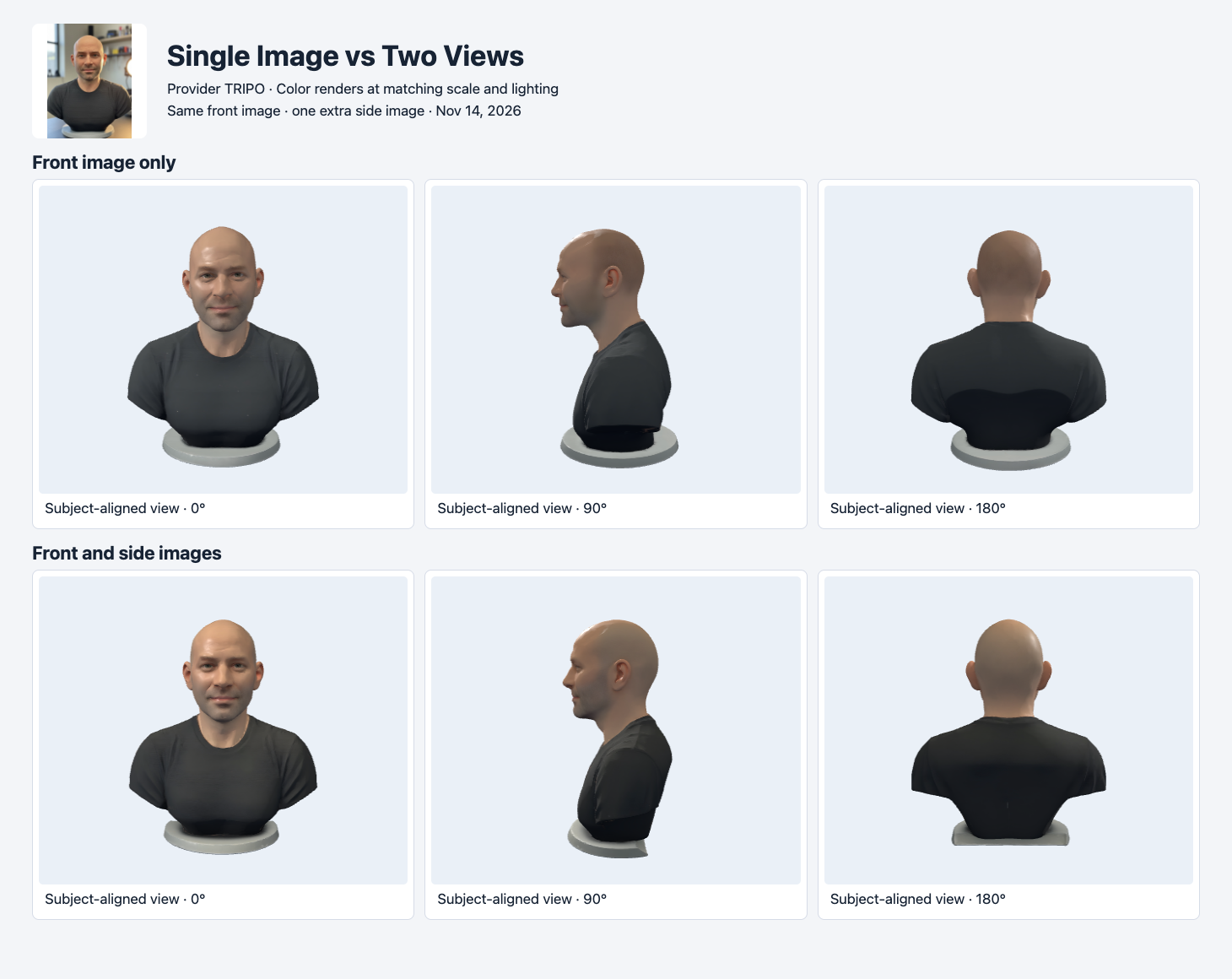
Tripo results use a subject-aligned camera. Both meshes are independently normalized to the same longest dimension.
Both runs reproduce a recognizable bust and stand. The two-view output looks different around the chin, rear shoulder and foot of the stand in the same lighting. The most visible trade-off is the lower contour. The single-image stand reads as a more continuous round pedestal in this viewer. The two-view version shows a less even perimeter from the side. When the base must sit flat or match a measured diameter, inspect it directly in a modeling tool instead of inferring dimensions from the screenshot.
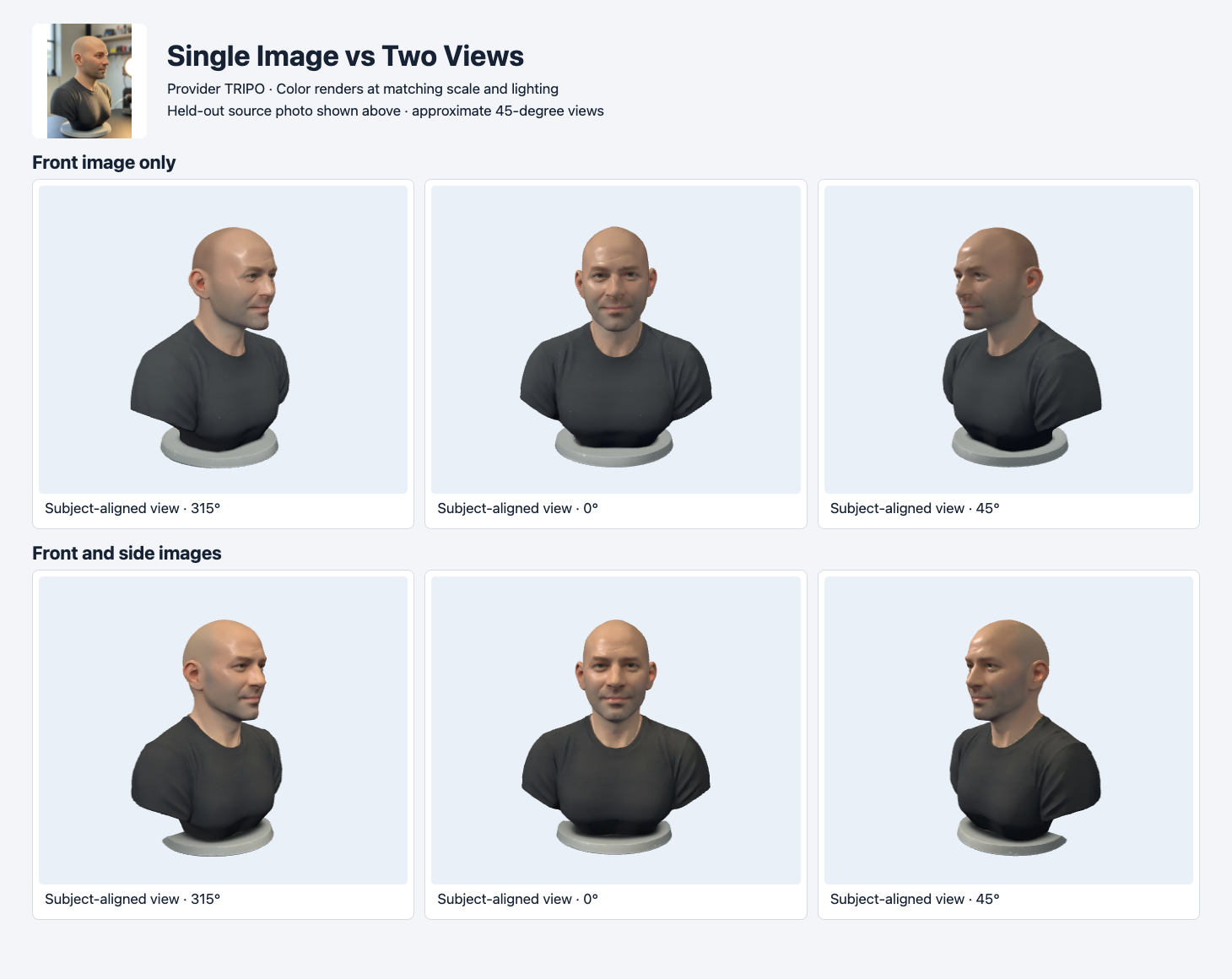
The header shows the reserved opposite-side photo. The renders use approximate oblique cameras. They are not aligned pixel by pixel.
The held-out photo makes the outline of the ear, cheek and neck easier to check. Both renders show those features, and the two-view shape shifts visibly around the chin and shoulders. The rendering camera is only approximately comparable to the source. The source lighting is also different. An accuracy claim would require camera alignment or actual measurements. This visual check can still identify where to look next, especially when the extra reference changes the shape of a feature that matters to the final asset.
Meshy: smaller export and a different surface
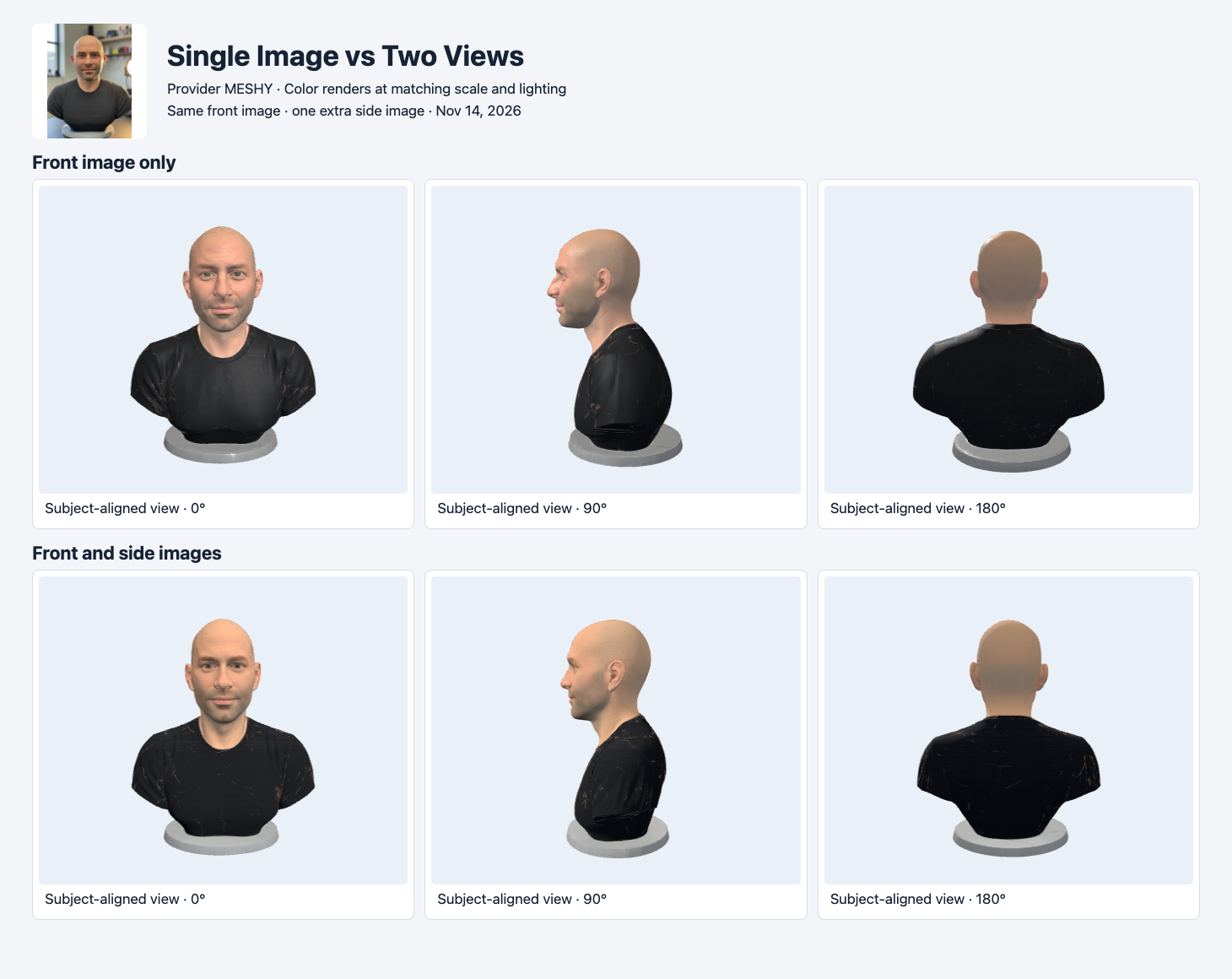
Meshy single-image and two-view GLBs use matching camera positions, light and background. Both retain the stand and main head and shoulder shapes.
The Meshy single and two-view outputs both retain the silhouette. The front lighting and face color look different, and the dark shirt has visible irregular streaks in both. An additional photograph can inform the shape while still leaving a material cleanup task. The rear view remains an inferred surface. The held-out photo gives another oblique view of the bust, not a rear photograph.
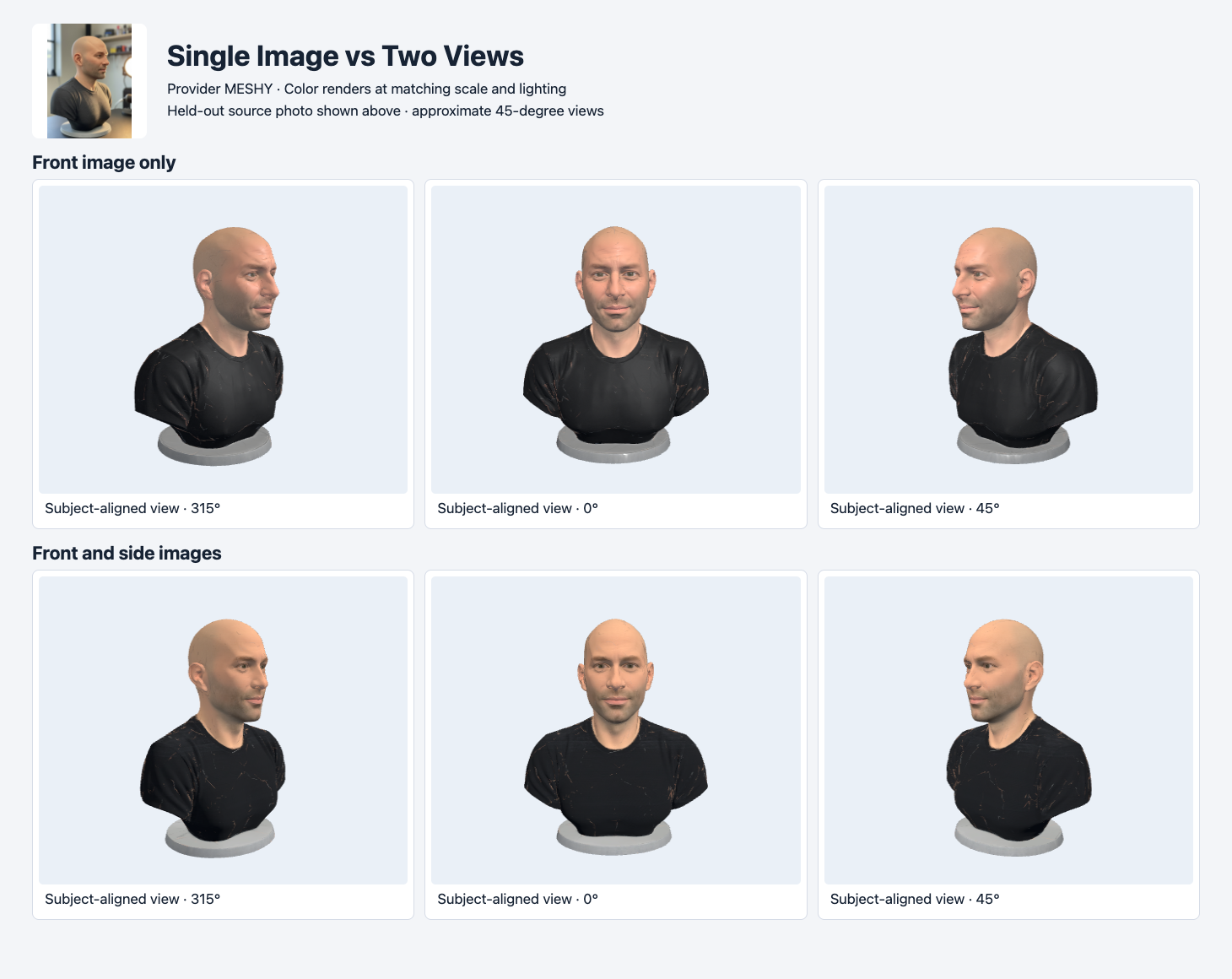
The opposite-side source is shown for inspection. Use the approximate same-side oblique render to compare silhouette and stand rather than color.
For a display pipeline, the measurable difference is export size. The single-view Meshy GLB used 10,859,176 bytes and the two-view one used 8,188,512 bytes. The 2,670,664-byte difference is about 24.6% of the first file. The geometry changed by 131 triangles. Other file data, including textures and attributes, also contribute to the byte count. This test does not establish that extra input images generally reduce file size.
Compare the four delivered files
| Route | Input views | GLB bytes | Triangles | Validator errors / warnings | Actual charge |
|---|---|---|---|---|---|
| Tripo H3.1 single | 1 | 3,159,048 | 19,180 | 0 / 1 | $0.36 |
| Tripo H3.1 multi-view | 2 | 3,102,724 | 19,032 | 0 / 1 | $0.36 |
| Meshy 7.1 single | 1 | 10,859,176 | 20,266 | 0 / 1 | $1.44 |
| Meshy 7.1 multi-image | 2 | 8,188,512 | 20,135 | 0 / 1 | $1.44 |
All four files rendered in the same Three.js loader. Each had three embedded images and one generated tangent-space warning. Check normal-map shading in the renderer you actually ship. Tripo’s files stayed below the submitted 20,000 limit in this test. Meshy’s target is a request for the desired polygon count. Both delivered Meshy meshes were slightly above 20,000 triangles. The appropriate comparison is the actual file count, especially after triangulation, optimization or import. Khronos glTF Validator
The generation bill was the same within each family. For 100 completed jobs at the recorded settings, the arithmetic would be $36 for either Tripo route and $144 for either Meshy route at unchanged prices. A two-view workflow still needs someone to capture and check the extra photo. Include the time required to acquire or clean the image set when comparing the true cost of the asset.
Reproduce the two-view request
The example submits Tripo H3.1 with the shared front and side images. Keep the SandBase key on the server. Save the returned run ID and poll GET /v1/run/{id} until it completes. This is a billable request. For a single-image comparison, send only the front as image to tripo3d/tripo-h3.1/image-to-3d with the same other options.
BASE='https://static.sandbase.ai/examples/hyper3d/rodin/2.5/fast/image-to-3d'
jq -n --arg front "$BASE/input_images_0.png" --arg side "$BASE/input_images_2.png" \
  '{model:"tripo3d/tripo-h3.1/multiview-to-3d",images:[$front,$side],
    seed:42,face_limit:20000,pbr:true,texture:true,quad:false,
    texture_quality:"standard",geometry_quality:"standard"}' |
curl --fail-with-body -sS https://api.sandbase.ai/v1/run \
  -H "Authorization: Bearer $SANDBASE_API_KEY" \
  -H 'Content-Type: application/json' --data-binary @-
When an extra photo is worth taking
The same logic applies when an asset must sit on a physical surface. In the bust test, adding a view changed the outline of the base. A preview can tolerate some variation in that outline. An asset intended for fabrication needs the base checked for planarity, thickness and fit after import, with a known scale. Use the visual difference to decide where to measure.
For a side-view test on a new asset, make a short checklist before taking photos. Put the known dimensions, expected orientation and visible components in it. Record which views go into the generation request and which stay outside. A held-out image can reveal a missing piece or an unexpected contour. For a numerical comparison, use a capture setup with known camera geometry and a consistent scale. A useful qualitative preview and a calibrated measurement serve different acceptance decisions.
Start with one image when the object is simple, the preview is small and you can accept some variation on hidden surfaces. Use an extra side image when a profile, a thin part or the stand is central to acceptance. Reserve another photo to check the result, ideally from the side where a feature was hidden in the supplied view. If you cannot acquire a second independent view, use the renders as evidence of what the API produced and report the remaining uncertainty.
For a batch, keep the shared photo, the extra photo, the file and the acceptance result for each run. A team should be able to reproduce the decision without relying on a favorable preview angle. The image-to-3D selection guide shows how format and geometry budgets fit into the same acceptance loop.
Found this useful? Share it