TRELLIS vs TRELLIS.2 for Image to 3D
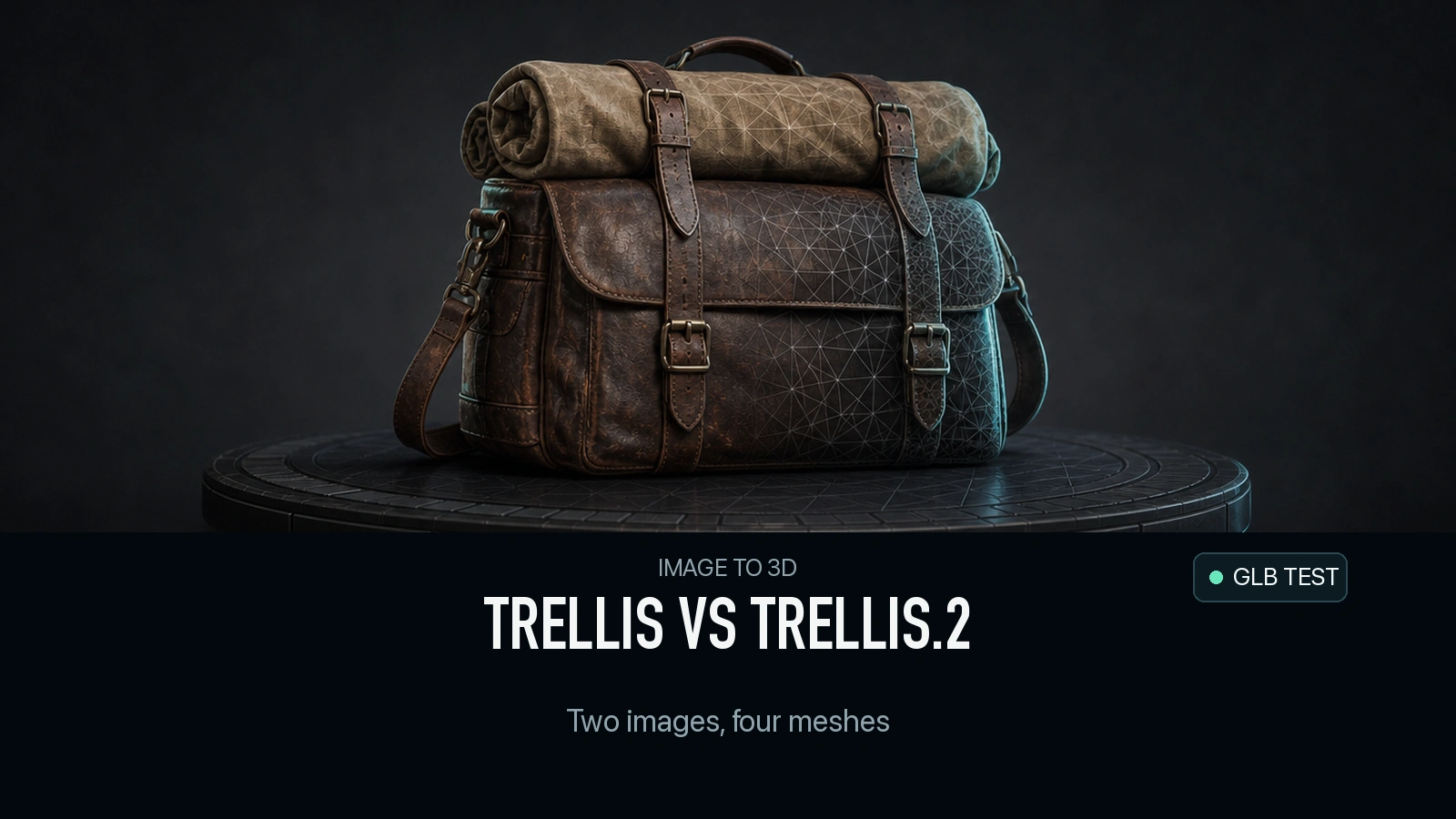
Four GLBs from two shared inputs. Compare TRELLIS and TRELLIS.2 on cost, triangle count, PBR textures, visible geometry and file validation.
A dog sits on a metal bench in the input photo. In the TRELLIS result, the dog is still recognizable, but most of the bench has become a low slab. TRELLIS.2 preserves the seat, legs and open backrest in that run. A second input changes the decision. On a leather satchel, both routes produce a usable silhouette for a first preview, and TRELLIS.2’s file renders even though a standards validator reports an error. The upgrade is easier to justify for some input shapes than for others.
Key takeaway
- Each model ran once on each of two public images on November 14, 2026. Through SandBase, the completed runs cost $0.02 on TRELLIS and $0.30 on TRELLIS.2 per asset.
- The two TRELLIS.2 files contained base-color and metallic-roughness textures. Both TRELLIS files had a base-color texture and no metallic-roughness texture.
- TRELLIS.2 preserved more of the bench in the supplied photo, including a backrest and legs. Its satchel result contained a zero-length vector flagged by glTF Validator.
- A file that renders can still fail validation, and a file that passes validation can still fail the visual task. Review both before using the asset.
What was held constant
These tests use the TRELLIS and TRELLIS.2 routes on SandBase. The first input is a satchel with two buckles, a strap and a roll tied across the top. The second is a dog sitting on a bench, with a patterned backrest and thin legs. Both were publicly available example inputs on SandBase. No side or rear reference images were available. The photo can support a check of visible components, while unseen surfaces remain a reconstruction.
Each pair uses the same image URL, the same seed argument of 42 and the same 2048 texture size setting. Seeds are local to their respective models. The number 42 does not synchronize internal noise or guarantee identical reruns. TRELLIS.2 also received a generation resolution of 1024, remeshing enabled and a decimation target of 100,000. The TRELLIS route does not expose matching controls. This comparison therefore measures complete route configurations, with texture settings aligned and geometry controls documented. TRELLIS model parameters · TRELLIS.2 model parameters
| Setting or result | TRELLIS | TRELLIS.2 |
|---|---|---|
| Required input | Image URL | Image URL |
| Seed supplied | 42 | 42 |
| Texture size requested | 2048 | 2048 |
| Generation resolution in request | Route default | 1024 |
| Remesh field | No matching field | true |
| Decimation target in request | No matching field | 100,000 |
| Format delivered on both inputs | GLB | GLB |
| Charge per completed run | $0.02 | $0.30 |
| Material maps found in tested files | Base color | Base color and metallic-roughness |
The screenshots use Three.js and the same GLB loader. They share camera positions, background and lights. The longest side of each model’s bounding box was normalized to the same length. That makes the comparison readable without implying that either export has accurate physical dimensions. The three columns use each asset’s coordinate frame, so a route that exports a differently oriented mesh may show a different angle of the subject. No post-generation repair or material correction was applied.
Satchel: inspect the surface and the validator separately
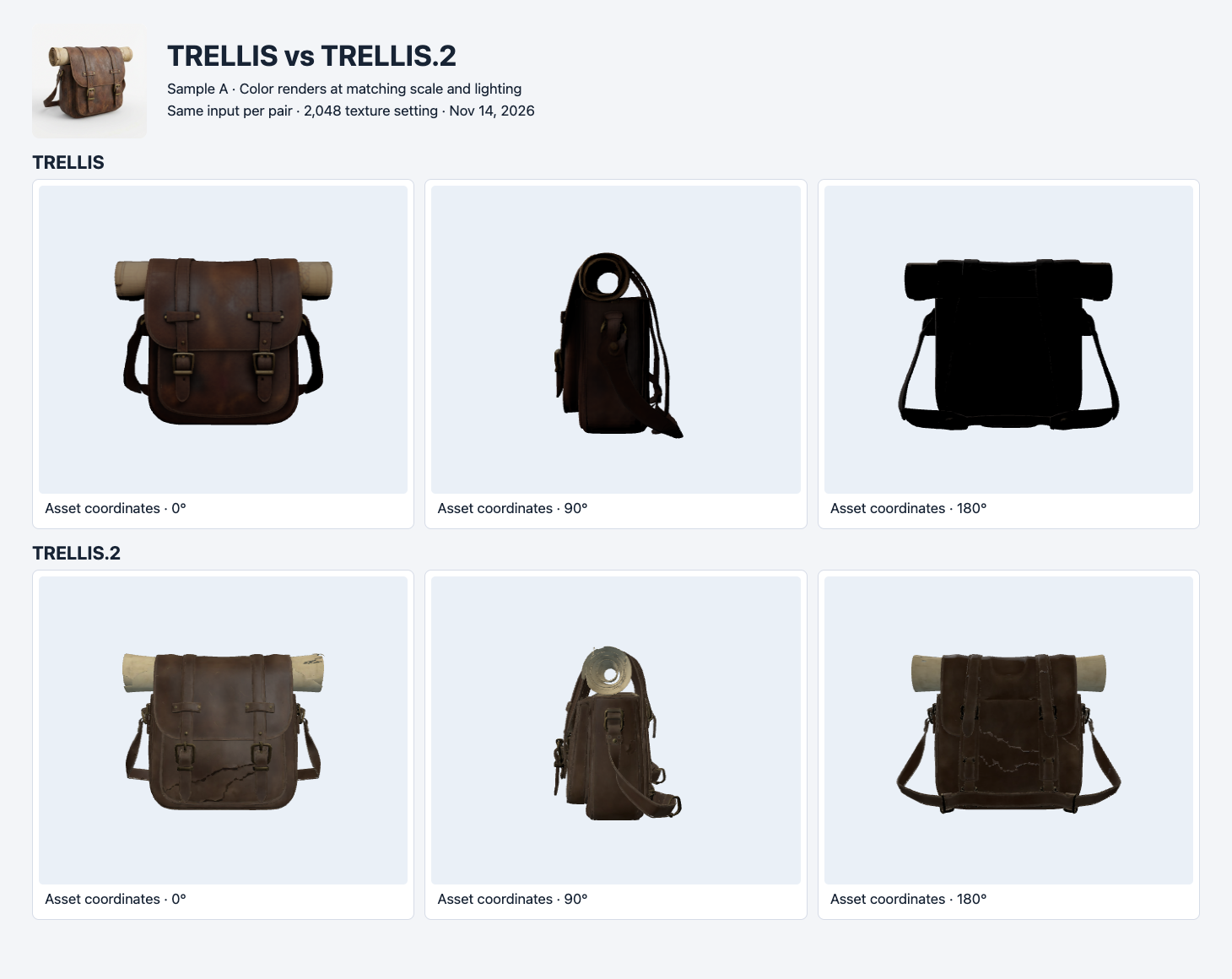
Sample A. Each row shows the same three camera positions, with the original input in the header. The rear of the first result looks much darker under this setup.
Both outputs preserve two front straps, front buckles and the outline of the rolled material. On this lighting setup, the original TRELLIS result’s rear is very dark. TRELLIS.2 shows more readable detail there and an opening through the side of the roll. It also shows irregular dark lines across the satchel, so a brighter rear view does not settle which surface looks better. Under different lighting, the effect of the additional metallic-roughness map could change. This test does not isolate lighting, geometry and texture contributions.
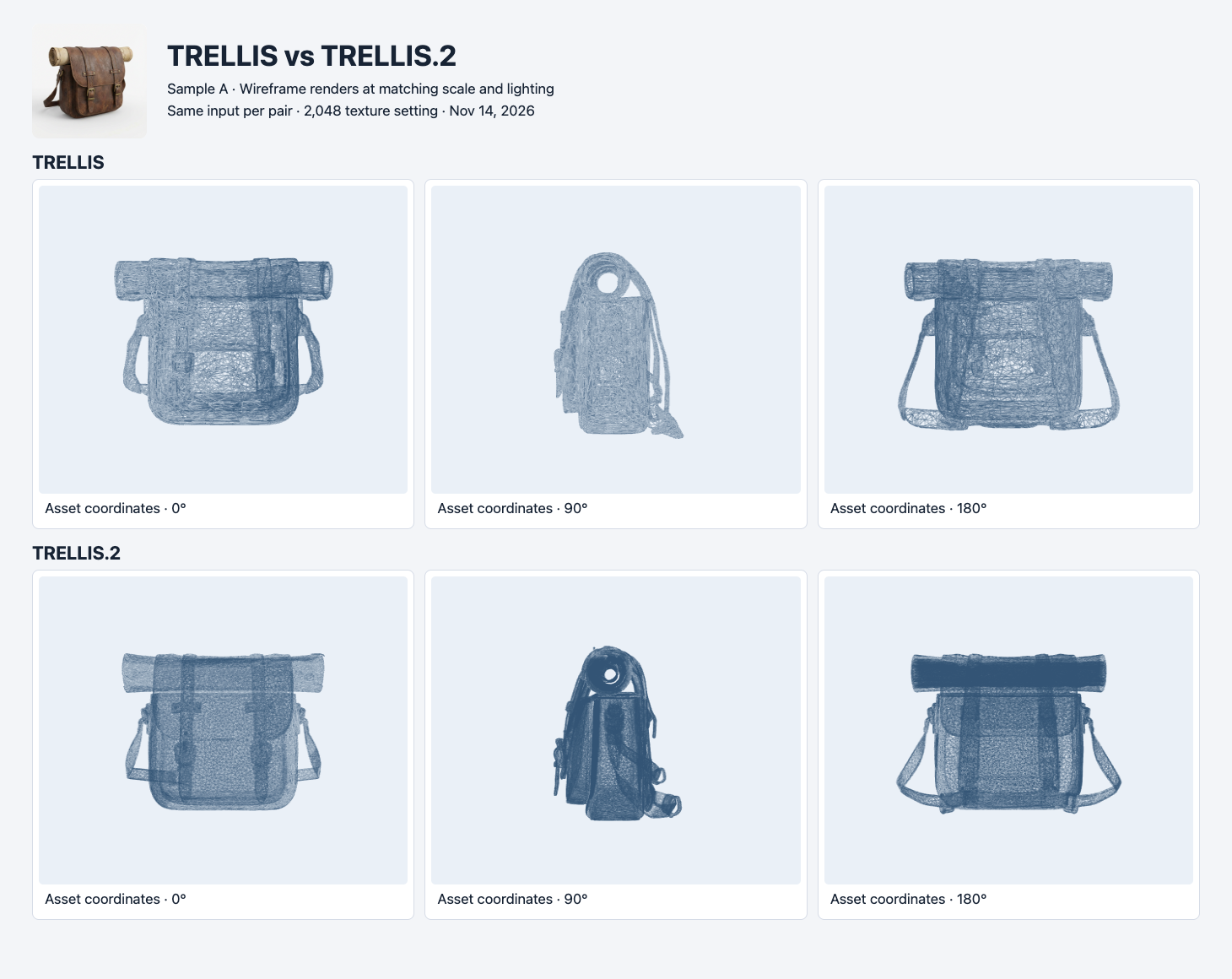
The same satchel assets with a wireframe material applied for inspection. The file counts come from triangle primitives, separate from how dense a screenshot looks.
The wireframe comparison shows why the image alone is a poor guide to delivery cost. The TRELLIS.2 satchel has 93,352 triangles, versus 35,944 for TRELLIS. Yet the file is about 0.45 MB smaller. Embedded images, vertex attributes and the representation of the file all contribute to bytes. If a viewer has a network limit and a geometry limit, measure both. Treat the requested decimation target as an input setting and record the actual outputs independently.
The TRELLIS.2 satchel loaded in Three.js. Khronos glTF Validator still recorded one ACCESSOR_VECTOR3_NON_UNIT error, reporting a vector of length zero. The validator also reports diagnostic information for other files, including two degenerate triangles in the TRELLIS satchel. For a release workflow that rejects any validator error, the TRELLIS.2 satchel needs repair or regeneration. If a workflow tracks diagnostic notices separately, keep their severity with each record. A browser screenshot establishes that this loader rendered the file. Validator results establish a different property. Khronos glTF Validator
Dog and bench: a valid file can still miss the task
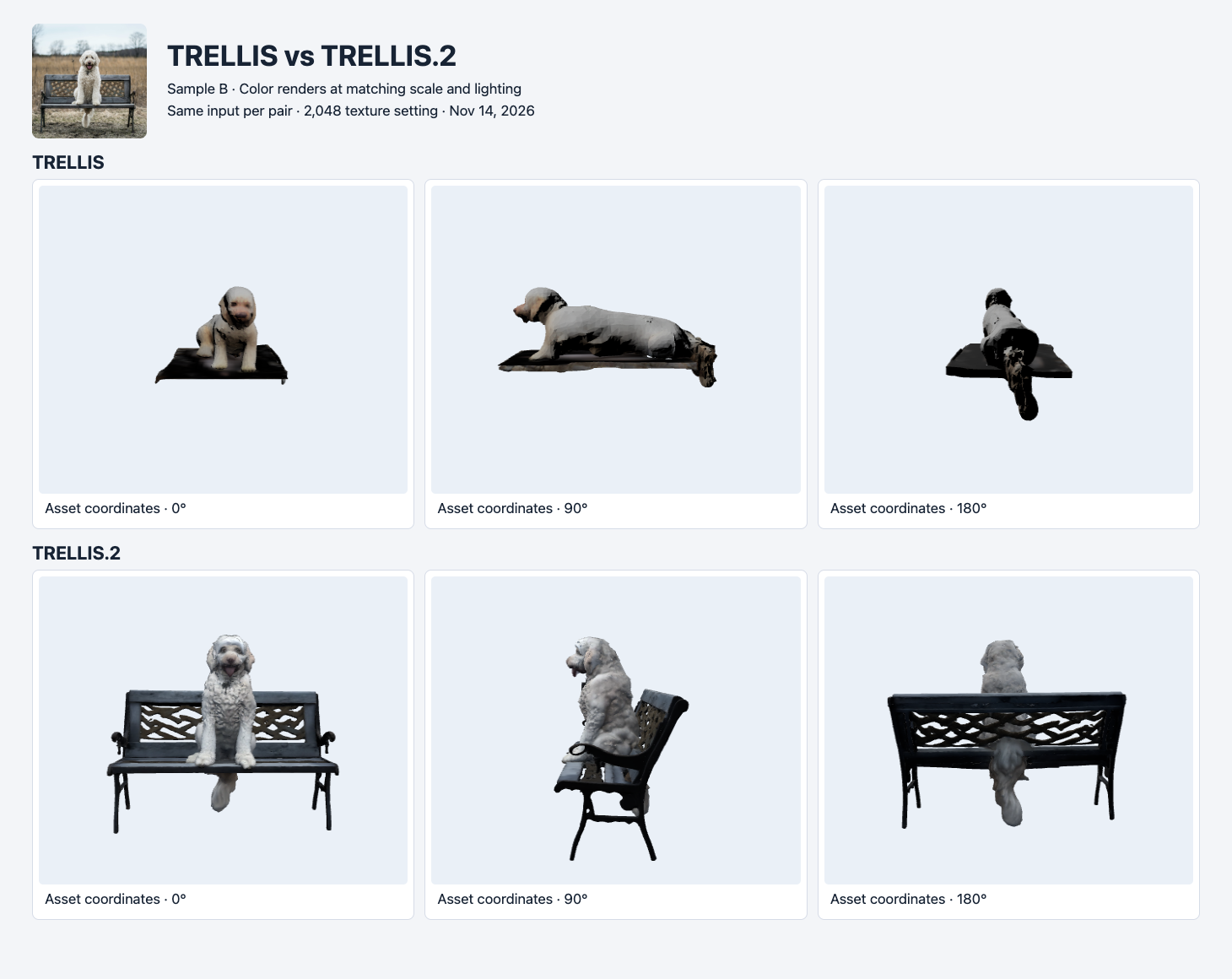
Sample B. The lower row keeps the main bench structure visible. The upper row retains the dog and a slab-like surface. No side or rear ground-truth views were supplied.
For a task defined as reproducing the dog and its seat, inspect the open backrest and legs before looking at fur. TRELLIS.2 preserves recognizable versions of both in this sample. The TRELLIS output omits most of that structure. Both files have zero validator errors and zero warnings. A preflight that stops at format validation would accept both, even though one misses visible components of the requested scene.
The result is specific to these routes, settings and inputs. One plausible next test would crop the dog alone for both models, then score preservation of the head, body and pose separately from the bench. A product that needs a whole object with fine openings should test a similarly structured input. A product that only needs a subject cutout should measure its own acceptance criteria before paying for additional structure.
File results and budget
| Asset | Route | Bytes | Triangles | Embedded images | Validator errors / warnings |
|---|---|---|---|---|---|
| Satchel | TRELLIS | 4,826,140 | 35,944 | 1 | 0 / 0 |
| Satchel | TRELLIS.2 | 4,380,648 | 93,352 | 2 | 1 / 0 |
| Dog and bench | TRELLIS | 3,981,800 | 11,222 | 1 | 0 / 0 |
| Dog and bench | TRELLIS.2 | 4,985,364 | 94,241 | 2 | 0 / 0 |
All four completed runs cost $0.64 total. At the observed prices, 100 completed generations would cost $2 for TRELLIS or $30 for TRELLIS.2 if every call used the same configuration and charge. The math covers generation only. For a product pipeline, compare cost per asset that passes both the structural checklist and format validation. Also log conversion or repair time, since the lowest-priced file can still cost more to make usable.
The visible structures offer a way to define those checks before the next experiment. For a satchel, verify both front buckles, a continuous strap, a complete roll and legible side geometry. For a dog on a bench, require a seat, backrest and distinct legs if the entire scene is the requested asset. Store the screenshot and the validator report with each decision. The reasons for rejection matter more than a single quality score when choosing what to retest.
Reproduce the two requests
Run the commands with your SandBase key in a server-side environment variable. The commands submit the satchel pair. Substitute the second example URL for the other pair, then poll each run ID with GET /v1/run/{id} until it reaches a terminal state. The request launches billable jobs.
IMAGE_URL='https://static.sandbase.ai/examples/trellis/trellis-2/input_image_0.png'
jq -n --arg image "$IMAGE_URL" \
  '{model:"trellis/trellis",image:$image,seed:42,texture_size:2048}' |
curl --fail-with-body -sS https://api.sandbase.ai/v1/run \
  -H "Authorization: Bearer $SANDBASE_API_KEY" \
  -H 'Content-Type: application/json' --data-binary @-

jq -n --arg image "$IMAGE_URL" \
  '{model:"trellis/trellis-2",image:$image,seed:42,texture_size:2048,
    resolution:1024,remesh:true,decimation_target:100000}' |
curl --fail-with-body -sS https://api.sandbase.ai/v1/run \
  -H "Authorization: Bearer $SANDBASE_API_KEY" \
  -H 'Content-Type: application/json' --data-binary @-
The second input used the public example at https://static.sandbase.ai/examples/pixal3d/pixal3d/input_image_0.png. The figures and table show the GLB files delivered by the two TRELLIS routes. The run receipts did not establish an elapsed-time comparison.
The same two photos also went through Rodin 2.5 Fast and Standard, with a 20K triangle setting and PBR on both routes.
For a separate set of research exports, see Pixal3D versus TRELLIS.2 on three project examples.
Which route fits the job?
What does the second texture change?
In the delivered TRELLIS.2 files, the material points to a base-color image and a separate metallic-roughness image. A renderer can use the second map when responding to light. The original TRELLIS files have a base-color image and a roughness factor in the material. To compare how those settings look in your product, render the same camera under a diffuse light and a brighter directional light, then inspect whether buckles, fabric and leather respond as expected. Changing the light also helps expose dark regions that were hard to read in a single preview.
For low-cost first passes on a single prop, start with TRELLIS and set a visual threshold for silhouette, attachments and coverage. For a complex input where openings or multiple visible components matter, test TRELLIS.2 alongside it. The bench shows one case where the extra geometry changes what the asset contains, and the satchel shows why the more expensive output still needs review.
If accuracy on the unseen back is required, collect additional photos before relying on either single-image result. If an application needs strict glTF compliance, place the validator in the pipeline and make its errors actionable. For another example of what a model-route decision can change downstream, see the Hunyuan3D Pro vs Rapid file comparison, which received two different formats from the same front image.
Found this useful? Share it