How to Choose an Image-to-3D API in 2027
Choose an image-to-3D API by the asset you need. Compare measured GLB and OBJ delivery, file sizes, triangle counts and real charges.

A generated mesh can open in a browser and still be the wrong asset. In one of the tests behind this guide, TRELLIS returned a valid GLB of a dog on a small surface. The photo also contained an entire bench. Tripo H3.1 kept more of the visible seat, backrest and legs on the same input. The decision starts with that difference in the deliverable. Then you can compare the cost of getting it, the bytes your app must load and the triangle count it can afford.
Key takeaway
- Write down the required parts and file format before comparing image-to-3D APIs. Completed jobs and visually acceptable assets are separate counts.
- In the robot test, Hunyuan3D 3.1 Rapid returned an OBJ, MTL and PNG. Pro returned a GLB. Inspect the delivered files and use the appropriate loader.
- In a same-input bench example, TRELLIS cost $0.02 and H3.1 cost $0.36. The H3.1 result kept recognizable bench legs and a backrest. These are two recorded runs with different route settings.
- Use measured byte and triangle counts as separate checks. Then inspect the front, side and rear in your target renderer and calculate cost per accepted asset.
Start with the asset you plan to deliver
A product thumbnail, an interactive product viewer and an editable game prop can all use a mesh derived from the same photo. They have different acceptance criteria. A thumbnail needs a recognizable front and the right framing. A viewer needs a complete silhouette across angles and a file that loads within budget. A game prop may require an explicit triangle cap, suitable materials, separate parts or a collider. Write these requirements down before sending a request.
The SandBase catalog groups image and text generation with post-processing tools. Begin with an image-to-3D model when you already have a specific visual reference. Use a text-to-3D route to explore a design that has no fixed reference. If the delivered geometry is already usable and the requirement is a material change, a retexture step is another option. For this guide, the measured cases all begin with a single image. SandBase 3D catalog
| Deliverable | First check | Evidence to keep |
|---|---|---|
| Small product preview | Important front details are visible | Original photo and capture at final display size |
| Rotatable GLB | Actual format, bytes, rear geometry | GLB, validator result and three views |
| Editable prop | Geometry budget, part separation, UV and material import | Wireframe, importer screenshot and actual triangle count |
| Full scene or multi-part asset | Expected objects and openings are present | Annotated checklist and a side view |
| Printed or animated asset | Tool-specific preparation and final export | Slicer or animation preview after processing |
The last row has its own tests. The browser renders here verify files in one loader. For a print, check scale, closed surfaces, thin walls and the slicer’s result. For an animated asset, check whether the mesh can bind and deform in the target engine. A recognizable static character is an input to those checks.
Choose a route using the hardest requirement
Complex input: check the parts before comparing detail
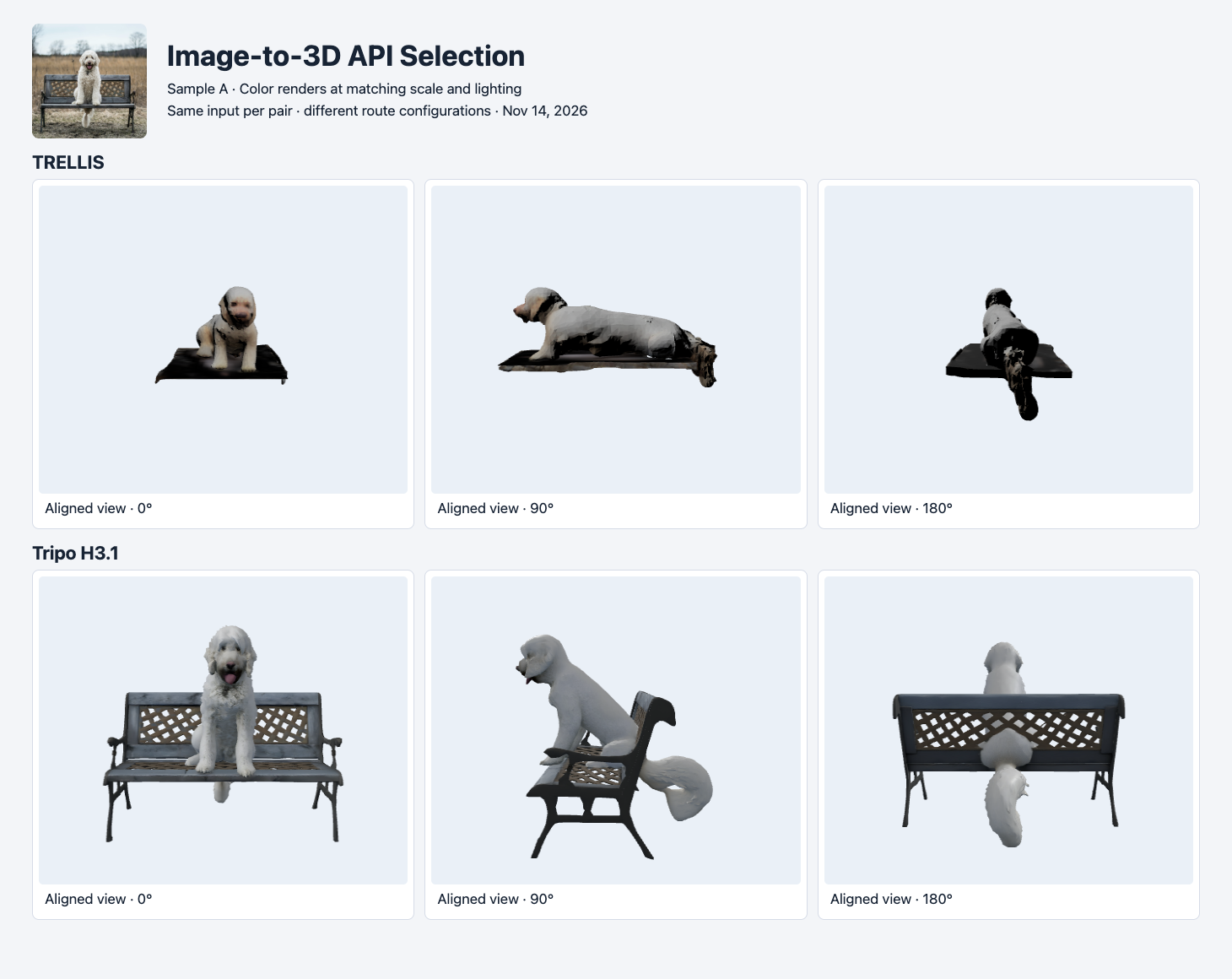
Re-rendered from the original TRELLIS and Tripo H3.1 jobs on November 14, 2026. Camera positions are aligned to the visible subject orientation, with each asset scaled to its longest bounding-box side. The bench legs and backrest differ visibly.
The two files started from the same public dog-and-bench image. TRELLIS kept the dog and a slab-like surface. H3.1 returned a recognizable bench with legs and openwork in the backrest. The input contains both objects. If the deliverable requires the complete bench, that criterion changes the choice even if the cheaper file opens and shows the dog clearly. If the deliverable only requires a dog, crop the dog and compare the routes on the new input before deciding.
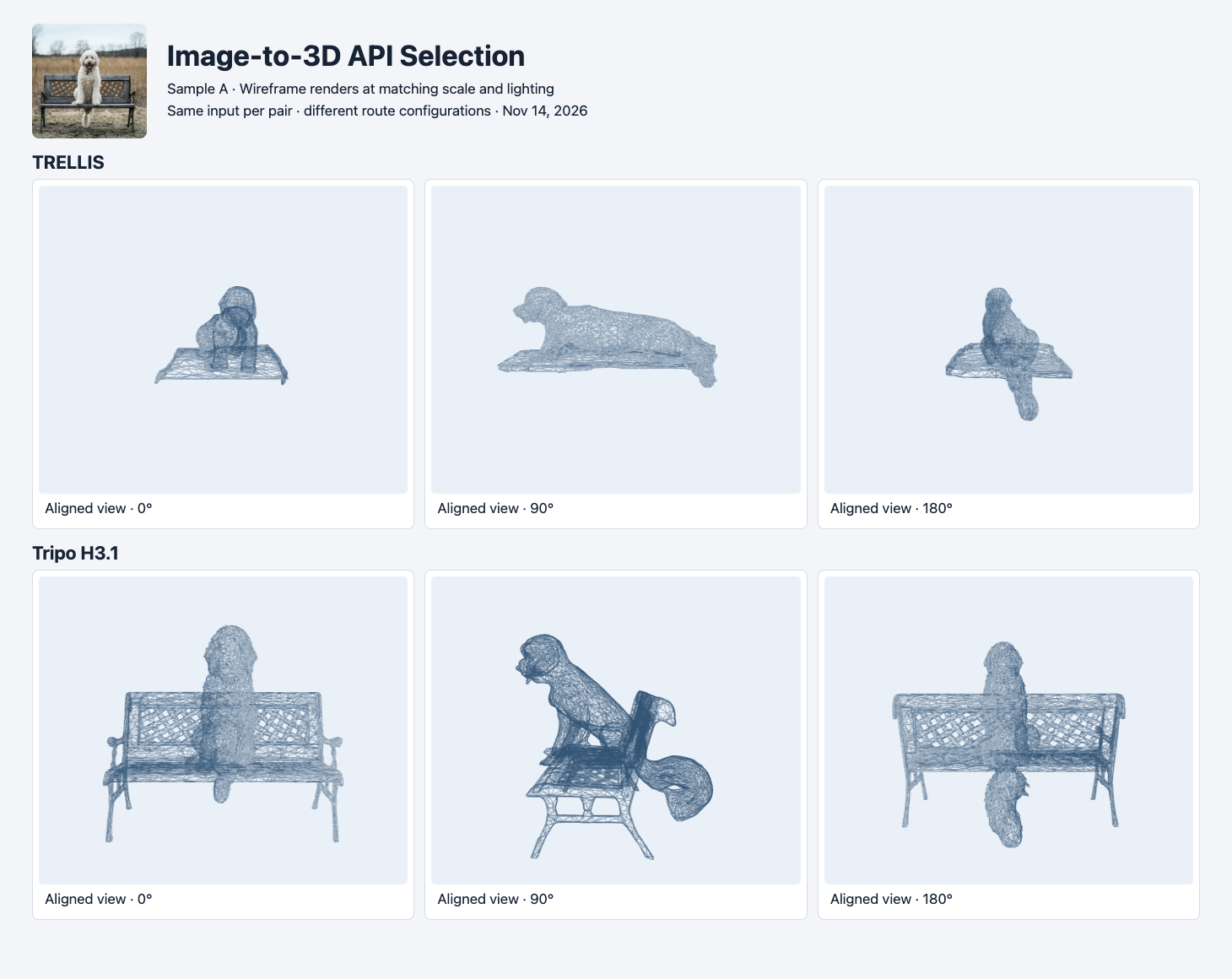
The same two GLBs with wireframe materials applied. Inspect the missing supports, then confirm the total using each file’s triangle primitives.
This difference is not explained by counting triangles alone. The original TRELLIS file has 11,222 triangles and the H3.1 file has 18,834, but these are different model configurations. The wireframe helps distinguish missing structures from dark textures. Compare the shapes first, then inspect their material and transfer cost. If the unseen back needs to match a real object, retain a separate photo for verification.
Web delivery: inspect the format before writing the loader
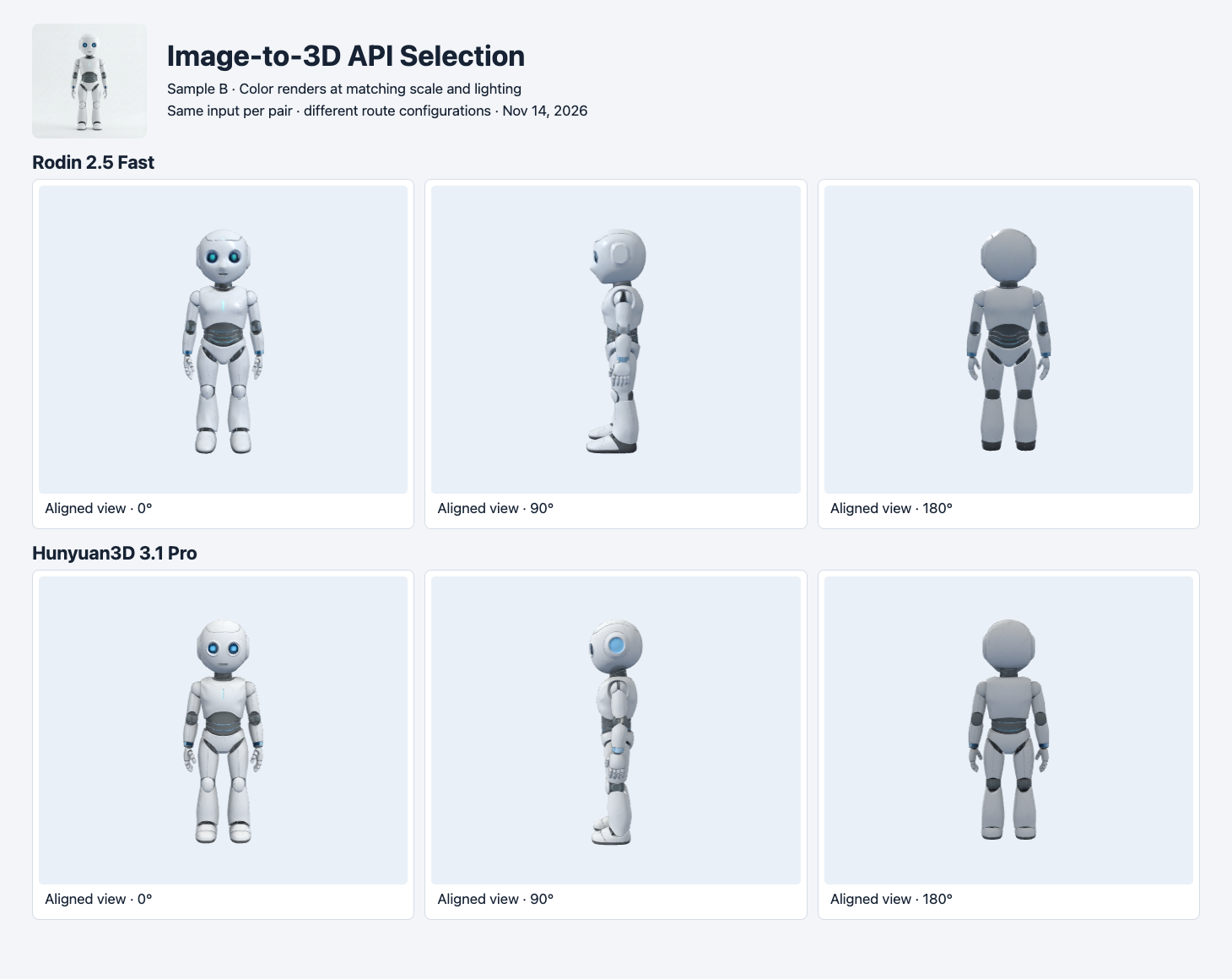
Rodin Fast and Hunyuan3D 3.1 Pro generated these robots from one shared image. The two selected GLBs are shown at matched display scale. This is a delivery-budget example across different settings.
Rodin 2.5 Fast delivered a 2,283,448-byte GLB with 19,190 triangles in the selected robot run. Hunyuan3D 3.1 Pro delivered 31,932,256 bytes and 499,914 triangles. Both rendered. Their price and mesh settings differed. Treat these numbers as two observed export sizes, not as a recommendation that one route always loads faster or preserves more shape.
A route can also return more than one file. In the Hunyuan3D Pro versus Rapid comparison, Rapid delivered an OBJ plus MTL and PNG. The OBJ alone was 3.17 MB, but the three required files totaled 14.49 MB. Pro returned a self-contained GLB in that test. If your application expects GLB only, verify the file signature and route the OBJ package into a tested conversion or loading step. Check that material and texture references still resolve after moving or renaming files.
The same source robot is also part of a four-way mobile GLB budget test that measures geometry and texture changes separately.
A hard geometry cap needs a check after download
The Tripo P2 and H3.1 comparison requested 20,000 faces on both routes. The P2 bench export had 20,794 triangles. The H3.1 bench export had 18,834. A local check can decide whether the final GLB fits the scene even if the provider’s field requests a limit. If you simplify a mesh to meet the cap, render it again. A reduction that removes a bench leg or fills an opening can still leave a file that meets the number.
Four measured examples to calibrate your shortlist
| Input and route | Observed format | Bytes | Triangles | Actual charge |
|---|---|---|---|---|
| Dog and bench, TRELLIS | GLB | 3,981,800 | 11,222 | $0.02 |
| Dog and bench, Tripo H3.1 | GLB | 4,447,736 | 18,834 | $0.36 |
| Robot, Rodin 2.5 Fast | GLB | 2,283,448 | 19,190 | $0.10 |
| Robot, Hunyuan3D 3.1 Pro | GLB | 31,932,256 | 499,914 | $0.375 |
All four rows are completed runs through SandBase on November 14, 2026. They reuse outputs from the linked comparisons. On the bench, TRELLIS used the 2048 texture setting. Tripo used a 20,000 face limit and standard PBR texture settings. On the robot, Rodin requested the Low tier, 20K Triangle and PBR. Pro used its textured default with PBR disabled. There is no normalized model ranking across these rows. They show the range of deliverables to expect before writing acceptance tests.
For a repeatable pricing comparison, pick a small batch of representative objects and use the same inputs for every candidate. Count complete jobs, accepted files and rejections separately. Include every actual charge in the batch cost, then divide by accepted files. The 18-run budget guide accepted 10 of 18 under its published browser-preview rubric. Six of those rejections came from the full-bench requirement. Its pass counts apply to three specific inputs and two seeds per route.
If you already have a front image and can capture another angle, the Tripo and Meshy single-versus-two-view study shows the added photo and a separate held-out reference.
If the viewer can consume Gaussian assets, compare a PLY splat and GLB mesh from the same house image before committing to a format.
If you have a written brief instead of an input image, the text-to-3D prop test compares the actual GLBs and visual checks for Hunyuan, Tripo and Meshy.
A first request and the acceptance loop
When choosing the images for this pilot, give the model a clean front view of the whole object and avoid cropping the parts that matter. Keep the production photos in the test, too. A model that handles a studio sample can still treat a thin support as background in a cluttered scene. For a multi-view trial, save one independently captured angle for checking. If all available photos go into the generation request, inspect against a measurement or another reference that was not supplied.
Use a server-side API key. The request below uses the public bench image with the tested H3.1 settings. It starts a billable task. Save the returned ID, poll GET /v1/run/{id} and download the result after completion. The same endpoint can take a different model ID, with that model’s own request fields. Tripo H3.1 model page
jq -n --arg image 'https://static.sandbase.ai/examples/pixal3d/pixal3d/input_image_0.png' \
  '{model:"tripo3d/tripo-h3.1/image-to-3d",image:$image,seed:42,
    face_limit:20000,quad:false,texture:true,pbr:true,texture_quality:"standard"}' |
curl --fail-with-body -sS https://api.sandbase.ai/v1/run \
  -H "Authorization: Bearer $SANDBASE_API_KEY" \
-H 'Content-Type: application/json' --data-binary @-- Save the exact input and request alongside the terminal response and actual charge.
- Inspect the downloaded format and referenced files. Run the appropriate validator and count triangles from the exported geometry.
- Render a front, side and rear at the expected display size. For a product with critical details, also save a closeup under consistent lights.
- Record why an asset passed or failed. If the budget is strict, measure the exact file the app will serve after conversion, optimization or other processing.
- Test a more demanding example before rolling out a batch. A solitary prop and an occluded multi-part object often expose different failure modes.
Start with one route for the easiest input that resembles your production work, then use an intentionally difficult object to decide whether another route is needed. This gives you a usable baseline, an explicit reason for any upgrade and a record of which assets your team can actually ship.
Found this useful? Share it