How to Set a Mobile GLB Size and Triangle Budget
Eight real GLBs show when to simplify meshes, resize textures, or do both. Compare exact bytes, triangles, validator results and matching-angle renders.
The robot that looked ready for a product viewer shipped as a 31.93 MB GLB with 499,914 triangles. We brought it down to 3.92 MB and 49,990 triangles by simplifying the mesh and resizing its texture. The dog on a bench needed a different decision. Resizing its textures alone took the file from 4.45 MB to 1.72 MB while keeping all 18,834 triangles. If you are setting a file budget for a mobile web viewer, the useful question is which part of the file you can reduce without losing the features the viewer needs to show.
Key takeaway
- The robot had roughly as much embedded image data as other GLB data. Either operation alone left it near 18 MB. Under the example limits of 4,000,000 bytes and 50,000 triangles, the combined export was the only robot variant that fit.
- Embedded images made up about 84.6% of the original dog-and-bench GLB. Texture resize alone reduced total file bytes by about 61.4%, preserving the mesh density around the feet, seat and lattice.
- The combined derivatives cut original file bytes by 87.7% for the robot and 72.3% for the bench. The bench carried one tangent-space warning through all four variants. All eight had zero validator errors.
- The figures are measurements of saved GLBs and renders made under the same desktop viewer settings within each sample. Mobile load time, memory and frame rate require measurements in the target application.
The two originals and three ways to change them
The first source is the Hunyuan3D 3.1 Pro robot from our Pro and Rapid delivery test. It came with one embedded 4096 × 4096 PNG. The second is the Tripo H3.1 dog-and-bench file from our P2 and H3.1 face-limit test. It came with three embedded 2048 × 2048 images serving base color, metallic/roughness and normals. We took each original GLB as the starting point for a simplify-only derivative, a resize-only derivative, and a derivative that applies both operations in that order. All six were created locally with glTF Transform 4.5.1 from the two existing assets.
We counted file bytes on disk and triangles from the glTF primitive accessors. Each primitive in these files used triangles. The embedded-image column sums the encoded image buffer views in the GLB, with rounding in the narrative based on decimal MB. It gives a concrete place to start when diagnosing a large download. The difference between file size and image bytes includes geometry, other buffer data, JSON and padding. The difference cannot all be assigned to triangle indices.
| Sample and operation | File bytes | Triangles | Embedded image bytes | Validator errors / warnings |
|---|---|---|---|---|
| Robot original | 31,932,256 | 499,914 | 16,101,773 | 0 / 0 |
| Robot simplify only | 17,912,892 | 49,990 | 16,101,773 | 0 / 0 |
| Robot 1024 resize only | 17,935,092 | 499,914 | 2,104,643 | 0 / 0 |
| Robot simplify + resize | 3,915,756 | 49,990 | 2,104,643 | 0 / 0 |
| Bench original | 4,447,736 | 18,834 | 3,763,398 | 0 / 1 |
| Bench simplify only | 3,964,336 | 4,704 | 3,763,398 | 0 / 1 |
| Bench 1024 resize only | 1,716,912 | 18,834 | 1,032,829 | 0 / 1 |
| Bench simplify + resize | 1,233,764 | 4,704 | 1,032,829 | 0 / 1 |
Robot: two similarly sized files solve different problems
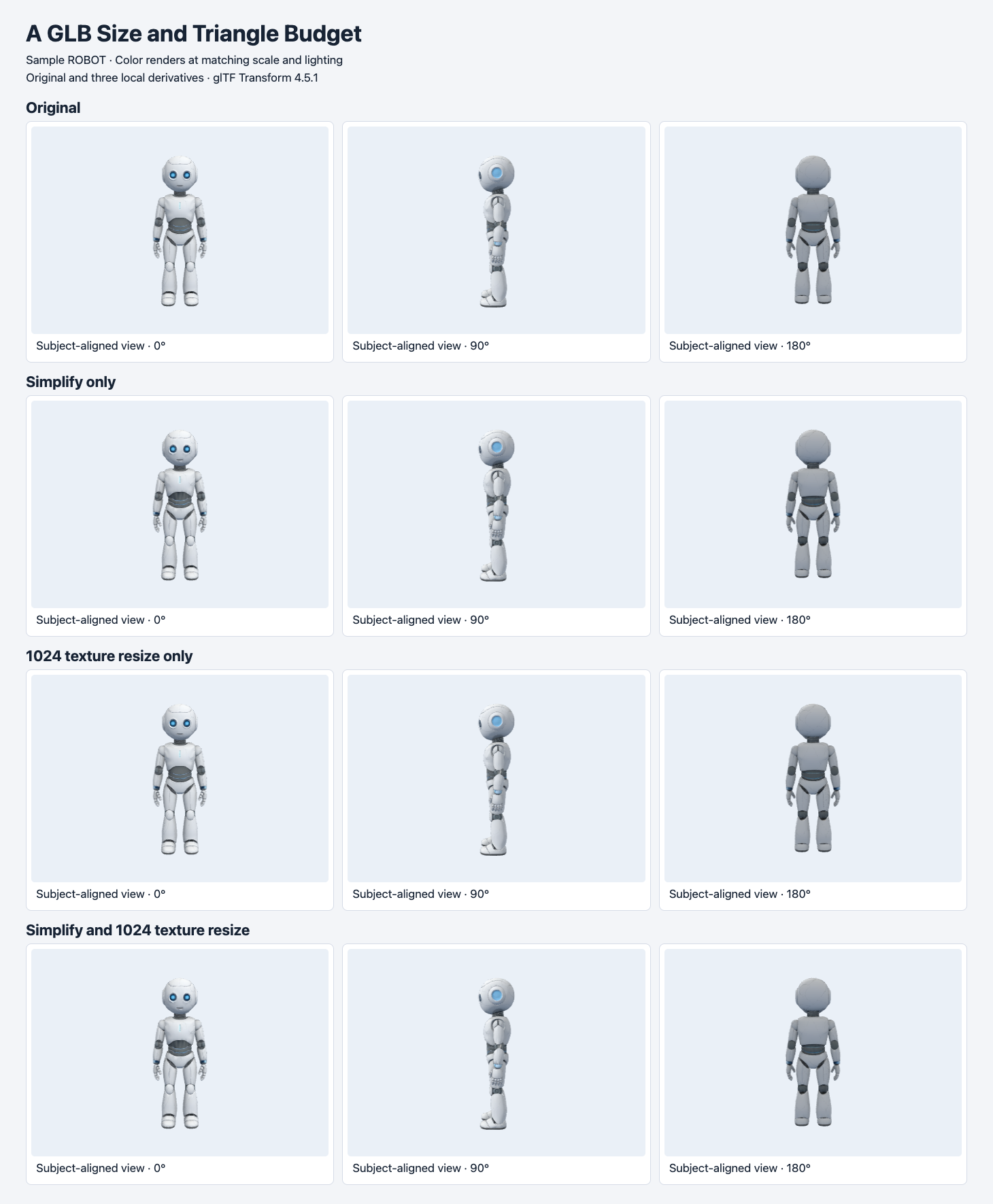
The columns use subject-aligned 0°, 90° and 180° views. The rows show the original, simplify only, resize only, and both. Three.js renders use normalized scale and shared lighting within the sample.
A file list would make the two middle variants look interchangeable. They differ by only 22,200 bytes, yet the simplify-only variant has 49,990 triangles and a 4096 texture, while the resize-only variant has 499,914 triangles and a 1024 texture. If the viewer is failing a geometry cap, pick the former for the next inspection. If the original outline and surface shape are especially important and you have room for the mesh, the latter lets you check the cost of reduced image detail in isolation.
The combined robot keeps the broad shoulder, waist and head shapes in the three full views. The upper-body framing reveals differences in the waist and small contours around the head and hands. The simplified versions show stronger variation in the shading around the front waist. The small blue areas and the outline of the eyes remain visible at this rendering scale. If those features are important in your viewer, compare them at your closest allowed zoom before accepting the export. Scale normalization in these images helps compare appearance and does not verify real-world dimensions.
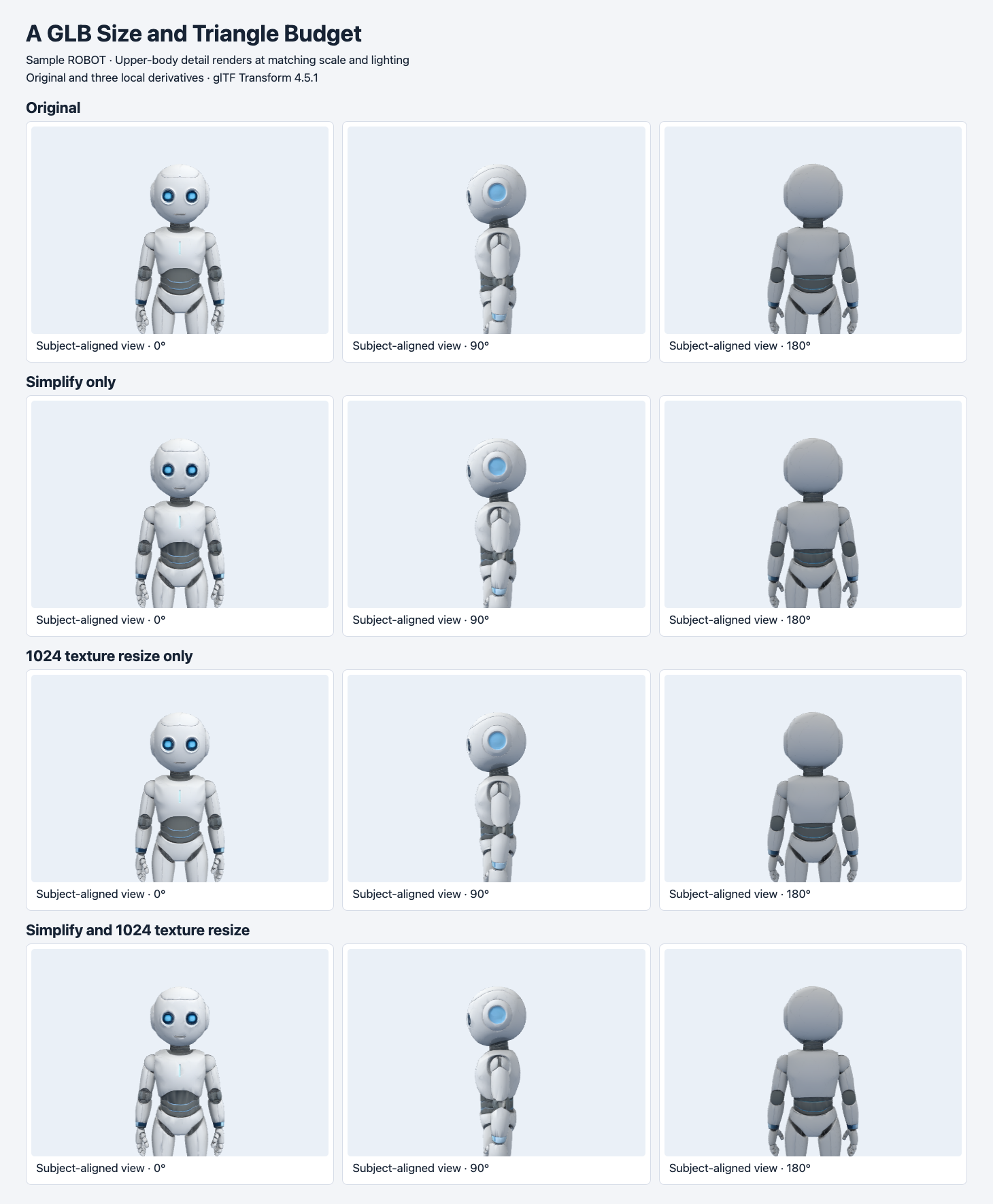
Use the original and resize-only rows to inspect the texture branch. Compare the simplify-only and combined rows to see the texture resize at a fixed post-simplification triangle count.
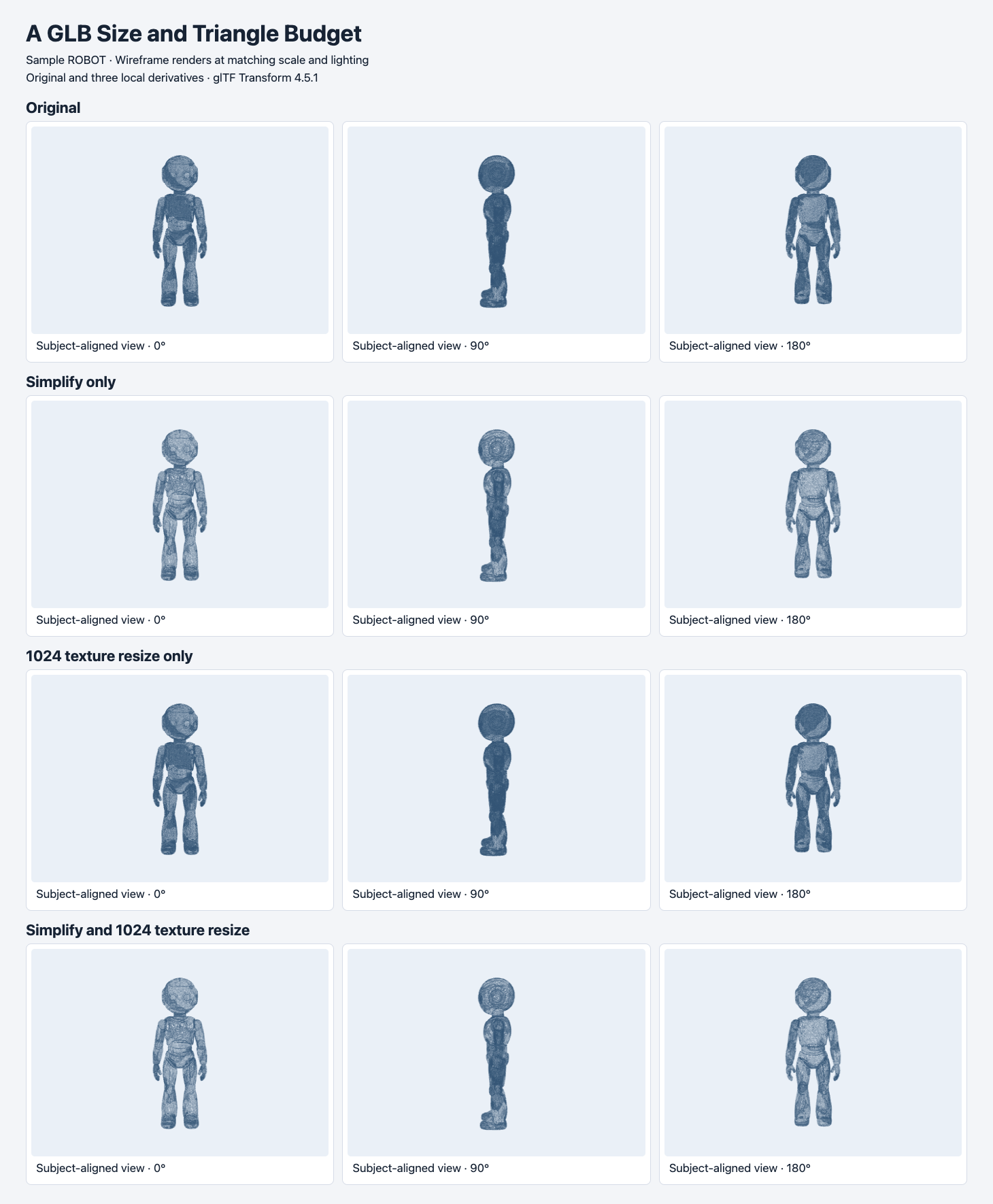
Wireframe exposes the difference the two 17.9 MB files hide. The resize-only mesh retains the original density. Both simplified variants use the same 49,990 triangles.
Bench: resize first when the geometry already fits
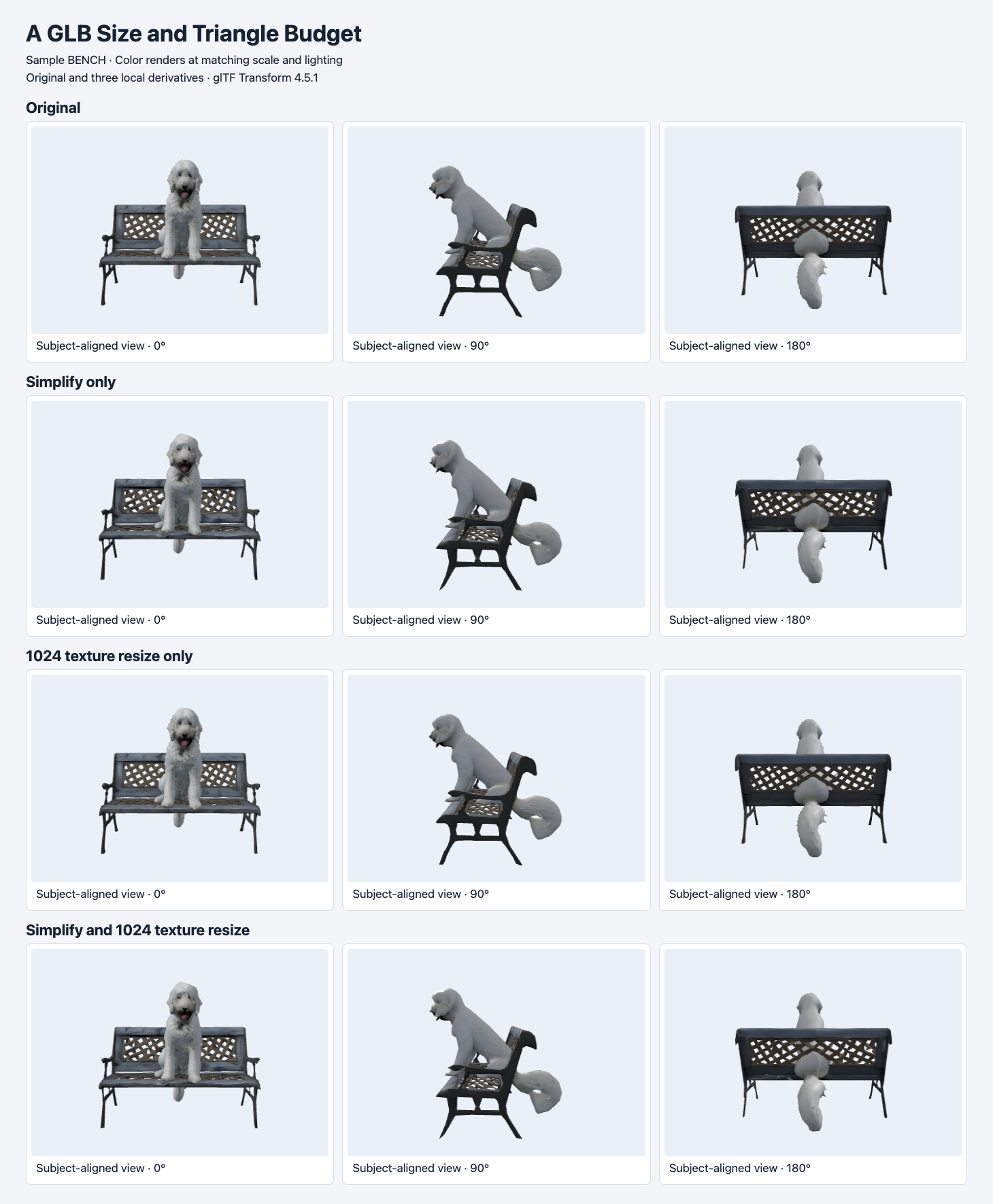
Compare the dog’s head, front paws, open backrest and thin legs across the rows. The simplification branch reaches 4,704 triangles, with visible changes around the head and silhouette.
The bench had 18,834 triangles before optimization. Simplifying alone removed 14,130 triangles and saved 483,400 bytes. Resizing its three images saved 2,730,824 bytes with the original triangle count. In a preview capped at 2,000,000 bytes and 50,000 triangles, both the resize-only and combined results fit. The resize-only file is the more conservative branch if the edge shape of the thin furniture and the dog’s face need to survive. If you also have a lower geometry cap, the combined derivative gives a different trade-off. It saves another 483,148 bytes versus the resize-only file and needs a closer review of the dog and legs.
The tangent-space warning persisted across the bench derivatives. Its normal map relies on runtime-generated tangent space in these files. The bench rendered in our viewer, but if it ships with a normal map, inspect the material in the target runtime under grazing light and record whether the warning is accepted. Treat the resized normals and metallic/roughness maps as part of the visual review. Those images influence lighting response rather than supplying painted color. Khronos glTF Validator
Reproduce the four-way test
Keep the original, write three separate files, and capture file size, triangles, images and validation for each one. The commands below reproduce the transform sequence given the original inputs. The simplification ratio is a target. Error tolerance and locked borders can affect how far it gets on another mesh. A flat triangle count would also miss changes such as a lost hole, a more angular boundary or UV seams that show up under light. glTF Transform CLI · Simplify function
1. Install and check the version
npm install --global @gltf-transform/[email protected]
gltf-transform --version
The commands were tested with version 4.5.1. Keep both original files in the working directory and use distinct output names so you can compare every branch.
2. Reduce triangles while keeping the original images
gltf-transform simplify robot-original.glb robot-simplified.glb --ratio 0.10 --error 0.02 --lock-border true
gltf-transform simplify bench-original.glb bench-simplified.glb --ratio 0.25 --error 0.02 --lock-border true
Expect 49,990 robot triangles and 4,704 bench triangles on these inputs. The embedded image payloads remain at their original byte counts.
3. Resize only from the two originals
gltf-transform resize robot-original.glb robot-resize-only.glb --width 1024 --height 1024
gltf-transform resize bench-original.glb bench-resize-only.glb --width 1024 --height 1024
The robot remains at 499,914 triangles. The bench remains at 18,834 and fits the 2 MB example file cap.
4. Resize the simplified files to make the combined branch
gltf-transform resize robot-simplified.glb robot-mobile.glb --width 1024 --height 1024
gltf-transform resize bench-simplified.glb bench-mobile.glb --width 1024 --height 1024
The combined exports are 3,915,756 and 1,233,764 bytes. The geometry counts match the simplify-only branch.
5. Measure and validate the delivery files
wc -c robot-mobile.glb bench-resize-only.glb
gltf-transform inspect robot-mobile.glb
gltf-transform validate bench-resize-only.glb
The chosen robot and bench files are 3,915,756 and 1,716,912 bytes respectively. Check the scene and mesh sections, then read the validation report. The bench warning is MESH_PRIMITIVE_GENERATED_TANGENT_SPACE. If a variant reports an error, preserve the source and validate each earlier output to find where it first appeared.
Set a budget you can verify in the viewer
- Write the file and geometry limits independently. The example 4 MB and 50,000 triangles are test thresholds. A page loading a single product can allocate bytes differently from a gallery loading six models together. Include textures and other required resources in the actual delivery budget if they live outside the GLB.
- Name the features that matter. For the robot, inspect eyes, thin fingers, waist and profile. For the bench, check the open backrest, all visible legs, seat and paws. Compare a front view, a side view, a rear view, and the closest zoom your product actually supports.
- Record a separate runtime check. Test the chosen GLB in the production loader on your lower-tier device and record first usable render, peak memory if available, and orbit behavior. Fix the test device and network conditions and distinguish a cold fetch from a cached load. Encoded image payload, decoded texture allocation and network transfer are different measurements.
- Keep the source and delivery variant together. Store the GLB hash, transform version, commands and validation report alongside your approved screenshots. If a later release moves to a different loader or a lower cap, rerun from the same original and compare a new branch.
Start with an original from Hunyuan3D 3.1 Pro image-to-3D or Tripo H3.1 image-to-3D, then measure which limit it misses. For the bench in this test, resizing alone met the tighter 2 MB example cap. For the robot, both interventions were needed to meet 4 MB and 50,000 triangles. Which derivative you deliver depends on the two limits and the details a person can see while using it.
Once a derivative meets both numeric limits, run automated GLB intake and visual QA before placing it in the production catalog.
To see what changes when material references are disabled without modifying the geometry, read the same-mesh PBR comparison.
The rotatable product GLB workflow puts two optimized files into a live product viewer, then measures their downloads, decoder transfer and first model frame.
FAQ
Should the preview replace the original file?
Keep both when another team needs the original texture density or geometry for editing. Point the default viewer at the reviewed derivative and use a distinct URL for the original. The URLs should make it possible to update or invalidate each version separately.
How do I account for images that live outside the GLB?
Record the bytes of every resource the loader actually requests for the first view. Add the GLB and its required external images and buffers. If a shared texture is already cached, record that as a separate warm-load case so it does not reduce the estimate for a first visit.
Where does geometry compression fit?
Test it as a separate branch once you have a representative file. Draco can reduce stored geometry bytes, and the target loader needs support for its decoding path. Record the output size and check both rendering and first usable render on the device you plan to support. The eight-file comparison above measures mesh simplification and image resizing. glTF Transform Draco documentation
Found this useful? Share it