Hi3D Texture vs TRELLIS.2 Retexture in 2027
Compare original Hi3D and TRELLIS.2 textures on one GLB. See actual charges, 4K map sizes, normalized geometry, and front and rear render differences.
Hi3D Texture and TRELLIS.2 Retexture both received the same relief-mask GLB and the same reference image. Both returned a 500,000-triangle file with two 4096 × 4096 PNGs. The Hi3D download was 31,924,404 bytes and the TRELLIS.2 download was 48,055,680 bytes. The comparison matters if a retexture is expected to preserve an asset’s shape and fit a delivery budget. It also shows why the painted back needs a separate review, even when the front looks close to the supplied image.
Key takeaway
- The settled texture charges were $0.200 for Hi3D and $0.240 for TRELLIS.2. Both used the same existing mesh. The earlier $0.375 geometry charge is separate.
- The TRELLIS.2 GLB was 16,131,276 bytes larger, about 50.5%. Its base-color PNG alone was 10,462,484 bytes larger than Hi3D’s base-color PNG.
- Both results have 500,000 triangles, one UV layer and two 4096 × 4096 PNGs. Their stored vertex attributes differ.
- In Blender the source and Hi3D shared a longest bounding-box dimension of 0.924032, while TRELLIS.2 measured 0.999990. Independently normalized surface samples aligned within 5.2 × 10⁻⁸ in the tested directions.
- The two rear appearances are inferred from one oblique reference image. They are useful for selecting a look, while rear accuracy and physical dimensions need independent references.
Hold the source mesh and reference image fixed
The input was the original Hunyuan geometry-only GLB from the Hunyuan-to-Hi3D workflow. It held 500,000 triangles and no UV layer. We reused the exact stored Hi3D output from that workflow and sent the same original geometry URL and image to TRELLIS.2. The reference shows a relief mask with bronze and green color regions, raised brows and several open cutouts. It gives no complete back image.
The Hi3D Texture route received the version hitem3dv1.5, the resolution string 1536 and the GLB export option. The TRELLIS.2 Retexture route received internal resolution 1024, a baked texture size of 4096 and seed 42. These settings are from two different schemas and the resolution fields have different meanings. In this run both routes actually delivered 4096 × 4096 maps. We matched the model and reference, and measured exported maps directly instead of assuming the resolution inputs describe the same operation.
The comparison used one run per route. It records the settings that were submitted and the files that came back. It does not measure render speed, texture generation time, consistency across seeds, or the provider’s internal encoding workflow. For production, keep the actual two payloads, output hashes and measured dimensions alongside the accepted version.
Measure what the two GLBs contain
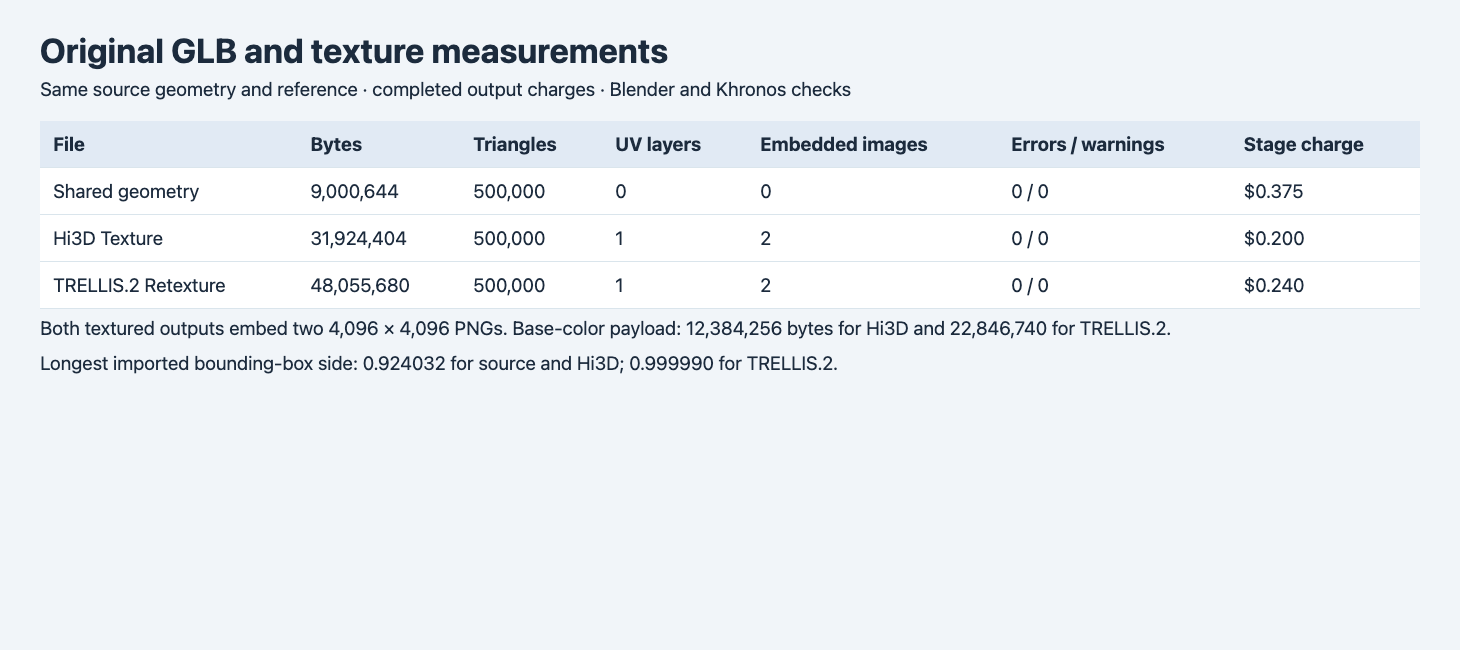
The browser table uses the settled receipts and independently measured original GLB and Blender data. The longest dimension is shown in imported coordinates.
| Field | Shared geometry | Hi3D Texture | TRELLIS.2 Retexture |
|---|---|---|---|
| Original GLB bytes | 9,000,644 | 31,924,404 | 48,055,680 |
| Triangles | 500,000 | 500,000 | 500,000 |
| Position entries | 249,992 | 257,207 | 326,700 |
| Blender UV layers | 0 | 1 | 1 |
| Base-color PNG bytes | — | 12,384,256 | 22,846,740 |
| Metallic-roughness PNG bytes | — | 8,394,352 | 8,752,748 |
| Khronos errors / warnings | 0 / 0 | 0 / 0 | 0 / 0 |
| Actual stage charge | $0.375 | $0.200 | $0.240 |
Two matching dimensions do not guarantee matching image sizes. In this pair, the embedded PNG payloads added up to 20,778,608 bytes in Hi3D and 31,599,488 bytes in TRELLIS.2. That accounts for 10,820,880 bytes of the full 16,131,276-byte difference. The remaining 5,310,396 bytes are elsewhere in the file, including differing mesh attributes and buffers. TRELLIS.2 explicitly stored vertex normals, while the Hi3D primitive lists positions and UV coordinates. Neither material declared a normal texture. A vertex normal attribute and a normal map are different inputs to a renderer.
A 35,000,000-byte delivery cap would accept the Hi3D original and reject the TRELLIS.2 original in this test. A new asset could yield different file sizes. If your renderer needs a small download, first measure the exported maps and buffers. Compress a copy and check the areas where the reference has fine texture. Re-evaluate surface response after changing the metallic-roughness map. Measured GLB texture and byte budgets
Compare the material in front and around the edge
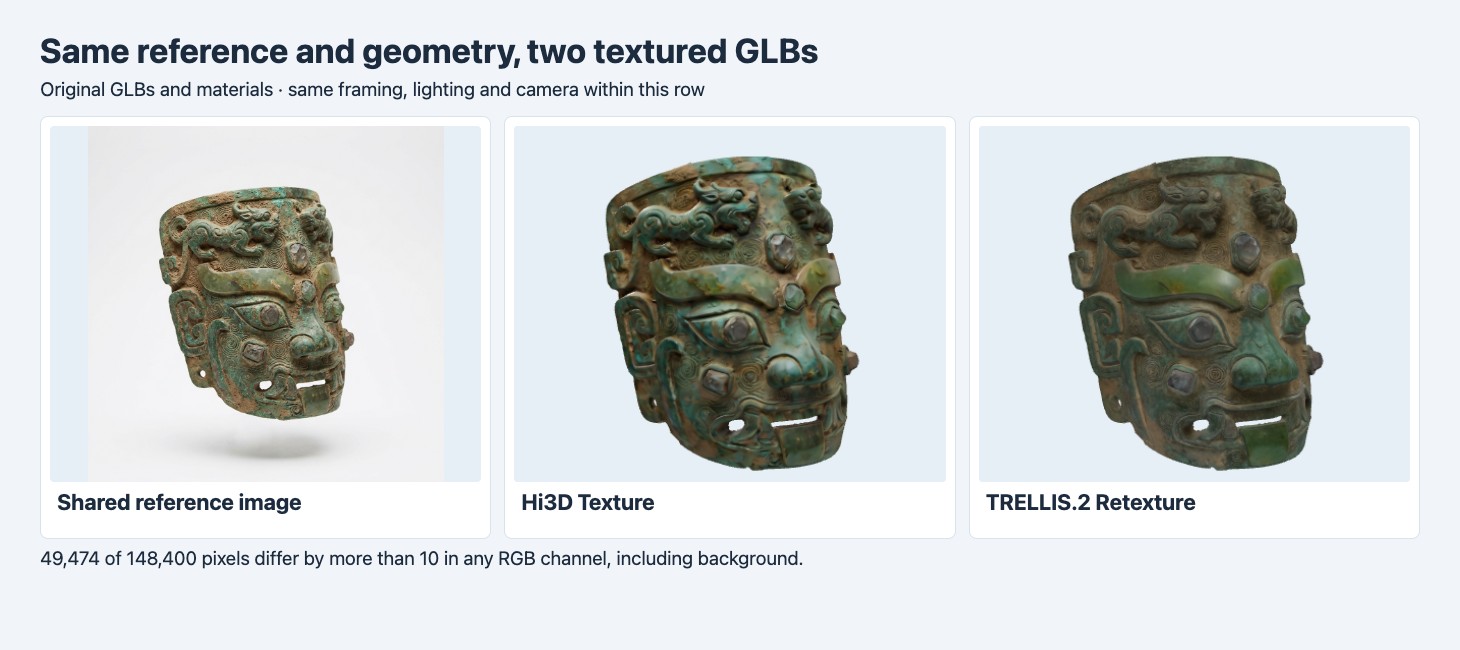
Both outputs use their original materials under the same camera and lights. The browser normalizes their longest dimension for framing.
The Hi3D front has stronger mottled blue-green color around the eyes and nose in this setup. TRELLIS.2 renders a darker overall surface with a more continuous band of green across the brow. The open mouth and lower cutouts remain visible in both. The input photograph has its own lighting. Use the rendered differences to select a look under your target lights and compare the base-color image itself if matching a specific paint or patina is required.
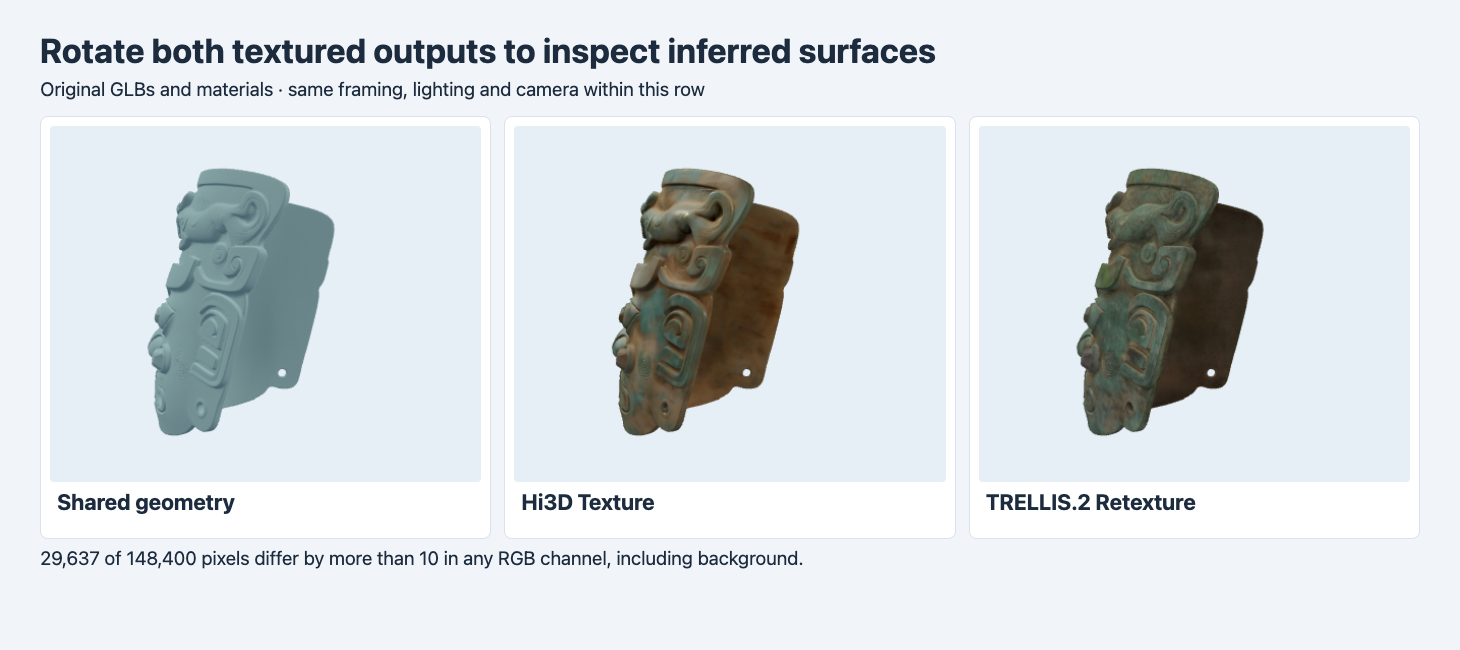
The geometry panel uses a neutral material. Both output panels retain their original materials. The inner surface is only partially visible in this angle.
The oblique side view reveals how each texture continues into a surface the reference barely shows. Hi3D’s interior reads warmer and brighter, and the TRELLIS.2 interior is darker and more muted in this setup. The same opening is visible on the rear shell in all three panels. If your asset has to match a real object from behind, supply a verified reference to the review. The experiment has no ground truth for the interior appearance.
Check the shape and scale independently
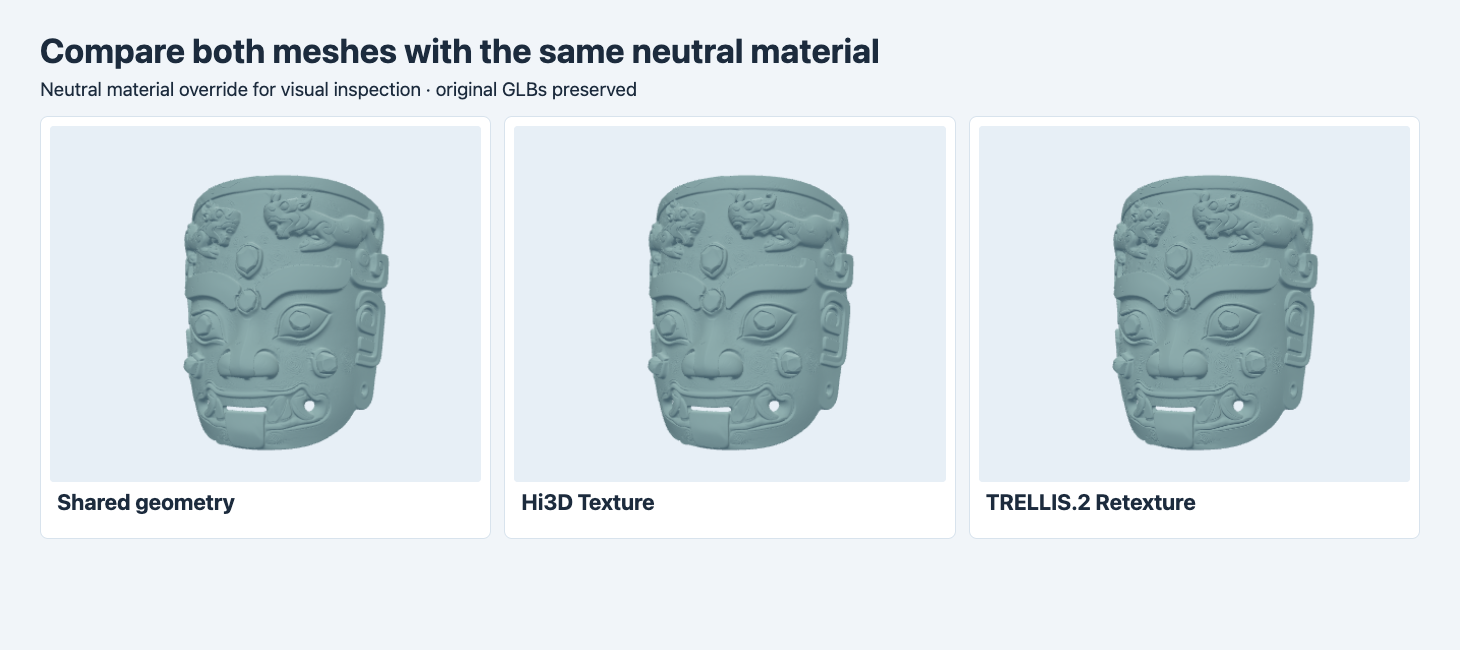
The browser temporarily overrides materials and fits each mesh to the frame. The view is useful for comparing the silhouette and raised relief.
We imported all three in Blender 4.5.9. Hi3D’s raw imported bounds match the source in this run. TRELLIS.2’s imported longest side was about 8.2% greater than the source and its coordinates were centered differently. The browser framing hides that difference. If an output will be exchanged into a scene with a known fit, compare imported dimensions and transforms before replacing the original mesh.
For the sampled surface check we centered each mesh and normalized by its own longest side. We then sampled up to 10,000 vertices in each direction and found their nearest point on the other surface. The largest distance observed against the source was 4.21 × 10⁻⁸ for Hi3D and 5.16 × 10⁻⁸ for TRELLIS.2, in normalized units. This shows close agreement at the sampled points after normalization. It does not show identical vertex order, unchanged raw coordinates, matching UV islands or an exact dimensional fit.
Measure the render difference in the actual review view
The two color panels give a concrete measurement alongside the visual reading. We compared the output render buffers pixel by pixel, with 424 × 350 pixels per view. We counted a pixel when at least one eight-bit RGB channel differed by more than 10 levels. The front had 49,474 of 148,400 different pixels, or 33.3%. The rear view had 29,637, or 20.0%. The full frame, including background, is the denominator. These are differences between two output renders, so there is no ground-truth image in the calculation.
Treat the percentages as a check for how much the selected view changes when you swap the two complete GLBs. They combine texture, material and any shading differences, including the exported normals. A different light or framing can change the numbers. To isolate a specific channel, keep the same GLB and toggle only that channel in the renderer.
Reproduce the comparison on your asset
| Delivery requirement | First check |
|---|---|
| Fixed scale in a product scene | Compare imported transforms and bounds before swapping files. |
| Compact original GLB | Download both candidates and measure the embedded maps and total bytes. |
| Match an existing palette | Compare fixed front and side lighting, and inspect the color maps. |
| Consistency across a catalog | Repeat with multiple reference types and record actual charges and results. |
Use the same reachable original mesh URL and the same reference on both endpoints. For TRELLIS.2, send the following fields to POST https://api.sandbase.ai/v1/run with the server-side bearer token, then save and poll the returned ID. The example mesh URL is a public placeholder for a valid mesh field. Replace it with your tested source before comparing.
{
  "model": "trellis/trellis-2/retexture",
  "model_url": "https://static.sandbase.ai/examples/tencent/hunyuan-3d/3.1/smart-topology/input_input_file_url_0.glb",
  "image": "https://static.sandbase.ai/examples/tencent/hunyuan-3d/3.1/pro/image-to-3d/input_image_0.png",
  "resolution": 1024,
  "texture_size": 4096,
  "seed": 42
}
The same mask files later joined a second asset and a third route in the three-way PBR texturing comparison, with decoded metallic and roughness channels for each mask export.
If you need several finishes for one product, the TRELLIS.2 and Meshy colorway test checks the source UVs and shows which exported base-color maps can be swapped onto the original mesh.
FAQ
Are the 4K textures identical?
Both outputs have two 4096 × 4096 PNGs with corresponding base-color and metallic-roughness slots. Their encoded sizes and rendered appearances differ.
Did retexturing change the mesh?
Triangle counts were unchanged and the sampled normalized surfaces agree closely. The exported vertex data differ, and the TRELLIS.2 result has different imported bounds.
Does the larger file mean a better texture?
Size measures encoded payload. Choose based on visible detail in your target renderer, file budget and fit checks.
Found this useful? Share it