Hunyuan 3D 3.0 vs 3.1 Pro for Image-to-3D in 2027
Compare four matched Hunyuan 3D 3.0 and 3.1 Pro runs. See actual charges, GLB and texture sizes, and original color and neutral material renders.
On the relief-mask input, Hunyuan 3D 3.1 Pro cost $0.525 to run and returned a 38,928,132-byte GLB. Hunyuan 3D 3.0 cost $0.630 and returned 35,091,260 bytes. Both meshes had about half a million triangles. The larger file carried a larger embedded color image, and the two meshes differed visibly when rotated. This comparison uses original downloads from four requests to show what changes when you switch versions while keeping the image, material mode and target face count fixed.
Key takeaway
- All four calls completed. On November 14, 2026, SandBase reported $0.630 per tested 3.0 run and $0.525 per tested 3.1 Pro run, including the explicit face target in the Pro configuration.
- With a 500,000 face request on both routes, the original GLBs contained between 499,986 and 500,004 triangles. All four had zero validator errors and warnings.
- 3.1 Pro returned the larger GLB for both inputs. The robot difference was only 72,216 bytes. The mask difference was 3,836,872 bytes.
- Every output contained a single 4096 × 4096 color PNG. For the mask, Pro’s PNG was 4,385,735 bytes larger even though the pixel dimensions matched.
- One supplied angle per subject limits the visual comparison. We can compare visible features and inferred backs, and we have no reference mesh or rear photograph to score geometric accuracy.
Hold the request fields fixed
We tested a standing robot and a relief mask from the public SandBase example sets. The robot gives us distinct shoulders, hands, knees and toes in a nearly frontal image. The mask is photographed at an oblique angle. Its raised trim, apparent thickness and openings make it useful for inspecting what a finished 3D shape looks like away from the input angle. We sent each of the same two URLs to both routes.
The matched requests set generate_type to Normal, enable_pbr to false and face_count to 500000. We supplied no other view and used one run per route and image. The Hunyuan 3D 3.0 route documents LowPoly as another mode. The 3.1 Pro route exposes more optional camera directions. Those features were outside the test. The article compares original textured outputs at a common request setting. It does not compare the default face budget, multi-view or PBR results.
Both returned a primary output labeled GLB. We downloaded the files unchanged, inspected their indexed triangle counts and base-color image bytes, and validated them locally. The rendering tests use a single viewing setup with each asset centered and scaled to fit. This exposes differences in shape and appearance. It also removes absolute scale from the comparison, so the figures cannot establish physical dimensions or fit tolerances.
What came back, including the actual charges
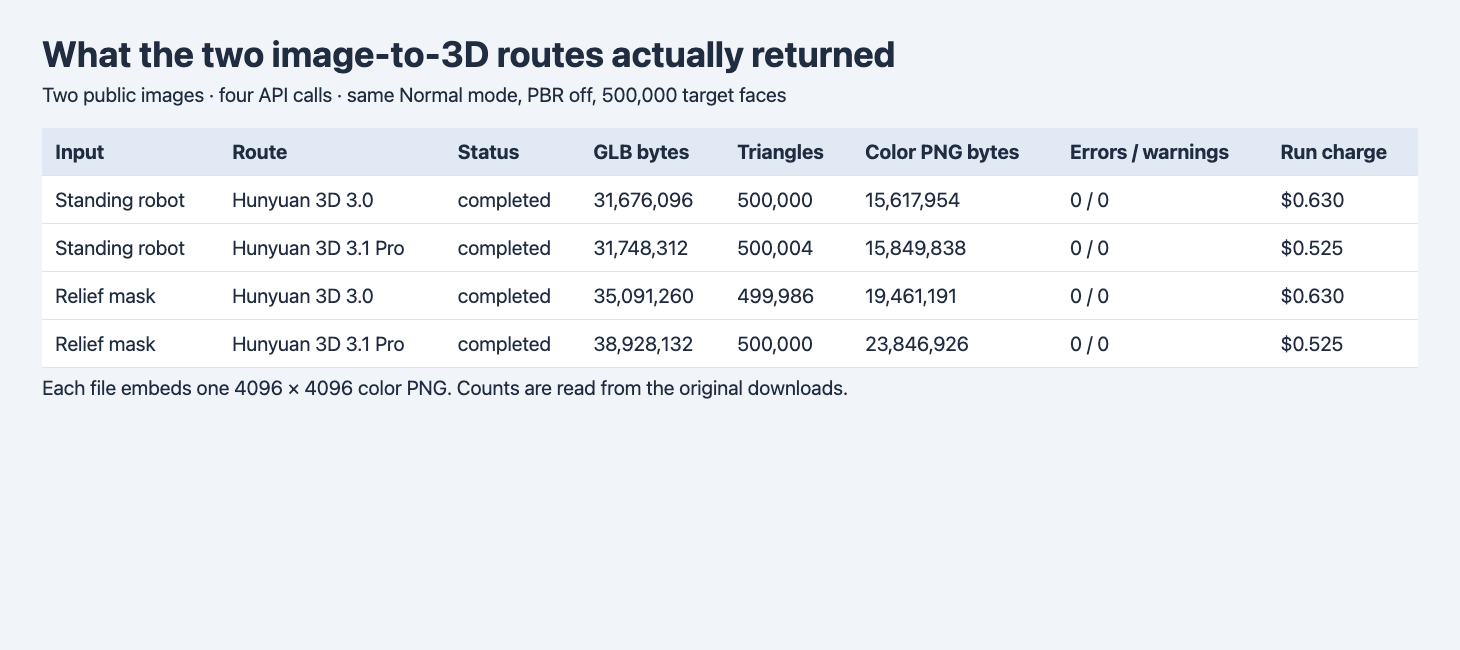
The table combines recorded run charges with file metadata read from the exact original GLBs. PBR was off for every call.
| Input | Route | GLB bytes | Triangles | Embedded color PNG bytes | Errors / warnings | Actual charge |
|---|---|---|---|---|---|---|
| Robot | 3.0 | 31,676,096 | 500,000 | 15,617,954 | 0 / 0 | $0.630 |
| Robot | 3.1 Pro | 31,748,312 | 500,004 | 15,849,838 | 0 / 0 | $0.525 |
| Mask | 3.0 | 35,091,260 | 499,986 | 19,461,191 | 0 / 0 | $0.630 |
| Mask | 3.1 Pro | 38,928,132 | 500,000 | 23,846,926 | 0 / 0 | $0.525 |
The largest miss against the requested count was 14 triangles below target, on the 3.0 mask. The Pro robot was four over. If your acceptance limit is a literal 500,000 triangles, the Pro robot misses it by four triangles. Inspect the exported primitive count or request enough headroom. File size has its own limit. A 35,000,000-byte ceiling would accept both robot files and reject both masks, including the 3.0 result only 91,260 bytes over.
Pro was $0.105 cheaper per run in the tested configuration. Four jobs cost $2.310. The listed 3.1 Pro base price was $0.375, with a $0.150 addition for supplying a face target, so the tested Pro job cost $0.525. The observed 3.0 jobs cost $0.630 with the same explicit 500,000 target, which is also the default documented on that route. This comparison does not establish the charge for another 3.0 target. We have terminal receipts without an instrumented submit-to-completion timeline and leave speed out of the comparison.
Why the mask file grew with nearly the same triangle count
Each original file has one 4096 × 4096 base-color PNG. The Pro mask PNG contains 23,846,926 encoded bytes against 19,461,191 in 3.0. Subtract each PNG’s encoded byte length from its full file size and the remaining portion is about 15.08 MB for Pro and 15.63 MB for 3.0. The embedded image accounts for more than the net size increase because the remainder is smaller in the Pro file. This is an accounting of the encoded bytes and says nothing on its own about perceived texture quality or GPU memory. It gives a concrete first place to look if a web copy must fit a byte budget. Measured GLB file size and texture trade-offs
Turn the two assets around
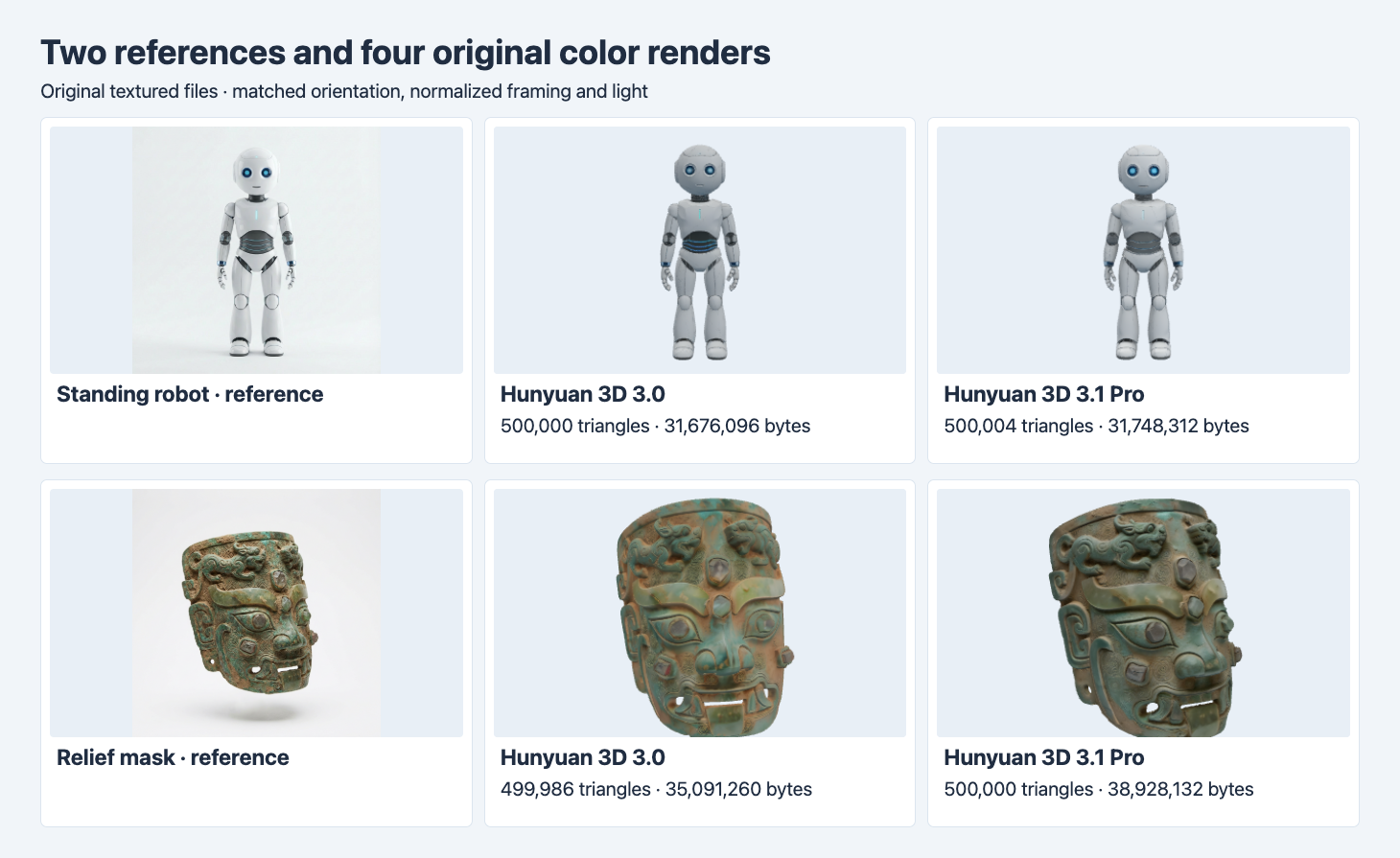
Both routes retain the robot’s eyes and joints and the mask’s raised face and open details. The mask reference was shot at an oblique angle, while the output cameras use the same settings for the two GLBs.
The robot is recognizable on both routes from the front. In this setup the 3.0 render shows more conspicuous cyan stripes at the waist, while the Pro waist appears more muted. The photographs and viewer lights differ, and the appearance alone does not identify how much of that contrast comes from color encoding or the inferred surface. To judge an asset for a product page, decide which front details are required and inspect the target viewer under the final lighting.
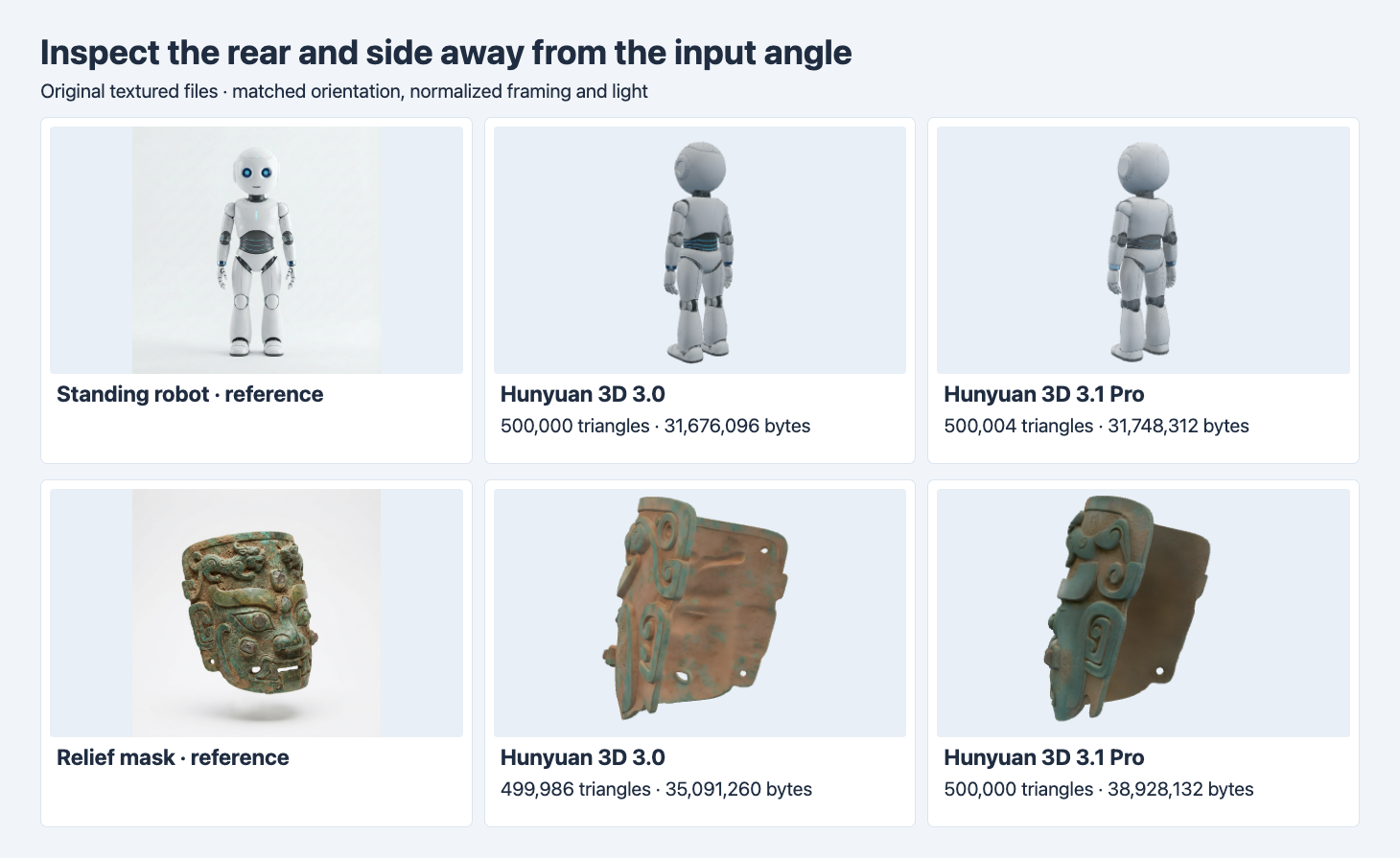
The robot waist and knee treatments differ from behind. The 3.0 mask shows a mottled interior and several small bright openings at this angle. The Pro interior appears darker and plainer.
The rear image changes what we would ask a reviewer to check. Both masks curve into a shell at the back. Their interior surfaces, opening visibility and color distribution differ. The Pro interior looks smoother and darker in the chosen view, while the 3.0 interior carries more visible color variation. The supplied photo gives no verified interior. An asset meant to display the back needs a second reference or a clearly stated policy for inferred surfaces. If openings must pass through, rotate the asset and verify them directly before acceptance.
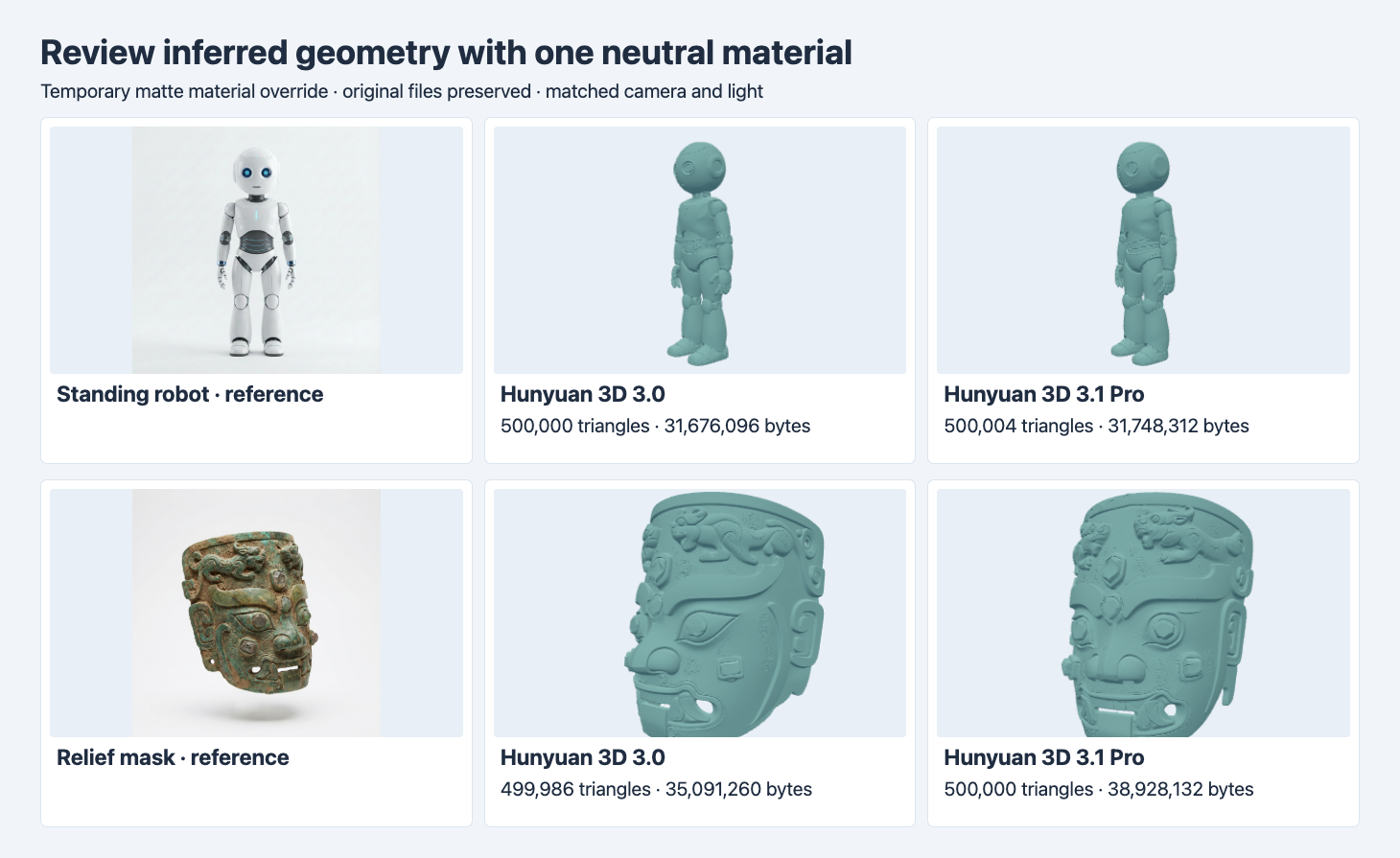
This comparison temporarily overrides the browser material and preserves the original GLBs. Both meshes carry raised brows and sculpted relief. The detailed surface around the mask’s eyes still differs with the color image hidden.
The neutral renders reveal which shapes are visible with the color map removed. The brows and lip openings remain visible, and the mask side details still differ. That supports inspecting geometry separately when a renderer or export is likely to swap materials. The technique makes relative relief easier to see. It cannot establish whether either surface matches the physical object’s thickness. For machining or dimension-critical jobs, bring verified measurements into the test.
Decide which route to evaluate first
| Requirement | Start with | Confirm before delivery |
|---|---|---|
| Textured single-view output at the tested face target | 3.1 Pro for the lower observed charge | Check the exported mesh count, size and required views. |
| Original asset under a strict byte cap | Test both routes on the target object | Keep the embedded image and geometry byte breakdown. |
| Decorative relief with important openings | Inspect both in color and with a neutral material | Verify which openings are visible from the required views and actually go through. |
| Exact dimensions or rear fit | Collect a calibrated or multi-view reference | Validate in a pipeline that preserves scale and includes tolerances. |
To reproduce the mask pair, send the following JSON to POST https://api.sandbase.ai/v1/run from a server with your SandBase bearer token. Use tencent/hunyuan-3d/3.0/image-to-3d for the second request and keep the other values unchanged. Store the IDs, poll GET /v1/run/{id} and keep the original downloads plus receipts for reconciliation. Each completed run may be billed.
{
  "model": "tencent/hunyuan-3d/3.1/pro/image-to-3d",
  "image": "https://static.sandbase.ai/examples/tencent/hunyuan-3d/3.1/pro/image-to-3d/input_image_0.png",
  "generate_type": "Normal",
  "enable_pbr": false,
  "face_count": 500000
}
If your next step is reducing the polygon count, the Hunyuan Smart Topology and Tripo Remesh test uses this same 500,000-triangle 3.0 robot GLB and compares the delivered meshes.
FAQ
Did a target of 500,000 set a strict maximum?
In this test the four exports were within 14 triangles of the request, including one export that was four over. Check the primitive count after download if the maximum is a hard acceptance rule.
Does the larger Pro mask have higher-resolution color?
The measured mask PNGs both have 4096 × 4096 pixels. Their encoded byte lengths differ. View the files under the lighting your audience will see before treating file size as a visual-quality indicator.
Which route reconstructed the back more accurately?
The photos give no verified rear view. The screenshots show two inferred surfaces. Use rear references to score accuracy if it matters to your brief.
Found this useful? Share it