How to Build a Searchable GLB Asset Catalog
Build a small SQLite catalog for generated 3D assets. See twelve actual records, eight unique GLBs, exact duplicates, and three rendered search results.
When the same generated GLB appears in a benchmark, a product experiment and a delivery folder, the catalog needs to remember all three uses. It does not need three copies of the bytes. We indexed 12 source records from actual image-to-3D experiments and found eight distinct files. Four groups were exact duplicates. Two locally optimized exports remained distinct and linked to their originals. This walkthrough builds a small searchable catalog in SQLite and shows what a size-filtered shortlist looks like when you render the actual assets.
Key takeaway
- The 12 source records account for 74,819,416 GLB bytes if counted separately. The eight distinct files account for 58,438,100 bytes. Storing one copy of each would avoid 16,381,316 bytes in this sample, about 21.9%, before database, thumbnail or storage overhead.
- Identical GLBs share a SHA-256 content key while each source record retains its own label. The resized bench and optimized robot have their own hashes and parent links.
- Filtering for a bench at or below 4,000,000 bytes returned three distinct GLBs. All three render, but only one shows the full backrest and legs in the displayed view.
- Reimporting the same manifest produced the same JSON output. A missing parent rolled back the replacement and preserved the previous catalog.
1. Separate the file, its source, and its derivatives
A generation route is useful for search, but it cannot identify bytes. The original TRELLIS bench and a later TRELLIS run share a subject and route. The original was 3,981,800 bytes with 11,222 triangles. The later run was 4,491,860 bytes with 13,765 triangles. A route-and-subject key would collapse results you may want to compare. On the other hand, the exact original shows up in both the original comparison and the budget experiment. Two filenames refer to the same underlying file.
Use three records. The asset stores the full SHA-256 and measured properties. The occurrence stores the source path, human label, subject and generation route. A variant points from the derived hash to its original hash. The database enforces that both ends of a variant link resolve to assets. If you have generation job IDs or source image hashes, add them to occurrences so they describe the particular job or import. The sample works with local paths under one manifest and uses the file bytes as the deduplication key. Python hashlib documentation · SQLite foreign keys
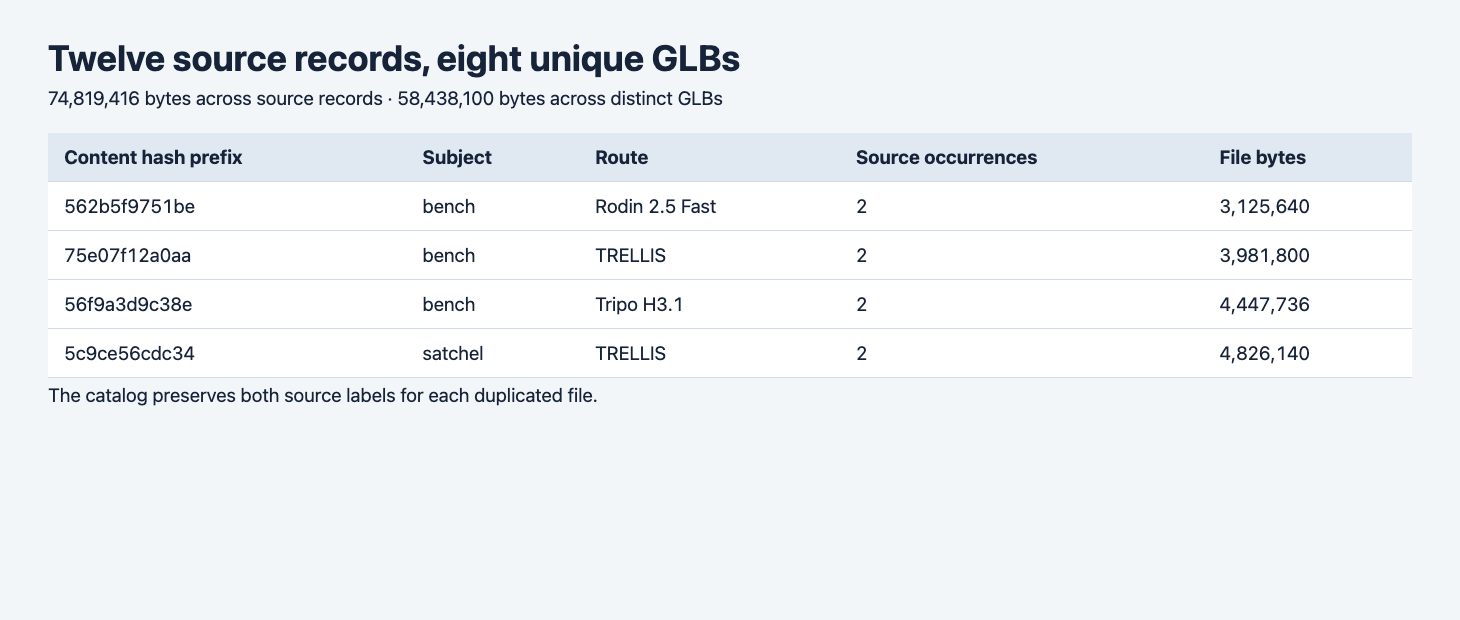
The browser table reads the executed catalog output. Short hashes appear in the screenshot for readability. The database stores and compares the full hashes.
2. Prepare a manifest with the original and a derived file
Use Python 3.11 or newer and a dedicated SQLite database for this example. No third-party Python package is required. Put the following JSON in sources.json, with three GLB paths relative to it. Use two byte-identical paths for the original and one actual derivative. For the 12-record evidence set we used source files from the TRELLIS comparison, the budget runs and the mobile GLB budget test, plus the source comparison files linked from those posts.
[
  {
    "label": "Bench original",
    "subject": "bench",
    "route": "Tripo H3.1",
    "file": "bench-original.glb"
  },
  {
    "label": "Bench archived copy",
    "subject": "bench",
    "route": "Tripo H3.1",
    "file": "archive/bench-original.glb"
  },
  {
    "label": "Bench texture derivative",
    "subject": "bench",
    "route": "Tripo H3.1",
    "file": "bench-resize-only.glb",
    "parent": "bench-original.glb"
  }
]
In an export folder, take the route and input reference from the generation receipt. Take byte length, triangle count and embedded image count from the downloaded file. The catalog below reads the GLB JSON chunk and counts stored triangle primitives. If a delivery system requires specification validation, run the GLB intake checks before promoting the entry to an approved catalog. Measured fields and approval status can coexist, with separate meanings.
3. Build and search the catalog
Save the program as catalog.py. It checks the GLB v2 header, reads stored metrics, builds full hashes and replaces the dedicated snapshot tables in one transaction. A missing file aborts before replacement. A broken parent aborts the transaction. Use a separate database path for each independently managed manifest. This example is a single-manifest snapshot, so records removed from the next manifest are removed from the next snapshot.
import argparse
from hashlib import sha256
import json
from pathlib import Path
import sqlite3
import struct

SCHEMA = """
PRAGMA foreign_keys = ON;
CREATE TABLE IF NOT EXISTS asset (
    hash TEXT PRIMARY KEY, bytes INTEGER NOT NULL,
    triangles INTEGER NOT NULL, images INTEGER NOT NULL
);
CREATE TABLE IF NOT EXISTS occurrence (
    source TEXT PRIMARY KEY, hash TEXT NOT NULL REFERENCES asset(hash),
    label TEXT NOT NULL, subject TEXT NOT NULL, route TEXT NOT NULL
);
CREATE TABLE IF NOT EXISTS variant (
    child TEXT NOT NULL REFERENCES asset(hash),
    parent TEXT NOT NULL REFERENCES asset(hash),
    PRIMARY KEY (child, parent), CHECK (child <> parent)
);
"""

def inspect(path):
    data = path.read_bytes()
    if len(data) < 20:
        raise ValueError(f"Short GLB: {path}")
    magic, version, size, json_size, kind = struct.unpack_from("<4sIIII", data)
    if (magic, version, size, kind) != (b"glTF", 2, len(data), 0x4E4F534A) or json_size > len(data) - 20:
        raise ValueError(f"Invalid GLB header: {path}")
    doc = json.loads(data[20:20 + json_size])
    primitives = [p for mesh in doc["meshes"] for p in mesh["primitives"]]
    if not primitives or any(p.get("mode", 4) != 4 for p in primitives):
        raise ValueError(f"Expected triangle primitives: {path}")
    triangles = sum(doc["accessors"][p.get("indices", p["attributes"]["POSITION"])]["count"] // 3
                    for p in primitives)
    embedded_images = sum("bufferView" in image for image in doc.get("images", []))
    return sha256(data).hexdigest(), len(data), triangles, embedded_images

def import_manifest(db, manifest):
    rows = json.loads(manifest.read_text())
    assets = {row["file"]: inspect(manifest.parent / row["file"]) for row in rows}
    with db:
        db.execute("DELETE FROM variant")
        db.execute("DELETE FROM occurrence")
        db.execute("DELETE FROM asset")
        for row in rows:
            asset = assets[row["file"]]
            db.execute("INSERT INTO asset VALUES (?, ?, ?, ?) ON CONFLICT(hash) DO NOTHING", asset)
            db.execute("INSERT INTO occurrence VALUES (?, ?, ?, ?, ?)",
                       (row["file"], asset[0], row["label"], row["subject"], row["route"]))
        for row in rows:
            if "parent" in row:
                child, parent = assets[row["file"]][0], assets[row["parent"]][0]
                db.execute("INSERT INTO variant VALUES (?, ?) ON CONFLICT(child,parent) DO NOTHING",
                           (child, parent))

def main():
    cli = argparse.ArgumentParser()
    cli.add_argument("manifest", type=Path)
    cli.add_argument("--database", default="catalog.sqlite")
    cli.add_argument("--subject")
    cli.add_argument("--max-bytes", type=int, default=1_000_000_000)
    args = cli.parse_args()
    with sqlite3.connect(args.database) as db:
        db.row_factory = sqlite3.Row
        db.executescript(SCHEMA)
        import_manifest(db, args.manifest)
        totals = db.execute("""
            SELECT (SELECT COUNT(*) FROM occurrence) AS records, COUNT(*) AS unique_files,
            (SELECT SUM(a.bytes) FROM occurrence o JOIN asset a ON a.hash = o.hash) AS repeated_bytes,
            SUM(bytes) AS unique_bytes, (SELECT COUNT(*) FROM variant) AS variant_edges FROM asset
        """).fetchone()
        matches = db.execute("""
            WITH matched AS (
                SELECT o.*, ROW_NUMBER() OVER (PARTITION BY hash ORDER BY source) AS choice
                FROM occurrence o WHERE (? IS NULL OR o.subject = ?)
            )
            SELECT a.*, o.subject, o.route,
            (SELECT COUNT(*) FROM occurrence other WHERE other.hash = a.hash) AS records
            FROM asset a JOIN matched o ON o.hash = a.hash AND o.choice = 1
            WHERE a.bytes <= ? ORDER BY a.bytes, a.hash
        """, (args.subject, args.subject, args.max_bytes)).fetchall()
        print(json.dumps({"totals": dict(totals), "matches": [dict(r) for r in matches],
                          "occurrences": [dict(r) for r in db.execute("SELECT * FROM occurrence ORDER BY source")],
                          "variants": [dict(r) for r in db.execute("SELECT * FROM variant ORDER BY child")]}, indent=2))

if __name__ == "__main__":
    main()
Run the program with no filter to inspect the complete snapshot. With the three-entry example above, expect three source records, two unique files and one lineage edge, provided the archived original is a byte-for-byte copy and the derivative actually changed.
python3 catalog.py sources.json --database catalog.sqlite > catalog.json
python3 catalog.py sources.json --database catalog.sqlite > reimport.json
cmp catalog.json reimport.json
An unchanged manifest produces identical output in this example. The sorted query uses the file hash as a stable tie-breaker. When a source file changes, the next run computes a new hash, refreshes the record and rebuilds the lineage from the current manifest. Keep the old manifest and files separately if you need history beyond this current snapshot.
4. Preserve the lineage even when the geometry is the same
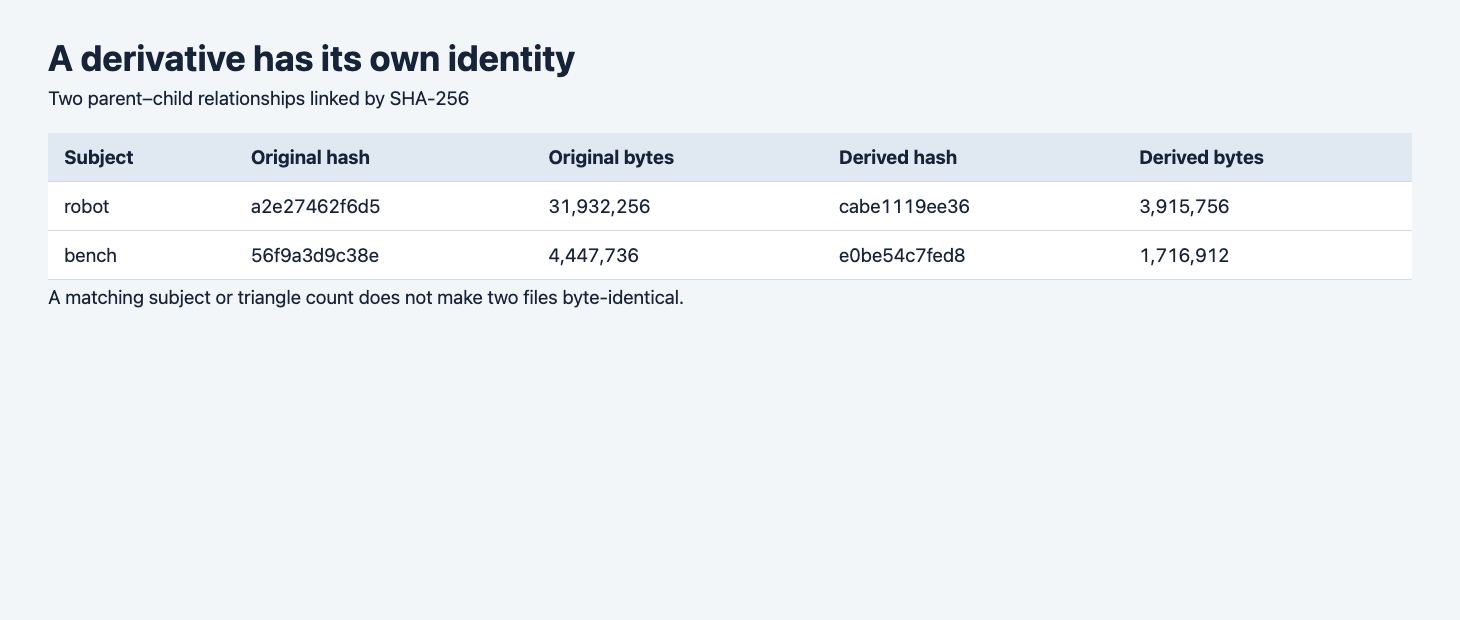
The robot is the combined mesh and texture derivative. The bench is the texture-only derivative. Parent links came from the test manifest.
The Hunyuan robot’s original was 31,932,256 bytes with 499,914 triangles. Its delivery version was 3,915,756 bytes with 49,990 triangles. The Tripo bench moved from 4,447,736 to 1,716,912 bytes and stayed at 18,834 triangles. If you deduplicate by name or face count, the two bench versions can appear to be interchangeable. Their encoded texture payloads differ. Hash-based identity keeps the preview separate and lets a reader navigate back to the larger editable source.
5. Read the shortlist with thumbnails
python3 catalog.py sources.json --database catalog.sqlite \
  --subject bench --max-bytes 4000000 > bench-filter.json
This filter uses an exact subject tag and an inclusive byte limit. In the full evidence set it returned three distinct files, ordered by size. The screenshot uses a small local browser viewer that reads those results and renders the matching GLBs under the same lighting and normalized framing. The query and the thumbnail are different parts of the workflow. The supplied Python produces the shortlist JSON, and you can open the selected files in your own viewer.
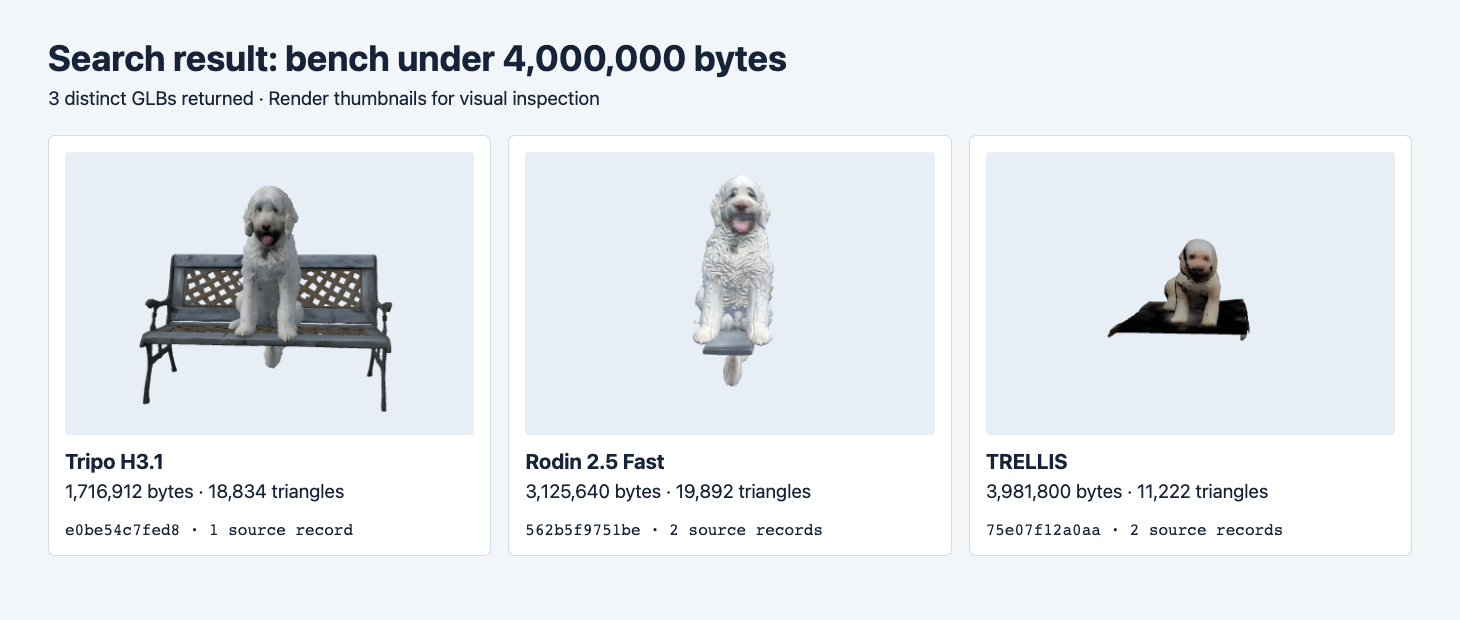
From left to right: resized Tripo H3.1, original Rodin Fast and original TRELLIS. A bench tag records what the input requested. The thumbnail reveals how much of the bench the export preserved.
| Match | File bytes | Triangles | Source records |
|---|---|---|---|
| Tripo H3.1, resized | 1,716,912 | 18,834 | 1 |
| Rodin 2.5 Fast | 3,125,640 | 19,892 | 2 |
| TRELLIS | 3,981,800 | 11,222 | 2 |
In the preview, the first result retains a recognizable seat, lattice and legs. The other two have the dog and part of a surface. Add a reviewed completeness field if your users need to filter for an intact bench. If you generate persistent thumbnails, key them by the asset hash and a rendering configuration version. The same bytes can then get a fresh thumbnail after your lighting or camera changes. A missing thumbnail should leave the record visible with an explicit status.
The original model files are the source of truth for this demo. The script indexes them in place and computes potential savings. It does not copy them to a new storage service or delete duplicates. If you later store one physical copy per hash, confirm that each source reference resolves to the shared object and that deletion of a source record leaves the bytes accessible to the other references.
Check the JSON and database after reimport
python3 - <<'PY'
import json
import sqlite3
with open("catalog.json") as source:
    result = json.load(source)
print(result["totals"])
with sqlite3.connect("catalog.sqlite") as db:
    print(db.execute("PRAGMA integrity_check").fetchone()[0])
    print(db.execute("PRAGMA foreign_key_check").fetchall())
PY
In the tested snapshot these checks returned ok and an empty list of foreign-key violations. The missing-parent test left the database bytes unchanged. For a larger service, record the manifest revision with each import and keep it with the generated JSON. That makes a report reproducible even after the catalog changes.
Start with outputs from Rodin 2.5 Fast image-to-3D or Hunyuan3D 3.1 Pro image-to-3D. Put the original and one edited copy into the manifest. Search by subject and bytes, then open the actual results before using a label as evidence that the asset is complete.
Keep approval attached to the bytes
An approval for one hash can carry across its exact copies. A regenerated file with the same name should start its own review. If you store review notes in another table, key them by the full content hash and record the review policy version. Then a stricter intake policy can trigger another check on the same file, and the source history still explains which generation jobs produced it. Keep the approval table outside the snapshot replacement shown here if it needs to survive imports.
FAQ
Does a different hash mean the mesh is visibly different?
The hash covers the entire GLB. Texture re-encoding, metadata or packaging changes can change the key. Use thumbnails or geometric comparison if you need to find visually similar files.
Can I use just the twelve displayed hash characters as the storage key?
Use the full SHA-256 as the database and storage key. The shorter form is for screenshots and human review. Log the full value when associating an approval with an exact file.
Does the example perform semantic image search?
It uses a controlled subject field and exact filters. If you later add text indexing or visual embeddings, keep the content hash as the join key. Search relevance can change independently of file identity.
Found this useful? Share it