How to Repair a Zero Normal in a Generated GLB
Fix a real GLB normal error with a 12-byte binary change. See validator results, geometry checks, runnable code and unchanged Blender renders.
The satchel looked usable in Blender. Khronos glTF Validator still rejected its GLB because one normal was a zero vector. We traced the vector to a vertex used only by one zero-area triangle, replaced it with a unit-length value derived from the neighboring normals, and checked both files again. The repair changed 12 bytes in the binary payload, preserved 93,352 triangles and removed the validator error. Both tested Blender renders matched pixel for pixel. This is a narrow repair workflow for a defect you can identify before changing any geometry.
Key takeaway
- The original TRELLIS.2 GLB reported
ACCESSOR_VECTOR3_NON_UNITat the primitive’s NORMAL accessor. The failing vector was at zero-based index 50,095 of 70,577 positions. - The corrected vector was the normalized sum of the other two normals referenced by the incident triangle. Exactly 12 binary payload bytes changed. Positions, UVs, index data and images match the original.
- The validator changed from one error and zero warnings to zero errors and zero warnings. Three exactly zero-area triangles still remain because no indices were removed.
- Both files imported in Blender 4.5.9 LTS with the same mesh and material counts. In two 470 × 350 Cycles renders, the original and repair differed in zero RGBA pixels.
1. Save the original and read the complete issue
The source is the satchel from the TRELLIS and TRELLIS.2 comparison. The original binary is 4,380,648 bytes. It contains one mesh primitive with a POSITION accessor, a TEXCOORD_0 accessor, a NORMAL accessor and triangle indices. It opened in Three.js and Blender in our previous checks. Rendering success gave us a way to inspect the asset, while validation located a defect in its data.
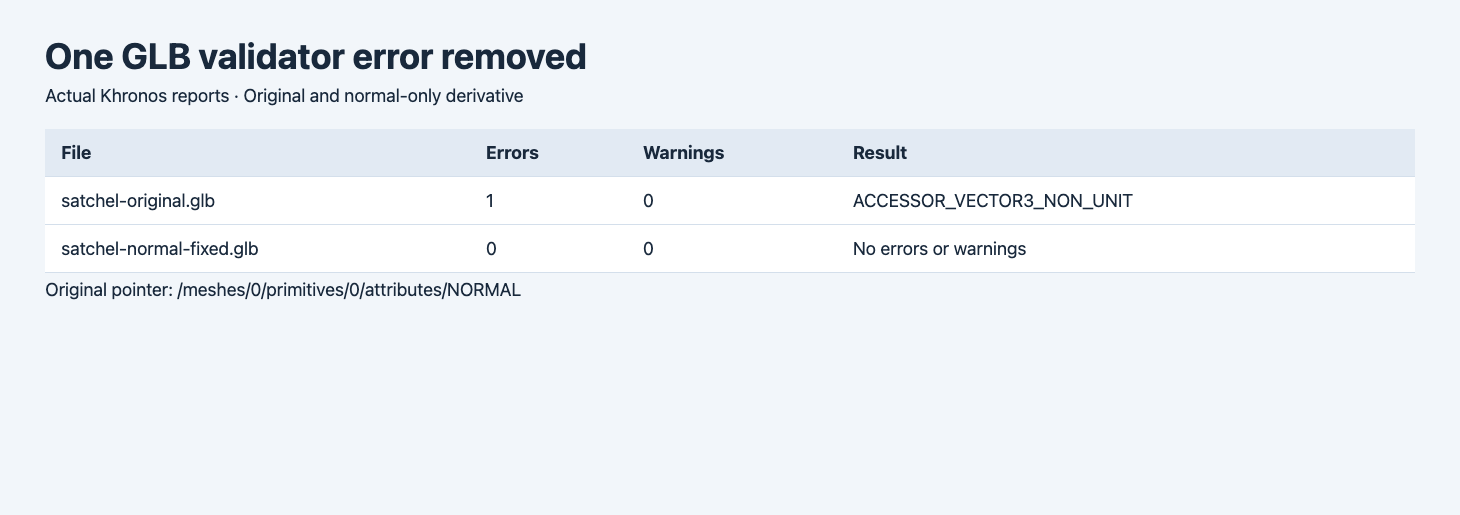
The report shows the actual issue totals and original pointer. The two passes use the same validator.
The issue pointer is /meshes/0/primitives/0/attributes/NORMAL. The validator message references scalar components 150285 through 150287. Dividing the first component index by three gives 50,095, the zero-based vector index. A unit normal has a length of one. This vector is zero, so dividing it by its length cannot fix it. The pointer tells you where to inspect, while the accessor layout tells you how to find the bytes. Khronos validator issue definitions
npm install --global @gltf-transform/[email protected]Run validation on an untouched file. Capture its report before opening or exporting it from an editor, because a re-export may change other data and make the original problem harder to identify.
gltf-transform validate satchel-original.glb2. Inspect where the affected vertex is used
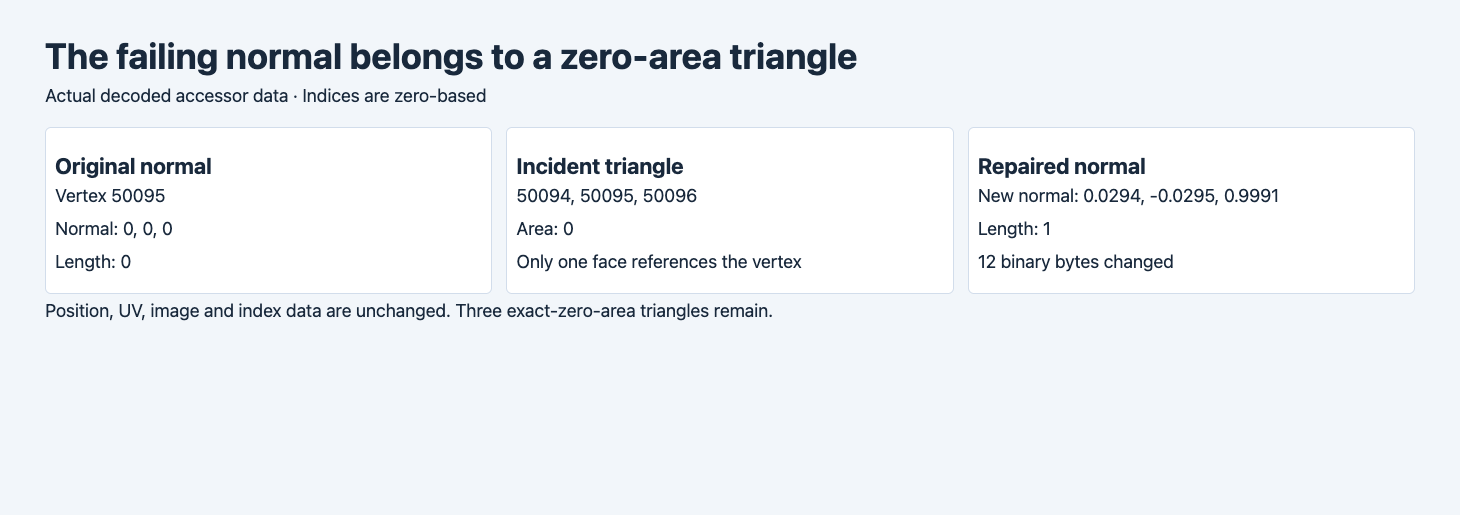
The diagnostic uses the actual accessor values. Vertex and accessor indices are zero based.
The primitive’s NORMAL attribute points to accessor 3. This accessor stores 70,577 float32 vectors of three components. The index buffer contains 280,056 scalar indices, or 93,352 triangles. We searched for each triangle referencing vertex 50,095. Exactly one did, with the indices 50,094, 50,095 and 50,096. The first and last positions of that triangle coincide, so the cross product of the two edges has length zero. This identifies the scope of the repair. It does not establish how the provider originally computed the zero normal.
The other two normals have nonzero length and point in nearly the same direction. We use their sum and normalize it. That produces approximately [0.02940, -0.02951, 0.99913]. This choice is specific to the diagnosed case. For a visible vertex shared by several valid faces, you may need to recalculate from the intended smooth or hard surface instead. Preserve a copy and review shading before accepting any broader normal changes.
3. Make a derivative with guarded assumptions
The following reproduces the local repair for this known binary layout. Work in an empty directory with a copy named satchel-original.glb. It expects the primitive and accessor structure described above. A generalized converter would need to handle additional primitives, sparse and interleaved accessors, compression and other component types. The guards here help stop a different file from silently being treated like this example.
python3 -m venv .venv
. .venv/bin/activate
python3 -m pip install numpyimport hashlib
import json
from pathlib import Path
import struct
import numpy as np
def unpack(data):
magic,version,total,json_size,json_type=struct.unpack_from("<4sIIII",data,0)
assert (magic,version,total,json_type)==(b"glTF",2,len(data),0x4e4f534a)
length,kind=struct.unpack_from("<II",data,20+json_size)
assert kind==0x004e4942 and 28+json_size+length==len(data)
doc=json.loads(data[20:20+json_size])
return doc,bytearray(data[28+json_size:])
def pack(doc,binary):
encoded=json.dumps(doc,separators=(",",":")).encode()
encoded+=b" "*(-len(encoded)%4)
return (struct.pack("<4sII",b"glTF",2,28+len(encoded)+len(binary))
+struct.pack("<II",len(encoded),0x4e4f534a)+encoded
+struct.pack("<II",len(binary),0x004e4942)+binary)
def view(doc,binary,index,dtype,width):
a=doc["accessors"][index]
v=doc["bufferViews"][a["bufferView"]]
expected={"<f4":(5126,"VEC3"),"<u4":(5125,"SCALAR")}
assert (a["componentType"],a["type"])==expected[dtype] and v["buffer"]==0
assert "byteStride" not in v and not a.get("sparse")
return np.frombuffer(binary,dtype=dtype,count=a["count"]*width,
offset=v.get("byteOffset",0)+a.get("byteOffset",0)).reshape(-1,width)
src=Path("satchel-original.glb").read_bytes()
doc,binary=unpack(src)
assert len(doc["meshes"])==1 and len(doc["meshes"][0]["primitives"])==1
p=doc["meshes"][0]["primitives"][0]
assert (p.get("mode",4)==4 and "extensions" not in p
and doc["accessors"][p["indices"]]["count"]%3==0)
norm_id=p["attributes"]["NORMAL"]
position=view(doc,binary,p["attributes"]["POSITION"],"<f4",3)
normals=view(doc,binary,norm_id,"<f4",3)
idx=view(doc,binary,p["indices"],"<u4",1).reshape(-1,3)
bad=np.flatnonzero(np.linalg.norm(normals,axis=1)==0)
assert len(bad)==1
vertex=int(bad[0])
incident=idx[np.any(idx==vertex,axis=1)]
assert len(incident)==1
triangle=incident[0]
coords=position[triangle]
assert np.linalg.norm(np.cross(coords[1]-coords[0],coords[2]-coords[0]))==0
before=normals[vertex].tolist()
neighbors=normals[triangle[triangle!=vertex]].astype(float)
replacement=neighbors.sum(axis=0)
replacement/=np.linalg.norm(replacement)
normals[vertex]=replacement
area=np.linalg.norm(np.cross(position[idx[:,1]]-position[idx[:,0]],position[idx[:,2]]-position[idx[:,0]]),axis=1)
repair=pack(doc,bytes(binary))
Path("satchel-normal-fixed.glb").write_bytes(repair)
fixed_doc,fixed_binary=unpack(repair)
original_doc,original_binary=unpack(src)
assert doc==original_doc==fixed_doc and binary==fixed_binary
diff=[i for i,(a,b) in enumerate(zip(original_binary,binary)) if a!=b]
buffer_offset=doc["bufferViews"][doc["accessors"][norm_id]["bufferView"]]["byteOffset"]
offset=buffer_offset+doc["accessors"][norm_id].get("byteOffset",0)+vertex*12
assert all(offset<=i<offset+12 for i in diff)
receipt={"normal_accessor":norm_id,"vertex":vertex,"incident_triangle":triangle.tolist(),
"incident_triangle_area":0,"exact_zero_area_triangles":int(np.count_nonzero(area==0)),
"before_normal":before,"after_normal":normals[vertex].tolist(),
"after_length":float(np.linalg.norm(normals[vertex])),
"binary_bytes_changed":len(diff),"triangles":len(idx),"positions":len(position),
"original_bytes":len(src),"fixed_bytes":len(repair),
"original_sha256":hashlib.sha256(src).hexdigest(),"fixed_sha256":hashlib.sha256(repair).hexdigest()}
Path("repair-metrics.json").write_text(json.dumps(receipt,indent=2)+"\n")
print(json.dumps(receipt))Run the script once and validate the derivative. The report should show one affected vertex, a length of one, 12 changed binary bytes and 93,352 triangles for this asset. The fixed GLB uses the same file length as the original.
python3 repair.py
gltf-transform validate satchel-normal-fixed.glb
The change is confined to the three float32 components of that one normal. We also verified that the parsed GLB JSON is equal. The serialized JSON can differ from the original formatting, so use the binary comparison for the 12-byte claim. The repaired file has its own SHA-256, which allows a later handoff to distinguish it from the source even though their sizes match.
4. Reimport and render both files in Blender
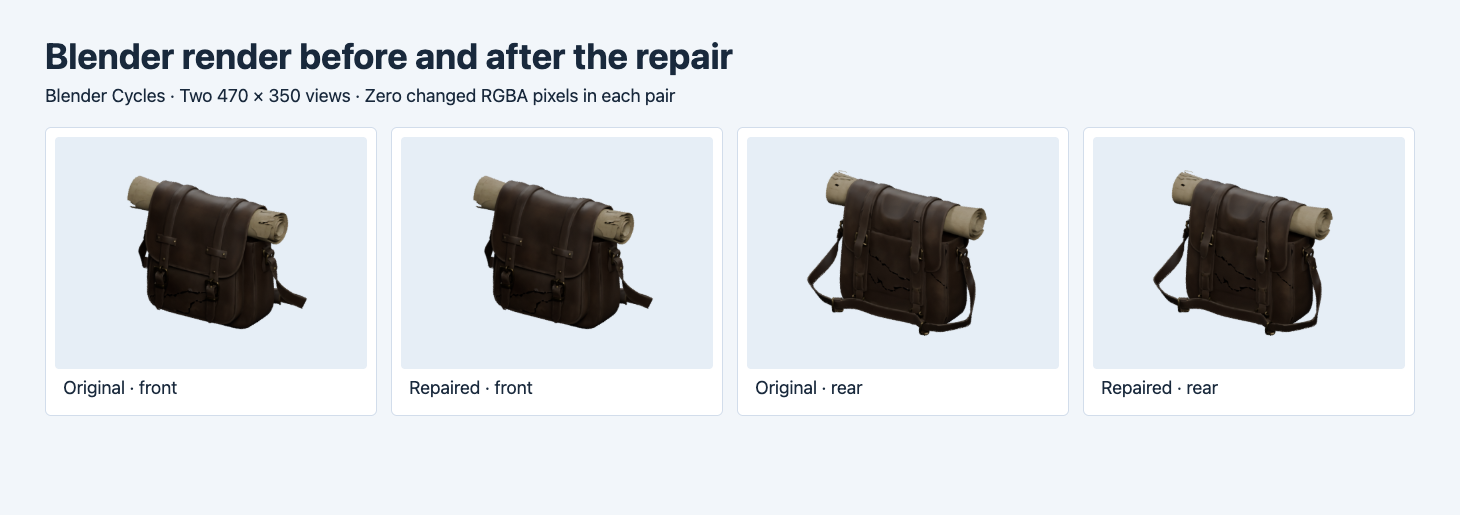
The corresponding front and rear images are direct Cycles renders from Blender 4.5.9 LTS. They use the same camera and light setup within each pair.
We imported both files into empty scenes with Blender’s GLB import operator. Each returned FINISHED and contained 70,577 vertices, 93,352 triangles, one UV layer and one material. Both imported meshes reported custom normals. We rendered two 470 × 350 views and compared the decoded RGBA values. Each pair had zero differing pixels across 164,500 pixels. The result supports no visible change in those two render settings. A different engine or camera can still warrant its own check. Blender glTF import operator
| Check | Original | Repaired |
|---|---|---|
| File bytes | 4,380,648 | 4,380,648 |
| Khronos errors / warnings | 1 / 0 | 0 / 0 |
| Blender vertices | 70,577 | 70,577 |
| Blender triangles | 93,352 | 93,352 |
| Exactly zero-area indexed triangles | 3 | 3 |
We counted triangles with exactly zero cross-product length using the stored positions and indices. This is a geometry diagnostic, separate from the validator’s issue totals. A project that requires zero degenerate faces would still reject this file. Removing triangles or merging vertices would be another operation. Re-run topology, UV and appearance checks after doing either. Here we kept those choices out of the one-vector repair.
Decide what deserves a separate repair
There are two distinct decisions in this case. Replacing one unusable normal makes this file pass the glTF validator, while the original topology remains available for other checks. If you are delivering a static visual preview, compare the image and any renderer warnings first. If you are delivering collision geometry, printable surfaces or an editable model, inspect the zero-area faces directly. A collapsed triangle can disappear in the preview and still affect a process that walks the connectivity.
Check how the affected vertices are shared before removing them. The two repeated positions in this example have different vertex indices. A weld based only on position can join vertices that are intentionally split at a UV seam or a sharp edge. If the project calls for cleaning duplicates, use a separate derivative and compare mesh connectivity, UV discontinuities, boundaries and the exact position of required parts. Run validation on that derivative rather than carrying over the status of the one-normal repair.
5. Keep the validation result with the asset
python3 -m json.tool repair-metrics.json
wc -c satchel-original.glb satchel-normal-fixed.glb
Save the original hash, the repair hash, the validator version, the issue pointer and the two images with the project. In an automated job, require an expected defect and an exact diff scope before replacing a reference with the derivative. Keep the repaired GLB and its record under a new asset version. A zero-error report shows the validator accepted the resulting file. Other application rules, like a geometry budget or a required physical dimension, remain separate. Automated GLB intake checks
Start with a real TRELLIS.2 image-to-3D output if you want to reproduce the inspection workflow. Validate it before modifying it. If its failure differs from this example, inspect the corresponding data first and use a repair scoped to that defect.
The order of checks also matters. Save a baseline render before changing the file. Then verify the derivative’s binary diff, rerun the validator and import it in a clean scene. If one of those checks changes unexpectedly, return to the original and reproduce the smallest edit. That makes the result easier to review than a combined geometry and material cleanup.
FAQ
Should I normalize every vector in a GLB?
First distinguish a zero vector from a nonzero vector with a slight length error. Normalizing zero does not provide a valid direction. Broadly replacing normals can change shading, so inspect the exact issues and compare renders before adopting a general fix.
Do zero errors mean the GLB has no degenerate geometry?
This repair eliminated the reported normal error. Our separate geometry check still found three exact-zero-area triangles. Use the tests your project needs for collision, printing or topology in addition to validation.
Is the 12-byte repair a claim about the whole file?
It is the exact change count in the GLB binary payload. The JSON parses to the same data, and the source and derivative have different full-file hashes. Save both hashes if you need to prove which version was delivered.
Found this useful? Share it