How to Calculate Cost per Accepted AI 3D Asset
18 image-to-3D jobs cost $2.16. Compare cost per completed run and per accepted GLB with actual charges, rendered examples, and Python.

The batch finished all 18 generation jobs and cost $2.16. Only 10 files met the delivery rubric. The same spend works out to $0.120 per completed job and $0.216 per accepted asset. For a team deciding what to charge or how many jobs to queue, those denominators answer different questions. This guide uses the actual run receipts, the rejected outputs and a runnable calculation to show how to budget for something a person can use.
Key takeaway
- All 18 runs completed. Ten met the asset rubric, so the measured generation cost per accepted asset was 80% higher than the cost per completed job in this batch.
- The satchel, bench and robot each spent $0.720. Their accepted counts were six, zero and four. The bench therefore has no observed cost per accepted asset.
- Per-route generation cost per accepted asset was $0.060 for TRELLIS, $0.150 for Rodin Fast and $0.360 for Hunyuan Mini Turbo. These values describe this input mix and rubric.
- The comparison excludes labor and other delivery costs because we did not measure them. Keep those as separate fields when extending the calculation.
Define an accepted asset before you total costs
The receipts come from our 18-run budget API comparison. It used three inputs, three routes and two seed arguments. We applied the same delivery rubric to both rounds. The rubric was written after inspecting round one and before inspecting round two, so this is a retrospective accounting exercise using a disclosed editorial rule. Every attempt’s settled charge contributes to the numerator.
The common checks were an original GLB no larger than 5,000,000 bytes, no validator errors, a successful browser render and recognizable required parts. A warning did not automatically fail this prototype brief. The satchel needed a recognizable bag, two buckles, a shoulder strap and a top roll. The bench needed a recognizable dog and an intact seat, openwork backrest and legs. The robot needed a recognizable head, torso and limbs and a readable rear view. A different brief can change which files pass and therefore change the unit cost.
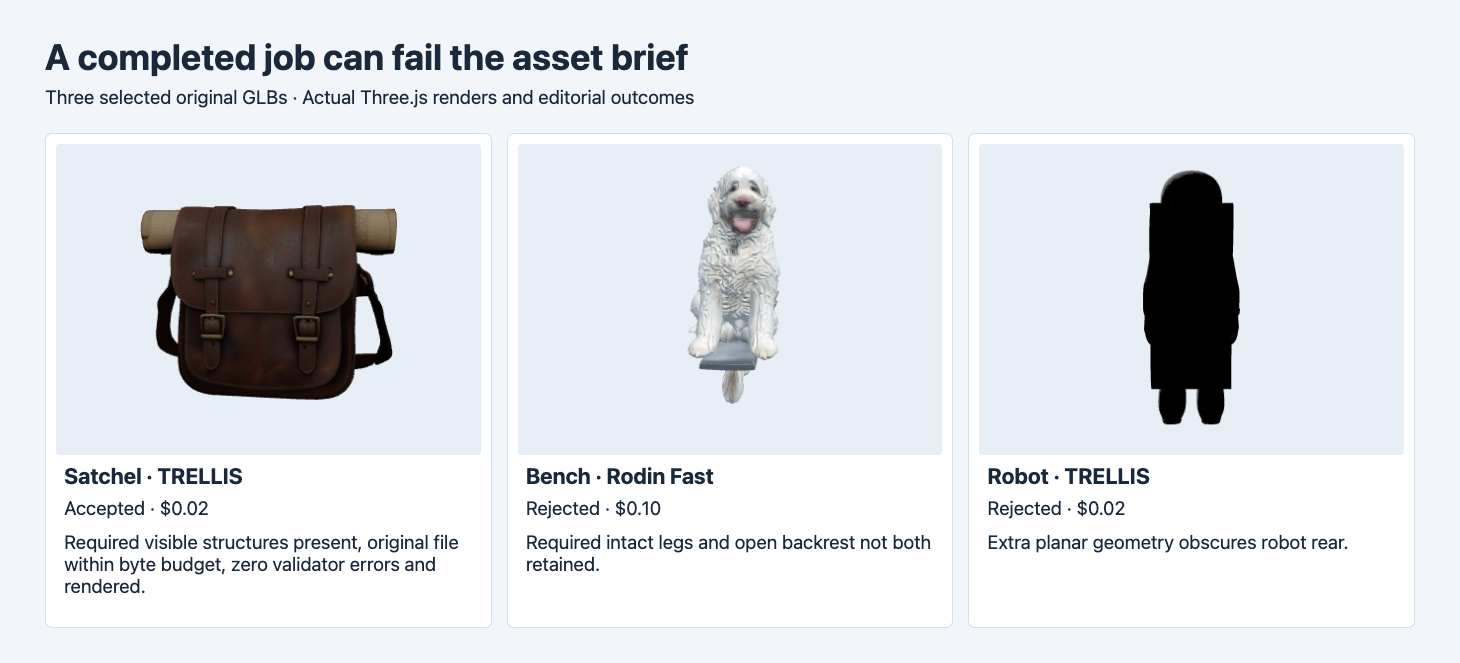
The satchel passed. The Rodin Fast result omitted required bench details. The rear view of the TRELLIS robot was obscured by an extra planar surface. All three were completed runs.
Use an explicit acceptance field. A file can be valid enough to load and still miss its subject or budget. If the project allows repair, define how a repaired result is promoted to accepted and how to record the original attempts. One deliverable should be counted once even if multiple generations or repair exports contributed. In these records each accepted row is a separate usable original GLB. The batch denominator counts ten accepted files. If the buyer orders one file per brief, this batch fulfilled two of the three briefs. That project would divide its spend by two when calculating generation cost per fulfilled brief. Automated GLB intake and visual QA
Divide the same charges by the right denominator
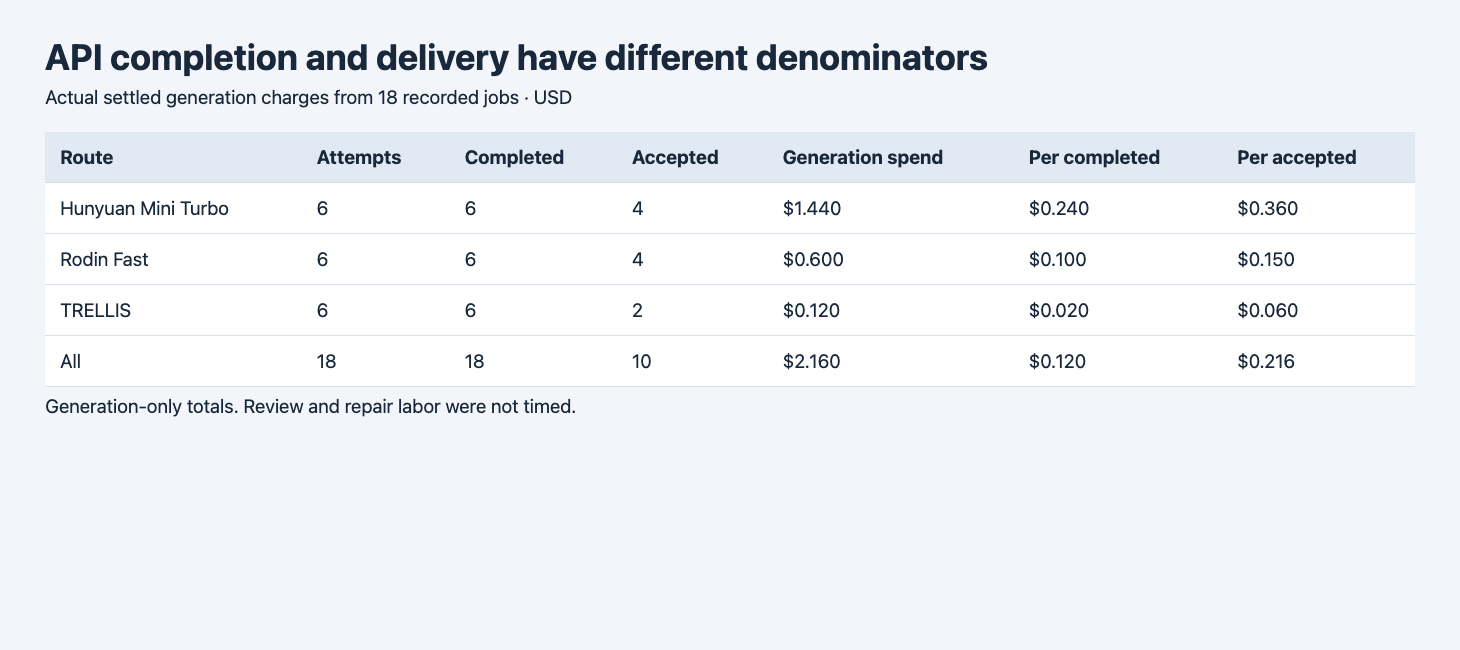
The table is generated from the recorded receipts. The totals include the charges for rejected files.
| Route | Attempts | Completed | Accepted | Generation spend | Per completed | Per accepted |
|---|---|---|---|---|---|---|
| TRELLIS | 6 | 6 | 2 | $0.120 | $0.020 | $0.060 |
| Rodin Fast | 6 | 6 | 4 | $0.600 | $0.100 | $0.150 |
| Hunyuan Mini Turbo | 6 | 6 | 4 | $1.440 | $0.240 | $0.360 |
| All | 18 | 18 | 10 | $2.160 | $0.120 | $0.216 |
For generation cost per completed job, use all settled generation charges for the group and divide by the completed job count. For generation cost per accepted asset, divide the same charges by the number of accepted outputs. The higher figure in this batch reflects completed files that did not make it through acceptance. The pooled result is total spend divided by total accepted count. Averaging route-level unit prices with equal weights would answer a different question when the groups contribute different numbers of accepted files.
A run ID is the key for reconciling one generation across status logs and billing. Polling the same ID can produce several status records for the same generation. Group those records before totaling. A second submitted generation can have another ID and another charge. The cost report should retain both attempts if both were part of producing the asset. Keep estimated prices and pending charges separate from the settled figures.
Group by input before projecting a budget
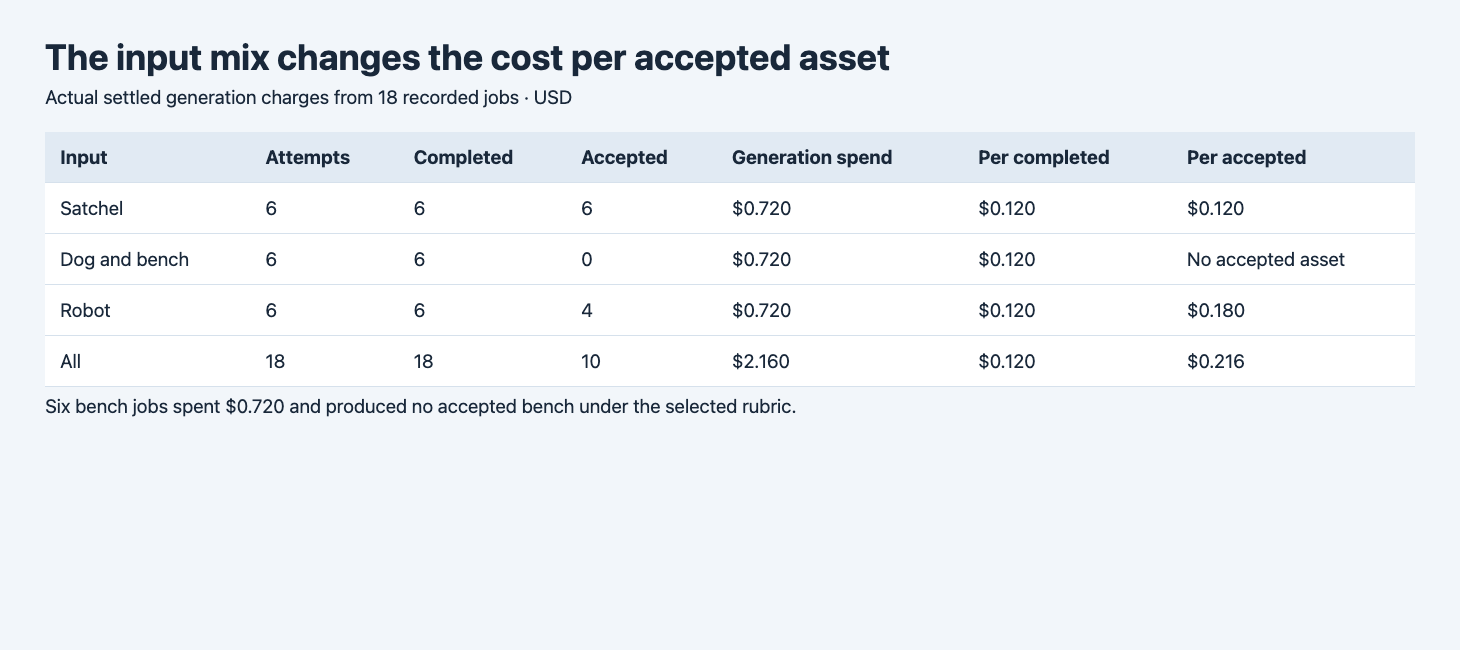
The same three-route spend appears in each input group. The bench column for accepted cost is intentionally unavailable because there were zero accepted files.
| Input | Generation spend | Completed | Accepted | Generation cost per accepted |
|---|---|---|---|---|
| Satchel | $0.720 | 6 | 6 | $0.120 |
| Dog and bench | $0.720 | 6 | 0 | No accepted asset |
| Robot | $0.720 | 6 | 4 | $0.180 |
A blended average hides the bench. The entire group spent $0.720, yet none preserved the required seat, backrest and legs together. Dividing by zero produces no unit cost. Entering $0 would confuse no deliverable with a free one. If the next batch is mostly furniture and multi-object scenes, the 18-job total does not predict the next budget on its own. Run a small test on the mix that will actually be processed.
Within the robot group, two TRELLIS runs failed the rear-visibility check. The other four route–seed combinations passed for that input. In the satchel group, every tested output passed the listed conditions. This variation is why model price alone is not enough for planning. Set a budget per category of work or keep the category as a field in your estimate. The six attempts per input are descriptive observations, not a production acceptance-rate estimate.
Recalculate with the same receipt schema
Use one row per provider run, with a unique run ID, route, input group, status, actual charge and acceptance decision. This Python calculation uses decimal arithmetic and outputs per-run and per-accepted figures. It rejects duplicate IDs or missing costs before summing. A free job can have a recorded zero charge. A missing charge is a different value.
from collections import defaultdict
from decimal import Decimal
import argparse
import json
from pathlib import Path

def totals(rows):
    completed=[r for r in rows if r["status"]=="completed"]
    accepted=[r for r in rows if r["accepted"]]
    charges=sum((Decimal(str(r["cost_usd"])) for r in rows),Decimal(0))
    def usd(value):
        return format(value.quantize(Decimal("0.001")),"f")
    return {"attempts":len(rows),"completed":len(completed),"accepted":len(accepted),
            "settled_generation_usd":usd(charges),
            "per_completed_usd":usd(charges/len(completed)) if completed else None,
            "per_accepted_usd":usd(charges/len(accepted)) if accepted else None}

def report(rows):
    ids=[r["run_id"] for r in rows]
    if len(set(ids))!=len(ids):
        raise ValueError("Run IDs must be unique before totaling charges")
    if any(r["cost_usd"] is None for r in rows):
        raise ValueError("Reconcile missing billing records before publishing a settled total")
    by_route=defaultdict(list)
    by_sample=defaultdict(list)
    for row in rows:
        by_route[row["route"]].append(row)
        by_sample[row["sample"]].append(row)
    return {"batch":totals(rows),
            "by_route":{name:totals(group) for name,group in sorted(by_route.items())},
            "by_input":{name:totals(group) for name,group in sorted(by_sample.items())}}

if __name__=="__main__":
    cli=argparse.ArgumentParser()
    cli.add_argument("receipts",type=Path)
    rows=json.loads(cli.parse_args().receipts.read_text())["runs"]
    print(json.dumps(report(rows),indent=2))
For your own receipts.json, use an object with a runs array. The fields needed by the calculator are shown below. This miniature input is one row drawn from the recorded data.
{
  "runs": [
    {
      "run_id": "157dc13f-9906-45a7-9dd6-5707dbbfe697",
      "route": "trellis",
      "sample": "A",
      "status": "completed",
      "cost_usd": 0.02,
      "accepted": true
    }
  ]
}python3 cost.py receipts.json > cost-results.jsonThe example row gives one accepted asset at $0.020. With the full batch it gives $0.216. An input group with zero accepted rows returns null for that unit cost. In a dashboard, display that state as no accepted asset. Use the published result only for settled records and retain the underlying data so later billing corrections can be applied to the same keys.
Add measured work when you need a delivery cost
For production accounting, record review and repair separately. A useful total can include settled generation charges, measured reviewer and repair time multiplied by the applicable labor rate, and storage or processing costs if they are material to the project. Use the same accepted-deliverable count and a defined time window. A test that only ran inference should leave labor blank until it can be measured. A route with low generation charges can still require substantial cleanup. When labor is available, calculate it from measured minutes for each task and the corresponding hourly rate, then add it to the same batch numerator.
You can start with TRELLIS and Rodin 2.5 Fast on the same input and save every run receipt. Use your required visual features and file budget to score the results. Then compute costs by route and input before deciding whether to expand. The batch retry guide shows how to avoid a duplicate local submission and keep unresolved charges out of a settled total.
Keep the report reproducible when prices change
Record the billing snapshot date and the acceptance policy version on each report. If a charge is corrected later, update the receipt for that ID and recompute the totals. If the policy changes, keep the earlier pass decisions available so you can explain whether a new unit cost came from a price change or from a different acceptance threshold. This matters when a team tightens a byte cap or adds a required part after the first trial. A new report can reuse the same exact file hashes and apply the new rule without submitting the batch again.
FAQ
Should a failed job always have a cost?
Use the actual settled record for that attempt. The HTTP state alone does not tell you the amount. Keep an unresolved charge unknown until it is reconciled.
How should I count a repaired file?
Count one accepted deliverable when the final version passes. Associate its generation attempts and measured repair work with that deliverable. Keep the repair version’s file hash for review.
Is the cheapest completed call the cheapest usable asset?
It depends on the acceptance count and the work needed to deliver. Compare the charges and acceptance results on the input mix you plan to use.
Found this useful? Share it