SAM 3D Objects vs Tripo H3.1 in 2027: Select or Crop?
Four real image-to-3D runs compare SAM object selection with full-frame and cropped Tripo. See original GLBs, actual costs, and side views.
The same photo showed a dog sitting on a park bench. SAM 3D Objects returned a dog or a bench depending on the text prompt. Tripo H3.1 kept both subjects in one GLB when given the full photograph. Cropping around the dog removed most of the bench from the input, yet the output contained a detached loop and a small floating fragment. These four calls show why the first decision in a multi-object image is what you want the 3D file to contain.
Key takeaway
- Two SAM runs used the same image and changed the prompt from
dogtobench. Each charged $0.024. They returned separate subjects with 6,026 and 11,008 triangles. - Tripo H3.1 on the full photo returned a dog and bench in one mesh object, with 1,428,961 triangles and 42,256,832 bytes. That job charged $0.360.
- The Tripo dog crop still contained a detached loop and a small floating fragment. Blender found three connected components after grouping exact-position vertices within the one imported mesh object.
- All four original GLBs had zero validator errors and warnings. Their outputs serve different tasks, and the test compares the observed files from one photo.
Define whether you need an object or a scene
The source is a 512 × 512 public SandBase example of a cream-colored dog sitting on an outdoor metal bench. The dog’s body covers part of the seat and backrest. The tail overlaps the lower area. This makes it a useful input for asking whether a tool targets one subject, keeps both subjects, or carries overlapping details into a selected asset.
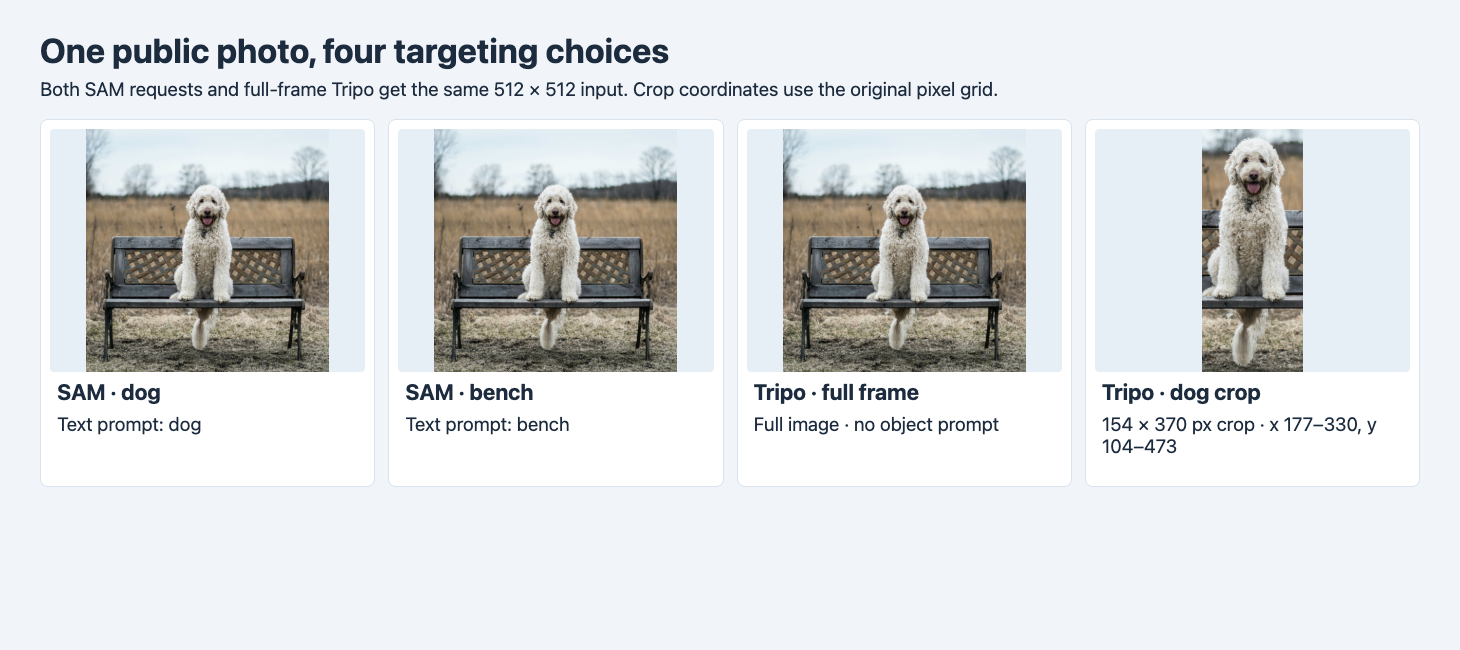
Both SAM jobs and the full-frame Tripo job received the same original file. The cropped Tripo job received a 154 × 370 image from the same photograph.
We ran SAM 3D Objects twice with seed 42, export_textured_glb: true and one text target, first dog, then bench. We did not supply an explicit mask or box. The route schema also exposes those input types. We ran Tripo H3.1 Image to 3D with seed 42, textures on, PBR off, triangle output requested and the default adaptive face setting. Tripo received either the whole photo or a crop from x 177–330 and y 104–473 in the original zero-based pixel grid. The crop kept the visible tail and included some of the bench around the dog.
Those are two different targeting methods. SAM received an explicit object name and the full context. Tripo received pixels with no object-selection prompt. Comparing these routes answers which workflow produced a suitable object or combined asset under the chosen settings. It cannot isolate model quality under identical input controls. The experiment used one run per condition, no repeats, and no timed start-to-completion benchmark.
Compare what each original GLB contains
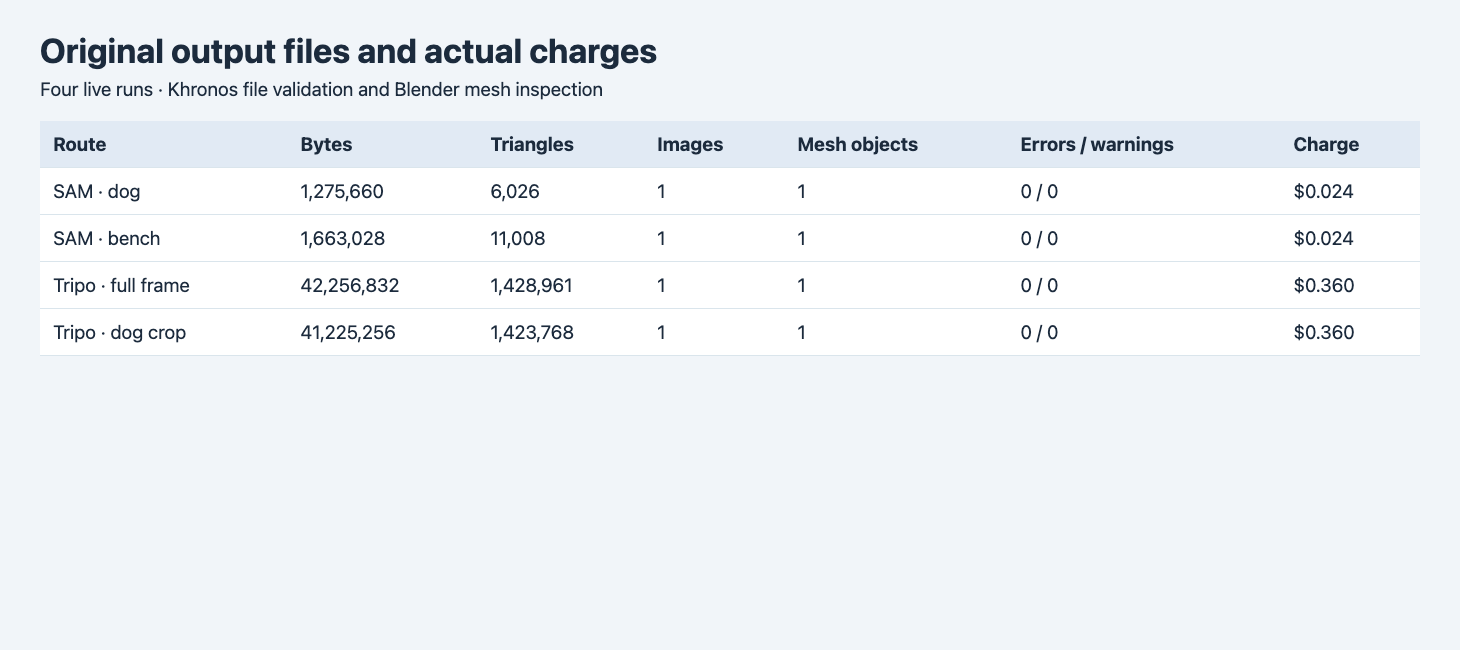
The four outputs were downloaded as GLBs. The table combines settled charges, container measurements and fresh Blender 4.5.9 imports.
| Route and input | GLB bytes | Triangles | Embedded images | Imported mesh objects | Validator errors / warnings | Actual charge |
|---|---|---|---|---|---|---|
| SAM full frame, dog prompt | 1,275,660 | 6,026 | 1 | 1 | 0 / 0 | $0.024 |
| SAM full frame, bench prompt | 1,663,028 | 11,008 | 1 | 1 | 0 / 0 | $0.024 |
| Tripo full frame | 42,256,832 | 1,428,961 | 1 | 1 | 0 / 0 | $0.360 |
| Tripo dog crop | 41,225,256 | 1,423,768 | 1 | 1 | 0 / 0 | $0.360 |
The four calls cost $0.768 in total. Tripo’s cropped original was 1,031,576 bytes smaller than its full-frame original and had 5,193 fewer triangles. The output was still larger than 41 million bytes. In this pair, cropping changed the visible content much more than it changed the file budget. If the chosen asset has to fit a web viewer, inspect its measured size and polygon count or plan a separate optimization step. Measured file-size budgets for GLB
A single imported mesh object can contain multiple connected islands. We grouped exactly identical positions within each Blender mesh and joined triangles through shared edges and vertices. Both SAM results and full-frame Tripo had one connected component under that method. The cropped Tripo asset had three. The connected full-frame mesh still includes two recognizable subjects, so neither the number of objects nor the number of connected components establishes semantic part count.
Look at the dog and bench from more than one direction
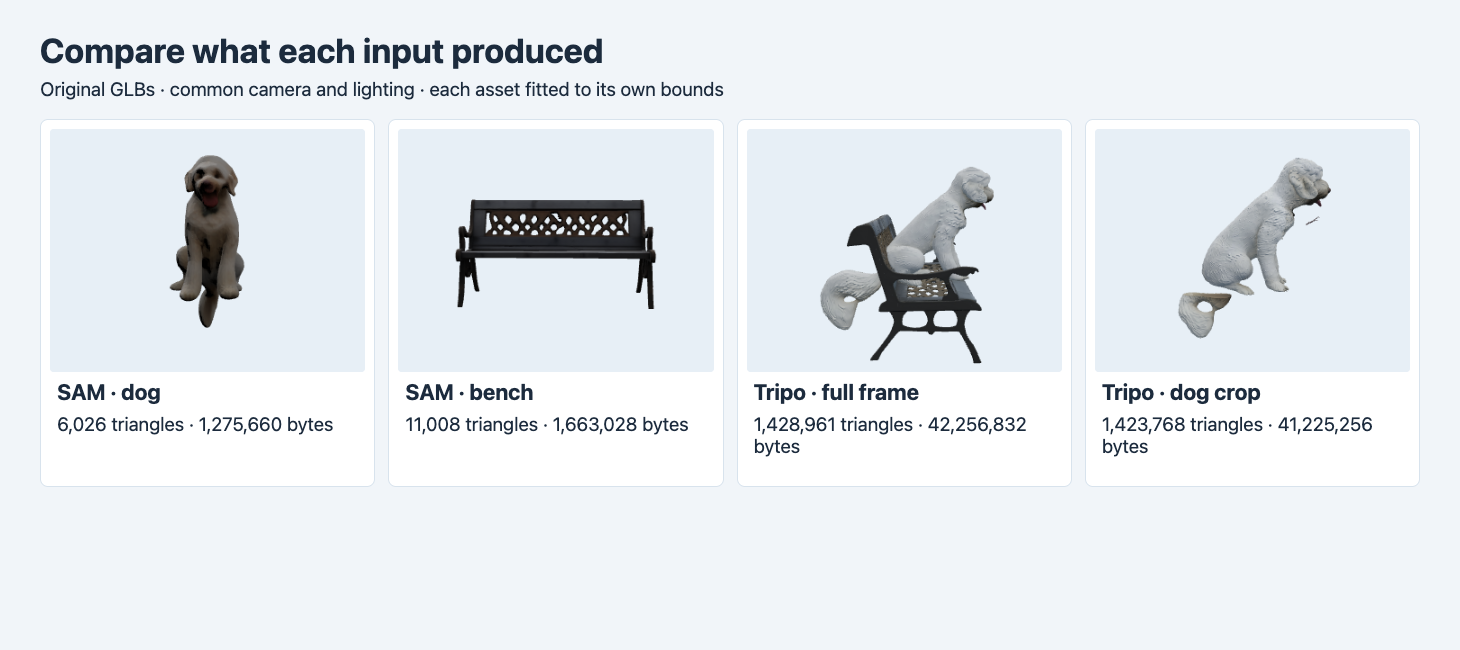
Each asset is framed to its own bounds under one camera and light setup. Export orientation differs, so these are common camera positions rather than matched semantic front views.
The SAM dog render shows a seated dog with a hanging tail and no recognizable bench in the checked views. It is compact, and the rear is coarser than the higher-polygon Tripo crop in these screenshots. The SAM bench render shows the lattice back, seat and legs with no visible dog. Parts of the seat were hidden in the input. Their appearance in the result is reconstructed. These are useful outcomes if you want an individual object without manually drawing an exact mask.
The Tripo full-frame result shows the dog seated on the bench. Both subjects are in one imported mesh, with one connected component in the measured inspection. This is useful if you need the two subjects as one composition. If the dog and bench must be moved independently, inspect or segment the output before treating it as two assets.
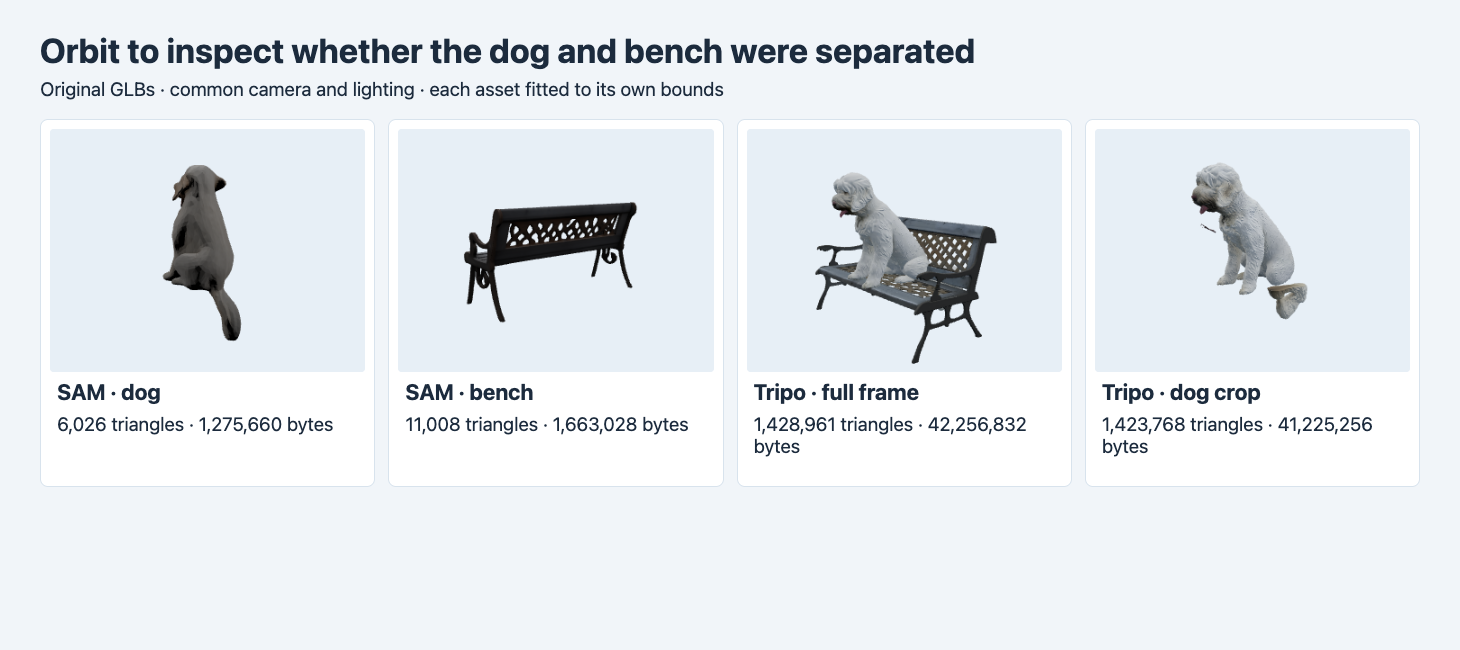
The crop keeps the dog as the main subject but leaves a separate loop near the tail and a smaller fragment near the chest. Those pieces remain visible after orbiting.
Tripo’s crop preserved more fur-like visual detail around the body and face in the displayed view. It also retained unwanted geometry. The detached loop sits in the image near where the original tail and bench overlap. The small fragment appears near the chest. We can see that those pieces are separated, and the connectivity calculation supports a three-island result. The photographs and meshes do not tell us which pixels caused each artifact. Mark the pieces for review and decide whether to mask, crop differently or remove them in a downstream edit.
Pick the targeting method before deciding which file passes
| Desired result | Starting workflow | Check before accepting |
|---|---|---|
| Dog as an independent asset | Full image with a dog selection prompt | Orbit to confirm furniture is absent and check the tail and legs. |
| Bench as an independent asset | Full image with a bench selection prompt | Inspect the seat area hidden by the dog and verify the legs. |
| Dog sitting on a bench as one composition | Full-frame image-to-3D | Confirm the relationship, file size and mesh structure. |
| High-detail dog from a crop | Use a crop or a verified mask and test | Inspect the overlap region and count disconnected islands before delivery. |
You can send the SAM request below to POST https://api.sandbase.ai/v1/run using a server-side bearer token. Save the ID and poll GET /v1/run/{id}. Change only prompt to bench to replicate the tested selection change. On Tripo, use the image field without a prompt. The crop is a separate input file, with the coordinates above allowing a reader to recreate it from the public example.
{
  "model": "meta/sam-3/3d-objects",
  "image": "https://static.sandbase.ai/examples/pixal3d/pixal3d/input_image_0.png",
  "prompt": "dog",
  "export_textured_glb": true,
  "seed": 42
}
Store the requested target and original file hash alongside the render. A reviewer should be able to tell which subject was requested, whether another object is visible, and whether the output can be edited independently. If a single mesh still has unwanted islands, isolate each candidate and check hidden surfaces before deleting geometry. Inspect named GLB parts after segmentation
Run a targeted acceptance pass before changing the prompt
For this example, treat “contains a dog,” “contains a bench,” and “can be moved independently” as three separate fields. Review the rendered views first, and then inspect the object and connectivity counts. An object can look isolated at one angle while a small fragment remains behind it. Keep that view with the rejection reason, so the next generation or edit can be judged against the same condition.
If you need camera-space depth instead of a complete object asset, see the MoGe-2 and MoGe-3 calibrated depth test for the original point-cloud measurements.
FAQ
Is cropping equivalent to selecting an object?
A rectangular crop changes the pixels visible to the model. Here it still included overlapping bench and tail pixels, and the returned mesh contained detached geometry. The SAM prompt produced a separate visible target from the original full image in this test.
Can the dog and bench be moved separately in the full-frame Tripo file?
Blender imported one mesh object, and the measured exact-position connectivity found one component. Separate movement would require further editing or segmentation.
Does a smaller GLB establish higher quality?
File size measures delivery cost in bytes. Check the selected subject, visible shape and intended viewing distance along with geometry and material requirements.
Found this useful? Share it