Pixal3D vs TRELLIS.2: Six Published GLBs Compared
Compare three same-image Pixal3D and TRELLIS.2 project exports with exact file bytes, triangles, validator results and three-angle renders.
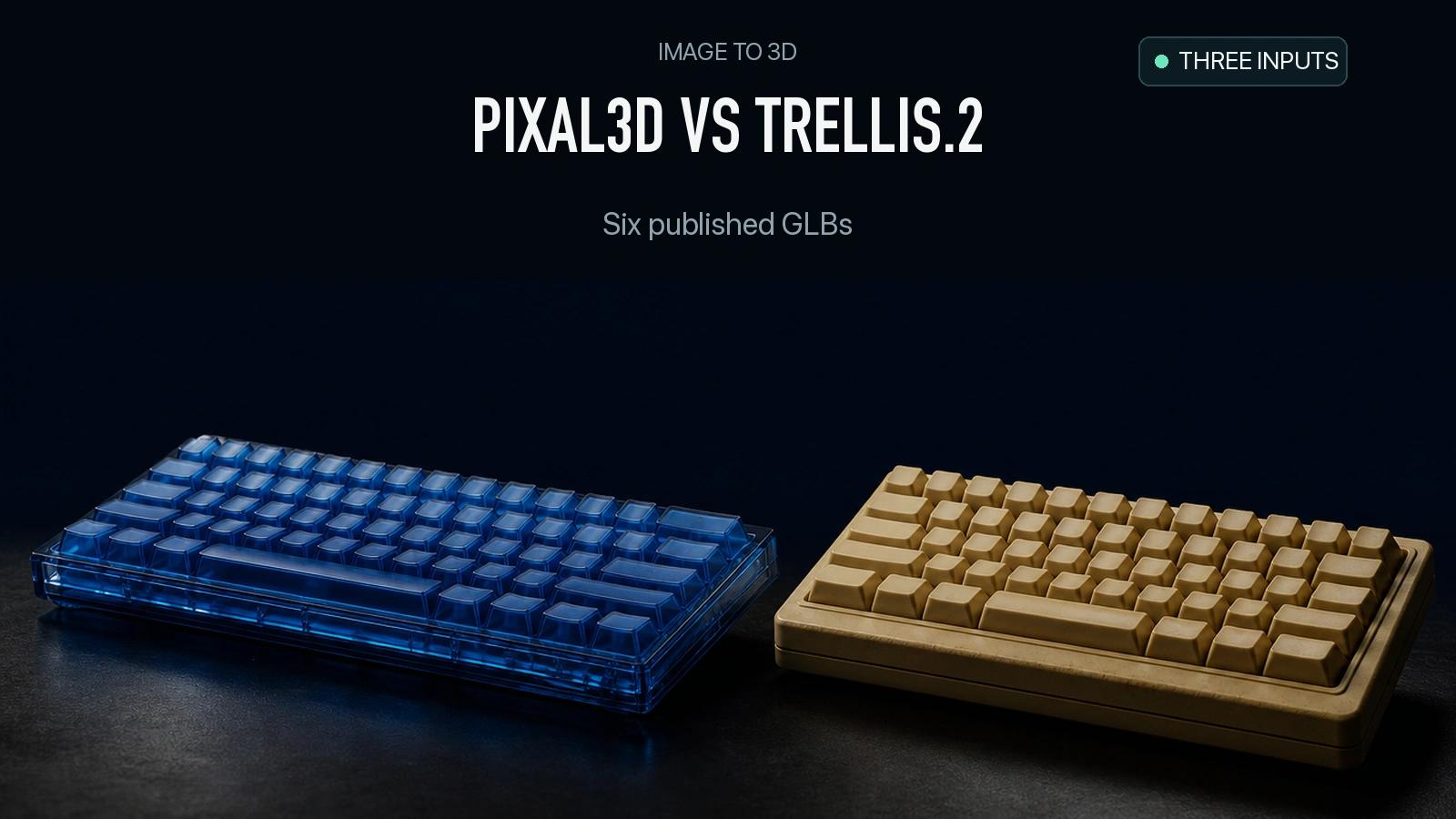
The keyboard is the biggest delivery difference in this comparison. Pixal3D’s published GLB is 47.02 MB with 985,796 triangles. TRELLIS.2’s is 13.63 MB with 291,414. On an ornate chair, Pixal3D is the smaller of the two, and on a windmill house the files differ by less than half a megabyte. We downloaded the six comparison exports from the Pixal3D project page and rendered them again. The paired files let you inspect shape, appearance and what each export would cost to deliver over a network in bytes.
Key takeaway
- For the keyboard, Pixal3D’s file is 3.45 times the size of the TRELLIS.2 export. It also has 694,382 more triangles. The same direction does not hold for the chair.
- The windmill GLBs are 49,068,556 and 48,642,124 bytes. Their triangle counts are within 5,626, yet the visible rear details differ.
- All six loaded in the local Three.js viewer. Khronos glTF Validator reported two errors for the Pixal3D keyboard and 28 for the Pixal3D windmill. Both sets are non-unit normal diagnostics. The other four had zero errors and warnings.
- These are published project exports selected by the Pixal3D team. We measured and rendered the downloaded files. This is a file audit of three examples, with no matched live API price, timing or parameter benchmark.
Use the original project exports as evidence
The Pixal3D project page links each input with interactive comparison meshes. We selected three rows that expose different delivery questions: a keyboard with small mechanical details, a chair with narrow gaps, and a windmill house with plants and thin parts. For each row we downloaded the Pixal3D and TRELLIS.2 GLBs as served by the project site. The project team says that comparison meshes from TRELLIS.2 and Hunyuan3D were manually rotated and scaled for alignment. Our viewer framed each asset by its bounds with shared camera settings and lighting within each row. The original source angles are approximate, and the exports may reflect different inference and export settings. Pixal3D project comparison
Pixal3D’s official repository describes an improved implementation based on TRELLIS.2 and identifies a separate branch for the original paper implementation. The project page pairs the exports shown here, but does not provide a complete execution receipt for those downloads. A route listed by the same model name can have different defaults or packaging. During our SandBase test, both separate Pixal3D API jobs returned an upstream 404. This comparison uses the research team’s published assets, so the measurements are of the downloaded files rather than SandBase Pixal3D jobs. Official Pixal3D repository · Pixal3D route · TRELLIS.2 route
| Input | Export | File bytes | Triangles | Embedded image bytes | Validator errors / warnings |
|---|---|---|---|---|---|
| Keyboard | Pixal3D | 47,018,152 | 985,796 | 5,387,160 | 2 / 0 |
| Keyboard | TRELLIS.2 | 13,625,880 | 291,414 | 1,687,796 | 0 / 0 |
| Chair | Pixal3D | 34,845,496 | 950,386 | 2,236,472 | 0 / 0 |
| Chair | TRELLIS.2 | 38,988,044 | 999,588 | 4,594,448 | 0 / 0 |
| Windmill house | Pixal3D | 49,068,556 | 934,893 | 7,874,448 | 28 / 0 |
| Windmill house | TRELLIS.2 | 48,642,124 | 929,267 | 9,137,008 | 0 / 0 |
The file size is the GLB length in bytes. We counted stored triangles from indexed or non-indexed triangle primitive accessors. The image column sums encoded buffer view lengths. Each of the six exports declares a base-color texture and a metallic/roughness texture, with two embedded WebP images and no declared normal map. All six use EXT_texture_webp. Check extension support in the shipping loader if you are bringing these exact files into an application. glTF WebP extension
Keyboard: examine front detail and the generated back
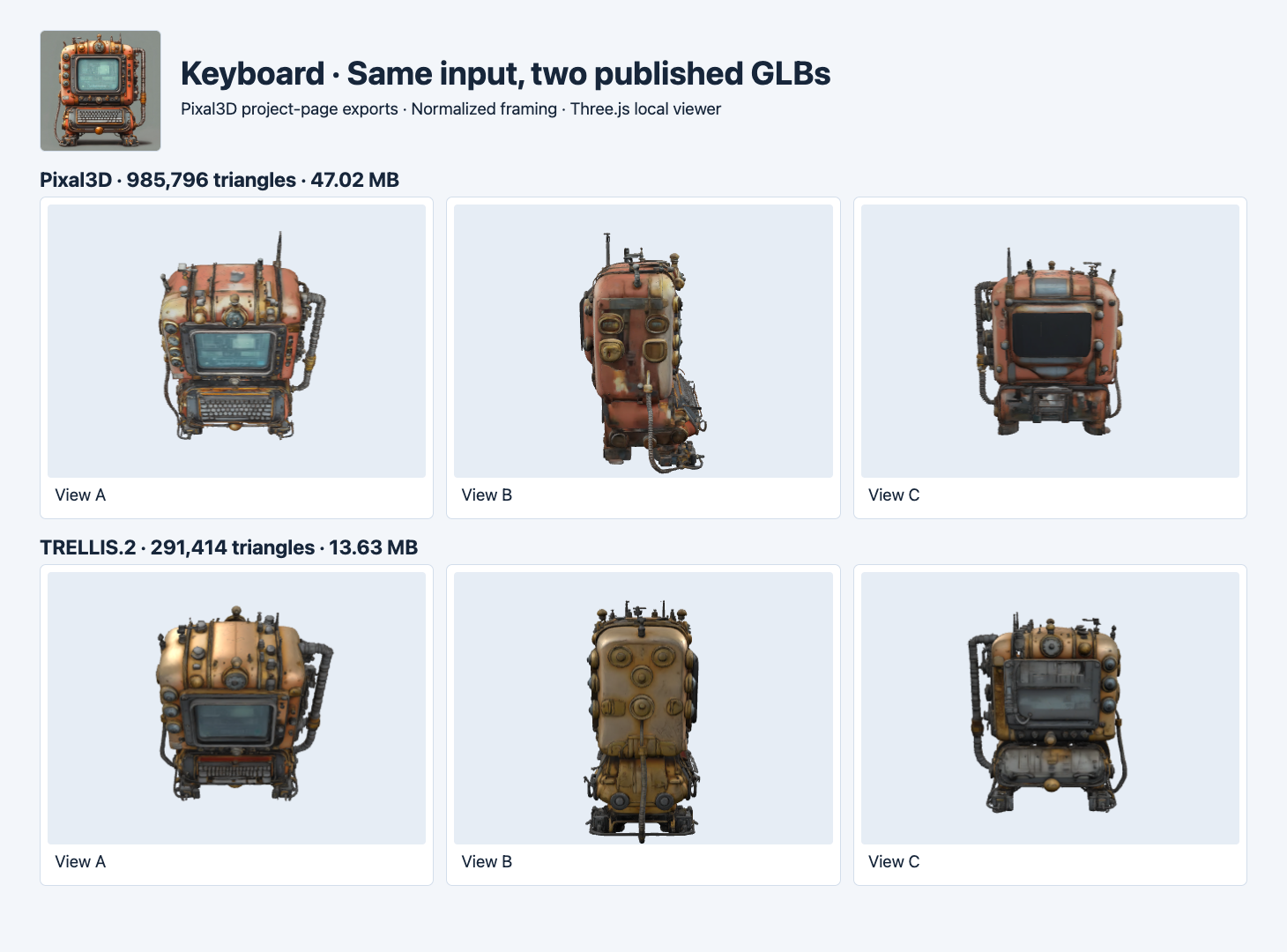
The small image is the shared project input. View A shows the front at a higher angle. Views B and C inspect the side and rear. The models were independently framed to fit.
Pixal3D’s front preserves more of the red-orange casing seen in the input. The small keyboard and bright teal display remain distinct at the screenshot scale. TRELLIS.2 uses a warmer metallic brown around the top casing and a darker display. Both show a curved side cable and several raised fittings. In the rear view, Pixal3D has a broad dark panel, while TRELLIS.2 shows a different gray panel layout. The input does not show either rear, so treat those surfaces as generated alternatives.
The Pixal3D file is 33,392,272 bytes larger. Its encoded images account for 3,699,364 bytes of that difference. The rest includes geometry and other GLB data. File size alone cannot tell you whether more triangles go to readable key spacing, rear reconstruction or dense surfaces. If you are choosing for a viewer, inspect the keys, panel edge and cable at the size users actually see. If a hard size budget applies, compare independently optimized exports and validate those files again.
Chair: inspect gaps, leg shape and seat profile
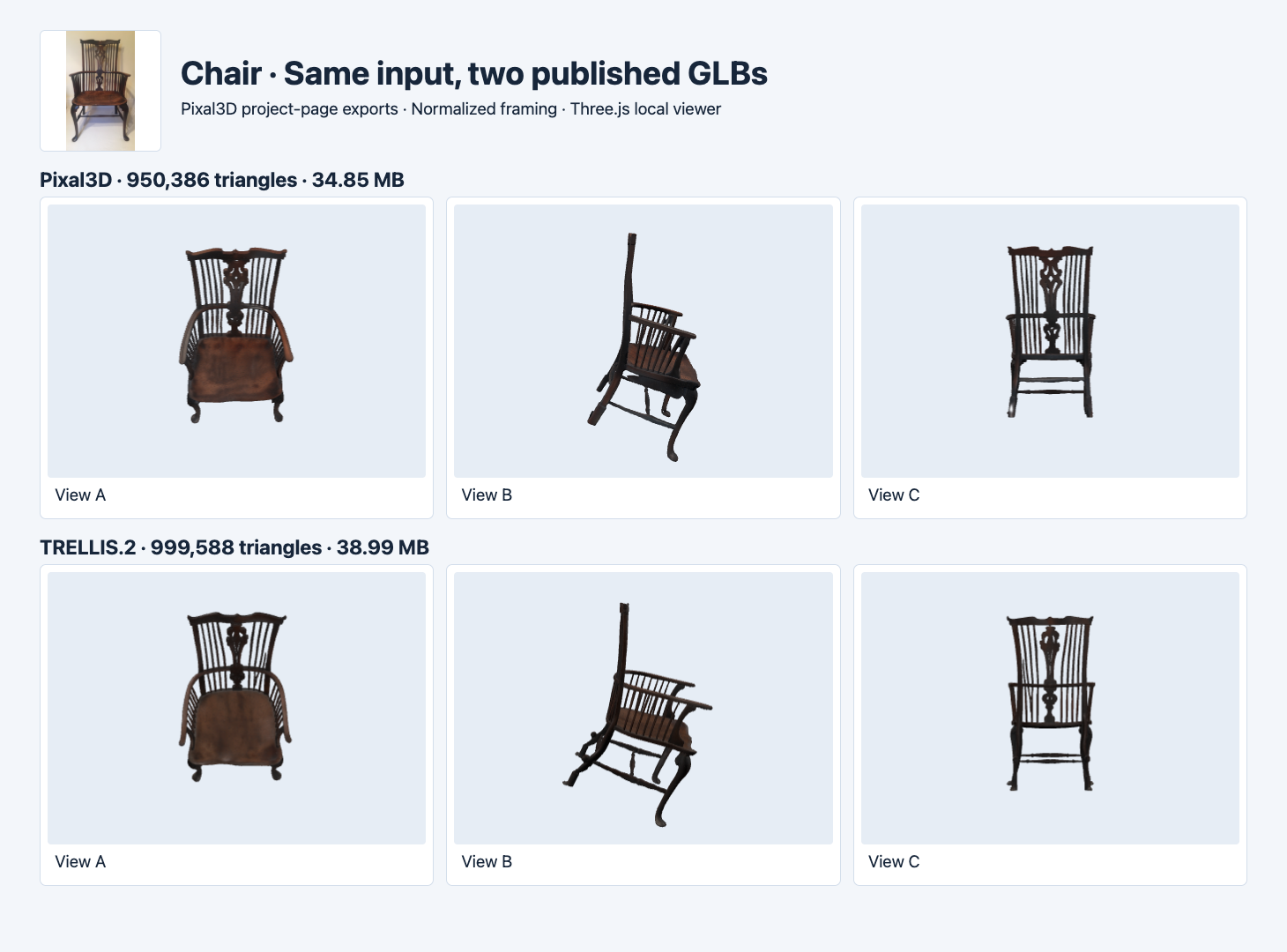
Both published meshes are near one million triangles. This example compares recognizable structural features such as the central cutout and narrow gaps.
Both chairs show the central ornamental back and open gaps between the spindles. The darker Pixal3D seat appears reddish, while the TRELLIS.2 seat looks more muted under this lighting. The side view exposes differences in the curve of the front leg and the placement of the lower support. Rear views show the main openings at similar locations. If the gaps matter for your product, check them close up as the camera moves. Some apparent dark areas can come from lighting or the texture instead of an opening in geometry.
Here Pixal3D is smaller by 4,142,548 bytes and has 49,202 fewer stored triangles. Both passed the validator without warnings. A strict web budget might still require substantial optimization because both source files exceed 34 MB. If you need to reduce geometry, compare an optimized copy with the original and look for newly filled gaps or broken narrow parts. Measured GLB size optimization
Windmill house: similar size, different rear detail
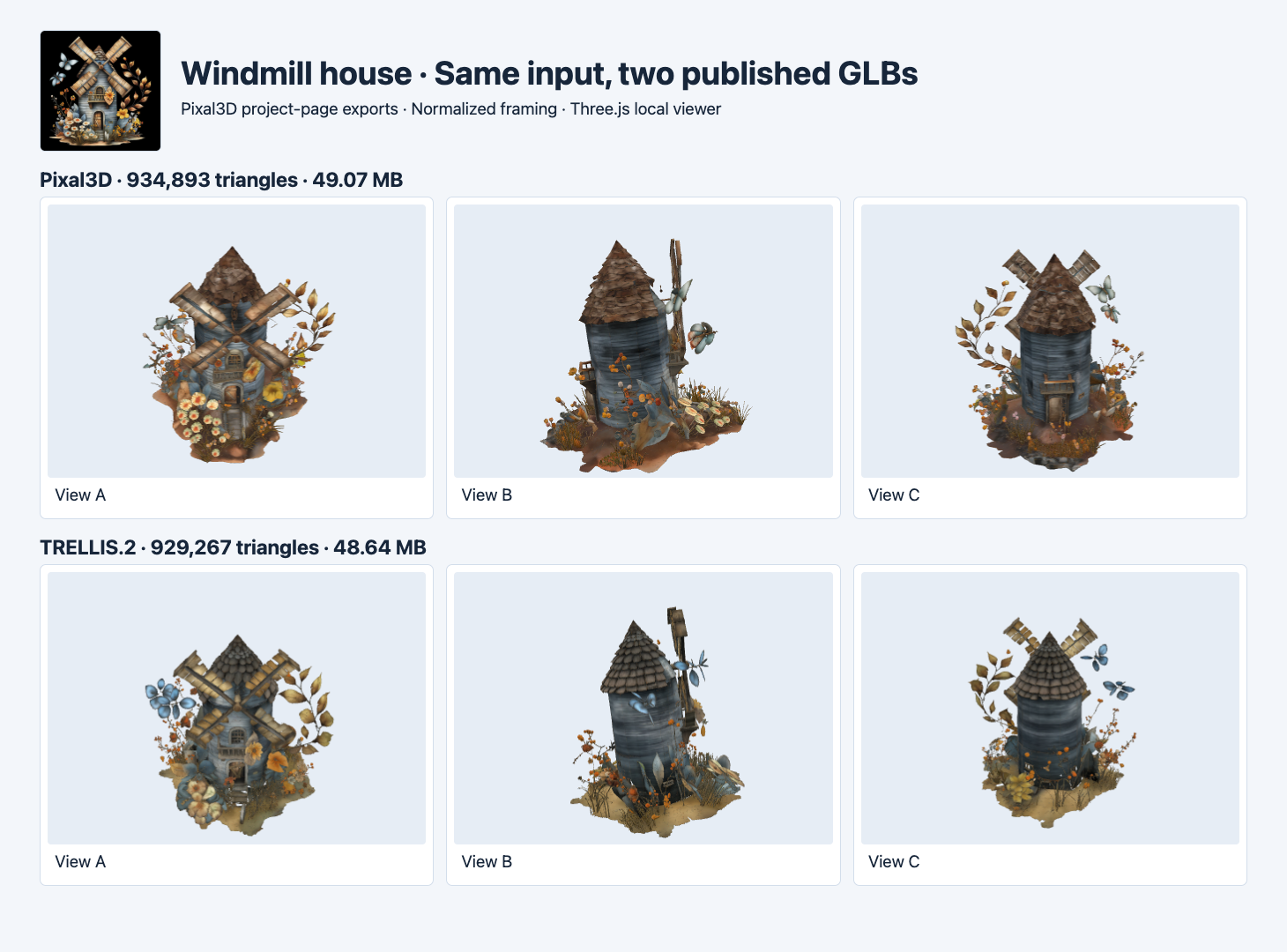
The windmill house pair has less than 1% difference in stored file size relative to the TRELLIS.2 export.
Both front views show the crossed blades and clusters of leaves. The Pixal3D rear includes a door-like panel at the lower center in this render. The TRELLIS.2 rear reads as a continuous cylindrical wall with horizontal bands. The roof pattern and nearby foliage also look different. Similar byte counts and near-matched triangle counts still allow meaningful differences in placement and texture.
The Pixal3D GLB drew in our viewer despite 28 reported non-unit-vector errors. The keyboard from the same project had two errors of the same class. The validator points to normal accessor data. Check whether your import pipeline rejects those files, accepts them or repairs normals. After any repair, retain the original and verify the derived file. A visible result in one viewer gives you a useful inspection point, with validation and importer acceptance as separate checks. Khronos validator issue definitions · Automated GLB intake
Evaluate the file you plan to deliver
For a geometry-heavy input, keep the same source image and record the requested and actual face count. Save the returned texture types, GLB size and validation. Open the actual file at the camera distance and light your users will see, then inspect the features that matter for that asset. A keyboard has small spacing and hard edges. A chair needs gaps and support pieces. A windmill needs blades, foliage and clean transitions around the building. The three examples show why a single size ratio would be a poor basis for choosing a route.
If you want a practical starting point, choose an image-to-3D API by its deliverable and use the exact files from the route you plan to ship. The project examples here are a way to compare appearance and export properties before paying for your own matched runs. If a route is unavailable, preserve the error separately and use a documented artifact to answer narrower questions about the file and its rendering.
FAQ
Were the API output settings held equal?
The project page pairs the inputs and comparison exports. It does not show a complete matched request configuration for these GLBs. The byte and face counts apply to the published artifacts.
Is every GLB with WebP safe to load on my site?
Check the target loader’s handling of EXT_texture_webp and try the actual file in the deployment environment. The local Three.js viewer rendered these six exports, and other loaders can differ.
Can I choose the smaller file automatically?
Use file size to enforce a delivery limit. Check structure and the parts you must preserve before choosing among files that fit. The chair and windmill examples expose different visual details even when both files fit the same hypothetical size cap.
Found this useful? Share it