How to Check Tripo Segment GLB Parts Before Editing
Inspect two original Tripo Segment results in Blender. See part names, mesh boundaries, settled charges, and close-ups of a detached handle and latch.
Tripo Segment turned one lantern mesh into 19 Blender objects and one wooden chest mesh into 24. The lamp’s carrying loop and the chest latch could each be selected and moved. Both pieces had open boundary edges after separation, and one object in the lamp held two connected components. If you intend to recolor a part, that split may already be useful. If you intend to move it, rotate it on a hinge or reuse it as independent geometry, inspect what the cut actually produced.
Key takeaway
- Two Tripo Segment jobs cost $0.48 each. Both original outputs were GLBs with zero Khronos validator errors and warnings.
- The lantern went from one mesh object to 19, with 40,000 triangles in both files. The chest went from one to 24 and from 34,662 to 34,650 triangles.
- Every segmented object in both results had boundary edges under the exact-position inspection. The lamp’s selected handle had 95 and the chest latch had 42.
- Both files named their selected object
tripo_part_10. That name referred to different physical parts. The lamp also contained one separate object,tripo_part_7, with two connected components. - The tests used two generated props. They verify a repeatable inspection method and the results of these two runs.
Submit one source file per job
We used the original Hunyuan mining lantern and Tripo wooden chest from the six-run text-to-3D comparison. Each source had one mesh and one material. The shapes give two distinct inspection targets. The lantern handle is an arch with two contact points. The chest latch is a small face detail with a backside that is hidden when installed.
Tripo Segment on SandBase accepts a reachable GLB, OBJ, FBX or STL URL up to 150 MB. The inspected SandBase route exposes one model_url field. Its public schema differs from Tripo’s direct API, which lists additional segmentation modes and fields. Use the schema for the route you call. Tripo segmentation documentation
{
  "model": "tripo3d/tripo/segment",
  "model_url": "https://static.sandbase.ai/examples/tencent/hunyuan-3d/3.1/smart-topology/input_input_file_url_0.glb"
}
The URL illustrates the field shape. Substitute your own source model URL, submit to POST https://api.sandbase.ai/v1/run with a server-side bearer token, and save the returned ID. Use GET /v1/run/{id} to track completion. Save the original and the segmentation output as separate files, and retain both hashes. Each actual segmented prop in this test cost $0.48. The $0.96 total covers these two segmentation runs. The original generation jobs were billed separately.
Count the actual parts before assigning meaning
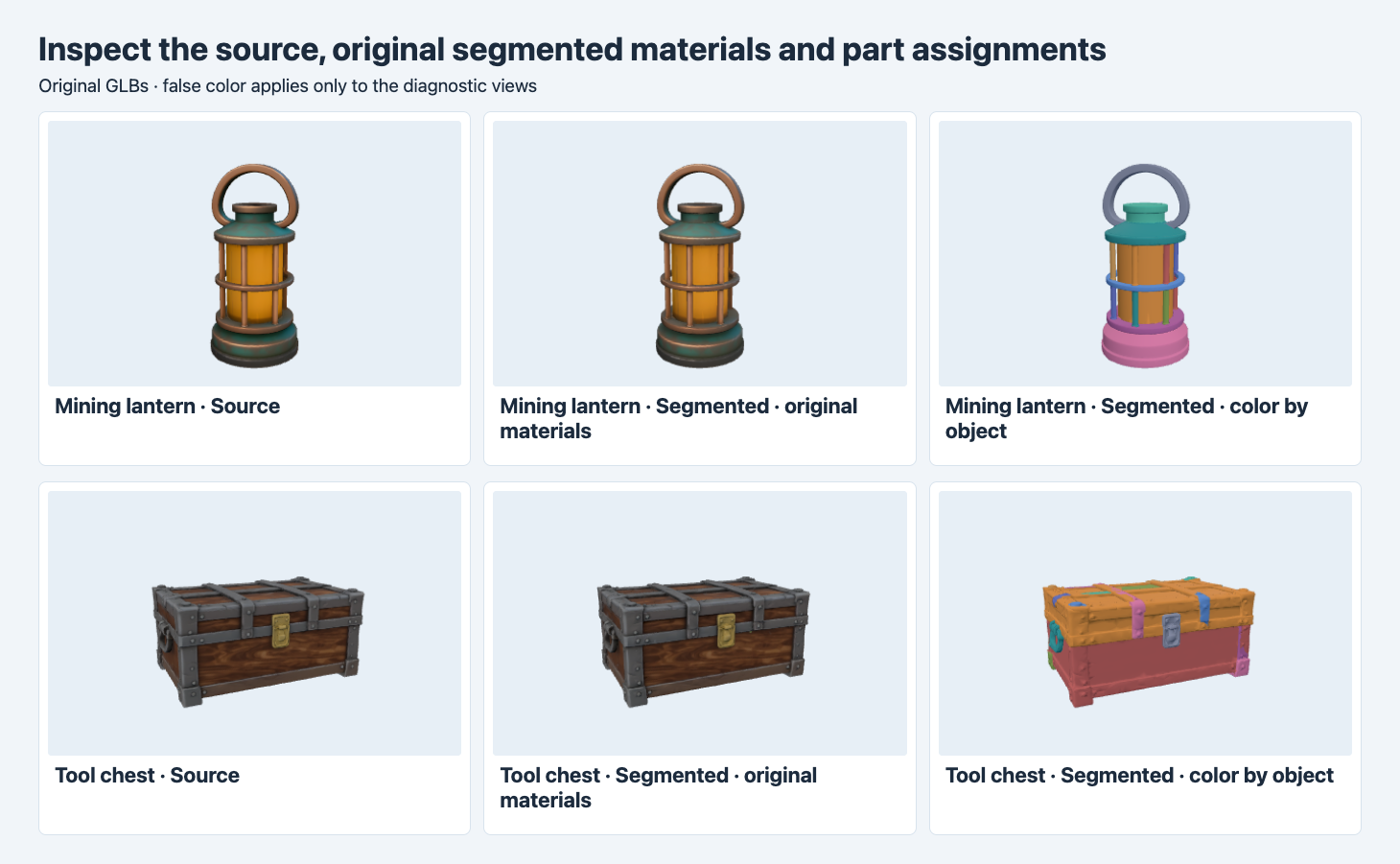
Left and middle use the original materials. The right column assigns colors in the viewer to show separate mesh objects. Colors are reused across objects.
The new files preserve the assembled appearance closely enough in these views to compare the parts in context. The false-color view reveals which elements became separate objects. On the lantern, the top loop has its own color and the body is split into several regions. On the chest, the front latch is separate from the lid and the surrounding panel. The viewer colors are diagnostic. They do not change the stored material slots or prove a single connected component per color.
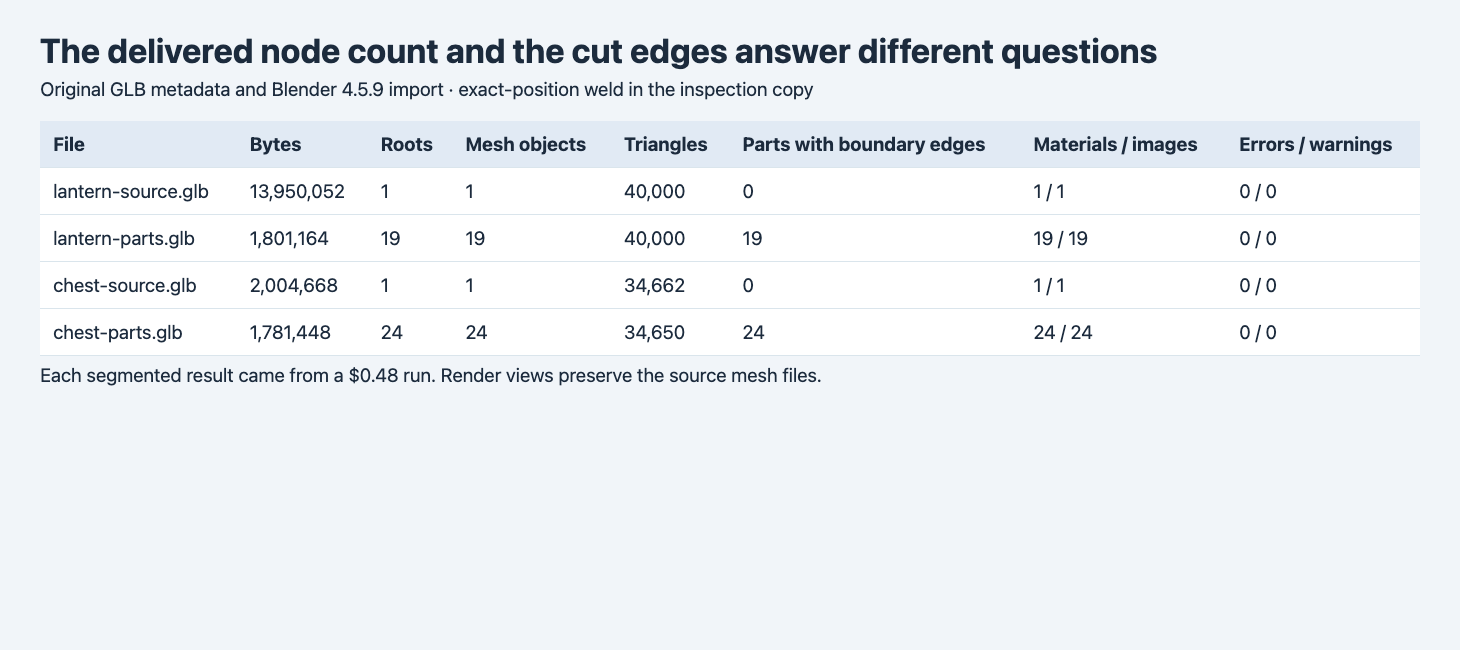
Counts come from the original GLBs and fresh Blender 4.5.9 imports. Boundary edges were counted on each object after grouping identical local positions.
| Asset | GLB bytes | Root mesh objects | Triangles | Materials / images | Objects with boundary edges | Validator errors / warnings |
|---|---|---|---|---|---|---|
| Lantern source | 13,950,052 | 1 | 40,000 | 1 / 1 | 0 | 0 / 0 |
| Lantern segmented | 1,801,164 | 19 | 40,000 | 19 / 19 | 19 | 0 / 0 |
| Chest source | 2,004,668 | 1 | 34,662 | 1 / 1 | 0 | 0 / 0 |
| Chest segmented | 1,781,448 | 24 | 34,650 | 24 / 24 | 24 | 0 / 0 |
The lantern became much smaller on disk even though its object and image counts rose and its triangle count held steady. Image count alone cannot predict download size. For the chest, the output had 12 fewer triangles. Its smaller file and nearly identical triangle count still leave separate material, alignment and component checks. The measurements do not identify a general rule for compression or how much per-part editing work is saved.
We checked each imported object’s parent and origin. Both segmented GLBs put all mesh nodes directly under the scene, and Blender imported all of them as unparented mesh objects. The selected parts have nonzero translations. That supplies a usable transform for selection and translation. A latch pivot at its hinge would require a separate check or placement. If you plan to animate several parts together, group and name them according to your project before setting constraints. Checking the exported mesh after retopology
Move and isolate the part you intend to edit
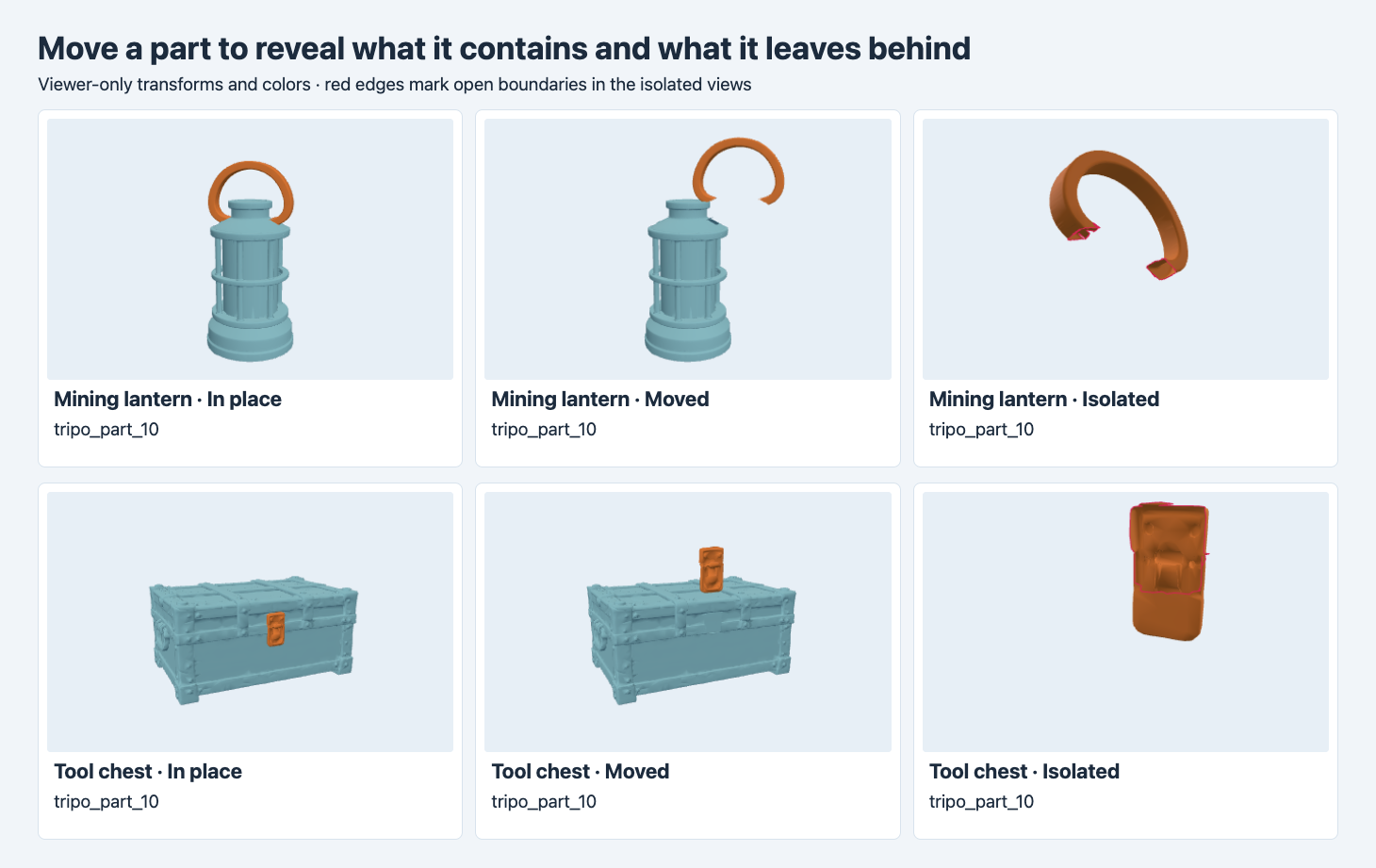
Orange marks the selected object. The middle views use temporary translations. The right views enlarge the isolated object and mark its boundary edges in red.
In both cases tripo_part_10 could be isolated. On the lantern it was the carrying loop. On the chest it was the front latch. The selected object could be translated without moving the other exported objects. This test establishes that the original file supports those independent selections. It does not demonstrate a finished hinge, sealed underside, interior detail or printable component.
To count the boundary edges, we grouped vertices with exactly identical local positions within each imported object. For each triangulated face, the inspection counted how many times each nonzero undirected edge appeared. An edge referenced by one face is counted as a boundary. The two source objects had zero such edges. The segmented lantern had 2,888 across its objects, and the chest had 3,164. At the selected-part level the handle had 95, and the latch had 42. A format validator can still report zero errors because an open mesh can be valid GLB.
The same grouping also supports a connectivity check. We connect welded vertex IDs through the triangle edges and count connected sets per object. The lamp’s tripo_part_7 contained a component of 2,565 welded vertices and a second of three. It contributed one Blender object and two connected components. This method can merge vertices at identical positions, and disconnected islands can be intentional. Read it alongside the visible assignment and your required use.
Decide whether the split is ready for the next operation
| Next step | What to accept | What to inspect |
|---|---|---|
| Recolor an installed part | The object selects and renders independently | Material slot, nearby colored regions and seam visibility. |
| Remove or move a part in a viewer | Both the detached part and exposed body look acceptable | Backside, cut boundaries and exposed surfaces. |
| Animate a hinge or handle | The intended component and its transform work in the rig | Pivot, parent chain, limits and collisions in the target pose. |
| Reuse a closed standalone component | The repaired part passes geometry checks and visual review | Boundary edges, caps and the destination tool’s requirements. |
In Blender, import the GLB into an empty scene and select the candidate in the Outliner. Toggle isolation and move it temporarily. Inspect both sides, then undo the move. For scripted validation, keep the per-object name, parent, triangle count and open boundary count next to the original hash. A different model may assign different numeric names or place seams differently. Record observations against the rendered component rather than relying on the same ID across files.
Make part review reproducible across a batch
Keep one row for each reviewed component. Include the source hash, result hash, node name, reviewer label and intended operation. For these files a row with the label “handle” points to a different asset from a row with the label “latch”, even though both raw node names are identical. A useful screenshot includes the selected part in place and the same selection displaced. Add a rear or underside close-up when the connection is occluded. If an artist repairs the cut, keep the repaired file under its own hash and compare it with the original segment at the same angle.
For a comparison on the exact same lantern and chest, see Tripo Segment versus Hi3D Split. It shows where both routes separated the carrying loop and what moved with the latch.
FAQ
Does 24 mesh objects mean 24 complete components?
The chest had 24 mesh objects. The inspection found boundary edges on every one. Object count establishes an editing structure, and completeness needs its own check.
Do the segmentation names describe the part?
The two selected objects were both named tripo_part_10, and one was a handle while the other was a latch. Inspect the visible region and rename objects for downstream use.
Is a zero-error GLB enough for printing or animation?
It validates the file format. Check closure for a standalone printed piece and check pivots, parent relationships and deformation or motion for animation.
Found this useful? Share it