Rodin 2.5 Text vs Image to 3D: A Prototype Test
Three measured Rodin 2.5 jobs compare a text brief, a front image, and front plus rear images for one portable weather receiver.
Three Rodin 2.5 jobs produced previewable GLBs of a weather receiver at $0.48 each. The text brief worked for a first interpretation, but the result was tall and put the specified rear vents and port on the front. A single front image produced a wide enclosure closer to the reference while leaving the back blank. The pair of front and rear images recovered both rear features in the preview, down to visible relief with the material maps removed. The three results came in between the last running and first complete checks shown below.
Key takeaway
- We ran one text job, one front-image job, and one front-plus-rear image job with High, PBR, a 20K triangle preset and seed 2027. The three jobs settled for $1.44 total.
- The front-only job had the best front silhouette score in this batch, at 97.63% overlap by intersection over union. The image pair scored 95.23% head-on and 83.92% from the side. Text scored 53.28% and 38.25% from those views.
- Text finished in the observed 117–126 second window after submission. The front-only job landed in 160–169 seconds and the pair in 144–152 seconds. These are polling windows from one batch, including the service queue, rounded to the nearest second.
- The paired image output showed three horizontal rear bars and a rectangular port in the common neutral pass. The front-only output lacked both at those positions. The full delivery was 76,328 bytes larger than the front-only asset.
Use a design with front and back features
We wrote a brief and built a small reference model of one portable weather receiver. It has a wide teal case, black front bezel, a rectangular blue screen with five rising bars, three orange buttons, seven upright grille slots and a right-leaning antenna. The back has three horizontal ventilation bars and a small rectangular port. The reference is a synthetic prop built for this experiment, so the back could be checked from the same authored shape even when the generation never received it. The concept is meant to be read at game-prop and prototype scale, without text or logos.
The text route got a written description including both rear features and their intended side. The single-image route received only an authored front three-quarter PNG. The two-image route received that identical front image followed by a rear three-quarter PNG. Neither image call used the optional prompt. The text specifies counts and locations. The images also encode proportions, placement, lighting and camera perspective, so the text and image conditions answer the practical choice between available inputs. Only the difference between the two image conditions isolates adding a rear view.
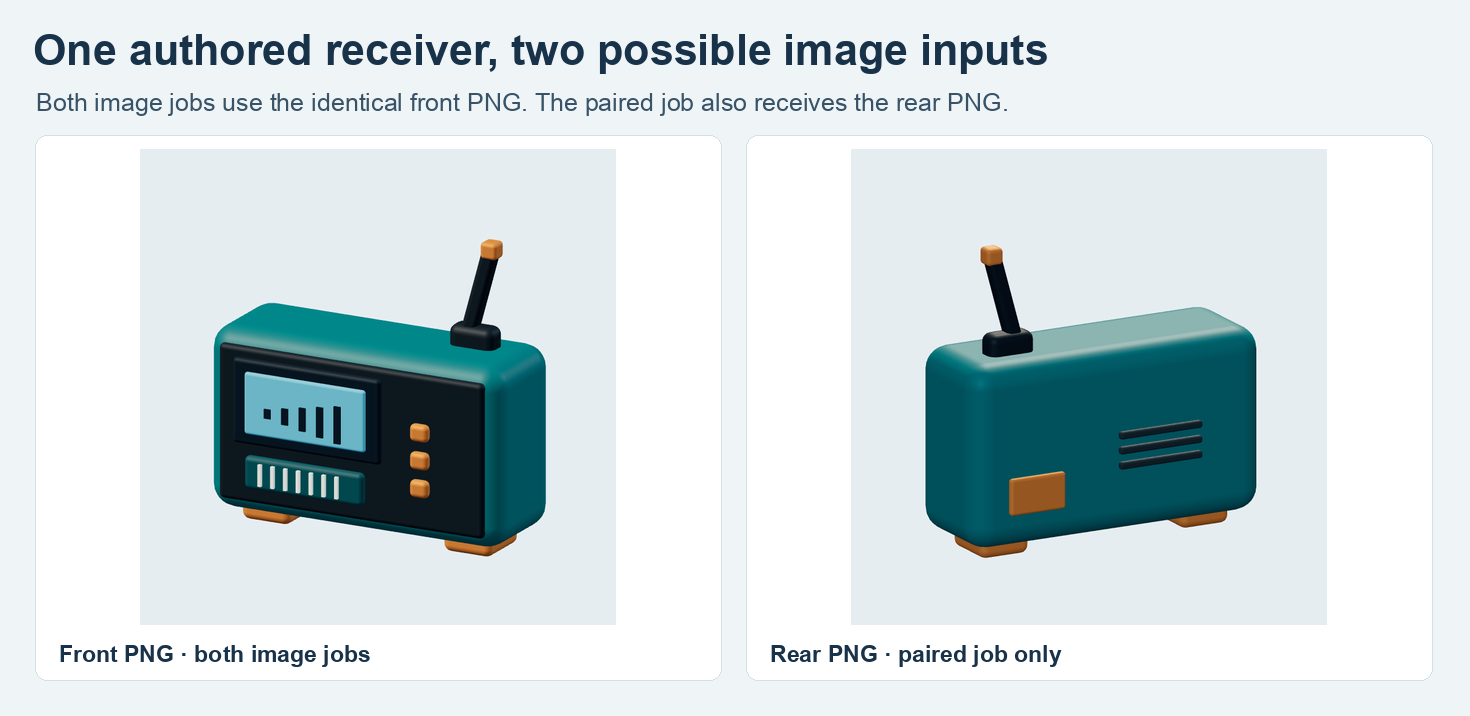
The same front PNG was used twice. The rear PNG was available to only one of the image jobs. Both inputs were 768 × 768 before the figure was assembled.
The Rodin 2.5 text route and image route both used Gen-2.5-High, 20K Triangle, glb, PBR, no HD texture or paid add-on and no T/A pose. All three used the same numeric seed. This records one attempt at a common seed value, which can be handled differently by different entry points. For the effect of changing tiers or output types, see the Rodin export guide.
Inspect the front and then turn the model around
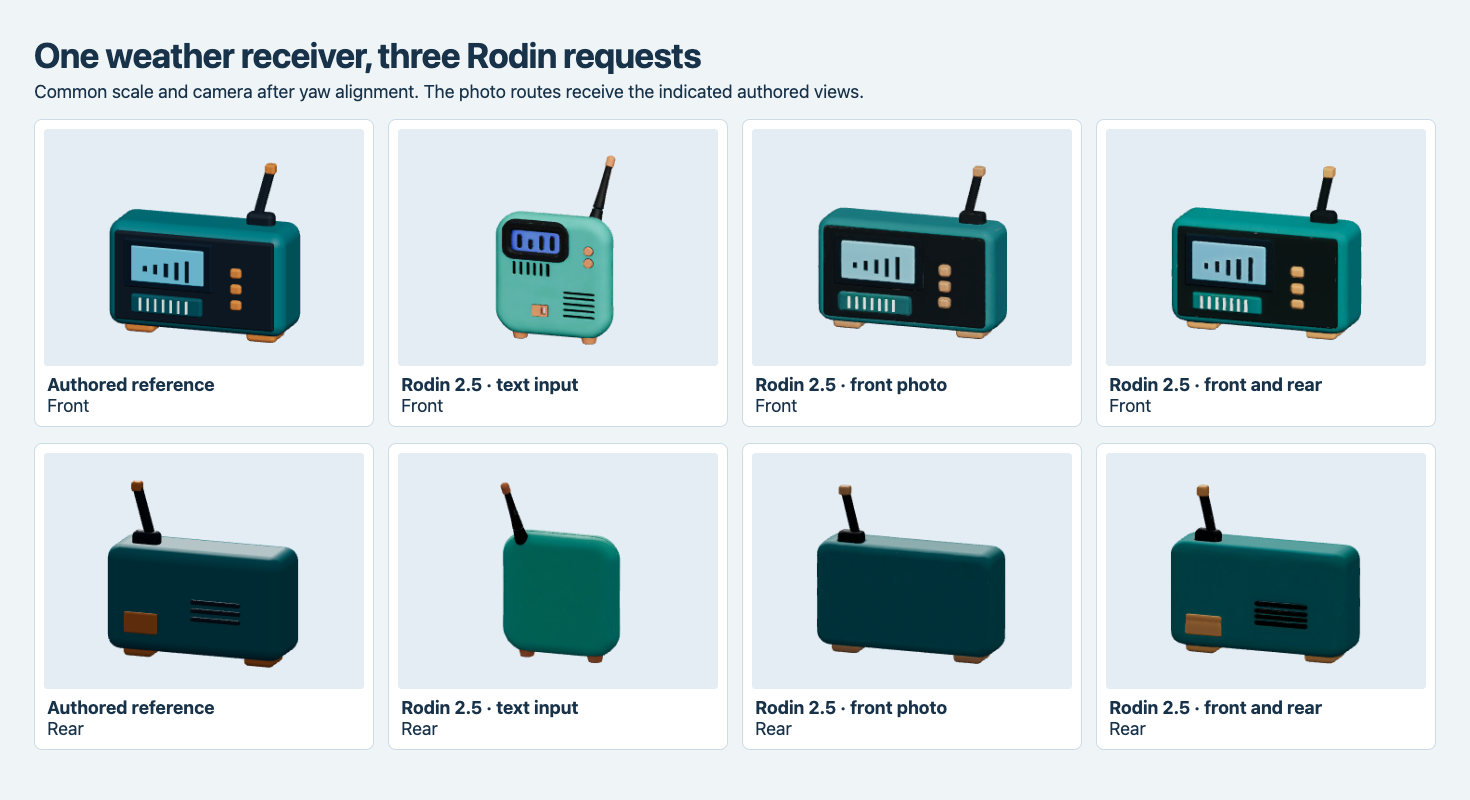
The left column is the authored reference. The other columns are the original Rodin mesh and materials. The rear row uses a second common viewing angle for all four assets.
The text job drew the upper screen, an angled antenna and two feet. It returned an upright case with two round controls on the front. In that same front view it added a grille-like group and orange rectangle near the lower edge. Those resemble the two features that the brief put on the rear. Its actual back is flat in the reviewed locations. This was enough to communicate the premise of a handheld receiver, but its face layout and width would both need revision before it matched the brief.
The front-only job placed the screen, grille and three controls on the correct face. The width, outline and antenna position were close enough that a person reviewing just the front thumbnail could accept it as a counterpart to the reference. Its back showed neither the port nor the three rear bars. Including the second image kept the wide housing and visibly put a port and a group of three bars on the back.
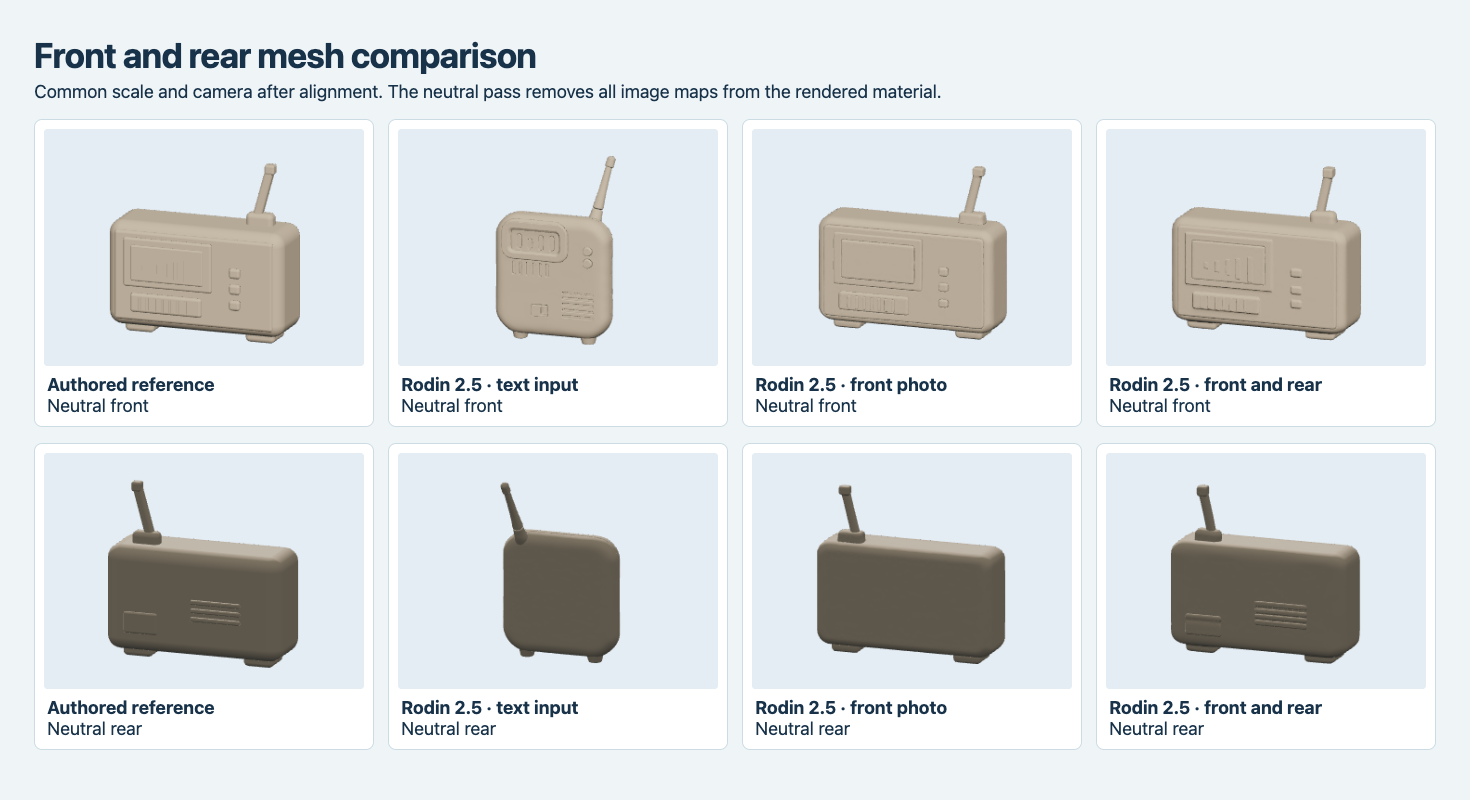
The same models are rendered with a shared neutral material and no texture maps. Relief on the two-image result remains visible on the rear. This visual check does not establish that the vents are through-holes or that the port fits a connector.
The neutral image is a useful handoff companion to the colored one. A dark mark can look like a slot in the original material without the mesh changing at that location. Here the two-image ribs and port outline remained visible once the material maps were replaced. The profile still differs around the depth of the housing, and we did not measure the port’s dimensions or test any mechanical fit. If a visible component has to carry a functional requirement, its dimensions and topology need their own acceptance test.
Measure shape agreement in three fixed views
We centered every bounding box and set each longest edge to the same normalized length, with the exported front orientations aligned as viewed. A 56 × 56 orthographic ray grid passed through each view. Front and side silhouette overlap is intersection divided by union of the rays hitting either mesh. The depth statistic averages absolute entry-distance differences only across rays hitting both objects, expressed as a fraction of the normalized longest side.
| Request | Front silhouette IoU | Side silhouette IoU | Front mean depth difference | Side mean depth difference |
|---|---|---|---|---|
| Text | 53.28% | 38.25% | 5.69% | 18.66% |
| Front image | 97.63% | 80.53% | 3.36% | 1.74% |
| Front and rear images | 95.23% | 83.92% | 2.29% | 1.98% |
At that sampling resolution, the second image traded 2.40 percentage points of front silhouette overlap for 3.39 points on the side. Front entry depths moved closer to the reference on shared rays, while side depths moved slightly farther away. Opposite orthographic directions see the same 2D occupied area, so the rear silhouette scores duplicate the front values here. That is why the rear feature check uses actual views and material replacement. A good front silhouette alone can coexist with a blank back.
Bounding-box depth was 43.16% of the longest dimension on the fixture, compared with 32.36% on the front-only result and 34.33% on the paired result. These normalized extents capture the thinner case before anyone assigns the prop a real-world unit. They include the antenna and other projecting details. Neither a normalized silhouette nor the link to a model route is a source of physical dimensions.
Account for the GLB and the wait
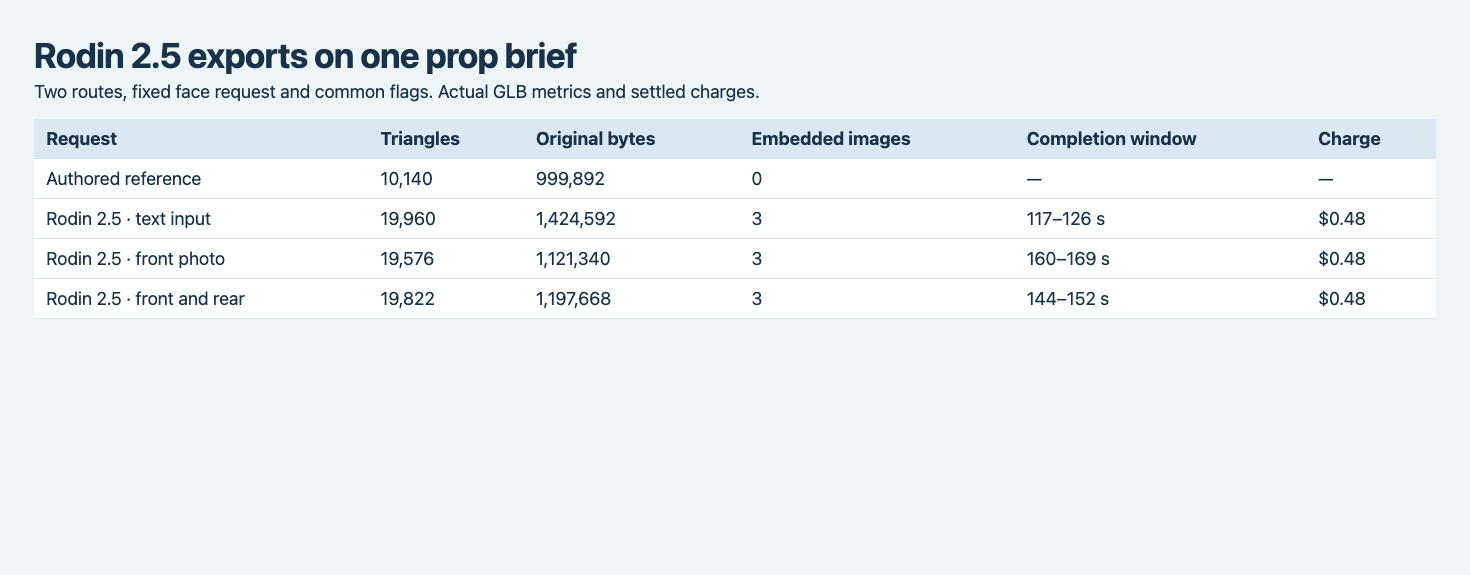
The lower bound is the last poll observed as running. The upper bound is the first complete response. Asset files were then separately downloaded, validated and rendered.
The text GLB held 19,960 triangles and was 1,424,592 bytes. The front-only result held 19,576 triangles and was 1,121,340 bytes. Front plus rear came back with 19,822 triangles at 1,197,668 bytes. All contained three embedded 2,048-square JPEGs. All rendered in Chromium. A format validator reported zero errors and the same generated-tangent-space warning on all three. It flags a material path where the renderer must generate tangents for the normal texture. Check the actual delivery renderer when the surface treatment matters, since the test render establishes behavior in this viewer.
The timings include API submission, queue and execution from the client side. They exclude creating the brief or images and the separate download and acceptance work. In this batch the second image finished before the single image despite receiving more input. One job per condition gives no reliable typical latency or repeatability. For a prototype review, keep these windows with the run records and time the whole path again if the turnaround affects the schedule.
Frequently asked questions
Which input gave a better first preview?
For a quick first concept from a written description, the text job gave a recognizable receiver. For a review against an existing design, the front image gave the closest head-on outline in this batch. For a turntable showing both sides, the two-image output was the only result with the specified rear bars and port in the expected places.
Is the 20K setting an exact triangle count?
The three delivered counts varied from 19,576 to 19,960 on the same preset. Inspect the actual GLB count when applying an import or runtime limit. The Rodin Fast and Standard comparison tests the same nominal target across those routes.
Can I use the two-image result as a production part?
Use the test as evidence about a preview asset. The authored fixture and exported shapes were aligned for visual comparison. A production mechanical part still needs a unit system and measured clearances, plus inspection of apertures, tolerances and mesh topology.
Found this useful? Share it