Qwen-Image-3: Generation + Edit in One Model
Deep dive into Alibaba's Qwen-Image-3 — a unified model for image generation and prompt-based editing with strong multilingual support, available on SandBase.
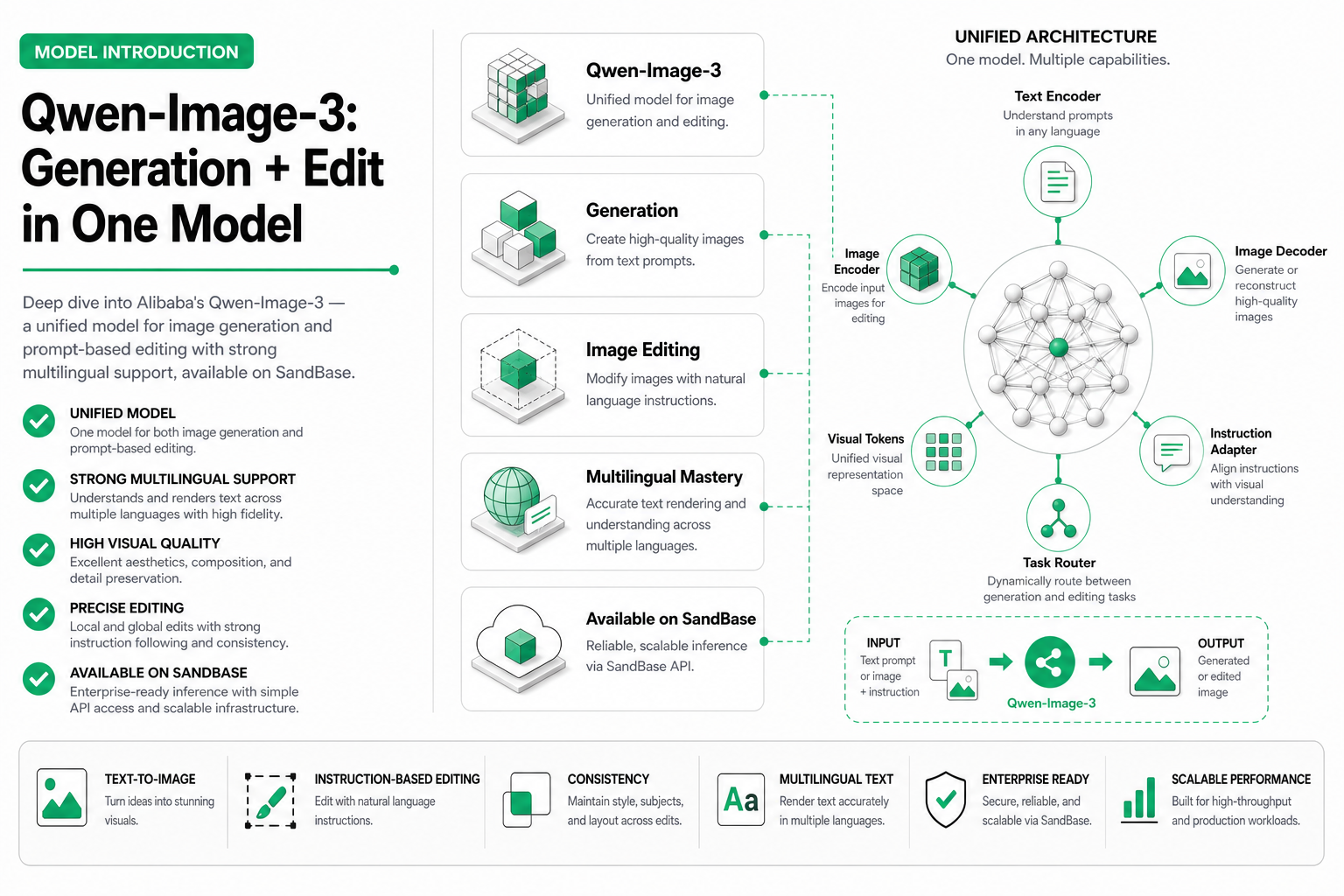
TL;DR — Alibaba’s Qwen-Image-3 (
alibaba/qwen-image-3) is a unified image generation and editing model on SandBase. It handles both text-to-image creation and prompt-based editing within a single model architecture. Strong multilingual prompt support (especially Chinese + English), competitive quality, and edit-native design make it ideal for workflows that need both capabilities without switching models.
The unified generation + editing approach
Most image models are either generators or editors. You create with one, edit with another, juggle two APIs, two billing structures, two sets of quirks. Qwen-Image-3 eliminates this split — the same model that generates your image can also modify it based on natural language instructions.
This isn’t just convenience. A unified architecture means the model understands the relationship between generation and editing semantically. When you ask it to “make the sky more dramatic” on an image it generated, it has context about the original composition decisions. Edit quality tends to be higher when generation and editing share weights.
Model specifications
| Specification | Value |
|---|---|
| Model ID on SandBase | alibaba/qwen-image-3 |
| Modality | Image (text-to-image + edit) |
| Max resolution | 2048×2048 |
| Typical generation latency | 5–9s |
| Typical edit latency | 4–7s |
| Aspect ratios | 1:1, 4:3, 3:4, 16:9, 9:16, 3:2, 2:3 |
| Multilingual prompts | Yes (100+ languages, strongest in zh/en/ja/ko) |
| Batch support | Up to 4 images per request |
| Edit operations | Background swap, element change, style transfer, inpaint, enhance |
Generation capabilities
Qwen-Image-3 produces high-quality images across photorealistic, artistic, and design styles. Its strengths relative to competitors:
- Multilingual prompt understanding — write prompts in Chinese, English, Japanese, Korean, or mix languages naturally. The model doesn’t just translate — it understands cultural context in each language.
- Composition intelligence — particularly strong at multi-subject scenes with correct spatial relationships
- Text rendering — handles both Latin and CJK text within images (a common weakness in other models)
- Style consistency — maintains coherent style across a batch of related images
Basic generation
from openai import OpenAI

client = OpenAI(
    base_url="https://api.sandbase.ai/v1",
    api_key="your-sandbase-api-key"
)

# Generate with English prompt
response = client.images.generate(
    model="alibaba/qwen-image-3",
    prompt="A modern co-working space with floor-to-ceiling windows, "
           "natural light streaming in, minimalist furniture, potted plants, "
           "people working on laptops, architectural photography style",
    n=1,
    size="1024x1024"
)

print(response.data[0].url)
Multilingual prompt example
# Chinese prompt — no translation needed, native understanding
response = client.images.generate(
    model="alibaba/qwen-image-3",
    prompt="一间现代中式茶室,落地窗外是竹林,阳光透过竹叶洒在实木茶桌上,"
           "桌上摆着紫砂壶和青瓷杯,氛围宁静雅致,摄影级写实",
    n=1,
    size="1024x1024"
)
The model captures cultural nuances that English-first models often miss — “紫砂壶” (Yixing clay teapot) renders correctly rather than as a generic teapot, and “现代中式” (modern Chinese style) produces the right architectural aesthetic.
Editing capabilities
The edit mode transforms Qwen-Image-3 from a generator into a precise image manipulation tool. You provide the source image and a natural language instruction.
Edit API usage
import base64

# Load your source image
with open("office_space.png", "rb") as f:
    image_data = base64.b64encode(f.read()).decode()

# Prompt-based edit
response = client.post(
    "/v1/run",
    body={
        "model": "alibaba/qwen-image-3",
        "operation": "edit",
        "input": {
            "image": image_data,
            "prompt": "Replace the wall art with a large abstract painting in blues and golds. "
                      "Keep everything else exactly the same."
        }
    }
)
Edit types and capabilities
| Edit type | Quality (1-10) | Use case | Example |
|---|---|---|---|
| Background replacement | 9.0 | E-commerce, headshots | ”Place on a beach at sunset” |
| Element swap | 8.5 | Product variants, color changes | ”Change the red dress to navy blue” |
| Style transfer | 8.0 | Creative assets, branding | ”Apply vintage film photography look” |
| Inpainting | 8.5 | Object removal, additions | ”Remove the person in the background” |
| Enhancement | 9.0 | Quality improvement | ”Improve lighting and add depth of field” |
| Text modification | 7.5 | Marketing, localization | ”Change the sign to read ‘OPEN 24/7‘“ |
Chained editing workflow
Save each intermediate image, not just the final output. For a concrete way to inspect unintended changes, see the original images and detail crops in our ChatGPT five-round editing test. That separate web test illustrates what to check; it does not measure Qwen’s performance.
One of the most powerful patterns is chaining edits — apply multiple changes sequentially:
def chain_edits(model: str, initial_image: str, edits: list[str]) -> str:
    """Apply a sequence of edits to an image."""
    current_image = initial_image

    for i, edit_prompt in enumerate(edits):
        response = client.post(
            "/v1/run",
            body={
                "model": model,
                "operation": "edit",
                "input": {
                    "image": current_image,
                    "prompt": edit_prompt
                }
            }
        )
        current_image = response.json()["output"]["image"]
        print(f"Edit {i+1} complete: {edit_prompt[:50]}...")

    return current_image

# Example: transform a product photo step by step
final = chain_edits(
    model="alibaba/qwen-image-3",
    initial_image=base64_product_photo,
    edits=[
        "Remove the background, replace with pure white",
        "Add a subtle shadow beneath the product",
        "Enhance colors to be more vibrant, increase contrast slightly",
        "Add a '新品上市' badge in the top-right corner, red with white text"
    ]
)
Comparing Qwen-Image-3 to Seedream
Both models are available on SandBase, so the question is when to use each. For a detailed breakdown of Seedream’s capabilities, see our Seedream 5.0 Pro deep dive.
| Dimension | Qwen-Image-3 | Seedream 5.0 Pro | Seedream Fast |
|---|---|---|---|
| Generation quality | 8.5/10 | 9.5/10 | 8.2/10 |
| Edit quality | 9.0/10 | 8.0/10 | 7.5/10 |
| Speed (generation) | 5–9s | 8–12s | 2–4s |
| Speed (edit) | 4–7s | 6–10s | 2–3s |
| Multilingual prompts | Excellent | Good | Good |
| CJK text rendering | Strong | Moderate | Moderate |
| Photorealism | High | Very high | High |
| Best for | Edit-heavy workflows, CJK content | Maximum quality output | Speed-critical pipelines |
Key takeaway: Qwen-Image-3 is the better choice when editing is a core part of your workflow, when you need strong CJK text in images, or when multilingual prompts matter. Seedream Pro wins on raw photorealistic quality for final assets.
Real-world use cases
E-commerce localization
An agent that takes a product image and creates localized versions for different markets:
markets = {
    "us": {"text": "NEW ARRIVAL", "bg": "modern American kitchen"},
    "jp": {"text": "新商品", "bg": "Japanese tatami room, natural light"},
    "cn": {"text": "新品首发", "bg": "modern Chinese apartment, warm tones"},
    "kr": {"text": "신제품", "bg": "Korean minimalist interior, white walls"},
}

localized_images = {}
for market, config in markets.items():
    # Step 1: Change background for local context
    edited = client.post("/v1/run", body={
        "model": "alibaba/qwen-image-3",
        "operation": "edit",
        "input": {
            "image": product_base_image,
            "prompt": f"Place the product in a {config['bg']}. Keep the product identical."
        }
    })

    # Step 2: Add localized text overlay
    final = client.post("/v1/run", body={
        "model": "alibaba/qwen-image-3",
        "operation": "edit",
        "input": {
            "image": edited.json()["output"]["image"],
            "prompt": f"Add '{config['text']}' as a stylish text overlay in the top-left corner"
        }
    })

    localized_images[market] = final.json()["output"]["image"]
Product variant generation
Generate color/material variants of existing products:
variants = [
    "Change the material to brushed gold metal finish",
    "Change the material to matte black with subtle texture",
    "Change the material to rose gold, reflective surface",
    "Change the material to natural walnut wood grain",
    "Change the material to white ceramic, glossy finish",
]

for variant_prompt in variants:
    response = client.post("/v1/run", body={
        "model": "alibaba/qwen-image-3",
        "operation": "edit",
        "input": {
            "image": base_product_image,
            "prompt": variant_prompt + ". Keep the shape and proportions exactly the same."
        }
    })
Content repurposing agent
An agent that takes blog post hero images and creates platform-specific variants:
def repurpose_for_platforms(source_image: str, topic: str):
    """Create platform-optimized variants from a single source image."""

    platforms = {
        "instagram_square": {
            "size": "1024x1024",
            "edit": f"Crop to focus on the main subject, add subtle vignette, "
                    f"make it Instagram-worthy with vibrant colors"
        },
        "twitter_banner": {
            "size": "1200x628",
            "edit": f"Extend to panoramic, add '{topic}' as clean overlay text"
        },
        "xiaohongshu": {
            "size": "1024x1366",
            "edit": f"Adjust to vertical format, add warm filter, "
                    f"include '分享' small text watermark"
        }
    }

    results = {}
    for platform, config in platforms.items():
        response = client.post("/v1/run", body={
            "model": "alibaba/qwen-image-3",
            "operation": "edit",
            "input": {
                "image": source_image,
                "prompt": config["edit"]
            }
        })
        results[platform] = response.json()["output"]["image"]

    return results
Prompt engineering for Qwen-Image-3
Generation prompts
- Language mixing works — “一个 cyberpunk 风格的城市夜景” performs well with mixed zh/en tokens
- Cultural references — direct references to Chinese art styles, Japanese aesthetics, Korean design trends produce accurate results
- Structured prompts — “subject, setting, style, lighting, camera angle” format works reliably
Edit prompts
- Be explicit about preservation — always say “keep everything else the same” or “only modify X”
- One major change per edit — chained single edits produce better results than one complex edit instruction
- Reference specific regions — “in the top-left corner”, “the background behind the person”, “the object on the right side”
Integration on SandBase
Qwen-Image-3 is available through SandBase’s unified API, providing:
- OpenAI-compatible generation endpoint —
/v1/images/generationsfor text-to-image - Flexible edit via /v1/run — full control over edit parameters
- Consistent billing — per-call pricing, tracked in the SandBase dashboard
- Same API key — works alongside Seedream, Nano Banana, and all other SandBase models
Related Reading
- Seedream vs Qwen-Image-3 vs Nano Banana (2026)
- Best AI Image Generation APIs in 2026
- Best AI Image Editing APIs for Agents (2026)
- Seedream 5.0 Pro: ByteDance’s Image Generator
- Batch Image Generation Pipeline for Agents
- Seedream Fast vs Pro: Quality-Cost Tradeoff
Conclusion
Qwen-Image-3 represents Alibaba’s vision of what an image model should be in the agent era: generation and editing as two sides of the same coin. The multilingual prompt support makes it especially valuable for teams operating across Chinese and English markets, and the edit-native architecture means you can build complete image manipulation pipelines without ever leaving a single model.
For workflows that are edit-heavy — product localization, variant generation, content repurposing — Qwen-Image-3 is the strongest choice on SandBase. For maximum photorealistic quality on final assets, consider using it alongside Seedream in a complementary workflow.