Seedream Fast vs Pro: Quality-Cost Tradeoff
Detailed comparison of Seedream 5.0 Pro vs Pro/Fast — when each variant makes sense, cost at scale, edit mode differences, and hybrid strategies for production pipelines.
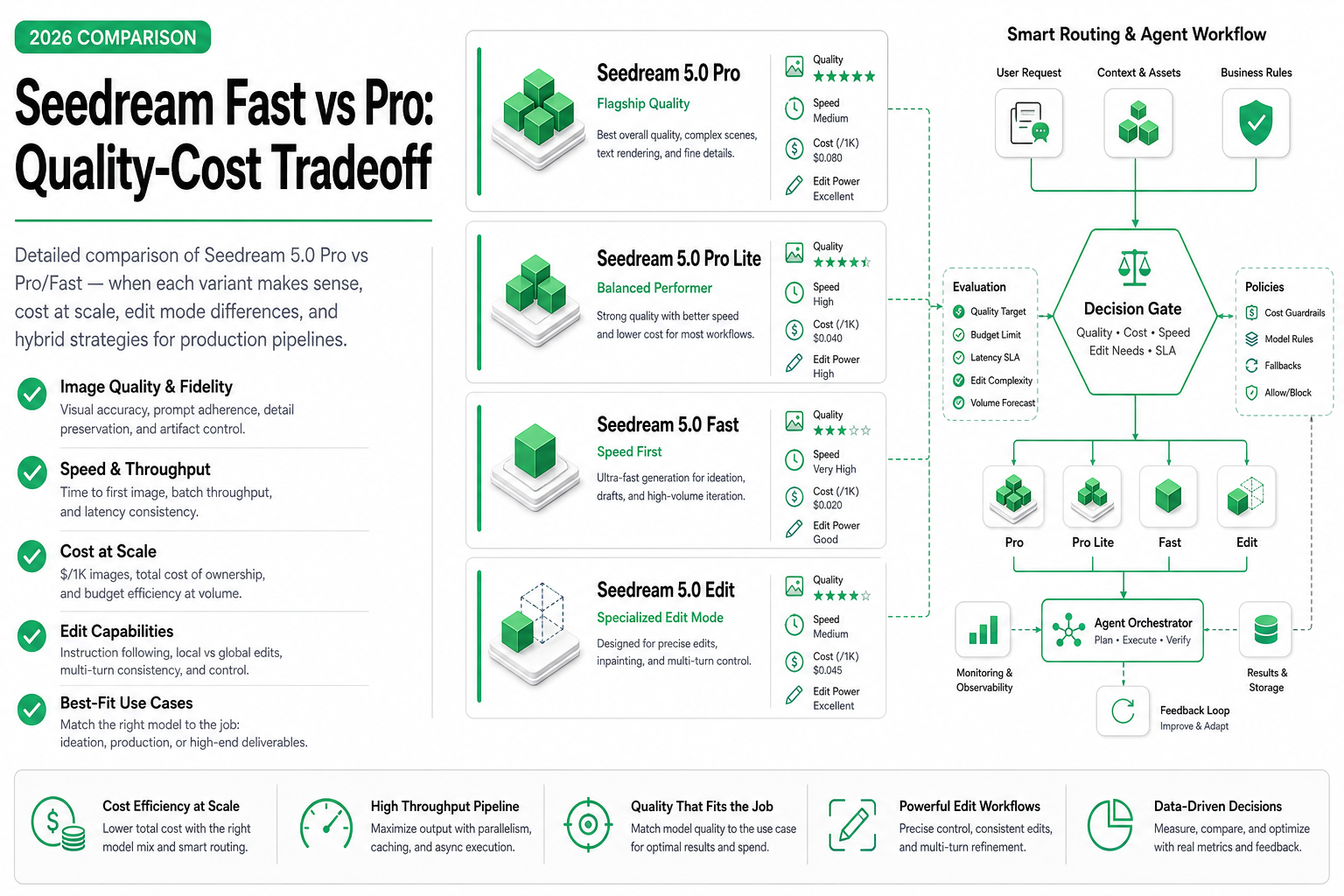
TL;DR — Seedream 5.0 Pro and Pro/Fast share the same model family but target different points on the quality-speed-cost spectrum. Pro delivers maximum fidelity (8–12s, ~$0.04/image). Fast delivers 90–95% of that quality in 2–4s at ~$0.015/image. For most production workflows, the optimal strategy is using both: Fast for iteration and volume, Pro for final deliverables.
Same family, different trade-offs
ByteDance’s Seedream 5.0 comes in two variants that share the same underlying architecture but are optimized differently:
- Pro (
bytedance/seedream/5.0/pro) — Full inference pipeline, maximum quality. Every denoising step runs at full precision. - Fast (
bytedance/seedream/5.0/pro/fast) — Optimized inference with reduced steps, quantized attention, and early stopping. Trades marginal quality for 3–4× speed improvement.
This isn’t two different models — it’s the same model with two inference configurations. The prompts, API format, and capabilities are identical. Only the output quality and speed differ.
For a comprehensive overview of both variants, see our Seedream 5.0 Pro introduction. For broader context on how image generation pricing works, see our video generation cost model guide.
Quality comparison: where does Fast fall short?
The “90–95% quality” claim needs unpacking. Where exactly does Fast lose quality?
Detailed quality breakdown
| Quality dimension | Pro (1-10) | Fast (1-10) | Gap | Visible to end user? |
|---|---|---|---|---|
| Overall sharpness | 9.5 | 8.5 | 1.0 | At full resolution, yes |
| Fine texture detail | 9.5 | 7.5 | 2.0 | Skin pores, fabric weave |
| Color accuracy | 9.0 | 8.5 | 0.5 | Subtle, mostly in gradients |
| Lighting realism | 9.5 | 8.0 | 1.5 | Complex lighting suffers |
| Composition accuracy | 9.0 | 8.5 | 0.5 | Minor positioning shifts |
| Text rendering | 8.0 | 7.0 | 1.0 | Occasional character blur |
| Edge definition | 9.5 | 8.0 | 1.5 | Subject-background boundary |
| Bokeh/DoF quality | 9.0 | 7.5 | 1.5 | Background blur less natural |
Key insight: The quality gap is most visible in:
- Fine textures (skin, fabric, materials) — 2.0 point gap
- Complex lighting scenarios — 1.5 point gap
- Edge definition — 1.5 point gap
These matter for print, zoom-in contexts, and hero placements. They’re largely invisible on social media (compressed), email (small display), and internal uses.
Visual impact by output medium
| Output medium | Typical viewing size | Pro advantage visible? | Recommendation |
|---|---|---|---|
| Instagram post (1080px) | Small/phone | Barely | Fast |
| Twitter/X image | Small/phone | No | Fast |
| E-commerce thumbnail | 200–400px | No | Fast |
| E-commerce hero (zoom) | Full resolution | Yes | Pro |
| Print ad (300 DPI) | Large/physical | Clearly | Pro |
| Billboard | Very large | Clearly | Pro |
| Slide deck | Medium/projected | Barely | Fast |
| Email banner | 600px wide | No | Fast |
| Website hero | 1920px+ | Slightly | Pro (or Fast if budget-constrained) |
| Video thumbnail | 1280px | Barely | Fast |
Rule of thumb: If the image will be viewed at full resolution or printed, use Pro. If it will be compressed, resized below 1200px, or viewed on mobile, Fast is sufficient.
Cost at scale
Per-image economics
| Metric | Pro | Fast | Difference |
|---|---|---|---|
| Cost per image | ~$0.04 | ~$0.015 | Fast is 62% cheaper |
| Latency | 8–12s | 2–4s | Fast is 3–4× faster |
| Throughput (sequential) | 5–7/min | 15–30/min | Fast is 3–4× higher |
| Quality (normalized) | 100% | 90–95% | 5–10% gap |
Cost projection at volume
| Volume | Pro total | Fast total | Savings | Fast quality loss |
|---|---|---|---|---|
| 10 images | $0.40 | $0.15 | $0.25 (62%) | Negligible for most uses |
| 50 images | $2.00 | $0.75 | $1.25 (62%) | |
| 100 images | $4.00 | $1.50 | $2.50 (62%) | |
| 500 images | $20.00 | $7.50 | $12.50 (62%) | |
| 1,000 images | $40.00 | $15.00 | $25.00 (62%) | |
| 5,000 images | $200.00 | $75.00 | $125.00 (62%) | |
| 10,000 images | $400.00 | $150.00 | $250.00 (62%) |
At 10,000 images/month (realistic for an e-commerce agent), the Fast variant saves $250/month ($3,000/year) with minimal quality impact for most outputs.
Time savings at volume
| Volume | Pro time (sequential) | Fast time (sequential) | Time saved |
|---|---|---|---|
| 100 images | ~17 min | ~5 min | 12 min |
| 500 images | ~83 min | ~17 min | 66 min |
| 1,000 images | ~167 min (~2.8h) | ~33 min | 134 min |
| 5,000 images | ~833 min (~14h) | ~167 min (~2.8h) | 11+ hours |
For agent workflows running overnight batch jobs, the time savings can be the difference between completing within a maintenance window or not.
Edit mode comparison
Both variants support the same edit operations, but quality differs:
Edit quality by operation type
| Edit operation | Pro quality | Fast quality | Gap | Notes |
|---|---|---|---|---|
| Background replacement | 8.5 | 7.5 | 1.0 | Edge blending less smooth in Fast |
| Color/material change | 8.0 | 7.0 | 1.0 | Texture fidelity reduced |
| Object removal | 8.0 | 7.0 | 1.0 | Inpaint artifacts more common |
| Style transfer | 8.5 | 7.5 | 1.0 | Style application less nuanced |
| Enhancement | 8.0 | 7.0 | 1.0 | Less detail recovery |
| Text modification | 7.0 | 6.0 | 1.0 | Character precision drops |
The edit quality gap is consistently ~1.0 across all operations. This is less dramatic than the generation gap for complex scenes, making Fast a more viable option for editing workflows where speed matters.
Edit latency comparison
| Edit complexity | Pro latency | Fast latency | Speedup |
|---|---|---|---|
| Simple (single element change) | 6–8s | 2–3s | 3× |
| Medium (background + adjustment) | 8–10s | 2–3s | 3–4× |
| Complex (multi-element + style) | 10–12s | 3–4s | 3× |
When Fast is clearly better
Scenario 1: Social media content factory
A brand producing 20 social media posts per day:
from openai import OpenAI

client = OpenAI(
    base_url="https://api.sandbase.ai/v1",
    api_key="your-sandbase-api-key"
)

# 20 posts × 3 variants each = 60 images/day
# Fast: 60 × $0.015 = $0.90/day, ~4 minutes total
# Pro:  60 × $0.04  = $2.40/day, ~10 minutes total
# Monthly savings: $45 | Yearly: $540

daily_posts = [
    {"topic": "product highlight", "count": 5},
    {"topic": "customer testimonial visual", "count": 5},
    {"topic": "educational infographic", "count": 5},
    {"topic": "engagement post", "count": 5},
]

for post_type in daily_posts:
    for i in range(post_type["count"]):
        for variant in range(3):  # 3 variants each
            response = client.images.generate(
                model="bytedance/seedream/5.0/pro/fast",  # Fast is optimal here
                prompt=f"Social media post about {post_type['topic']}, "
                       f"variant {variant+1}, modern design, vibrant colors",
                n=1,
                size="1024x1024"
            )
Scenario 2: Prompt exploration
Finding the right prompt direction before committing to Pro:
def explore_prompt_space(base_concept: str, variations: int = 20):
    """Test many prompt variations cheaply with Fast."""
    style_modifiers = [
        "minimalist", "maximalist", "retro", "futuristic", "organic",
        "geometric", "photorealistic", "illustrated", "3D rendered", "watercolor",
        "neon", "pastel", "monochrome", "gradient", "textured",
        "flat design", "isometric", "cinematic", "editorial", "abstract"
    ]

    results = []
    for style in style_modifiers[:variations]:
        response = client.images.generate(
            model="bytedance/seedream/5.0/pro/fast",
            prompt=f"{base_concept}, {style} style, professional quality",
            n=1,
            size="1024x1024"
        )
        results.append({
            "style": style,
            "url": response.data[0].url,
            "cost": 0.015
        })

    total_cost = sum(r["cost"] for r in results)
    print(f"Explored {len(results)} styles for ${total_cost:.2f}")
    # Same exploration with Pro would cost ${total_cost / 0.015 * 0.04:.2f}
    return results
Scenario 3: A/B testing at scale
Testing which visual style converts better:
def generate_ab_test_batch(
    product_descriptions: list[str],
    styles: list[str],
    n_variants: int = 3
):
    """Generate A/B test images. Speed + cost matter more than perfection."""
    total_images = len(product_descriptions) * len(styles) * n_variants

    # Fast: optimal for A/B testing
    # 50 products × 4 styles × 3 variants = 600 images
    # Cost: 600 × $0.015 = $9.00
    # Time: ~2 minutes (parallel) to ~20 minutes (sequential)
    # Pro would cost: $24.00 and take ~100 minutes sequential

    results = {}
    for product in product_descriptions:
        results[product] = {}
        for style in styles:
            response = client.images.generate(
                model="bytedance/seedream/5.0/pro/fast",
                prompt=f"{product}, {style}, product photography",
                n=n_variants,
                size="1024x1024"
            )
            results[product][style] = [img.url for img in response.data]

    return results
When Pro is necessary
Scenario 1: Campaign hero images
# The ONE image that appears on the homepage banner
# Worth the extra $0.025 and 8 seconds
response = client.images.generate(
    model="bytedance/seedream/5.0/pro",
    prompt="Luxury watch on dark marble surface, dramatic rim lighting, "
           "reflection visible, ultra-sharp detail, award-winning product photography",
    n=1,
    size="1024x1024"  # Will likely be displayed at 1920px+
)
Scenario 2: Print materials
# Brochure, poster, packaging — will be viewed at close range
response = client.images.generate(
    model="bytedance/seedream/5.0/pro",
    prompt="Coffee bean close-up macro shot, visible texture and oil sheen, "
           "warm backlight, shallow depth of field, magazine cover quality",
    n=1,
    size="1024x1024"
)
Scenario 3: Brand identity assets
# CEO portrait, brand imagery — reused extensively, quality reflects on brand
response = client.images.generate(
    model="bytedance/seedream/5.0/pro",
    prompt="Professional corporate office environment, natural light through "
           "floor-to-ceiling windows, modern minimalist design, architectural photography",
    n=1,
    size="1024x1024"
)
The hybrid strategy
The most cost-effective approach for production teams:
class SeedreamHybridPipeline:
    """Use Fast for exploration, Pro for delivery."""

    def __init__(self, client):
        self.client = client
        self.cost_tracker = {"fast": 0, "pro": 0}

    def generate(self, prompt: str, stage: str = "explore") -> str:
        """Auto-select model based on pipeline stage."""
        if stage in ("explore", "iterate", "test"):
            model = "bytedance/seedream/5.0/pro/fast"
            self.cost_tracker["fast"] += 0.015
        else:  # "final", "deliver", "print"
            model = "bytedance/seedream/5.0/pro"
            self.cost_tracker["pro"] += 0.04

        response = self.client.images.generate(
            model=model, prompt=prompt, n=1, size="1024x1024"
        )
        return response.data[0].url

    def report_costs(self):
        total = self.cost_tracker["fast"] + self.cost_tracker["pro"]
        print(f"Fast: ${self.cost_tracker['fast']:.2f}")
        print(f"Pro: ${self.cost_tracker['pro']:.2f}")
        print(f"Total: ${total:.2f}")

        # Compare to all-Pro
        all_pro_cost = (
            self.cost_tracker["fast"] / 0.015 * 0.04 + self.cost_tracker["pro"]
        )
        savings = all_pro_cost - total
        print(f"Saved vs all-Pro: ${savings:.2f} ({savings/all_pro_cost*100:.0f}%)")
Typical campaign economics
For a product launch campaign requiring 10 final hero images:
| Phase | Model | Images | Cost | Time |
|---|---|---|---|---|
| Concept exploration | Fast | 100 | $1.50 | 5 min |
| Direction refinement | Fast | 40 | $0.60 | 2 min |
| Final generation | Pro | 20 | $0.80 | 3 min |
| Edits on finals | Pro | 10 | $0.40 | 2 min |
| Total | — | 170 | $3.30 | 12 min |
All-Pro cost for same result: 170 × $0.04 = $6.80 (51% more expensive, 3× slower).
Decision framework
Ask these three questions:
- Will this image be viewed at full resolution or printed? → Pro
- Am I generating more than 20 images for exploration/testing? → Fast
- Is this a final deliverable for external audiences? → Pro
If none of the above clearly apply, default to Fast. The cost savings compound, and the quality difference is invisible in most digital contexts.
Related Reading
- Seedream 5.0 Pro: ByteDance’s Image Generator
- Seedream vs Qwen-Image-3 vs Nano Banana (2026)
- Best AI Image Generation APIs in 2026
- Per-Call vs Token Pricing: Which Works for Agents
- Batch Image Generation Pipeline for Agents
- Qwen-Image-3: Generation + Edit in One Model
Conclusion
The Seedream Pro vs Fast decision isn’t about choosing the “better” model — they’re the same model with different performance targets. The smart approach is treating them as two tools in the same toolbox: Fast for the 90% of image work that doesn’t need maximum fidelity, Pro for the 10% that does.
At scale, this hybrid approach saves 40–60% on image generation costs while maintaining Pro-level quality on the images that actually matter.