Best AI Image Editing APIs 2026: Price & Comparison
Best AI image editing APIs for developers and agents in 2026: compare Seedream, Qwen-Image-3, and Nano Banana on editing quality, speed, price, and use cases.
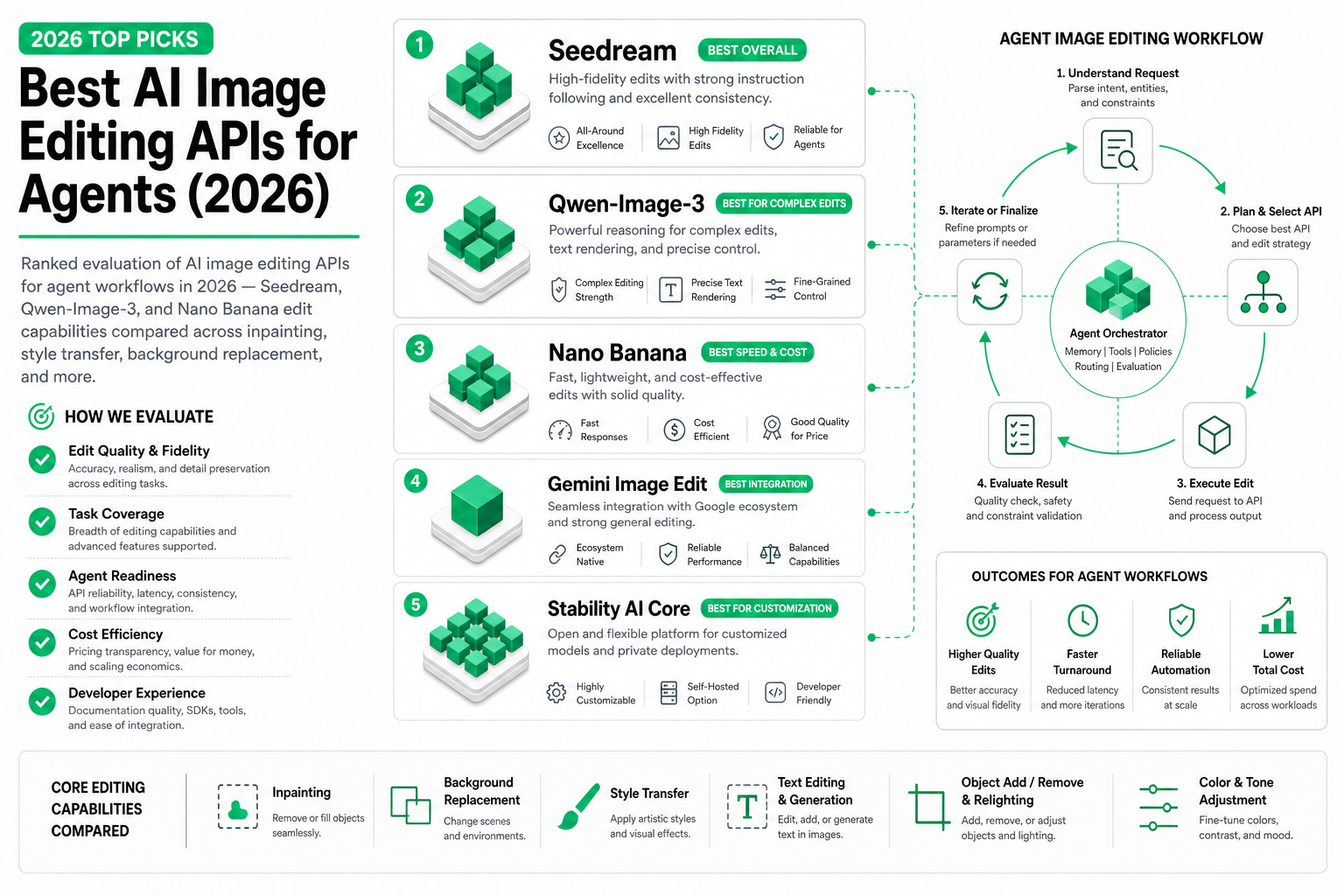
TL;DR — For agent-driven image editing in 2026, Qwen-Image-3 leads with the most capable unified edit engine. Seedream Pro offers strong edits with superior source quality. Nano Banana variants provide fast, cheap edits for volume operations. This guide evaluates each by edit type, quality, speed, and agent workflow suitability.
If your workflow also needs language and video models, pair this comparison with the unified AI API guide for one SandBase integration surface.
Considering OpenAI’s newer image tools too? Our ChatGPT Images 2.5 editing and API pricing overview separates ChatGPT’s editing controls from the Flare and Sunburst API options. Those models are not included in the comparison tables below.
Why image editing matters more than generation for agents
Here’s a counterintuitive truth: for most production agent workflows, image editing matters more than image generation. Why?
- Brands already have product photos — they need variants, backgrounds, localizations
- E-commerce requires the same product in 10 different contexts
- Marketing teams iterate on existing visuals rather than creating from scratch
- A/B testing means modifying one element while holding everything else constant
Generation creates from nothing. Editing transforms what exists. In production, transformation happens 3–5× more often than creation.
For the full generation comparison, see our best AI image generation APIs guide. For Seedream specifics, see our Seedream 5.0 Pro deep dive.
Edit capabilities on SandBase
All image models on SandBase support editing through the /v1/run endpoint. The input is always: source image + text instruction. The output is the modified image.
from openai import OpenAI
import base64

client = OpenAI(
    base_url="https://api.sandbase.ai/v1",
    api_key="your-sandbase-api-key"
)

def edit_image(model: str, image_b64: str, instruction: str) -> str:
    """Universal edit function — works with any SandBase image model."""
    response = client.post("/v1/run", body={
        "model": model,
        "operation": "edit",
        "input": {
            "image": image_b64,
            "prompt": instruction
        }
    })
    return response.json()["output"]["image"]
Edit type comparison
Background replacement
The most common edit operation for e-commerce and headshot workflows.
| Model | Quality | Speed | Edge handling | Lighting match | Score |
|---|---|---|---|---|---|
| Qwen-Image-3 | 9.0 | 4–7s | Excellent | Strong | 9.0 |
| Seedream Pro | 8.5 | 6–10s | Good | Good | 8.5 |
| Seedream Fast | 7.5 | 2–3s | Adequate | Adequate | 7.5 |
| Nano Banana 2 Lite | 7.5 | 1–2s | Adequate | Moderate | 7.5 |
| Nano Banana Lite | 7.0 | 1–2s | Basic | Moderate | 7.0 |
Winner: Qwen-Image-3 — particularly strong at maintaining realistic lighting interaction between subject and new background.
Element swap / color change
Changing specific attributes of objects in the image (color, material, shape modifications).
| Model | Quality | Consistency | Detail preservation | Score |
|---|---|---|---|---|
| Qwen-Image-3 | 8.5 | 9.0 | 8.5 | 8.7 |
| Seedream Pro | 8.0 | 8.0 | 8.5 | 8.2 |
| Seedream Fast | 7.0 | 7.5 | 7.0 | 7.2 |
| Nano Banana 2 Lite | 7.0 | 7.0 | 6.5 | 6.8 |
| Nano Banana Lite | 6.5 | 6.5 | 6.0 | 6.3 |
Winner: Qwen-Image-3 — best at changing one element without disturbing others.
Style transfer
Applying artistic styles to existing images while preserving content structure.
| Model | Style range | Content preservation | Aesthetic quality | Score |
|---|---|---|---|---|
| Qwen-Image-3 | 8.5 | 8.5 | 8.0 | 8.3 |
| Seedream Pro | 8.5 | 8.0 | 9.0 | 8.5 |
| Seedream Fast | 7.5 | 7.5 | 7.5 | 7.5 |
| Nano Banana 2 Lite | 8.0 | 7.5 | 8.0 | 7.8 |
| Nano Banana Lite | 7.5 | 7.0 | 7.5 | 7.3 |
Winner: Seedream Pro — produces the most aesthetically refined style transfers, though Qwen-Image-3 is close.
Inpainting (object removal / addition)
Removing unwanted elements or adding new ones seamlessly.
| Model | Removal quality | Addition quality | Seam blending | Score |
|---|---|---|---|---|
| Qwen-Image-3 | 8.5 | 8.5 | 8.5 | 8.5 |
| Seedream Pro | 8.0 | 8.0 | 8.0 | 8.0 |
| Seedream Fast | 7.0 | 6.5 | 7.0 | 6.8 |
| Nano Banana 2 Lite | 7.0 | 6.5 | 7.0 | 6.8 |
| Nano Banana Lite | 6.5 | 6.0 | 6.5 | 6.3 |
Winner: Qwen-Image-3 — cleanest removal and most natural additions.
Text modification
Adding, changing, or removing text within images.
| Model | Accuracy | Font matching | Language support | Score |
|---|---|---|---|---|
| Qwen-Image-3 | 7.5 | 7.0 | 9.0 (CJK strong) | 7.8 |
| Seedream Pro | 7.0 | 7.0 | 7.0 | 7.0 |
| Seedream Fast | 6.0 | 6.0 | 6.5 | 6.2 |
| Nano Banana 2 Lite | 6.0 | 5.5 | 6.0 | 5.8 |
| Nano Banana Lite | 5.5 | 5.0 | 5.5 | 5.3 |
Winner: Qwen-Image-3 — especially for CJK text and multilingual scenarios.
Overall edit rankings
| Rank | Model | Avg edit score | Best for |
|---|---|---|---|
| 1 | Qwen-Image-3 | 8.5 | Most edit operations, multilingual |
| 2 | Seedream Pro | 8.0 | Style transfer, high-fidelity edits |
| 3 | Nano Banana 2 Lite | 7.1 | Fast cheap edits at scale |
| 4 | Seedream Fast | 7.0 | Balanced speed + edit quality |
| 5 | Nano Banana Lite | 6.5 | Maximum throughput, basic edits |
Agent workflow patterns
Pattern 1: Product photo variants
Generate multiple product contexts from a single source photo:
import asyncio
from openai import AsyncOpenAI

client = AsyncOpenAI(
    base_url="https://api.sandbase.ai/v1",
    api_key="your-sandbase-api-key"
)

async def generate_product_variants(product_image_b64: str, contexts: list[str]):
    """Create product variants using Qwen-Image-3 (best edit quality)."""
    tasks = []
    for context in contexts:
        tasks.append(
            client.post("/v1/run", body={
                "model": "alibaba/qwen-image-3",
                "operation": "edit",
                "input": {
                    "image": product_image_b64,
                    "prompt": f"Place this product in {context}. "
                              f"Keep the product identical, only change the surroundings."
                }
            })
        )

    results = await asyncio.gather(*tasks)
    return [r.json()["output"]["image"] for r in results]

# Usage
contexts = [
    "a modern kitchen countertop with morning sunlight",
    "a minimalist white desk in a home office",
    "a wooden shelf in a cozy living room",
    "an outdoor patio table with garden background",
    "a gift box arrangement for holiday marketing"
]

variants = asyncio.run(generate_product_variants(source_image, contexts))
Pattern 2: A/B testing visual elements
Test which visual changes improve engagement:
def generate_ab_edits(source_image: str, variable: str, options: list[str]):
    """Generate A/B test variants by changing one visual element."""
    variants = {}

    for option in options:
        # Use Seedream Fast for A/B (speed + reasonable quality)
        response = client.post("/v1/run", body={
            "model": "bytedance/seedream/5.0/pro/fast",
            "operation": "edit",
            "input": {
                "image": source_image,
                "prompt": f"Change the {variable} to {option}. "
                          f"Keep everything else exactly the same."
            }
        })
        variants[option] = response.json()["output"]["image"]

    return variants

# Test different CTA button colors
button_variants = generate_ab_edits(
    source_image=hero_banner_b64,
    variable="call-to-action button color",
    options=["bright red", "deep blue", "vibrant green", "warm orange", "purple"]
)

# Test different background moods
mood_variants = generate_ab_edits(
    source_image=product_shot_b64,
    variable="background atmosphere",
    options=["warm and cozy", "cool and modern", "bright and energetic", "dark and premium"]
)
Pattern 3: Localization pipeline
Adapt marketing visuals for different regions:
class LocalizationPipeline:
    """Edit-based localization: adapt one visual for multiple markets."""

    def __init__(self):
        self.client = OpenAI(
            base_url="https://api.sandbase.ai/v1",
            api_key="your-sandbase-api-key"
        )
        # Use Qwen-Image-3 for localization (best multilingual + edit)
        self.model = "alibaba/qwen-image-3"

    def localize(self, source_image: str, market_configs: dict) -> dict:
        """Produce market-specific variants from one source image."""
        results = {}

        for market, config in market_configs.items():
            # Step 1: Adapt cultural context
            culturally_adapted = self._edit(
                source_image,
                f"Adapt the setting to feel natural for {config['culture']}. "
                f"Keep the product unchanged."
            )

            # Step 2: Add localized text
            if config.get("text_overlay"):
                final = self._edit(
                    culturally_adapted,
                    f"Add '{config['text_overlay']}' as an elegant text overlay"
                )
            else:
                final = culturally_adapted

            results[market] = final

        return results

    def _edit(self, image: str, prompt: str) -> str:
        response = self.client.post("/v1/run", body={
            "model": self.model,
            "operation": "edit",
            "input": {"image": image, "prompt": prompt}
        })
        return response.json()["output"]["image"]

# Usage
pipeline = LocalizationPipeline()
localized = pipeline.localize(
    source_image=global_campaign_image,
    market_configs={
        "japan": {"culture": "Japanese aesthetic", "text_overlay": "新発売"},
        "china": {"culture": "modern Chinese urban", "text_overlay": "限时优惠"},
        "korea": {"culture": "Korean minimalist", "text_overlay": "신제품 출시"},
        "us": {"culture": "American suburban", "text_overlay": "NEW"},
    }
)
Pattern 4: Iterative refinement agent
An agent that progressively improves an image based on feedback:
def iterative_refinement(
    image: str,
    target_description: str,
    max_iterations: int = 5,
    quality_threshold: float = 0.85
):
    """Agent iteratively edits image until it matches target description."""
    current_image = image

    for i in range(max_iterations):
        # Score current image against target (using a vision model)
        score = score_image_against_description(current_image, target_description)

        if score >= quality_threshold:
            print(f"Target reached at iteration {i+1} (score: {score:.2f})")
            return current_image

        # Generate improvement instruction based on gap analysis
        improvement = analyze_gap(current_image, target_description)

        # Apply edit — use Pro for final iterations, Fast for early ones
        model = ("bytedance/seedream/5.0/pro" if i >= max_iterations - 2
                 else "bytedance/seedream/5.0/pro/fast")

        response = client.post("/v1/run", body={
            "model": model,
            "operation": "edit",
            "input": {"image": current_image, "prompt": improvement}
        })
        current_image = response.json()["output"]["image"]
        print(f"Iteration {i+1}: score={score:.2f}, applied: {improvement[:50]}...")

    return current_image
Cost analysis for edit workflows
Single edit cost
| Model | Cost per edit | Latency | Monthly (100 edits/day) |
|---|---|---|---|
| Qwen-Image-3 | ~$0.03 | 4–7s | ~$90 |
| Seedream Pro | ~$0.04 | 6–10s | ~$120 |
| Seedream Fast | ~$0.015 | 2–3s | ~$45 |
| Nano Banana 2 Lite | ~$0.01 | 1–2s | ~$30 |
| Nano Banana Lite | ~$0.008 | 1–2s | ~$24 |
Multi-edit pipeline cost (5 edits per image)
Cost is only one check for a five-edit sequence. The ChatGPT five-round product-image editing test includes original images and crops for inspecting text, texture and color changes between revisions. It is one web-interface sequence, not an API benchmark of the models priced here.
| Model | Cost per image (5 edits) | 100 images | 1,000 images |
|---|---|---|---|
| Qwen-Image-3 | $0.15 | $15.00 | $150.00 |
| Seedream Pro | $0.20 | $20.00 | $200.00 |
| Seedream Fast | $0.075 | $7.50 | $75.00 |
| Nano Banana 2 Lite | $0.05 | $5.00 | $50.00 |
Recommended strategy by budget
| Monthly budget | Strategy | Models used |
|---|---|---|
| < $50 | All Nano Banana 2 Lite | NB 2 Lite |
| $50–150 | Fast for exploration, Qwen for finals | Fast + Qwen |
| $150–500 | Qwen for all edits | Qwen-Image-3 |
| $500+ | Qwen for edits, Pro for regeneration | Qwen + Pro |
Choosing the right edit model
| Your situation | Best choice | Why |
|---|---|---|
| E-commerce product variants | Qwen-Image-3 | Best background + element editing |
| Social media content iteration | Seedream Fast | Adequate quality, maximum speed |
| Marketing localization | Qwen-Image-3 | Multilingual text + cultural adaptation |
| A/B testing visuals | Seedream Fast | Speed for 20+ variants |
| Print-quality editing | Seedream Pro | Highest fidelity |
| Budget batch processing | Nano Banana 2 Lite | Cheapest acceptable quality |
| Agent autonomous editing | Qwen-Image-3 | Most reliable edit interpretation |
Related Reading
- Best AI Image Generation APIs in 2026
- Qwen-Image-3: Generation + Edit in One Model
- Seedream vs Qwen-Image-3 vs Nano Banana (2026)
- Batch Image Generation Pipeline for Agents
- Seedream 5.0 Pro: ByteDance’s Image Generator
- Per-Call vs Token Pricing: Which Works for Agents
Conclusion
Image editing APIs have matured to the point where agents can autonomously modify visuals based on natural language instructions. The three families on SandBase cover the full spectrum: Qwen-Image-3 for maximum edit quality and multilingual support, Seedream for the quality-speed spectrum, and Nano Banana for volume economics.
For most agent workflows, Qwen-Image-3 is the default recommendation for editing operations. Its unified architecture understands edits at a semantic level that specialized-for-generation models don’t quite match. Combine it with Seedream Pro for generation and you have a pipeline that produces and refines at the highest level.