Seedream 5.0 Pro: ByteDance's Image Generator
Deep dive into ByteDance's Seedream 5.0 Pro image generation model — two variants (Pro and Pro/Fast), text-to-image and edit capabilities, quality vs speed trade-offs, and practical use cases on SandBase.
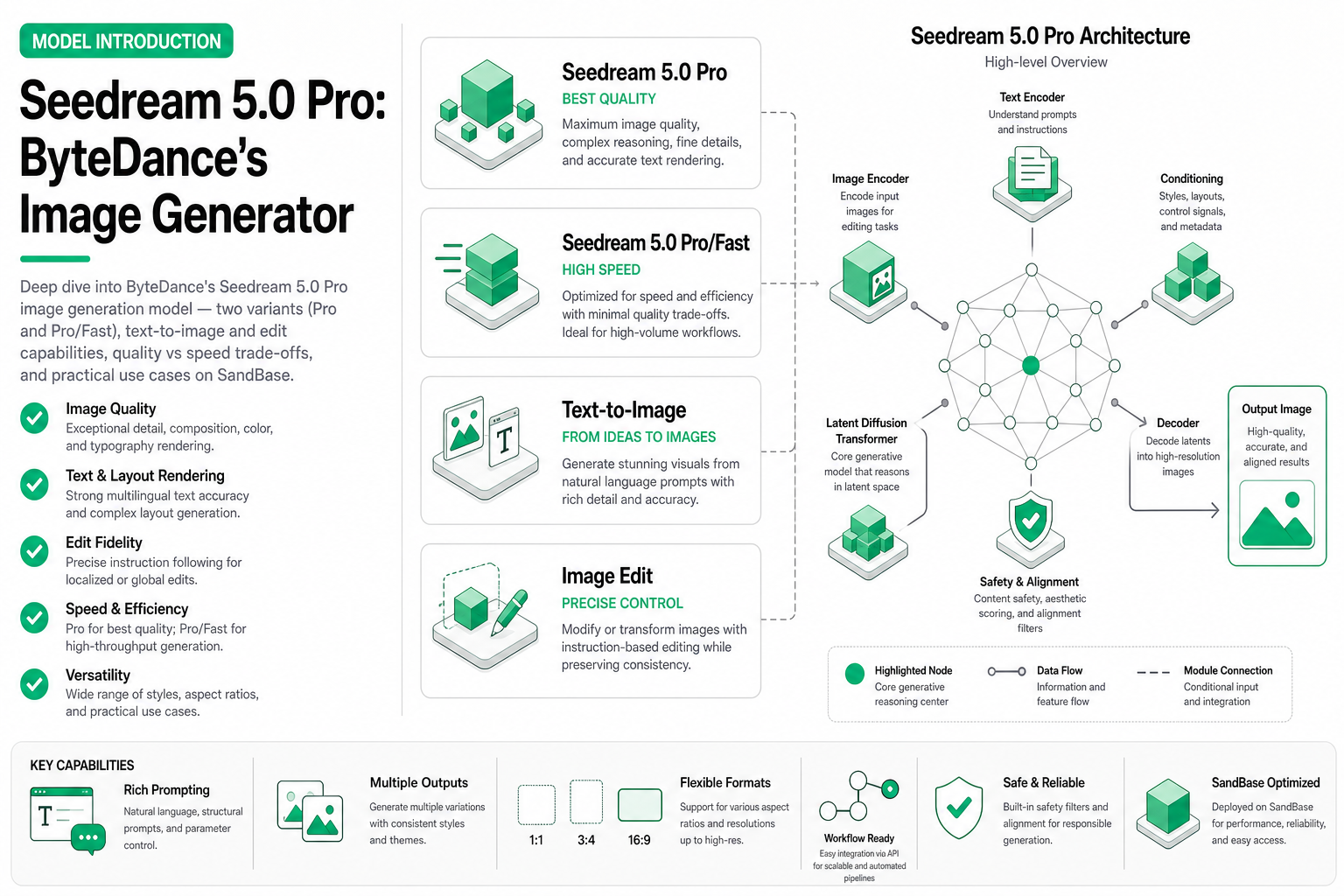
TL;DR — ByteDance’s Seedream 5.0 Pro is a production-grade image generation and editing model available on SandBase in two variants:
bytedance/seedream/5.0/pro(maximum quality) andbytedance/seedream/5.0/pro/fast(optimized for speed). Both support text-to-image generation and prompt-based editing. Choose Pro for final assets and Fast for iteration workflows.
Why Seedream matters in 2026
ByteDance has been quietly building one of the most capable image generation stacks in the industry. Seedream 5.0 Pro represents their latest production model — trained on massive datasets, optimized for commercial use cases, and designed to compete directly with DALL-E 3 and Midjourney on quality while offering something neither does well: integrated editing within the same model architecture.
The dual-variant approach (Pro + Pro/Fast) is particularly interesting for agent workflows. An agent can iterate quickly with Fast during exploration phases, then switch to Pro for final output — same API, same prompt format, different quality-speed profiles.
Model specifications
| Specification | Pro | Pro/Fast |
|---|---|---|
| Model ID | bytedance/seedream/5.0/pro | bytedance/seedream/5.0/pro/fast |
| Modality | Image (text-to-image + edit) | Image (text-to-image + edit) |
| Max resolution | 2048×2048 | 2048×2048 |
| Typical latency | 8–12s | 2–4s |
| Quality tier | Maximum | High (90–95% of Pro) |
| Aspect ratios | 1:1, 4:3, 3:4, 16:9, 9:16 | 1:1, 4:3, 3:4, 16:9, 9:16 |
| Edit support | Yes (prompt-based) | Yes (prompt-based) |
| Batch support | Up to 4 images per request | Up to 4 images per request |
Text-to-image generation
The core generation capability takes a text prompt and produces high-fidelity images. Seedream 5.0 Pro excels at:
- Photorealistic scenes — product photography, architectural visualization, lifestyle imagery
- Typography rendering — text within images with correct spelling (up to ~12 words reliably)
- Complex compositions — multiple subjects with accurate spatial relationships
- Style control — from photorealistic to illustration, watercolor, 3D render, and more
Basic generation example
from openai import OpenAI

client = OpenAI(
    base_url="https://api.sandbase.ai/v1",
    api_key="your-sandbase-api-key"
)

# Text-to-image with Seedream 5.0 Pro
response = client.images.generate(
    model="bytedance/seedream/5.0/pro",
    prompt="A premium wireless headphone floating against a gradient purple background, "
           "studio lighting, product photography, ultra-sharp detail, 8K quality",
    n=1,
    size="1024x1024"
)

image_url = response.data[0].url
print(f"Generated: {image_url}")
Using the Fast variant for iteration
# Same API — just swap the model ID
response = client.images.generate(
    model="bytedance/seedream/5.0/pro/fast",
    prompt="A premium wireless headphone floating against a gradient purple background, "
           "studio lighting, product photography, ultra-sharp detail, 8K quality",
    n=4,  # Generate 4 variants quickly
    size="1024x1024"
)

# Review all 4 variants, pick the best composition
for i, img in enumerate(response.data):
    print(f"Variant {i+1}: {img.url}")
Image editing capabilities
Both variants support prompt-based editing — you provide a source image and a text instruction describing the desired change. The model applies the edit while preserving the parts of the image you didn’t mention.
Edit operation example
import base64

# Load source image
with open("product_photo.png", "rb") as f:
    image_data = base64.b64encode(f.read()).decode()

# Edit via /v1/run endpoint
response = client.post(
    "/v1/run",
    body={
        "model": "bytedance/seedream/5.0/pro",
        "operation": "edit",
        "input": {
            "image": image_data,
            "prompt": "Change the background to a modern kitchen countertop, "
                      "warm natural lighting, keep the product exactly the same"
        }
    }
)
Supported edit types
| Edit type | Description | Example prompt |
|---|---|---|
| Background replacement | Swap background while preserving subject | ”Place on a wooden desk with sunlight” |
| Style transfer | Apply artistic style to existing image | ”Convert to watercolor illustration style” |
| Element modification | Change specific parts of the image | ”Make the shirt blue instead of red” |
| Enhancement | Improve quality/lighting/detail | ”Enhance lighting, add depth of field” |
| Text overlay | Add or modify text in image | ”Add ‘SALE 50% OFF’ in bold white text” |
Quality vs speed: when to use each variant
The decision between Pro and Fast isn’t just about patience — it’s about the workflow stage and the output’s destination.
Use Pro when:
- Final marketing assets — hero images for campaigns, print materials, billboards
- Product catalog shots — customer-facing images where quality directly impacts conversion
- Brand-sensitive content — CEO portraits, brand identity materials
- Complex compositions — scenes with 3+ subjects or detailed spatial requirements
- Typography-heavy images — when text accuracy is critical
Use Fast when:
- Exploration and iteration — trying 10+ prompt variations to find the right direction
- Social media content — Instagram stories, Twitter posts (compressed anyway)
- Internal presentations — slide decks, mood boards, concept visualization
- A/B test variants — generating 20 versions to test which performs better
- Agent pipelines — automated workflows where speed compounds across hundreds of images
Quality comparison at different use cases
| Use case | Pro score (1-10) | Fast score (1-10) | Recommendation |
|---|---|---|---|
| E-commerce hero | 9.5 | 8.2 | Pro |
| Social media post | 9.0 | 8.8 | Fast (quality diff imperceptible at Instagram resolution) |
| Print advertisement | 9.5 | 7.5 | Pro (compression artifacts visible in print) |
| Concept mockup | 8.0 | 8.0 | Fast (speed wins, quality sufficient) |
| Email banner | 9.0 | 8.5 | Fast (small display size) |
Cost analysis
Understanding the cost structure helps you optimize spend across the two variants. For broader context on how image generation pricing compares to video generation, see our video generation cost model guide.
| Volume | Pro cost (est.) | Fast cost (est.) | Savings with Fast |
|---|---|---|---|
| 10 images | $0.40 | $0.15 | 62% |
| 100 images | $4.00 | $1.50 | 62% |
| 1,000 images | $40.00 | $15.00 | 62% |
| 10,000 images | $400.00 | $150.00 | 62% |
Pricing is per-call based. Check SandBase dashboard for current rates.
The cost difference becomes significant at agent-scale operations. An e-commerce agent generating 5 variants per product across 1,000 products (5,000 images) would spend approximately $200 with Pro vs $75 with Fast. A common strategy: generate with Fast, identify the best compositions, then regenerate winners with Pro.
Real-world use cases
Marketing asset pipeline
A marketing team agent workflow:
import asyncio
from openai import AsyncOpenAI

client = AsyncOpenAI(
    base_url="https://api.sandbase.ai/v1",
    api_key="your-sandbase-api-key"
)

async def generate_campaign_assets(product_name: str, descriptions: list[str]):
    """Generate marketing assets: Fast for exploration, Pro for finals."""

    # Phase 1: Generate many variants quickly
    exploration_tasks = []
    for desc in descriptions:
        for angle in ["studio shot", "lifestyle context", "flat lay", "close-up detail"]:
            prompt = f"{product_name}, {desc}, {angle}, professional photography"
            exploration_tasks.append(
                client.images.generate(
                    model="bytedance/seedream/5.0/pro/fast",
                    prompt=prompt,
                    n=2,
                    size="1024x1024"
                )
            )

    # Generate all variants in parallel
    results = await asyncio.gather(*exploration_tasks)
    candidates = [img.url for r in results for img in r.data]
    print(f"Generated {len(candidates)} candidates with Fast")

    # Phase 2: Score candidates (use vision model or human review)
    top_prompts = score_and_select_top(candidates, top_k=5)  # your scoring logic

    # Phase 3: Regenerate winners with Pro quality
    final_tasks = [
        client.images.generate(
            model="bytedance/seedream/5.0/pro",
            prompt=prompt,
            n=1,
            size="1024x1024"
        )
        for prompt in top_prompts
    ]

    finals = await asyncio.gather(*final_tasks)
    return [img.url for r in finals for img in r.data]
Product mockup generation
For e-commerce teams that need product images in multiple contexts:
contexts = [
    "on a clean white background, e-commerce style",
    "on a rustic wooden table, warm lighting, lifestyle",
    "being held by a hand, outdoor natural light",
    "on a store shelf next to competitors, retail context",
    "in a gift box, holiday seasonal presentation"
]

for context in contexts:
    response = client.images.generate(
        model="bytedance/seedream/5.0/pro",
        prompt=f"Premium skincare bottle, {context}, photorealistic, high detail",
        n=1,
        size="1024x1024"
    )
Automated A/B testing visuals
def generate_ab_variants(base_prompt: str, variables: dict, n_per_variant: int = 3):
    """Generate A/B test image variants by changing one variable at a time."""
    variants = {}

    for var_name, options in variables.items():
        variants[var_name] = {}
        for option in options:
            prompt = base_prompt.replace(f"{{{var_name}}}", option)
            response = client.images.generate(
                model="bytedance/seedream/5.0/pro/fast",
                prompt=prompt,
                n=n_per_variant,
                size="1024x1024"
            )
            variants[var_name][option] = [img.url for img in response.data]

    return variants

# Example: test different background colors and lighting
results = generate_ab_variants(
    base_prompt="Wireless earbuds on {background}, {lighting}, product photography",
    variables={
        "background": ["white marble", "dark slate", "gradient blue", "natural wood"],
        "lighting": ["soft studio", "dramatic side light", "golden hour", "neon accent"]
    }
)
Integration with SandBase
Both Seedream variants are accessed through SandBase’s unified API. This means:
- Single API key — same credentials for generation, editing, and all other models
- Consistent error handling — standard HTTP status codes and error formats
- Usage tracking — monitor spend across Pro and Fast from one dashboard
- Rate limiting — managed at the platform level, no per-model configuration needed
The /v1/run endpoint provides the most flexible access, supporting both generation and edit operations with full parameter control.
Prompt engineering tips for Seedream
- Be specific about style — “cinematic lighting, shallow depth of field” produces better results than “good looking”
- Front-load important elements — the model weights earlier tokens more heavily
- Use resolution cues — “8K”, “ultra-sharp”, “high detail” measurably improve output sharpness
- Specify negative space — “minimalist composition with breathing room” prevents overcrowding
- Match aspect ratio to content — use 16:9 for landscapes, 9:16 for mobile-first content, 1:1 for social
Related Reading
- Seedream Fast vs Pro: Quality-Cost Tradeoff
- Seedream vs Qwen-Image-3 vs Nano Banana (2026)
- Best AI Image Generation APIs in 2026
- Qwen-Image-3: Generation + Edit in One Model
- Batch Image Generation Pipeline for Agents
- Best AI Image Editing APIs for Agents (2026)
Conclusion
Seedream 5.0 Pro brings ByteDance’s image generation capabilities to the broader developer ecosystem through SandBase. The dual-variant architecture (Pro + Fast) provides a practical solution to the quality-speed-cost triangle that every production team faces.
For agent builders, the key insight is that you don’t have to choose one variant — use both strategically within the same workflow. Fast for exploration and iteration, Pro for final delivery. Same API, same prompts, different performance profiles.
The integrated editing capability means you can build complete image workflows without juggling multiple providers: generate → review → edit → finalize, all through a single model family.