ChatGPT Images 2.5: Five Edits, Product Detail and Color Drift
SandBase's ChatGPT Images 2.5 web-workflow test: five bottle edits, original PNGs and texture/color checks. The exact API backend was not exposed.
The price was correct. The bottle was still blue. But by the fifth edit, its fine surface grain had become a much more conspicuous pattern—even though none of the prompts asked for a different finish.
In this ChatGPT Images 2.5 web-workflow test, SandBase Blog follows one newly generated product photograph through five revisions. It is for product-content editors making price and packaging changes, and developers deciding what to inspect before accepting an edited asset. The question is narrow: when the requested change succeeds, what happens to the details that were supposed to stay?
The sequence ran in ChatGPT, not on SandBase’s API. The web entry displayed Images 2.5; the exact backend model was not exposed. For the release features, Sketch and official API rates, use our ChatGPT Images 2.5 editing and pricing explainer. This page is the separate evidence record: original images, the five requested edits and what changed outside them.
Key takeaway
- This one web sequence completed all five requested changes; the bottle label and five measurement ticks remained readable and countable.
- Keeping the composition did not preserve the surface finish. Larger patterned marks became conspicuous on the bottle, and a fixed gray-background patch became darker.
- All six main outputs are original 1254 × 1254 PNG downloads. The CDN copies were checked against their file hashes; there was no resizing or lossy recompression.
- The entry page identified itself as Images 2.5, but the conversation did not expose an exact backend model ID. This is a web-workflow test, not a verified Flare-versus-Sunburst benchmark.
How SandBase tested the ChatGPT Images 2.5 web workflow
OpenAI’s September 8 announcement makes multi-turn consistency a central claim: earlier changes should carry forward through subsequent edits. Rather than repeat its selected demonstrations, this test uses a new blue water bottle. None of the coffee imagery from our release and editing overview is reused.
Testing took place on September 9, 2026, in native Chrome through the ChatGPT web interface. The Images landing-page title showed the Chinese-localized equivalent of “ChatGPT Images 2.5 | AI Image Generator.” The account displayed Free, and the Thinking toggle was off. Those observations identify the visible entry and settings, not the undisclosed image backend or its parameters.
The first baseline request produced a request to upload a source image, not an image. A clarification to generate from scratch also returned text. Selecting Create image explicitly then produced the baseline. These two non-image responses are part of the setup record, not successful generations or edit rounds. They also do not prove the chatbot’s explanation of a tool limitation was technically correct.
After that, each edit was submitted from the immediately preceding image’s viewer. No output was regenerated to find a better-looking example. One exception to a single-output sequence occurred automatically in round 3: the site supplied two candidates. Before inspecting either full-size, we fixed the rule to continue displayed candidate 1 and retained both files. There was no quality-based selection.
This is one object and one chain. There is no comparison model, controlled latency measurement, physical color reference or repeated-run success rate. All visible image text is English; Chinese text rendering is outside the test.
R0: a new bottle, not an old example with a new caption
The baseline prompt requested a square studio photograph: a cobalt-blue 500 mL bottle on a white pedestal, a silver cap with three raised horizontal rings, five white ticks, a neutral gray background and a separate USD 29 price card. The exact image-mode prompt was:
Generate a new square studio product photograph from scratch. A matte cobalt blue 500 mL water bottle on a white rectangular pedestal. A brushed silver screw cap with exactly three raised horizontal rings. White bottle text FIELD BOTTLE and 500 mL with five short white measurement tick marks underneath. A separate white price card at lower right reads USD 29. Smooth neutral light gray background. Soft neutral daylight from upper left and shadow to right. Empty space at upper left. Sharp product details. English text only. No other objects.
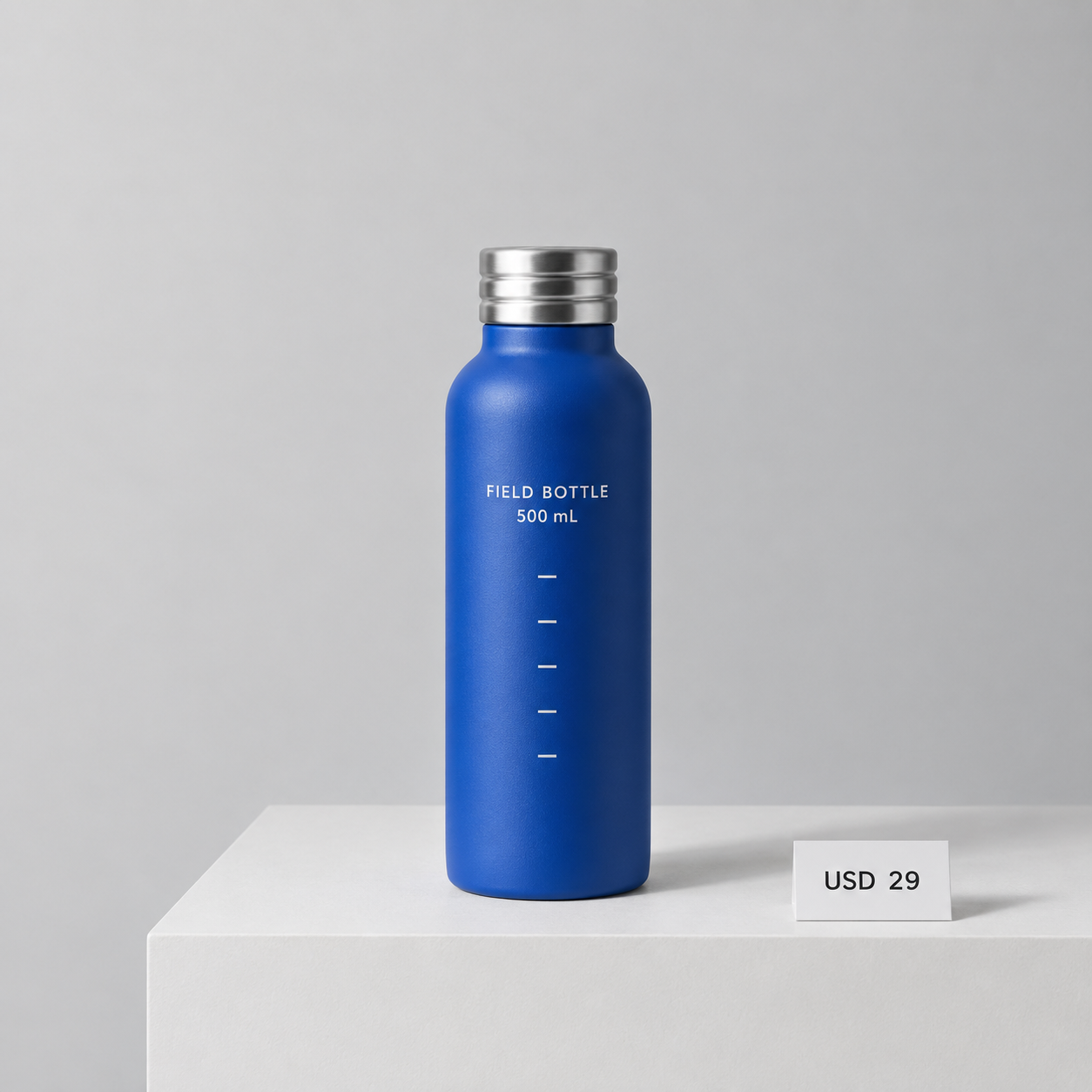 R0, the first actual baseline output. Click for the original 1254 × 1254 PNG. This is a generated fictional product, not a photograph of a manufactured bottle.
The requested label, capacity, price and five ticks appeared. The silver cap had three visible bands. Crucially, the bottle and pedestal already had surface texture. Later grain cannot all be blamed on editing: the relevant question is how that original texture changes.
The five edits were fixed before obtaining the baseline:
| Round | Requested change | What should remain from earlier rounds |
|---|---|---|
| R1 | USD 29 → USD 24 | Silver cap, blue bottle and original layout |
| R2 | Silver cap → matte black | Price stays USD 24; cap keeps three rings |
| R3 | Add an orange NEW badge at upper left | Black cap and revised price remain |
| R4 | Remove only the NEW badge | Restore the gray area, not an earlier bottle |
| R5 | Black cap → brushed silver | Keep USD 24, with no badge |
R1–R2: the requested edits work, but the bottle is not untouched
R1 was deliberately mundane. A product editor often needs to change two characters without commissioning a new photograph. The exact instruction was:
Edit this image. Change only the price card text from USD 29 to USD 24. Preserve the bottle shape and cobalt blue colour, FIELD BOTTLE and 500 mL text, all five white tick marks, the silver cap and its three rings, pedestal, background, lighting, white balance, framing and image dimensions. Do not add anything else. Keep all visible text in English.
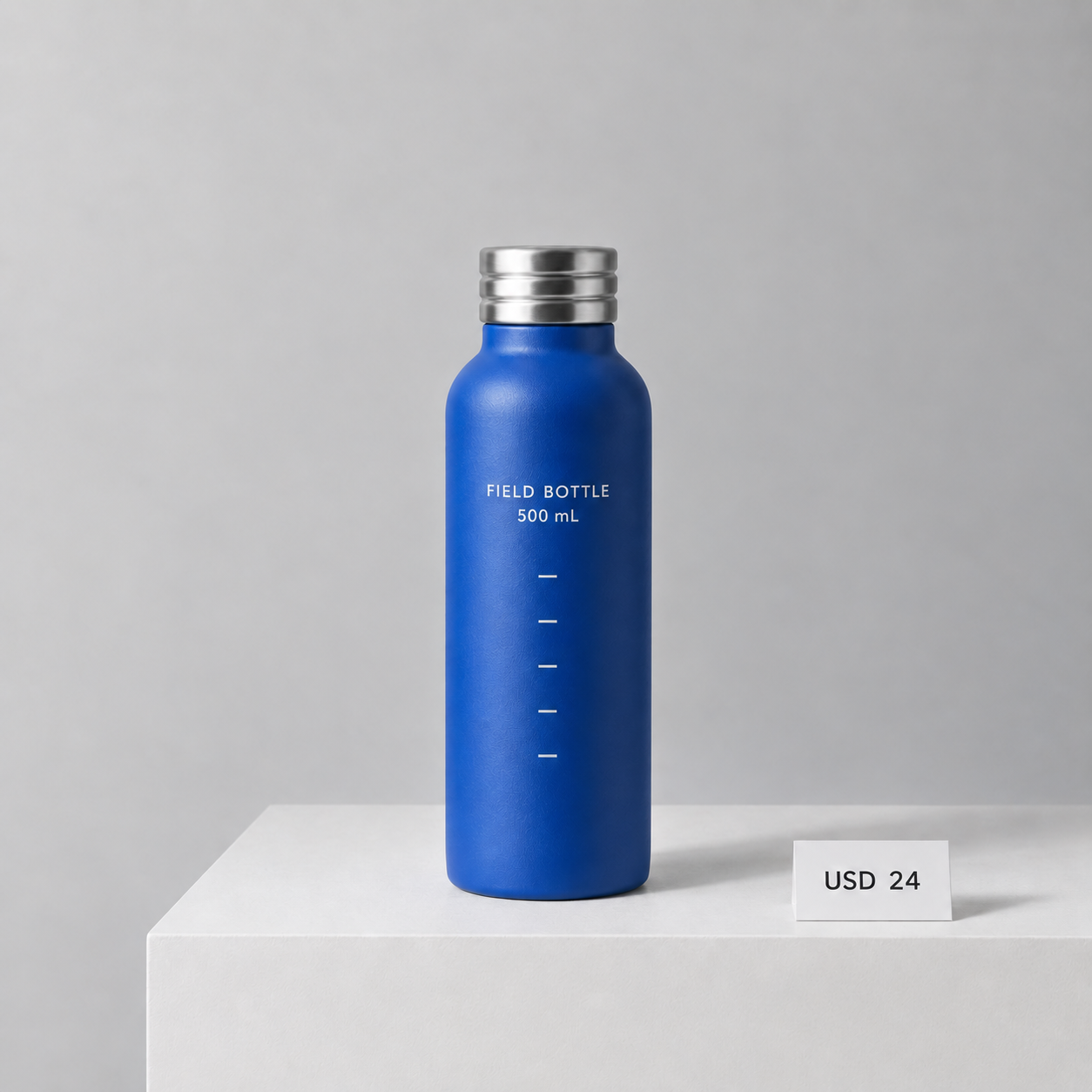 R1 original PNG. The price changed as requested; close inspection also shows changes to the bottle’s texture.
At a chat-thumbnail size, the result looks reassuring. The price is right, the bottle stays centered and the label is readable. At native size, the finish is already differently patterned. A correct text replacement is therefore not enough to accept the whole asset.
R2 asked only for a matte-black cap, explicitly preserving its three rings, the revised price and all other elements.
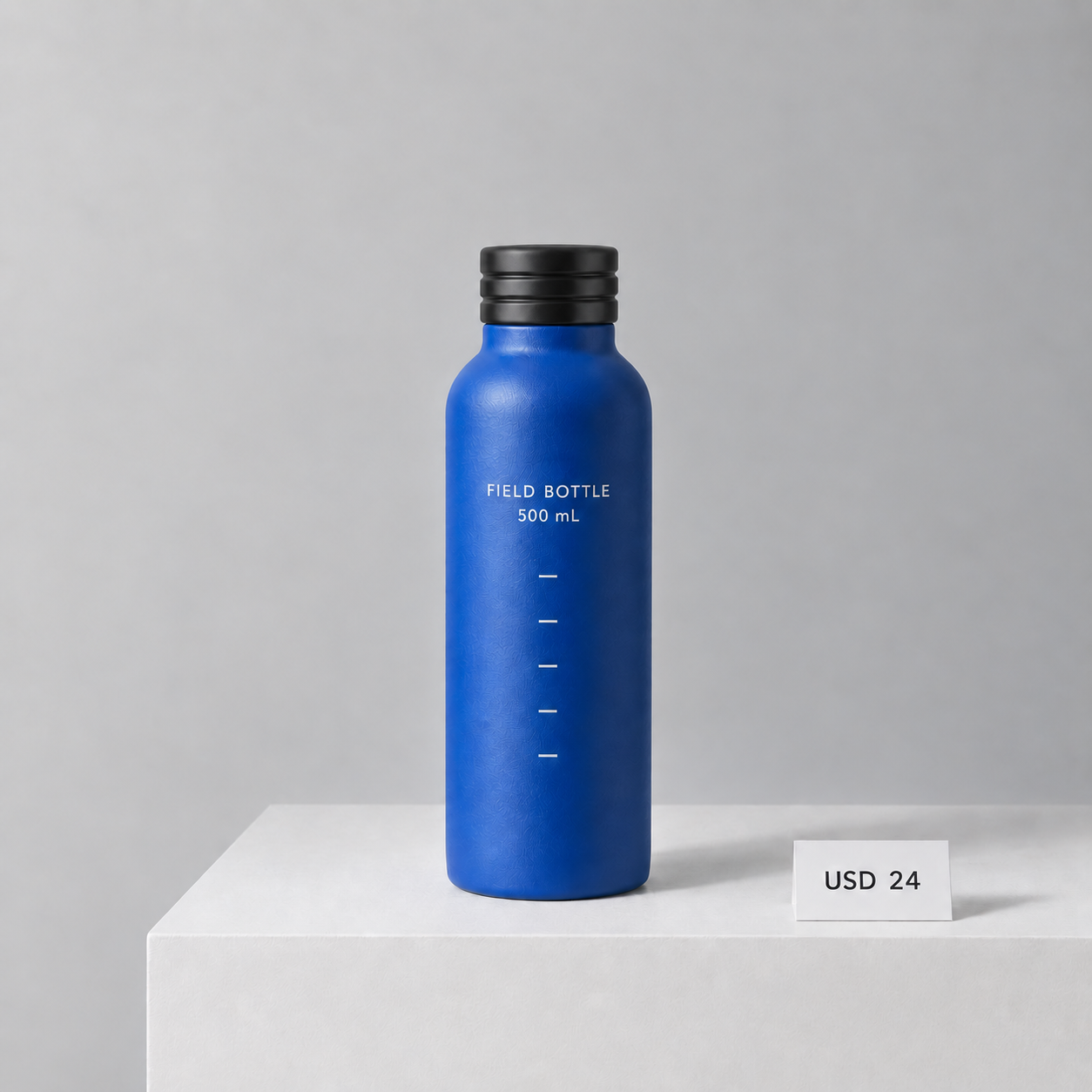 R2 original PNG. The cap is black, and the earlier price edit survives. The blue surface was not requested to change.
Three cap bands remain visible. “Matte black” is a visual interpretation rather than a verified material specification; highlights remain on the cap. More importantly, the bottle’s textured pattern becomes easier to see even though its material was supposed to remain fixed.
R3–R4: adding and removing a badge does not rewind the image
R3 added a small orange circle containing NEW in the unused upper-left background. Both automatically supplied candidates complied in broad terms, but their badges differed in position, color and typography. The chain below follows candidate 1 by display order; the unused candidate 2 original is available for inspection.
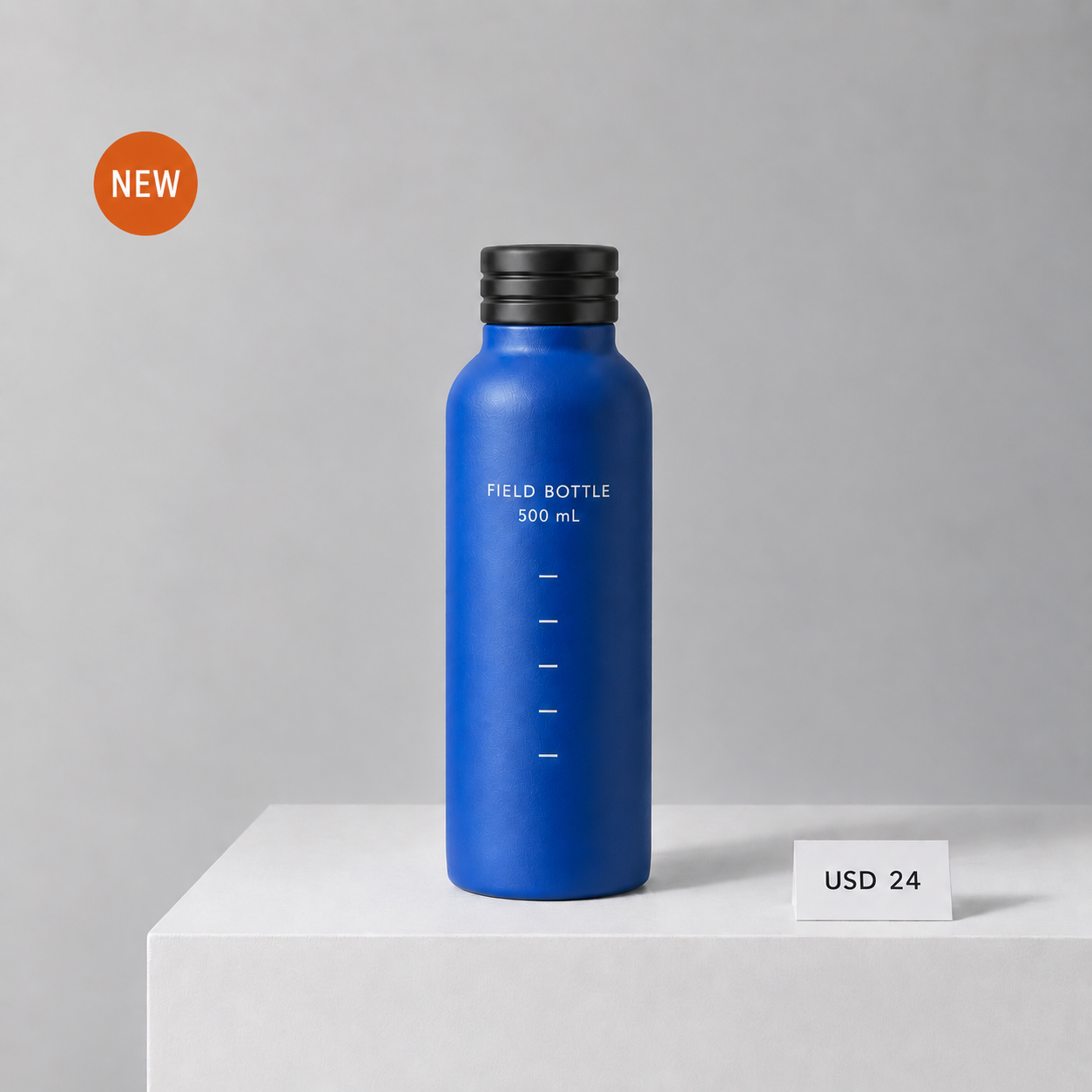
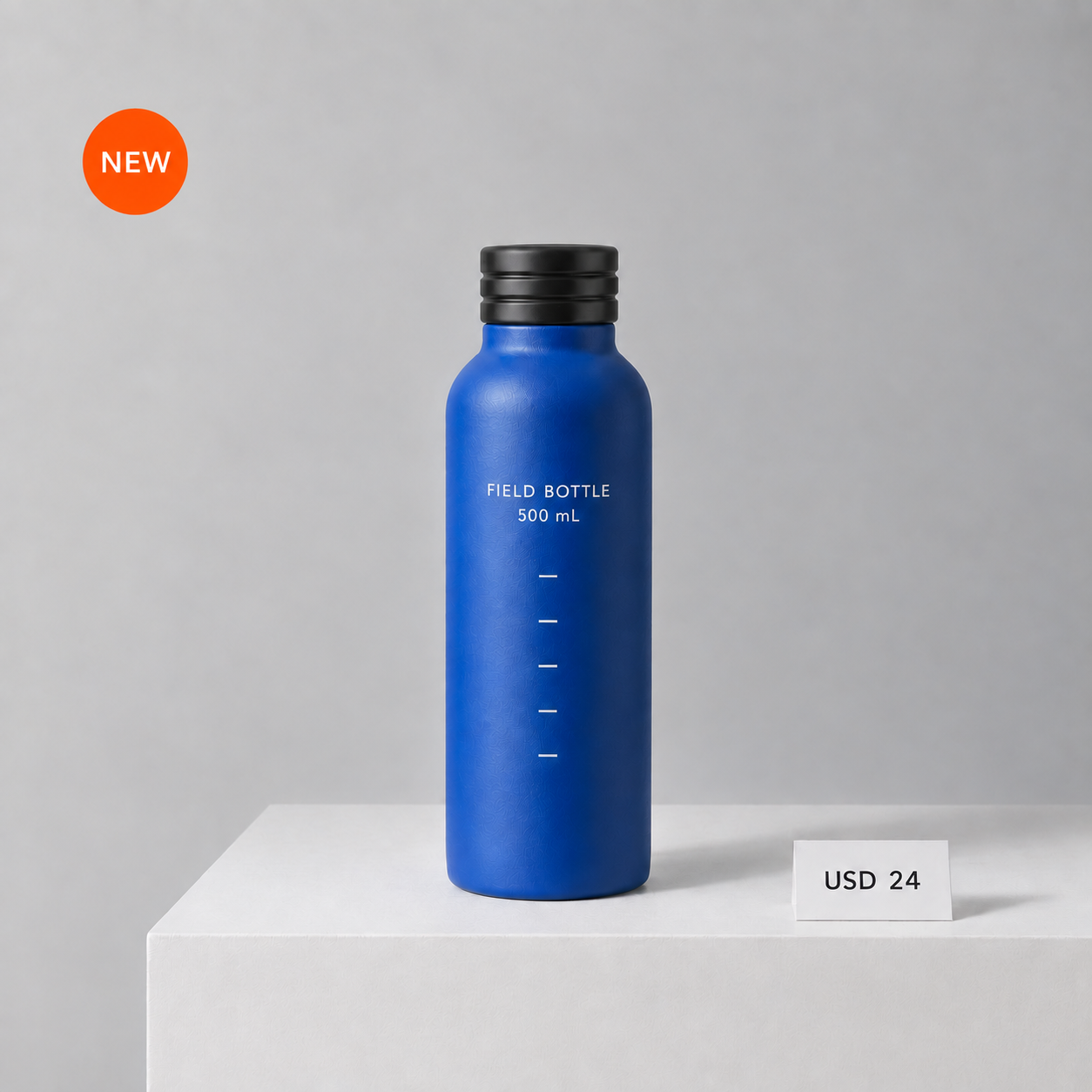 R3 candidate 1, retained by display order rather than preference. The second candidate is linked above; it was not used for R4.
R4 removed only that badge and requested matching gray in its place. It did not ask to improve the bottle, smooth its surface or return to the baseline.
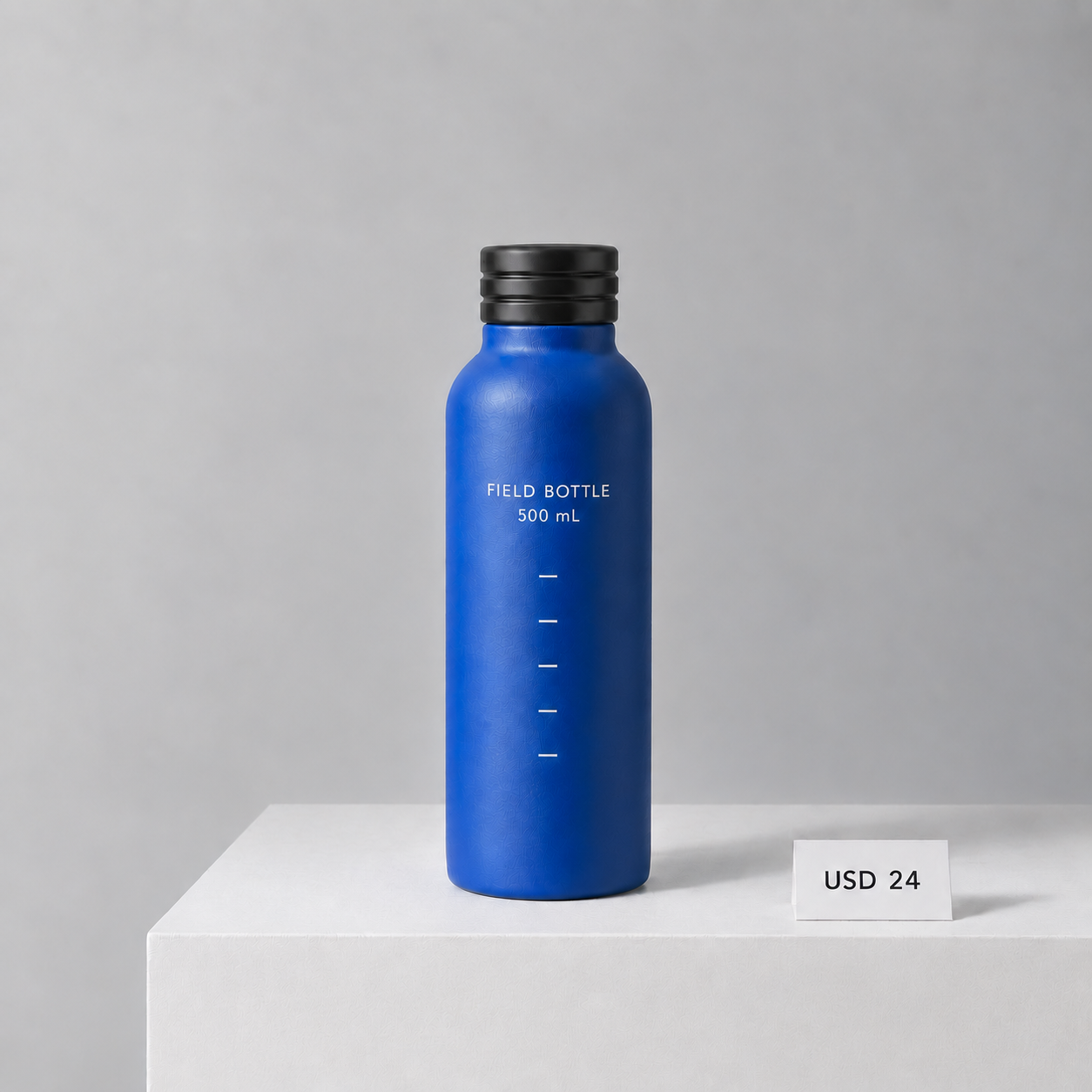 R4 original PNG. The badge is absent, but the earlier texture changes remain.
This is a useful distinction for revision-heavy work. “Remove the badge” reverses a content decision. It is not an undo operation that restores the earlier file’s exact pixels. The blue finish continues to show the larger pattern, and the pedestal also has visible fine markings.
R5: silver returns, the initial finish does not
The last instruction changed only the cap back to brushed silver. It explicitly kept the USD 24 price and prohibited restoring an earlier image. That leaves the final intended composition close to R0, with only the price different.
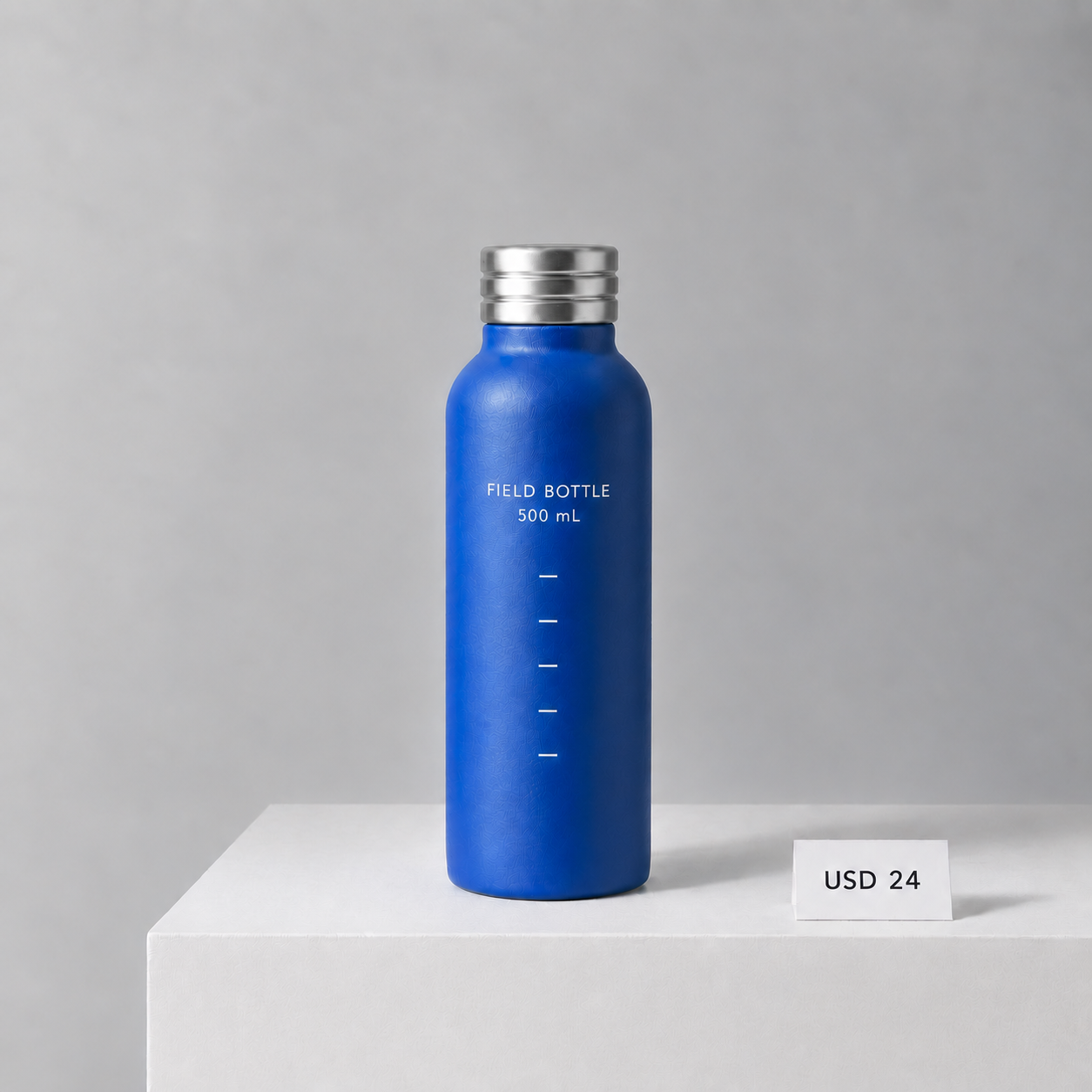 R5 original PNG after five edits. The earlier price change persists; the product’s finish no longer closely matches R0.
The broad shape, two label lines, five ticks and three cap bands survive. That is a meaningful success for instruction following in this sequence. But the final bottle’s finish is a poor match for the original fine-grained one. If that texture represented a real coating, it would matter to a product listing.
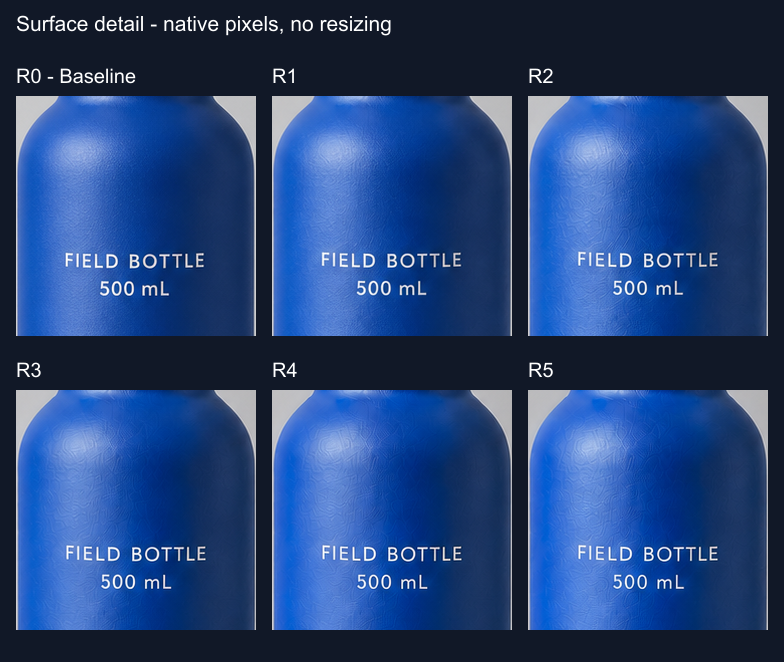 Each tile is a 240 × 240 crop at x=510, y=400 in its original. No tile was enlarged, sharpened, denoised or recolored. English labels were added outside the crops.
Calling this simply “blur” misses the visible failure. Letters remain readable while surface marks become more prominent. Nor can we report a scientific “noise increase”: there is no known clean photographic signal or sensor-noise model here. The supported observation is texture drift across this edit chain.
Color drift: the gray background darkened more clearly than it changed hue
To supplement visual inspection, we sampled the same 150 × 150 background patch in every original, beginning at x=900, y=350. This is away from the badge, bottle and price card. The numbers below are rounded means of the file’s 8-bit RGB channel values, on a 0–255 scale.
| Output | Mean red | Mean green | Mean blue |
|---|---|---|---|
| R0 | 184.4 | 184.6 | 186.5 |
| R1 | 176.2 | 176.1 | 178.0 |
| R2 | 174.9 | 175.3 | 177.6 |
| R3 | 175.5 | 175.4 | 177.6 |
| R4 | 171.6 | 171.4 | 173.6 |
| R5 | 168.4 | 168.1 | 170.3 |
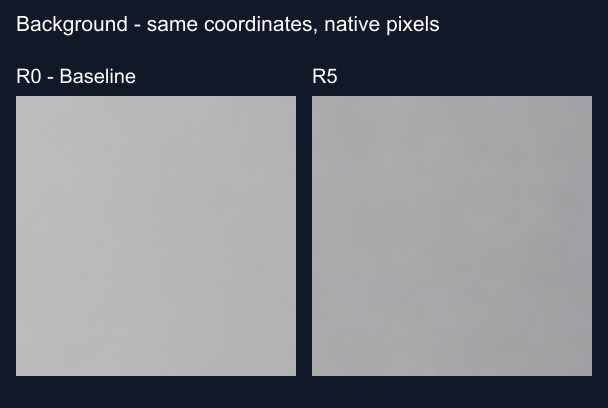 These larger 280 × 280 context crops start at x=870, y=310 and contain the measured patch. Their pixels are unchanged; the dark frame and labels are separate.
All three channels fall by roughly 16 code values between R0 and R5. Their proximity suggests a mostly neutral darkening in this patch, not strong evidence of a yellow cast. The sequence is not strictly monotonic: R3’s red and green means rise slightly from R2.
A separate blue-bottle patch at x=535, y=730, size 65 × 140, changes from approximately (60.4, 107.8, 196.6) to (60.0, 113.7, 212.1). That records a local channel change, not a calibrated product-color tolerance. Lighting, generated texture and the sampled location all affect it. Neither table establishes a whole-image percentage loss of quality.
What to do when a product image needs another correction
For a concept review, this sequence could be useful: a colleague can see the lower price, black-cap option and badge placement. For a final listing that must accurately depict a coating, the texture changes would require rejection or manual repair.
Keep the approved original separate from the latest generated edit. After each turn, inspect the changed area and three unchanged areas: the label, the product finish and a neutral background patch. In this run, checking only USD 24 would have missed the earliest warning.
If the only change is price or a promotional badge, use a separate text or shape layer in an editor when exact preservation matters. If you need to explore a different material, make a branch from the approved source and compare it before accepting it. These are workflow recommendations, not additional experimental arms tested here; we did not measure whether branching reduces drift.
For an API implementation, keep the original, prompt, parent-image ID and result as separate records. SandBase’s image-generation reference is a starting point for its API interface; this experiment itself ran in ChatGPT, not through SandBase, and does not verify a particular Images 2.5 route there.
FAQ
Did five rounds preserve every product detail?
No. The requested changes and main text survived, but surface texture and sampled colors changed. This single run cannot establish a general five-round failure or success rate.
Were the images compressed for the article?
No lossy recompression or resizing was applied. Each original download is a 1254 × 1254 PNG. The uploaded and downloaded CDN files matched SHA-256 hashes. Comparison panels use native-pixel crops; click the images to inspect full-size files.
Was this specifically Flare or Sunburst?
The web entry said Images 2.5, but did not reveal the backend model ID. Do not use this test to rank those API models or infer their prices and latency.
Does the result prove that editing always adds noise?
No. The visible issue here is changing texture, not a measured noise process. Other subjects and repeated trials would be needed to establish how often it happens.
Can a Free account always complete this sequence?
This account completed the baseline and five edits, then displayed an exhausted image quota. That is a session observation, not a promise about another account’s allowance. No upgrade was purchased.
The practical stopping rule is simple: if the price is fixed but the product’s coating has changed, the revision is not ready for a product listing. Preserve the successful idea, not the assumption that everything else stayed the same.