One 3D Mesh, Two Product Colorways: TRELLIS.2 vs Meshy 7
Four retextured GLBs show what happens to UVs, color placement, size and cost when one robot becomes two product colorways.
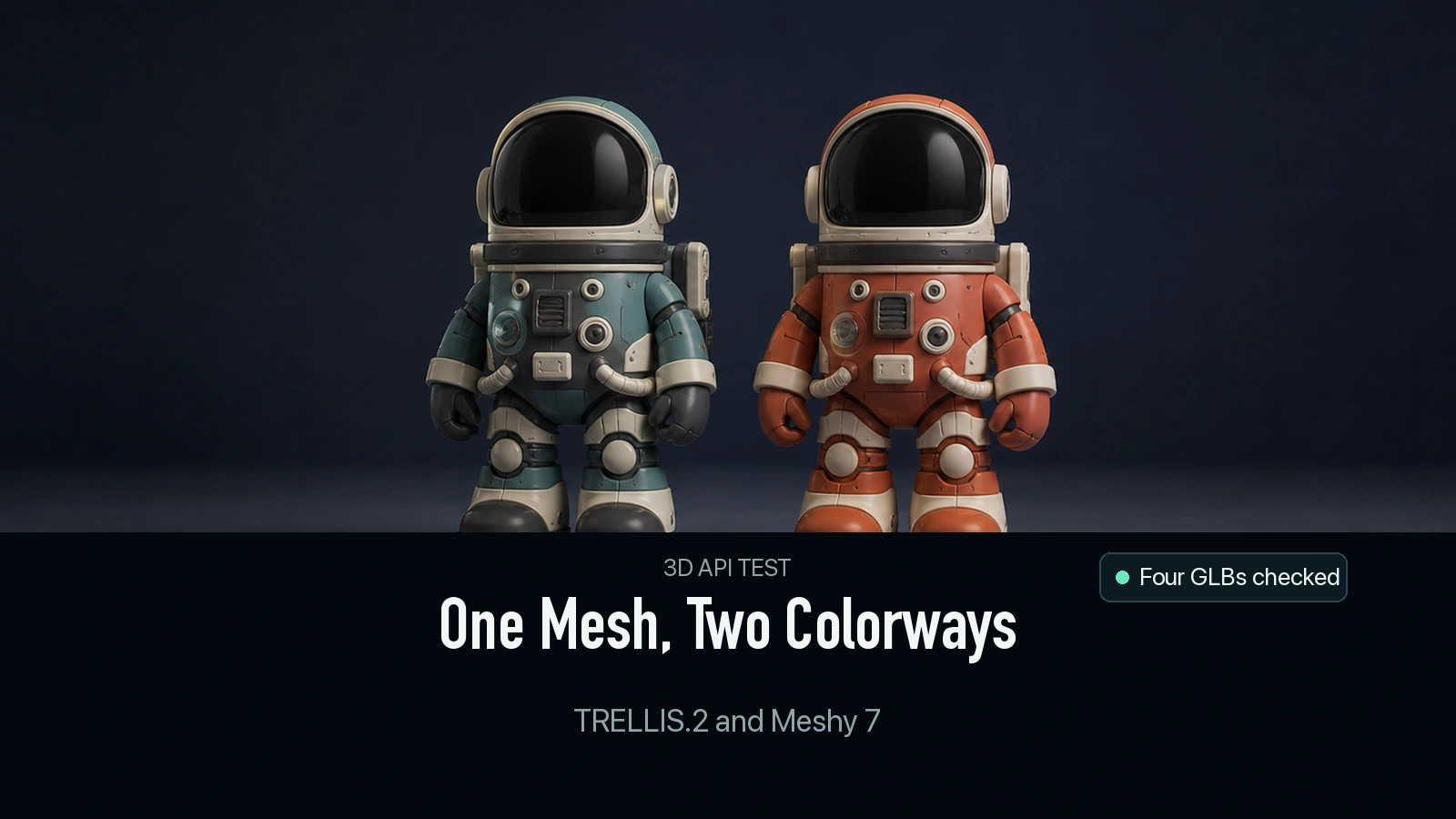
The same 8,089-triangle robot came back in two colors from each retexturing API. In a viewer that fits every asset to the frame, the four exports looked like different finishes on the same product. The original files told a more useful story. Meshy 7 kept the source UV layout within our comparison precision, while its exports were about twice the original file-unit height. TRELLIS.2 kept nearly the source height and produced a different UV layout. We verified the practical consequence by swapping each delivered base-color map onto the original mesh.
Key takeaway
- Use one source GLB for all variants. This keeps the product silhouette under control and lets you compare the returned geometry, UVs and materials independently.
- All four outputs had 8,089 triangles. Meshy 7 returned 5,435 vertices, matching the input count, while TRELLIS.2 returned 7,780. Both providers exported new GLB containers.
- Meshy 7 preserved the mapping of normalized triangle corners to UVs at five decimal places in this test. Its base-color JPEGs worked when applied to the original GLB. TRELLIS.2 used a new mapping and its PNGs needed the matching geometry and UV layout.
- The two-color cost was $0.48 with TRELLIS.2 and $0.66 with Meshy 7. The Meshy GLBs were smaller in this specific test, which used one base-color image for Meshy and two material images for TRELLIS.2.
Start from one approved product mesh
We used the low-count robot from the Tripo face-limit comparison. The source already had a material and a UV layout. It delivered 8,089 triangles, 5,435 vertices and one 2,048 × 2,048 base-color JPEG. It was a useful input because all five GLBs could be inspected in one viewer, including the original. The source had no rigged product behavior to compare. Our acceptance checks are intended for static product renders and a texture switch on a single mesh.
For the two references we painted a viewer copy of that same source mesh using vertex colors computed from fixed coordinate regions. For Ocean we used teal and charcoal with light accents. For Terracotta we used red-orange and cream with a warmer light accent. We rendered them from the same camera. Both reference PNGs therefore showed the same silhouette, with a deliberate palette change and the same zone boundaries. We submitted each reference at its original 768 × 768 resolution.
Each retexture call received the original unchanged GLB. TRELLIS.2 Retexture received the reference through image, internal resolution 1,024, final texture_size: 2048 and seed 42. Meshy 7 Retexture received image_style_url, texture_resolution: "2k", enable_original_uv: true and enable_pbr: false. This is a test of the two configured delivery paths. Each endpoint processed each palette once.
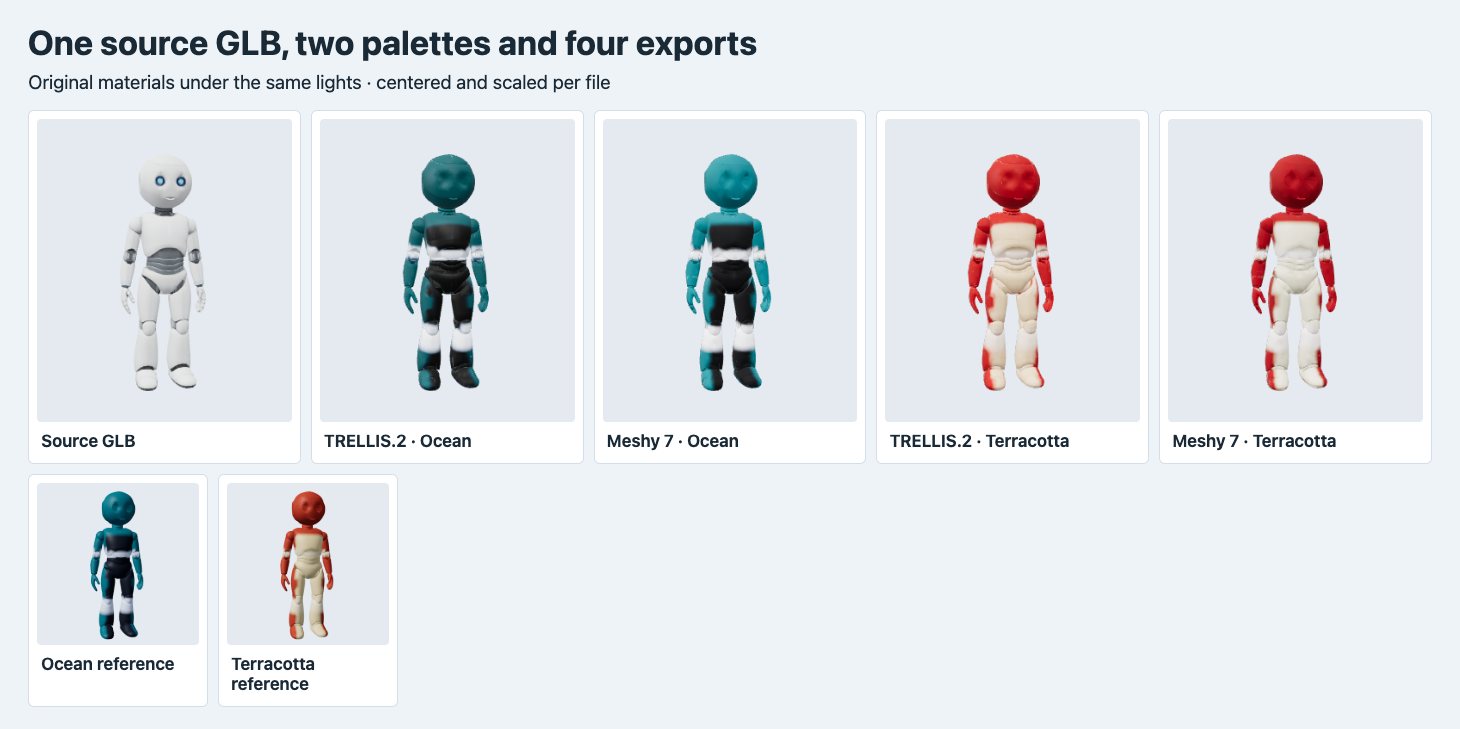
The four outputs use their delivered materials. A shared camera and light frame each file after centering and scaling. The two small panels show the separately rendered palette references.
Review color regions from both sides
In the normalized front shots, both routes put teal on the Ocean helmet and arms, a dark block on the torso, and light bands around the knees. The source’s blue eye details are less distinct in these four colorways. If an existing texture contains a trademark, status mark or painted-on fastener, include it in the reference or plan to put it back by hand. The test references intentionally left out the blue eye treatment, so there is no positive evidence for preserving that detail when the reference does include it.
The back view gives a concrete reason to rotate every output before sign-off. Terracotta’s upper back is more red in the TRELLIS.2 output. Meshy has a larger light cream patch in the upper middle of the back. Both saw the same single reference view, where that area was hidden. If the back of the product has an approved color block, treat the generated version as a candidate and verify that block specifically before it goes into your catalog. Palette matching here is visual. We did not measure color accuracy against a calibrated target or physical swatches.
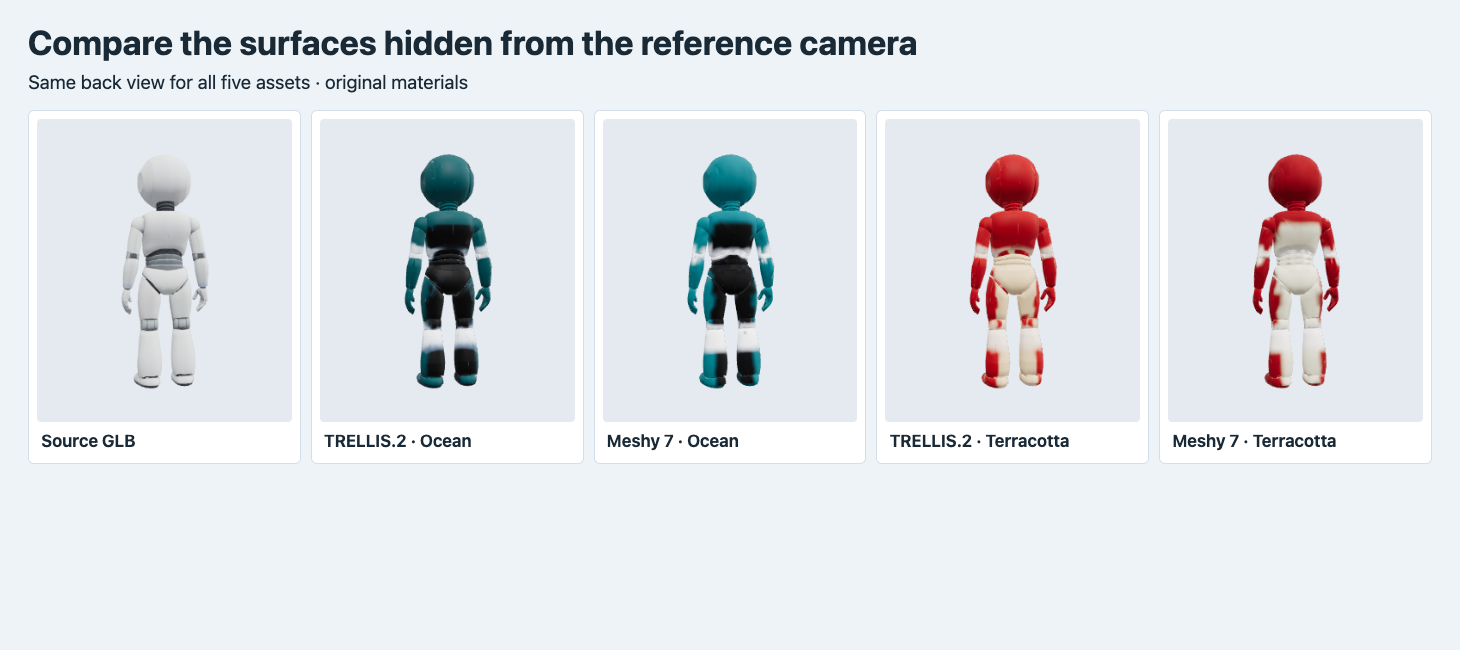
All five back views use the delivered materials under common lighting, after fitting the original files to the same frame.
Check scale independent of geometry and camera fit
We parsed vertex accessors and index arrays in the original GLBs. The longest model-local side was 0.99951 file units on the source, 0.99999 on both TRELLIS.2 outputs and 2.00000 on both Meshy outputs. The Meshy node matrix was identity in both files. In this case the size difference is recorded in the positions. A viewer that automatically frames each asset conceals it. In a shelf mockup or a two-product scene with a fixed camera, switching whole files changes the scale.
We also imported each GLB into Blender 4.5.9, centered it and divided by its longest side. For each pair we measured the distance from stored vertices to the nearest triangle in the other mesh, in both directions. The largest observed distance after normalization was 3.21 × 10⁻⁸ of the longest side across the four comparisons. This checks the normalized surfaces at the sampled vertices. It does not measure physical size or imply that the exported vertex and index arrays are interchangeable.
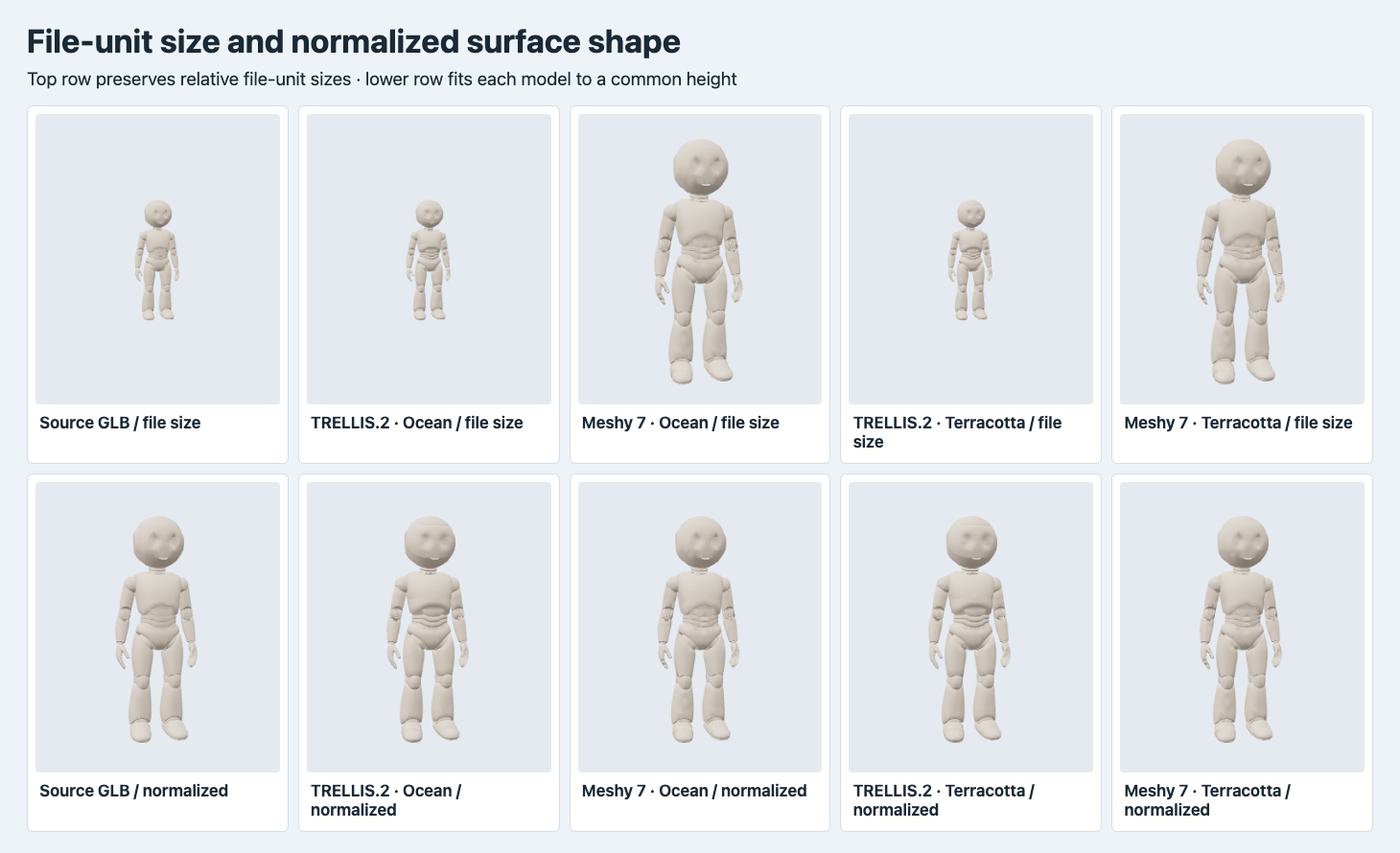
The upper row applies the same scene scale after centering each model. The lower row independently fits each to the same longest side. Neutral material isolates the visible shape.
Try a texture-only swap on the original UVs
To check actual reuse, we compared triangle corners using their model-local positions divided by the longest side and their UV values. We rounded those five numbers to five decimal places, sorted corners within faces and compared the sorted faces. This ignores vertex and face order while checking which UV belongs to which geometric corner. Both Meshy colorways matched the source at this precision, even though their ordered index arrays differ. The TRELLIS.2 outputs matched each other’s vertex positions, indices and UV hashes, while the source-corner comparison failed.
We then loaded the original robot and applied each result’s base-color texture to its original material in Three.js. In the two Meshy panels, the dark chest, bright legs and color bands still appeared in their intended regions. Applying the TRELLIS.2 PNGs directly to that same source layout put unrelated parts of the baked image across the body. These last panels are deliberate mismatches. The original TRELLIS.2 files looked coherent with their own UVs, as shown in the front and back comparisons.
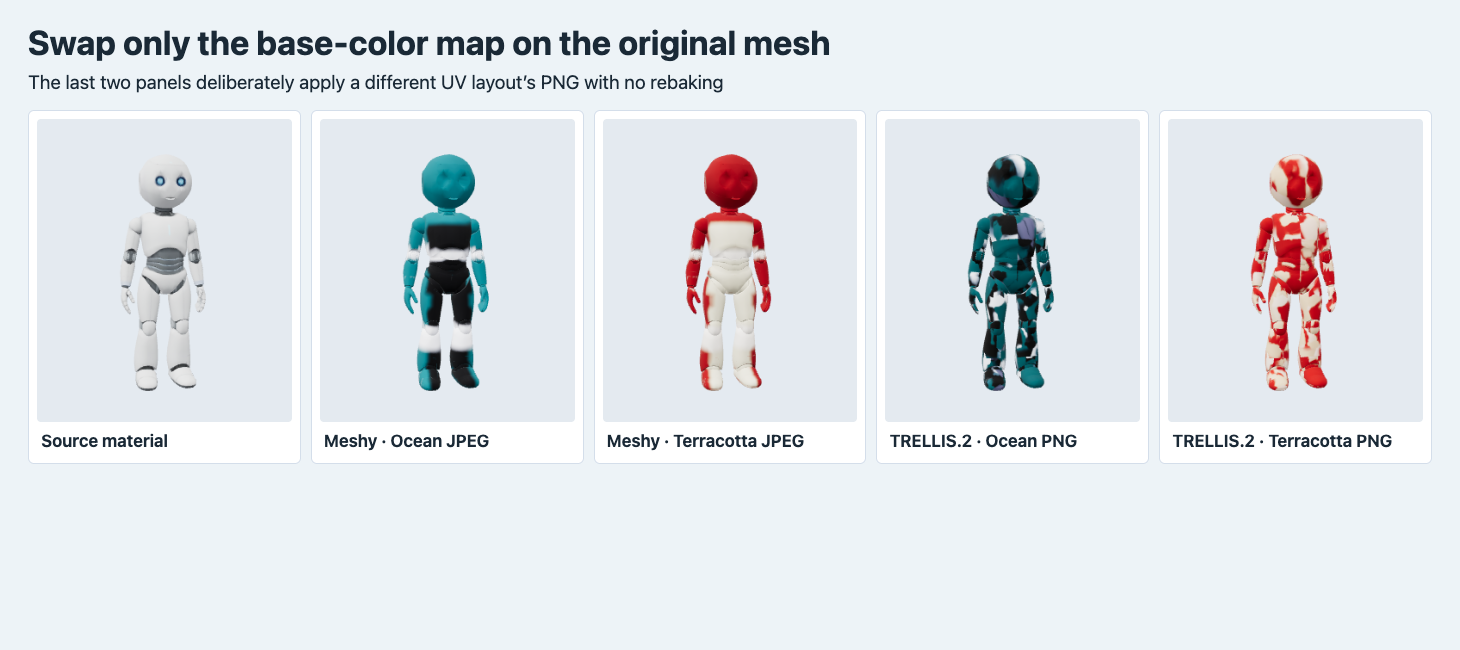
Every panel uses the input geometry, UVs and material factors. Only the base-color map changes. No metallic-roughness map, remapping or rebaking is applied.
For two colors in a fixed viewer, the successful texture-only swap means you can keep the original transform, geometry and UV layout and switch two base-color images. For the TRELLIS.2 pair, you can keep one of the delivered layouts as a new master if it passes your checks, or bake both materials onto your required layout. The identical geometry and UV hashes between these particular TRELLIS.2 outputs support the first option here. Repeat the check when adding another palette. An API result with separate roughness or metallic values needs the compatible maps and material parameters carried along if you want that appearance to survive the switch.
Price the variants and measure what the browser receives
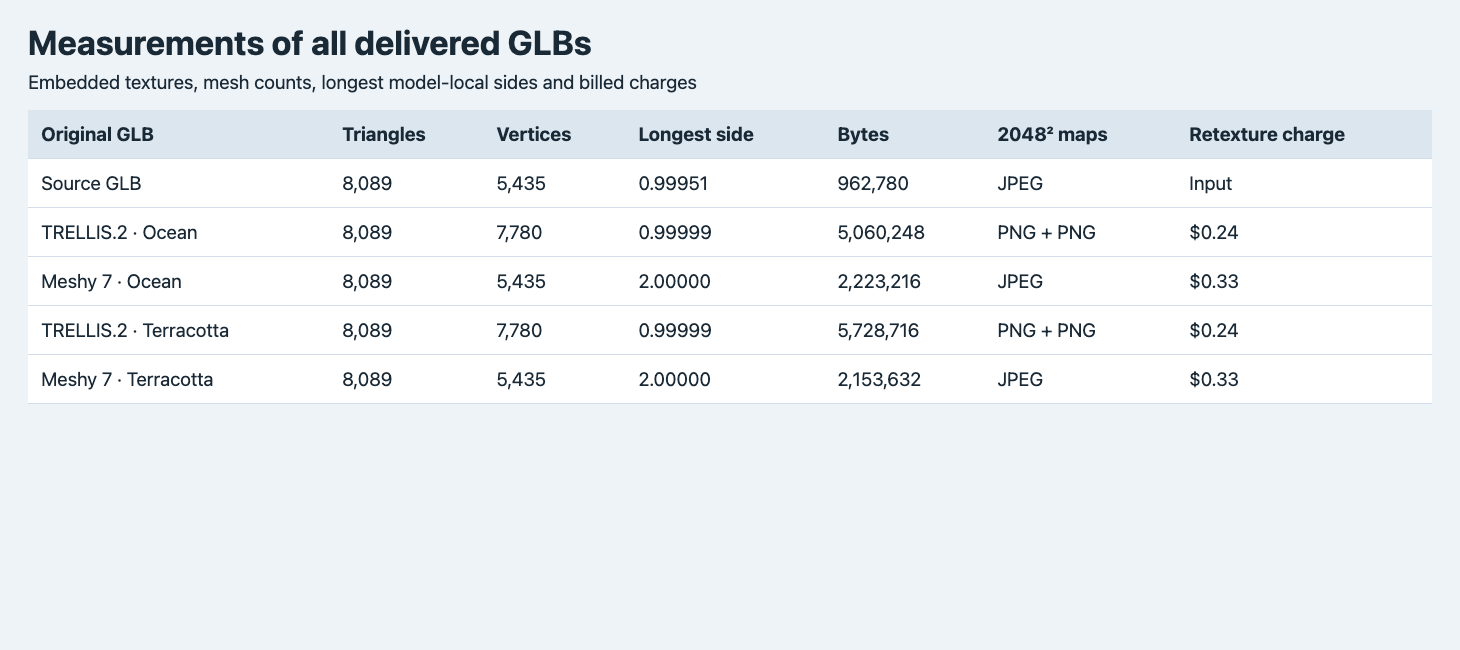
Longest side is measured in model-local GLB units. The listed amounts are the four recolor charges, and the source is shown for comparison.
| File | Vertices | Longest side | Original GLB bytes | Retexture charge |
|---|---|---|---|---|
| Source | 5,435 | 0.99951 | 962,780 | Input |
| TRELLIS.2 Ocean | 7,780 | 0.99999 | 5,060,248 | $0.24 |
| Meshy 7 Ocean | 5,435 | 2.00000 | 2,223,216 | $0.33 |
| TRELLIS.2 Terracotta | 7,780 | 0.99999 | 5,728,716 | $0.24 |
| Meshy 7 Terracotta | 5,435 | 2.00000 | 2,153,632 | $0.33 |
Every embedded image was 2,048 × 2,048. Meshy with PBR disabled had one base-color JPEG. TRELLIS.2 embedded a base-color PNG and a metallic-roughness PNG. For the Meshy colorways, a page can deliver the common mesh once and load each new base-color image as needed. The screenshot used the original carrier GLB, which also contains the original JPEG. Measure your actual packaging and caching behavior before estimating the savings. Texture decoding and browser memory need separate measurements because the compressed GLB byte count describes the transfer. The glTF validator reported zero errors and zero warnings for the five originals.
The $1.14 paid for the four recolors excludes generating the existing source and creating the article cover. Compare incremental costs with that boundary when the product file is already approved. If your acceptance check rules out a material because of its back or printed lettering, retain the cost of that attempt in your asset budget. Another bake or a manual fix is a separate cost. For a comparison of texturing the same source with different embedded map sets, see the Hi3D and TRELLIS.2 test.
Reproduce a colorway on your own mesh
Send the following as the body of POST https://api.sandbase.ai/v1/run with a bearer token kept on the server. Use your own approved GLB and a front reference render that follows its silhouette. Poll the returned run ID at GET /v1/run/{id} and retrieve the resulting file before inspecting it.
{
  "model": "meshy/7.0/retexture",
  "model_url": "https://example.com/assets/approved-robot.glb",
  "image_style_url": "https://example.com/assets/ocean-reference.png",
  "texture_resolution": "2k",
  "enable_original_uv": true,
  "enable_pbr": false
}
Before replacing the item in your storefront, test the base-color swap with the fixed camera and original geometry. Rotate once to confirm where the backs of each surface fall in the new palette. If you ship the complete GLB, compare its bounding box, world placement and material against the accepted source using the same scene transforms. The screenshots here fit the assets to a common display height for appearance and check file-unit size in a separate shot.
If the starting point is a flat product image, the Meshy 7.1 texture reference test uses that route to create two new finishes, then measures how the regenerated meshes differ.
For a deeper check of which original UV seams survived and how the baked colors change across them, see the TRELLIS.2 and Meshy seam comparison.
FAQ
Do unchanged triangle counts prove the mesh can use the same textures?
Use a normalized triangle-corner UV comparison or test the replacement texture on the original in the target viewer. Here the triangle count matched for every export, including the two with a different UV layout.
Is the lower-cost route also the smaller download?
In these two runs per endpoint, TRELLIS.2 charged less per color, and Meshy delivered smaller GLBs. The enabled maps and compression differed, so measure the file you plan to ship.
SandBase ran and billed the four colorway jobs on November 14, 2026 UTC (November 15 in China). The figures render original GLBs or explicit diagnostic views. The cover is illustrative.
Found this useful? Share it