Meshy 7.1 Standard vs 2K vs 4K Geometry: Six GLBs Measured
We ran the same horn and relief mask at three Meshy 7.1 geometry settings and compared relief, orientation, triangle counts, connectivity and cost.
A 4K geometry request in Meshy 7.1 cost 50% more than Standard in this test. The relief mask gained 139 triangles at the same 30,000 target, and its cheek spirals were readable under a neutral light. It also had more boundary and non-manifold edges in our connectivity check. The two results answer separate questions. One is whether extra detail survives in the delivered mesh. The other is how much work that file needs before it can move downstream.
Key takeaway
- Standard, 2K and 4K are geometry settings on this single-image route. With texturing disabled, six outputs all arrived without materials or embedded images.
- All six GLBs exceeded the 30,000-triangle target. Their delivered counts ran from 30,987 to 31,215. The resolution setting changed the geometry in ways a count alone could not describe.
- The 4K mask showed clearly visible shallow carving in a close view, while the 2K horn showed its capped tip on the opposite side in the common front view. Review orientation before evaluating apparent differences.
- The charges were $0.96, $1.20 and $1.44 per untextured result. Check a small feature and mesh connectivity before deciding whether the extra $0.24 or $0.48 per asset helps your delivery.
Fix the target and turn off texturing
We used two catalog reference images. The curved horn has a long taper, a shorter pointed end and several bands around the bend. The mask has shallow relief, open features around the mouth and small contours along the side. They give us two different jobs for the geometry pass. The horn needs a legible outline and band relief. The mask needs local carving and openings to read when the camera moves in.
We ran the same Meshy 7.1 Image-to-3D endpoint three times per image. The only request field we changed within each group was geometry_resolution. We held target_polycount at 30,000, selected triangle topology, turned symmetry off and disabled texturing, PBR, rigging and animation. The inspected SandBase route did not expose a seed field. The six jobs give one result for each setting per input, so changes in the runs can include generation variability.
Meshy’s Image-to-3D API documentation describes 2K and 4K as the geometry generation passes at 2048³ and 4096³. SandBase exposes the values as 2k and 4k. The export budget is set separately by target_polycount. We turned texture generation off so the appearance of a cutout or a spiral had to come from the neutral display of the mesh.
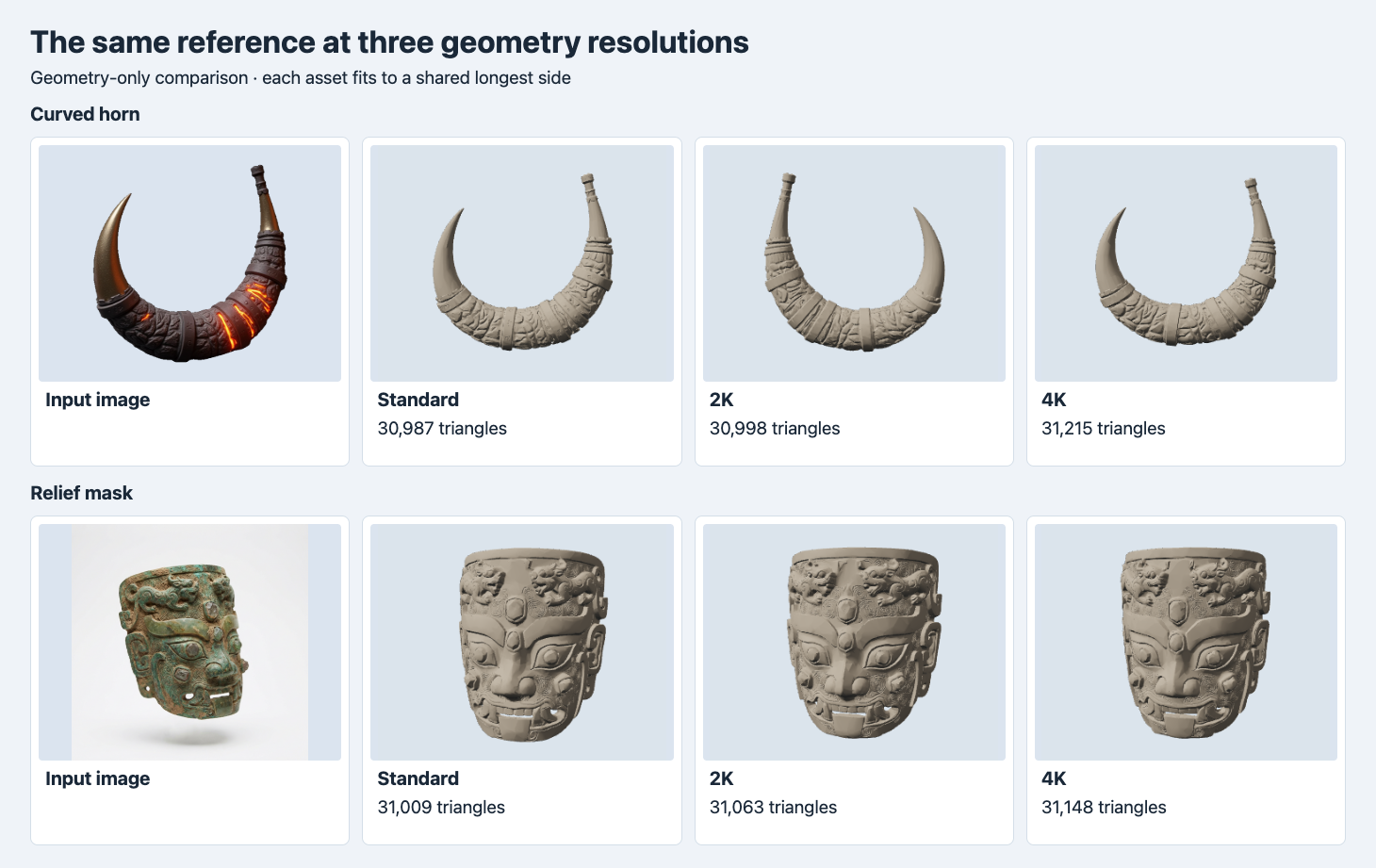
The outputs in each row use identical camera and light settings. Each loaded GLB is centered and scaled by its own longest side. The image at left is the actual input and uses its original view.
Inspect orientation before judging a silhouette
In the first row, the capped tip of the 2K horn appears on the left, while the original image, Standard and 4K show it on the right. In the opposite view it appears on the right. Looking at the results from two sides puts the same end back in view, so a group screenshot at one world camera can make the 2K result look like a different reconstruction at first glance. This test kept the orientations delivered by the API in the common-angle capture. It did not attempt to solve a camera calibration to the reference photo.
For a studio scene with preset cameras, add an orientation check to the acceptance pass. Name an asymmetric landmark and identify where it should sit in the approved front view. In this case choose the tall capped tip. Check that marker before judging contour, and record the transformation for any version you align. Here the horn’s 4K bound on Blender’s vertical axis was 1.76313 scene units. Standard and 2K measured 1.86291 and 1.88462. A common display scale can help the visual comparison while preserving those numbers separately for your own scene.
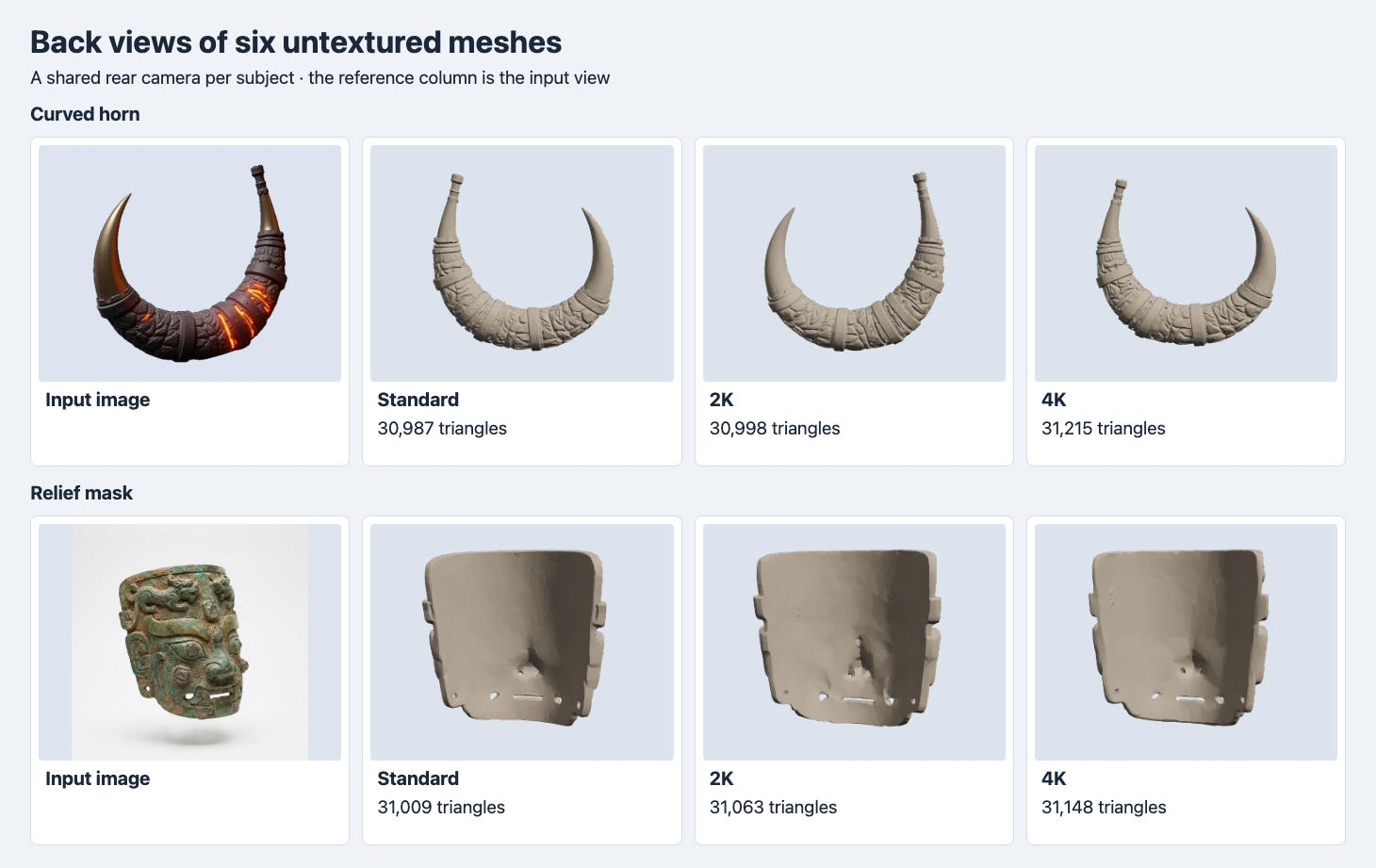
The reference column repeats the original single input view. A shared rear camera for each asset shows what the mesh delivers from the back. It supplies no independent photograph of the hidden side.
Look for small changes before moving to 4K
The mask’s larger forms are recognizable in every setting. The far cheek has a spiral pattern that is visible in each version. In the 4K close view, the curves along the cheek and the relief around the sides read clearly. The mouth opening also looks segmented by raised shapes in all three versions. Examine the silhouette of the opening in the neutral view and turn the model to confirm where the visible gaps continue. The image has a light gap below the upper lip, and neither the front screenshot nor the topology check by itself says whether the gap was reconstructed correctly throughout its depth.
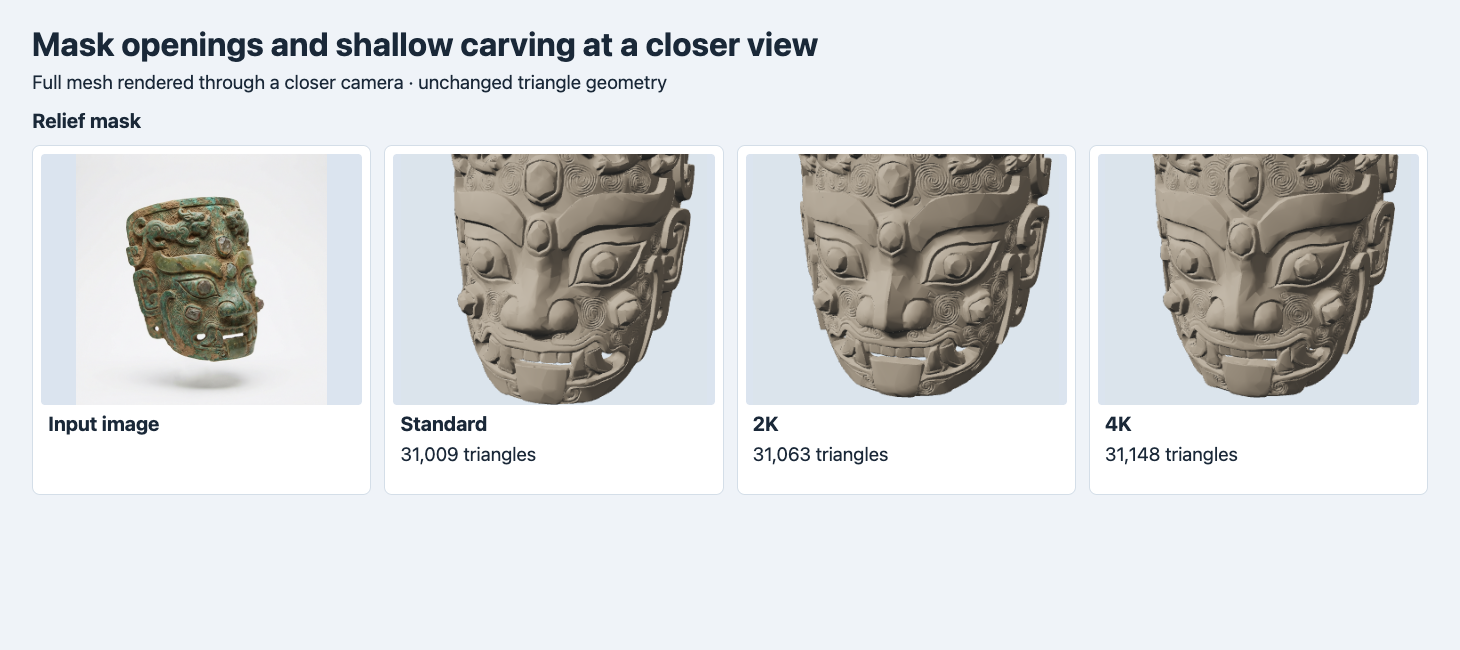
The camera moves toward each original output using the same orientation and settings. The model itself has the same geometry as in the full view.
The triangle overlay gives a different check. The large brow regions have broad triangle patches, and the dense areas appear around the cheek carving and some cutouts. Across the six files the count stayed close to 31,000, so you get more information by looking at where edges follow a feature. The close view is large enough to judge what survives at that camera distance. Place your own asset in its final composition first, since a distant thumbnail may make the differences too small to see.
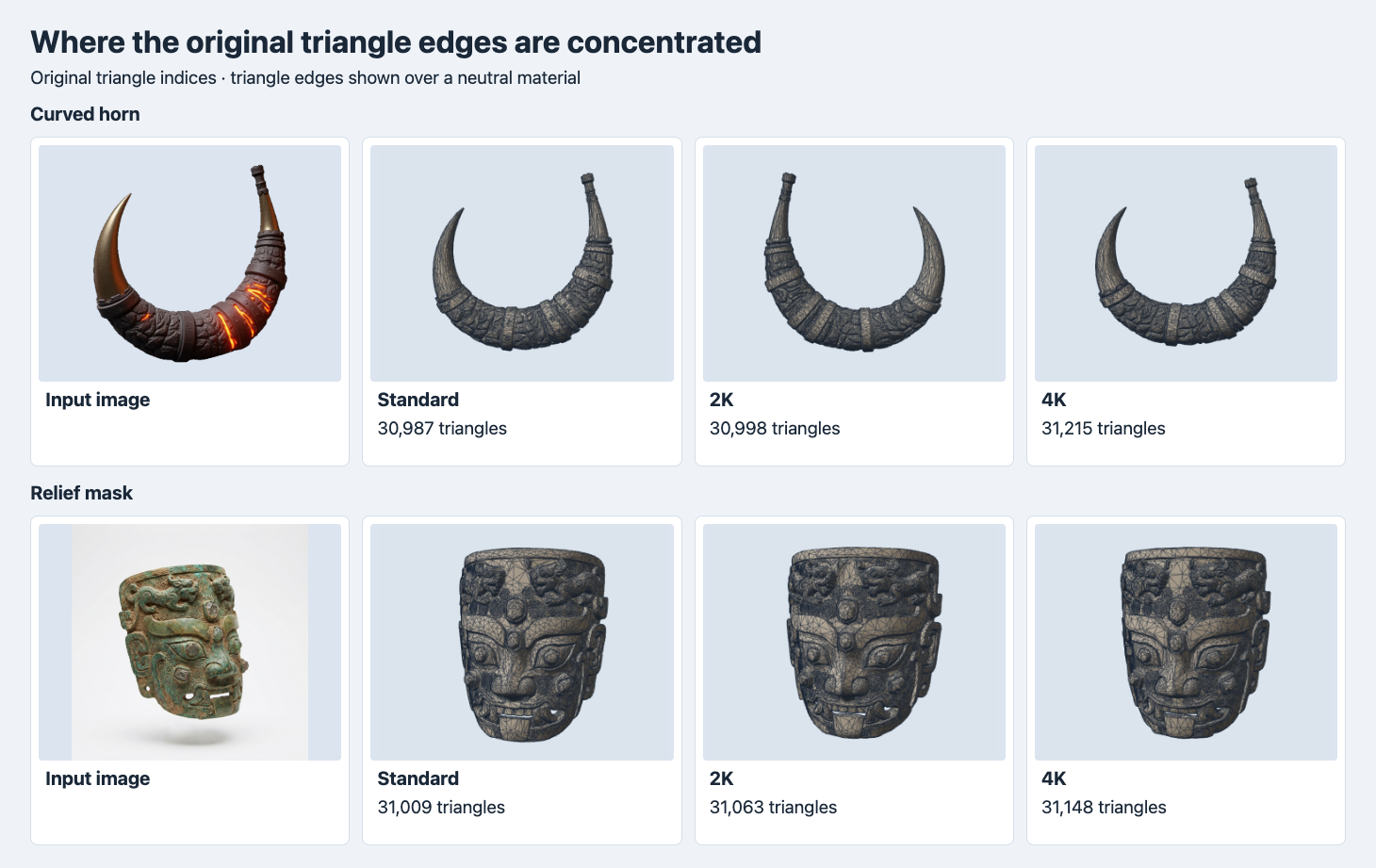
The line overlay shows the connectivity of the original triangles. It is kept out of the other shots so the line color does not get mistaken for surface detail.
Read the six exported files
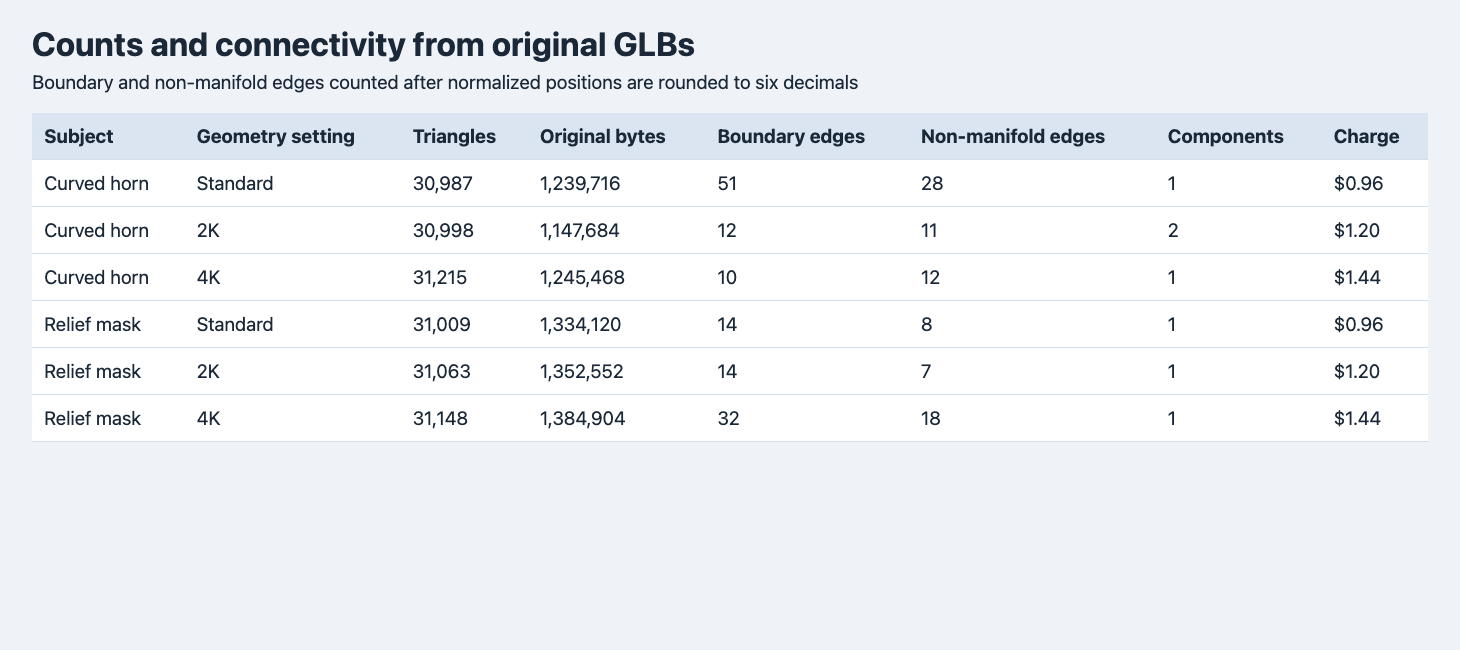
The topology diagnostic merges points that share the same rounded normalized position. Charges apply to the tested untextured configurations.
| Subject | Setting | Triangles | Original GLB bytes | Boundary edges | Edges with >2 faces | Charge |
|---|---|---|---|---|---|---|
| Horn | Standard | 30,987 | 1,239,716 | 51 | 28 | $0.96 |
| Horn | 2K | 30,998 | 1,147,684 | 12 | 11 | $1.20 |
| Horn | 4K | 31,215 | 1,245,468 | 10 | 12 | $1.44 |
| Mask | Standard | 31,009 | 1,334,120 | 14 | 8 | $0.96 |
| Mask | 2K | 31,063 | 1,352,552 | 14 | 7 | $1.20 |
| Mask | 4K | 31,148 | 1,384,904 | 32 | 18 | $1.44 |
Standard to 4K added 228 triangles for the horn and 139 for the mask. As a transfer file, the 2K horn was about 92 kB smaller than Standard despite delivering 11 more triangles. The mask increased in bytes across the three exports. These counts and original file sizes are a direct measurement. Treat the requested target as an input field and the triangle count as an artifact check. For another test that separates those values, see the Tripo face-limit comparison.
All six returned as single-mesh GLBs and passed glTF validation with zero errors and warnings. To inspect connectivity, we imported them in Blender 4.5.9, applied world transforms, centered and normalized the vertex positions by longest side and rounded them to six decimal places. Then we treated coincident rounded coordinates as single vertices and counted undirected triangle edges. A boundary edge has one attached face. An edge with three or more faces is non-manifold. Rounding can change the count near the chosen precision. This is a reproducible diagnostic and cannot certify a solid or distinguish intentional openings from accidental cracks.
The 2K horn had two connected components, with 30,729 triangles in the larger and 269 in the smaller. The other files each had one component by the same position-based method. If an optional strap should stay separate, component count alone can’t determine acceptance. If there must be a single continuous shell, locate the smaller region and check it before assigning a damage or repair ticket. For the mask, the 4K output’s 32 boundary edges and 18 edges with more than two faces make the same point in another way. A readable feature in the render can coincide with more connectivity work.
Pay for the detail you can verify
The six SandBase jobs billed $7.20 in total. Standard, 2K and 4K cost $0.96, $1.20 and $1.44 per untextured asset. Total call count matters when you plan a batch. For a single object, trying Standard and then 4K costs $2.40 in this configuration. Keep the Standard export and compare the same named features side by side. If Standard satisfies the final camera and there is spare room in the mesh budget, you have a finished candidate without an extra run. If the 4K pass gives a visible gain, check whether the extra repair work or export size is acceptable. This comparison has no independent scan, matched reference cameras or timings measured through completion.
To repeat on the SandBase route, send the following JSON to POST https://api.sandbase.ai/v1/run using a server-side bearer token and poll GET /v1/run/{id}. Each generation can incur a charge.
{
  "model": "meshy/7.1/image-to-3d",
  "image": "https://static.sandbase.ai/examples/meshy/relief/input_image_0.png",
  "geometry_resolution": "2k",
  "target_polycount": 30000,
  "topology": "triangle",
  "symmetry_mode": "off",
  "should_texture": false,
  "enable_pbr": false,
  "enable_rigging": false,
  "enable_animation": false
}
FAQ
Is 4K a request for a 4K texture?
It selects the geometry pass on this endpoint. Texture generation was disabled, and inspection found zero embedded images in all six original GLBs.
Can the mesh pass format validation and still need repair?
Yes. Each GLB passed format validation. The post-weld connectivity diagnostic still found mesh boundaries and edges shared by more than two faces. Verify the actual requirements of your viewer, editor or slicer.
SandBase executed and billed the six calls on November 14, 2026 UTC (November 15 in China). Figures render original geometry, and the cover is illustrative.
Found this useful? Share it