Product Photos to a Rotatable Web GLB: Two Exports Measured
Build a rotatable Three.js product preview and compare Hi3D and Rodin GLB bytes, mobile emulation, decoder cost and request-to-frame time.
In the rotatable preview, the Hi3D geometry and color payload went from 3,900,816 bytes to 267,980 bytes. The Rodin file went from 7,684,224 to 1,203,528 bytes. In desktop Chromium set to a Pixel 7 viewport and a 5 Mbps connection profile, the median time from model request to the first submitted frame fell from 6.67 to 1.33 seconds for Hi3D and from 12.52 to 2.61 seconds for Rodin. The compressed files did require more work after the download. For each cold run, the Draco loader transferred about 251 KB of its own.
Open the interactive Hi3D preview or switch to the Rodin export. Drag to inspect the asset or use the fixed Front, Side and Back buttons.
Key takeaway
- Capture a rear view and one that shows the depth of your most important protrusion. In this test the original files already differed in where the rear connector ended up. Compression did not fix that difference.
- Save a separate file at each optimization stage. For Hi3D, Draco removed the most bytes in the tested sequence. For Rodin, resizing the three delivered maps removed the most.
- Measure the actual GLB plus the decoder payload. The Hi3D web file was 267,980 bytes and the decoder responses added 251,242 encoded bytes in the cold benchmark.
- Review at the final viewer size and at all the angles customers can reach. Require both a functioning loader and a real visual check before publishing.
Use a capture set that exposes the back
Our input was a four-angle render of a small equipment case: front, left, back and right. It is the same authored fixture from the five-route reconstruction comparison. Each image is a 768 × 768 orthographic render. The front contains three round buttons and a small screen, and the rear has a row of vents and a projecting orange connector. This workflow is reproducible with those rendered images. It makes no reconstruction claim about phone photography or changing studio conditions.
For a physical product, capture the front while the object is in its final configuration. Then rotate the same piece or move the camera. Keep the focus, crop and relative orientation consistent. Take at least one angle where the connector, handle or hinge sticks out in profile. In a rotating product preview, that side matters as much as the front hero image.
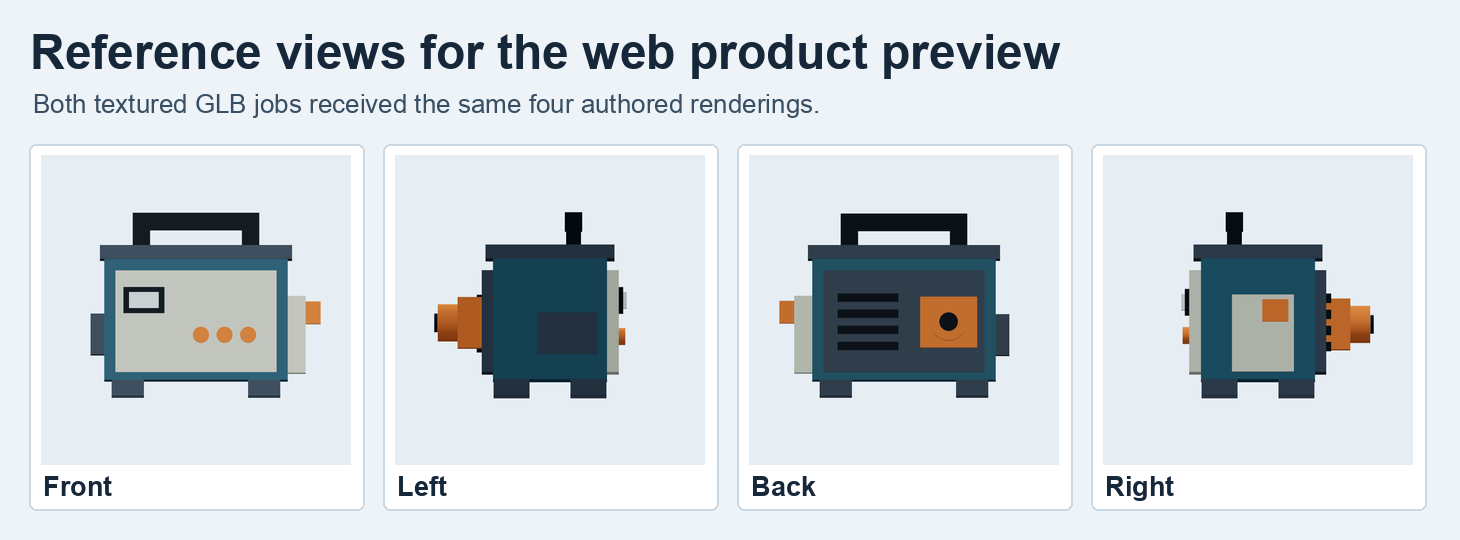
Each source image is an independent rendering of the same authored object. Both calls received all four images.
We sent those inputs to Hi3D 3.0 Multi-View at 2048quality, 100,000 requested faces, texture enabled, PBR disabled and GLB output. It settled at $2.40. Rodin 2.5 took the same files in an array, using Gen-2.5-High, the 50K Triangle preset, material PBR, seed 42 and GLB. It settled at $0.48. These are two configured examples. One retained three material maps and one retained a single base-color image. We did not convert one endpoint’s output into the other.
Prepare a website copy in three measured steps
Put the original in storage before making a viewer copy. Our first step resized the embedded maps to 1,024 pixels on each side. The second changed only the base-color map to WebP at quality 82. The third applied Draco to the geometry. The order makes it possible to attribute file savings to an individual step according to the output differences. We used glTF Transform 4.5.1 and created a new GLB at every step.
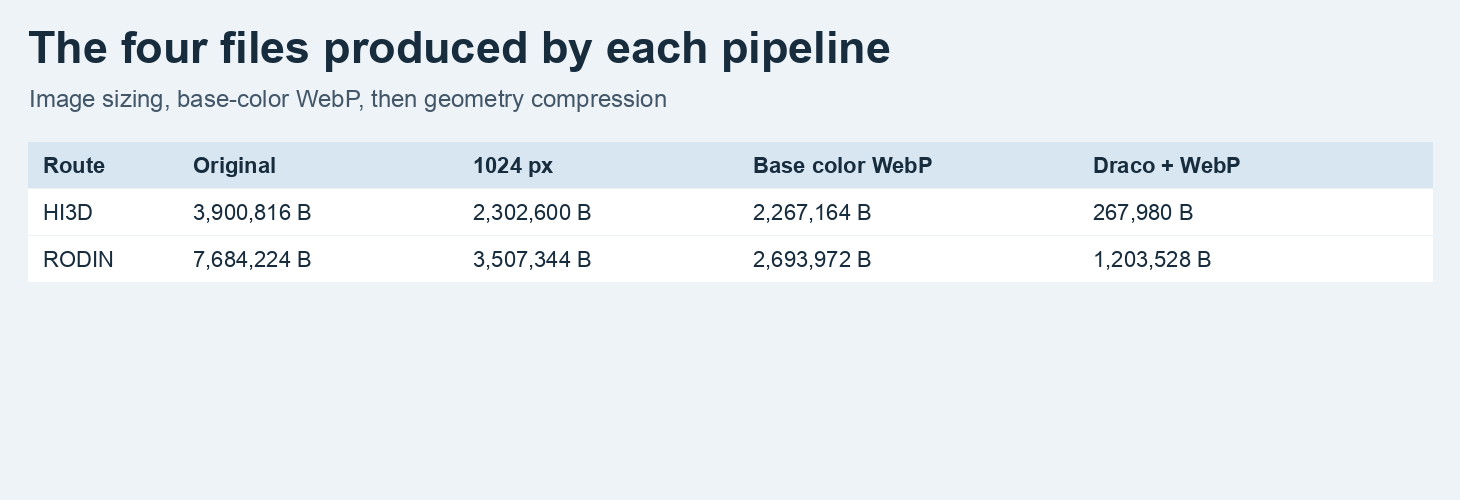
Stage sizes come from complete GLB files. The last column requires a compatible loader for WebP and Draco.
| Route | Original bytes | Resize to 1024 | Base-color WebP | Draco + WebP |
|---|---|---|---|---|
| Hi3D | 3,900,816 | 2,302,600 | 2,267,164 | 267,980 |
| Rodin | 7,684,224 | 3,507,344 | 2,693,972 | 1,203,528 |
Hi3D delivered one 8,192 × 8,192 base-color JPEG under this particular request. Shrinking that image reduced the file by about 1.60 MB, and Draco reduced the resulting WebP-containing GLB by about another 2.00 MB. The decoded geometry still had 96,892 triangles. Rodin’s original had three 2,048 × 2,048 PNGs. Resizing removed about 4.18 MB. The two non-base-color images stayed PNG. The Draco output decoded to 49,994 triangles, six fewer than the original. The pipeline uses quantization, so a new file or unchanged count alone does not establish that every vertex and seam is identical.
The glTF validator issued zero errors for the eight files. All four Rodin stages carried a generated tangent-space warning because the normal-map material did not have stored tangents. The validation tool also reported limited Draco extension coverage. We independently opened the compressed files with a Draco-aware reader and exercised the actual browser path. Keep the file checks and the viewer check as separate release gates.
gltf-transform resize original.glb resized.glb --width 1024 --height 1024
gltf-transform webp resized.glb base-webp.glb --quality 82 --slots baseColorTexture
gltf-transform draco base-webp.glb web.glb --method edgebreaker \
  --quantize-position 14 --quantize-texcoord 12
gltf-transform validate web.glb
See the glTF Transform Draco documentation and the mobile GLB size guide for the separate roles of mesh compression and image resizing. On a detailed product label or normal map, inspect the smaller file at the maximum zoom your shop enables before accepting it.
Fit the camera, then rotate to the important faces
The demo uses Three.js GLTFLoader, with a local DRACO decoder and OrbitControls to rotate the asset. It centers the box and scales the longest side for display. We assigned a 90-degree yaw correction to the Rodin preview based on the closest test orientation to the authored front. Hi3D used its original yaw. This is a viewer transform, applied the same way to the original and compressed captures for each route. It is specific to these two assets.
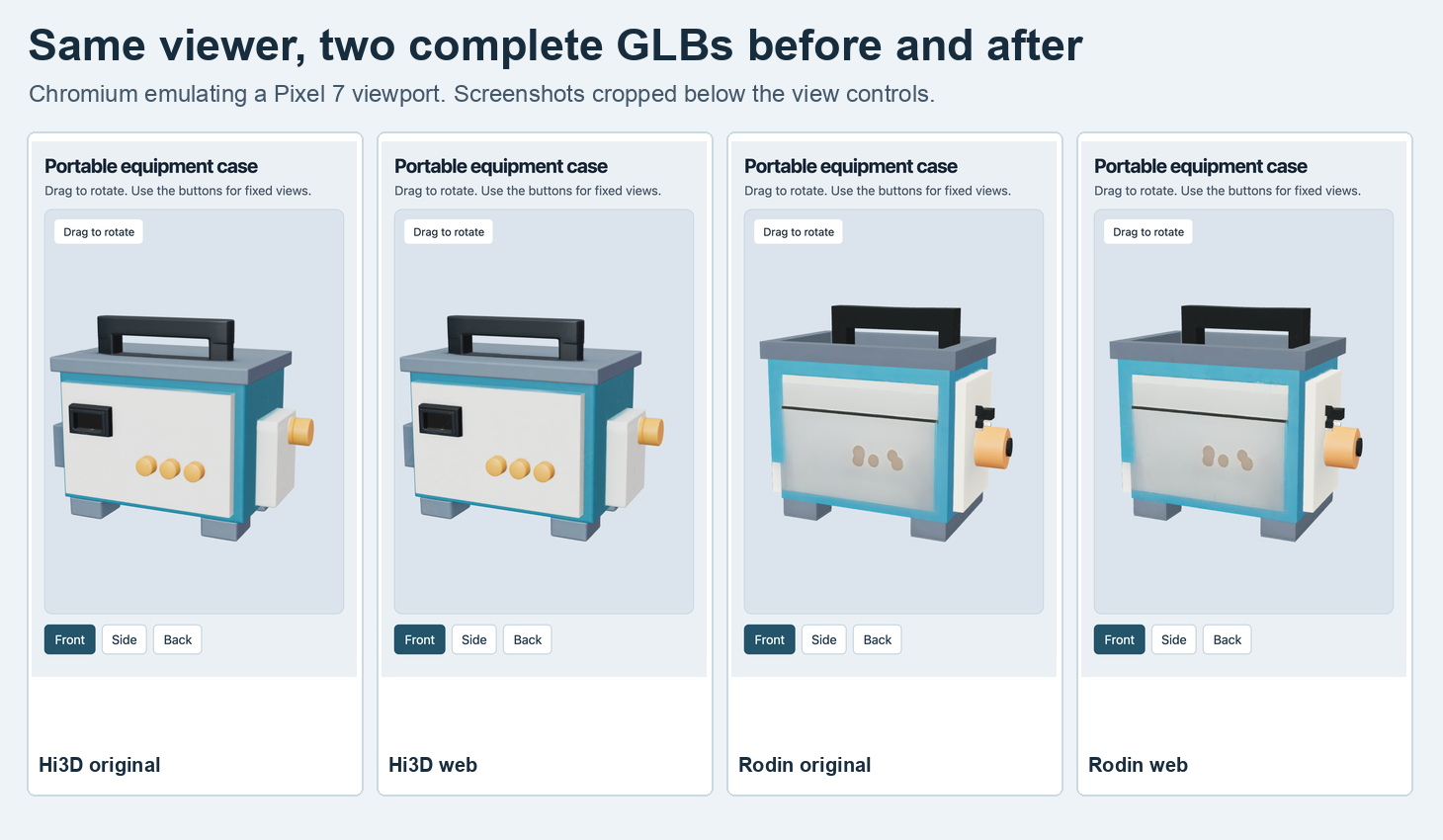
The screenshots show the same local viewer in a Pixel 7 viewport emulation. For each route, the original and compressed copy use the same camera and lights.
The initial frame shows Hi3D’s three distinct gold-colored front buttons under the screen. Rodin’s already has less regular buttons in the original. In the rotated view, Hi3D puts the orange connector on the rear plate alongside the vents. Rodin’s orange projection is visible from the front-right view and appears off the desired rear-panel position. A clean loop in the viewer can still be orbiting an asset with incorrect industrial geometry. Compare the original to the capture sheet first, and compare the compressed copy to the accepted original second.
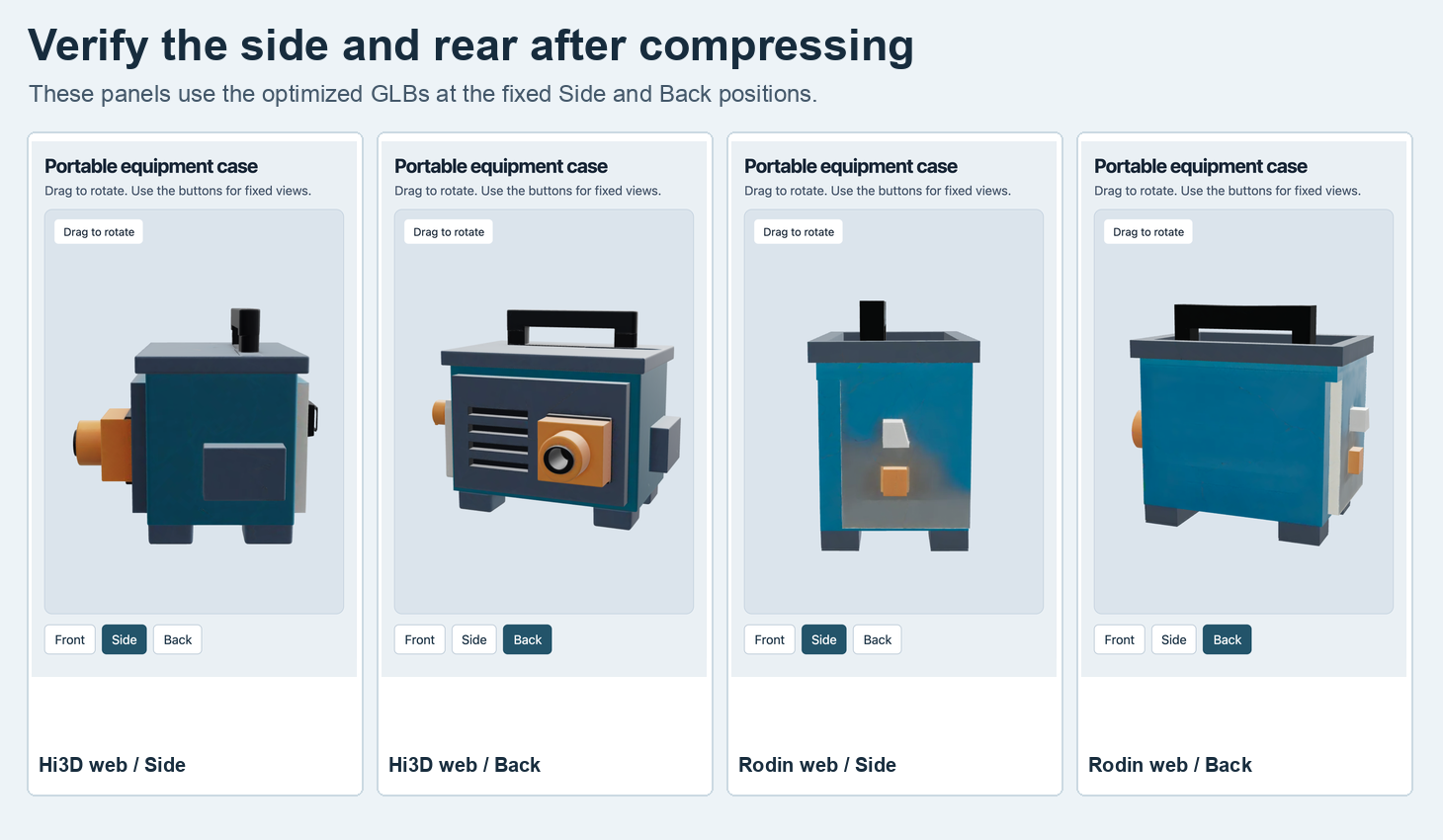
The buttons move to fixed cameras in the same viewer. We also dispatched a touch swipe in both demo variants and observed the camera azimuth change.
For deployment, copy the verified GLB and its decoder files alongside the viewer. Initialize the decoder path before loading the model. A product page can keep an approved still image available while the preview loads or if it fails. Watch the three required states in your own build: asset requested, first frame submitted and ability to orbit. A successful HTTP status only covers the first of those.
The loader should point to the exact directory you serve. In the example, the two decoder files are deployed beside the viewer in a decoder folder. Set the path before parsing the file.
const decoder = new DRACOLoader();
decoder.setDecoderPath(new URL("./decoder/", document.baseURI).href);
const loader = new GLTFLoader().setDRACOLoader(decoder);
const gltf = await loader.loadAsync("./hi3d-web.glb");
scene.add(gltf.scene);
Time the actual loading path
We served the files locally and used Chromium 157 with a Pixel 7 viewport and touch emulation, with software WebGL through SwiftShader on the desktop host. Each variant had three runs in fresh browser contexts with cache disabled and a DevTools profile set to 5 Mbps download and 100 ms latency. The download timer ends once the GLB body has been read. The parse interval includes the decoder fetch, parsing and building the scene. We rendered once and waited for the next animation-frame callback to mark request-to-frame. Browser startup and viewer bundle loading are outside that measurement.
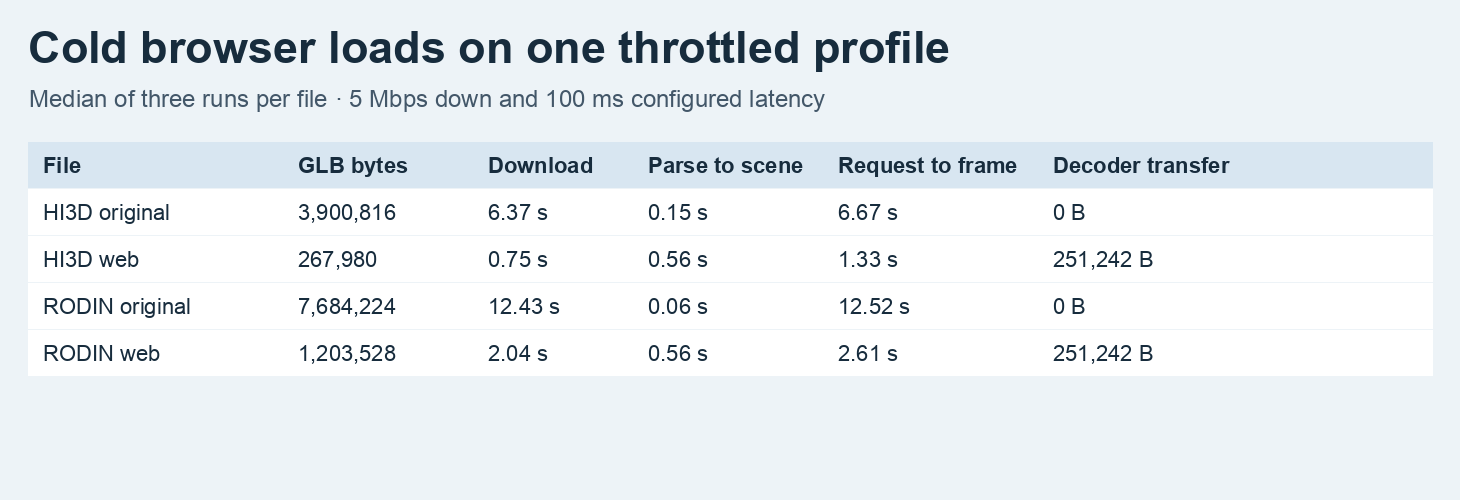
Mobile viewport emulation on desktop Chromium with throttling. Each row is the median of three cold loads. Decoder transfer reflects the two additional network responses, including response overhead.
| File | Download | Parse to scene | Request to frame |
|---|---|---|---|
| Hi3D original | 6.37 s | 0.15 s | 6.67 s |
| Hi3D web | 0.75 s | 0.56 s | 1.33 s |
| Rodin original | 12.43 s | 0.06 s | 12.52 s |
| Rodin web | 2.04 s | 0.56 s | 2.61 s |
The extra parse time was visible in both compressed cases. Hi3D’s 0.75-second GLB download alone would understate the wait for the first frame. The live demo also has a viewer bundle of 656,331 uncompressed bytes, which the model-request timer does not cover. Measure full navigation and revisit behavior on the devices and CDN you actually ship. This is a controlled local comparison with a network profile, not a field estimate or a physical handset test.
For a test using one shared front image and withheld back reference, compare the Meshy and Rodin mobile GLB results.
FAQ
Can I reuse the same file in another viewer?
The web files require EXT_texture_webp and KHR_draco_mesh_compression. Verify your loader and decoder against the downloadable GLB. Keep an original available for a separate pipeline that requires its original encoding.
Why compare the rear view after loading?
The capture exposes whether the connector sits on the correct face and projects from the housing. A front camera can miss both problems and both issues were discernible with the two actual deliveries.
What should the page do if the Draco decoder fails to load?
Keep the approved still image visible and let the user retry 3D. In DevTools, look for the decoder wrapper and WASM requests as well as the GLB. Downloading the GLB successfully leaves the model unavailable if the decoder fails. Verify those URLs in the deployed build, then test a blocked decoder request on purpose to check the page’s error state.
The two SandBase generations settled at $2.88 in total on November 14, 2026 UTC (November 15 in China). Optimization and browser testing were local. The cover is illustrative.
Found this useful? Share it