Meshy 7.1 Texture References: Two Product Finishes Tested
Use Meshy 7.1 texture_image with a fixed geometry photo. See how two references change colors, stripes, GLB size and the regenerated mesh.
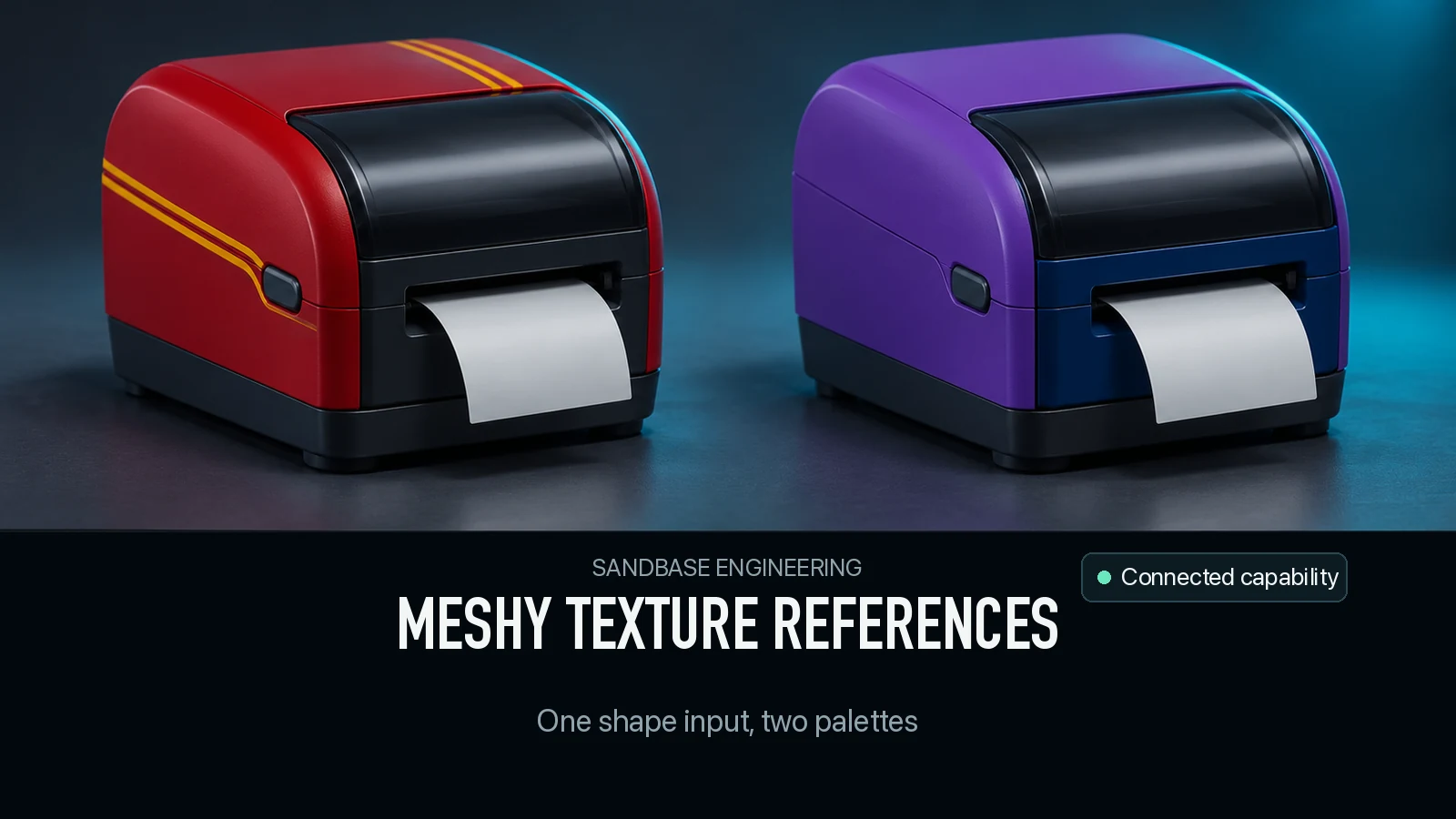
A teal printer went into Meshy 7.1 three times. Without a texture reference the result stayed teal. A second picture changed the shell to red and added pale parallel stripes. Another produced a violet shell and put a blue patch on the lower-left front. All three jobs cost $1.44 each. The two new finishes also came back with different triangle counts, even though the main image and mesh settings stayed fixed. You can use the reference to communicate a finish and still need to review the mesh the API returns.
Key takeaway
- The same 768 × 768 teal product render was the geometry input in all three jobs. The two optional reference renders used the same product angle and mapped color onto specific areas.
- The red reference transferred the red body, pale lid and visible stripes. The violet reference transferred the darker lid and lower-left blue patch. The original display, label and base remained recognizable.
- The no-reference GLB contained 45,360 triangles. The red and violet variants contained 46,456 and 45,379. Each had a single 2,048 × 2,048 base-color JPEG and zero format errors.
- In the neutral comparison, the red result had 93.53% side silhouette overlap with the control. Violet had 96.83%. Both are separate generations. This test measures the delivered mesh differences and cannot assign them entirely to the reference setting.
Give geometry and finish their own input
The Meshy 7.1 image-to-3D route uses image for the source and exposes texture_image as an optional URL to guide texturing. The source in this test was one three-quarter render of an authored desktop label printer. The teal body, pale label, dark base, display and three orange buttons define the geometry and visible starting appearance. The two reference renders use the same view and hardware design. One shows a red casing with gold-toned parallel stripes, and the other shows a violet casing with a blue block on part of the front. The reference images are controlled examples of a new finish at the supplied camera angle.
We kept the image bytes, standard geometry setting, 50,000 triangle request, should_texture: true and enable_pbr: false fixed. The control omitted texture_image. The other two used one reference each and left texture_prompt unset. We chose one source and one image of the desired finish per variant. The public SandBase route uses the field name in the request below. Meshy’s direct API documentation calls its field texture_image_url and gives texture_prompt priority when both are supplied. This test measures the SandBase requests and their charges.
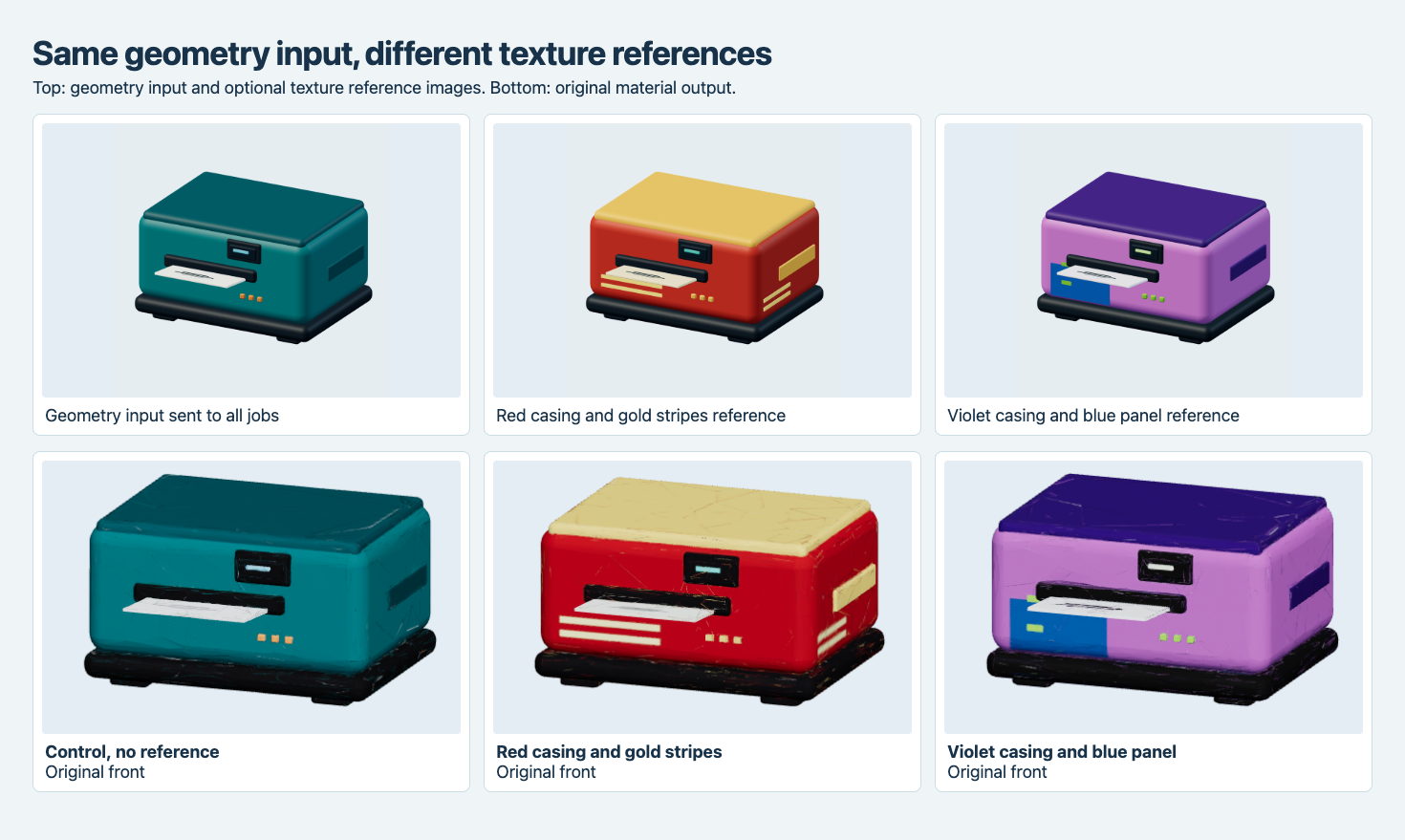
The top-left PNG is the geometry input for all three generations. The other two top images are references for the matching bottom result. The cover is an illustration.
Inspect which color changes survived
The control stayed in the blue-green family. It retained the dark slot and the trio of orange details below it. In the red result, the color continued across the visible front and side, and two pale horizontal strokes appear on both exposed faces. The original source image has no stripes. The violet result contains a separate blue region in the lower-left front and green accents around it, consistent with the reference. The output is easier to inspect if the color zones are visible in their expected place on the exact object.
The reference images do not supply an observed back. For a decal that must wrap around a physical product, use the front figure to identify what transferred and rotate the result to check coverage before approving it. We did not compute a brand-color tolerance or verify exact screen graphics, print readability or real materials. The renderer applies the same key light and color rendering to the three deliveries. That keeps the comparison of the visible parts consistent, while the source and texture guide remain their respective input images.
Compare the exported mesh with the starting delivery
| Texture guidance | Exported triangles | Original bytes | Base-color JPEG | Charge |
|---|---|---|---|---|
| None | 45,360 | 4,512,864 | 2,350,644 bytes | $1.44 |
| Red and gold reference | 46,456 | 4,530,496 | 2,560,976 bytes | $1.44 |
| Violet and blue reference | 45,379 | 4,593,372 | 2,477,097 bytes | $1.44 |
The three runs settled on November 14, 2026 UTC, for $4.32 total. Each produced one 2,048-square base-color JPEG and a GLB that opened in Chromium. The red output contained 1,096 more triangles than the control, and violet contained 19 more. The violet GLB was the largest even though the red variant stored a larger image buffer. Whole GLB bytes include the material data, the vertex and index buffers and container metadata. Save file bytes separately from the embedded picture bytes when budgeting downloads.
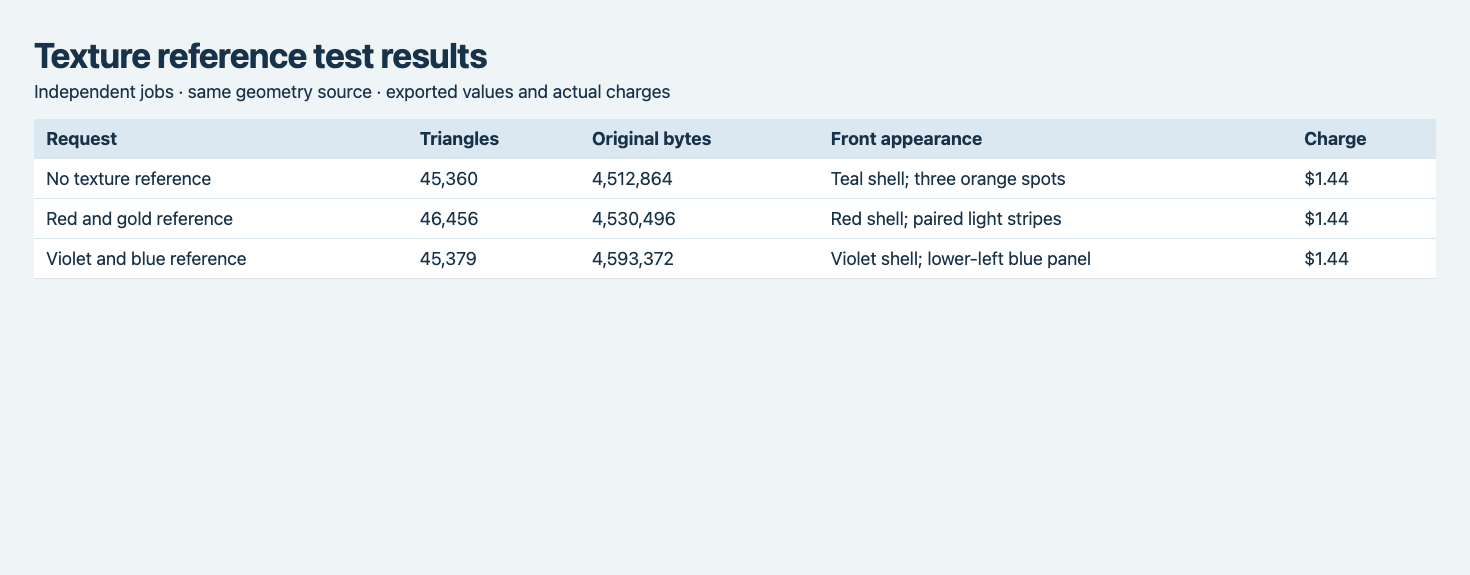
Same source and fixed request fields with one reference per variant. Each row is a separate settled image-to-3D job.
To compare geometry, we centered every original model and normalized its largest bounding dimension. We cast a 56 × 56 grid of rays along the front, side and rear directions. For each pair, silhouette intersection-over-union is the count of samples hit by both meshes divided by the count hit by either. Mean first-hit depth difference uses the samples that hit both. Depth is expressed as a share of the longest normalized bounding dimension. The control is the output without texture_image. It is not the authored reference mesh.
| Compared with control | Front silhouette overlap | Side silhouette overlap | Rear mean depth difference |
|---|---|---|---|
| Red and gold | 98.55% | 93.53% | 1.90% |
| Violet and blue | 99.66% | 96.83% | 0.35% |
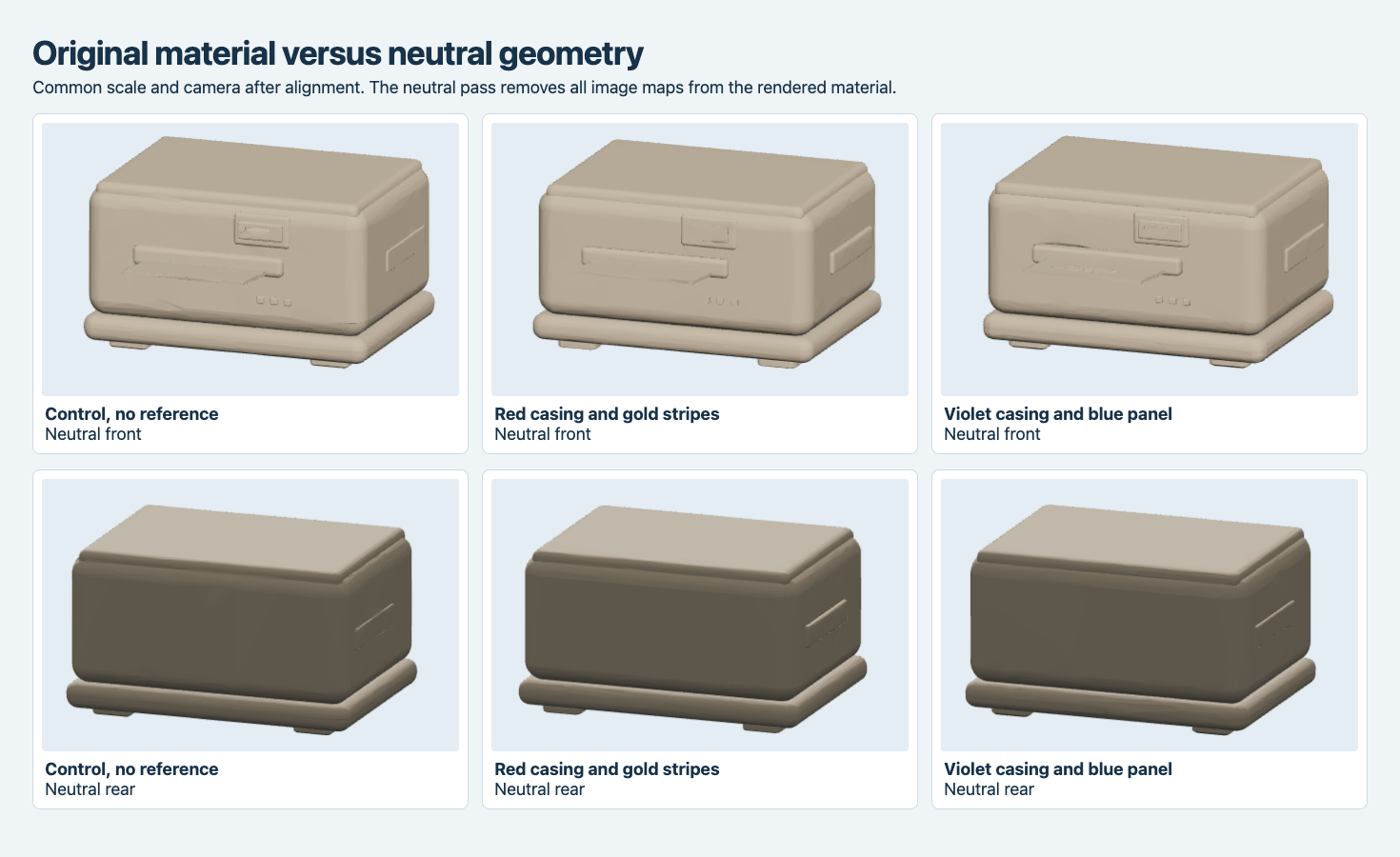
The neutral images help you compare the lid seam, protruding label and body contour with the color influence removed. The numerical metrics use axis-aligned rays and the untouched GLBs.
All three models remain recognizable as the same product, but the exported geometry differs. The apparent lack of raised stripes in the neutral red render is consistent with a texture effect at this scale and from these angles. The three jobs had no exposed seed and no repeated controls. The differences reflect the files that came back without isolating the source of geometric variation. Even high silhouette overlap does not mean a UV layout, topology or vertex correspondence was preserved.
Send a reference image with the same object pose
For this route, keep your main picture unchanged when comparing finishes. Use the texture reference for information the base view does not express, such as the location of a two-color boundary. Keep unchanging hardware visible in both images so you can review it after the API returns. If the part must keep exact dimensions, folds or attachment surfaces, store the approved mesh and evaluate actual recoloring on that single mesh. See the single-mesh color variant experiment for the difference between swapping materials and accepting a new geometry result. If you need metallic and normal maps as well, the Meshy 7.1 and Rodin label-printer comparison tested the asset with PBR enabled.
The following is the request shape for a reference. Put your public URLs into the input fields and send the object as JSON to POST https://api.sandbase.ai/v1/run with your server-side credentials. Poll for completion and inspect the downloaded asset before treating a request as an approved variant.
{
  "model": "meshy/7.1/image-to-3d",
  "image": "https://example.com/teal-printer-front.png",
  "texture_image": "https://example.com/red-printer-with-stripes.png",
  "should_texture": true,
  "enable_pbr": false,
  "topology": "triangle",
  "target_polycount": 50000
}
Keep the variant record connected to the mesh
Record the input image hash, texture reference hash and the returned GLB together. When a design reviewer approves the red stripes, retain the exact render and route ID they saw. Separately validate the model used on the page, especially well-defined boundaries near the label slot or a mounting surface. If your application later moves to another export or texture encoding, check the same locations on the derivative. This turns a render-based finish comparison into a repeatable handoff and keeps guidance distinct from the accepted file.
Frequently asked questions
Does the texture-reference field add a charge?
It did not change the observed $1.44 job charge in these two matched reference cases. Repeat the pricing check for the enabled options you plan to use. Later downloads, inspection and retries were outside the total.
Can I use it to retexture an existing GLB without changing the mesh?
This route accepts an image as its geometry source and each submission generates a new asset. The three source GLBs have different triangle counts. Use a workflow that validates or keeps an existing mesh if interchangeable materials are required.
Can I send both a text prompt and reference image?
We sent only an image for texture guidance. The upstream direct API documents how it prioritizes text and image, and integrations can expose different field names. Keep one source of texture guidance when reproducing the comparison, so you can interpret the result.
Found this useful? Share it