Hunyuan3D Mini vs Mini Turbo for Image-to-3D in 2027
Compare four Hunyuan3D 2.0 Mini and Mini Turbo runs on one input. See measured wait times, GLB sizes, list prices and front and rear renders.
With the same robot image and the same seed argument, Hunyuan3D 2.0 Mini Turbo returned a textured GLB in 37.08 seconds, while Mini took 92.30 seconds. The order reversed on the second seed. All four meshes had exactly 40,000 triangles, yet their rear silhouettes differed when we turned them around. If you are choosing a route for a batch of image-to-3D assets, the useful question is whether a faster or cheaper first pass still meets your visual brief once the viewer rotates away from the input angle.
Key takeaway
- Four API calls completed and yielded four original GLBs. Mini took 37.08–92.30 seconds, and Mini Turbo took 37.08–43.14 seconds in this four-run sample.
- Both routes returned 40,000 triangles and one embedded image in every run. Original files ranged from 4,096,512 to 4,252,660 bytes.
- The back of the seed 73 Mini mesh shows a broad shape across the lower torso. The two Turbo meshes kept clearer separation between the torso and adjacent limbs in the rendered rear angle.
- On November 14, 2026, the two SandBase pages listed $0.30 for a textured Mini run and $0.24 for Mini Turbo. The run-status responses carried no settled charge.
- The test used one front-facing image, two seed arguments and an octree setting of 256. Its timing and appearance findings apply to those four jobs.
Set up a matched run
We used the 512 × 512 public robot image on the Hunyuan3D 2.0 Mini page for every request, including the ones sent to the Mini Turbo route. It shows two cyan eyes, two antennae, rounded headphones and a small body with compact arms and legs. A front-facing reference gives a strong clue about the face and outer contour. The exact shape and color of the back are unobserved, so the rear views show plausible or implausible reconstructions rather than agreement with an unseen ground truth.
Both requests explicitly enabled textured_mesh and set octree_resolution to 256. We sent four calls in sequence on November 14, starting with Mini and then Turbo for seed 42, followed by Turbo and then Mini for seed 73. Each job had a distinct server ID. Keeping the two jobs from each pair sequential avoided running them at the same instant on our client. Queue depth and execution resources were outside our control. Sending the same integer in both requests controls the parameter we submit. It gives no basis for assuming the routes share identical internal noise or scheduling.
The timers started just before the POST and ended at the first GET response reporting completion. We slept five seconds between requests, so the completion moment sits somewhere between the last pending or running response and the completed response. The figures include network calls, queue time and the polling interval. Download, GLB validation and rendering happened afterward. This is close to what an application waiting on the same poll loop sees. Measuring pure inference or reporting a latency percentile would require a different experiment.
Compare the four outputs
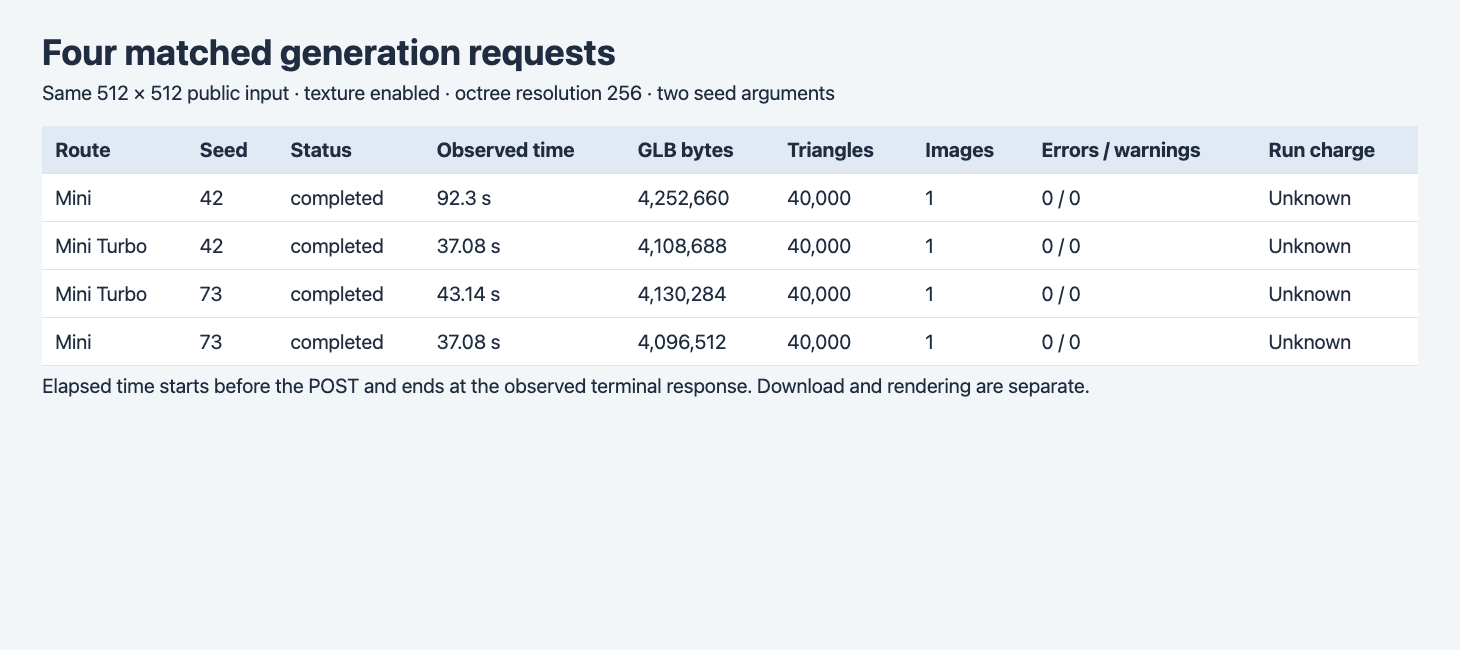
The browser table uses the actual POST and GET traces and the original GLB files. Charge is unknown in the status trace. The model pages provide separate list prices.
| Route | Seed | Observed completion | GLB bytes | Triangles | Embedded images | Validator errors / warnings |
|---|---|---|---|---|---|---|
| Mini | 42 | 92.30 s | 4,252,660 | 40,000 | 1 | 0 / 0 |
| Mini Turbo | 42 | 37.08 s | 4,108,688 | 40,000 | 1 | 0 / 0 |
| Mini | 73 | 37.08 s | 4,096,512 | 40,000 | 1 | 0 / 0 |
| Mini Turbo | 73 | 43.14 s | 4,130,284 | 40,000 | 1 | 0 / 0 |
For seed 42, the Turbo result reached the observed completed state 55.22 seconds sooner and was 143,972 bytes smaller. For seed 73, Mini completed 6.06 seconds sooner and was 33,772 bytes smaller. The faster and smaller route changed across these two pairs. A queue budget based on the single 37.08-second Turbo result would miss the slower Turbo run and the reversal. On a real batch, record every attempt and compare per-route completion distributions once there are enough jobs and time periods to interpret them.
The GLB container includes vertex data, triangle indices, materials and embedded images, among other possible fields. Equal triangle counts tell us that the exported primitive counts matched. They say little about triangle placement or the distribution of detail across the face and limbs. The four files contained one material and one embedded image apiece and had zero validator errors and warnings. The validator also emitted informational buffer view messages. The visual check is still needed to decide whether those parts are arranged in a way the brief can use.
Look at the face and the back
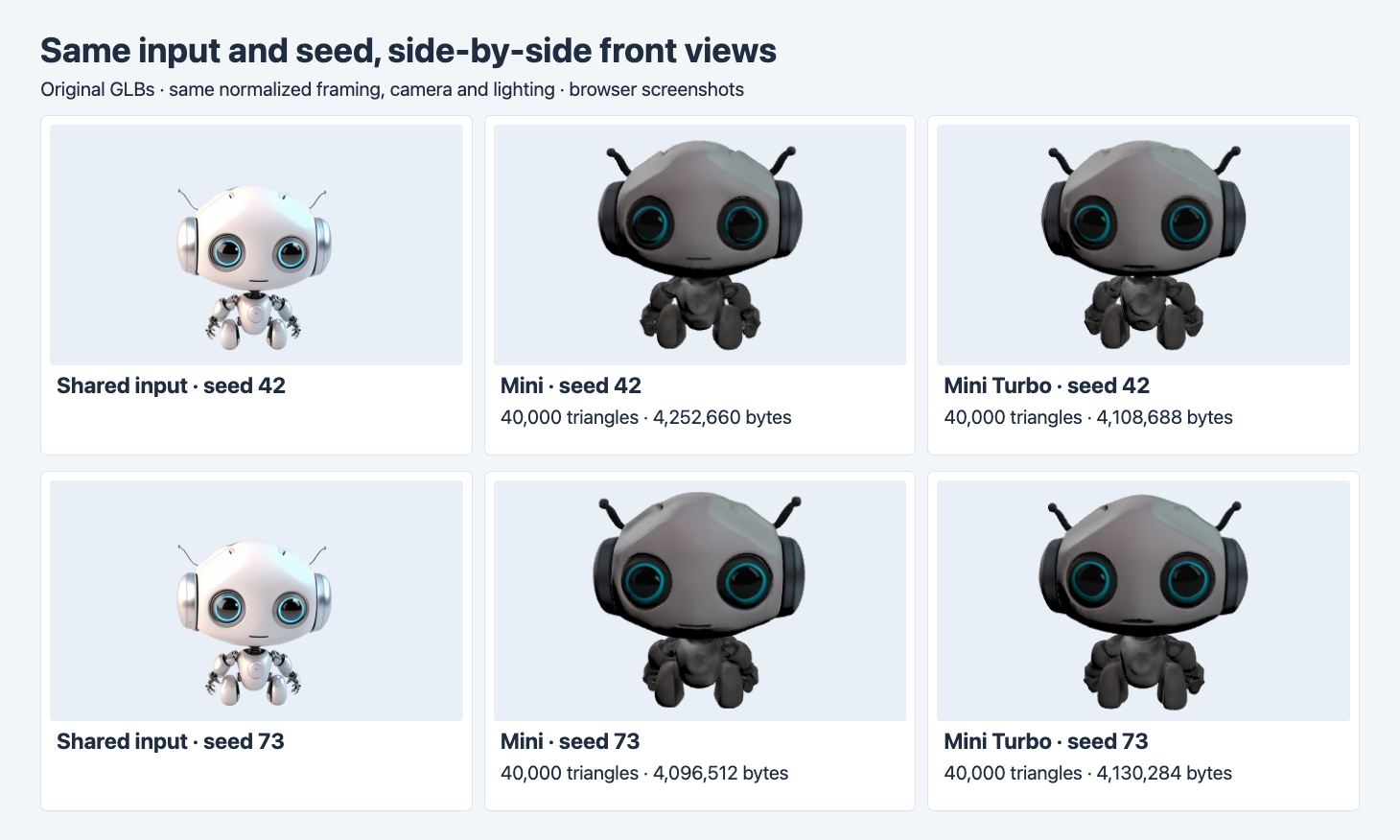
Original browser renders with one scale normalization, camera and lighting setup. Both routes preserve the large eyes and antennae. The front renders appear darker than the reference image.
The four front views retain two eyes and antennae, the oversized head and the small body. There are also visible differences in the mouth and in the separation of the dark lower-body parts. The source is a finished 2D image with its own lighting, whereas the GLBs were rendered with the same new lights. Apparent brightness describes that rendering setup. The side-by-side result alone cannot attribute the change to the embedded texture, material response, the renderer or some combination. A workflow with specific color requirements should inspect the embedded image and check the model under the lighting used in the deliverable.
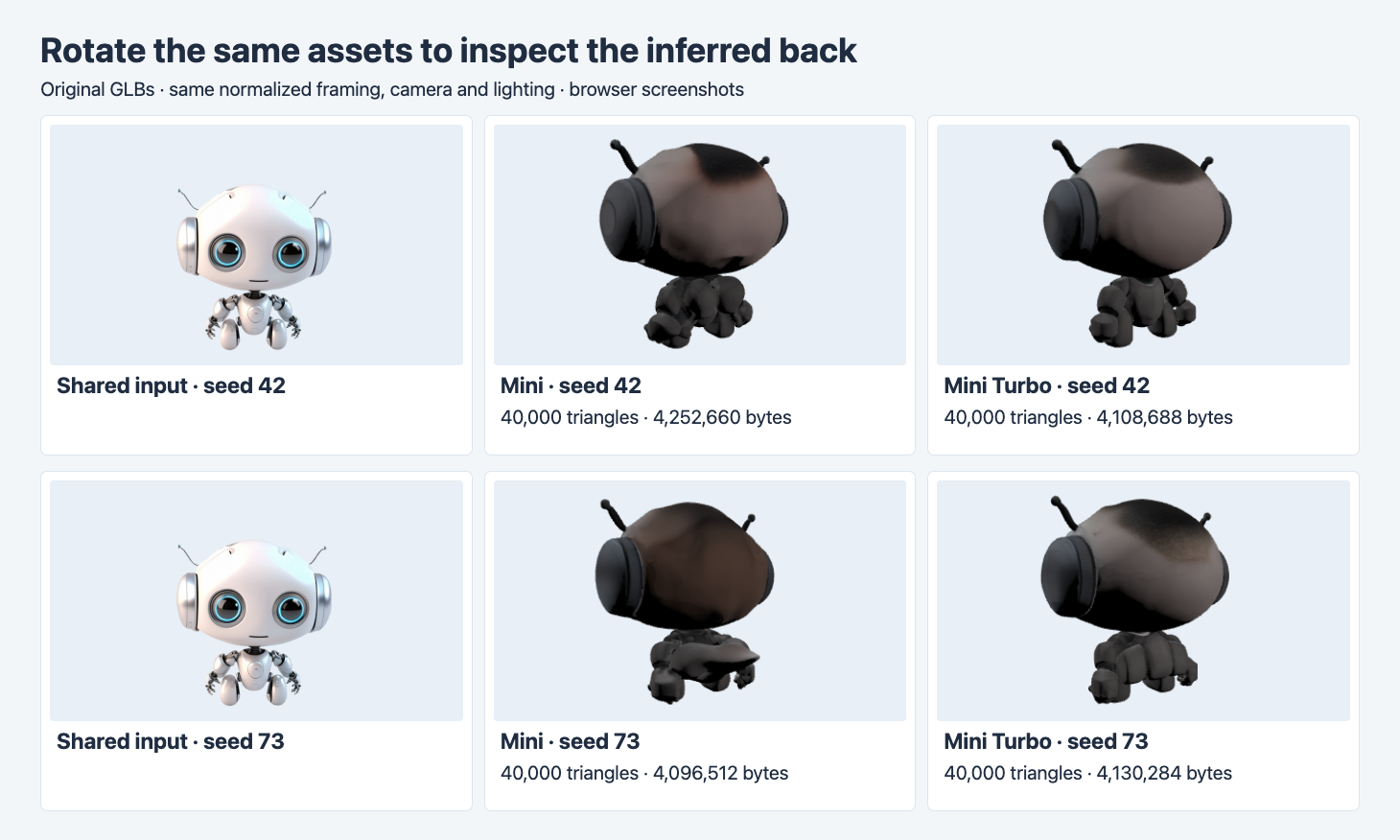
The source thumbnail is still front-facing. At seed 73, a broad protruding shape appears across the lower back of Mini. Both Turbo renders show a clearer gap between adjacent body parts in this angle.
The rear views are where the seed choice changes the decision. On seed 42, both results keep the head and ears legible, with differing shapes in the shoulder and limb area. On seed 73, the Mini mesh shows a broad extension around the lower back. It makes the lower-body silhouette harder to read from this view. The two Turbo outputs have rear texture shading that differs from the source’s light front view and still need review. If the intended asset is a rotating preview, evaluate the rear view against the required separation of head, torso and limbs before accepting it. If the asset must match a real product from every angle, obtain rear references and use them in the review. Single-view and multi-view results
Decide which route to try first
| Delivery requirement | Start here | What to check before delivery |
|---|---|---|
| Low-cost textured preview | Mini Turbo | Review the front and rear, and confirm the file cap on the actual mesh. |
| Fixed wait budget | Measure a new batch on both routes | Record failed jobs, submit and completion times, and the poll cadence. |
| Precise rear fit or color | Obtain additional references | Compare matched poses and target lighting. Check distinctive parts and attachments. |
| Cap of 4,200,000 bytes | Check each output | Three of the four original GLBs fit this illustrative cap. The first Mini output exceeded it. |
The texture flag changes the price basis. The listed geometry-only prices were $0.10 for Mini and $0.08 for Mini Turbo. With textures enabled the list prices were $0.30 and $0.24. At those rates, 20 successfully billed textured jobs would be $6.00 for Mini or $4.80 for Turbo. The $1.20 difference is a scenario based on list prices, and delivery cost also depends on how many files pass visual checks. We did not count reviewer labor, run texture-off jobs or calculate a cost per accepted asset for this four-run experiment. Cost per accepted 3D asset
Repeat the same test on your own input
Use one publicly reachable input image and a server-side key. These request fields show the Mini version of the tested configuration. Swap the model identifier for tencent/hunyuan-3d/v2/mini-turbo for the matching call and record a second seed on both routes.
{
  "model": "tencent/hunyuan-3d/v2/mini",
  "image": "https://static.sandbase.ai/examples/tencent/hunyuan-3d/v2/mini/input_image_0.png",
  "textured_mesh": true,
  "octree_resolution": 256,
  "seed": 42
}
Send the JSON to POST https://api.sandbase.ai/v1/run with a bearer token. Store the returned ID, then read GET /v1/run/{id} until a terminal state. If your renderer and size limits are the real acceptance gates, keep the original downloaded file, the byte count, the validator summary and screenshots from two preset angles. Use the same lighting and keep the distance in normalized framing fixed. Review the time series and rejects before increasing concurrency. A file size gate close to 4.2 MB, for example, benefits from evaluating the actual byte count per run, even when the triangle count is identical.
For the higher-face-budget routes, see the Hunyuan 3D 3.0 and 3.1 Pro comparison with two matched 500,000-face requests per route.
FAQ
Does Turbo always finish first?
In this sample Turbo finished first on seed 42 and second on seed 73. Repeated trials over several time windows would let a team estimate the spread seen in its own integration.
Will these routes always return 40,000 triangles?
Forty thousand was the count in each of the four downloaded outputs. Measure other inputs and settings directly before choosing a triangle budget or deciding whether to simplify a file.
Does turning texture off change the visual result and charge?
The model pages show lower list prices for texture-off requests. This comparison kept texture on, so it gives no measured latency or quality change for the other setting.
Found this useful? Share it