Hunyuan 3D 3.1 Pro Multi-View API Guide: Five Requests Tested
Map front, back and side fields, then compare five Hunyuan 3D jobs against a known fixture. Includes a deliberate left-right swap and actual charges.
Adding the back image to Hunyuan 3D 3.1 Pro lowered the mean rear depth difference on our test case from 5.22% to 4.85% of its longest side. Sending six correctly assigned views gave the highest side silhouette overlap of the five runs, at 57.72%. Swapping the left and right URLs reduced it to 48.91%. Even the better outputs left out the fixture’s projecting rear connector. This is a guide to filling the API fields and checking the result against the details that matter.
Key takeaway
- Use
imagefor the front. Put the other images in named fields tied to the same object orientation. Label the source files before building the request. - With the same six images, correcting the left and right assignments raised side silhouette overlap by 8.81 percentage points in this one pair of runs. The larger overlap still left a visible error at the rear connector.
- For this fixture the front and rear pair had the lowest mean rear depth difference, while all six correctly assigned views had the highest side silhouette overlap. Inspect the face and the feature that your scene actually needs.
- With a requested 40,000-face geometry export, the front-only job settled at $0.525. Each job with extra views settled at $0.675. The five calls billed $3.225.
Decide what front means before capturing the other views
The Hunyuan 3D 3.1 Pro endpoint on SandBase takes one required front view and exposes separate names for the supplemental angles. We built a small equipment case specifically for this test, with a handle, three front buttons, visibly different left and right panels, and a cylindrical connector projecting from the rear. Using our own 3D fixture gave us an independent mesh to measure after reconstruction. It also provided a way to distinguish a narrow case from a wide one even if both front silhouettes looked plausible.
We rendered eight 768 × 768 PNGs from fixed orthographic cameras around the fixture. In our capture convention, the fixture faces +Z in Three.js and the names left and right correspond to cameras on −X and +X. The back camera is on −Z. The two diagonal frames show the front plus the adjacent side. The top and bottom cameras use a fixed up direction so the front edge stays identifiable. If you shoot a real product, decide on that reference orientation first and keep filenames tied to the object while the camera or turntable is moving.
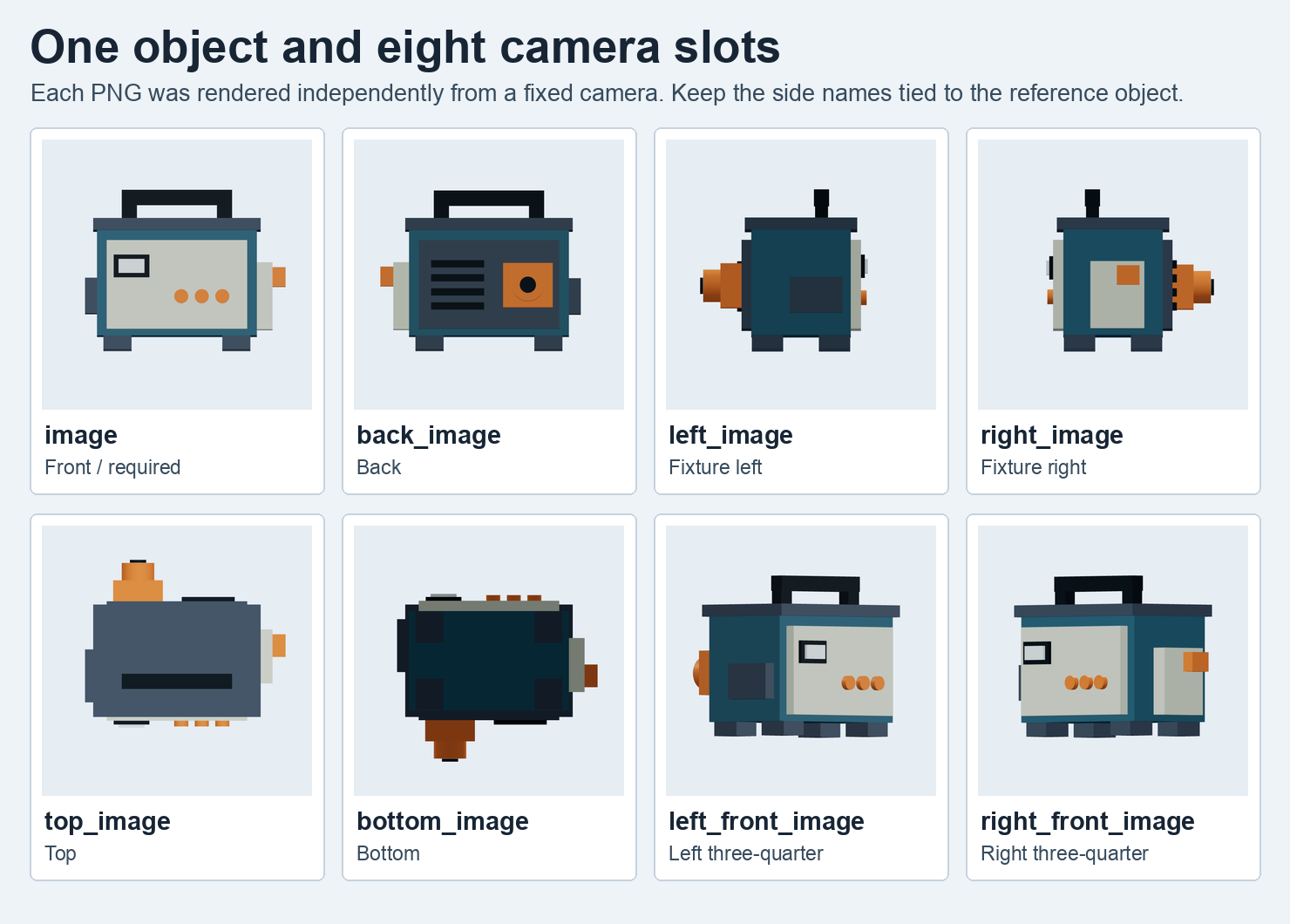
Each tile is one PNG rendered from the authored fixture. The names describe the test’s capture convention. We sent the original files individually.
| Field | Reference to put there |
|---|---|
image | Required front, with a recognizable orientation marker |
back_image | Opposite face, including rear-only parts |
left_image, right_image | Separate side profiles from the defined left and right |
top_image, bottom_image | Overhead and underside, with the front edge identifiable |
left_front_image, right_front_image | Two separate views showing the front and one adjacent side |
The current field schema lists seven optional view names. The model page also describes up to six extra views. We exercised every named slot across separate requests, with at most five supplemental views in any one call. Sending all seven together was outside this test.
Keep the same base request and vary the slots
The five calls used generate_type: "Geometry", face_count: 40000 and enable_pbr: false. All five used the same front PNG. One sent just that image, one added the back, and one added the two front diagonals. The fourth used front, back, left, right, top and bottom. The fifth used those same six URLs with the left and right values exchanged. Those last two requests changed only the mapping for two fields. There was one call per condition, and the inspected route did not offer a seed field.
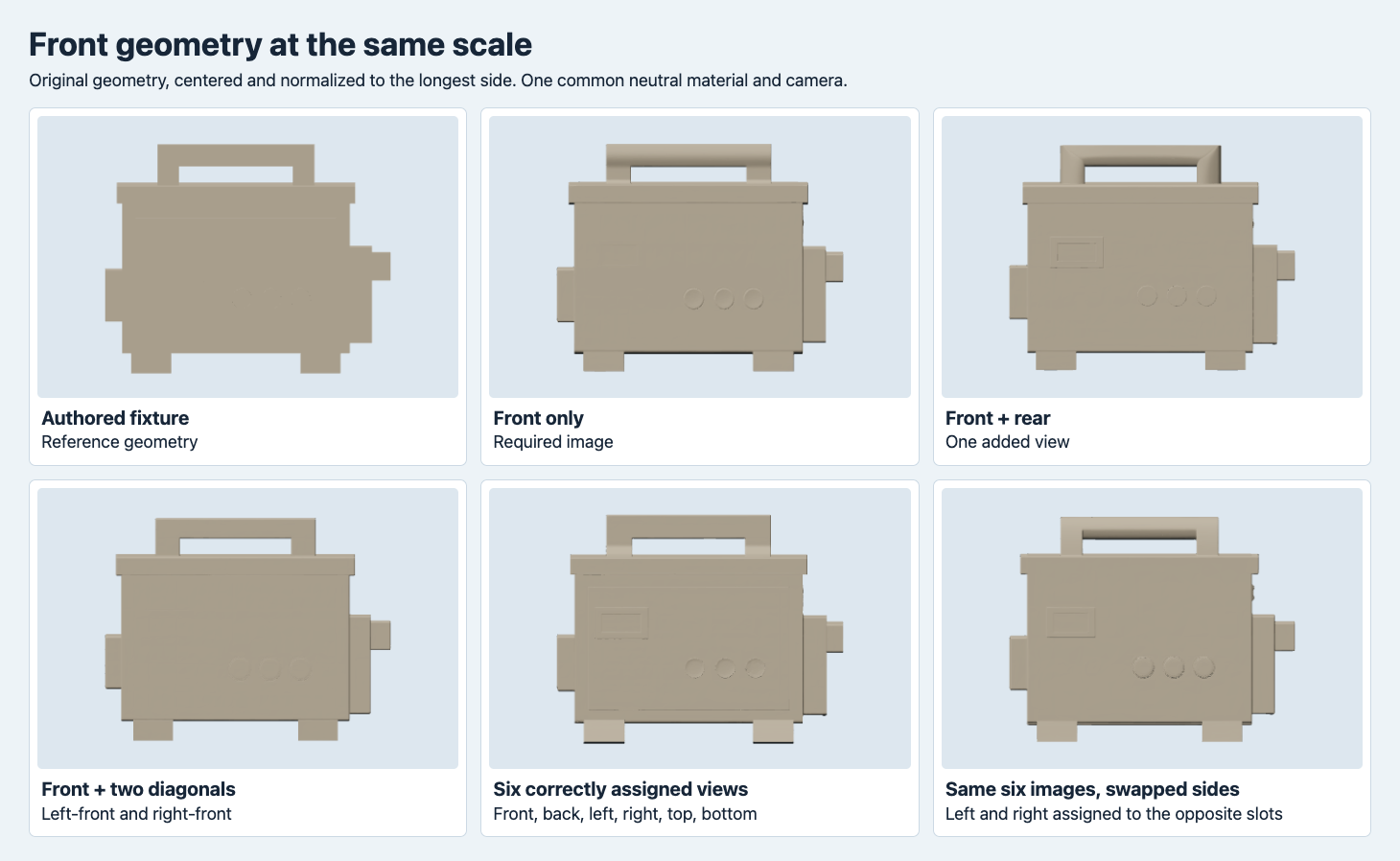
The displayed meshes keep their geometry, with individual centering and longest-side normalization. The front render uses a common neutral material and camera.
The case outline and handle can look close from the front even when the rear structure differs. For the front-only and six-view jobs, front silhouette overlap was 94.99% and 97.94%. In the corresponding side projections it was 55.22% and 57.72%. This difference matters if a storefront defaults to a front render but shoppers can rotate the asset. A frontal check can pass the overall composition while the side profile still misses a protrusion or estimates the case as too shallow.
Check the rear panel and side depth independently
From the back camera, the front-only output shows three round marks where the reference has a large offset connector and slats. They resemble the layout of the front buttons. Adding the rear reference removed those three obvious circles from that output, but the back still looked mostly flat in the neutral render. The correctly assigned six-view result also showed round forms on the rear and did not recover the long projection in this test. Check that the connector extends behind the housing from a side view before treating a front or rear mark as a modeled feature.
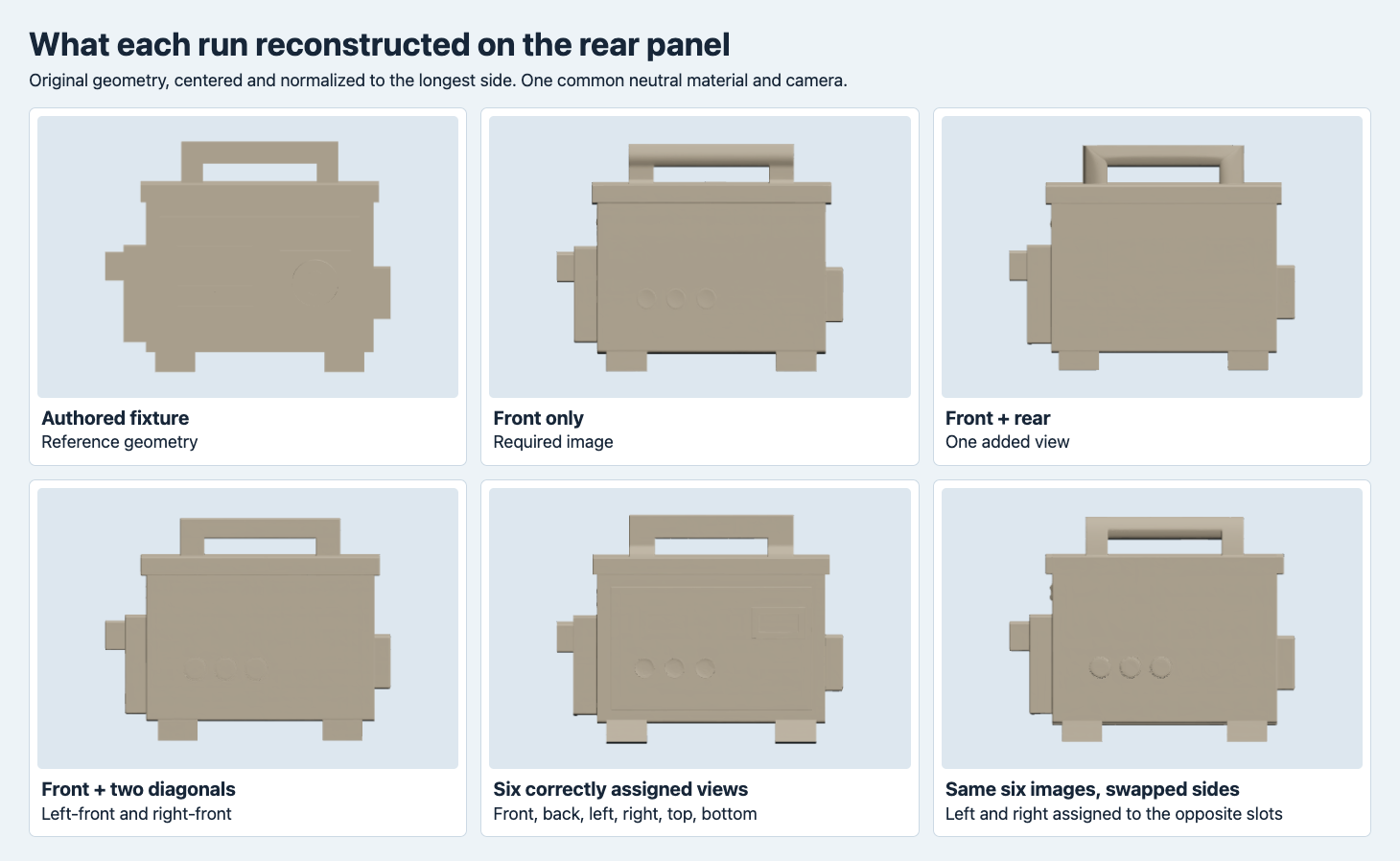
The rear render uses the same camera orientation across files. The neutral material removes color and shows the available geometry.
From the side, the authored rear plug clearly projects beyond the housing. All five reconstructed GLBs lost most of that feature. Blender measured the fixture’s front-to-back span as 83.67% of its longest side, versus 40.80% for front only and 51.05% for the correctly assigned six-view result. Swapping the side URLs gave a thicker result by this bounding-box measure, about 54.49%, even as its silhouette overlap declined. An extreme point can change the span without giving the targeted feature back. The side shot shows the swapped output’s irregular feet and split-looking handle profile, which the front overview makes harder to detect.
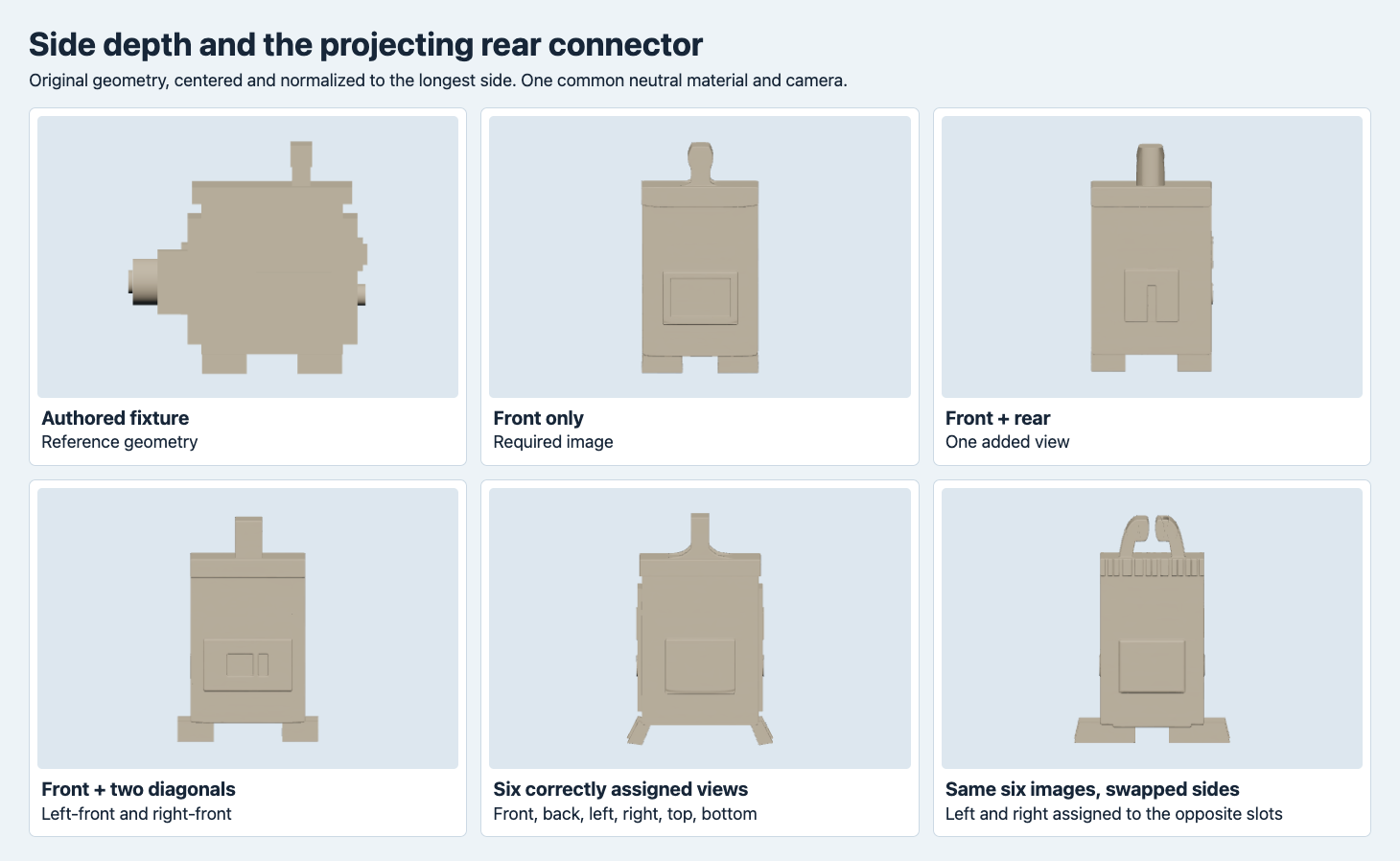
All panels use a common side camera after longest-side normalization. The generated geometry and reference are rendered using the same neutral material.
Measure silhouettes and depth against the fixture
We imported each GLB with Blender 4.5.9. We centered the bounding box and divided by the longest side independently. We tested four yaw angles at 90-degree intervals and selected the angle that maximized front silhouette overlap minus mean front depth difference. All five selected their delivered yaw of 0° in our convention. The diagnostic then projected the model along the six coordinate directions. Each projection sampled a 128 × 128 orthographic ray grid.
Silhouette IoU divides pixels hit in both projections by pixels hit in either projection. Opposite orthographic cameras see the same occupancy after reversing the horizontal coordinate, so rear silhouette overlap cannot evaluate the rear surface independently of the front. First-hit depth adds a direction-sensitive check. We report the mean absolute difference as a percentage of the normalized longest side across pixels hit in both projections. A feature with no hit in one mesh contributes to silhouette mismatch when it breaks the outline, and has no depth comparison at that pixel. The two columns should be read together with the actual shots. This setup measures reconstruction of one authored object and provides no physical metrology.
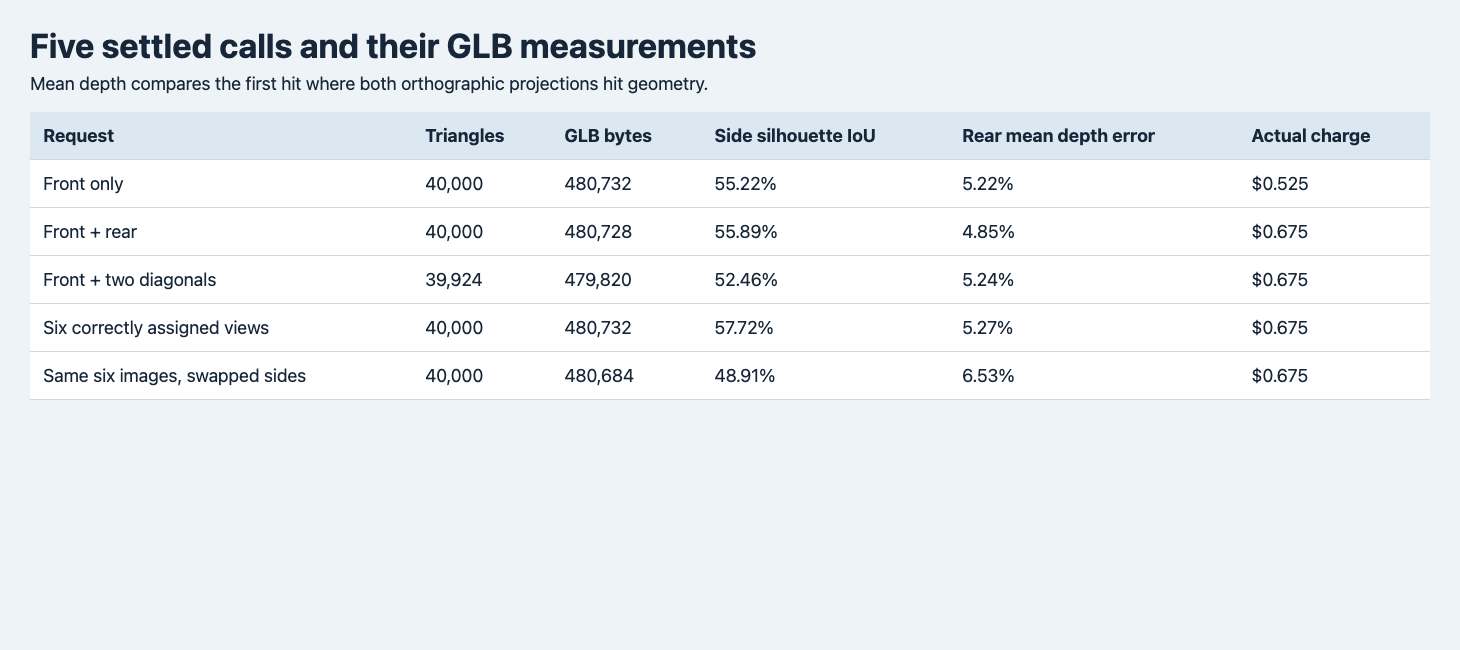
Side overlap uses the side occupancy mask. Rear depth compares first-hit distances only on shared hit pixels. The charge is the settled amount for the geometry configuration.
| Request | Triangles | Original GLB bytes | Side silhouette IoU | Mean rear depth difference | Charge |
|---|---|---|---|---|---|
| Front only | 40,000 | 480,732 | 55.22% | 5.22% | $0.525 |
| Front + rear | 40,000 | 480,728 | 55.89% | 4.85% | $0.675 |
| Front + two diagonals | 39,924 | 479,820 | 52.46% | 5.24% | $0.675 |
| Six views, correct slots | 40,000 | 480,732 | 57.72% | 5.27% | $0.675 |
| Same six, swapped sides | 40,000 | 480,684 | 48.91% | 6.53% | $0.675 |
The five exports all passed glTF validation with zero errors and warnings. They were single meshes with no embedded images. File sizes stayed within 912 bytes of one another. A file size or triangle budget check would miss the side swap. These charges include the requested face count and one multiview add-on when any extra slot is set. For a wider selection between generation routes, see the Hunyuan 3.1 Pro and Rapid comparison.
Build and verify a request from your capture sheet
Keep the front and back filenames separate. Hold basic framing, distance and lighting steady and make sure each added photo shows the same physical configuration. Start with the view that reveals a required feature. If a shelf display needs an identifiable rear plate, add the back and judge it from behind. If depth around the connector matters, add a side view and verify the protrusion in profile. Keep a contact sheet that records the field used for every file so a batch job can flag swapped or duplicated inputs.
Send the JSON to POST https://api.sandbase.ai/v1/run with a server-side bearer token, and poll its ID at GET /v1/run/{id}. Replace the example URLs with the actual photos. Each job may be billed.
{
  "model": "tencent/hunyuan-3d/3.1/pro/image-to-3d",
  "image": "https://example.com/case-front.png",
  "back_image": "https://example.com/case-back.png",
  "left_image": "https://example.com/case-left.png",
  "right_image": "https://example.com/case-right.png",
  "top_image": "https://example.com/case-top.png",
  "bottom_image": "https://example.com/case-bottom.png",
  "generate_type": "Geometry",
  "face_count": 40000,
  "enable_pbr": false
}
The five-route multi-view benchmark gives the same fixture to five APIs and measures side silhouette overlap, whole-back depth and the small connector region with two versus four views.
FAQ
Can the same image count give a different shape?
Yes. Assigning the same six images to different side fields changed the side silhouette and rear depth measures in this test. Start the review with the exact filename-to-field mapping.
Does a good rear depth number mean the connector was reconstructed?
Check the connector directly. The depth average covers shared pixels across the full view, so the housing can dominate the metric while the small plug is still visibly wrong.
SandBase executed and billed these five jobs on November 14, 2026 UTC (November 15 in China). The screenshots are based on authored input or delivered geometry. The cover is illustrative.
Found this useful? Share it