Hi3D Multicolor for 3D Printing in 2027: 2, 4 and 8 Colors
Compare three Hi3D Multicolor GLBs from one textured mask. See decoded vertex colors, color area, geometry checks and cross-section images.
Hi3D Multicolor returned exactly two, four and eight stored colors when we requested those palette sizes on the same relief mask. The two-color file looked almost monochrome because its second color covered about 0.0045% of the mesh surface area. The eight-color file still concentrated more than 99% of the area in three colors. All three outputs kept the source’s 500,000 geometric triangles, and each replaced the original texture maps with constant vertex colors assigned to many separate mesh objects.
Key takeaway
- The three GLBs contained exactly the requested number of
COLOR_0values. Each output primitive used one constant color across its vertices. - The two-color result assigned 499,897 of 500,000 triangles to one color. Its second color occupied about 0.0045% of the total geometric surface area.
- Sorting the three positions of every triangle and then sorting the faces produced an exact match to the source for all three outputs. The files differed in mesh grouping and material representation.
- Each run settled at $0.40. Inspect the stored colors and the areas where they land before moving an output into a printing workflow.
Use the same textured input for every job
We used the relief mask from the three-way PBR texturing comparison. Its Hi3D textured GLB contains 500,000 triangles, a 4096 × 4096 base-color PNG and a separate 4096 × 4096 metallic-roughness PNG. The front mixes green patina with tan relief, and the inside has a broad brown area. The sample gives us both small color transitions at the raised features and a large comparatively flat region to inspect.
On November 14, 2026 we sent the same source GLB to Hi3D Multicolor on SandBase three times. We requested GLB output and changed only number_of_colors, setting it to 2, 4 and 8. We downloaded each original file and measured the stored mesh and color attributes. This test uses one asset and one run at each setting. It does not measure repeatability across calls or across different materials.
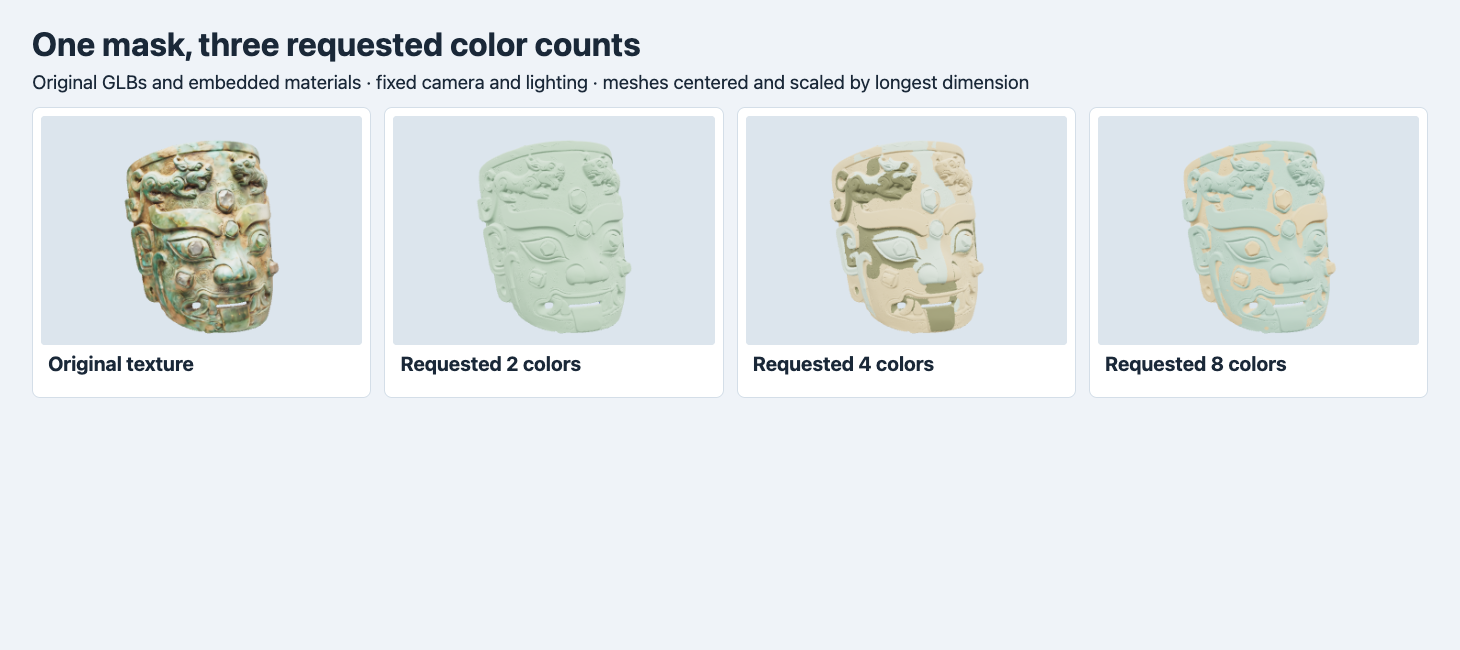
Each panel uses the original GLB and a common camera, lighting and scale. The display colors are shaded render results.
The original shows fine mottling and gradual color shifts. At two colors, the mask appears pale green across almost the whole front. Four colors give the brow, mouth and raised features large olive, cream and green regions. At eight, the large mint-green sections still dominate the front and tan details pick out some raised shapes. Four and eight are separate results from the same input, so the eight-color palette should not be assumed to contain the four-color palette plus four extra entries.
Read the export structure
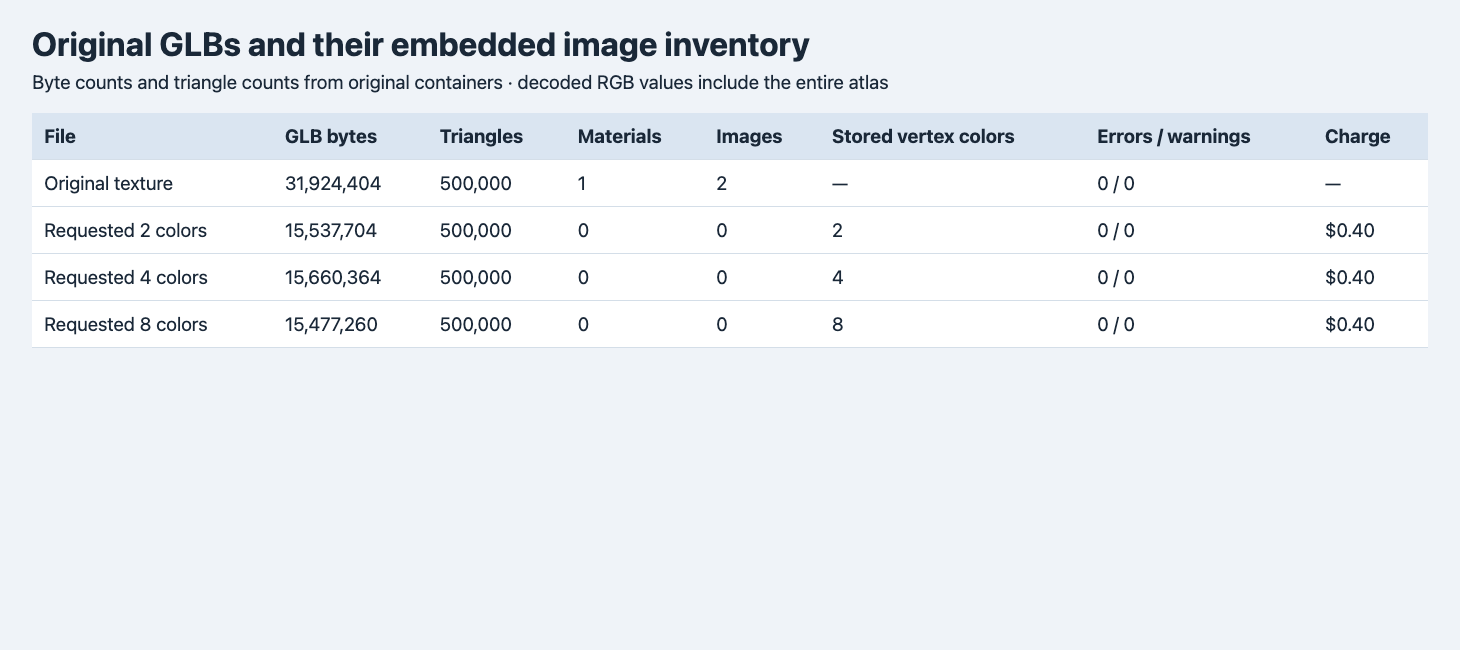
These are the original downloads. Vertex color is counted from decoded COLOR_0 data. The source stores its color in an image.
| GLB | Scene roots and mesh objects | Materials / images | Unique vertex colors | Triangles | Bytes | Charge |
|---|---|---|---|---|---|---|
| Textured source | 1 root, 1 mesh | 1 / 2 | — | 500,000 | 31,924,404 | — |
| 2 requested | 237 roots, 237 meshes | 0 / 0 | 2 | 500,000 | 15,537,704 | $0.40 |
| 4 requested | 314 roots, 314 meshes | 0 / 0 | 4 | 500,000 | 15,660,364 | $0.40 |
| 8 requested | 208 roots, 208 meshes | 0 / 0 | 8 | 500,000 | 15,477,260 | $0.40 |
The three color-reduction jobs settled at $1.20 total. The prior geometry and texturing costs are separate. All four files reported zero errors and zero warnings from the glTF validator. In the reduced files we found no texture images or material declarations. Every mesh primitive had POSITION and COLOR_0 attributes. The color accessors use normalized unsigned bytes with four components, and all vertices in any one primitive shared the same value. glTF supplies a default material for a primitive without its own material, and vertex colors contribute to its base color. Check how your target importer handles that representation. glTF 2.0 material and vertex color specification
The outputs are all less than half the size of the source GLB, and the eight-color file was the smallest of the three. File size did not increase with color count in this test. The texture maps were removed and the mesh objects changed, so color count alone does not predict the final file size. Mesh count also does not predict color count. For example, the four-color result holds 314 mesh objects. A destination that treats those as separate objects may require grouping or joining, depending on how you intend to assign colors.
We compared the full lists of triangle coordinates. We sorted each triangle’s three positions to ignore its winding and indexed order, then sorted the complete list while keeping duplicate faces. The resulting position lists matched exactly. Blender also measured the same native bounding box in all four imports. This is stronger than an equal triangle count. It still does not establish unchanged vertex IDs, winding, attributes, UVs, normals or connectivity between objects. To carry an existing assignment by vertex index, test the indexing explicitly.
Count colors and weigh their distribution
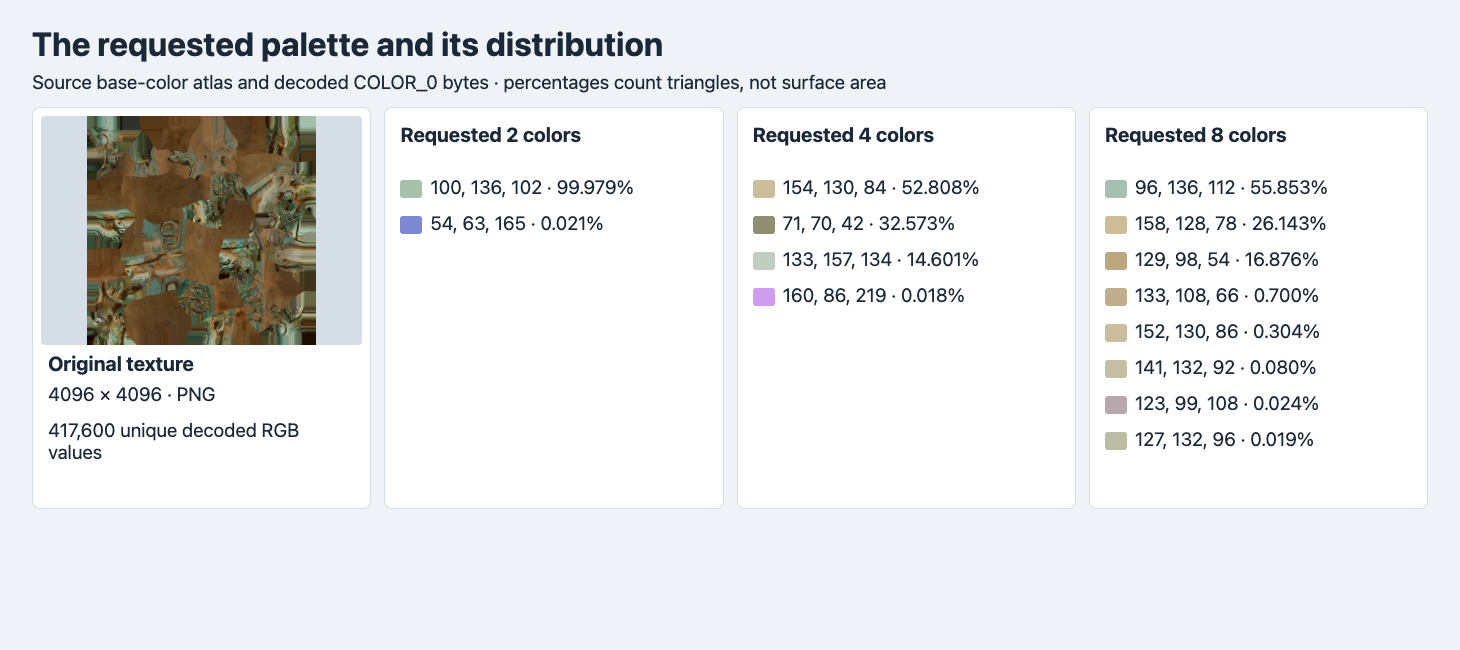
The numbers next to each swatch give the stored RGB byte components and the fraction of triangles. Swatches are converted from linear values for display. The source atlas is decoded from its embedded PNG.
The base-color atlas contained 417,600 unique decoded RGB triples across all pixels, including unused atlas regions. The palette files use vertex colors instead. They contain only the listed RGB triples, all with alpha 255. The count confirms the delivery at the data level. The share indicates how much of the model any one color might affect, provided you use the right denominator for the question.
We counted triangles per color and also summed their geometric areas. For the two-color GLB, the dominant green accounts for 99.979% of triangles and 99.995% of area. The blue entry has 103 triangles, about 0.0206% by count and 0.0045% by area. This explains why it is hard to see a second color at normal display size.
For the four-color output, the smallest entry has 90 triangles and about 0.0038% of area. The olive entry 71,70,42 accounts for about 32.6% by triangle count and 52.3% by area. In the eight-color file, three colors occupy about 99.39% of the summed surface area. Area weights large triangles more heavily and includes the inside surface. Neither statistic represents screen coverage, filament consumption or the area visible from one camera.
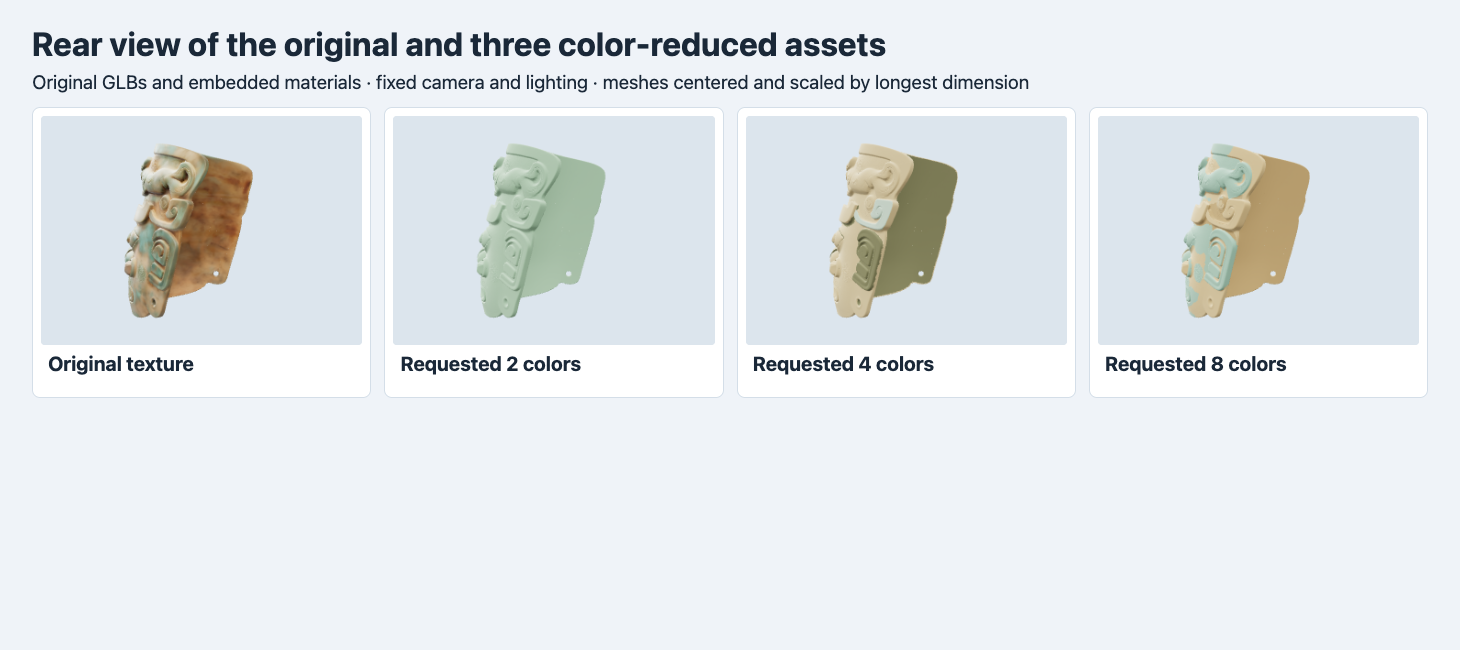
The common view makes the large inside region visible. Four colors turn it olive in the preview, while eight give it a tan shade.
The inside retains a broad color assignment even when a palette looks varied from the front. Check both sides before deciding which output best follows the reference. The source’s metallic-roughness map and the vertex-color outputs also shade differently. The screenshots compare the appearance you receive in this renderer and do not isolate the effect of palette size from the change in material representation.
Follow the color along shared cross-sections
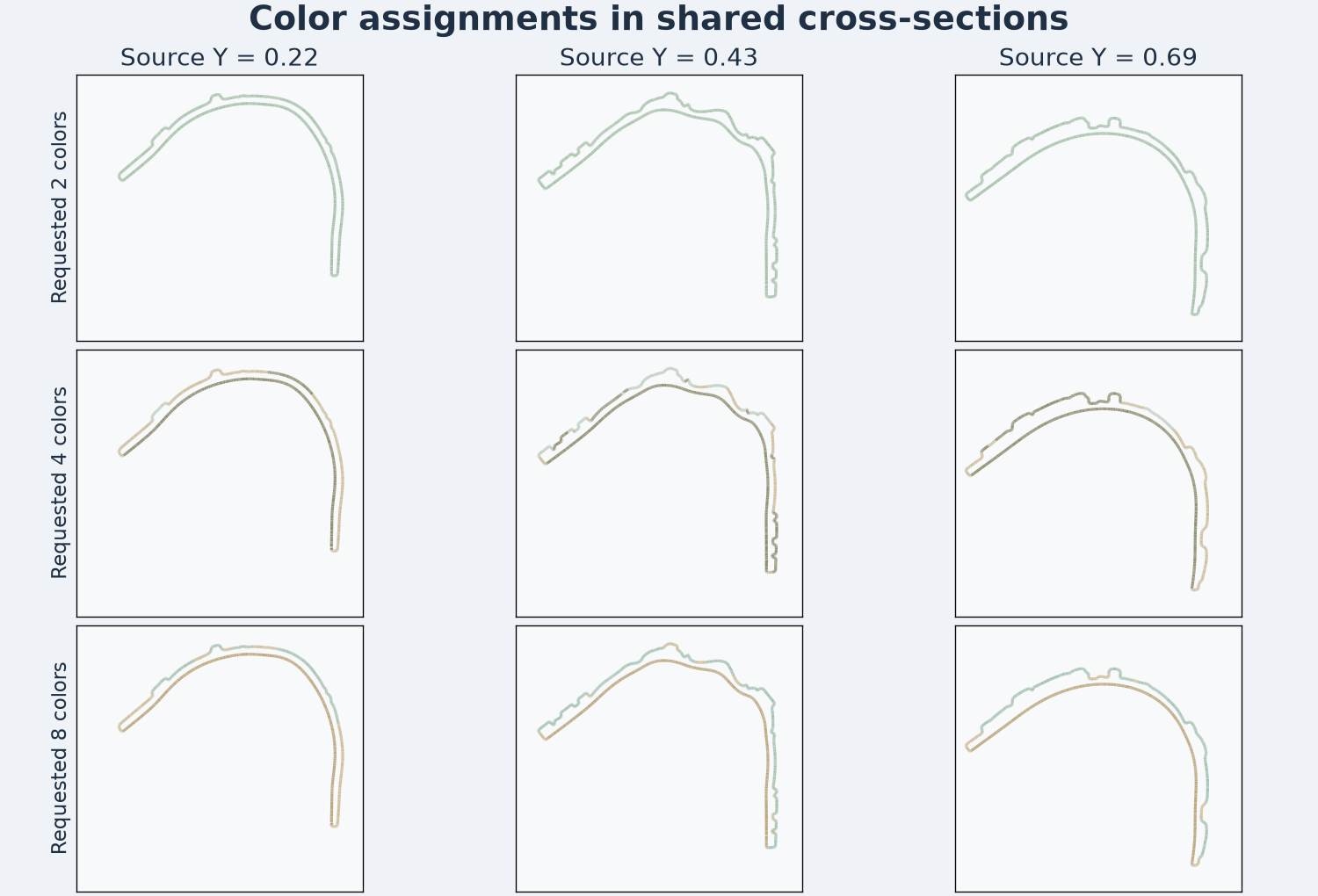
Lines are triangle intersections at the same three source Y coordinates. Each segment uses its source triangle’s vertex color, with no lighting applied.
At Y = 0.43, the two-color file shows one color throughout the cut. The four-color file shows three, and the eight-color file shows four. The cross-section geometry matches because the triangles match. Color transitions along a line can shift even when the shape stays fixed. For a design with a hard boundary between two intended colors, sample that boundary at the actual feature and check both faces of the thin shell.
These cuts are geometric inspections. They do not turn the file into toolpaths or verify printable enclosed bodies. We did not run a printer profile, set up filament assignments or print the mask. A slicer might ignore vertex colors or expect separate material assignments, depending on its import options. Verify the first imported sample and inspect the sliced preview before sending it to a machine. For a measured physical-size example with original STL slices, see the Meshy Relief depth and plate test.
Reproduce the color check
Send the following request to POST https://api.sandbase.ai/v1/run from a server with a bearer token. Substitute a publicly accessible textured GLB. Check GET /v1/run/{id} for the result. Each request can incur a charge.
{
  "model": "hitem3d/hi3d/multicolor",
  "model_url": "https://example.com/assets/textured-mask.glb",
  "number_of_colors": 4,
  "export_format": "glb"
}
Keep the source hash, palette request and delivered bytes. Inspect unique colors, group boundaries and one representative cross-section. If an extra color covers only a few triangles, decide whether that region is large enough to justify a separate material in the destination. Make that decision on the asset and scale that will actually be used.
For a print handoff, see the STL and 3MF comparison, which tracks this four-color mesh through a slicer round trip.
FAQ
Does requesting eight colors guarantee eight large color regions?
This file delivered eight stored colors, with about 99.39% of the measured surface area in the three largest assignments. Check placement and area before choosing a palette size.
Will this workflow preserve the original PBR maps?
The three tested outputs had no embedded images and no declared materials. Their surface colors are stored in COLOR_0. Retain the textured source when the original maps are needed.
SandBase ran and billed the three jobs. Figures and measurements use the original downloads. The cover is illustrative.
Found this useful? Share it