Hunyuan Part Splitter in 2027: FBX Input to GLB Components
See two Hunyuan Part Splitter jobs in Blender. Compare 23 actual GLBs, shared origins, mesh growth, vertex colors and original input textures.
The SandBase Hunyuan Part Splitter accepted a textured FBX robot and a textured FBX horn. It returned 17 and 6 separate GLBs respectively. Every Blender mesh origin was at the scene origin, even though the vertices remained distributed around the assembled objects. The files can be translated independently, but rotating the head around its imported origin would swing it around the scene origin. Both outputs also lost their embedded source images and gained triangles, so this workflow needs checks for geometry, pivots and material recovery.
Key takeaway
- Two $0.45 jobs returned 23 original GLBs in total. The robot yielded 17 files; the Rodin horn yielded six. None of the returned files were FBX.
- Each GLB has a single mesh child of a world root. In Blender all mesh origins were at (0, 0, 0); the part shapes were positioned in the vertices.
- Both input FBXs contained packed images. All output GLBs contained one constant vertex color per file, zero embedded images and zero UV layers on import.
- The horn grew from 19,874 to 1,793,724 triangles across the output kit. Exact-position edge counting found zero open boundaries across all 23 meshes, and the glTF validator reported zero errors or warnings. These checks cover different properties.
Start with the format and the actual input count
Hunyuan Part Splitter on SandBase takes a publicly reachable FBX URL as its input. Our two tests used the vendor example robot and a separate bronze horn generated with Rodin 2.5 as a textured FBX. The horn source image is the same public image we used for the Rodin and Meshy STL comparison. The FBX is a new 20K Triangle request with PBR enabled and is distinct from the earlier 50K STL. Rodin settled at $0.48 for this FBX generation, counted separately from the split.
Blender 4.5.9 counted 19,874 triangles in the Rodin original, which is below the 30,000-face value exposed in SandBase’s inspected tool schema. The catalog FBX had 499,822 triangles and still completed. That is an observed result for the catalog example, with no general conclusion about the enforced cap. Use the documented limit for enqueueing new assets and log the measured count and service response. The lower-poly source also lets you check the geometry expansion without depending on the behavior of a sample that exceeds the stated number.
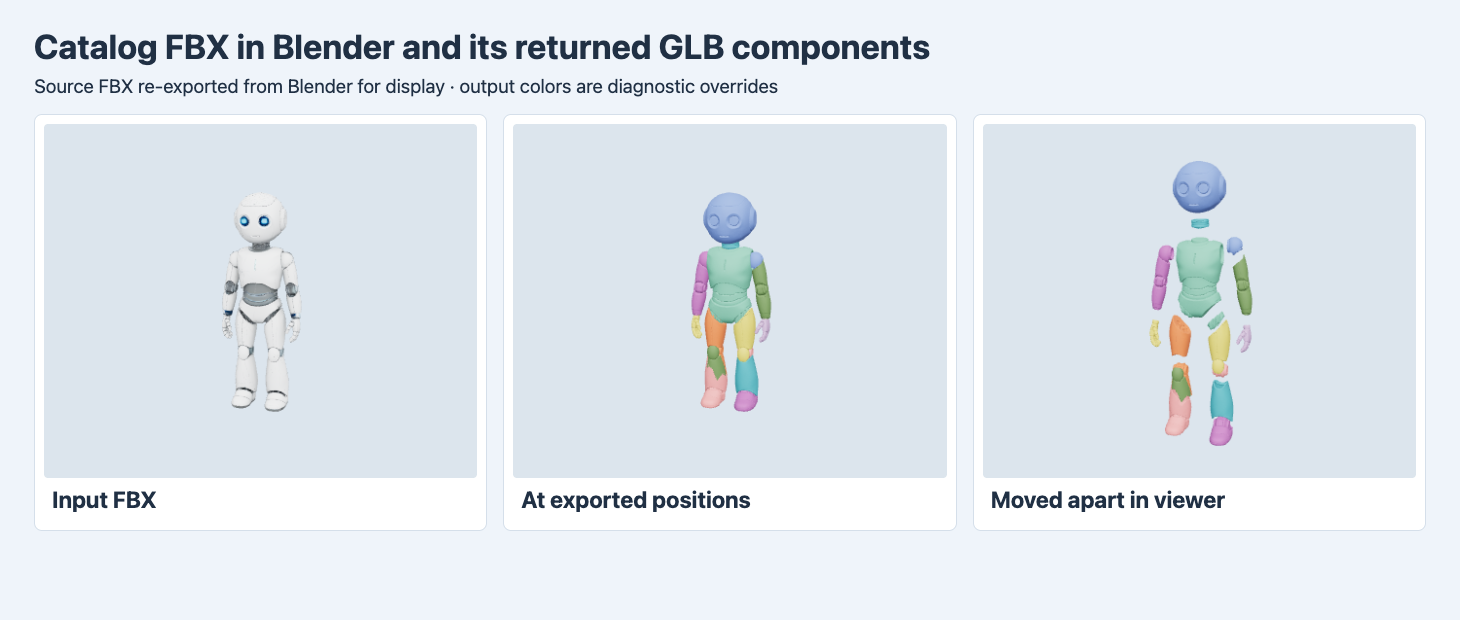
The source FBX is re-exported from Blender for display. The middle view loads the original component GLBs at their saved positions. The right view applies translations only in the viewer. The component colors in both views are diagnostic overrides.
The robot’s head, torso and hand regions are recognizable in the exploded view. The splits are more granular on one side than the other in this example, including a separate small shoulder region on one side. Neither request asked the service to create an armature, enforce bilateral symmetry or label body parts. Treat the exported part names as identifiers you can match to a manifest. Assign a semantic name only after inspecting the geometry.
Inventory the downloads before importing
The completed responses each held an array of file entries. Save the entire array. A handler that takes the first URL would keep just one part. Both sets identified the downloads as model/gltf-binary, and we verified the GLB headers. The mesh names inside each asset are part_* identifiers and are not ordered the same way as the returned positions in the array. In the robot job, our sequential download part-02.glb contains the mesh named part_0. Save both fields if you need to connect a downstream edit to its original run.
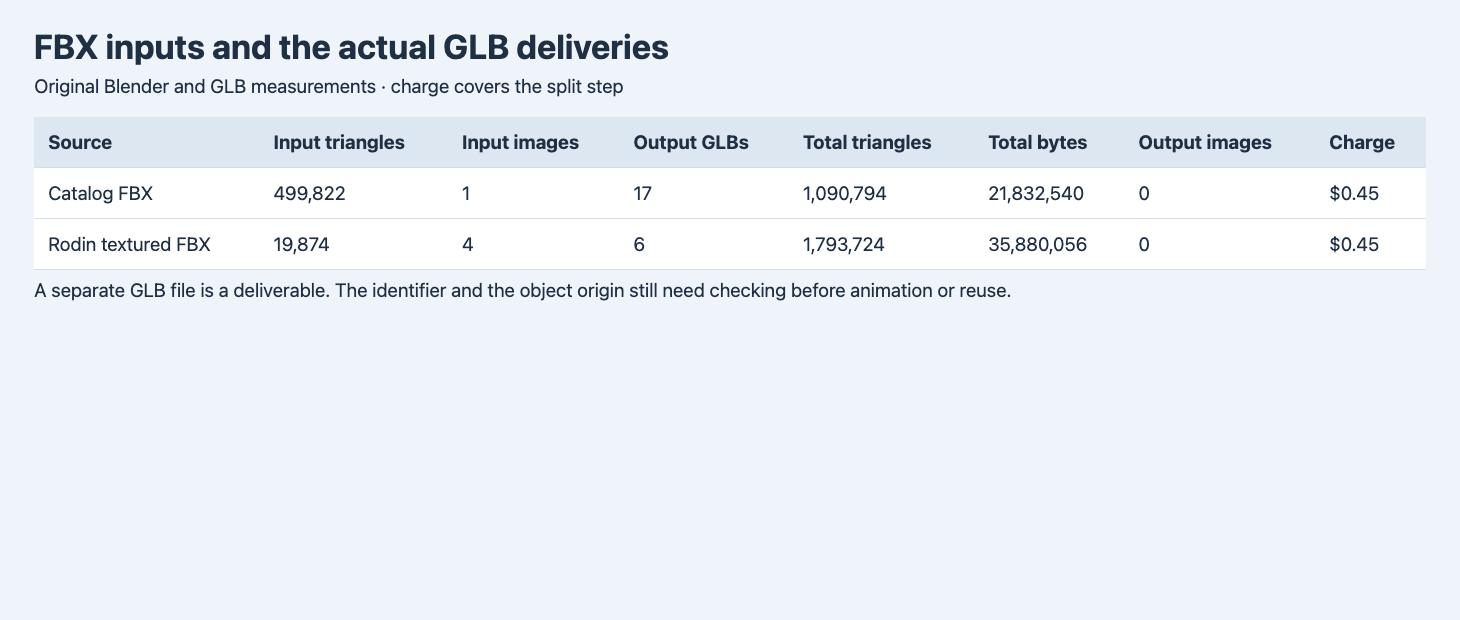
Totals are sums across the original delivery files. Charges are for the two component-generation jobs.
| Input FBX | Input triangles | Packed input images | Returned GLBs | Total output triangles | Total GLB bytes | Charge |
|---|---|---|---|---|---|---|
| Catalog robot | 499,822 | 1 | 17 | 1,090,794 | 21,832,540 | $0.45 |
| Rodin horn | 19,874 | 4 | 6 | 1,793,724 | 35,880,056 | $0.45 |
The smaller input mesh returned the larger geometry kit. This route generated new geometry around the separated components in these trials. The vertex and triangle totals describe the output, so do not assume a source triangle can retain its original index or mapping. The no-boundary check grouped identical positions within each imported part, then counted edges used by one face. We found none of those edges and none used by more than two faces across the delivered meshes. Those measurements do not establish that separate parts have compatible contact surfaces, no self-intersections or enough thickness for a manufacturing process.
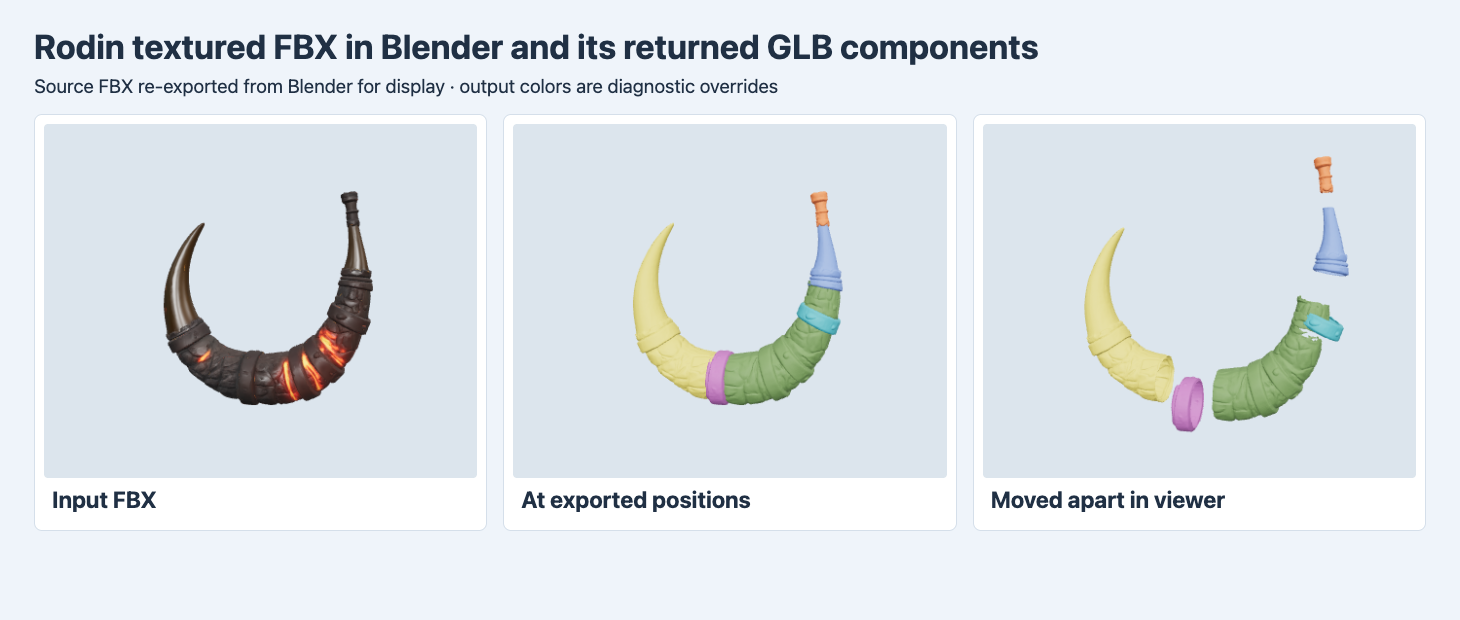
The outputs are the original GLBs with a diagnostic color override. The center view applies no individual translation. On the right, each part is shifted outward from the assembly center.
The horn shows why preserving the input is useful. In the textured source, the wrapped band and bright orange material regions are part of the appearance. The six outputs separate several regions, including the distinct lower band and the right tip. The bright color and other detailed texture data are absent from the files. We decoded the output COLOR_0 accessors. Each of the 23 files has just one RGBA value for its mesh, with no UVs or linked image. That gives a flat color to guide inspection. To recover the original material look on the altered surfaces, plan for material reassignment, UV work or texture transfer and compare the result with the source from multiple angles.
When a downstream task needs a subset of the kit, keep the mandatory parts list separate from what the service returned. A head, neck and torso can all be present while the geometry around a shoulder still crosses the boundary you want. Record each inspected boundary and the planned assignment before deleting parts. For a reusable replacement piece, isolate it in a clean scene and inspect its surfaces in the assembled position and after moving it away. Compare those surfaces with the input and the adjoining output separately.
Place pivots without moving the assembly
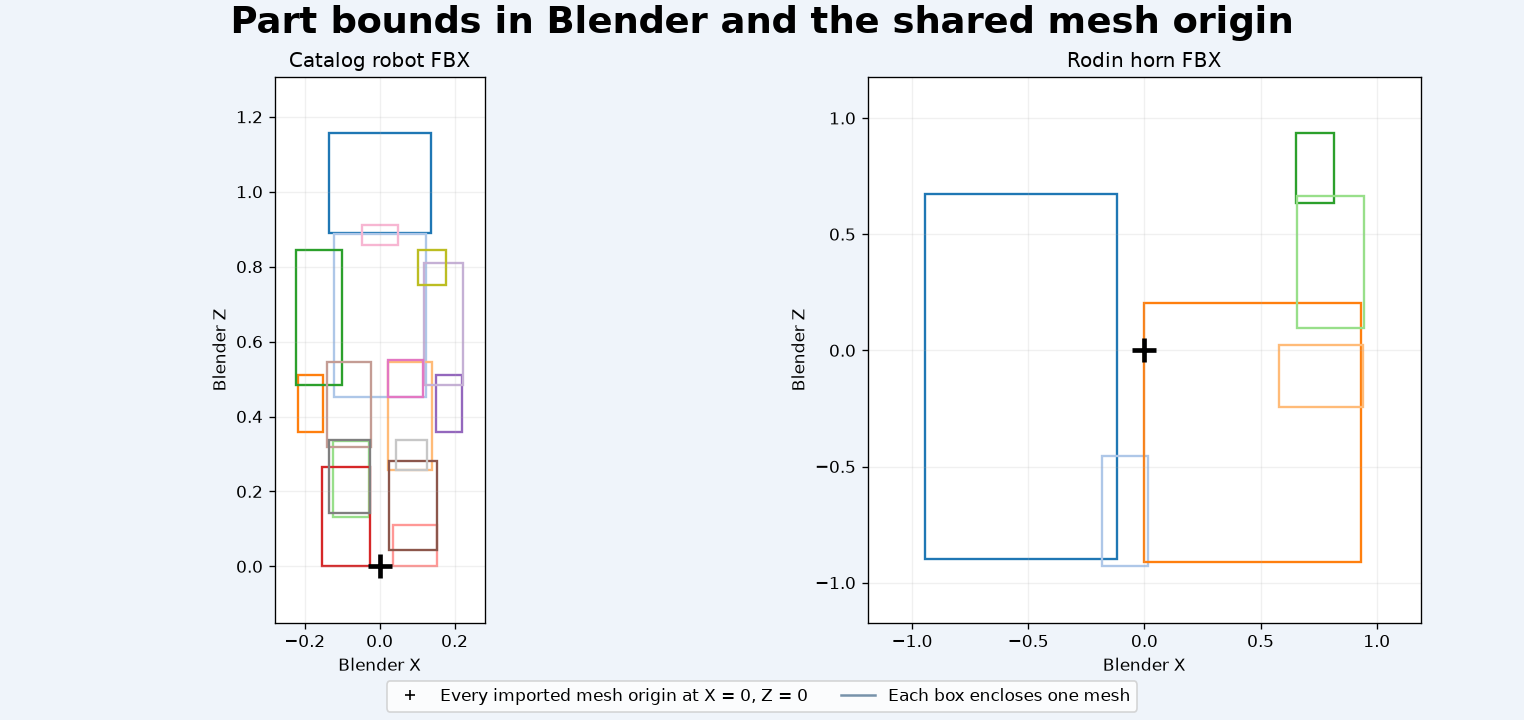
The boxes show each component’s X–Z bounds in Blender world coordinates, with separate scales for the two subjects. The cross marks the origin shared across all meshes.
Import all GLBs in one Blender scene. Each brings a root named world and a mesh below it, with no additional articulation hierarchy. The 17 robot and six horn meshes all imported at the same origin. The positions of the vertices are enough to reproduce the arrangement. The individual pivot coordinates do not identify a shoulder, hinge or connector center. For example, the robot head part part_0 spans roughly 0.889 to 1.156 along Blender Z, while its mesh origin stays at Z = 0.
On a working copy, first group the output under a named collection and keep the input in a separate reference collection. Before setting a joint, inspect the assembled mesh and place the 3D cursor at the intended pivot. Use Blender’s object origin operation to move the selected pivot to the cursor while keeping its vertices in place. Confirm the result by rotating the part a small amount and undoing the test. An automatic bounding-box center may be sufficient for an inspection turntable, while a hinge should be based on the actual joint location. Save your edited file separately from the original export and carry the part IDs into the final asset manifest.
Reproduce the request and keep all outputs
The request below uses the public catalog example. Send it to POST https://api.sandbase.ai/v1/run with a server-side bearer token. Check GET /v1/run/{id} until the run completes. Calls can incur a charge. To use your own FBX, host it at a URL that the service can fetch. Save a checksum and a short manifest of original output types, filenames, byte counts and internal mesh identifiers.
{
  "model": "tencent/hunyuan-3d/3.1/part",
  "model_url": "https://static.sandbase.ai/examples/tencent/hunyuan-3d/3.1/part/input_input_file_url_0.fbx"
}
If a downstream tool requires FBX, the tested exports need a conversion step. Run that step against a copy then recheck part transforms, materials and counts after import. The workflow should validate the whole kit, including the smallest parts and the most heavily rebuilt ones. For a contrasting segmentation delivery that has multiple scene roots inside one GLB, see the Tripo and Hi3D part comparison.
The matched Hi3D Split comparison runs the same catalog robot through both routes and shows how their package and object counts differ.
FAQ
Are the output files FBX because the input is FBX?
Both tested jobs returned individual GLBs. Read the type on each returned item before choosing an importer.
Do the exported origins correspond to hinges?
The 23 imported mesh origins were all at zero. Place and test each pivot separately before adding a rig or joint.
Did these tests establish a safe printing workflow?
The file validator and edge counts covered limited properties. We did not check printable clearances, wall thickness, supports or assembly on these outputs.
SandBase ran and billed the tests. Figures are based on original files with noted display conversions and diagnostic colors. The cover is illustrative.
Found this useful? Share it