Meshy 7.1 vs Meshy 6 for Image-to-3D Migration
A same-image migration test measures Meshy 6 and 7.1 GLB dimensions, texture slots, triangles, browser and Blender imports, and settled cost.
We submitted an existing product image to the Meshy 6 and Meshy 7.1 Image-to-3D routes with the same 50,000-triangle target. Both returned a GLB we could open in Chromium and Blender. The fresh 7.1 file fit the old thumbnail almost exactly by its longest dimension, yet its front-to-back span was 13.78% larger. The legacy export also included an emission image absent from the two 7.1 files. This is what we would measure before switching the version in a product pipeline.
Key takeaway
- The paired exports returned 48,533 and 48,043 triangles and charged $1.20 and $1.44. Both brought base color, normal and packed metallic-roughness maps into the tested viewer.
- The maximum span increased by 0.18% in the fresh 7.1 export. Along the front-to-back axis, its full-mesh span increased by 13.78%. The archived 7.1 run was 2.88% deeper than Meshy 6.
- The Meshy 6 GLB’s fourth image was a 2K emissive JPEG. Every decoded RGB value was zero. Its presence can satisfy a slot-presence check without making the product glow.
- Retain the last accepted file and the original request. During a migration, validate each axis, the base position and the material needs of the downstream consumer.
Replay a known production-style input
We used the authored teal label printer from the Meshy and Rodin web GLB comparison. Its front image shows a paper strip, a small display and orange indicator buttons. The authored rear has a vent and a rectangular socket. We retained the original input bytes and the archived Meshy 7.1 GLB from that earlier project. The two new calls used only the front image.
We set should_texture: true, enable_pbr: true, target_polycount: 50000 and topology: "triangle" on both Meshy 6 Image to 3D and Meshy 7.1 Image to 3D. The archived 7.1 request used those same inputs. The paired routes reported different backend names in their receipts. Meshy 6 was routed to fal-ai/meshy/v6/image-to-3d, and 7.1 to meshy/v7.1/image-to-3d. The comparison measures these SandBase delivery routes as used. The model version, provider route and provider-side defaults are part of the observed change.
| Original GLB | Request creation, UTC on November 14, 2026 | Triangles | File bytes | 2K images | Settled charge |
|---|---|---|---|---|---|
| Meshy 6, paired | 23:33:58 | 48,533 | 8,809,048 | 4 | $1.20 |
| Meshy 7.1, paired | 23:33:58 | 48,043 | 8,161,196 | 3 | $1.44 |
| Meshy 7.1, archived | 20:01:31 | 43,712 | 8,549,388 | 3 | $1.44, earlier run |
The new pair cost $2.64. Status observations bracket completion between about 2m36s and 2m45s for 7.1 and between about 3m31s and 5m27s for Meshy 6, measured from the receipts’ creation time. These are polling intervals for individual requests. They include time the public status API reports as running and do not expose provider compute time. The archive has a creation timestamp and no matching observation interval in this migration test.
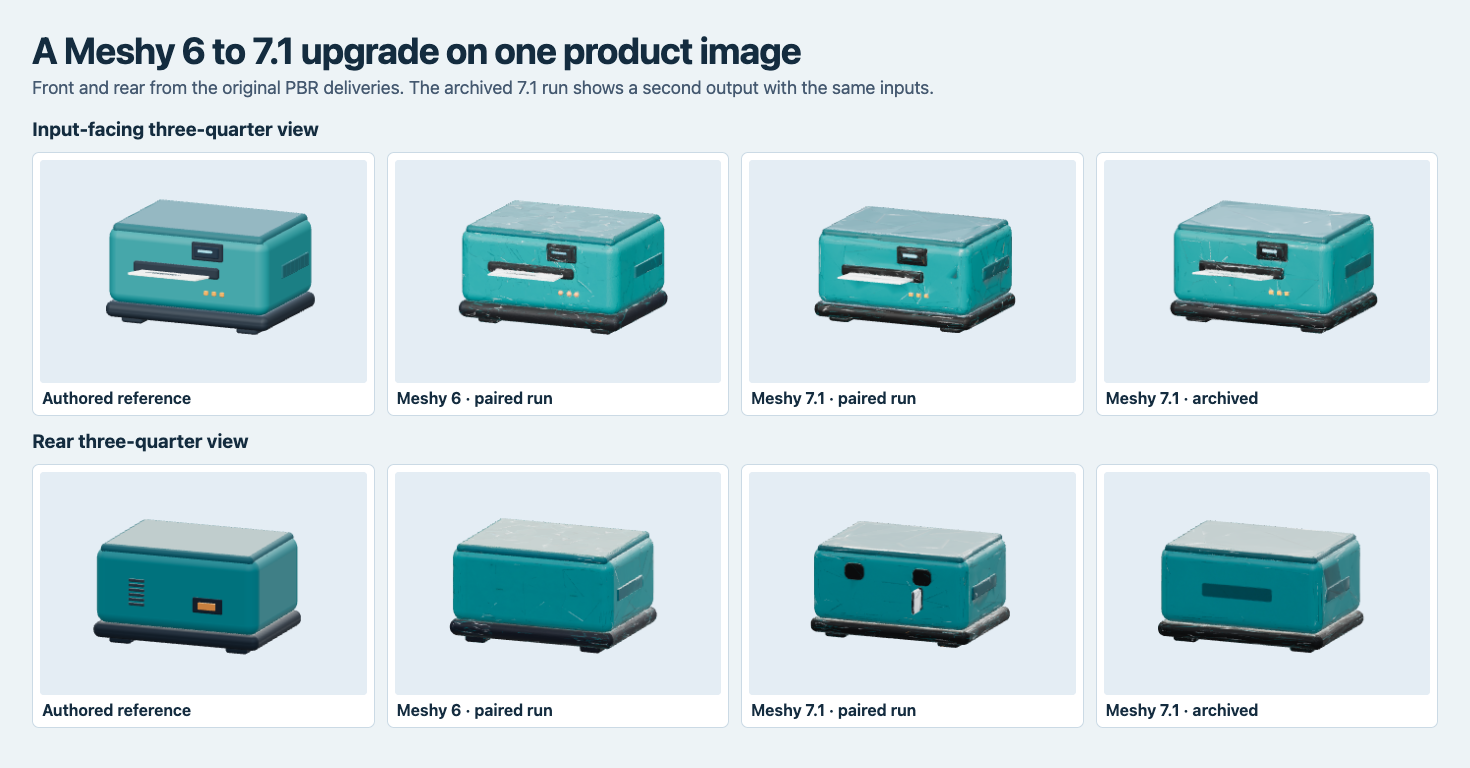
All three produce familiar front controls and a paper strip. Their backs differ, including two dark shapes and a pale projection on the fresh 7.1 run.
Compare each axis before reusing an anchor
We measured transformed mesh vertices in the raw files. The table uses the browser import’s Y-up axes in width, height and depth order. A Blender 4.5.9 import independently reproduced those spans after mapping to its Z-up axes. These are imported scene units. The printer never received a measured physical size in this fixture.
| Original GLB | Width | Height | Depth | Longest axis | Lowest Y |
|---|---|---|---|---|---|
| Meshy 6, paired | 1.89961 | 1.08525 | 1.67256 | Width | -0.54354 |
| Meshy 7.1, paired | 1.83000 | 1.02249 | 1.90305 | Depth | -0.51229 |
| Meshy 7.1, archived | 1.90297 | 1.08391 | 1.72067 | Width | -0.54238 |
The fresh 7.1 model was 3.66% narrower and 5.78% shorter than the Meshy 6 file. Its depth increased by 13.78%, and depth replaced width as the longest axis. A migration check comparing only the maximum span would see a difference of about two tenths of a percent. Calculating the lowest point also tells you where a catalog transform needs to lift the model before it rests on a shelf plane. The fresh file’s minimum Y is about 0.03125 scene units higher than the legacy file’s.
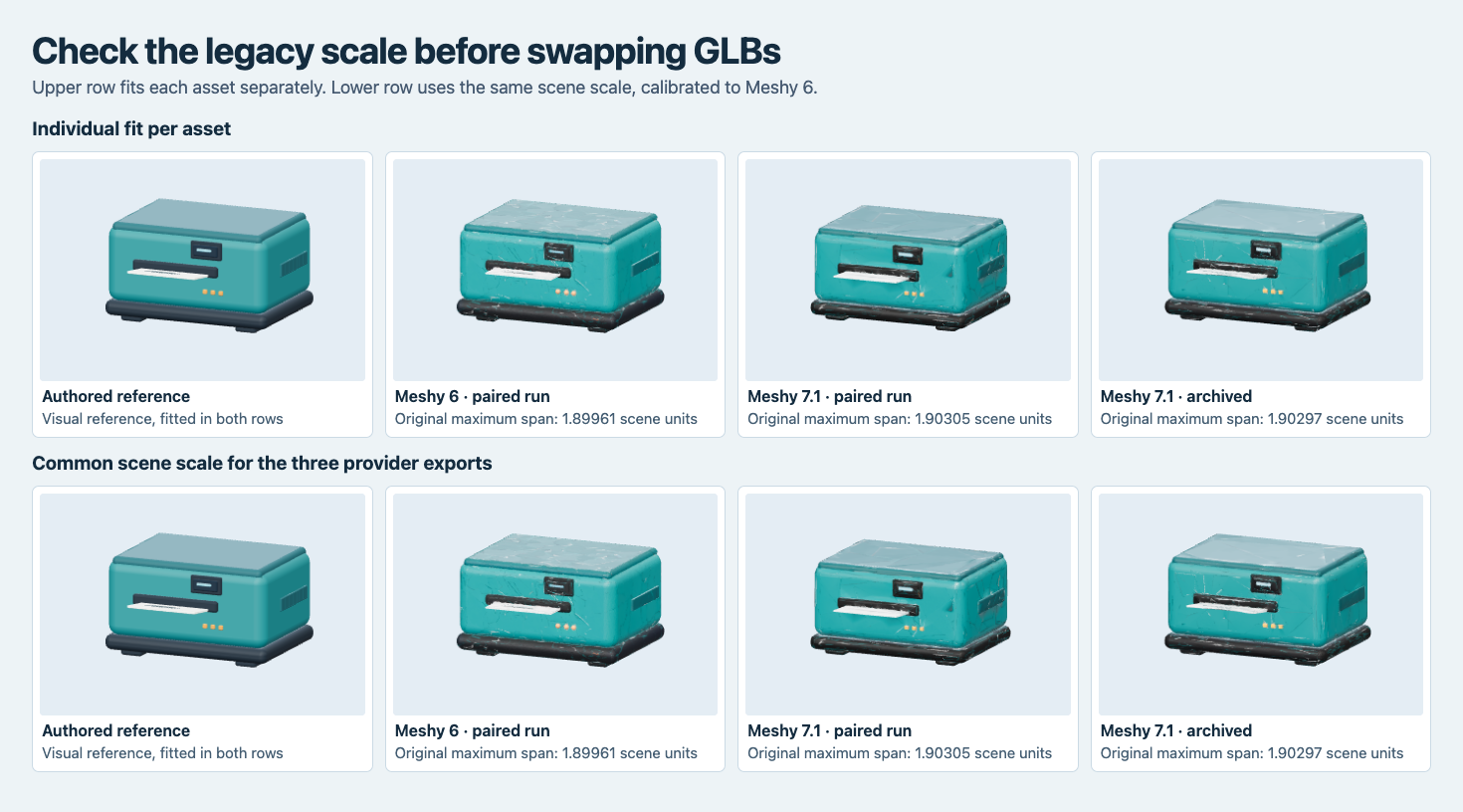
The top row fits each model to the viewport. The bottom row shares a scale across the three Meshy files. Each model is centered for viewing while the raw table preserves the original minimum Y.
The scale measurements include every vertex. A rear protrusion can increase depth even if the housing face appears close to the reference. In the neutral side view the new 7.1 file has a block projecting behind the case. The archived 7.1 sample, which used the same request fields, does not show that projection. The archive also has 4,331 fewer triangles than the paired 7.1 output. Keep a candidate’s own file hash and dimensions in the approval record. A route name and a request hash can identify the inputs, while the file hash identifies the delivery reviewed.
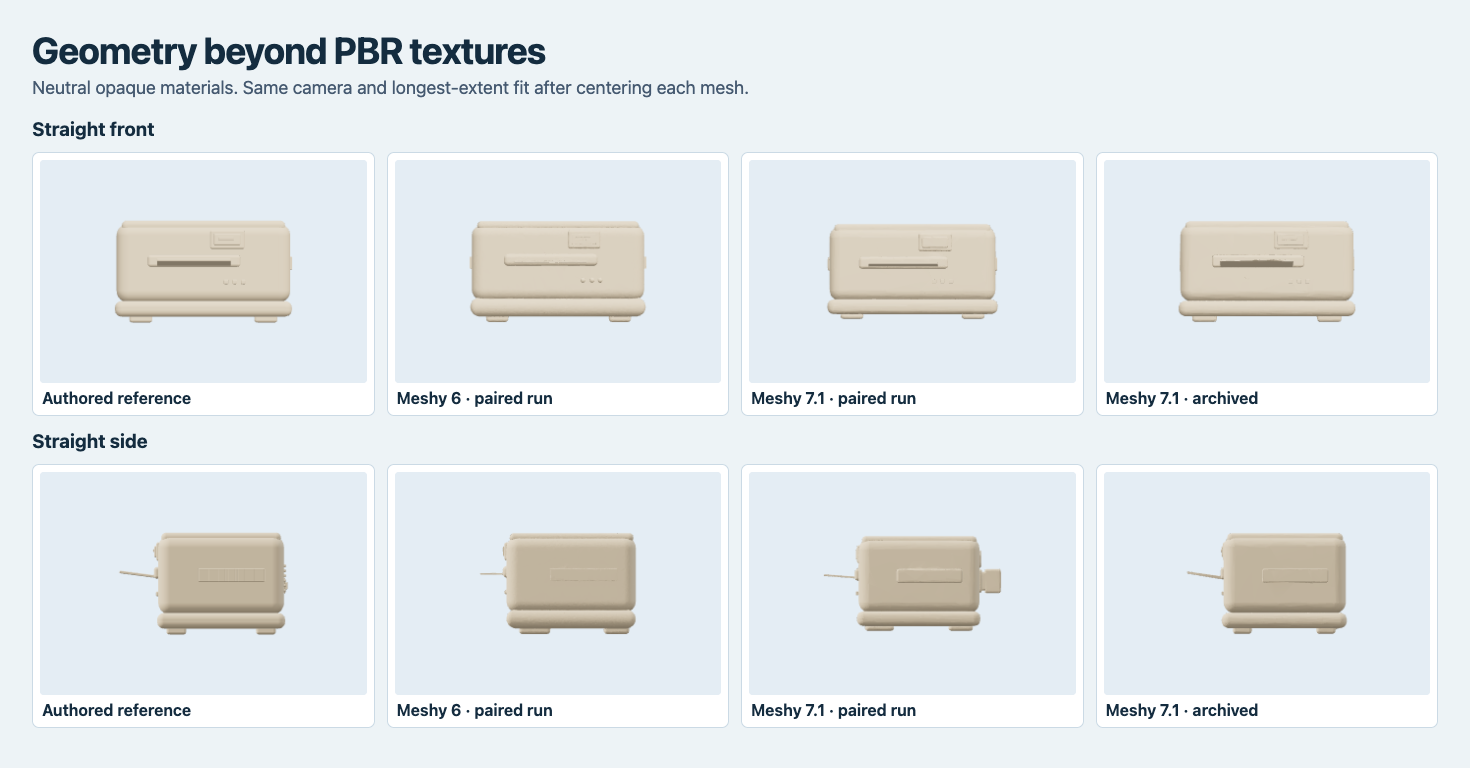
Removing the image maps reveals the geometry beneath the display, feet, label slot and the new rear shape.
Verify the material works in the consuming renderer
All three generated GLBs passed validation with zero errors and one generated-tangent-space warning. Chromium and Blender loaded the original files with one mesh each. The Blender meshes each had one UV layer. The three files bind base color, normal and a packed metallic-roughness texture. The Meshy 6 delivery additionally binds an emissive texture with factor [1, 1, 1]. The two 7.1 files omit that slot. Meshy’s model notes distinguish geometry model and default texture model on direct Image-to-3D requests. Check the package that your selected route actually sends.
The extra image in the Meshy 6 file is a 66,165-byte JPEG. Its 2,048 × 2,048 pixels decode to black in every RGB channel. We rendered each export with lights and environment illumination disabled. All three gave a maximum RGB value of zero in both camera views. To check the test could detect light, we used a copy of the authored reference with emission explicitly enabled on the orange accents. The positive control reached a maximum channel value of 243 in both views.
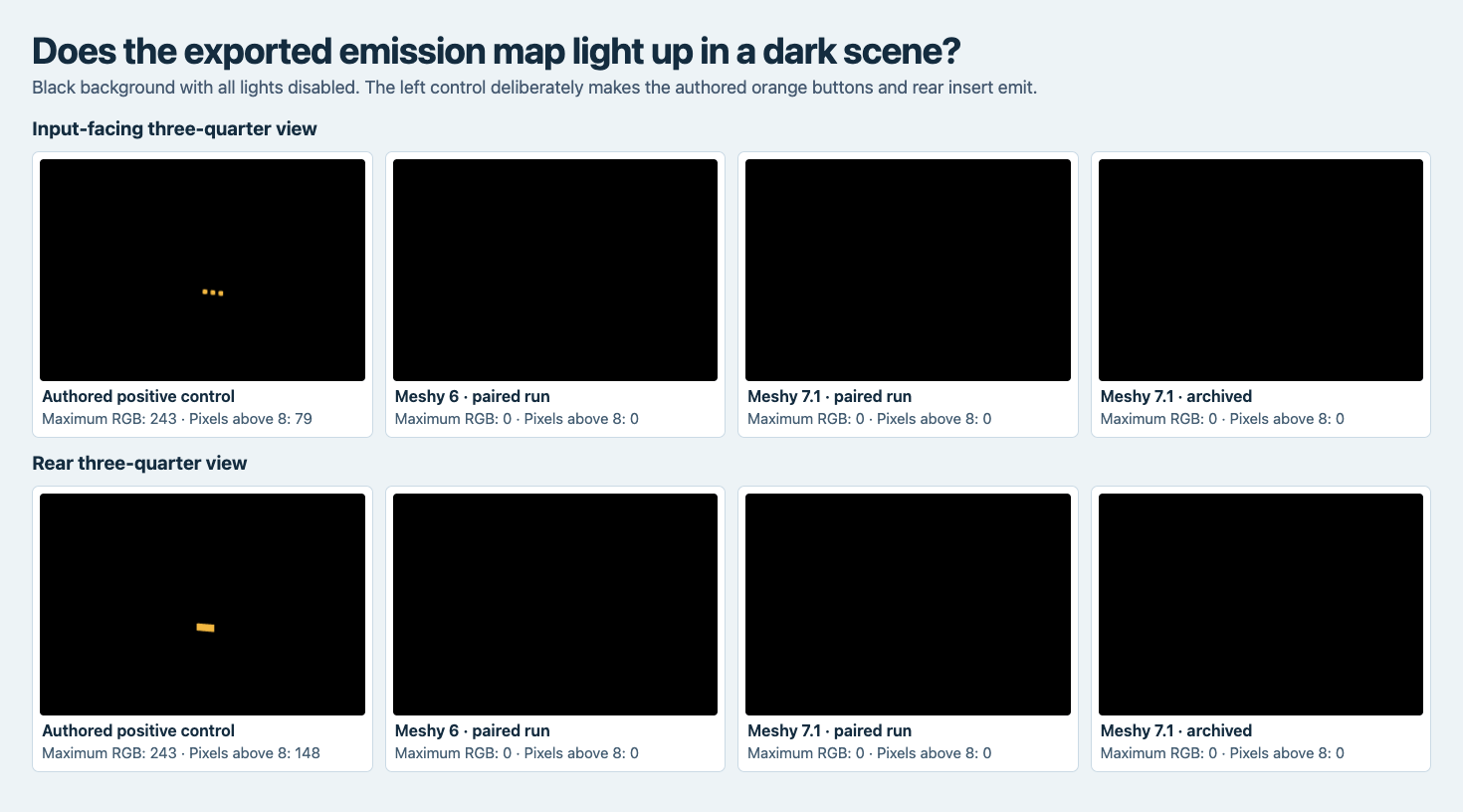
The left control glows in the harness. All three original exports remain black and produce zero pixels above the eight-level threshold.
If the application expects an emission slot as part of its material mapping, make the validation match that contract. If a control needs to appear illuminated, run a dark-scene probe and verify its visible output. The newer paired file was 647,852 bytes smaller than Meshy 6, and the archived 7.1 file was only 259,660 bytes smaller. Record the actual payload because both image encoding and geometry vary between exports.
The embedded images summed to 7,166,592 bytes in the Meshy 6 file and 6,477,267 in the fresh 7.1 file. The total GLB shrank even though the package excluding the image payloads grew from 1,642,456 to 1,683,929 bytes. The difference includes the image slots that both routes share. Measure their encoded lengths before deciding whether to optimize textures or geometry for delivery.
Use the exact accepted GLB for the rollout
Keep the first accepted Meshy 6 artifact as the fallback. Generate a few candidate assets using preserved inputs and parameters. For each candidate, run file validation, compare straight views and track each axis around the business tolerance for that asset. An example depth limit of ±10% against the legacy printer would pass the archived 7.1 file and flag the fresh one. That limit is an illustration. Measure the clearances required by the actual product scene.
Check material behavior with the normal production lights and one diagnostic scene. A new asset package is ready for this workflow once the render, bounds and attachment points have been checked together. Record the tested hash so the asset that ships matches the one that passed.
Keep separate size thresholds for meshes and the complete delivered file. A 50,000-triangle cap would accept the three samples, but an 8,500,000-byte limit on the original GLB would accept only the fresh 7.1 result. An automated check can report material-slot changes and compare them with values from its own scene test. This makes the exception review specific: the legacy printer has an emissive slot with zero RGB, whereas a light-up model may carry visible values. Confirm how the application handles both a black texture and a missing texture before applying a batch replacement.
Frequently asked questions
Can I replace Meshy 6 by changing the model endpoint?
Both endpoints accepted the shared fields we used and both returned a GLB. A production replacement should test the consumed material slots, measured dimensions and exact file your downstream system will load.
Should I assume 7.1 always produces smaller files or completes faster?
The two 7.1 files in this study were smaller than the one Meshy 6 file, and the paired 7.1 request completed earlier in the observed intervals. More fixtures and repetitions are needed to characterize queue or payload behavior across a catalog.
Found this useful? Share it