Importing AI 3D Props into Unreal Engine 5.3
A 12 cm Rodin printer moves through Unreal 5.3.2 via GLB and FBX, with measured axes, material graphs and UV precision.
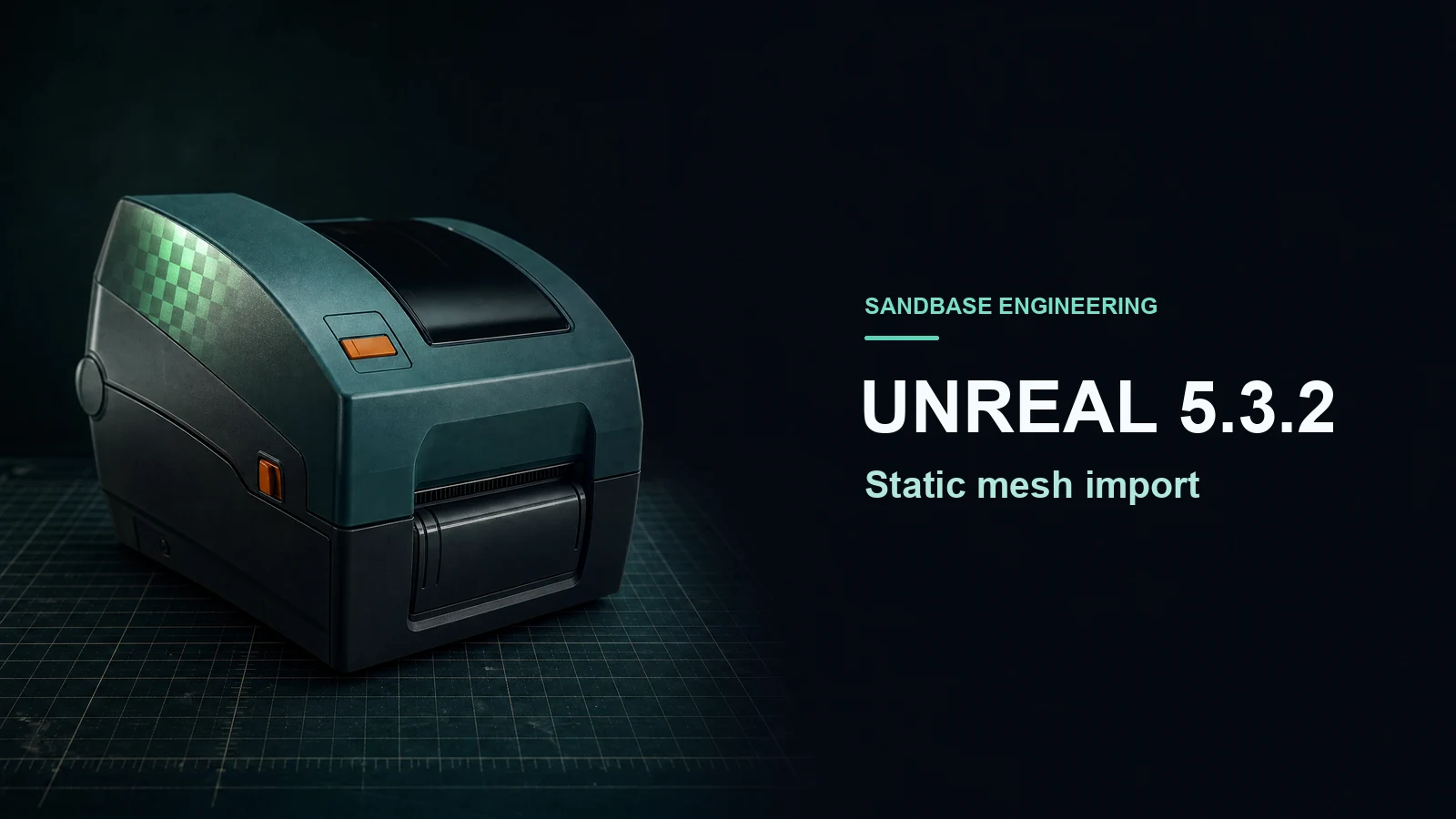
A 12 cm printer imported into Unreal Engine 5.3.2 through both GLB and FBX and kept its size to five decimal places in centimeters. Both static meshes had one material slot. The slot on the GLB import had connections to four PBR inputs and the FBX route had only base color connected. Rebuilding a copy with full-precision UVs also eliminated a set of triangles that had collapsed in UV space without changing their 3D vertex or index values.
Key takeaway
- Both routes produced a static mesh measuring 11.59863 × 12.00000 × 6.95044 cm in Unreal’s X, Y and Z axes. The lowest point stayed at ground height within floating-point precision.
- Interchange created three 2K texture assets from the GLB. The tested Blender-to-FBX transfer carried only the diffuse payload as a distinct image. Unreal created one texture and connected base color.
- The generated lightmap UV channel is visible as
TEXCOORD_1in both Unreal mesh read-backs. The source UV channel count and the render export’s channel count answer different questions. - With full-precision UVs enabled, the UV0 near-zero area counts dropped from 50 and 48 to zero. Each format’s default and rebuilt mesh kept the same 3D positions and index values.
Keep one calibrated source
We reused a Rodin 2.5 Image-to-3D printer from the GLB and USDZ size test. Blender 4.5.9 centered its horizontal footprint, set the long side to 0.12 m and put the base at ground level. The source GLB contains 50,000 triangles, one UV stream and three embedded 2,048 × 2,048 PNGs. We kept that file byte-identical. We made a second delivery as FBX with Blender’s meter scene, converted units, Z-up, local -Y export forward setting and embedded textures. Importing the two source files back into Blender reproduced 50,000 triangles and one UV layer in each.
In a clean project we used Unreal 5.3.2 on an Apple silicon Mac. The GLB went through the default Interchange asset pipeline. The FBX used the legacy static mesh importer, with scene and unit conversion and lightmap UV generation enabled. Automatic collision was disabled on the FBX route. The experiment reads the Unreal editor’s static mesh and material graph directly from scripted imports. For screenshots, Chromium draws the original and Unreal-exported mesh geometry at one fixed scale. The Metal-enabled probe did not produce an Unreal viewport frame on this workstation. The local toolchain did not find a Metal compiler, so rendering evidence here is the browser read-back, alongside native asset metadata.
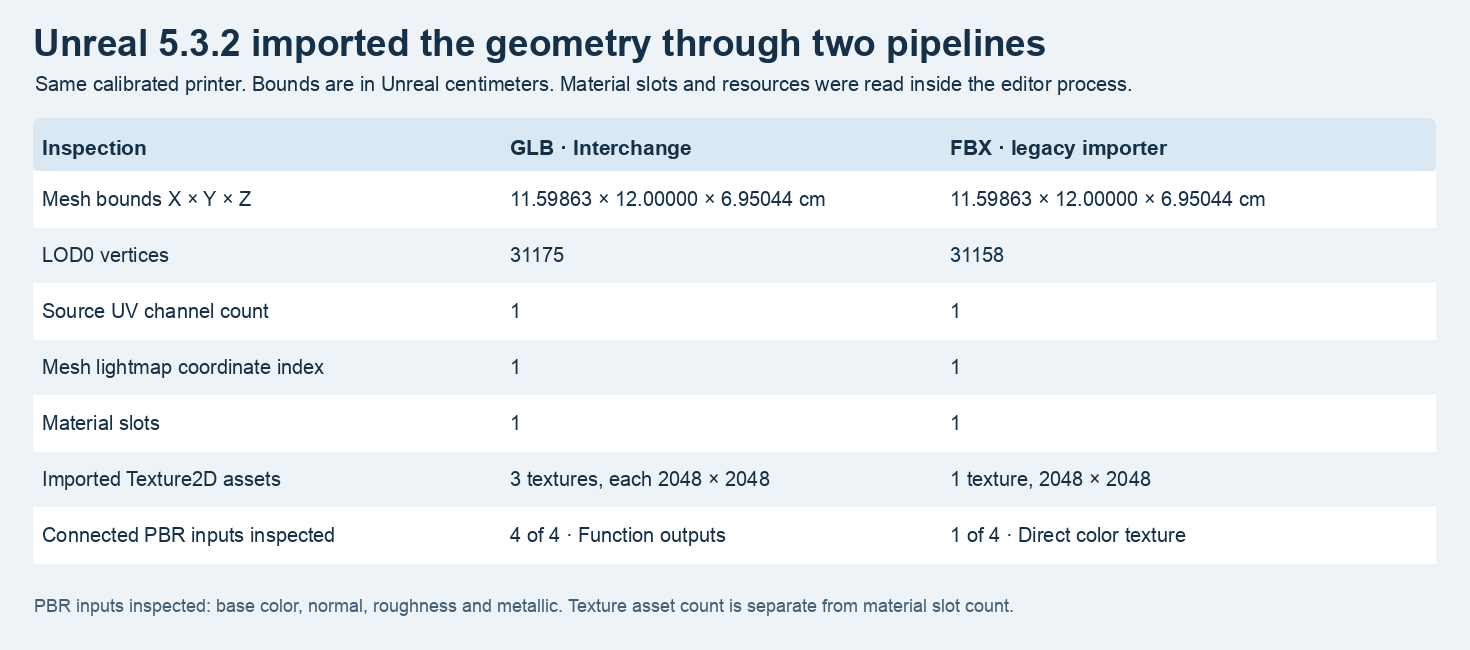
These values come from the Unreal editor process. The material slot count, imported texture count and connections describe distinct parts of the asset.
Verify centimeters and forward direction separately
Unreal reported a 12.00000 cm Y span, an 11.59863 cm X span and a 6.95044 cm Z span for both static meshes at the shown precision. The source’s Y-up GLB normally expresses its height along Y. The displayed Z-up Unreal coordinates put the 6.95 cm height on Z. The original model and both Unreal read-backs keep the front controls and paper slot on the same side when displayed in a common glTF world. Use the actual front geometry as the orientation cue. A rectangular bounding box alone cannot distinguish a front-back flip.
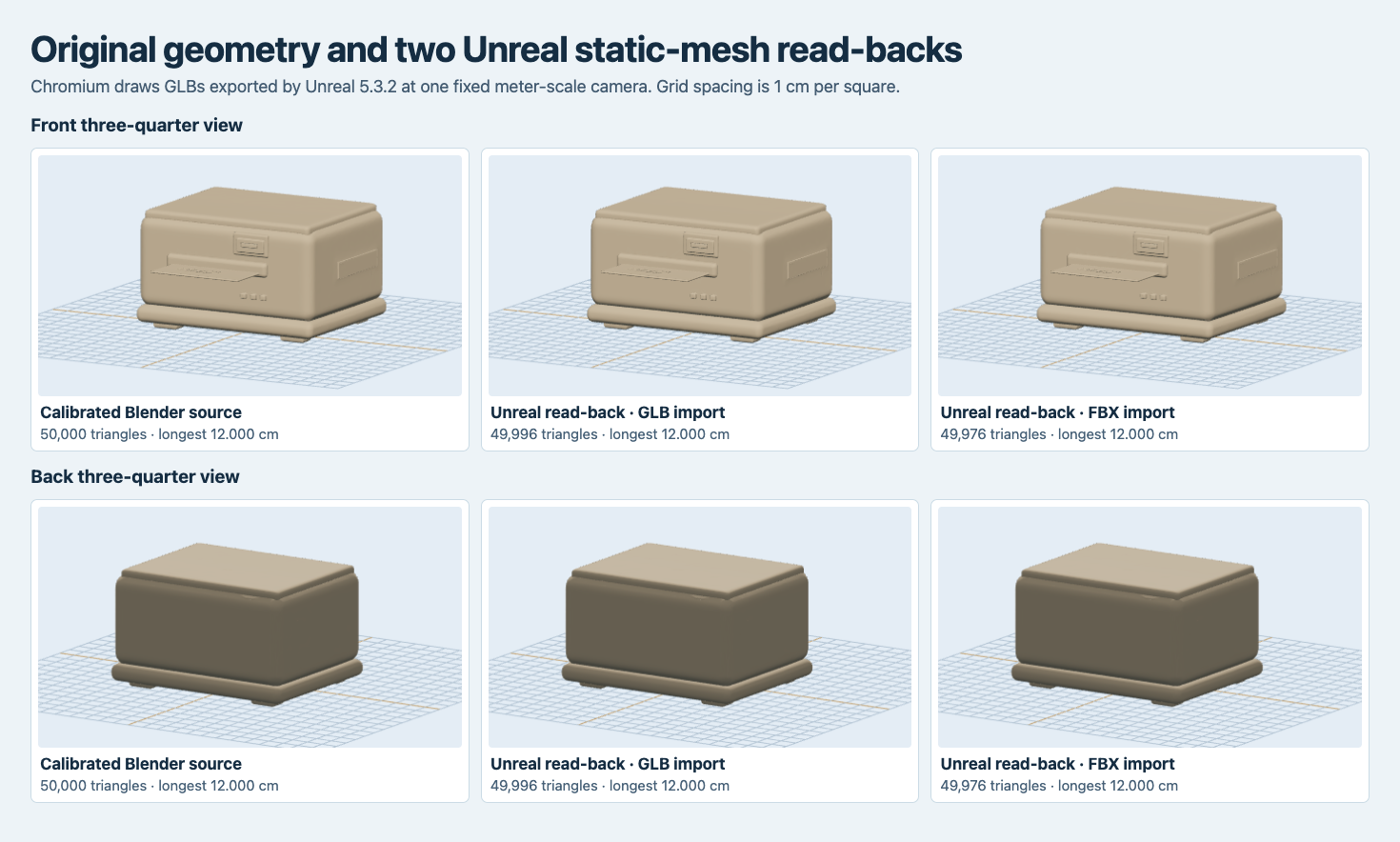
The original is at left; the other two columns are mesh outputs exported from Unreal and rendered in Chromium at the same meter-scale camera. A neutral diagnostic material makes the geometry easier to compare.
The source GLB had 31,157 position records. Unreal’s LOD0 vertex counts were 31,175 for GLB and 31,158 for FBX. The Unreal glTF read-backs have 49,996 and 49,976 triangles, respectively. The raw input count, imported vertex count and exported index count describe three stages. Keep the measured stage with each number. If you measure the final engine asset for a scene budget, do it after the engine build settings have run.
Read the texture graph before accepting a material slot
The static mesh assets both showed one slot named model. Unreal created three Texture2D assets for the GLB, all 2048 square. The base-color texture was sRGB. The packed metallic-roughness texture and the normal map were linear, and the normal map had Unreal’s normal-map compression. The active imported material graph connected base color, normal, roughness and metallic to four outputs of a common helper function. We inspected the node upstream and confirmed it references all three imported textures.
The tested Blender FBX had the two diffuse texture nodes pointing to packed files with the same SHA-256 digest as the original GLB base color. We did not find packed normal or metallic-roughness images in its imported Blender node inspection. Unreal’s FBX route created a single 2K Texture2D and connected it to base color. The normal, metallic and roughness inputs were unconnected in that imported material graph. An FBX-based project can carry those maps as separate files and wire them into the project’s material. Verify texture type and channel mapping at that handoff. Epic’s FBX static mesh pipeline documentation describes default import material behavior, and the Unreal 5.3 release notes describe the glTF Interchange import pipeline.
The two Unreal-exported diagnostic GLBs were written with material baking disabled. Neither included image payloads. This let us compare geometry and UV attributes without using the exported materials as a proxy for the original editor graph. The asset-package and graph audit above is the material result of the import itself.
Check UV0 and lightmap UV1 on the built mesh
Both imports reported one source UV channel, lightmap coordinate index 1 and generation enabled. The Unreal mesh exports both contain two streams, TEXCOORD_0 and TEXCOORD_1. The checker screenshot samples each stream independently. The original source provides only UV0. The two engine exports also include tangents. Use Epic’s lightmap UV guide to review which source channel the build repacks into its destination channel.
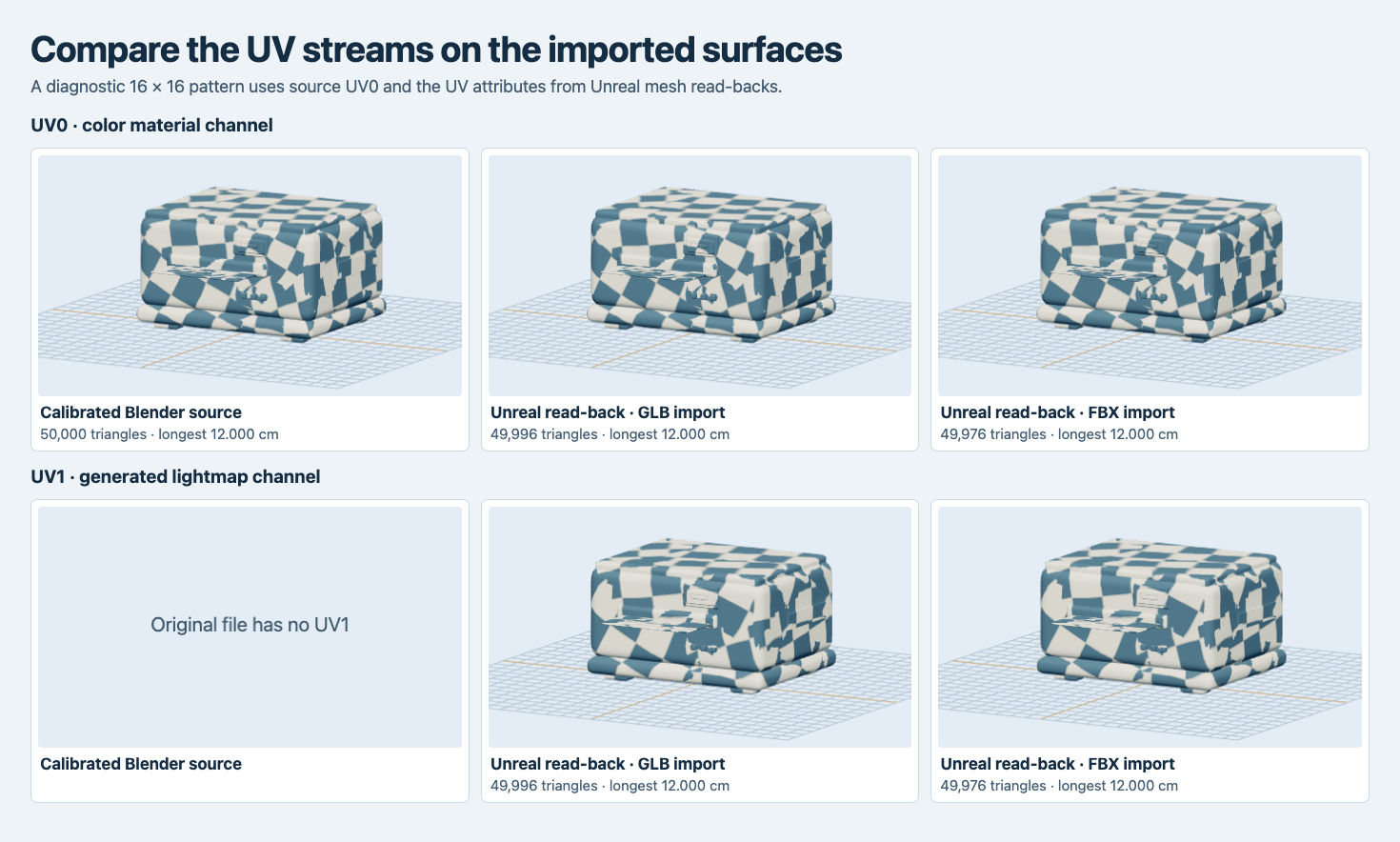
The color checker is a temporary diagnostic. Both Unreal read-backs have a second UV stream. The left source file has one.
For each UV triangle we calculated the absolute 2D cross product, which is twice its area. We flagged values below 10⁻¹². The default GLB import read-back had 50 flagged triangles on UV0 and 96 on UV1. The FBX read-back had 48 and 93. We duplicated both static meshes, enabled Use Full Precision UVs on LOD0, rebuilt and re-exported. Every flagged count fell to zero in the two rebuilds. The corresponding 3D position and index arrays remained numerically identical for each route.
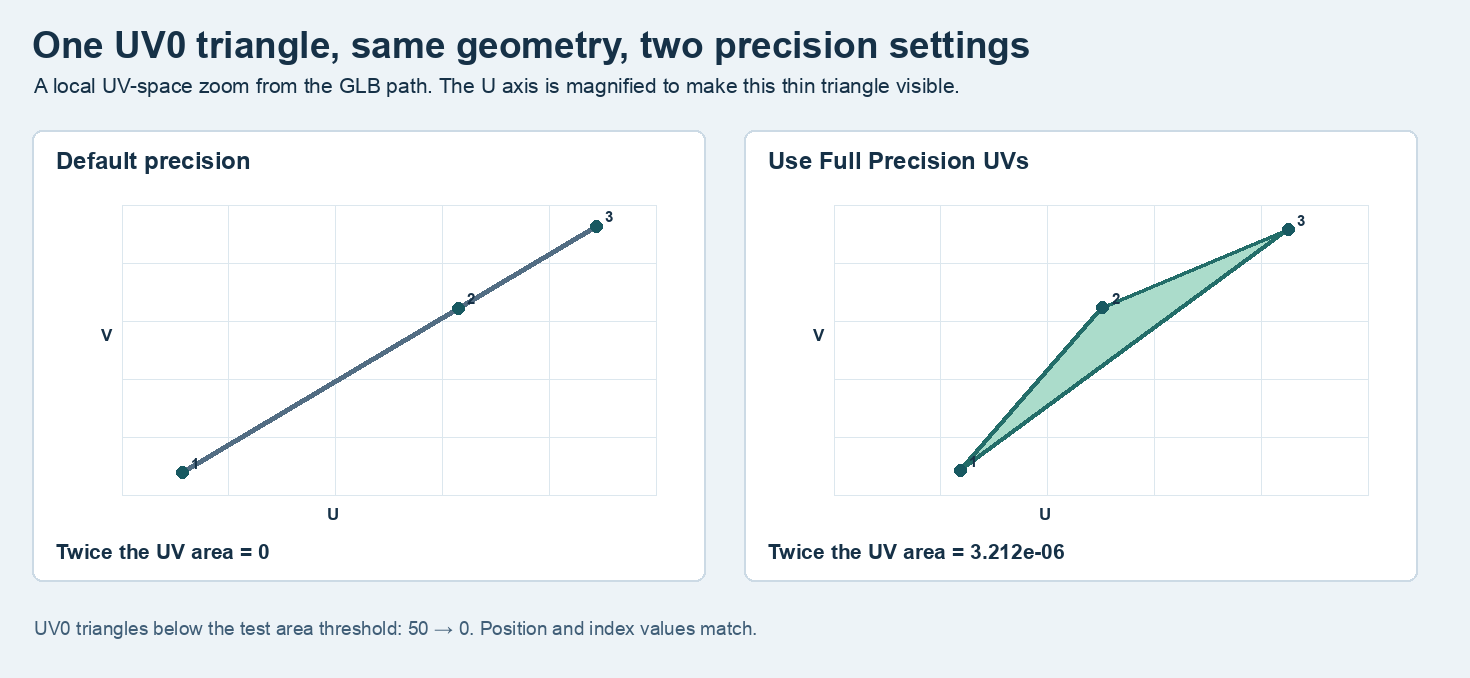
One GLB-path triangle has three collinear UV0 points with default precision. Its full-precision counterpart encloses a measurable area with the same three 3D vertices.
That numeric change matters when a small UV island has to retain enough area for texture sampling. The test measures the exported UV coordinates and the checker demonstrates how UV0 and UV1 map the surface. A project using static lighting should also run its own light build with the intended lightmap resolution and check padding and warnings.
For automation, the import script can separate files into two content folders and enumerate generated asset classes after each task. We ran Unreal’s Python commandlet with the Python Editor Script and Editor Scripting Utilities plugins enabled. Start from the selected project’s engine path, pass the disposable project and use -run=pythonscript -script=/absolute/path/import_probe.py. Epic’s editor Python guide describes how to run a commandlet. Keep the two imported packages and a separate copy for the precision rebuild so changes in an imported asset cannot leak into the default comparison.
The measured static mesh bounds are asset-local. When the prop is placed in a level, check the actor and component scale before comparing its width with the calibrated dimensions. A parent transform or a placement offset can change floor contact even when the saved asset has the expected minimum Z.
Make the asset acceptance repeatable
- Decide the target physical span, scale and floor contact in a source scene. Import a calibrated reference and check all three dimensions and the front orientation inside Unreal.
- Audit the material inputs and their texture assets separately. Verify sRGB color, linear data maps and a normal compression choice appropriate to the map.
- Check the source and built UV streams. If a detailed pattern warps at a small chart, rebuild a copy with full precision and compare the same UV indices.
- Retain the mesh path and the build configuration with the accepted source hash. Test the resulting asset under the project’s actual lights and camera before using it in a level.
Reproduce the import and UV checks
The runnable probe ZIP contains the calibrated GLB, a small Unreal project, the actual scripts and expected JSON reports. The tested setup uses macOS on arm64, Python 3.11, Unreal 5.3.2, Node 22 and installed Google Chrome. Run each block in the same terminal. The expected fixture digest is recorded in the package.
curl -fL https://blog.sandbase.ai/examples/unreal-static-prop-import/unreal-static-prop-probe.zip -o unreal-static-prop-probe.zip
unzip -q unreal-static-prop-probe.zip
cd unreal-static-prop-probe
LC_ALL=C shasum -a 256 Inputs/Printer_GLTF.glb
Install the pinned Python dependencies, create the FBX and audit both source files.
python3.11 -m venv .venv
.venv/bin/python -m pip install -r requirements.txt
.venv/bin/python export-fbx.py
.venv/bin/python source-audit.py
Set the editor path to your Unreal 5.3.2 installation and run the two native imports. The report should include two static meshes in separate content folders.
export UE_EDITOR="/Users/Shared/Epic Games/UE_5.3/Engine/Binaries/Mac/UnrealEditor.app/Contents/MacOS/UnrealEditor"
"$UE_EDITOR" "$PWD/ImportProbe/ImportProbe.uproject" -unattended -NullRHI -NoSound -NoSplash -stdout -run=pythonscript "-script=$PWD/import-probe.py"
Read the material inputs, then rebuild duplicate meshes with full-precision UVs.
for script in diagnose-materials.py precision-probe.py; do
  "$UE_EDITOR" "$PWD/ImportProbe/ImportProbe.uproject" -unattended -NullRHI -NoSound -NoSplash -stdout -run=pythonscript "-script=$PWD/$script"
done
Inspect the four engine GLBs and replay the evidence. Compare the UV counts to the expected JSON files. The browser writes the fixed-scale and checker PNGs.
npm ci
node audit-exports.mjs Inputs/Printer_GLTF.glb engine-gltf.glb engine-fbx.glb engine-gltf-full-uv.glb engine-fbx-full-uv.glb
node select-uv-triangle.mjs
.venv/bin/python diagnostic-boards.py
node capture.mjs readback checker
The sample run made no API calls. If the editor command saves the JSON reports but your installation uses a different engine build, compare the per-field measurements and record that build before comparing binary file hashes.
Frequently asked questions
Which format preserved more of the printer’s PBR material?
In this workflow, the direct GLB path kept three textures and four connected PBR inputs. The tested FBX conversion carried the diffuse image and needs the other maps supplied separately for the same material setup.
Can the preview establish correct lightmap baking?
The preview verifies that each exported UV stream can be sampled on the mesh. The validation of shadows or chart padding belongs to the final project’s light build.
Can I run this check without compiling Unreal shaders?
The five blocks use the editor commandlet with NullRHI for the asset and material graph measurements. Use Chromium for the supplied geometry screenshots. A native Unreal viewport or a light build requires the rendering environment of the target project.
Found this useful? Share it