Texture a Hunyuan Geometry-Only GLB with Hi3D
See how a Hunyuan white mesh gained UVs and two 4K maps with Hi3D Texture. Includes requests, charges, file metrics, and fixed-light render comparisons.
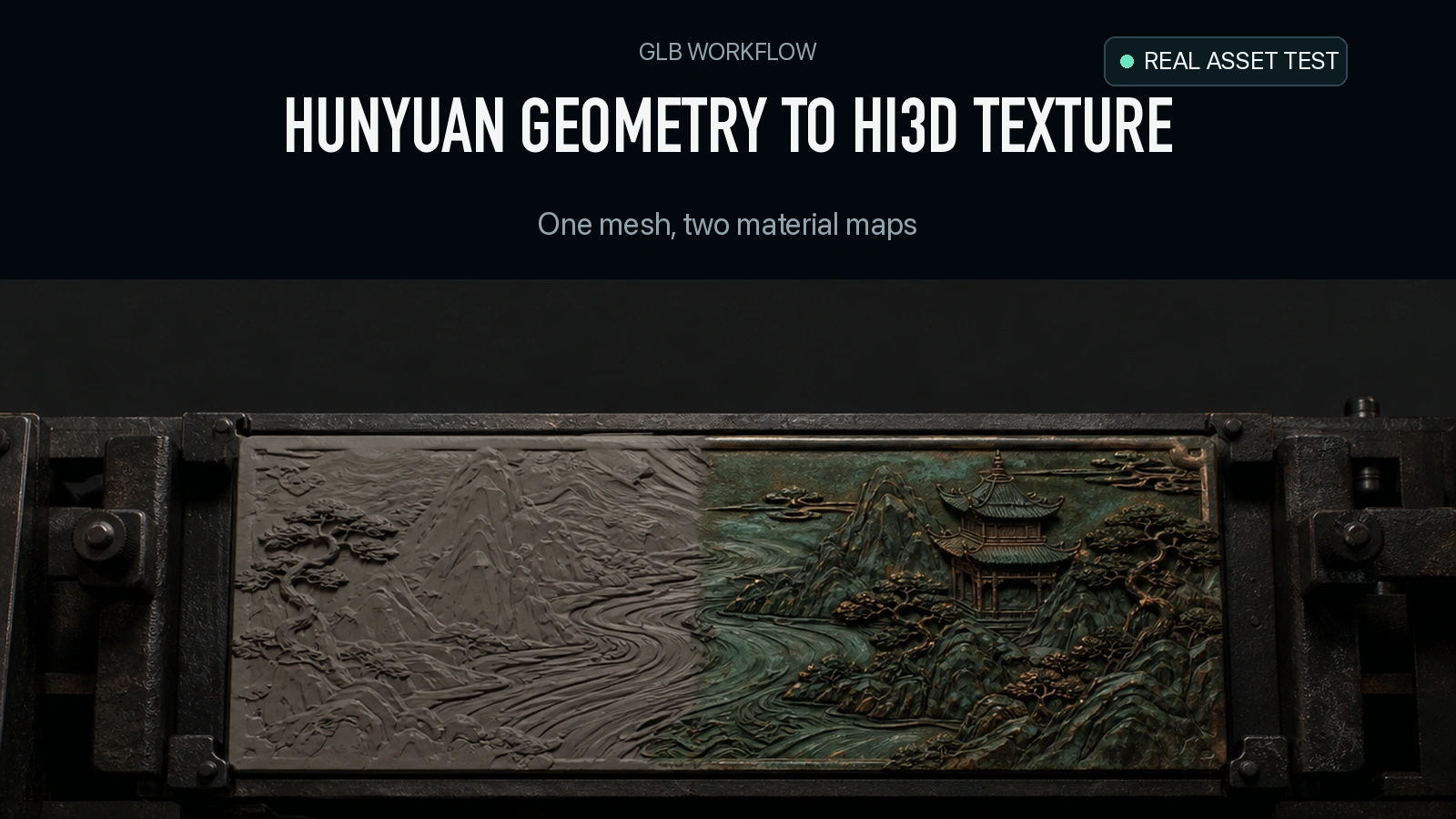
The Hunyuan geometry-only GLB was 9,000,644 bytes. After the same mesh went through Hi3D Texture, the returned GLB was 31,924,404 bytes, with the same 500,000 triangles and two embedded 4096 × 4096 PNGs. The grooves and holes were already visible in the geometry stage. The second stage added the bronze and green surface colors and a metallic-roughness map that changed how the mask responded to lighting. This walkthrough shows the exact requests, actual charges, and what to inspect before publishing the result.
Key takeaway
- Hunyuan 3D 3.1 Pro in Geometry mode cost $0.375. Hi3D Texture added $0.200. The two completed jobs cost $0.575 in this experiment.
- The source had 249,992 position entries and no UV layer. The textured result had 257,207 position entries, one UV layer, one material and two embedded PNGs. Both had 500,000 triangles.
- The output mapped one PNG to base color and one to metallic-roughness. Both were 4096 × 4096 even though the request supplied a resolution value of 1536.
- In Blender, sampled surface deviations were under 0.00000005 times the normalized longest dimension in both directions. Raw triangle-coordinate hashes differed, so the two files have distinct stored geometry data.
- A browser render under two light setups shows how the same textured GLB reads under a brighter key and a warm grazing light. The comparison covers one subject and two jobs.
Generate the relief before texturing
The reference is the public relief mask shown on the Hunyuan 3D 3.1 Pro image-to-3D page. We chose it because its brows, spirals and openings give us recognizable surface features to track. The original is an oblique image of a bronze-colored mask with green patina and pale openings. A single image gives no verified rear surface, dimensions or material measurements.
We set the Pro route to generate_type: "Geometry" and enable_pbr: false. This route returned a GLB directly, which the next route could take as a geometry input. The original file carried positions and triangle indices, with no material and no texture coordinates. The first browser preview uses a temporary neutral material so the reader can see the relief. That material was not written into the source file.
{
  "model": "tencent/hunyuan-3d/3.1/pro/image-to-3d",
  "image": "https://static.sandbase.ai/examples/tencent/hunyuan-3d/3.1/pro/image-to-3d/input_image_0.png",
  "generate_type": "Geometry",
  "enable_pbr": false
}
Send the request from a server to POST https://api.sandbase.ai/v1/run with a SandBase bearer token. Save the task ID and use GET /v1/run/{id} to observe its status. Once completed, store the original GLB with its receipt. The next stage needs a reachable URL for those exact bytes. If the first output URL expires, use your own storage to provide a fresh URL for the same file. Re-running geometry could change the shape you are trying to compare.
Apply the original reference to the same geometry
We passed the first job’s GLB and the original mask image to Hi3D Texture. We requested GLB, version hitem3dv1.5 and the documented resolution option 1536. The JSON below uses an example URL for the input field. For a matched test, replace it with the exact geometry-only GLB you saved.
{
  "model": "hitem3d/hi3d/texture",
  "model_url": "https://static.sandbase.ai/examples/tencent/hunyuan-3d/3.1/smart-topology/input_input_file_url_0.glb",
  "image": "https://static.sandbase.ai/examples/tencent/hunyuan-3d/3.1/pro/image-to-3d/input_image_0.png",
  "export_format": "glb",
  "version": "hitem3dv1.5",
  "resolution": "1536"
}
The first completion receipt recorded $0.375 and the second recorded $0.200. The geometry job is a one-time cost for this single asset. A series of material variants on the same geometry would still need separately measured texture charges and a way to check that each variant retains the shape. This test produced one variant and did not measure workflow time, revision effort or a production acceptance rate.
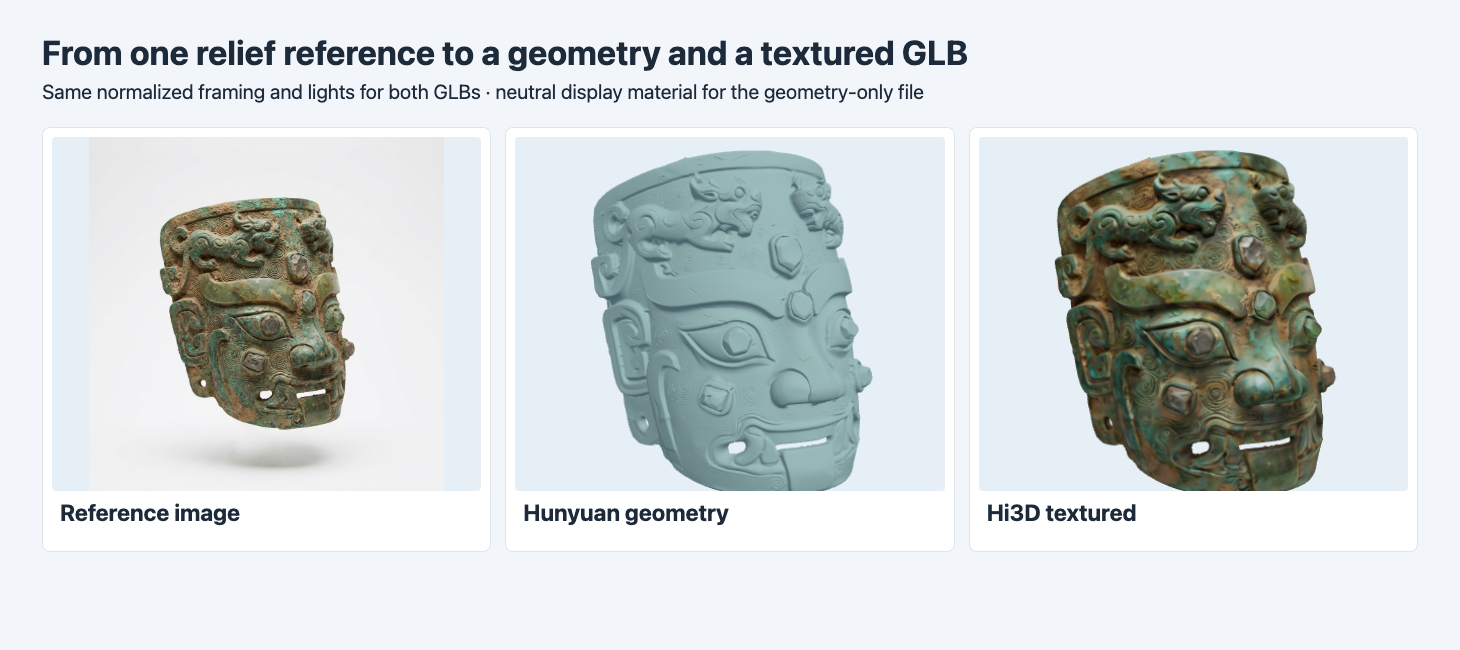
The GLBs use the same camera, lighting and normalized framing. Raised brows and lower holes are visible before color is added. The geometry-only preview uses a neutral display material.
The matte image makes it easier to see what was already in the shape. The upper relief, outlines around the eyes and bright openings along the bottom remain legible before texturing. The textured version adds a green cast and brown flecks across the face. Comparing those two stages is useful when a required feature vanishes or appears. If the lip opening is already closed in the first render, a painted highlight in the second does not restore it as a hole. If the opening survives but the color no longer matches the reference, check the texture stage and the destination lighting.
Inspect the exported material and actual size
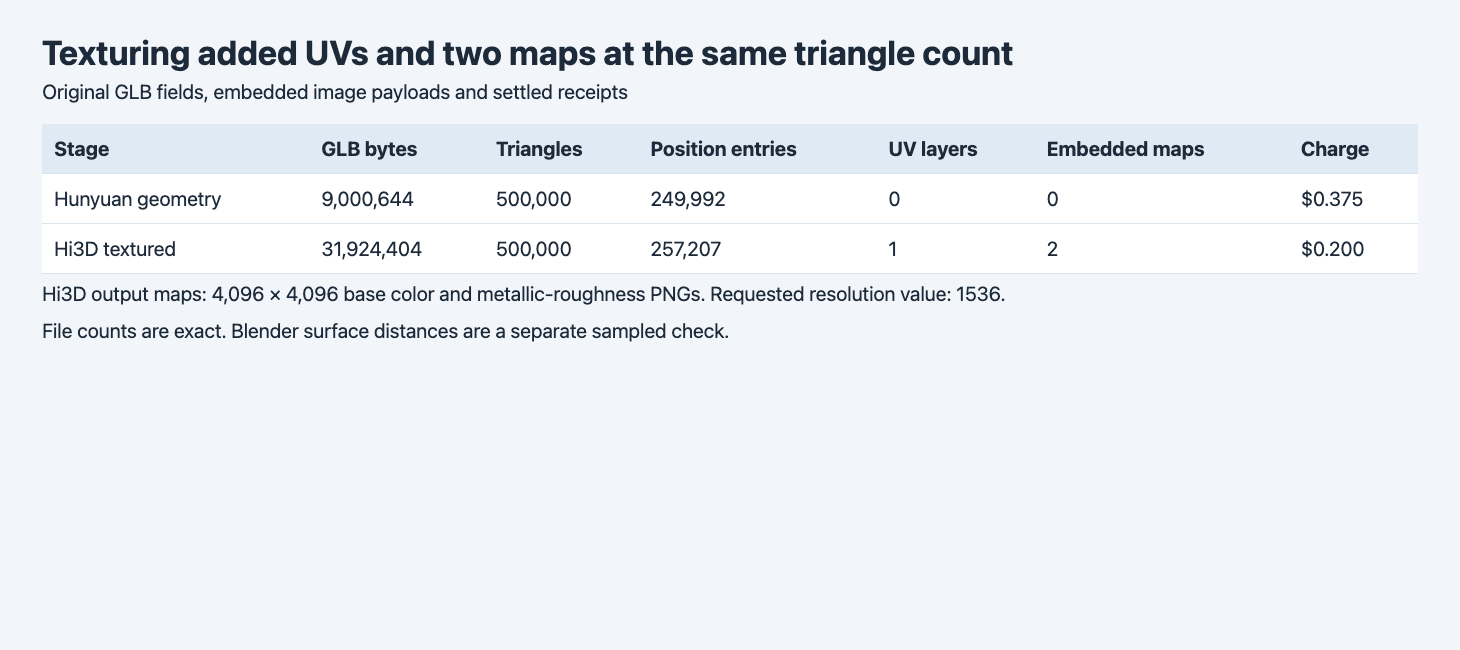
The two output PNGs were decoded and measured. The request’s resolution field and the returned map dimensions are recorded separately.
| Item | Hunyuan geometry | Hi3D textured GLB |
|---|---|---|
| File size | 9,000,644 bytes | 31,924,404 bytes |
| Triangles | 500,000 | 500,000 |
| Position entries | 249,992 | 257,207 |
| UV layers in Blender | 0 | 1 |
| Materials in GLB | 0 | 1 |
| Embedded PNGs | 0 | 2 |
| Khronos validator errors / warnings | 0 / 0 | 0 / 0 |
| Actual charge | $0.375 | $0.200 |
The base-color PNG occupied 12,384,256 encoded bytes, and the metallic-roughness PNG occupied 8,394,352. Together they account for 20,778,608 bytes of the 22,923,760-byte increase. The rest of the increase lies in the other GLB data, including UV and geometry buffers. The exported dimensions of both PNGs were 4096 × 4096. The experiment does not reveal why the response had those dimensions when the request specified 1536. A delivery requirement such as a 2048-pixel texture limit should be checked after export. Measured texture size reductions for web delivery
The material uses baseColorTexture and metallicRoughnessTexture. glTF reads roughness from the green channel and metalness from blue in the latter texture. The tested GLB did not declare a normal map or an occlusion texture. The visible raised details remain apparent in the geometry-only file. The exported metallic-roughness map affects surface response under lighting. Khronos glTF 2.0 specification
Check whether the surface moved
Equal triangle counts do not by themselves establish that geometry stayed unchanged. Here the textured file also had 7,215 more position entries and different triangle-coordinate hashes. We imported both files in Blender 4.5.9 and compared up to 10,000 vertices in each direction with the nearest opposing triangle. We centered the meshes independently and normalized by each longest bounding-box dimension. The largest distance in the chosen samples was about 4.21 × 10⁻⁸ from source to textured and 3.07 × 10⁻⁸ in the reverse direction. Bounds reported by Blender were the same. These checks show close sampled surface agreement for this asset while leaving topology equivalence, vertex order and absolute physical fit outside the claim.
Verify the material under two lights
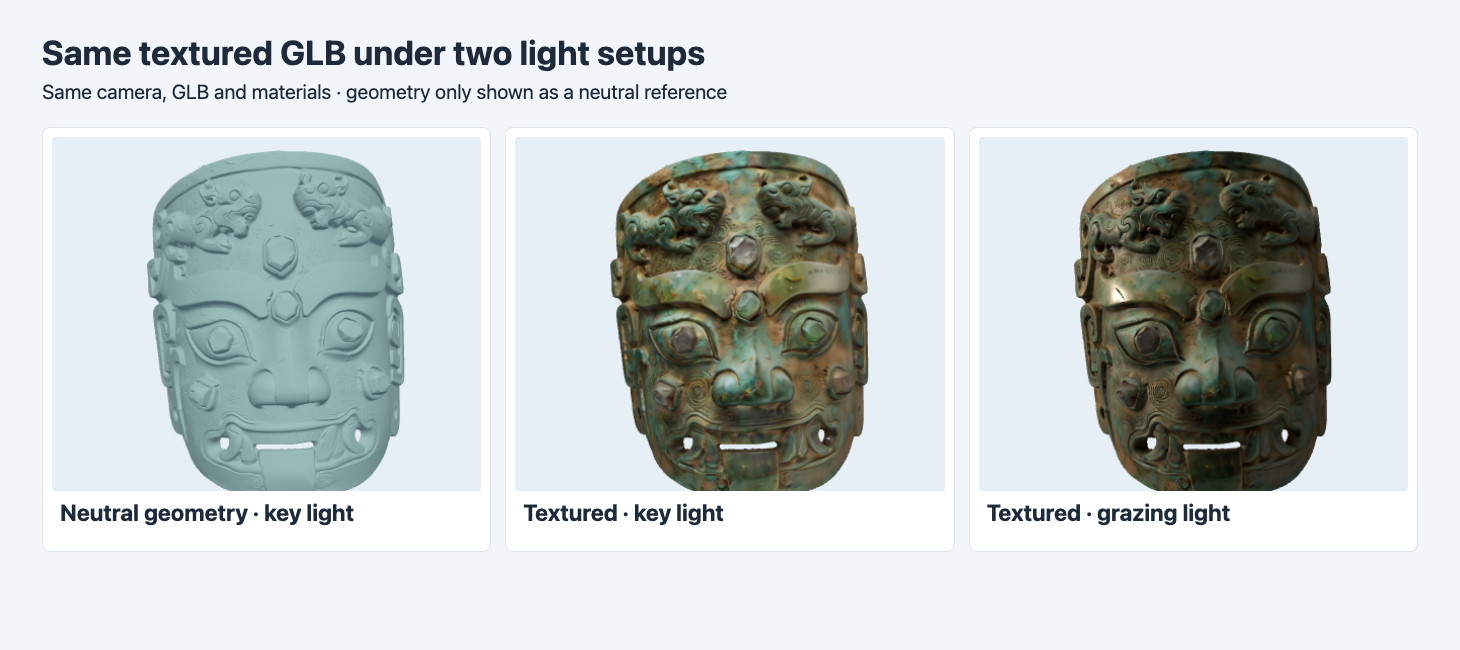
The middle and right images use the same textured GLB, camera and materials. The lighting direction, color and ambient contribution change in the right image.
The bright key view shows the mottled green and brown color across the eyebrows and upper frame. With the warm light at a grazing angle, the surface darkens overall and a bright highlight appears on one brow. This is a useful way to catch an asset that looks right in one preview and fails under another. Because several lighting parameters changed together, the screenshot does not isolate the contribution of one map. Keep the desired display lighting for your final acceptance render. If the asset will be reused in different scenes, take one additional screenshot under the most demanding setup. Measured base-color and PBR material comparison
Isolate the packed map with one lighting setup
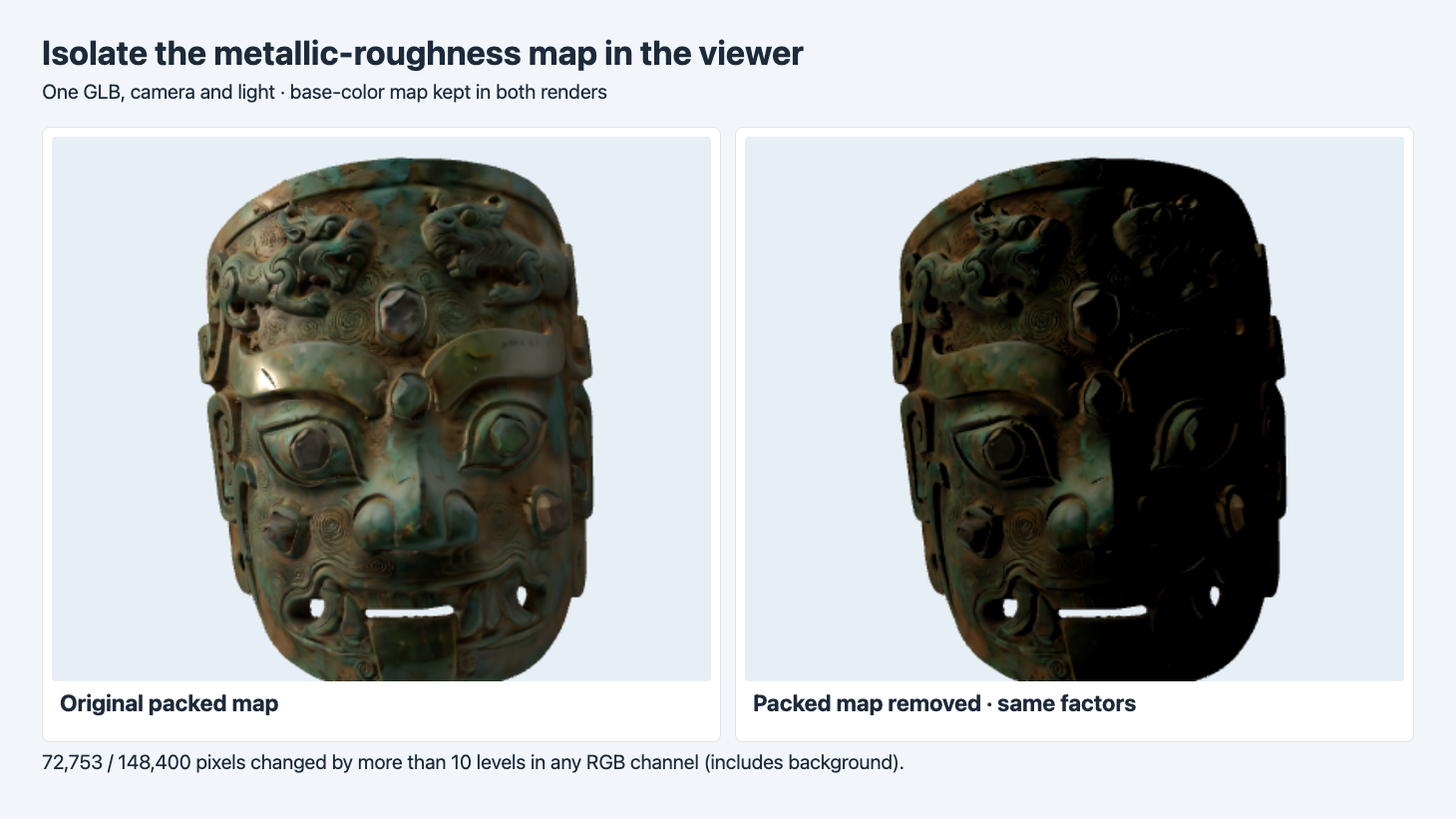
The viewer keeps the same geometry, camera, base-color map, lights and material factors. The right preview removes only the metallic-roughness map in memory.
The two-light comparison changes several settings together. To see whether the packed map itself matters, we repeated the grazing-light render after clearing the metallic and roughness texture slots in the viewer. The GLB, framing, base-color map and material factors stayed fixed. In the 424 × 350 render buffers, 72,753 of 148,400 pixels changed by more than 10 levels in at least one eight-bit RGB channel. That is 49.0% of the full frame, including the background. The change is concentrated on the mask, with a noticeably darker right-hand side once the map is removed.
The comparison keeps the file’s default metalness and roughness factors. When the map is absent, the renderer uses those factors without texture modulation. Another fallback material may use different factors and produce a different comparison. Use the percentage here to identify a large visible change in this scene. It gives no threshold for accepting another asset and no judgment about which render is physically more faithful.
The same-source Hi3D and TRELLIS.2 comparison reuses this exact geometry and checks how the two original exports differ in bytes, materials and imported bounds.
FAQ
Can I use the textured result under a 20 MB cap?
The original textured GLB exceeded 20,000,000 bytes. The two embedded images are the largest measured addition. Preserve the original, make a smaller delivery copy, and compare both files in the same viewer.
Does the 1536 request establish the exported dimensions?
The two exported PNGs measured 4096 × 4096 in this run. Check the delivered maps directly whenever there is a hard texture size limit.
Did the texture job change the relief?
The files contain different vertex data at the same triangle count. The sampled surfaces align very closely under the measured normalization, and the tested views retain the same major relief and openings.
Found this useful? Share it