GLB vs USDZ for Product Previews and AR
The same 50,000-triangle printer compares GLB and USDZ bytes, texture parity, physical scale and renders in Chromium and native macOS SceneKit.
A 120 mm product asset looked the same size as a 1.2 mm copy when each model was fitted to its viewport. Both used the same mesh and textures. The error was a USDZ stage-unit value. We compared the two packages in Chromium, repeated the USDZ import and render in macOS SceneKit, and measured the figures at one fixed camera scale. The GLB and correctly authored USDZ gave the same decoded 120 mm span in the tested browser.
Key takeaway
- We exported one label printer at a 120 mm longest extent, with 50,000 triangles. The GLB was 6,553,764 bytes and the correct USDZ was 8,772,488 bytes. The three 2K PNGs matched byte-for-byte.
- A second USDZ kept the same authored mesh and materials but changed
metersPerUnitfrom 1 to 0.01. Its declared longest extent became 1.2 mm. - With a single fixed camera scale in Chromium, the incorrect file drew 10 foreground pixels instead of roughly 61,600. Individual viewport fitting made the difference disappear.
- Our SceneKit harness on an Apple M4 Mac imported both USDZs with the same scene-coordinate bounds and produced the same PNG. OpenUSD still read different declared physical lengths. Device placement is a separate check for an AR handoff.
Export one shape at a known size
We reused the printer generated through Rodin 2.5 image to 3D for the web product GLB test. That earlier project measured preview delivery bytes and browser timings. Here we kept the same model and authored a 120 mm maximum span to compare format behavior. We assigned that test dimension in the authoring scene.
In Blender 4.5.9 we scaled the model’s world bounds, centered its horizontal footprint and placed its lowest vertex at ground height. We exported a GLB and a Y-up USDZ, with a meter scene unit and materials enabled. After import, the correct files both measured approximately 115.986 × 69.504 × 120.000 mm in the tested axes. Both had one loaded mesh and 50,000 drawn triangles. A glTF validator reported zero errors and one generated-tangent-space warning on the GLB. The browser loaded its normal map successfully under the tested rendering setup.
The glTF specification defines meters for linear distances. For USD, the stage metadata defines how numeric coordinates convert to physical distance. We used OpenUSD 26.11 to compute the world-aligned stage bounds and multiply by metersPerUnit. A longest coordinate span of 0.12 and a scale of one meter per unit gives 120 mm. Set that property to 0.01 with the same coordinates and the declared span is 1.2 mm. Use the same calculation for width and height if those dimensions affect the experience.
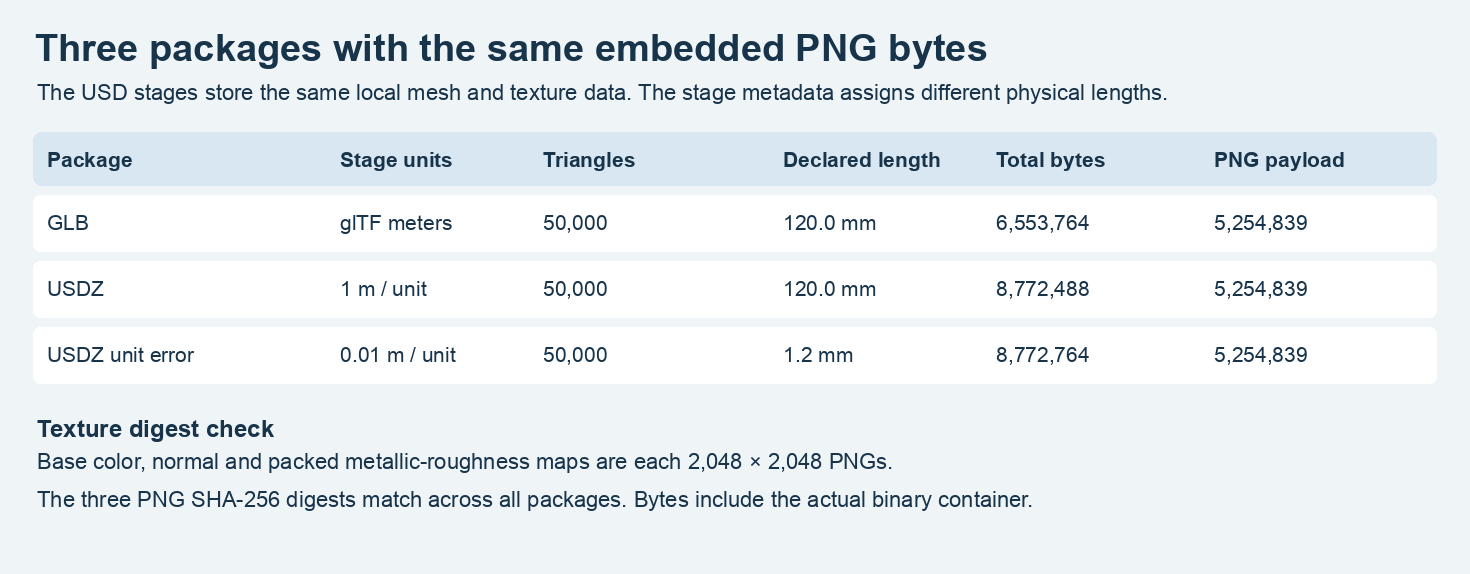
The first two packages agree on the authored size. The third is a controlled unit error. All three preserve the same encoded PNG texture bytes.
Compare the material payload and bytes
The GLB embeds a 2,048-square base-color PNG, a 2,048-square normal PNG and a 2,048-square packed metallic-roughness PNG. The USDZ contains three corresponding files. We extracted them on both sides and compared SHA-256 digests. The three images totaled 5,254,839 bytes in each package and were exact matches. Both Chromium loaders produced a material with base-color, normal, roughness and metalness inputs. The roughness and metalness values come from the packed texture in these files.
This export added 2,218,724 bytes when delivered as USDZ, roughly 33.9% over the GLB. With equal extracted PNG bytes, the difference sits in the rest of these two packages. The USDZ contains a 3,516,749-byte USD crate, plus the stored PNGs and ZIP structure. The GLB contains a binary geometry buffer plus its own scene information. The browser renders used Chromium and SwiftShader on the same Mac. Other exporters, geometry encodings, image choices and shader graphs can change the byte ordering. For a separate format export matrix straight from the model service, see the Rodin tier and format guide.
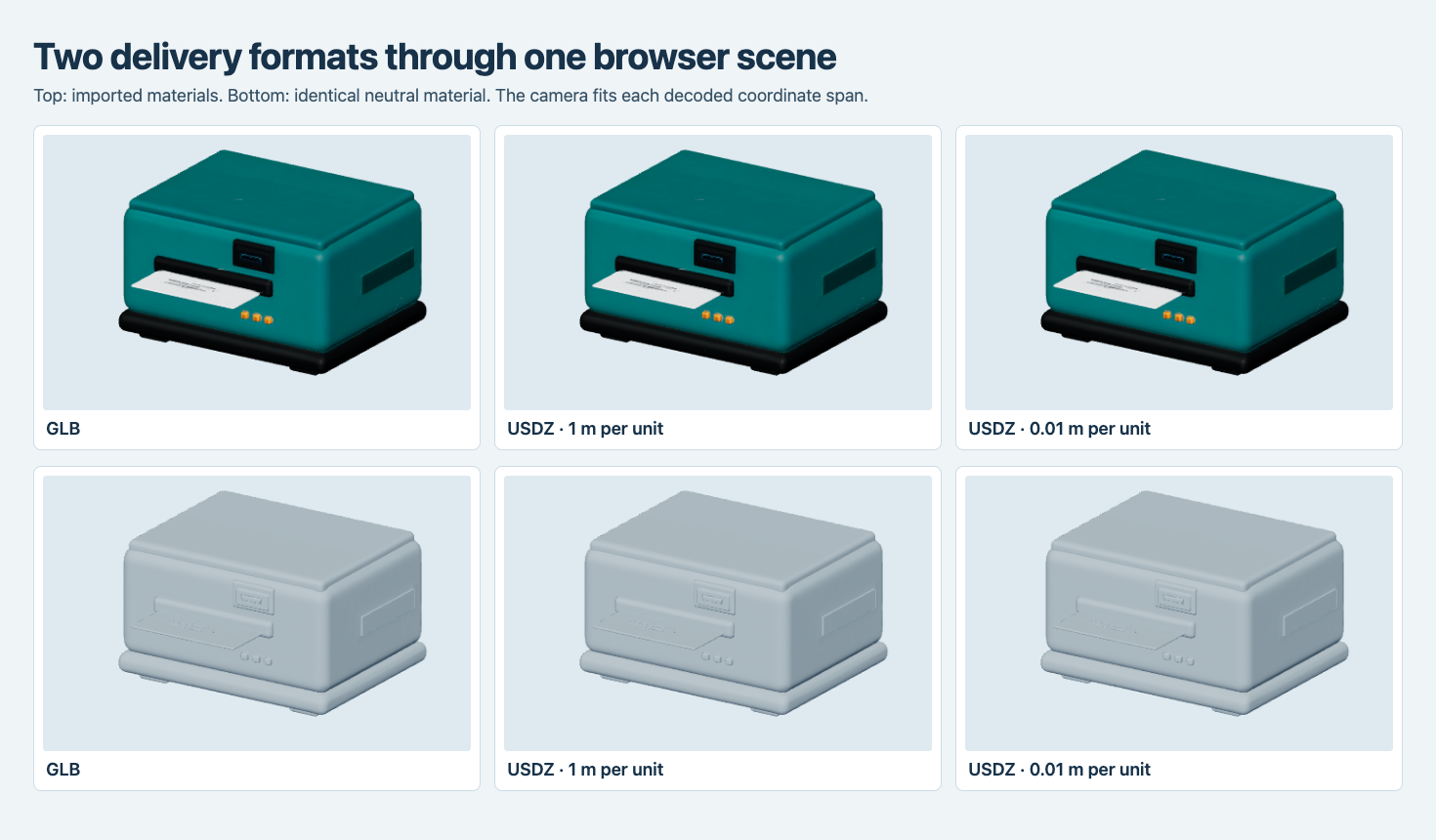
The top row uses imported materials. The lower row uses a common neutral material to show geometry. In this gallery mode, every model is independently fitted to the available space.
The teal shell, orange buttons, dark slot and paper strip were visible in the imported browser materials. The normalized view made the correct USDZ and intentionally wrong copy look alike. A product card often adjusts its camera in this way to keep each item visible. Its view can establish that geometry and textures load. To measure size, use decoded coordinates and metadata, or place the asset at a shared scale alongside a known object.
Make a unit error visible with a fixed camera
We used OpenUSD to prepare the alternate package. Its stage text matched the correct export after removing the metersPerUnit line. All PNGs in the two archives matched by hash. The Three.js USD loader decoded the 0.01 version at 1.2 mm, even though the mesh still had 50,000 triangles. Holding the camera scale constant made the model shrink to a few pixels.
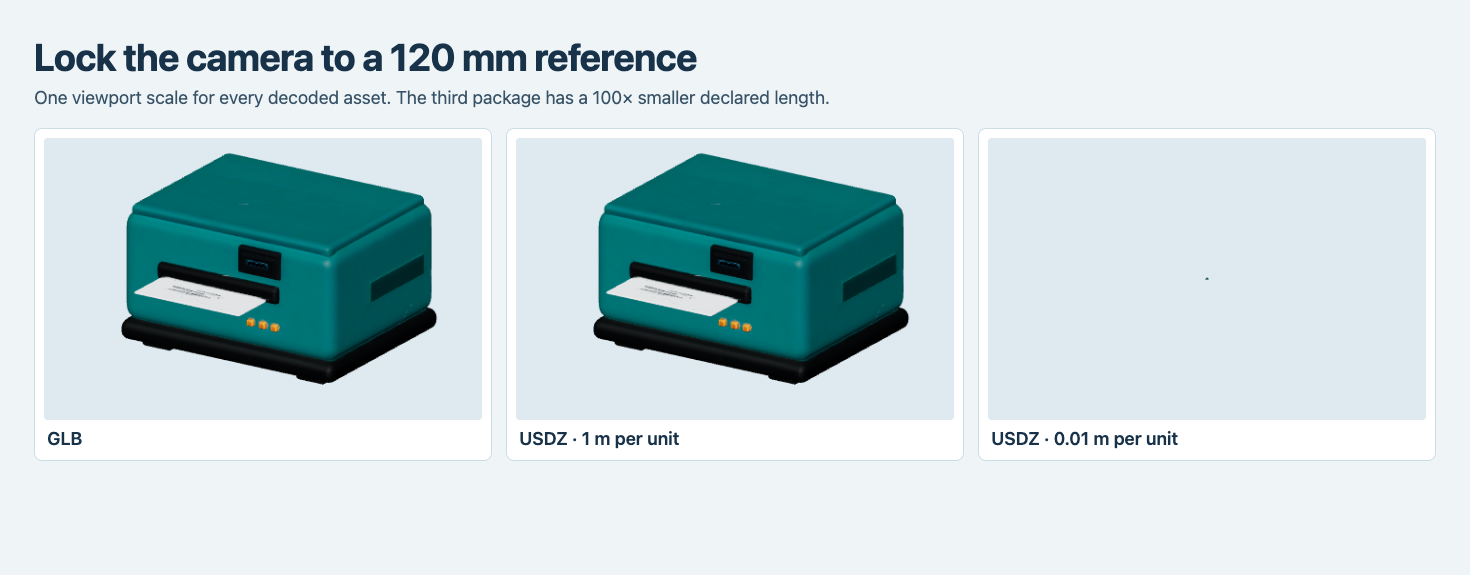
The fixed view uses a 120 mm reference length for all three models. A pixel counts as foreground when at least one RGB channel differs from the background by more than eight levels.
At 460 × 296 pixels per browser panel, the GLB and correct USDZ each occupied a bounding rectangle of 332 × 243 pixels, with 61,583 and 61,582 foreground pixels. The wrong-unit file had a 4 × 3 pixel bounding rectangle and ten foreground pixels. Raster sampling rounds a tiny object’s footprint to whole pixels, so the screen size ratio is approximate. The decoded dimensions show the 100-fold difference exactly to the precision of this export.
The stage-handling path can matter even on the same computer. In an offscreen SceneKit test on macOS 15.3.1 on Apple M4, both USDZs reported the same raw scene bounds through the importer. We used the same camera setup and rendered a 760 × 568 PNG for each. The two PNG files had identical hashes. That establishes the behavior of this native harness. The OpenUSD audit provides the separate physical-size reading.
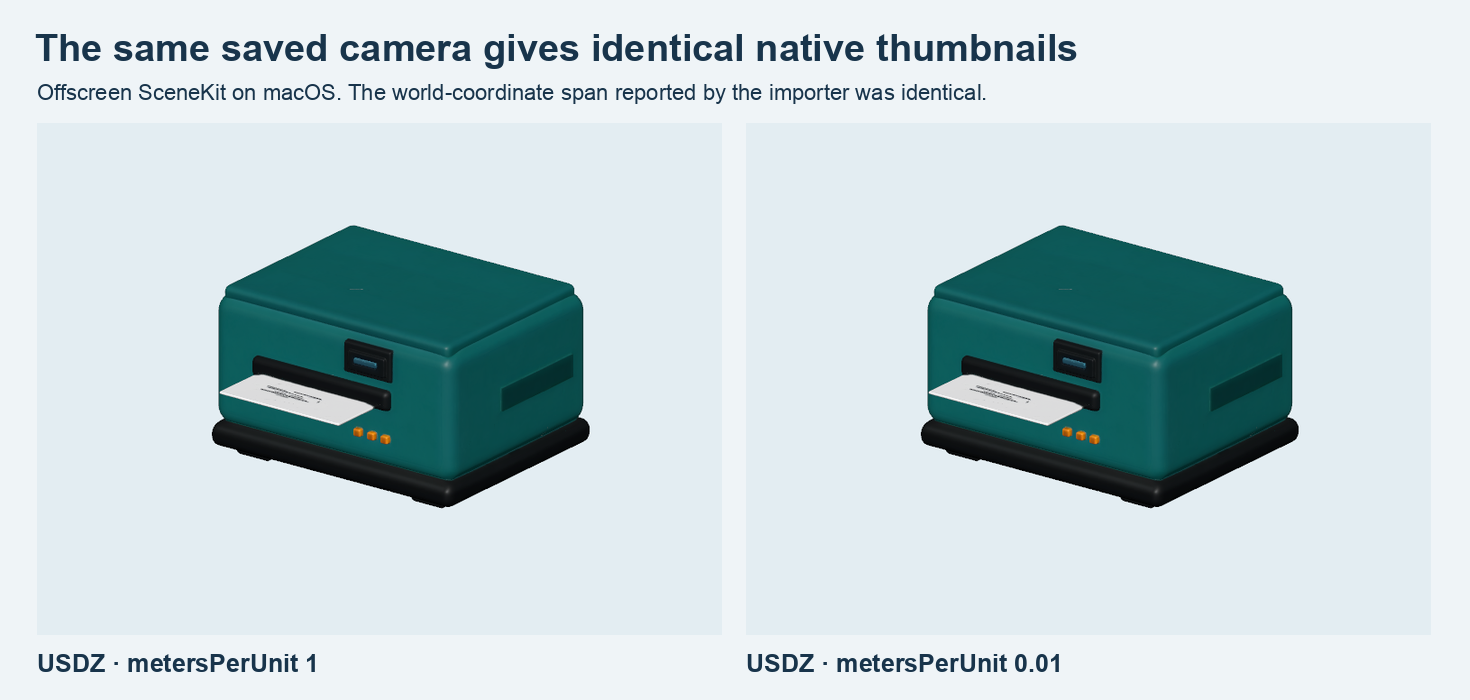
These native screenshots are the output of a SceneKit render on the Mac. The labels record the different stage units. Both renders show the same numeric scene size in that harness.
Verify placement during the AR handoff
Apple’s AR Quick Look documentation describes placing a USDZ on a detected surface. Apple’s Quick Look authoring guidance explains how stage units determine physical scale in its spatial preview workflow. The experiment here measures the files, browser imports and SceneKit previews. For an AR release, record the target device and compare placed size, orientation and ground contact against a reference of known dimensions on that device.
Package the web and AR assets from the same correctly scaled scene. Check the actual unit on the packaged USD stage, then compare world bounds with the web asset in millimeters. Test a browser gallery at a fitted scale for viewing, and check physical dimensions at a shared scale. If the visible screen or metallic finish is important, verify the target view under its own light and rendering environment. Our exported texture hashes provide a way to establish that differences in display are downstream of image encoding.
Store dimensions in the same record as the file hashes
For this asset, subtracting the shared 5,254,839 bytes of PNGs leaves 1,298,925 bytes in the GLB and 3,517,649 in the correct USDZ. That split gives an immediate debugging clue. Recompressing identical images will not explain this package difference, since their contribution is already the same. Inspect the mesh and stage encoding or export settings for the rest of the size budget.
At delivery, we would record the intended three-axis dimensions, up direction, format and file digest before making the preview. The USD validation would add the declared unit and world-space bounds. Our two sample stages have identical coordinate values and texture digests, so a unit check is the field that distinguishes them. Checking the packaged asset also catches a unit edit made after export. Put the accepted physical range next to the asset’s intended dimensions so later versions can be measured against the same target.
Frequently asked questions
Does the bigger file contain more triangles?
Both matched files have 50,000 triangles and the same three texture images. In this pair the USDZ’s geometry and scene encoding plus archive overhead make up the larger remaining payload.
Can I trust a USDZ thumbnail to confirm its size?
Use it to check whether the model and material can be displayed. Read the world bounds and metersPerUnit to verify declared physical dimensions. Our native previews were identical between the 120 mm and 1.2 mm packages.
Which file should I put on a product page?
Use the package your renderer accepts. The GLB was verified in the browser here. USDZ is the handoff for Apple’s documented AR Quick Look path. Keep outcomes and dimensions in the release record for each destination.
The calibrated printer also appears in our Unreal 5.3 static-mesh import test, where its GLB and a matching FBX are audited for scale, material inputs and built UV precision.
Found this useful? Share it