Preview AI Character Animations in Godot 4.5.2
Replay two Meshy clips in Godot, measure skeletal root motion and see how cancelling Hips travel changes low toe-marker movement.
The imported robot’s scene origin stayed fixed during an entire attack in Godot 4.5.2. Its Hips bone finished 1.06 m from where it started. When we cancelled that horizontal bone travel by moving the model in the opposite direction, a low left toe marker went from a 3.15 cm start-to-end shift to 55.83 cm. You can reproduce the comparison from two original GLBs in a clean Godot project before wiring the animation into a character controller.
Key takeaway
- Both the 4.03 s Idle and 2.87 s Double Combo Attack imported with 24 bones and
Hipsas the only root bone. The clips had 25 and 24 Godot animation tracks, respectively. - The imported scene origin stayed at zero in both clips. The Attack
Hipsmoved as far as 1.09 m horizontally from its first sample. Idle reached 2.25 cm and ended essentially where it started. - Cancelling horizontal
Hipstravel increased the left toe marker’s net movement from 3.15 to 55.83 cm in the first sampled low window. In a later right toe window it increased from 3.95 to 44.08 cm. - The download includes both original assets, the headless motion sampler, the script that captures native Godot frames and the measured reports.
Keep the action files and their names together
The two files in the replay project came from one Meshy Multi-Animation run on a remeshed 21,833-triangle robot. The request selected action 92, Double Combo Attack, and action 0, Idle. The run used Meshy’s meshyrig skeleton template with finger bones disabled and a 1.7 m height parameter. The original generation settled at $0.44 in the single versus multi-animation rigging test. This tutorial reused those two files. The attack GLB weighs 7,542,940 bytes and the idle GLB 7,573,976 bytes. Their exact hashes travel with the sample.
The distinction between the source job and the engine result is useful when debugging. Keep each action ID with the returned file and check the names after the import. Here the action 92 file became Armature|Double_Combo_Attack|baselayer and action 0 became Armature|Idle|baselayer. The sample uses one action per GLB and picks the imported clip programmatically after excluding a possible built-in RESET entry. A production asset that contains multiple named actions needs an explicit mapping. Save that mapping alongside the animation library so a re-export cannot silently change which clip plays.
The project loads each file with Godot’s GLTFDocument directly. This gives a repeatable starting state for the motion probe. If you use editor-based import settings, a retarget profile or a saved inherited scene, run the same measurements on the final node and animation library used in your game.
Check the viewport before measuring the skeleton
The capture script imports the asset using the same function as the motion probe, pauses the player and seeks at five evenly spaced clip phases. It uses an orthographic camera, a 20 cm grid, teal for the left toe marker and amber for the right. This is Godot’s native Compatibility renderer on an Apple silicon Mac. The overlay markers are joint references drawn through the mesh, and the grid provides a visual scale. The highlighted joints can therefore appear in front of a shoe surface when the bone is behind it.
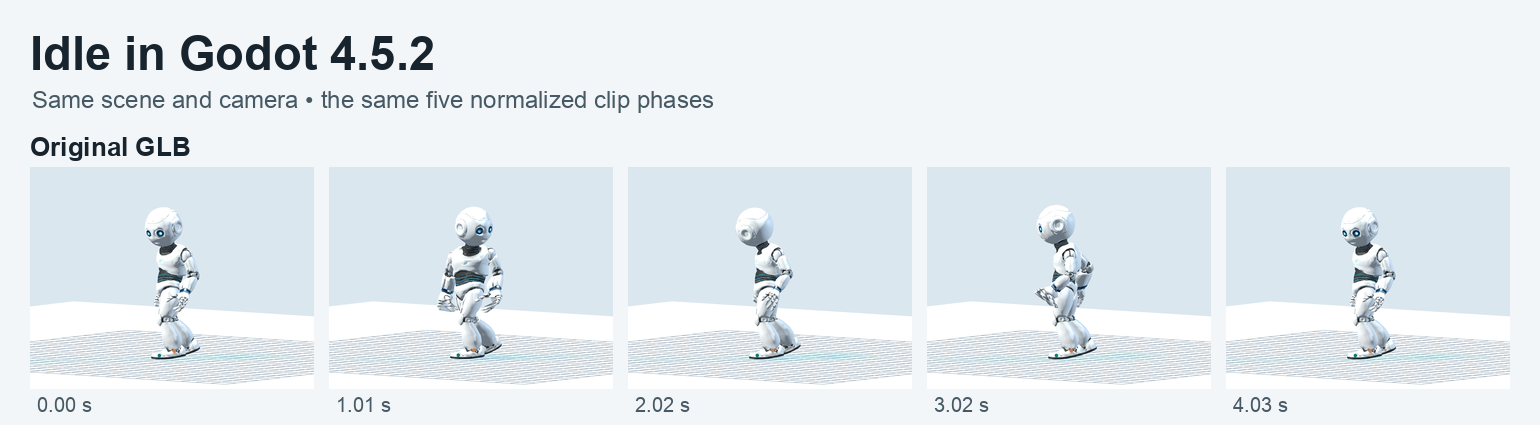
These five frames are from the original Idle GLB. The pose changes across frames while the root bone stays close to its initial horizontal position.
Use the full grid and fixed camera when first inspecting the clips. A camera that follows the character tends to hide the world-space translation you are trying to measure. Keep the two comparison rows at the same time offsets rather than matching similar-looking poses by eye. The columns below show 0.00, 0.72, 1.43, 2.15 and 2.87 seconds after rounding. The lower row applies only a horizontal translation to the whole model above the skeleton. This leaves the source limb poses, heading and vertical trajectory intact. At the end, the two versions are visibly offset relative to the ground grid.
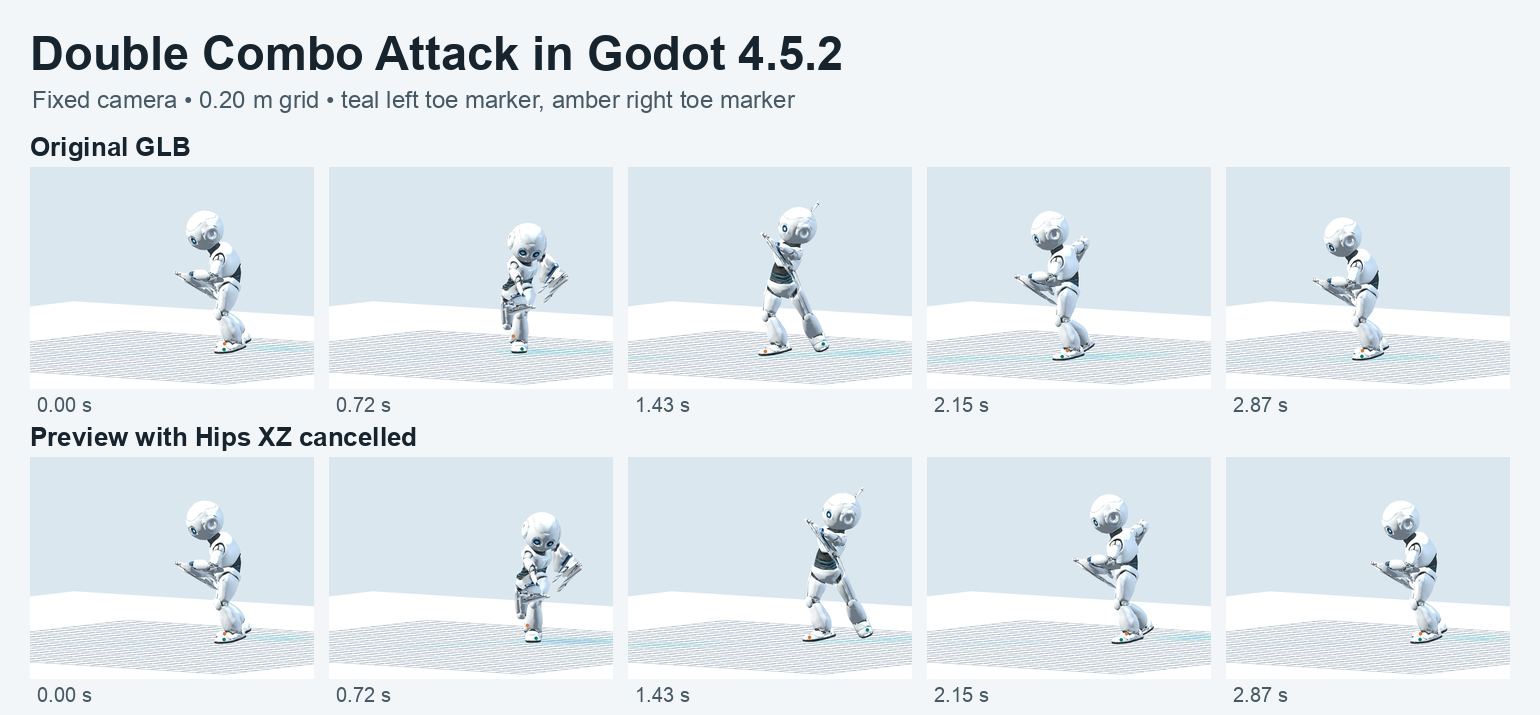
Both rows share the same clip, camera and time offsets. The bottom row shifts the complete model by the opposite of the sampled Hips XZ displacement.
Record the scene origin and root bone independently
The engine probe reads the model’s global position and the selected bones after each seek. With the player in manual process mode, seek(time, true) writes the pose and force_update_all_bone_transforms() updates the skeleton before the read. Godot’s get_bone_global_pose() gives the pose in skeleton space. The script applies the skeleton’s global transform to the pose origin to make the position comparable to the scene origin and the floor grid. This matters when the parent scene has a rotation, translation or scale. The Skeleton3D documentation marks the forced-update helper as deprecated and reserved for internal use. The probe pins it to this 4.5.2 replay. In production, read the joints after the engine has applied the animation and updated the skeleton for that tick. AnimationPlayer class reference · Skeleton3D class reference
| Measured in Godot | Idle | Double Combo Attack |
|---|---|---|
| Imported duration | 4.033 s | 2.867 s |
| Bones / animation tracks | 24 / 25 | 24 / 24 |
| Pose samples | 243 | 173 |
| Scene origin XZ distance, first to last | 0 cm | 0 cm |
| Hips XZ distance, first to last | ≈0 cm | 105.85 cm |
| Hips farthest XZ distance from start | 2.25 cm | 109.39 cm |
| Hips cumulative XZ path | 9.26 cm | 118.93 cm |
Sampling runs at 60 Hz plus the real end of each clip. If the last nominal tick is within one microsecond of the end, the endpoint takes its place. This makes the final comparison use the imported length even when frame times have been rounded in the file. The cumulative path adds the distances between adjacent samples. The start-to-end distance measures the length of the difference between the first and last points. Idle returns to its starting Hips position even after tracing a 9.26 cm path. Use maximum displacement and path length as well if you want to see motion inside a looping clip.
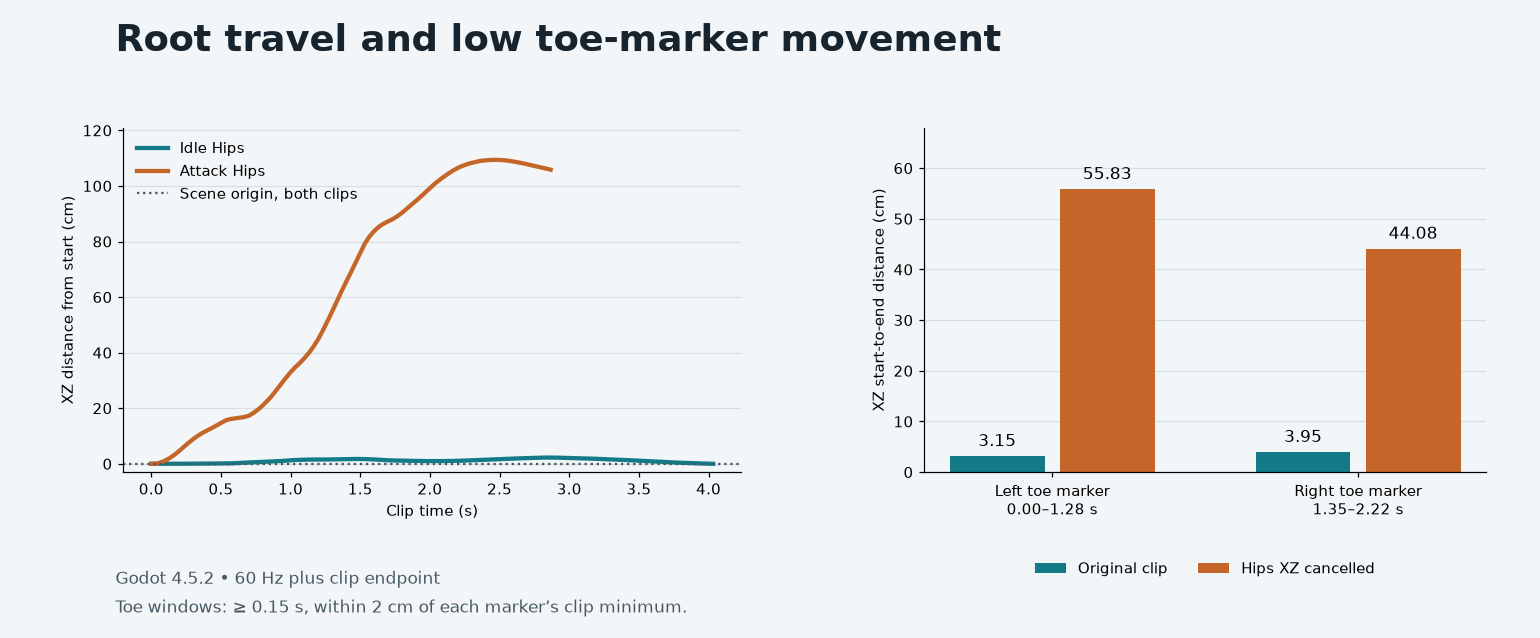
The left plot follows the scene origin and both Hips trajectories. The right plot uses start-to-end motion in two low-toe windows from the attack.
Read low markers as candidates for a plant
For each toe joint, take its lowest sampled Y over the entire clip. A low window is a continuous stretch within 2 cm of that toe’s own minimum, lasting at least 0.15 s. Both settings are explicit in the sample. The marker can sit above the visible sole and the rendered grid has its own origin, so the threshold has a direct interpretation in sampled joint coordinates. Treat it as a prompt to inspect the sole, the ankle and the animated bend together. Collision contact requires a collider and a physics pass.
The attack’s left window from 0.00 to 1.28 s has 78 sampled poses. In the original it moves 3.15 cm end to end and follows a 16.91 cm cumulative path. After subtracting Hips XZ, its end-to-end movement reaches 55.83 cm and its path 62.88 cm. The right marker’s window from 1.35 to 2.22 s moves 3.95 cm end to end in the original and 44.08 cm after subtraction. The right joint has three windows in the report. The selected interval is its longest one. Idle also has internal marker movement despite the small end-to-end distances. Read the entire report before choosing a clip-specific rule.
For this asset, use the original attack as the visual reference when deciding how a gameplay lunge should move. If you want the animation to drive the body, compare a dedicated animation-root track with the actual grounded moves allowed by the controller. If gameplay supplies the displacement, preview a clip authored in place and test foot placement against the actual controller speed. Parenting an imported moving mesh to a controller, then applying matching travel to that controller as well, can count the displacement twice. Retiming, blending, slopes and collision response each introduce another condition to test.
Replay the project locally
1. Download and verify the two originals
Install the official Godot 4.5.2 build and set GODOT_BIN to the absolute executable path. In a clean directory run:
curl -fL https://blog.sandbase.ai/examples/godot-character-motion/godot-character-motion-probe.zip -o godot-probe.zip
unzip -q godot-probe.zip -d godot-probe
cd godot-probe
LC_ALL=C shasum -a 256 -c SHA256SUMS
"$GODOT_BIN" --version
The engine used here reports 4.5.2.stable.official.6ce3de25a. The ZIP is 12.73 MB in decimal units.
2. Sample both clips in the Godot process
"$GODOT_BIN" --headless --path "$PWD" --script res://measure.gdThis creates engine-motion.json with engine version, tracks, names, sample times and joint coordinates. The Godot command-line reference documents script execution and headless mode.
3. Derive the table and inspect the stored reference
python3 summarize-motion.py
diff -u expected/motion-summary.json motion-summary.json
Compare the rounded distances and the exact sample counts if your build produces tiny floating-point differences. The expected report comes from the official macOS build on Apple silicon.
4. Capture native frames in a desktop session
"$GODOT_BIN" --path "$PWD" --rendering-method gl_compatibility \
  --resolution 900x704 --script res://render.gd
This renders 15 PNGs and writes native-frame-index.json with exact timestamps. Keep the resolution and camera fixed if you plan to compare another source file against these frames.
5. Rebuild the boards from the reports and PNGs
python3 -m venv .venv
.venv/bin/python -m pip install -r requirements.txt
.venv/bin/python make-evidence.py
This step uses Python 3.11 or later. It lays out the original frames and builds the chart directly from the sampled coordinates and low-window summary. The resulting PNGs are in evidence/.
FAQ
Does a stationary scene node mean my clip is in place?
Check the skeletal root and the visible model as well. Here the model node stays at one point and the attack’s Hips travels over a meter. An in-place acceptance rule should specify the node or bone, coordinate space and the expected tolerance.
Can I use the sample’s horizontal compensation as a foot lock?
Use it to see what the root contributes to the image. The preview moves every vertex and joint together, so the low toe windows can move farther in world space. A game using a foot lock would add explicit planting and grounding logic and test it on its intended terrain.
Does importing 24 bones confirm retargeting compatibility?
It confirms the number in this Godot import. Retargeting also depends on the hierarchy, bind orientation, scale and which bones your source tracks animate. Inspect the mapped rest pose and the result of a real transition into the sample attack when testing another character.
Found this useful? Share it