Build a Social Monitor Agent (OpenAI SDK)
Build a social media monitoring agent using the OpenAI SDK for LLM analysis and direct HTTP requests for SandBase's social data APIs. Complete code tutorial showing the correct pattern: requests for data + OpenAI SDK for reasoning.
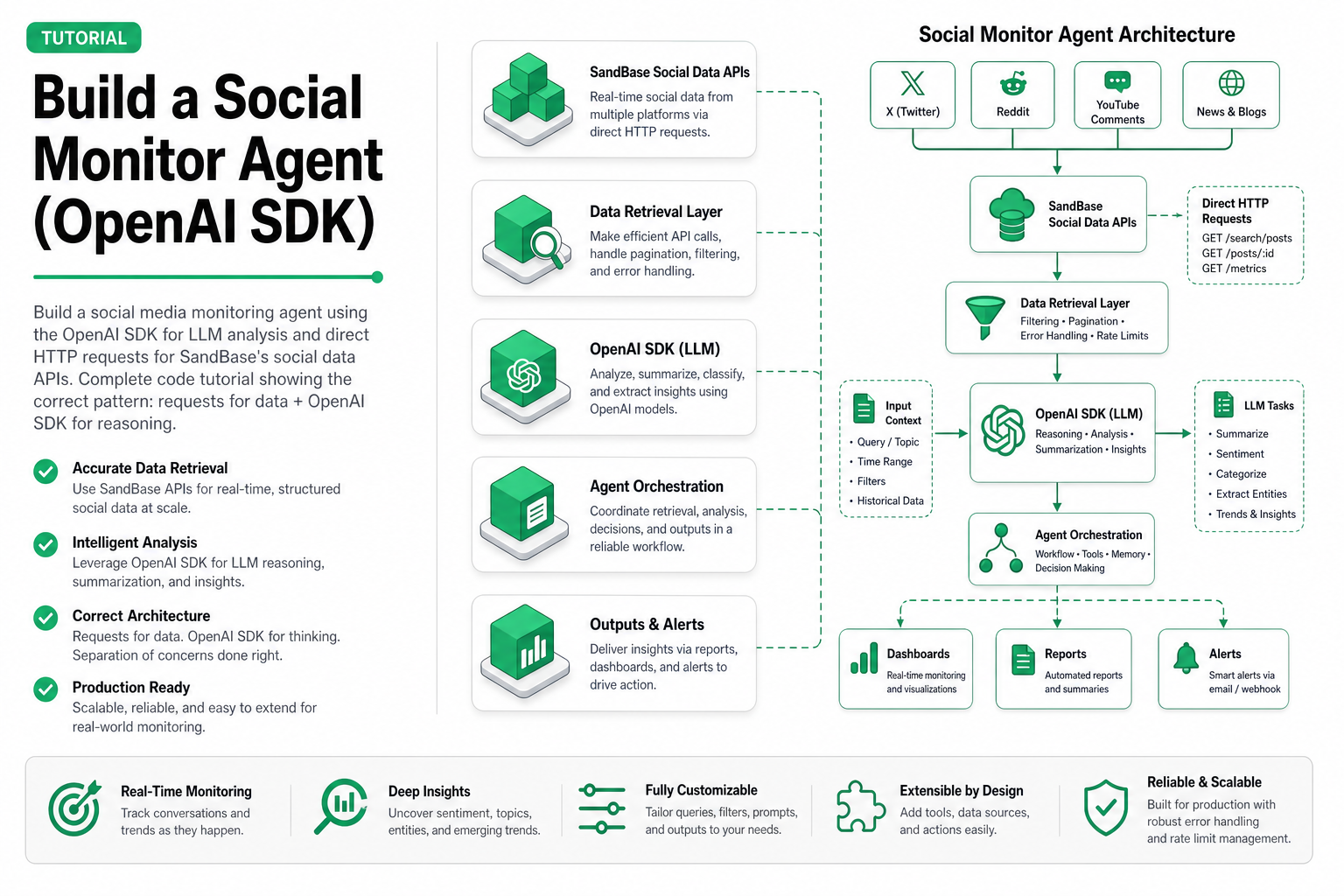
TL;DR — A complete, working social monitoring agent in ~100 lines of Python. Uses direct HTTP requests (
requests) to call SandBase’s social data APIs and the OpenAI SDK for LLM reasoning. Monitors Douyin and Weibo for brand mentions, analyzes sentiment, and produces alerts. Data fetching usesPOST /v1/run; LLM analysis uses the OpenAI-compatible chat completions endpoint.
What we’re building
A social monitoring agent that:
- Periodically checks Douyin and Weibo for mentions of specified keywords
- Uses an LLM to analyze sentiment and urgency
- Produces structured alerts when negative sentiment or volume spikes are detected
- Uses direct HTTP requests for social data APIs and the OpenAI SDK for LLM reasoning
This is the minimal production-ready pattern. You can extend it with more platforms, more sophisticated analysis, or automated responses.
Why this two-client pattern
SandBase exposes social data APIs through POST /v1/run (direct HTTP) and LLM models through an OpenAI-compatible chat completions endpoint. This means:
requestslibrary for data retrieval (social APIs return structured JSON directly)- OpenAI SDK for LLM reasoning (chat completions with tool-calling)
- One API key for both (same SandBase authentication)
- Clear separation: data calls are sync and return immediately; LLM calls use the familiar chat interface
Prerequisites
pip install openai requests pydanticYou’ll need a SandBase API key with access to:
- An LLM model (we’ll use GPT-4.1-mini for cost-efficiency)
- Douyin data APIs
- Weibo data APIs
The complete agent
"""
Social Media Monitor Agent — OpenAI SDK + Direct HTTP Pattern
Monitors Douyin and Weibo for brand mentions, analyzes sentiment.
Uses requests for social data APIs + OpenAI SDK for LLM reasoning.
"""

import json
import time
from datetime import datetime
import requests
from openai import OpenAI
from pydantic import BaseModel

# --- Configuration ---
SANDBASE_API_KEY = "your-sandbase-api-key"
MONITOR_KEYWORDS = ["你的品牌", "YourBrand", "品牌产品名"]
CHECK_INTERVAL_SECONDS = 900  # 15 minutes
ALERT_THRESHOLD_NEGATIVE = 0.3  # Alert if >30% negative sentiment

# --- Client Setup ---
# Direct HTTP headers for social data APIs
HEADERS = {
    "Authorization": f"Bearer {SANDBASE_API_KEY}",
    "Content-Type": "application/json",
}

# OpenAI SDK client for LLM reasoning only
client = OpenAI(
    base_url="https://api.sandbase.ai/v1",
    api_key=SANDBASE_API_KEY,
)

# --- Data Models ---
class SentimentResult(BaseModel):
    keyword: str
    platform: str
    total_mentions: int
    positive: int
    neutral: int
    negative: int
    urgent_items: list[str]
    summary: str

class Alert(BaseModel):
    timestamp: str
    severity: str  # "low", "medium", "high", "critical"
    keyword: str
    platform: str
    reason: str
    details: str

# --- Tool Definitions ---
tools = [
    {
        "type": "function",
        "function": {
            "name": "search_douyin_content",
            "description": "Search Douyin for videos and content matching a keyword. Returns recent videos with engagement metrics.",
            "parameters": {
                "type": "object",
                "properties": {
                    "keyword": {
                        "type": "string",
                        "description": "Search keyword"
                    },
                    "count": {
                        "type": "integer",
                        "description": "Number of results to return (max 20)",
                        "default": 10
                    }
                },
                "required": ["keyword"]
            }
        }
    },
    {
        "type": "function",
        "function": {
            "name": "search_weibo_topics",
            "description": "Search Weibo for posts and discussions matching a keyword. Returns recent posts with engagement data.",
            "parameters": {
                "type": "object",
                "properties": {
                    "keyword": {
                        "type": "string",
                        "description": "Search keyword"
                    },
                    "count": {
                        "type": "integer",
                        "description": "Number of results to return (max 20)",
                        "default": 10
                    }
                },
                "required": ["keyword"]
            }
        }
    },
    {
        "type": "function",
        "function": {
            "name": "get_douyin_video_comments",
            "description": "Get comments on a specific Douyin video for sentiment analysis.",
            "parameters": {
                "type": "object",
                "properties": {
                    "video_id": {
                        "type": "string",
                        "description": "Douyin video ID"
                    },
                    "count": {
                        "type": "integer",
                        "description": "Number of comments to retrieve",
                        "default": 20
                    }
                },
                "required": ["video_id"]
            }
        }
    }
]

# --- Tool Execution (calls SandBase data APIs via direct HTTP) ---
def execute_tool(tool_name: str, arguments: dict) -> str:
    """Execute a tool call by routing to the appropriate SandBase data API."""

    if tool_name == "search_douyin_content":
        # Call Douyin search API via direct HTTP POST /v1/run
        resp = requests.post(
            "https://api.sandbase.ai/v1/run",
            headers=HEADERS,
            json={
                "model": "douyin/search/general",
                "keyword": arguments["keyword"],
                "count": arguments.get("count", 10),
                "sort_type": "0",
            },
        )
        return json.dumps(resp.json(), ensure_ascii=False)

    elif tool_name == "search_weibo_topics":
        resp = requests.post(
            "https://api.sandbase.ai/v1/run",
            headers=HEADERS,
            json={
                "model": "weibo/web-v2/search",
                "keyword": arguments["keyword"],
                "count": arguments.get("count", 10),
            },
        )
        return json.dumps(resp.json(), ensure_ascii=False)

    elif tool_name == "get_douyin_video_comments":
        resp = requests.post(
            "https://api.sandbase.ai/v1/run",
            headers=HEADERS,
            json={
                "model": "douyin/web/fetch-video-comments",
                "video_id": arguments["video_id"],
                "count": arguments.get("count", 20),
            },
        )
        return json.dumps(resp.json(), ensure_ascii=False)

    return json.dumps({"error": f"Unknown tool: {tool_name}"})

# --- Agent Loop ---
def run_monitoring_cycle(keywords: list[str]) -> list[Alert]:
    """Run one monitoring cycle: search, analyze, alert."""

    alerts = []

    for keyword in keywords:
        # Step 1: Ask the agent to monitor this keyword
        messages = [
            {
                "role": "system",
                "content": """You are a social media monitoring agent. For each keyword:
1. Search both Douyin and Weibo for recent mentions
2. Analyze the sentiment of the results
3. Identify any urgent items (complaints, crises, viral negative content)
4. Produce a structured assessment

Be concise. Focus on actionable signals, not summaries of neutral content.
If engagement is unusually high on negative content, flag it immediately."""
            },
            {
                "role": "user",
                "content": f"Monitor keyword: '{keyword}'. Search both platforms and provide sentiment analysis."
            }
        ]

        # Step 2: Agent reasons and calls tools
        max_iterations = 5
        for _ in range(max_iterations):
            response = client.chat.completions.create(
                model="gpt-4.1-mini",
                messages=messages,
                tools=tools,
                tool_choice="auto"
            )

            message = response.choices[0].message
            messages.append(message)

            # If no tool calls, agent is done reasoning
            if not message.tool_calls:
                break

            # Execute tool calls and add results
            for tool_call in message.tool_calls:
                arguments = json.loads(tool_call.function.arguments)
                result = execute_tool(tool_call.function.name, arguments)

                messages.append({
                    "role": "tool",
                    "tool_call_id": tool_call.id,
                    "content": result
                })

        # Step 3: Extract structured assessment
        assessment_prompt = messages + [{
            "role": "user",
            "content": """Based on your analysis, provide a JSON response with:
{
    "keyword": "the keyword",
    "platforms_checked": ["douyin", "weibo"],
    "total_mentions": <number>,
    "sentiment": {"positive": <pct>, "neutral": <pct>, "negative": <pct>},
    "alert_needed": true/false,
    "alert_severity": "low|medium|high|critical",
    "alert_reason": "why an alert is needed (or empty)",
    "urgent_items": ["list of specific concerning items"],
    "summary": "one-paragraph summary"
}
Only output the JSON, no markdown."""
        }]

        assessment_response = client.chat.completions.create(
            model="gpt-4.1-mini",
            messages=assessment_prompt
        )

        try:
            assessment = json.loads(assessment_response.choices[0].message.content)
        except json.JSONDecodeError:
            # LLM didn't return clean JSON, skip this cycle
            continue

        # Step 4: Generate alerts if needed
        if assessment.get("alert_needed"):
            alert = Alert(
                timestamp=datetime.now().isoformat(),
                severity=assessment.get("alert_severity", "medium"),
                keyword=keyword,
                platform=", ".join(assessment.get("platforms_checked", [])),
                reason=assessment.get("alert_reason", "Elevated negative sentiment"),
                details=assessment.get("summary", "")
            )
            alerts.append(alert)
            print(f"🚨 ALERT [{alert.severity.upper()}] — {alert.keyword}: {alert.reason}")
        else:
            print(f"✓ {keyword}: Normal ({assessment.get('total_mentions', 0)} mentions, "
                  f"{assessment.get('sentiment', {}).get('negative', 0)}% negative)")

    return alerts

# --- Alert Delivery ---
def deliver_alerts(alerts: list[Alert]):
    """Send alerts to configured destinations."""
    for alert in alerts:
        if alert.severity in ("high", "critical"):
            # High-priority: immediate notification
            print(f"\n{'='*60}")
            print(f"🔴 {alert.severity.upper()} ALERT — {alert.timestamp}")
            print(f"   Keyword: {alert.keyword}")
            print(f"   Platform: {alert.platform}")
            print(f"   Reason: {alert.reason}")
            print(f"   Details: {alert.details}")
            print(f"{'='*60}\n")
            # In production: send to Slack, email, PagerDuty, etc.
        else:
            # Low-priority: log for daily digest
            print(f"📋 [{alert.severity}] {alert.keyword}: {alert.reason}")

# --- Main Loop ---
def main():
    """Run the monitoring agent on a schedule."""
    print(f"🔍 Social Monitor Agent started")
    print(f"   Keywords: {MONITOR_KEYWORDS}")
    print(f"   Interval: {CHECK_INTERVAL_SECONDS}s")
    print(f"   Alert threshold: >{ALERT_THRESHOLD_NEGATIVE*100}% negative")
    print()

    while True:
        print(f"--- Cycle start: {datetime.now().isoformat()} ---")
        alerts = run_monitoring_cycle(MONITOR_KEYWORDS)

        if alerts:
            deliver_alerts(alerts)
        else:
            print("No alerts this cycle.")

        print(f"--- Next cycle in {CHECK_INTERVAL_SECONDS}s ---\n")
        time.sleep(CHECK_INTERVAL_SECONDS)

if __name__ == "__main__":
    main()
How the pattern works
The key insight is that data APIs use direct HTTP and LLM calls use the OpenAI SDK:
# LLM reasoning — OpenAI SDK (correct for chat completions)
client.chat.completions.create(model="gpt-4.1-mini", messages=...)

# Data retrieval — direct HTTP to /v1/run (correct for social data APIs)
requests.post("https://api.sandbase.ai/v1/run",
    headers=HEADERS,
    json={"model": "douyin/search/general", "keyword": "...", "count": 10})
SandBase’s social data APIs are not LLMs — they don’t take messages or return chat completions. They accept structured parameters and return data directly via the /v1/run endpoint. The OpenAI SDK is used only for the LLM reasoning layer (GPT-4.1-mini for analysis and tool-calling).
Cost breakdown
Per monitoring cycle (3 keywords, 2 platforms each):
Data API calls:
  6 searches (3 keywords × 2 platforms): 6 × $0.001 = $0.006
  ~3 comment fetches (for flagged videos): 3 × $0.001 = $0.003

LLM calls:
  6 reasoning calls (tool-use): ~2K input + 500 output tokens each
    = 6 × $0.0019 = $0.0114
  3 assessment extractions: ~1K input + 200 output each
    = 3 × $0.001 = $0.003

Total per cycle: ~$0.023
Running every 15 minutes:
Daily: 96 cycles × $0.023 = $2.21
Monthly: ~$66
Compare to manual monitoring: one analyst spending 2 hours/day on brand monitoring costs $2,000–4,000/month. This agent provides 24/7 coverage at 2% of the cost.
Extending the agent
Add more platforms
# Add Xiaohongshu monitoring
{
    "type": "function",
    "function": {
        "name": "search_xiaohongshu_notes",
        "description": "Search Xiaohongshu for notes mentioning a keyword.",
        "parameters": {
            "type": "object",
            "properties": {
                "keyword": {"type": "string"},
                "count": {"type": "integer", "default": 10}
            },
            "required": ["keyword"]
        }
    }
}
Add trend comparison
# Store historical data for trend detection
class TrendTracker:
    def __init__(self):
        self.history = {}  # keyword -> [(timestamp, mentions, sentiment)]

    def record(self, keyword: str, mentions: int, negative_pct: float):
        if keyword not in self.history:
            self.history[keyword] = []
        self.history[keyword].append((time.time(), mentions, negative_pct))

    def detect_spike(self, keyword: str, window_hours: int = 24) -> bool:
        """Detect if current volume is 3x the 24h average."""
        if keyword not in self.history or len(self.history[keyword]) < 10:
            return False

        cutoff = time.time() - (window_hours * 3600)
        recent = [m for t, m, _ in self.history[keyword] if t > cutoff]

        if not recent:
            return False

        avg = sum(recent) / len(recent)
        current = recent[-1]
        return current > avg * 3
Add automated response drafting
def draft_response(alert: Alert) -> str:
    """Use the LLM to draft a response for high-severity alerts."""
    response = client.chat.completions.create(
        model="gpt-4.1-mini",
        messages=[
            {"role": "system", "content": "You are a brand communications specialist. "
             "Draft a brief, empathetic response to the following social media issue. "
             "Keep it professional, acknowledge the concern, and offer next steps."},
            {"role": "user", "content": f"Issue: {alert.reason}\nDetails: {alert.details}\n"
             "Draft a response suitable for posting on social media."}
        ]
    )
    return response.choices[0].message.content
Production considerations
Rate limiting
import asyncio
from collections import deque

class RateLimiter:
    def __init__(self, max_calls: int, window_seconds: int):
        self.max_calls = max_calls
        self.window = window_seconds
        self.calls = deque()

    async def acquire(self):
        now = time.time()
        while self.calls and self.calls[0] < now - self.window:
            self.calls.popleft()

        if len(self.calls) >= self.max_calls:
            sleep_time = self.calls[0] + self.window - now
            await asyncio.sleep(sleep_time)

        self.calls.append(time.time())

# Limit to 60 API calls per minute
limiter = RateLimiter(max_calls=60, window_seconds=60)
Error recovery
def execute_tool_with_retry(tool_name: str, arguments: dict, max_retries: int = 3) -> str:
    """Execute tool with exponential backoff on failure."""
    for attempt in range(max_retries):
        try:
            return execute_tool(tool_name, arguments)
        except Exception as e:
            if attempt == max_retries - 1:
                return json.dumps({"error": str(e), "tool": tool_name})
            time.sleep(2 ** attempt)  # 1s, 2s, 4s
    return json.dumps({"error": "max retries exceeded"})
Logging and observability
import logging

logger = logging.getLogger("social_monitor")

def log_cycle_metrics(keyword: str, mentions: int, alerts: int, cost: float):
    logger.info(
        "cycle_complete",
        extra={
            "keyword": keyword,
            "mentions": mentions,
            "alerts_generated": alerts,
            "estimated_cost_usd": cost,
            "timestamp": datetime.now().isoformat()
        }
    )
Comparison with the full social listening agent
This tutorial is deliberately simpler than our comprehensive social listening agent:
| Feature | This tutorial | Full agent |
|---|---|---|
| Platforms | 2 (Douyin, Weibo) | 3+ (+ Xiaohongshu) |
| Analysis depth | Keyword-level sentiment | Thread-level, influencer tracking |
| State management | Stateless per cycle | Historical trend comparison |
| Output | Console alerts | Multi-channel (Slack, email, dashboard) |
| Code complexity | ~100 lines core | ~400 lines |
| Monthly cost | ~$66 | ~$200–400 |
Use this pattern as your starting point. Add complexity only when the simpler version’s limitations actually block your use case.
Related Reading
- Build a Social Listening Agent: Weibo + Douyin
- Build a Douyin Competitor Monitor Agent
- Top 5 Social Media Data APIs for AI Agents (2026)
- Best Douyin Data API Services in 2026
- Xiaohongshu KOL Screening Agent (Tutorial)
- China Social Commerce Data: The Agent Opportunity
Key takeaways
- Two clients, one API key. Direct HTTP (
requests) for social data APIs, OpenAI SDK for LLM reasoning — both authenticated with the same SandBase key. - Tool-calling is the integration pattern. Define social data endpoints as tools, let the LLM decide when to call them, execute via
POST /v1/run. - Cost is dominated by LLM calls. Data API calls at $0.001 are negligible. Optimize the LLM layer first.
- Start simple, extend later. A working agent in 100 lines beats a perfect agent that never ships.
- Sync APIs enable simple loops. Because social data APIs are sync-only, the agent loop stays clean — no callbacks, no polling, no task management.