Build a Douyin Competitor Monitor Agent
Step-by-step tutorial: build an agent that tracks competitor Douyin accounts, detects new videos, and generates daily briefings in about 30 data calls a day.

Key takeaway (TL;DR) — A complete Python agent that monitors up to 10 competitor Douyin accounts daily: detects new videos on each account’s first page, tracks follower changes, and produces an LLM-generated briefing. Load: up to ~30 Douyin data API calls/day. The ~20 profile and post-list calls fit within the 100 free data API calls each organization gets per UTC day (beyond that, they are billed per call at the SandBase catalog price). The 0 to 10
multi-video-statisticscalls are not covered by the daily free calls and are billed from the first call at the catalog price. The agent also makes one LLM call, which is estimated at a few cents per day depending on token counts. Full code included, runs via cron or any scheduler.
You want to know what your competitors are doing on Douyin without checking 10 accounts manually every morning. Here is an agent that uses the Douyin data API on SandBase to do it in about 30 data calls and one LLM call a day.
What the agent does
Every day at 7 AM:
- Fetches the profile of each competitor (follower count, bio)
- Pulls the first page of their posted videos (requests
count=20) - Compares with yesterday’s snapshot to detect new uploads
- For new videos, fetches play counts in one batched call
- Sends everything to an LLM for analysis
- Writes the briefing to a Markdown file (send it on to Slack or email yourself if you want)
Prerequisites
- A SandBase API key (used for both Douyin data and LLM calls): Get a SandBase API key
- Python 3.10+
requestsandopenaipackages (pip install requests openai)
This works on public, read-only Douyin data only. It needs a SandBase API key and is not an official Douyin partnership. It cannot see private accounts, DMs, owner-only analytics, or publish or act on any account. If you need data for accounts you own or authorize, Douyin’s official developer platform is the route for those account-linked workflows.
| SandBase public data endpoints | Douyin Open Platform | |
|---|---|---|
| Data scope | Public, read-only data (profiles, videos, counts) | Data of accounts that have authorized your app |
| Authentication | One SandBase API key (Bearer) | Developer registration and an app, plus user authorization for account data |
| Actions | None; read-only | Account-linked operations for authorized accounts, per the platform’s docs |
| Use when | Monitoring public competitor accounts, as in this tutorial | Working with accounts you own or that authorize your app |
The code calls three endpoints through SandBase’s Model API route, POST https://api.sandbase.ai/v1/api/<vendor>/<path>, with only that endpoint’s parameters in the JSON body (the Douyin catalog, which lists 262 endpoints as of 2026-10-01, displays a separate GET /apis/v1/... surface; this tutorial does not use it):
douyin/app-v3/user-profile(sec_user_id)douyin/app-v3/user-post-videos(sec_user_id,max_cursor,count, max 20)douyin/app-v3/multi-video-statistics(aweme_ids, comma-separated, max 50)
The catalog page shows the endpoint count and status for these entries:
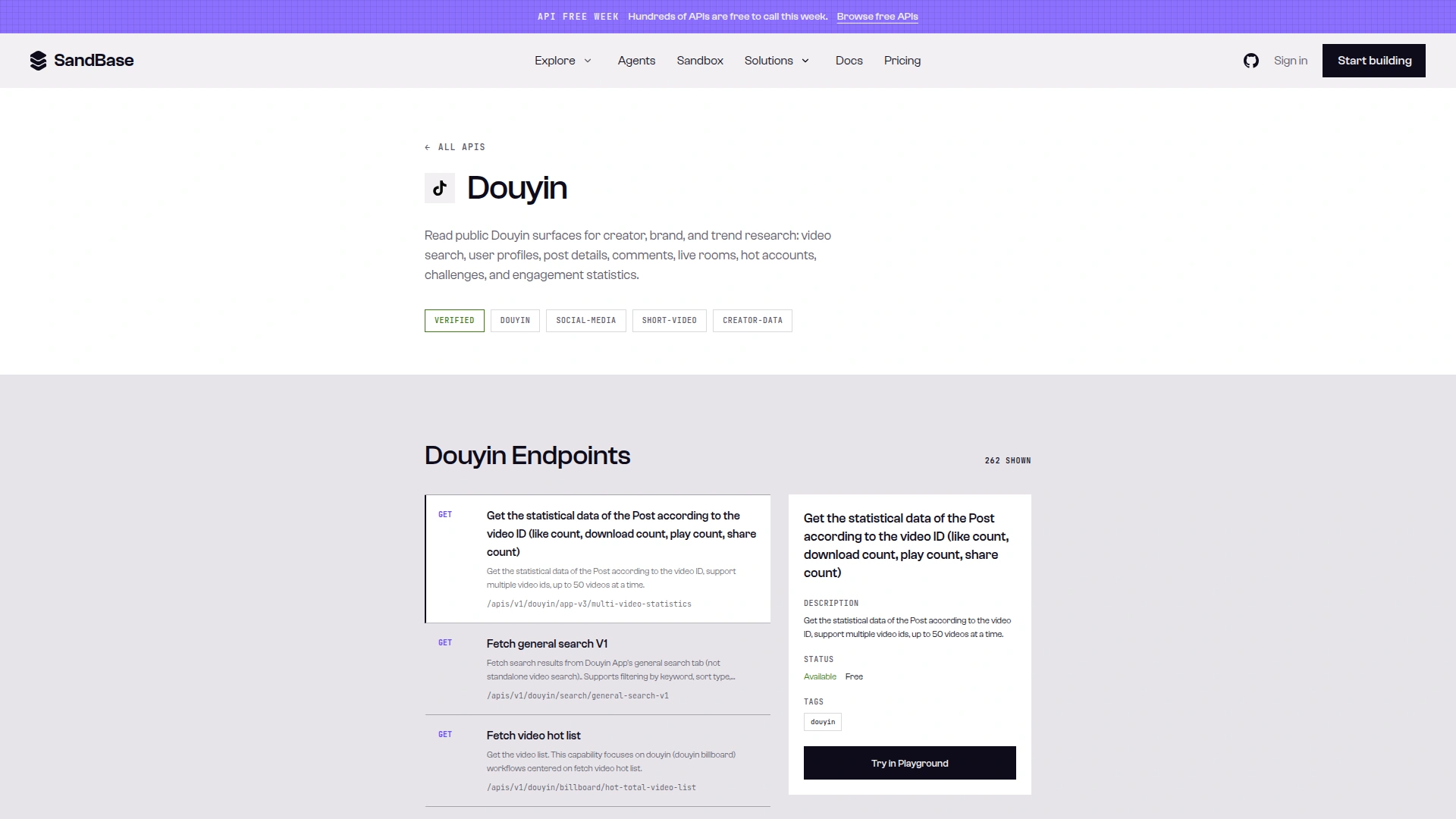
Caption: The SandBase Douyin catalog shows “262 SHOWN” endpoints, with douyin/app-v3/multi-video-statistics selected as Available · Free (captured 2026-10-02). The Free label is from API Free Week, which has since ended; data API calls now include 100 free calls per organization per day on eligible APIs, then are billed per call.
The complete agent
#!/usr/bin/env python3
"""Douyin competitor monitoring agent.

Tracks competitor accounts, detects new videos, analyzes trends.
Run daily via cron: 0 7 * * * python3 /path/to/monitor.py
"""

import json
import os
from datetime import datetime, timezone
from pathlib import Path

import requests
from openai import OpenAI

# --- Configuration ---
# Two public brand accounts used in the test run below; replace or extend
# with your own competitors (up to 10 keeps you at ~30 data calls/day).
COMPETITORS = [
    {"sec_user_id": "MS4wLjABAAAAqToDPmMuXPVGt7jNJTgewNGXmImMr0EgMwiN0VygLOQ", "name": "Luckin Coffee"},
    {"sec_user_id": "MS4wLjABAAAAtI0BhriyYFCrLtBZ9G3zwUsXD5O_6tOcI-s1gfphuGM", "name": "Luckin Coffee Store"},
]

SNAPSHOT_DIR = Path("./snapshots")
SNAPSHOT_DIR.mkdir(exist_ok=True)

SANDBASE_API_KEY = os.environ["SANDBASE_API_KEY"]
HEADERS = {
    "Authorization": f"Bearer {SANDBASE_API_KEY}",
    "Content-Type": "application/json",
}

# OpenAI client for LLM calls only
client = OpenAI(
    base_url="https://api.sandbase.ai/v1",
    api_key=SANDBASE_API_KEY,
)


# --- Data fetching (POST /v1/api/<model>) ---
def run_data_api(model: str, params: dict) -> dict:
    """POST /v1/api/<model> with only the endpoint's params; return outputs[0].data."""
    resp = requests.post(
        f"https://api.sandbase.ai/v1/api/{model}",
        headers=HEADERS,
        json=params,
        timeout=90,
    )
    resp.raise_for_status()
    body = resp.json()
    outputs = body.get("outputs") or []
    if body.get("status") != "completed" or not outputs:
        raise RuntimeError(f"SandBase call did not complete: {body.get('status')} {body.get('error')}")
    return outputs[0].get("data") or {}


def fetch_profile(sec_user_id: str) -> dict:
    """Fetch a Douyin user's profile data."""
    data = run_data_api("douyin/app-v3/user-profile", {"sec_user_id": sec_user_id})
    user = data.get("user") or {}
    return {
        "nickname": user.get("nickname"),
        "signature": user.get("signature"),
        "follower_count": user.get("follower_count", 0),
        "aweme_count": user.get("aweme_count"),
    }


def fetch_video_list(sec_user_id: str, count: int = 20) -> list:
    """Fetch a user's most recent posted videos (first page)."""
    data = run_data_api("douyin/app-v3/user-post-videos", {
        "sec_user_id": sec_user_id,
        "max_cursor": 0,
        "count": count,
    })
    videos = []
    for a in data.get("aweme_list") or []:
        stats = a.get("statistics") or {}
        videos.append({
            "aweme_id": str(a.get("aweme_id")),
            "desc": a.get("desc"),
            "create_time": a.get("create_time"),
            "digg_count": stats.get("digg_count"),
            "comment_count": stats.get("comment_count"),
            "share_count": stats.get("share_count"),
        })
    return videos


def fetch_play_counts(aweme_ids: list[str]) -> dict:
    """Fetch play counts for up to 50 videos in one call.
    The post list returns play_count as 0, so plays come from here."""
    data = run_data_api("douyin/app-v3/multi-video-statistics",
                        {"aweme_ids": ",".join(aweme_ids[:50])})
    return {
        str(s.get("aweme_id")): s.get("play_count")
        for s in data.get("statistics_list") or []
    }


# --- Snapshot comparison ---
def load_previous_snapshot(competitor_name: str) -> dict:
    """Load yesterday's snapshot for comparison."""
    path = SNAPSHOT_DIR / f"{competitor_name}.json"
    if path.exists():
        return json.loads(path.read_text())
    return {"videos": [], "follower_count": 0}


def save_snapshot(competitor_name: str, data: dict):
    """Save today's data as the new snapshot."""
    path = SNAPSHOT_DIR / f"{competitor_name}.json"
    path.write_text(json.dumps(data, ensure_ascii=False, indent=2))


def detect_new_videos(current_videos: list, previous_videos: list) -> list:
    """Find videos that exist now but didn't exist yesterday."""
    previous_ids = {v.get("aweme_id") for v in previous_videos}
    return [v for v in current_videos if v.get("aweme_id") not in previous_ids]


# --- Analysis ---
def generate_briefing(all_data: list[dict]) -> str:
    """Use LLM to generate a human-readable competitive briefing."""
    prompt = f"""You are a competitive intelligence analyst for a Douyin-focused brand.

Analyze the following competitor activity data and produce a concise daily briefing.

Focus on:
1. Who posted new content and what topics/formats they used
2. Significant follower changes (>1% growth or decline)
3. Videos with unusually high engagement (vs their average)
4. Content strategy shifts or patterns across competitors

Data:
{json.dumps(all_data, ensure_ascii=False, indent=2)}

Output a structured briefing with:
- Executive summary (3 sentences max)
- New content highlights (by competitor)
- Engagement anomalies
- Recommended actions for our brand
"""

    response = client.chat.completions.create(
        model="anthropic/claude-sonnet-4",
        messages=[{"role": "user", "content": prompt}],
        max_tokens=2000,
    )
    return response.choices[0].message.content


# --- Main loop ---
def run_daily_monitor():
    """Execute the full monitoring cycle."""
    today = datetime.now(timezone.utc).strftime("%Y-%m-%d")
    print(f"[{today}] Starting competitor monitoring cycle...")

    all_competitor_data = []
    total_api_calls = 0

    for competitor in COMPETITORS:
        sec_user_id = competitor["sec_user_id"]
        name = competitor["name"]
        print(f"  Checking {name}...")

        # Fetch current state
        profile = fetch_profile(sec_user_id)
        videos = fetch_video_list(sec_user_id)
        total_api_calls += 2

        # Compare with previous
        previous = load_previous_snapshot(name)
        new_videos = detect_new_videos(videos, previous.get("videos", []))

        # Add play counts for new videos (one batched call per competitor)
        new_video_details = new_videos[:5]  # Cap at 5 new videos per competitor
        if new_video_details:
            plays = fetch_play_counts([v["aweme_id"] for v in new_video_details])
            for v in new_video_details:
                v["play_count"] = plays.get(v["aweme_id"])
            total_api_calls += 1

        # Build competitor summary
        competitor_data = {
            "name": name,
            "follower_count": profile.get("follower_count", 0),
            # None on the first run, when there is no previous snapshot yet
            "follower_change": (profile.get("follower_count", 0) - previous["follower_count"]
                                if previous.get("follower_count") else None),
            "new_videos_count": len(new_videos),
            "new_videos": new_video_details,
            "total_videos_checked": len(videos),
        }
        all_competitor_data.append(competitor_data)

        # Save today's snapshot
        save_snapshot(name, {
            "videos": videos,
            "follower_count": profile.get("follower_count", 0),
            "date": today,
        })

    # Generate LLM briefing
    print(f"  Generating briefing ({total_api_calls} data calls made)...")
    briefing = generate_briefing(all_competitor_data)
    total_api_calls += 1

    # Output
    output_path = SNAPSHOT_DIR / f"briefing-{today}.md"
    output_path.write_text(f"# Competitor Briefing: {today}\n\n{briefing}")
    print(f"  Briefing saved to {output_path}")
    print(f"  Total API calls: {total_api_calls}")
    print(f"  Data calls: {total_api_calls - 1} (+1 LLM call)")

    return briefing


if __name__ == "__main__":
    run_daily_monitor()
How it works, step by step
Tested on 2026-10-01 (UTC)
Public resource: the official Luckin Coffee brand account, https://www.douyin.com/user/MS4wLjABAAAAqToDPmMuXPVGt7jNJTgewNGXmImMr0EgMwiN0VygLOQ.
curl -s https://api.sandbase.ai/v1/api/douyin/app-v3/user-profile \
  -H "Authorization: Bearer $SANDBASE_API_KEY" \
  -H "Content-Type: application/json" \
  -d '{"sec_user_id": "MS4wLjABAAAAqToDPmMuXPVGt7jNJTgewNGXmImMr0EgMwiN0VygLOQ"}'
Trimmed response (run id e69e529b-f7c3-4bd7-a2d0-cb88a88e20c8):
{
  "id": "e69e529b-f7c3-4bd7-a2d0-cb88a88e20c8",
  "status": "completed",
  "model": "douyin/app-v3/user-profile",
  "outputs": [{"data": {"user": {
    "nickname": "瑞幸咖啡",
    "unique_id": "luckincoffee01",
    "follower_count": 7369643,
    "aweme_count": 2292
  }}}]
}
The same day, user-post-videos with {"sec_user_id": "<same>", "max_cursor": 0, "count": 20} (run id 16b6f726-7eb6-4c7c-ab8b-80ef7ac7866d) returned outputs[0].data.aweme_list[] with 22 items, has_more: 1, and a max_cursor. A trimmed item:
{"aweme_id": "7475625096317521164", "create_time": 1740554604, "is_top": 1,
 "statistics": {"play_count": 0, "digg_count": 25208, "comment_count": 2804, "share_count": 4708}}
And multi-video-statistics with {"aweme_ids": "7688258340685679882,7475625096317521164"} (run id 94ef9077-351e-4c08-9f8e-228b9f48145f) returned:
{"statistics_list": [
  {"aweme_id": "7688258340685679882", "digg_count": 179, "play_count": 12222, "share_count": 2},
  {"aweme_id": "7475625096317521164", "digg_count": 25208, "download_count": 458, "play_count": 9997938, "share_count": 1400}
]}
The endpoint references document the envelope (id, status, model, outputs[0].data) but not the business fields inside data. The field names above come from these calls and are observed-only, not documented guarantees, which is why the code reads every one with .get(). I also ran the full agent above verbatim on both Luckin accounts with the LLM call stubbed: six data calls, all completed (run ids 2dad8674-…, f7f1b8ef-…, aec4e5a6-…, 1fd0227d-…, 12da6c6d-…, a2c3e02c-…).
Step 1: Profile check (1 call per account)
profile = fetch_profile(sec_user_id)
# e.g. {"nickname": "瑞幸咖啡", "signature": "...", "follower_count": 7369643, "aweme_count": 2292}
The agent stores today’s follower count and passes the day-over-day follower_change to the LLM; the prompt asks it to call out changes above 1%. There is no hard-coded alert threshold in the code (see “Extending the agent” to add one). On the first run there is no snapshot yet, so follower_change is None.
Step 2: Video list (1 call per account)
videos = fetch_video_list(sec_user_id, count=20)
# e.g. [{"aweme_id": "7475625096317521164", "desc": "...", "create_time": 1740554604,
#        "digg_count": 25208, "comment_count": 2804, "share_count": 4708}, ...]
This requests the first page only (max_cursor=0, count=20, the documented maximum). By comparing with yesterday’s list, the agent identifies new uploads. Accounts that post several times a day can push older items off that page, which is fine for spotting new posts but means the agent does not see the full history.
The user-post-videos reference is where the 20-item cap and the cursor rule come from:
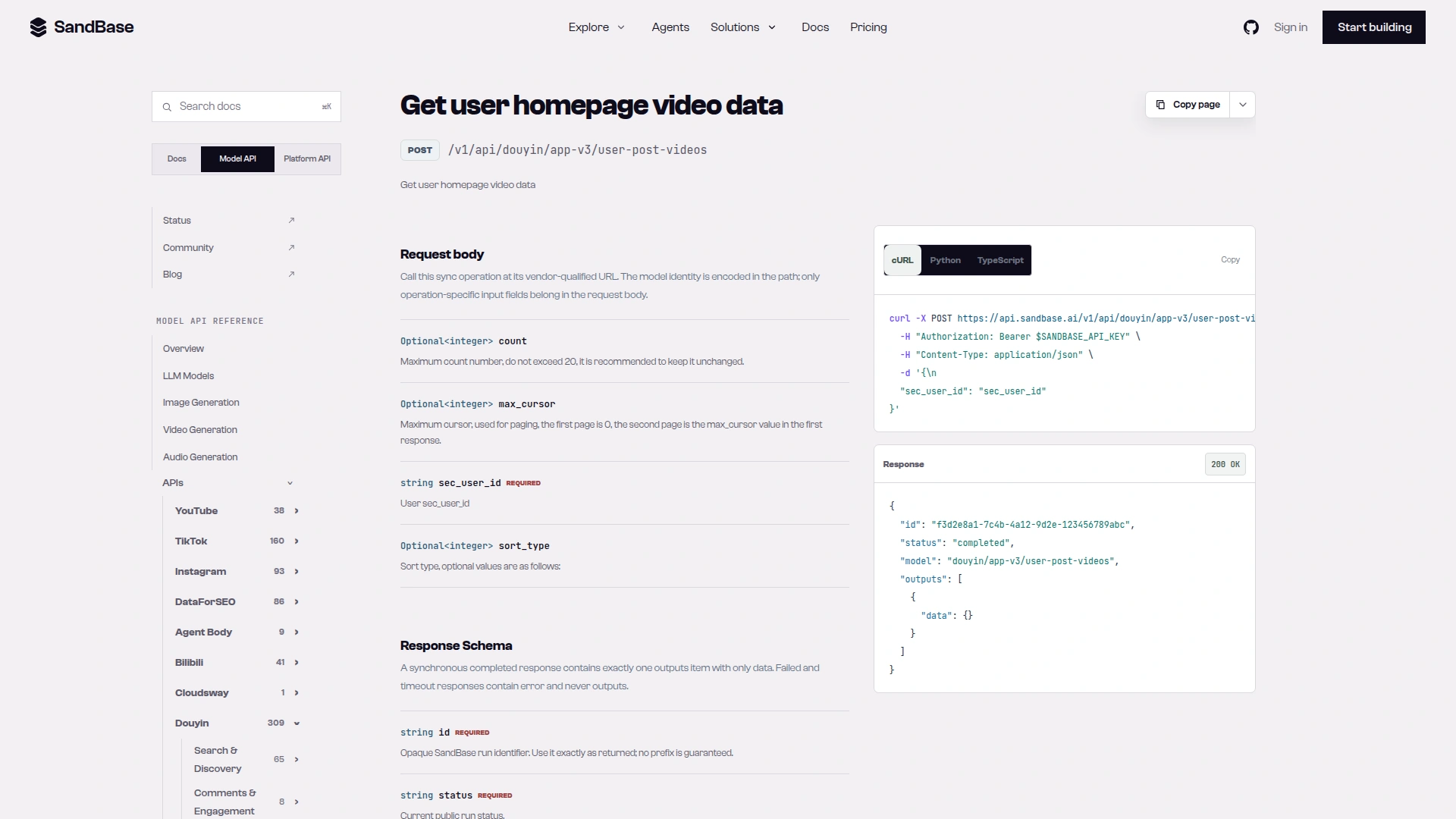
Caption: The user-post-videos reference documents POST /v1/api/douyin/app-v3/user-post-videos, a count that should not exceed 20, and max_cursor starting at 0 for the first page (captured 2026-10-02).
Step 3: Play counts for new videos (0 or 1 call per account)
Only fetched for videos that weren’t in yesterday’s snapshot, in one batched call per competitor:
plays = fetch_play_counts([v["aweme_id"] for v in new_videos[:5]])
# e.g. {"7475625096317521164": 9997938, ...}
In my 2026-10-01 runs the post list returned likes, comments, and shares, but its play_count was 0, and so was douyin/app-v3/one-video’s (run id 85e7f8c5-6977-4499-9872-ff2aeff82b61). douyin/app-v3/multi-video-statistics filled in plays (up to 50 ids per call per its reference), so the agent takes only play_count from it and keeps the other metrics from the post list. The code enriches at most 5 new videos per competitor; if an account posts more than that in a day, the rest are counted in new_videos_count but get no play count.
In those runs a count of 20 returned 22 to 23 items per account, and the first page started with older posts marked is_top: 1 (pinned) before recent ones, so the code diffs on aweme_id rather than assuming list order.
Step 4: LLM analysis (1 call)
The entire batch of competitor data goes to Claude Sonnet 4 in one prompt (max_tokens=2000). Output is a structured briefing with suggested actions.
Cost breakdown
For 10 competitor accounts:
| Component | Calls/day | Price on SandBase |
|---|---|---|
douyin/app-v3/user-profile | 10 | Billed per call (see catalog) |
douyin/app-v3/user-post-videos | 10 | Billed per call (see catalog) |
douyin/app-v3/multi-video-statistics | 0–10 | Billed from the first call, not covered by free calls (see catalog) |
anthropic/claude-sonnet-4 briefing | 1 | $3/M input tokens, $15/M output tokens |
Each organization gets 100 free data API calls per UTC day across eligible APIs (sandbase_inspect shows an endpoint’s free_quota, sandbase_account shows today’s remaining free calls); beyond that, user-profile and user-post-videos are billed per call. multi-video-statistics is not covered by the daily free calls and is billed from the first call at the catalog price. Check each price in the SandBase Douyin catalog or with sandbase inspect before you scale. One inconsistency to know about: the multi-video-statistics reference description still contains an upstream line, “Price: 0.025$ each time”, which is upstream text, not the SandBase price. On 2026-10-01 the catalog entry and the model page showed a promotional Free price; that promotion has ended, and the model page now shows the per-call price you are billed.
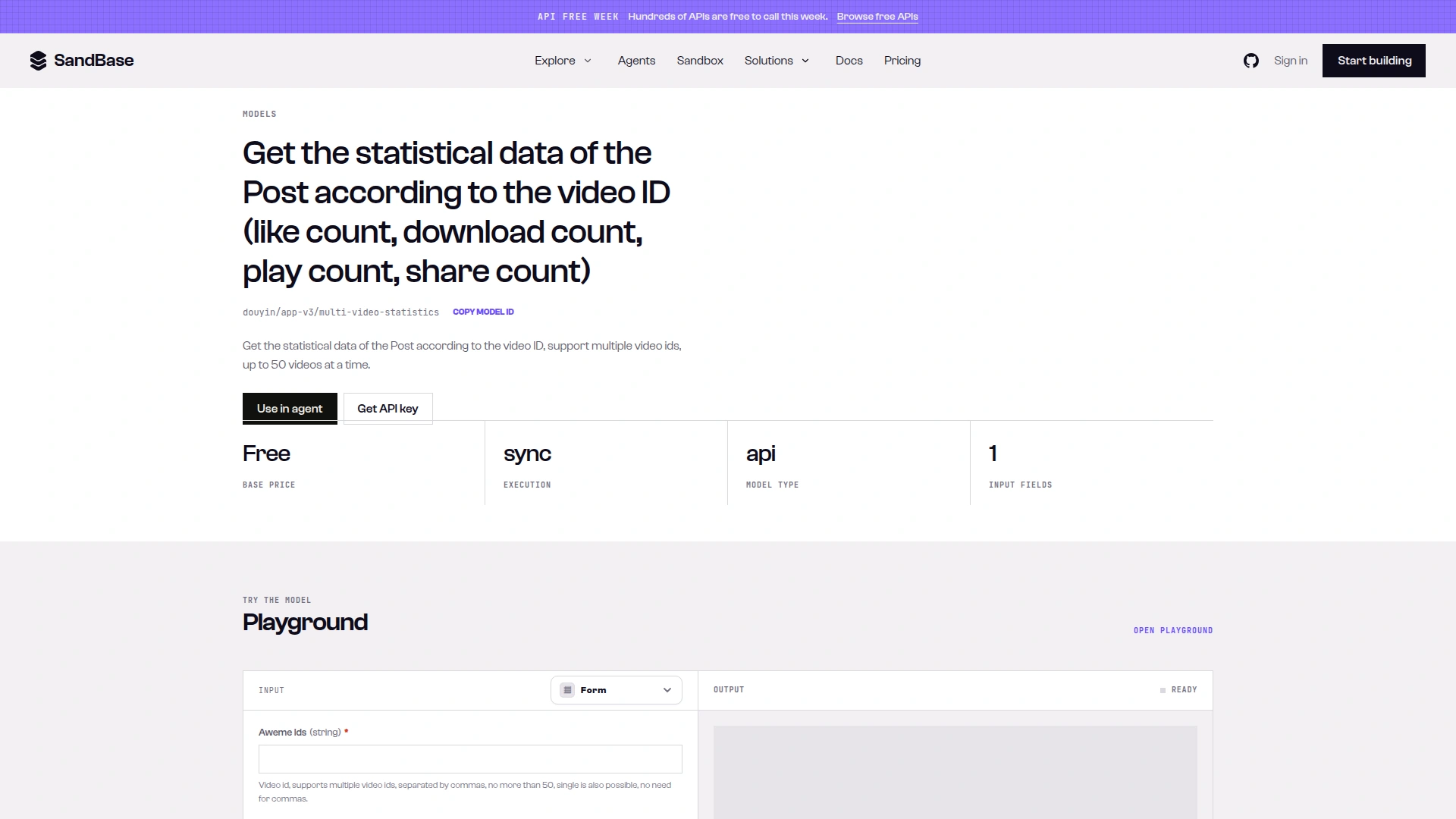
Caption: The multi-video-statistics model page lists Base price Free, sync execution and one aweme_ids input that accepts up to 50 ids, the promotional Free label cited above (captured 2026-10-02). The Free label is from API Free Week, which has since ended; data API calls now include 100 free calls per organization per day on eligible APIs, then are billed per call.
LLM estimate (not a quote; billing follows measured tokens). In my test run the prompt for two accounts, each with 5 new videos, was about 3,700 characters, roughly 1,500 tokens. Scaling that to 10 accounts:
| Scenario | Input tokens | Output tokens | Per run | 30 runs |
|---|---|---|---|---|
| Quiet day (few new videos) | ~2,000 | ~800 | 2,000 × $3/M + 800 × $15/M = $0.018 | ~$0.54 |
Busy day (5 new videos per account, output hits max_tokens) | ~6,000 | 2,000 | 6,000 × $3/M + 2,000 × $15/M = $0.048 | ~$1.44 |
Long video descriptions, more accounts, or a larger max_tokens push these up; a cheaper model such as openai/gpt-4.1-mini ($0.40/M input, $1.60/M output) brings the busy-day run to about $0.0056.
Compared with checking 10 accounts by hand each morning, the agent runs on schedule every day. It is narrower than a person, though: it reads only the first page of each account and enriches at most 5 new videos per account.
Running it
Option 1: Cron (simplest)
# Run every day at 7 AM
0 7 * * * SANDBASE_API_KEY=sk-... python3 /path/to/monitor.py >> /var/log/competitor-monitor.log 2>&1
Option 2: GitHub Actions
Whether this costs anything depends on your GitHub plan and its included Actions minutes; a short daily job usually fits in the allowance.
name: Daily Competitor Monitor
on:
  schedule:
    - cron: '0 23 * * *'  # 7 AM Beijing time = 23:00 UTC previous day
jobs:
  monitor:
    runs-on: ubuntu-latest
    steps:
      - uses: actions/checkout@v4
      - uses: actions/setup-python@v5
        with:
          python-version: '3.12'
      - run: pip install requests openai
      - run: python monitor.py
        env:
          SANDBASE_API_KEY: ${{ secrets.SANDBASE_API_KEY }}
Option 3: Any agent framework
The run_daily_monitor() function can be wrapped as a tool in LangGraph, CrewAI, or any framework that supports periodic execution.
Extending the agent
Add alerting: The code above has no thresholds. To add one, check whether follower_change exceeds a percentage you choose and post {"text": ...} to a Slack incoming webhook instead of waiting for the daily briefing.
Add Weibo cross-reference: When a competitor posts a viral Douyin video, check if the same content appears on their Weibo (using weibo/app/user-timeline with their Weibo uid). Cross-platform content strategy reveals their distribution playbook.
Add historical trending: Store snapshots for 30 days and ask the LLM to identify weekly trends: “Brand A is posting 40% more product demos this month compared to last.”
Limitations
sec_user_ids must be known: You need each competitor’ssec_user_id. It’s theMS4wLjABAAAA...segment of their public profile URL, or you can look it up by search (see FAQ).- First run: With no snapshot yet, every video on the first page counts as new and
follower_changeisNone. The briefings from day two onward are the useful ones. - Call volume: The code makes calls one after another. The endpoint references reviewed here don’t publish rate limits, so if you scale up, add retries with backoff for transient errors rather than assuming a fixed safe rate.
- Data lag: Video engagement metrics reflect the state at query time. A video posted 1 hour ago may show low engagement that is not yet representative.
- No private data: This monitors public content only. DMs, private videos, and restricted accounts are not accessible.
FAQ
Can I monitor more than 10 accounts?
Yes. Data calls scale linearly: 20 accounts ≈ 60 calls/day, 50 accounts ≈ 150 calls/day, while the single daily LLM briefing grows with prompt length (and so does its token cost). At larger scale, add retries with backoff around run_data_api; no rate limit is documented in the references used here.
What if a competitor deletes a video?
The published code does not detect deletions; it only looks for new ids. You could add deleted_videos = previous_ids - current_ids, but because the agent reads only the first page, a video that drops off that page because of newer posts would also look deleted. Confirm with douyin/app-v3/one-video before treating it as a removal.
Can I use GPT-4o instead of Claude Sonnet 4 for analysis?
Yes. Replace model="anthropic/claude-sonnet-4" with model="openai/gpt-4o". Both are available through the same SandBase endpoint. GPT-4o is listed at $2.50/M input and $10/M output (as of 2026-10-01), so the busy-day scenario above would be 6,000 × $2.50/M + 2,000 × $10/M = $0.035 per run instead of $0.048.
How do I get competitor sec_user_ids?
From their public Douyin profile URL: https://www.douyin.com/user/{sec_user_id}. You can also search by name with douyin/search/user-search-v2 (keyword, cursor). In my 2026-10-01 run with {"keyword": "瑞幸咖啡", "cursor": 0} (run id b76520df-b3dc-477e-b9e9-e4e1a856720e) the results sat under outputs[0].data.data.user_list[], and the first item’s user_id was MS4wLjABAAAAqToDPmMuXPVGt7jNJTgewNGXmImMr0EgMwiN0VygLOQ (the same sec_user_id used above), next to nick_name: "瑞幸咖啡" and fans_cnt (observed-only).
For more Douyin API details, see Douyin Public Data API on SandBase. For context on social data approaches, see our social media data API guide.