ChatGPT Images 2.5: Editing, Sketch and API Pricing
SandBase explains ChatGPT Images 2.5 editing, Sketch and OpenAI API pricing, separating official demos from its version-unconfirmed ChatGPT web test.
A coffee-shop poster is ready. Then the price changes from $12 to $9. The job is not to invent another attractive poster: it is to replace two characters without moving the cup, rewriting the opening hours, or changing the approved colors.
That is the useful question behind ChatGPT Images 2.5, announced by OpenAI on September 8, 2026. It generates and edits images from text and visual references. For designers preparing campaign variations and developers building image-editing tools, the promise is less waiting and fewer unwanted changes between versions.
This SandBase Blog explainer separates OpenAI’s release claims from the coffee-poster web test below. For repeated revisions rather than feature and pricing information, read our separate ChatGPT Images 2.5 five-round editing test, which follows a blue bottle through price, cap and badge changes. Neither article establishes an exact API backend for the web outputs.
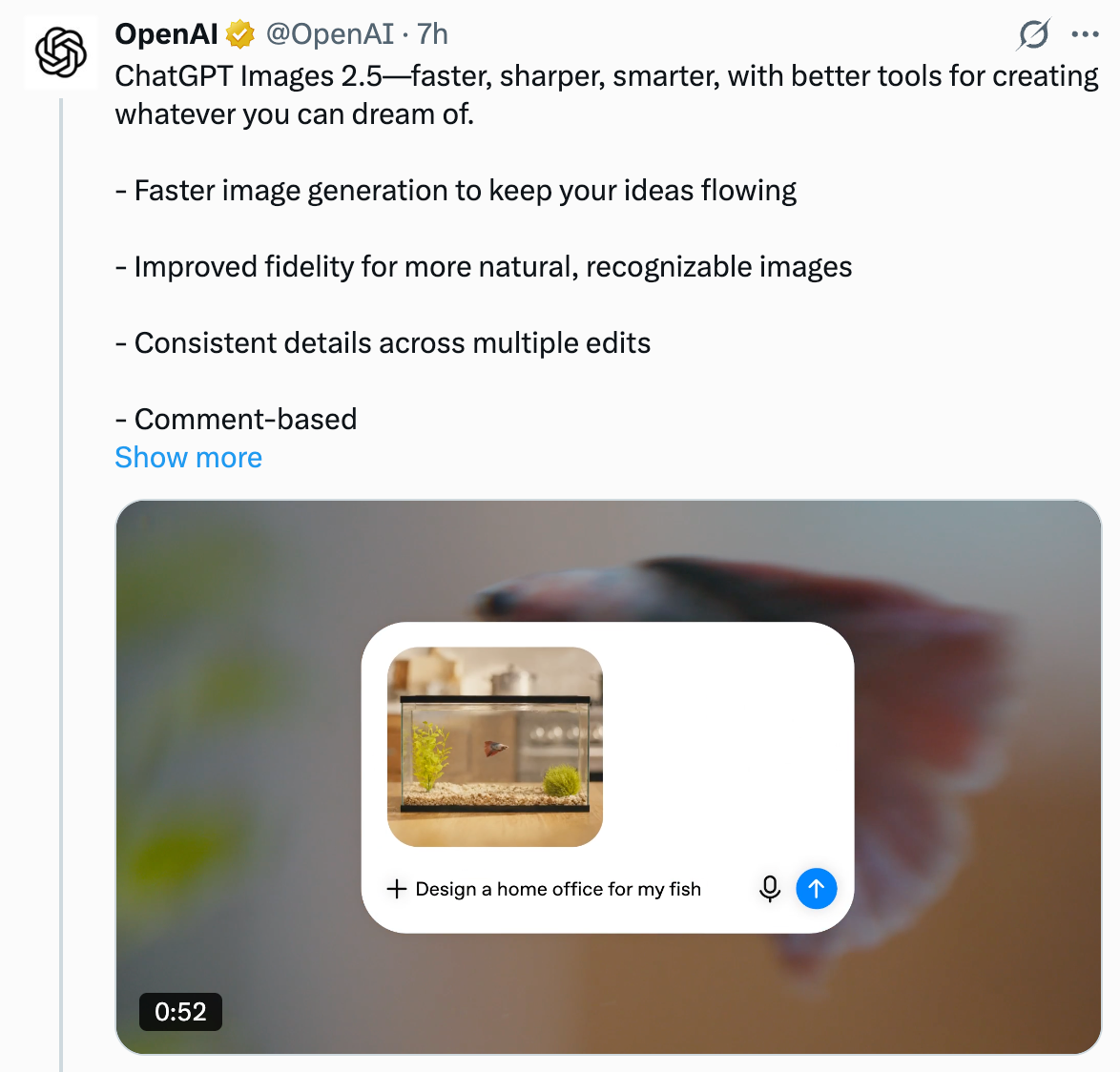 An excerpt from OpenAI’s launch post on X. Click to view the original-resolution 1174 × 1124 PNG.
Key takeaway
- OpenAI reports up to 50% lower generation latency than Images 2.0, alongside improvements in reference fidelity and editing consistency.
- Sketch, image comments, templates and prompt sharing make it easier to specify a change without describing everything from scratch.
- GPT-Image-2.5 Flare targets faster everyday generation; Sunburst targets more detailed creative work with longer generation times.
- The official examples below are OpenAI demonstrations. Our separate two-turn ChatGPT web test preserved the main layout but changed fine details; its exact backend version was not exposed.
ChatGPT Images 2.5 or GPT Image 2.5: which name do you need?
ChatGPT Images 2.5 names the image experience in ChatGPT. For an application, OpenAI documents the API model identifiers gpt-image-2.5-flare and gpt-image-2.5-sunburst. A ChatGPT feature announcement is not a gateway’s supported-model list.
| What you need to do | Start here | What to check |
|---|---|---|
| Revise a poster in ChatGPT | Sketch, comments and templates | Download and inspect the result, including areas you did not ask to change |
| Estimate an application’s image costs | Flare and Sunburst API pricing | These are OpenAI’s token rates, not SandBase prices or a fixed per-image quote |
| Decide whether repeated edits preserve a product | SandBase’s five-round bottle test | Original PNGs, texture changes and sampled background colors; one web sequence, not an API comparison |
What ChatGPT Images 2.5 actually changes
In its launch announcement, OpenAI groups the improvements around image fidelity, precision editing and consistency across multiple edits. Reference subjects should remain more recognizable, lighting and textures should look more natural, and earlier edits should be less likely to disappear during later revisions.
The speed claim needs its comparison attached: generation latency reduced by up to 50% versus Images 2.0. It is not a promise that every request finishes in half the time. OpenAI also reports more than three billion images created weekly across ChatGPT Images and GPT-Image API models combined. That is usage across those services, not a count of Images 2.5 outputs.
The release announces rollout to all tiers of ChatGPT, ChatGPT Work and Codex across desktop, mobile and web. All-tier access does not mean unlimited free generation. Nor does a rollout announcement identify the model behind every individual account’s next image.
For a designer, the practical distinction is between getting a good first draft and keeping it good after the client says, “Change the shirt,” then “Keep the face,” then “Use yesterday’s background.” The official demonstrations make that distinction easier to inspect.
OpenAI’s official launch film (58 seconds), not our hands-on test. The player offers a 1080p source; playback quality depends on the player and connection. Watch the official video or read the launch announcement.
Changing clothes without replacing the person
OpenAI’s portrait example starts with a photograph of a printed studio portrait. The child wears a red shirt against a blue backdrop; the paper, hand holding it and surrounding room are visible.
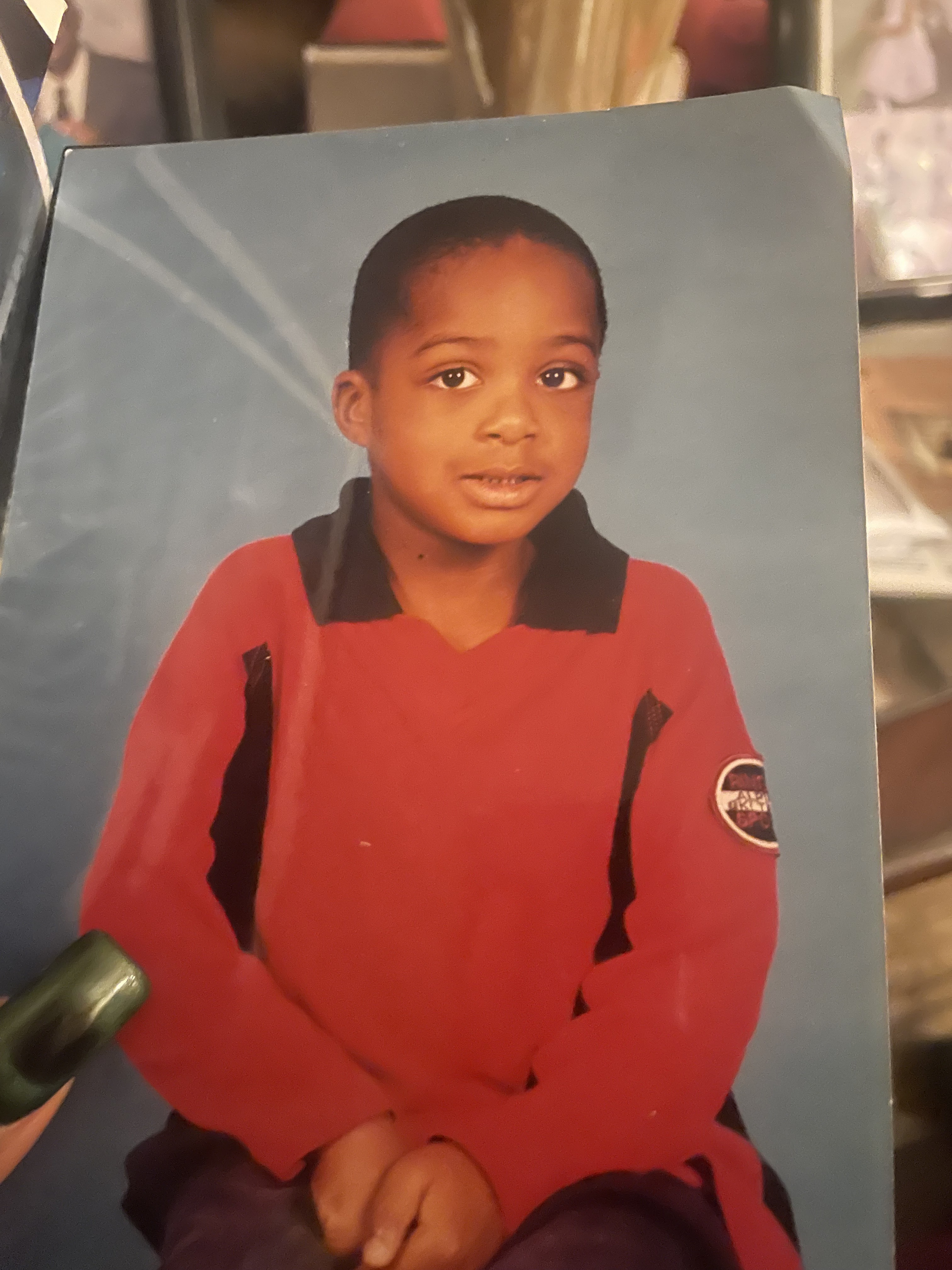 OpenAI demonstration, input: the original photographed portrait. Source.
The result replaces the clothing with an ivory tuxedo, black lapels and a bow tie. The output remains recognizably a photograph of a print, rather than becoming an unrelated studio scene.
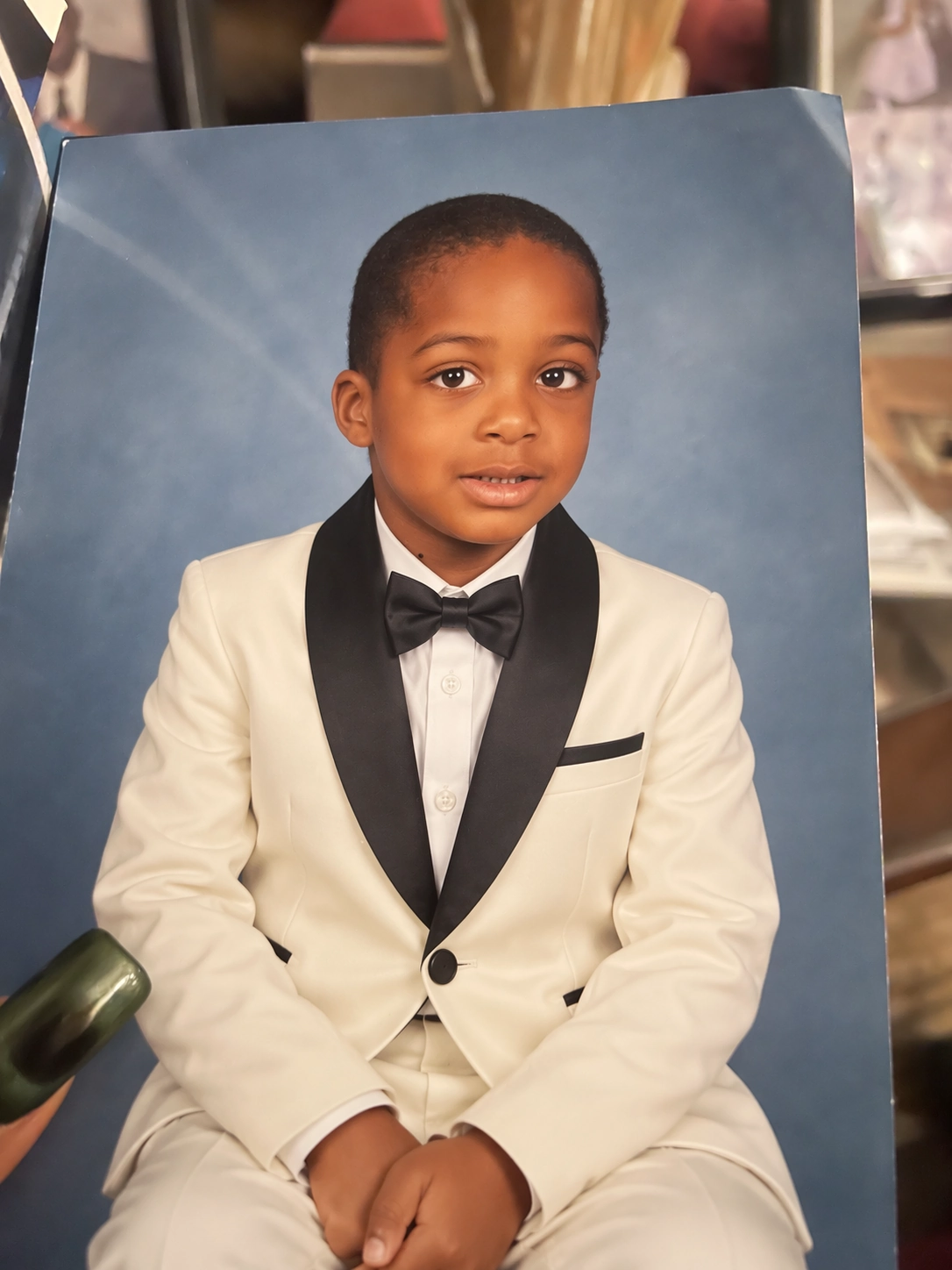 OpenAI demonstration, output: clothing changed while the portrait’s broad pose, blue background and photographed-print presentation remain recognizable. This is not a test performed by SandBase.
The useful comparison is not just “Does the tuxedo look realistic?” Look at the face, head angle, hands and photograph’s outline. Those are the elements a reference-led edit is supposed to carry forward. One selected example supports the possibility of a convincing edit; it does not establish an identity-preservation success rate.
The same release includes a photographed-print-to-headshot example. Such tools can produce a cleaner presentation of an old photograph, but a generated restoration is not recovery of a historically verified original. Keep the untouched source when the distinction matters.
Making the bed, not redesigning the bedroom
The bedroom example is closer to a common commercial task: change the condition of one object while preserving the surrounding scene.
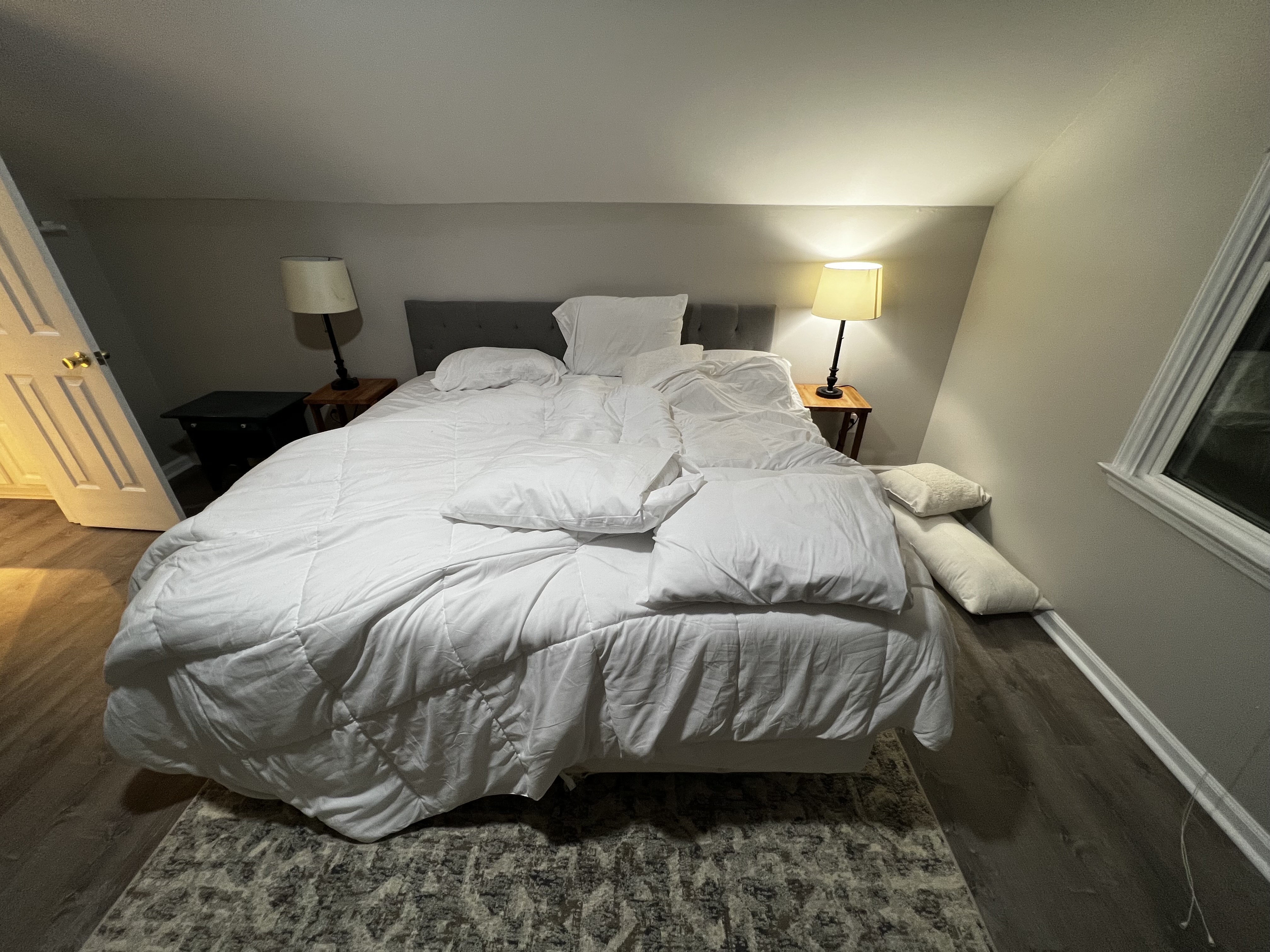 OpenAI demonstration, input: the unmade bed, photographed from the foot of the bed. Source.
In the output, the bedding is straightened and the pillows are arranged. The open door, window, bedside lamps and general camera viewpoint remain recognizable.
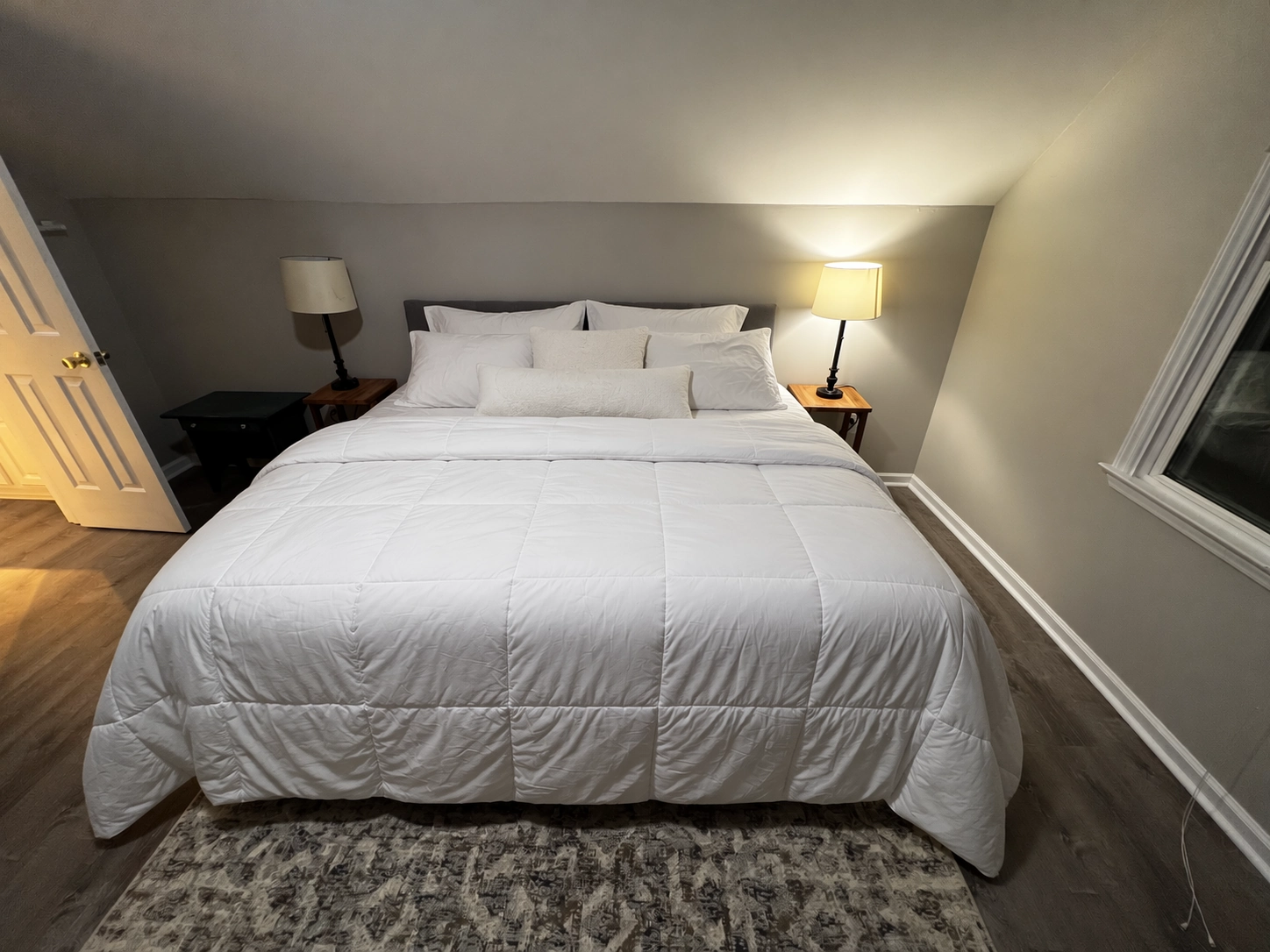 OpenAI demonstration, output: a tidier bed within the same recognizable room. The source output is 1448 × 1086 pixels; this copy has not been resized or recompressed.
For someone preparing room imagery, that is a more relevant capability than generating a spectacular bedroom from nothing. The room must still be the room being offered. Check window geometry, furniture, fixture positions and material details before using an edited image commercially, and disclose edits where required.
There is also an important difference between preserving a scene and preserving every pixel. The first can be useful for creative revisions; the second is what a strict compositing workflow may require. OpenAI describes better precision, not a guarantee that everything outside a requested edit remains byte-for-byte unchanged.
A two-turn web test: $12 becomes $9
For this SandBase Blog report, we ran one generation and one follow-up edit through the ChatGPT web interface on September 9. The test ran in ChatGPT, not through the SandBase API.
Test scope: the account was on the Free tier, with the Thinking toggle off. Its Images landing-page title still said “ChatGPT Images 2.0.” The session exposed no exact image-model identifier, so this is a test of the available ChatGPT web workflow, not a confirmed GPT-Image-2.5 benchmark. There were no retries, no comparison model and no controlled latency measurement.
The first prompt requested a square coffee poster with a cream background, teal ceramic cup, pale wooden table, light from the left and exactly three coffee beans. It specified these four lines:
WEEKEND COFFEE
周末咖啡(Chinese for “weekend coffee”)
SAT–SUN 09:00–17:00
$12
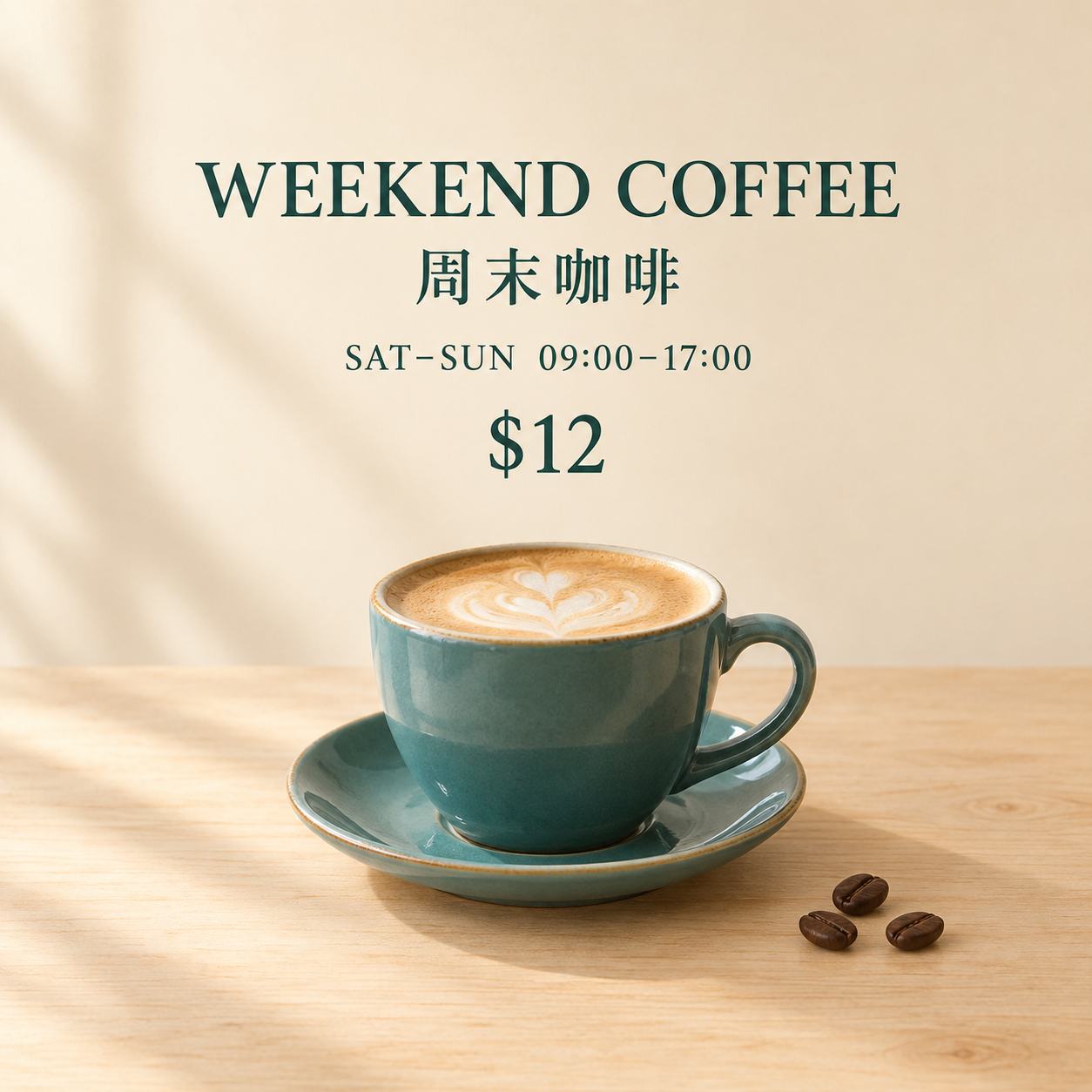 Our web test, first output: the original 1254 × 1254 PNG downloaded from ChatGPT. The backend version was not independently confirmed.
The four lines were readable, and the three requested beans appeared at the lower right. This small example says nothing about dense Chinese paragraphs, unusual characters or tiny legal text.
The follow-up used the image’s editing interface:
Change only the price from “$12” to “$9”. Preserve every other word and all other visual details: the teal cup, latte art, saucer, exactly three coffee beans, lighting, shadows, wood grain, cream background, and the position and size of all elements. Do not redesign or recompose the poster.
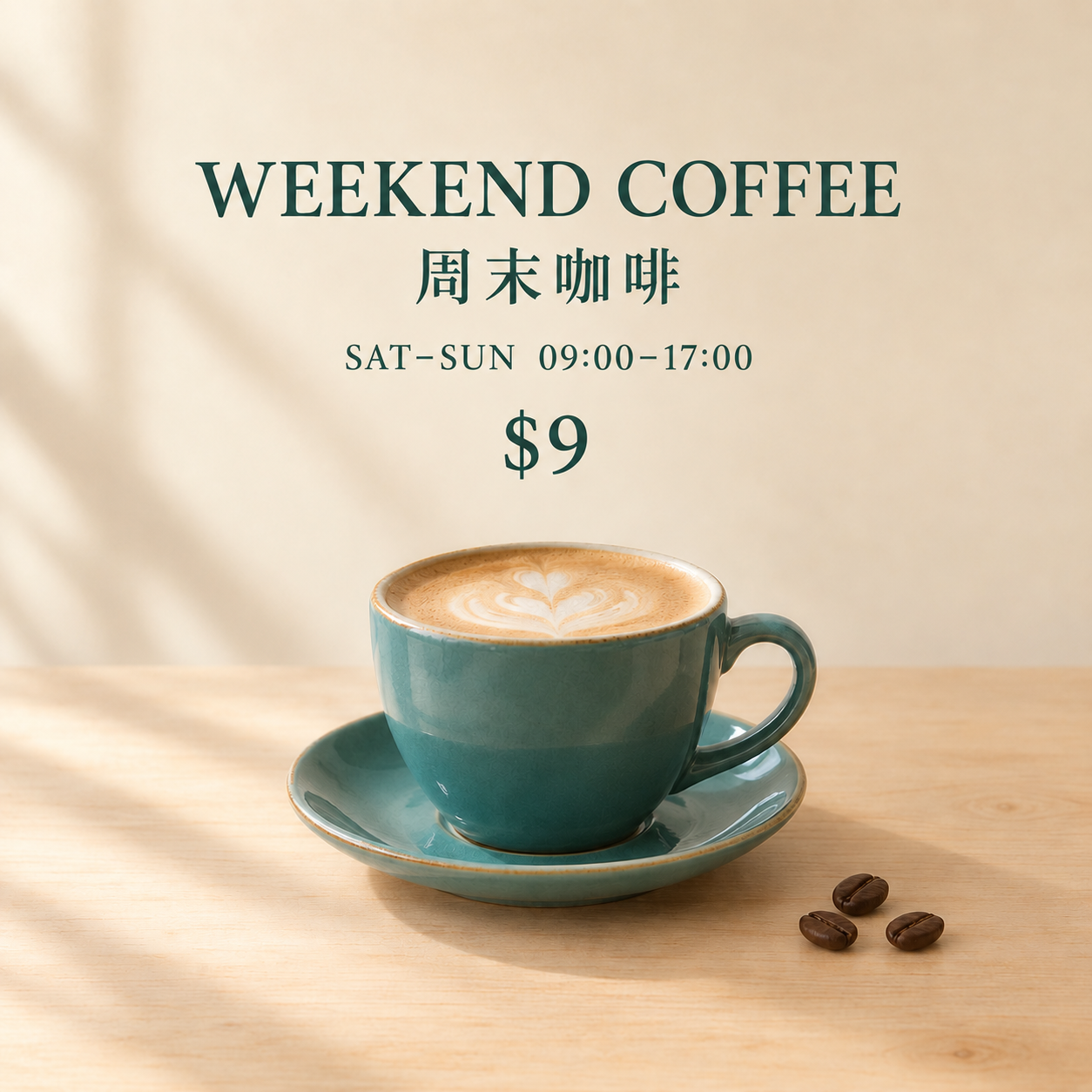 Our web test, second output: the original 1254 × 1254 PNG. The requested price changed, but a similar composition should not be mistaken for identical surrounding pixels.
The price changed successfully. The other text remained readable, the cup stayed in roughly the same position, and the three beans remained. However, close inspection showed changes to the cup’s reflections and latte-art detail. A pixel comparison in the lower cup-and-table region also confirmed changes outside the price area.
The narrow verdict is useful: this run preserved the overall design more successfully than it preserved every fine detail. For a rough promotion concept, that may be enough. For an approved product photograph whose surface texture must remain exact, edit the price as a separate text layer in a conventional editor.
This is also why “Chinese text errors are solved” is too strong. The official image-generation guide still lists text rendering, recurring-character consistency and precise composition as limitations. Proofread the exported file, not just the chat thumbnail.
How to use ChatGPT Images 2.5: Sketch, comments and templates
For an existing image, start with a small revision: upload the original, name the one change you need, and list the elements that must stay. Download the result and compare it with the original before asking for another change. The coffee test above shows why the last step matters, even when the requested text is correct.
A prompt such as “Make the layout more balanced” leaves many decisions open. Sketch gives the model a spatial reference instead: draw a large image area, a smaller price box and where the headline should sit, then describe the desired style.
OpenAI’s documented entry is @Sketch in ChatGPT. The official video below demonstrates the drawing workflow; it is separate from our coffee test.
OpenAI’s Sketch demonstration, with an official player offering a 1080p source. Watch the official video or read the launch section. Playback quality depends on the player and connection.
Image comments serve a different purpose: they locate a revision on an existing image. For example, point at a label and ask for a new price, rather than relying only on “the text near the bottom.” A localized comment is still an instruction to a generative model, not a promise of an exact protected region.
Templates help when the format is known but the initial prompt is not. OpenAI names Poster and Merch examples. A practical brief supplies the audience, required wording, intended placement and visual style, then checks the result against those requirements. A template does not make up missing business details correctly on its own.
OpenAI’s official Templates demonstration (28 seconds), separate from our coffee test. The player offers a 1080p source; playback quality depends on the player and connection. Watch the official video.
Prompt sharing covers reuse. OpenAI lets a shared image optionally include the prompt so another person can try it with their own reference photo and details. Its 1980s portrait example is a clear illustration of a reusable style brief.
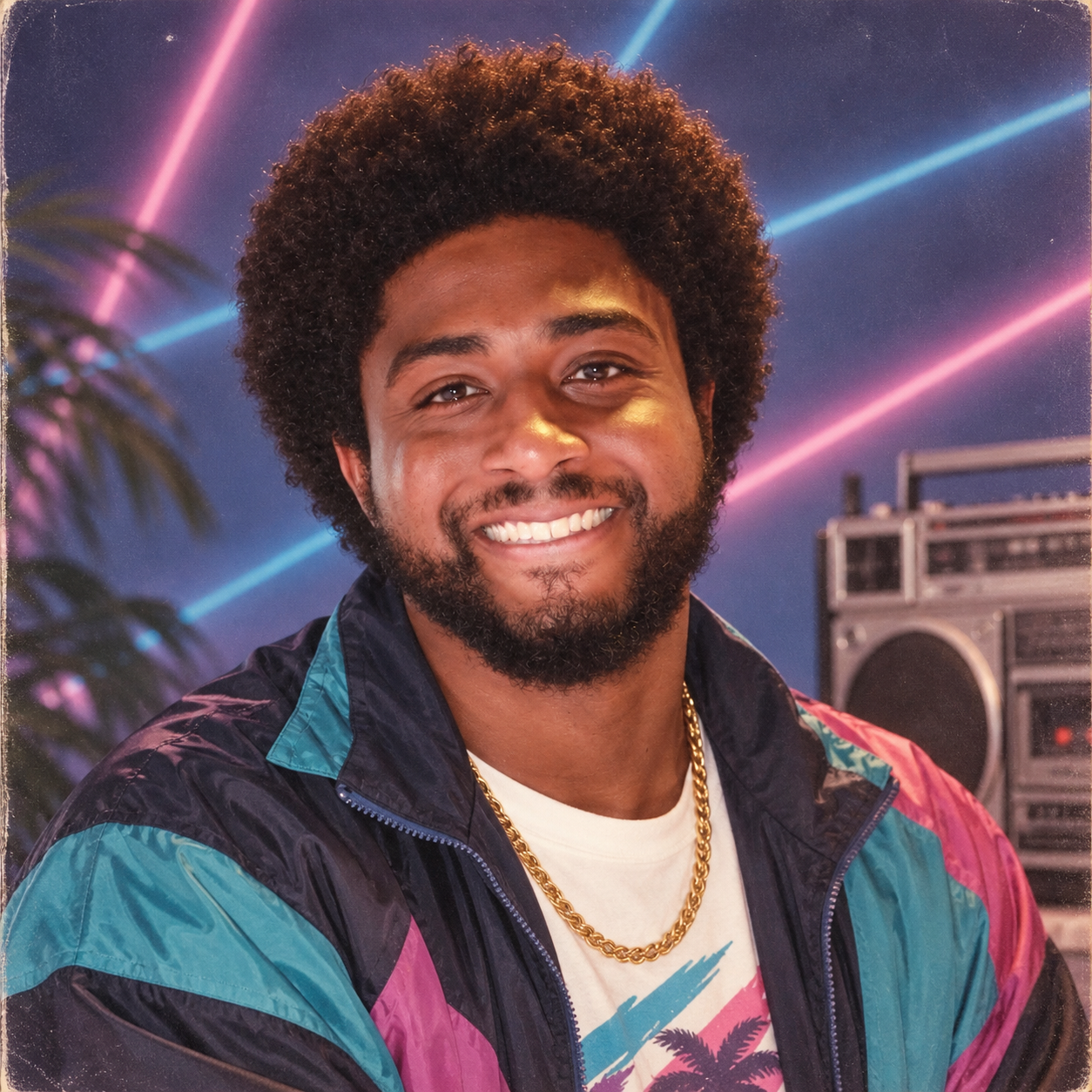 OpenAI’s prompt-sharing example, downloaded as the original 1254 × 1254 PNG. This image is an official demonstration, not a portrait generated in our test.
Only share reference images you are entitled to use. A reusable prompt is not permission to redistribute somebody else’s photograph or likeness.
GPT-Image-2.5 API pricing: Flare or Sunburst?
For a closer look at the two variants, read GPT Image 2.5 Flare vs Sunburst: differences, pricing and which to choose, including a headphone recoloring example that illustrates what to inspect after a local edit.
The API exposes two model identifiers. “API” here means calling the image model from your own software rather than clicking through ChatGPT.
| Model | OpenAI’s stated positioning | A sensible first evaluation |
|---|---|---|
gpt-image-2.5-flare | Default for most applications; faster generation and editing | Draft variations, social assets and frequently revised product concepts |
gpt-image-2.5-sunburst | More precise detailed creative work, with longer generation times | Final campaign candidates and edits where small deviations cause rejection |
Those are evaluation starting points, not results from our own API comparison. Run the same reference image and requested edit on both, then compare correctness, unwanted changes, completion time and actual usage.
As checked on September 9, the Standard pricing table lists the same per-million-token rates for both: $8 for image input, $2 for cached image input and $30 for image output; text input is $5, or $1.25 when cached. Equal rates do not imply equal cost per image: model and quality settings can change token consumption.
OpenAI’s announcement quotes Manus’s Lucky Liao reporting Flare at two to four times GPT-Image-2’s speed in Manus’s evaluations. It also quotes Adobe confirming the new models in Firefly. These are attributed partner statements, not independent performance results or proof of access on a particular account.
To compare other models on the same editing task, see SandBase Blog’s image-editing API comparison. For implementation, open the SandBase image model API catalog to check the chosen model’s inputs, then follow the SandBase image and video API guide to submit a task and retrieve its result. Use the exact model ID and required fields from that model’s reference; this article does not establish that SandBase offers GPT-Image-2.5 Flare or Sunburst.
FAQ
Is Images 2.5 available to free users?
OpenAI announced rollout across all tiers. That does not mean unlimited usage, and the rollout statement alone does not identify the backend for a specific generation. Check the controls and limits shown in your account.
Can it change only one part of a picture?
OpenAI reports improved targeted editing. Our separate, version-unconfirmed web test changed the requested price while retaining the broad composition, but fine details changed too. Use a conventional editor when unchanged regions must remain exact.
Are the examples here official or hands-on?
The portrait, bed, 1980s image and all three videos (launch, Sketch and Templates) are OpenAI demonstrations. The two coffee posters came from the recorded two-turn ChatGPT web test. They are deliberately labeled separately.
How do I keep an exported image sharp?
Download the image from ChatGPT rather than taking a screenshot of its chat thumbnail. Inspect that original file at its native size before publishing. Enlarging a small output does not recover missing detail, and repeatedly saving it in a lossy format can degrade text. OpenAI also uses provenance metadata and invisible watermarking; keep that provenance intact.
The revision matters more than the first image
The release’s most useful claim is not that it can make another attractive picture. It is that a change request should cost less time and discard less of the work already approved.
Start with one real revision: a price, a garment or a background element. Save the original, specify what must stay fixed, and inspect both what changed and what should not have changed. A model earns a place in that workflow by reducing rejected revisions—not by producing one impressive launch example.