Tripo P1 vs P2 in 2027: Textured GLBs at a 20K Face Budget
Tripo P1 and P2 tested on two props with the same 20K request. Compare exported triangles, material maps, GLB bytes, prices and front-to-back renders.
Tripo P1 delivered 19,328 triangles for a textured horn ornament. Tripo P2 delivered 21,011 from the same image and a shared 20,000-face request. The P2 file was still 2,323,944 bytes smaller. The P1 result included three embedded maps and the tested P2 result included one. The same direction held on a toy robot. A switch between the two endpoints can change the mesh budget, material inputs and download size at the same time.
Key takeaway
- P1 fit under 20,000 triangles on both props. P2 exceeded it by 1,011 triangles on the horn and 898 on the robot. Enforce a hard scene cap after downloading and counting the exported mesh.
- The P2 standard configuration with PBR disabled produced a GLB 67.08% smaller on the horn and 46.84% smaller on the robot. Its one embedded image carried base color. P1’s three maps also supplied normal and metallic-roughness inputs.
- The settled charge was $0.60 per P1 job and $1.32 per P2 job. Four jobs cost $3.84 on November 14, 2026 UTC.
- The horn had a substantially different profile between versions. For props that can rotate, inspect the profile and the back alongside the triangle and texture counts.
Put both routes on the same task
Send a textured image-to-3D job to Tripo P1 on SandBase and Tripo P2 on SandBase with the same PNG, texture: true, face_limit: 20000 and seed 42. The horn ornament and the toy robot were separate inputs. Each route received the same source bytes within each pair, for a total of four first submissions. The comparison uses the untouched GLBs and the charges recorded when the jobs settled. There was one result per prop and route.
P2’s settings were texture_quality: "standard", pbr: false and quad: false. The inspected SandBase P1 route did not expose equivalents to those three controls. The exercise compares the deliveries from the specified requests. Turning P2 PBR on would define another test. The shared seed records how to submit the same requests again. The routes can differ in how they use it.
| Field | Tripo P1 | Tripo P2 |
|---|---|---|
| SandBase route | P1 image-to-3D | P2 image-to-3D |
| Input | One PNG per job | Same PNG within each pair |
| Seed sent | 42 | 42 |
| Requested face limit | 20,000 | 20,000 |
| Texture flag | Enabled | Enabled |
| Texture controls used | Texture enabled | Standard with PBR disabled |
| Triangles delivered, horn / robot | 19,328 / 19,225 | 21,011 / 20,898 |
| Embedded image maps per GLB | 3 | 1 |
| Dimensions of each embedded image | 2,048 × 2,048 | 2,048 × 2,048 |
| Settled charge per job | $0.60 | $1.32 |
The test focuses on original download and rendering behavior. It excludes account-wide throughput, completion-time estimates and multi-image reconstruction. The 2027 title indicates the edition. The dated measurements are the four original jobs listed here.
Count exported triangles and bytes separately
| Sample | Exported triangles | Relative to 20,000 | Original GLB | Position records |
|---|---|---|---|---|
| Horn, P1 | 19,328 | −672 | 3,464,304 bytes | 20,491 |
| Horn, P2 | 21,011 | +1,011 | 1,140,360 bytes | 11,818 |
| Robot, P1 | 19,225 | −775 | 3,731,864 bytes | 25,465 |
| Robot, P2 | 20,898 | +898 | 1,983,940 bytes | 23,846 |
Each file had one mesh and indexed triangle geometry. We summed the indexed triangle counts and counted position accessor records separately. A position record can repeat a coordinate to carry attributes for shading or a texture seam. It is a stored vertex entry. The triangle count describes the exported primitives. For example, the P2 horn carried fewer position records and more triangles. Its stored index data was 252,132 bytes, compared with 115,968 for P1. Index width as well as the number of elements contributes to that difference.
The P2 horn was 5.06% over 20,000 and the robot was 4.49% over. A prop that needs to remain below 20,000 in the final scene would still have to be adjusted or rejected in both P2 cases. At import, check the exporter that produces the delivery format. If you change the topology afterward, count the resulting triangles again and compare the visible openings and edges before publishing. The P2 face limit and remesh comparison measures that next step. For upper budgets, the 40K and 50K comparison with Hunyuan shows how two other paired limits landed.
Understand the maps before comparing the renders
Each P1 GLB stored a base-color texture, a normal map and a packed metallic-roughness map. Each tested P2 GLB contained a base-color JPEG. For the horn, the compressed image payload occupied 2,690,728 bytes in P1 versus 508,330 in P2. That difference accounts for most of the gap in the downloaded horn files. The remaining gap includes the geometry attributes, indices and container overhead. The two sets shared the same 2,048 × 2,048 map resolution. A label such as “2K textured” therefore leaves out how many maps the renderer receives.
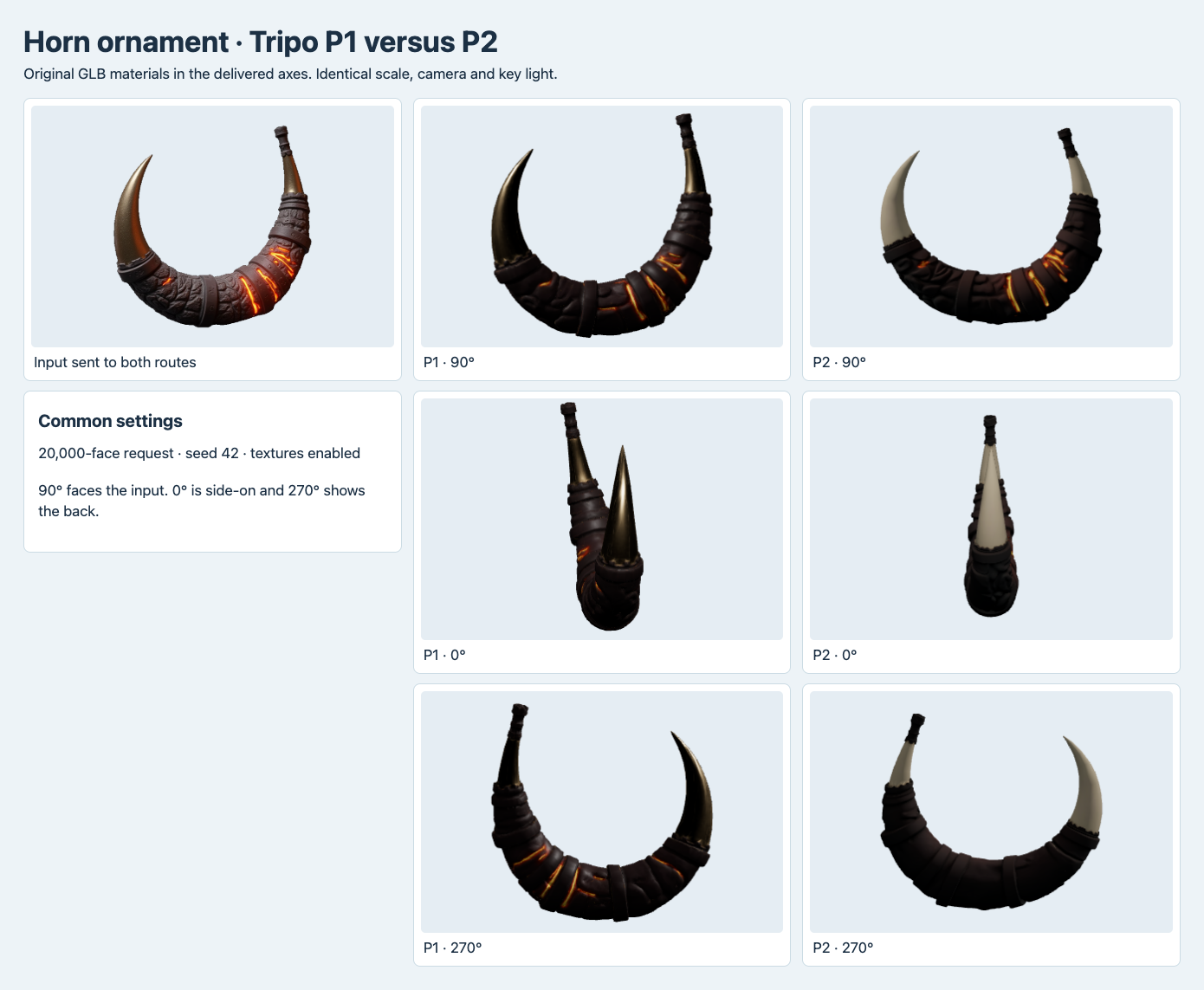
The horn’s wrapped bands, tips and rear surface from each original GLB. The angles and lights are shared. A change in the highlights can come from the material and shape together.
The difference is visible on the horn. The P1 asset has darker bronze-looking tips, with a brighter orange area visible from the rear. The P2 tips appear paler under the same illumination. A base-color map can paint a line where the surface appears to turn. A normal map can move a highlight without adding geometry. To inspect the tip spacing, use the profile and the wireframe. To review appearance, render with the destination pipeline’s light and material settings.
Both originals loaded in the browser and returned zero glTF validator errors. Each P1 result had one warning, MESH_PRIMITIVE_GENERATED_TANGENT_SPACE, and each P2 result had zero warnings. The P1 normal map is a reason to check how the destination renderer generates or imports tangent space. The warning alone does not measure a visible difference. A zero-error report also leaves the application triangle and byte budget for a separate check.
Rotate both assets before accepting the delivery
We preserved the delivered yaw, centered each mesh and set its longest bounding dimension to the same display length. The camera and lights were constant within the comparisons. At 90° the examples face the input direction. At 0° and 270° they show the side and the rear. The neutral pass uses one shared material from the front and displays triangle edges at the other two angles. The camera looks from slightly above the center in all three views.
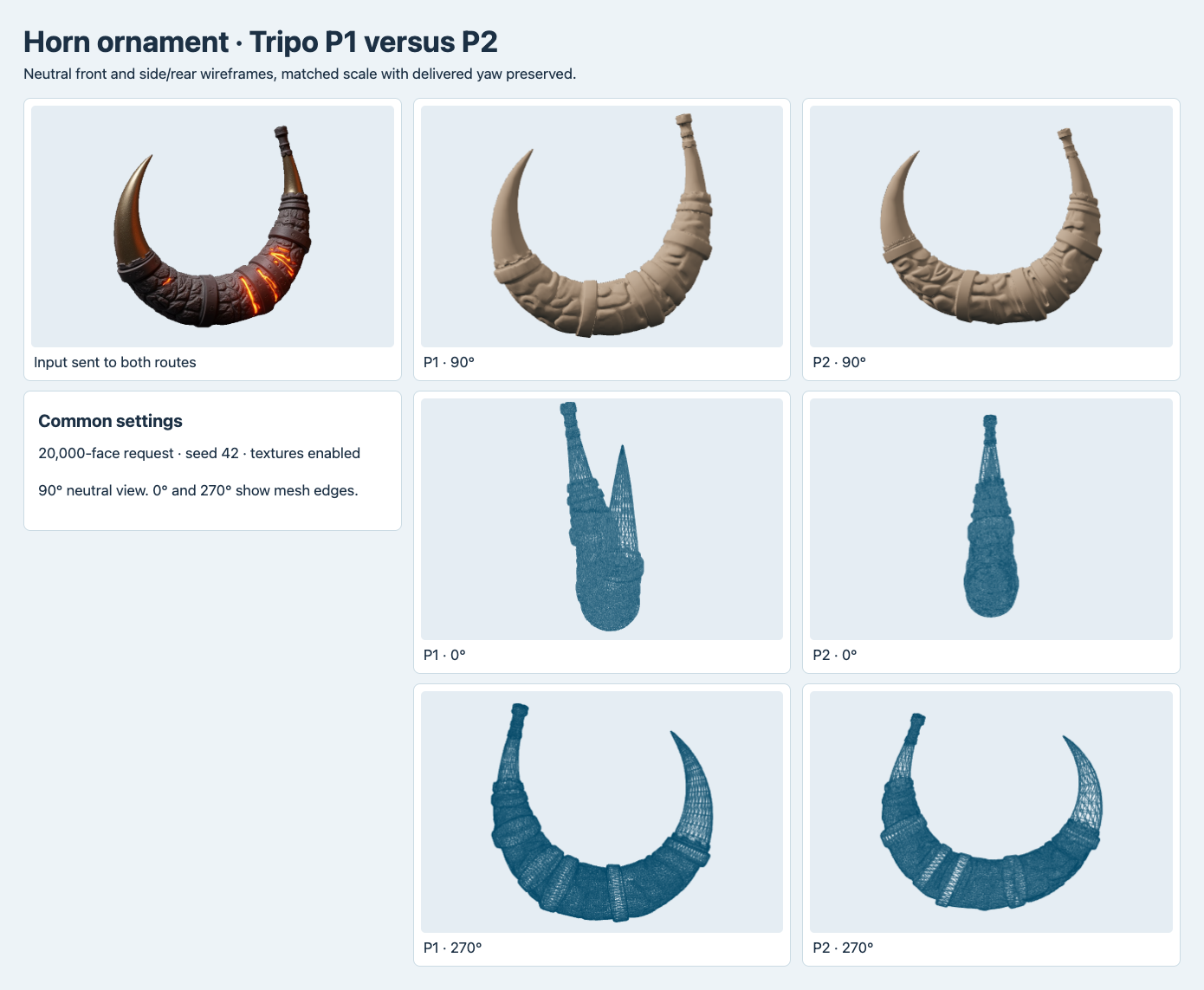
Both horn meshes shown at the same normalized display scale. The side wireframes make the different tip spacing visible even with the textures removed.
The horn changes shape conspicuously in profile. Viewed side-on, P1 shows two tips with a visible gap. The P2 tips nearly overlap in that projection. The delivered X span is 37.38% of the longest bounding dimension on P1 and 24.67% on P2. The camera faces along X in the front view, so the span summarizes front-to-back variation in this coordinate setup. It includes the whole ornament and gives no thickness for any particular point. The robot’s corresponding spans were 24.27% and 25.35%. The effect was much smaller on that example.
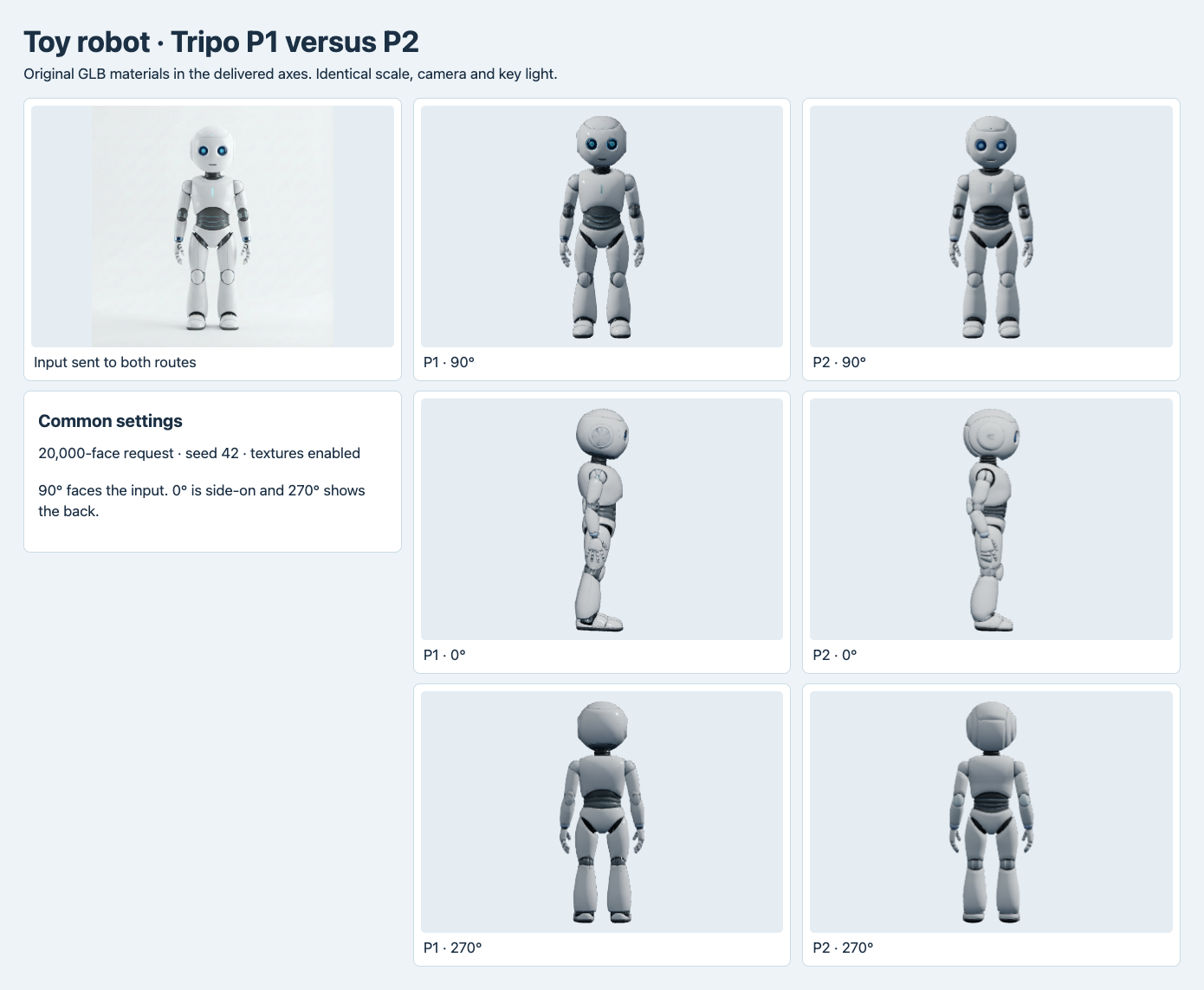
Both routes render the toy’s face and side appendages. The rear panel shapes differ, although the same front image went into both jobs.
The robot front broadly preserves the source’s large rounded head, small body and blocky limbs. From the back the P2 head has a more conspicuous rectangular panel outline. The P1 result has a smoother, faceted-looking rear shell in the corresponding view. That gives a reviewer a place to zoom in when the rear will be visible. Only the input view is available as reference, so the screenshots establish differences between deliveries and show their visible relation to that view. There is no measured reconstruction error relative to an original mesh or a photographed back.
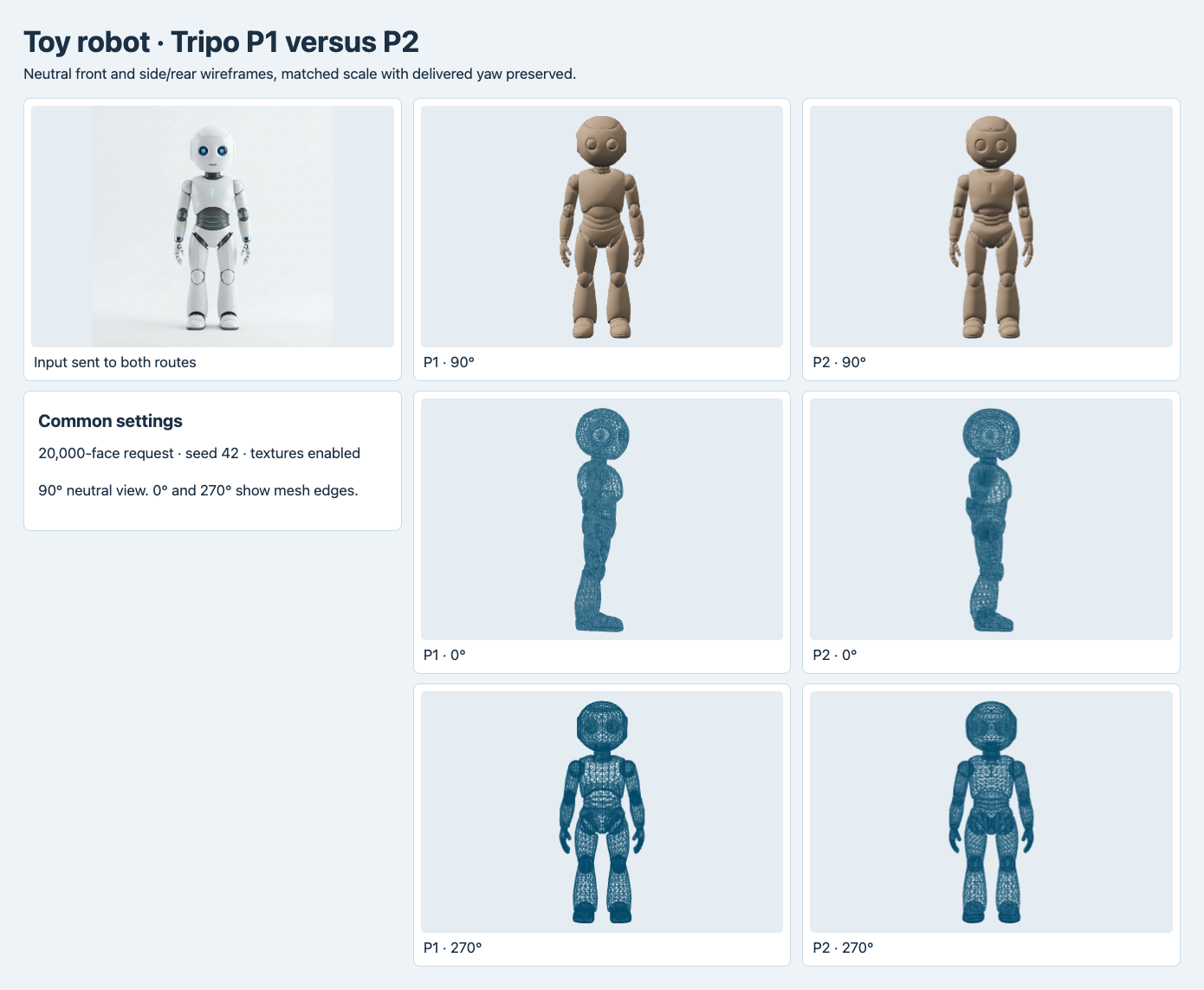
The wireframes show where geometry exists independently of the printed effect of the texture. Count the file’s indexed triangles to make a budget decision.
Price the job and the delivery
| Workload at the observed settings | P1 | P2 |
|---|---|---|
| One textured submission | $0.60 | $1.32 |
| Ten submissions on one route | $6.00 | $13.20 |
| One hundred submissions on one route | $60.00 | $132.00 |
The workload rows multiply the measured per-job charges. They assume a single submission for each input and omit retries, cleanup, storage and serving. P2 was 2.2 times the generation charge per submitted prop in this configuration. For web delivery, record the expected number of downloads separately. A smaller original GLB can reduce the bytes sent to clients opening the model, depending on cache behavior and any later compression. Original file size alone does not determine viewer frame rate, decode time or device memory.
For these four jobs, start with P1 if you want the lower generation charge, the delivered normal and metallic-roughness maps, and a result that fit the tested triangle cap. Start with the tested P2 mode if you want fewer source bytes and your application accepts base-color-only textures. Recheck the triangle cap before delivery. If both an under-20K mesh and a small textured file are strict requirements, set explicit thresholds for both and accept only after validating the processed file and its visual result.
Frequently asked questions
Does P1 always produce fewer triangles than P2?
These two P1 outputs were smaller in triangle count than their P2 counterparts. The comparison has two images and one generation per combination. Count the asset you actually deliver, particularly if your pipeline hard-fails above 20,000 triangles.
Can a textured P2 job deliver additional maps?
The tested P2 request explicitly disabled PBR and used standard texture quality. Check the P2 route schema for alternate settings, and inspect the returned material and charge for that request before making a production decision.
What should I save for a reproducible comparison?
Keep the input bytes, exact endpoint and request controls, settled charge, model file hash and validation report. Capture the front, side and back with a known camera and use a neutral pass when the question is about geometry. Save raw and derived counts separately if you add a mesh optimization step.
Found this useful? Share it