Tripo H3.1 Text-to-3D vs Image-to-3D: One Prop Tested
Compare two Tripo H3.1 routes from one prop brief. See which visible parts survived, how close the meshes came to a reference and what each job cost.
Tripo H3.1 made two recognizable blue field tools from the same design brief. The $0.24 text version had the specified amber and green lenses but omitted the open carry handle at the top. The $0.36 image version preserved it. The image job also came closer to the proportions of the authored mesh, with 96.37% front silhouette overlap compared with 67.50% from text. Neither recreated the two concealed details on the back. For a game prop, the choice depends on whether the team is still exploring the form or needs a particular silhouette to survive.
Key takeaway
- Both requests shared a 50,000-face target, seed 42, textures enabled, PBR disabled and the standard geometry and texture settings. One used a written brief and the other used the authored prop’s front three-quarter image.
- The front appearance was recognizable on both. The image output retained the overhead carry bar, open gap and broad lower grip. The text output used a narrow cylindrical grip and added a pale horizontal feature to the front.
- The image output’s front and side silhouette overlaps against the reference mesh were 96.37% and 90.69%. The text output measured 67.50% and 65.93% after centering, scale normalization and a fixed quarter-turn alignment.
- Both downloaded GLBs had one 2,048-square embedded image and no validation errors or warnings. The two model calls cost $0.60 total. A local Three.js render supplied the concept image. Its authoring labor and later asset cleanup were outside that total.
Keep the design constraints common
The prop was a stylized handheld signal tool. Its first-order features were a rounded navy body, a short cream grip, enough spacing between two different-sized circular lenses, a burgundy switch under the green lens, teal pads, a dark lower band and an overhead silver carry bar. We authored a simplified 3D reference from that specification and rendered a 768 × 768 PNG. The PNG fixes how the lenses, grip and case line up in one view, which a list of features leaves open.
Tripo H3.1 Text to 3D received only the prompt below. Tripo H3.1 Image to 3D received only the authored front image. We sent both once on November 14, 2026 UTC. Both submissions request the same delivery settings and use the same numeric seed. The internal sampling of each route remains unmeasured. The source image also conveys spacing and proportions absent from the words, so this compares two practical starting points rather than an equal-information model test.
A single stylized hand-held field signal tool, upright isolated game prop. A navy blue rounded rectangular instrument housing sits on top of a short cream vertical handle. On the front when looking at the tool are exactly two circular lenses, a large amber lens on the viewer’s left and a smaller lime-green lens on the viewer’s right. A narrow upright burgundy switch sits below the green lens. A full-width dark rubber band follows the bottom of the navy housing, and a short horizontal silver carry handle with a clear open gap sits above it. Small teal side pads. No text, no logo, no ground plane, no added objects.
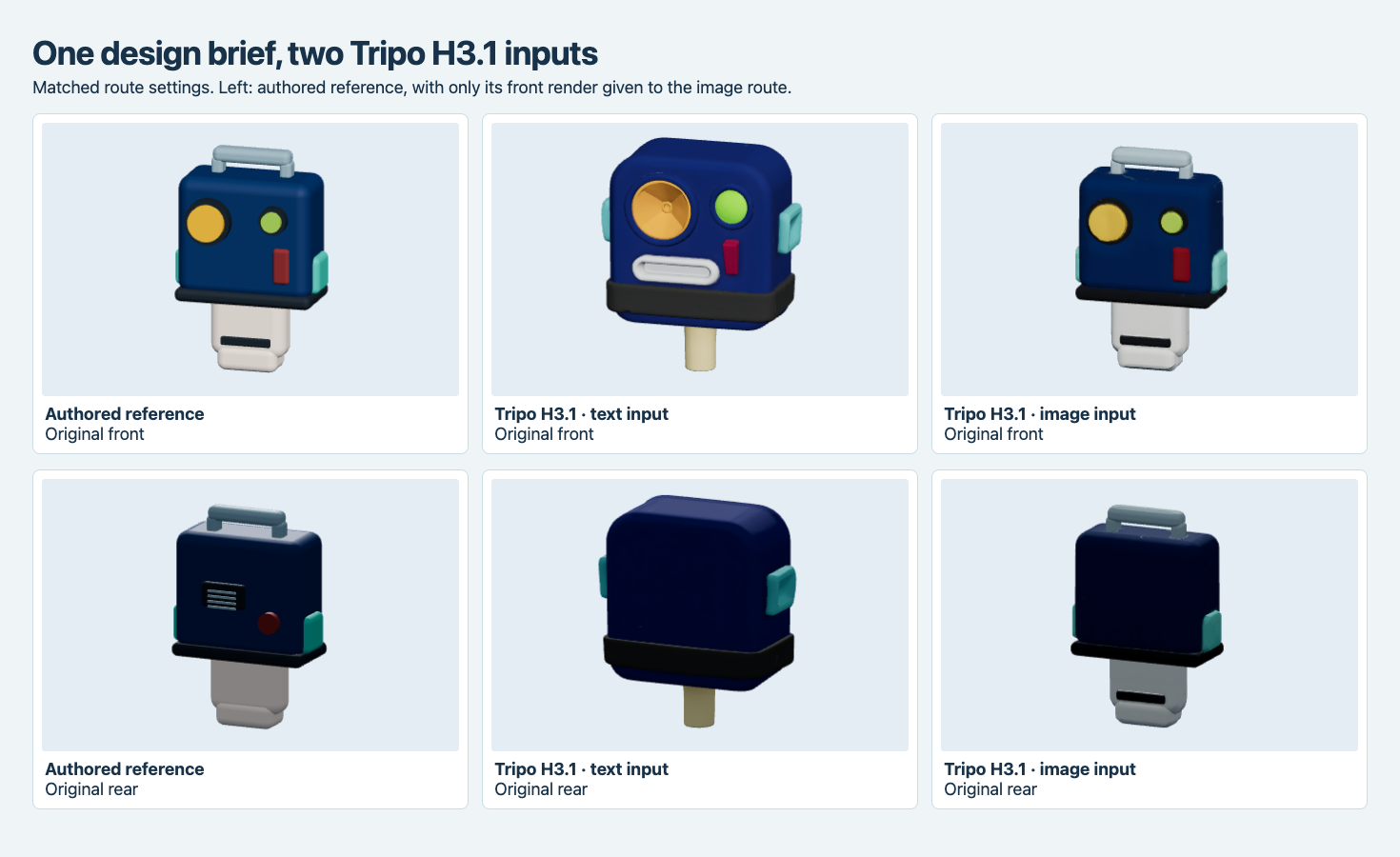
The image route received only the front render. The authored model on the left gives a held-back rear view for inspection. The cover is illustrative.
Check the features before comparing file statistics
The text result kept the larger left amber and smaller right green lenses, the navy case, the burgundy vertical switch and teal accents. Its large lens acquired a more elaborate inner shape. A pale horizontal insert appeared above the dark band, and the bottom grip was much thinner, more like a short cylinder. Most importantly, the top of the case was closed and rounded without the carry bar from the prompt.
The image result kept the reference’s more rectangular proportions, the circular lens arrangement and the bottom dark band. It also included a broad cream grip and a horizontal silver bar with a visible gap beneath it. The rear of the generated grip shows a dark strip, whereas the corresponding authored rear does not. This distinction matters for an asset that will spin in a viewer. A desirable front appearance can survive while other faces acquire new details.
Turning off the materials confirmed that the raised rims, broad grip and overhead bar can be inspected as geometry. Neither generated rear shows the small louver and circular connector modeled on the reference. Those features were withheld from the image, and the text prompt did not describe them. The back comparison captures what the chosen inputs left unconstrained.
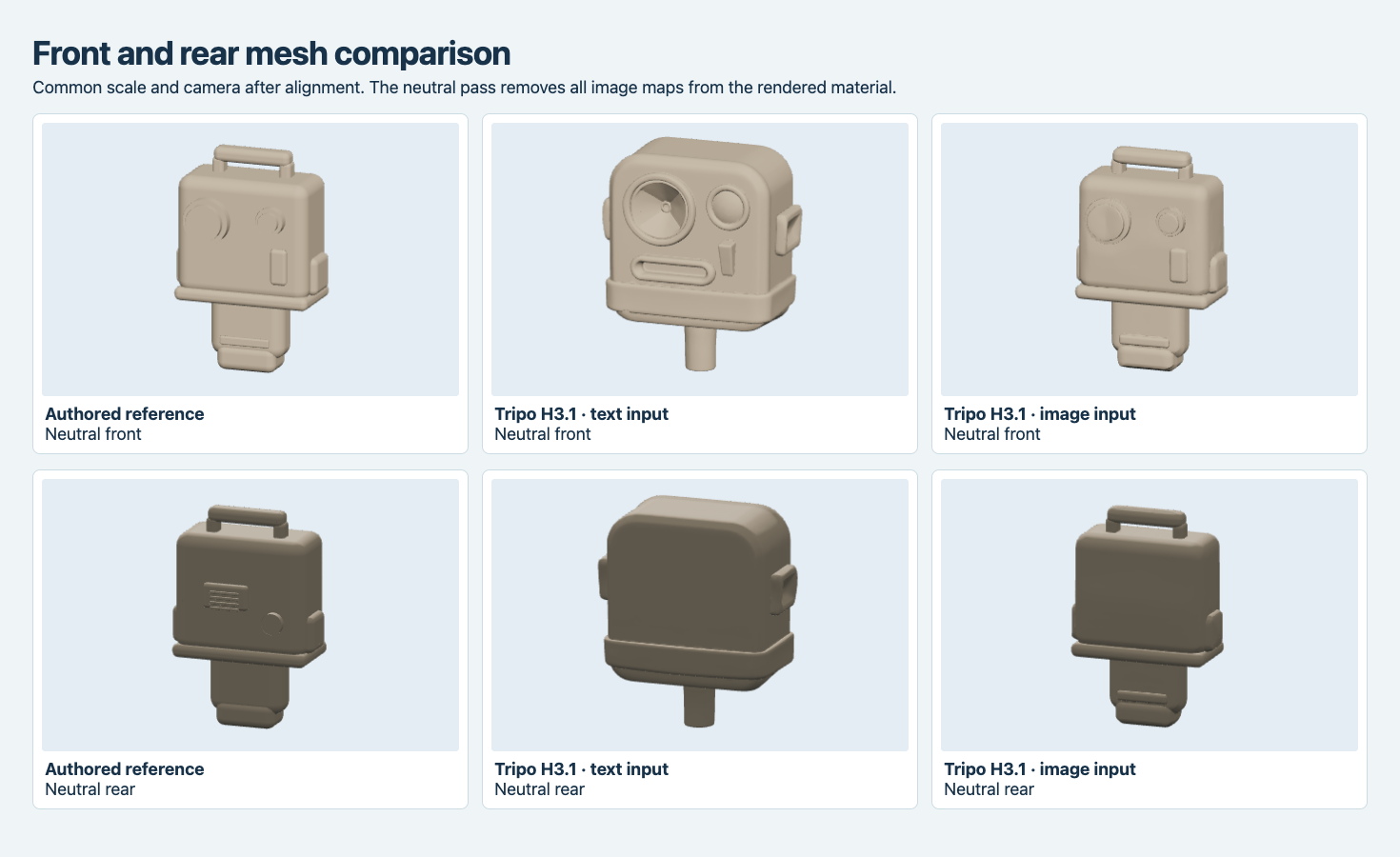
Common cameras, aligned by the generated lenses, and one shared neutral material. The text output’s missing carry bar and narrower grip remain visible with textures removed.
Measure shape against the authored reference
We centered each GLB on its bounding box and used the longest dimension to normalize display size. Both outputs needed a −90° rotation around Y to match the front reference axes. We used the lenses for that alignment and kept it for the side and rear checks. The measurements use axis-aligned rays at 56 × 56 points per view, which is different from the slight elevation of the browser screenshots.
| Measurement against the reference mesh | Text result | Image result |
|---|---|---|
| Front silhouette overlap | 67.50% | 96.37% |
| Side silhouette overlap | 65.93% | 90.69% |
| Front mean first-hit depth difference | 7.28% | 1.03% |
| Side mean first-hit depth difference | 11.40% | 0.69% |
| Rear mean first-hit depth difference | 7.54% | 0.79% |
The overlap divides the number of points where both meshes were hit by the number where either mesh was hit. Depth difference averages the distance along the ray only for points that hit both meshes, expressed as a percentage of each normalized longest dimension. Large areas of flat shell can make the rear mean small even when the louver and connector are missing. Check critical details in a crop or a parts list where that would affect the decision. No physical scale or surface tolerance was measured.
Compare price, texture and generated payload
| Delivered field | Text | Image |
|---|---|---|
| Generation charge | $0.24 | $0.36 |
| Original triangles | 48,606 | 47,498 |
| Original GLB | 1,890,728 bytes | 1,897,324 bytes |
| Embedded base-color JPEG | 424,392 bytes | 452,120 bytes |
| Image size | 2,048 × 2,048 | 2,048 × 2,048 |
| glTF validator errors / warnings | 0 / 0 | 0 / 0 |
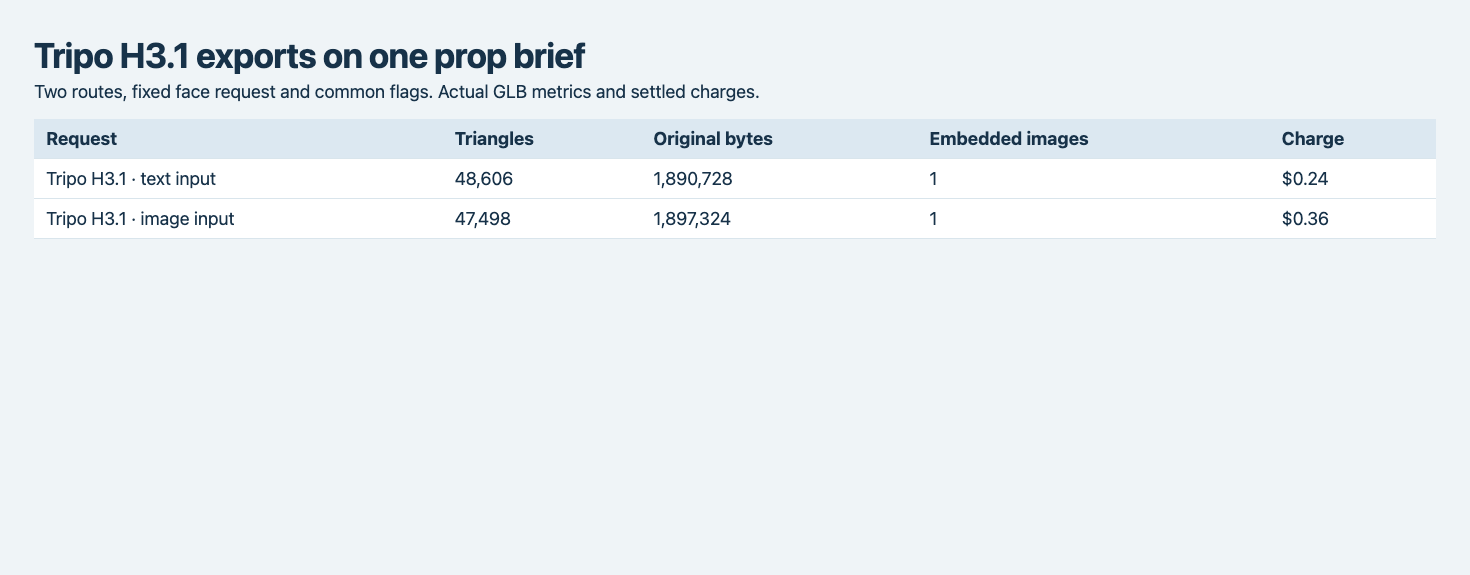
The two native GLBs were similar in size. The triangle counts and fees belong to the exact configuration tested.
At these settings the image route cost $0.12 more. For ten independent submissions at the observed prices, generation would be $2.40 from text or $3.60 from images, before retries, cleanup or concept work. There was no third-party fee for the input PNG in this experiment because it came from a locally authored reference mesh. Preparing this controlled input required writing and checking geometry and rendering it. We did not time that work or price artist labor. This makes the generation-price comparison reproducible and leaves finished-asset cost open.
If a reference already exists, comparing both routes only adds the measured generation and resulting cleanup. If the team must commission or generate a concept, that cost belongs beside the image call. A text attempt also takes time to rewrite when a part is missing. Record which change is required and how many iterations it takes before comparing the accepted file’s cost. The four-route text-to-3D prototype test shows the same distinction for part counts and divider orientation.
For a silhouette-driven prop, this one sample favors an image that shows the carry gap, lens sizes and grip outline. For rapid exploration of alternate shapes, the text output carries enough of the brief to serve as a starting point. To approve a specific rear panel, supply its actual reference and test the route that accepts it. See the Tripo H3.1 multi-view experiment for examples where the rear and side inputs changed the result.
Capture the handoff with the same camera
Keep the text or source-image hash, settled run and exact original file in the review record. Use a neutral view to confirm that gaps are actually open and that accessories are present in the geometry. A rear capture is valuable even when only the front came from a reference. If a later iteration improves the top handle but invents a different rear panel, the paired views make it possible to decide which change is acceptable for the final asset.
Frequently asked questions
Was the concept image AI-generated?
The image was a local render of the manually authored geometry described in the test. Only the front PNG was submitted. The cover illustration and retained rear view did not go into either route.
Did more triangles improve fidelity here?
The text output had 1,108 more triangles and a substantially lower front silhouette overlap with the authored shape. The two deliveries differ in geometry and input, so triangle count alone cannot explain fidelity.
Can I use these prices as a production quote?
They describe two settled generation calls in the tested mode. Add your concept preparation, acceptance review, edit or retry cost and delivery work to price an accepted asset.
The same authored tool also appears in our Meshy 7.1 and T2.5 static-prop topology test, which compares original triangle counts, openings, wireframes and inventory thumbnails.
The four-API prototype timing comparison also uses this prop to measure repeated completion observations and an explicit import gate.
Found this useful? Share it