Gemini Omni Flash: Google's Fast Video Model
Deep look at Gemini Omni Flash for video generation — token-based pricing, sub-30s generation speed, four operation modes, and the cost predictability trade-off.
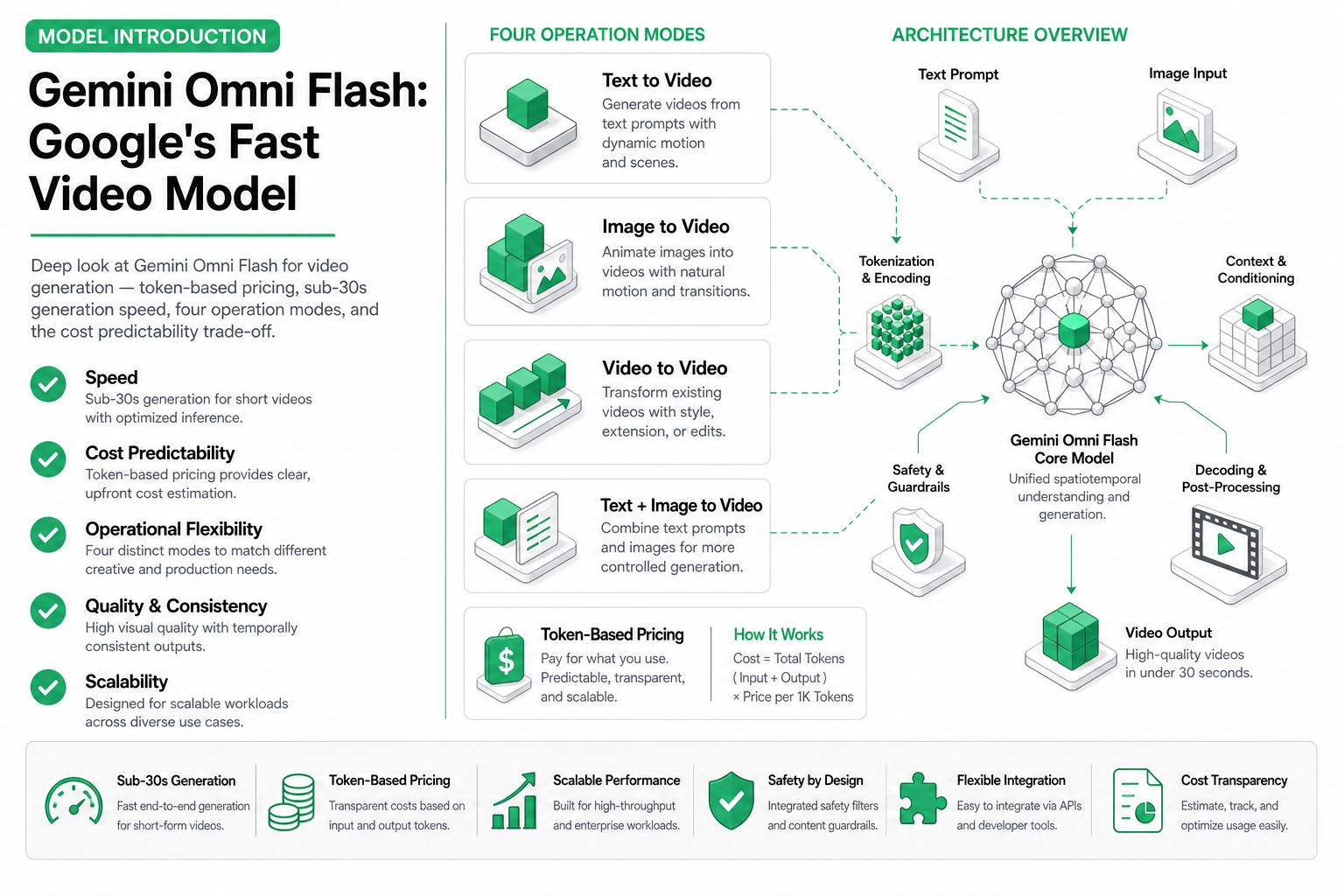
TL;DR — Gemini Omni Flash generates video in 10–30 seconds, making it the fastest option available on SandBase. It supports text-to-video, image-to-video, reference-to-video, and video editing. The trade-off: token-based pricing makes per-video cost less predictable than per-second or per-call models. Best for speed-critical pipelines and interactive applications.
Speed kills — or in this case, speed wins. Gemini Omni Flash from Google trades some visual fidelity for generation times that are 3–5× faster than competing models. When your agent needs a video response in under 30 seconds, this is currently the only viable option.
But there’s a catch: token-based pricing. Unlike Kling’s clear $X/second or H3’s flat per-video rate, Gemini Omni Flash bills by input and output tokens. Your cost per video depends on prompt length, image inputs, and generated output complexity. Let’s break it all down.
What Gemini Omni Flash offers
Gemini Omni Flash is Google’s speed-optimized multimodal model with video generation capability. It sits in Google’s model lineup as the “flash” tier — optimized for latency over maximum quality.
Available on SandBase as: google/gemini-omni-flash
Four operation modes
| Mode | Input | Output | Use case |
|---|---|---|---|
| Text-to-Video | Text prompt | Video (silent) | Creative generation |
| Image-to-Video | Image + text | Video (silent) | Animate stills |
| Reference-to-Video | Video + text | New video | Style/motion transfer |
| Video Edit | Video + edit instructions | Modified video | Transform existing content |
All four modes produce silent video — no native audio generation (unlike MiniMax H3).
Speed advantage
Here’s where Gemini Omni Flash earns its name:
| Model | 5s video generation time | 10s video generation time |
|---|---|---|
| Gemini Omni Flash | 8–15 seconds | 15–28 seconds |
| Kling Turbo Standard | 15–30 seconds | 25–45 seconds |
| Kling Omni Pro | 45–90 seconds | 70–120 seconds |
| MiniMax H3 | 60–120 seconds | 90–180 seconds |
For interactive use cases — a user submitting a prompt and waiting for the result — Gemini Omni Flash is the only model where the wait feels acceptable. Sub-30-second generation means you can build real-time-ish video generation into user-facing products.
When speed matters
- Chatbot with video responses: User asks for a visual explanation, agent generates and returns a video within the conversation flow
- Interactive design tools: Designer iterates on video concepts with rapid feedback cycles
- Live content pipelines: News or event content needs video generated within minutes of a trigger
- Testing and iteration: Developers testing prompts need fast feedback, not 2-minute waits
Token-based pricing
This is the complex part. Gemini Omni Flash uses Google’s token-based billing:
| Component | Approximate cost |
|---|---|
| Input tokens (text prompt) | $0.10 / 1M tokens |
| Input tokens (image) | ~1,000 tokens per image |
| Output tokens (video) | Variable, estimated $0.40 / 1M tokens |
| Estimated 5s video cost | $0.15–$0.35 |
| Estimated 10s video cost | $0.25–$0.55 |
The “estimated” qualifier is important. Token counts for video output are not as predictable as text. A visually complex scene (many distinct objects, rapid motion) may consume more output tokens than a simple one.
Cost comparison with predictable pricing
| Scenario | Gemini Omni Flash | Kling Turbo Pro | MiniMax H3 |
|---|---|---|---|
| Simple 5s clip | ~$0.15 | $0.20 | $0.30 |
| Complex 5s clip | ~$0.35 | $0.20 | $0.30 |
| Simple 10s clip | ~$0.25 | $0.40 | $0.80 |
| Complex 10s clip | ~$0.55 | $0.40 | $0.80 |
Key insight: Gemini Omni Flash can be cheaper or more expensive than alternatives depending on scene complexity. This makes budget forecasting harder for agents processing diverse content.
Budget safety tips
For agents using Gemini Omni Flash at scale:
- Set token limits on API calls to cap maximum spend per generation
- Track rolling average cost per video to detect drift
- Use prompt templates with consistent length to reduce variance
- Reserve Gemini for speed-critical paths only; route budget-sensitive batch work to Kling Turbo
Quality characteristics
Gemini Omni Flash makes quality trade-offs for speed:
What it does well:
- Scene composition and framing are solid
- Color accuracy and lighting are natural (Google’s image training shows)
- Simple motion (pans, zooms, single-subject movement) is smooth
- Text understanding is excellent — prompts are followed more literally than with other models
Where it falls short:
- Complex motion (multiple subjects interacting) has more artifacts than Kling Omni Pro
- Resolution maxes at 1080p — no 2K or 4K option
- Fine details (facial features at distance, small text) are less sharp
- Temporal coherence over 8+ seconds can drift
- No audio output
Visual quality tier ranking
- Kling Omni Pro (best)
- MiniMax H3
- Kling Turbo Pro
- Gemini Omni Flash
- Kling Turbo Standard
Gemini Omni Flash sits in the middle of the pack on visual quality — better than budget tiers but below premium models.
API usage
Text-to-video through SandBase:
from openai import OpenAI

client = OpenAI(
    base_url="https://api.sandbase.ai/v1",
    api_key="your-sandbase-api-key"
)

# Fast text-to-video generation
response = client.chat.completions.create(
    model="google/gemini-omni-flash",
    messages=[
        {
            "role": "user",
            "content": "A minimalist workspace: a hand places a coffee cup on a wooden desk, "
                       "laptop screen glows softly. Overhead shot, 5 seconds, 16:9."
        }
    ]
)

video_url = response.choices[0].message.content
print(f"Video (generated in ~12s): {video_url}")
Image-to-video:
# Animate a product image quickly
response = client.chat.completions.create(
    model="google/gemini-omni-flash",
    messages=[
        {
            "role": "user",
            "content": [
                {
                    "type": "image_url",
                    "image_url": {"url": "https://example.com/product.jpg"}
                },
                {
                    "type": "text",
                    "text": "Slowly zoom out to reveal the product in a lifestyle setting. "
                            "Add subtle parallax depth. 5 seconds."
                }
            ]
        }
    ]
)
Video editing:
# Edit an existing video
response = client.chat.completions.create(
    model="google/gemini-omni-flash",
    messages=[
        {
            "role": "user",
            "content": [
                {
                    "type": "video_url",
                    "video_url": {"url": "https://example.com/original.mp4"}
                },
                {
                    "type": "text",
                    "text": "Change the background to a beach sunset. "
                            "Keep the foreground subject unchanged."
                }
            ]
        }
    ]
)
When to choose Gemini Omni Flash
Pick Gemini Omni Flash when:
- Generation speed is the primary constraint (user-facing, interactive)
- You need video editing/transformation (not just generation)
- Your prompts are simple/medium complexity (cost stays reasonable)
- You’re building rapid prototyping tools
Don’t pick it when:
- Budget predictability is critical (use Kling per-second pricing)
- You need audio in the video (use MiniMax H3)
- Maximum visual quality is required (use Kling Omni Pro)
- You’re doing high-volume batch generation (cost variance adds up)
For a full comparison of all three models, see Video Generation Cost Model Explained.
Related Reading
- H3 vs Kling 3.0 vs Gemini Omni Flash (2026)
- Gemini 3.5 Flash for Agents: Fast, Cheap, and When It Wins
- Best AI Video Generation APIs in 2026
- Kling Video 3.0: Unified Multi-Shot Generation
- Text to Video vs Image to Video AI: When to Use Each
- MiniMax H3: Native 2K Stereo Video Generation
Key takeaways
- Fastest video generation available — 10–30 seconds vs 60–180 for alternatives
- Four modes: text-to-video, image-to-video, reference-to-video, and video editing
- Token-based pricing makes per-video cost variable ($0.15–$0.55 for 5–10s clips)
- Mid-tier visual quality — better than budget models, below premium
- No audio output — pair with TTS if needed
- Best for interactive/real-time workflows where users wait for results
- Budget unpredictability is the primary trade-off — complex scenes cost more than simple ones