Kling Video 3.0: Unified Multi-Shot Generation
Full breakdown of Kling Video 3.0's tier system, multi-shot generation, per-second pricing, and when to use turbo, omni, or pro for your agent workflows.
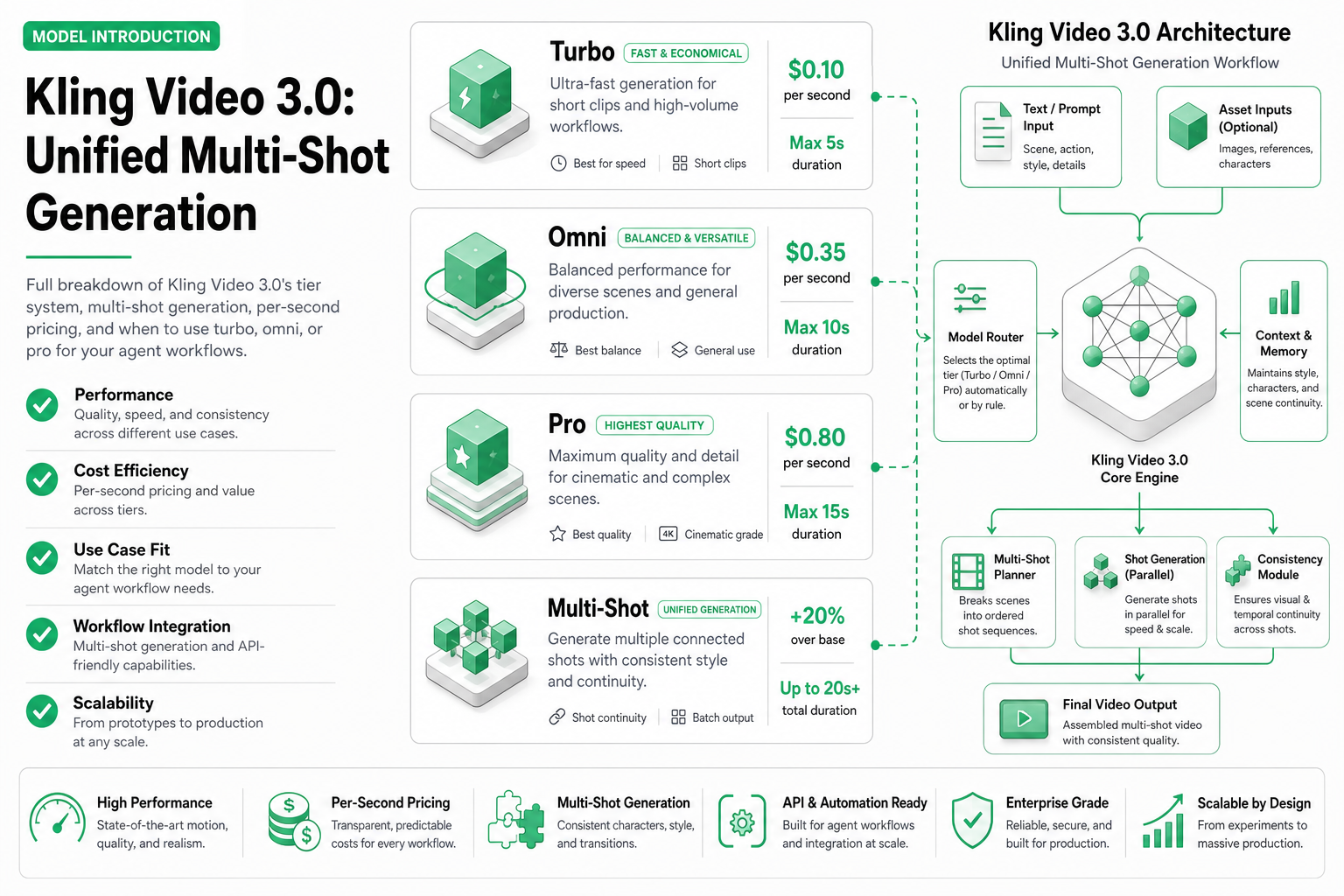
TL;DR — Kling Video 3.0 offers a tiered system (turbo standard, turbo pro, omni pro) with per-second pricing from $0.02 to $0.10/sec. Multi-shot text control lets you script multiple scenes in a single generation request. Best for agents needing predictable per-second billing and granular quality control.
Kling Video 3.0 from KwaiVGI is not one model — it’s a family of tiers designed for different cost-quality trade-offs. Whether you’re generating 1,000 social media clips on a tight budget or crafting premium brand content, there’s a tier for it.
This guide covers the tier system, multi-shot generation capability, real pricing at scale, and practical selection criteria for agent developers.
The tier system explained
Kling 3.0 splits into distinct tiers, each available as a separate model endpoint on SandBase:
| Tier | Model ID | Resolution | Quality level | Speed | Cost/sec |
|---|---|---|---|---|---|
| Turbo Standard | kwaivgi/kling-video/3.0/turbo-standard | 720p | Good | Fast (15–30s) | $0.02 |
| Turbo Pro | kwaivgi/kling-video/3.0/turbo-pro | 1080p | Better | Fast (20–40s) | $0.04 |
| Omni Pro | kwaivgi/kling-video/3.0/omni-pro | 1080p–4K | Best | Moderate (45–90s) | $0.07–$0.10 |
Each tier makes a different trade-off:
- Turbo Standard: Maximum throughput, minimum cost. Ideal for testing, iteration, and bulk content where 720p is acceptable.
- Turbo Pro: The middle ground. 1080p output at double the per-second cost of standard. Most teams land here for production social media content.
- Omni Pro: Premium quality with advanced motion physics, better face consistency, and optional 4K output. For hero content, ads, and anything where visual quality is the priority.
Multi-shot text control
The headline feature of Kling 3.0 is multi-shot generation. Instead of generating a single continuous clip, you can define multiple shots within one generation request:
{
  "model": "kwaivgi/kling-video/3.0/omni-pro",
  "messages": [
    {
      "role": "user",
      "content": {
        "type": "multi_shot",
        "shots": [
          {
            "duration": 3,
            "prompt": "Wide establishing shot of a modern coffee shop exterior at golden hour"
          },
          {
            "duration": 4,
            "prompt": "Medium shot: a barista pouring latte art, steam rising, warm interior lighting"
          },
          {
            "duration": 3,
            "prompt": "Close-up: the finished latte with a leaf pattern, customer's hands wrapping around the cup"
          }
        ]
      }
    }
  ]
}
This produces a single 10-second video with three distinct shots, each with its own camera angle and subject. The model maintains visual consistency (same coffee shop, same lighting palette) across shots.
Why multi-shot matters for agents
Without multi-shot, an agent generating a product video needs to:
- Generate shot 1, download it
- Generate shot 2, ensure visual consistency
- Generate shot 3, ensure continuity
- Stitch them together with ffmpeg or similar
- Handle failures, retries, and consistency drift
With multi-shot: one API call, one video, guaranteed visual consistency. The agent’s logic becomes dramatically simpler.
Per-second pricing in detail
Kling’s per-second model means you pay exactly for what you generate. No rounding up to the nearest 5-second block:
| Video length | Turbo Standard | Turbo Pro | Omni Pro |
|---|---|---|---|
| 3 seconds | $0.06 | $0.12 | $0.21–$0.30 |
| 5 seconds | $0.10 | $0.20 | $0.35–$0.50 |
| 8 seconds | $0.16 | $0.32 | $0.56–$0.80 |
| 10 seconds | $0.20 | $0.40 | $0.70–$1.00 |
| 15 seconds | $0.30 | $0.60 | $1.05–$1.50 |
Cost at scale
| Monthly volume | Turbo Standard | Turbo Pro | Omni Pro |
|---|---|---|---|
| 100 videos × 5s | $10 | $20 | $35–$50 |
| 500 videos × 5s | $50 | $100 | $175–$250 |
| 1,000 videos × 10s | $200 | $400 | $700–$1,000 |
For detailed pricing comparisons across all video models, see Video Generation Cost Model Explained.
Video-to-video editing
Beyond generation, Kling 3.0 supports video-to-video editing — transforming an existing video while preserving its motion and structure:
import requests
import time

SANDBASE_API_KEY = "your-sandbase-api-key"
HEADERS = {
    "Authorization": f"Bearer {SANDBASE_API_KEY}",
    "Content-Type": "application/json",
}

# Submit video-to-video transformation
submit = requests.post(
    "https://api.sandbase.ai/v1/run",
    headers=HEADERS,
    json={
        "model": "kwaivgi/kling-video/v3",
        "prompt": "Transform into anime style, keep all motion and camera angles",
        "video": "https://example.com/source-video.mp4",
    },
).json()
task_id = submit["id"]

# Poll for completion
while True:
    result = requests.get(
        f"https://api.sandbase.ai/v1/run/{task_id}",
        headers={"Authorization": f"Bearer {SANDBASE_API_KEY}"},
    ).json()
    if result["status"] in ("completed", "failed", "timeout"):
        break
    time.sleep(3)

video_url = result["outputs"][0]["url"]
Use cases for video-to-video:
- Style transfer (live action → anime, realistic → watercolor)
- Seasonal variations (summer scene → winter version)
- Brand adaptation (change color palette, add visual effects)
- A/B testing (same motion, different visual treatments)
Generation speed benchmarks
Measured generation times for a 10-second video:
| Tier | Avg generation time | P95 generation time |
|---|---|---|
| Turbo Standard | 18 seconds | 32 seconds |
| Turbo Pro | 28 seconds | 45 seconds |
| Omni Pro | 65 seconds | 95 seconds |
Turbo tiers are fast enough for near-real-time workflows where a user waits for the result. Omni Pro is background-task territory — queue it and notify on completion.
Quality differences between tiers
The tier names aren’t marketing fluff — there are real visual differences:
Turbo Standard (720p):
- Motion is plausible but occasionally repetitive
- Fine details (hair strands, fabric weave) are simplified
- Good enough for social media feeds where videos auto-play at reduced resolution
- Occasional frame-to-frame flickering in static scenes
Turbo Pro (1080p):
- Noticeably sharper details and more varied motion
- Better physics on particle effects (rain, smoke, sparks)
- Face consistency across the full clip is reliable
- Suitable for content that will be viewed full-screen on mobile
Omni Pro (1080p–4K):
- Film-quality motion with complex physics (cloth, water, hair)
- Multi-person scenes maintain distinct identities throughout
- Camera movements feel cinematic rather than mechanical
- 4K output is genuinely detailed, not just upscaled
- Best color grading and dynamic range
When each tier makes sense
| Use case | Recommended tier | Rationale |
|---|---|---|
| Prototype/testing | Turbo Standard | Cheapest, fastest iteration |
| Social media ads (Instagram, TikTok) | Turbo Pro | Good quality at mobile resolution |
| YouTube pre-roll | Omni Pro | Viewers see it full-screen |
| Product demos | Turbo Pro | Balance of quality and cost |
| Brand hero video | Omni Pro | Premium perception matters |
| Bulk A/B testing (50+ variants) | Turbo Standard | Minimize cost while testing |
| Real estate virtual tours | Omni Pro | Detail and space matter |
| E-commerce product clips | Turbo Pro | High volume, good quality |
API integration
Basic text-to-video call through SandBase:
import requests
import time

SANDBASE_API_KEY = "your-sandbase-api-key"
HEADERS = {
    "Authorization": f"Bearer {SANDBASE_API_KEY}",
    "Content-Type": "application/json",
}

# Single-shot Turbo Pro generation — submit task
submit = requests.post(
    "https://api.sandbase.ai/v1/run",
    headers=HEADERS,
    json={
        "model": "kwaivgi/kling-video/3.0/turbo-pro",
        "prompt": "A ceramic mug being filled with coffee from above, "
                  "steam swirling upward in morning sunlight through a window.",
        "duration": 5,
        "aspect_ratio": "9:16",
    },
).json()
task_id = submit["id"]

# Poll for completion
while True:
    result = requests.get(
        f"https://api.sandbase.ai/v1/run/{task_id}",
        headers={"Authorization": f"Bearer {SANDBASE_API_KEY}"},
    ).json()
    if result["status"] in ("completed", "failed", "timeout"):
        break
    time.sleep(3)

video_url = result["outputs"][0]["url"]
print(f"Video: {video_url}")
Related Reading
- Kling Turbo vs Omni vs Pro: Which Tier When
- H3 vs Kling 3.0 vs Gemini Omni Flash (2026)
- Best AI Video Generation APIs in 2026
- Best Image to Video AI Models for Agents (2026)
- Text to Video vs Image to Video AI: When to Use Each
- Video Generation Costs: Per-Second vs Per-Call
Key takeaways
- Kling 3.0 is a tier system, not a single model — pick the tier that matches your quality/cost needs
- Per-second pricing ($0.02–$0.10) makes costs predictable and proportional to output length
- Multi-shot generation eliminates the need for separate shot generation + stitching in agent pipelines
- Turbo Standard at $0.02/sec is the lowest-cost video generation available on SandBase
- Omni Pro delivers film-quality output but takes 60–90 seconds to generate
- Video-to-video editing extends the model beyond generation into transformation workflows
- No audio — all tiers produce silent video (pair with a TTS API if you need voiceover)