MiniMax H3: Native 2K Stereo Video Generation
Deep dive into MiniMax H3's native 2K stereo video generation — audio + video in one pass, three generation modes, and cost breakdown vs Kling and Gemini.
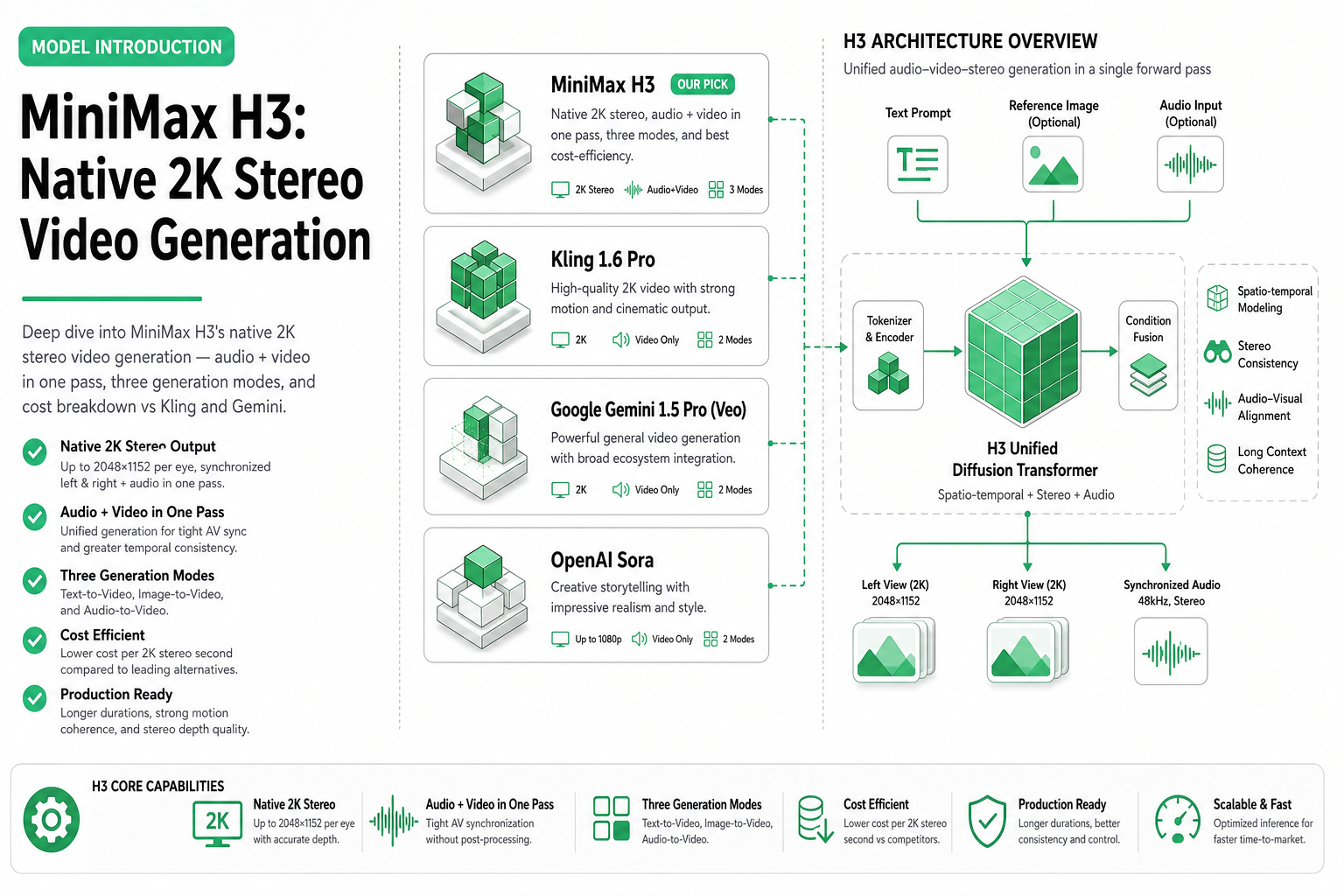
TL;DR — MiniMax H3 generates video with synchronized stereo audio in a single API call. It supports three modes (text-to-video, image-to-video, reference-to-video), outputs at native 2K resolution, and costs $0.30–$0.80 per video depending on duration. No separate TTS or audio generation step needed.
Most video generation APIs produce silent clips. You generate the video, then separately call a TTS or music model, then sync the audio track manually. MiniMax H3 skips that entire workflow: it outputs video with native stereo audio in one generation pass.
This matters for agents. One API call instead of three means fewer failure points, lower latency, and a single billing event. Here’s what H3 actually offers, how much it costs, and when you should pick it over Kling 3.0 or Gemini Omni Flash.
What H3 does differently
H3 is MiniMax’s third-generation video model. The key differentiator: audio is not bolted on after the fact. The model generates synchronized audio (dialogue, ambient sound, music) as part of the same diffusion process that produces the video frames.
What this means in practice:
- A prompt like “a barista steaming milk in a busy café” produces both the visual and the ambient café noise, espresso machine sounds, and background chatter
- Character dialogue is lip-synced to the generated video without post-processing
- Music-driven scenes generate matching visual motion (e.g., a dancer whose movement matches the generated beat)
Three generation modes
H3 exposes three operations on SandBase, each suited to different workflows:
| Operation | Input | Best for | SandBase model ID |
|---|---|---|---|
| Text-to-Video | Text prompt | Creative generation from scratch | minimax/h3/text-to-video |
| Image-to-Video | Image + text prompt | Animating product shots, stills | minimax/h3/image-to-video |
| Reference-to-Video | Reference video + text prompt | Style/motion transfer | minimax/h3/reference-to-video |
All three modes produce stereo audio output. All three output at up to 2K (2048×1080) resolution.
Technical specifications
| Spec | Value |
|---|---|
| Max resolution | 2048 × 1080 (2K cinematic) |
| Frame rate | 24 fps |
| Max duration | 10 seconds |
| Audio | Stereo, 44.1 kHz |
| Output format | MP4 (H.264 + AAC) |
| Generation time | 60–180 seconds |
| Aspect ratios | 16:9, 9:16, 1:1 |
The generation time of 60–180 seconds is the primary trade-off. H3 prioritizes quality and audio-visual sync over speed. If you need sub-30-second generation, Gemini Omni Flash is faster but produces silent video.
Pricing breakdown
H3 uses per-call pricing with duration tiers:
| Duration | Cost per video | With audio |
|---|---|---|
| 5 seconds | $0.30 | Included |
| 7 seconds | $0.50 | Included |
| 10 seconds | $0.80 | Included |
Compare this to the “silent video + separate audio” approach:
| Approach | Video cost | Audio cost | Sync cost | Total |
|---|---|---|---|---|
| H3 (10s) | $0.80 | $0.00 | $0.00 | $0.80 |
| Kling Pro (10s) + TTS | $0.70 | $0.05–$0.15 | Manual/code | $0.75–$0.85 |
| Kling Turbo (10s) + TTS | $0.20 | $0.05–$0.15 | Manual/code | $0.25–$0.35 |
The cost difference narrows when you account for development time to build audio sync logic. For agents that need audio-visual content in one shot, H3 eliminates integration complexity.
Monthly cost projections
| Videos/month | 5s clips | 10s clips | Mixed (avg 7s) |
|---|---|---|---|
| 50 | $15 | $40 | $25 |
| 200 | $60 | $160 | $100 |
| 1,000 | $300 | $800 | $500 |
For cost model details across all video APIs, see our video generation cost breakdown.
API usage via SandBase
H3 is available through the OpenAI-compatible endpoint on SandBase. Here’s a text-to-video example:
import requests
import time

SANDBASE_API_KEY = "your-sandbase-api-key"
HEADERS = {
    "Authorization": f"Bearer {SANDBASE_API_KEY}",
    "Content-Type": "application/json",
}

# Text-to-Video generation — submit task
submit = requests.post(
    "https://api.sandbase.ai/v1/run",
    headers=HEADERS,
    json={
        "model": "minimax/h3/text-to-video",
        "prompt": "A golden retriever running through autumn leaves in a park, "
                  "with crunching leaf sounds and birds chirping in the background. "
                  "Camera follows from a low angle.",
        "duration": 10,
        "aspect_ratio": "16:9",
    },
).json()
task_id = submit["id"]

# Poll for completion
while True:
    result = requests.get(
        f"https://api.sandbase.ai/v1/run/{task_id}",
        headers={"Authorization": f"Bearer {SANDBASE_API_KEY}"},
    ).json()
    if result["status"] in ("completed", "failed", "timeout"):
        break
    time.sleep(3)

video_url = result["outputs"][0]["url"]
print(f"Video URL: {video_url}")
Image-to-video with a product photo:
# Image-to-Video: animate a product shot
submit = requests.post(
    "https://api.sandbase.ai/v1/run",
    headers=HEADERS,
    json={
        "model": "minimax/h3/image-to-video",
        "prompt": "The shoe rotates slowly on a reflective surface, "
                  "with soft ambient music and a subtle whoosh sound.",
        "image": "https://example.com/product-shoe.jpg",
        "duration": 5,
    },
).json()
task_id = submit["id"]

# Poll for completion
while True:
    result = requests.get(
        f"https://api.sandbase.ai/v1/run/{task_id}",
        headers={"Authorization": f"Bearer {SANDBASE_API_KEY}"},
    ).json()
    if result["status"] in ("completed", "failed", "timeout"):
        break
    time.sleep(3)
Reference-to-video for style transfer:
# Reference-to-Video: apply motion/style from reference
submit = requests.post(
    "https://api.sandbase.ai/v1/run",
    headers=HEADERS,
    json={
        "model": "minimax/h3/reference-to-video",
        "prompt": "Apply this dance motion to a cartoon character in a studio setting. "
                  "Keep the music rhythm from the reference.",
        "video": "https://example.com/reference-dance.mp4",
        "duration": 7,
    },
).json()
task_id = submit["id"]

# Poll for completion
while True:
    result = requests.get(
        f"https://api.sandbase.ai/v1/run/{task_id}",
        headers={"Authorization": f"Bearer {SANDBASE_API_KEY}"},
    ).json()
    if result["status"] in ("completed", "failed", "timeout"):
        break
    time.sleep(3)
Quality characteristics
H3’s output quality sits in the upper tier of current video generation models:
Strengths:
- Audio-visual synchronization is the best available — lip sync, ambient matching, and music timing are noticeably better than manual post-processing
- Motion coherence across 10-second clips is strong; fewer “melting” artifacts in complex scenes
- 2K output is genuinely sharp, not upscaled from lower resolution
- Skin textures and fabric physics are above average
Weaknesses:
- Text rendering in video (signs, labels) is still unreliable
- Very fast camera movements can produce frame blending artifacts
- Complex multi-person scenes occasionally have identity drift after 7+ seconds
- No granular control over audio volume or mix (it’s generated holistically)
When to use H3 vs alternatives
| Scenario | Best pick | Why |
|---|---|---|
| Ad creative with voiceover | H3 | Audio + video in one call |
| Bulk social media clips (silent) | Kling Turbo | Cheaper, audio unnecessary |
| Speed-critical pipeline | Gemini Omni Flash | 10–30s generation time |
| Premium brand film | Kling Omni Pro | Highest visual fidelity |
| Product photo animation | H3 I2V | Adds ambient sound naturally |
| Style transfer with reference | H3 Ref2V | Transfers both visual style and audio mood |
| Budget batch processing | Kling Turbo Standard | $0.02/sec, lowest cost |
H3’s position in the ecosystem
H3 is not the cheapest video generation model and not the fastest. Its value proposition is specific: native audio-visual generation eliminates a full category of integration work.
For agents building content pipelines (ad creative, social media, educational content), the single-call audio+video output removes:
- Audio generation API calls
- Audio-video synchronization logic
- Timing alignment bugs
- Extra cost from failed sync attempts
If your agent’s output needs sound, H3 should be your default choice. If it doesn’t, you’re paying a premium for a feature you won’t use — look at Kling Turbo or Gemini Omni Flash instead.
Related Reading
- H3 vs Kling 3.0 vs Gemini Omni Flash (2026)
- Best AI Video Generation APIs in 2026
- Kling Video 3.0: Unified Multi-Shot Generation
- Gemini Omni Flash: Google’s Fast Video Model
- Text to Video vs Image to Video AI: When to Use Each
- Video Generation Costs: Per-Second vs Per-Call
Key takeaways
- H3’s differentiator is audio — native stereo in the same generation pass, no post-processing
- Three modes cover most agent workflows: text-to-video, image-to-video, reference-to-video
- $0.30–$0.80 per video is mid-range pricing that includes audio (no separate audio API cost)
- 60–180 second generation time is the trade-off for quality + audio sync
- Best for agents that produce content requiring sound (ads, tutorials, social media with voiceover)
- Not ideal for bulk silent clip generation or speed-critical pipelines where sub-30s latency matters