Text to Video vs Image to Video AI: When to Use Each
Practical comparison of three video generation modes — text-to-video, image-to-video, and reference-to-video — with cost, quality, and control trade-offs plus code examples.
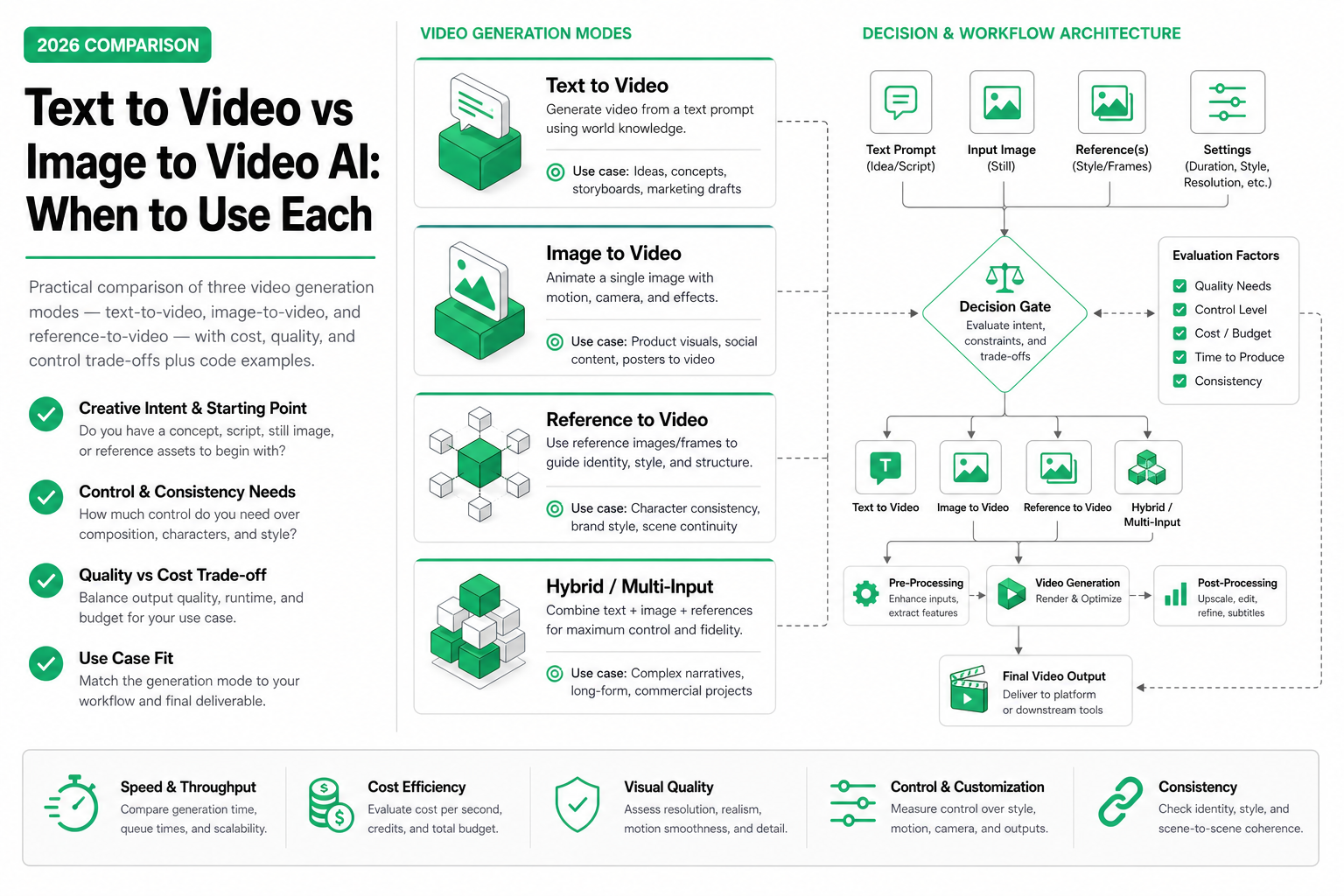
TL;DR — Text-to-video (T2V) is for creative exploration when you have no assets. Image-to-video (I2V) animates an existing still with pixel-precise visual control. Reference-to-video (Ref2V) transfers motion or style from a source clip into new content. Choosing the wrong mode is the most expensive mistake in video agent workflows — not because of price differences, but because of wasted iterations.
The problem becomes obvious around the third generation. Someone picked text-to-video for a product rotation ad because they didn’t have a clean product shot ready. Three tries and $0.90 later, the shoe color is still wrong — the model keeps interpreting “midnight blue” as navy. If they’d started with image-to-video and a quick phone photo, they’d have the video in one shot for $0.20.
After building video agents for six different use cases, the lesson is clear: choosing the wrong generation mode is the most common — and most avoidable — waste. Not because the models are expensive, but because bad mode selection turns a 1-call task into a 3-call task with worse output.
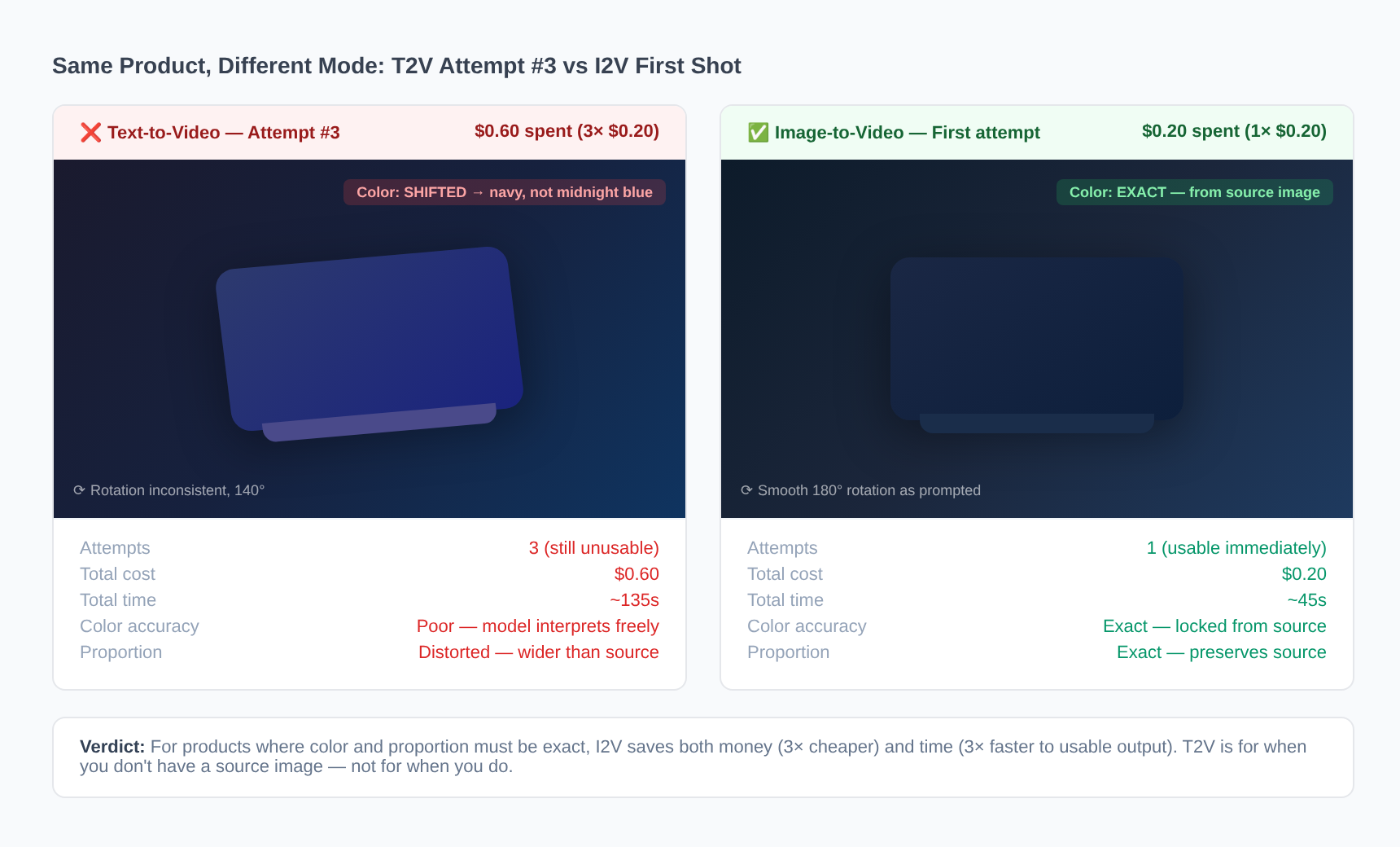 Left: T2V attempt 3 — color shifted, wrong proportions. Right: I2V first attempt — exact product shot animated. Same $0.20 per call.
This post breaks down exactly when each mode wins, how much it costs in real production scenarios, and how the choice changes your agent’s architecture.
The three modes at a glance
| Mode | Input | Control level | Consistency | Best for |
|---|---|---|---|---|
| Text-to-Video (T2V) | Text prompt only | Low — model interprets creatively | Variable | Creative exploration, no-asset ideation |
| Image-to-Video (I2V) | Image + text prompt | High — exact visual appearance | High | Product animation, brand consistency |
| Reference-to-Video (Ref2V) | Video + text prompt | Medium — transfers motion/style | Medium–High | Campaign variants, series consistency |
Three real scenarios that expose the difference
Scenario 1: E-commerce product rotation — 100 SKUs, consistent style
What you need: 5-second rotation videos for 100 sneaker SKUs, all with identical lighting, background, and rotation speed.
Why I2V wins: You already have product photos (every e-commerce store does). I2V locks the visual from the source image — exact color, exact shape, exact texture — and adds only motion. T2V would require you to describe each shoe perfectly in text, and even then the model interprets color and proportion differently each time.
| Metric | T2V approach | I2V approach |
|---|---|---|
| Calls per SKU | 2.5 avg (need retries for color/shape accuracy) | 1.0 (first-shot usable 90%+ of the time) |
| Total API calls | 250 | 100 |
| Cost per usable video | $0.50 (2.5 × $0.20) | $0.20 |
| Total batch cost | $50 | $20 |
| Generation time per video | ~45s × 2.5 = ~112s effective | ~45s |
| Total batch time (sequential) | ~7.8 hours | ~1.25 hours |
| Visual consistency across batch | 4/10 — each video looks slightly different | 9/10 — only motion varies |
Model choice: Kling 3.0 Turbo Pro at $0.20/5s clip. Best price/quality for product video.
Scenario 2: Social media content ideation — no assets, exploring
What you need: 10 creative video concepts for a brand’s summer campaign. No product shots yet, no reference videos. You’re exploring mood, tone, and visual direction.
Why T2V wins: You don’t have images to animate. You’re generating ideas, not producing final assets. T2V lets you describe abstract concepts (“sunset melting into ocean waves, liquid gold color palette, dreamy slow motion”) and get surprising interpretations.
| Metric | T2V approach | I2V approach | Ref2V approach |
|---|---|---|---|
| What you’d need to start | Just prompts | Need to create/find 10 source images first | Need to find/create reference videos first |
| Calls for 10 concepts | 10–15 (some prompts nail it, others need a tweak) | N/A without source images | N/A without reference videos |
| Cost | $1.50–$4.50 (varies by model) | Blocked — no input | Blocked — no input |
| Generation time | ~2 minutes per concept | N/A | N/A |
| Creative diversity | High — each generation is unique | N/A | N/A |
Model choice: MiniMax H3 at $0.30/5s clip (includes audio — you hear the concept, not just see it). Or Kling Turbo Standard at $0.10/5s for rapid iteration on a budget.
Scenario 3: Campaign with one hero video, need 8 platform variants
What you need: Your creative director approved one 7-second hero video. Now you need 8 variants: same energy and motion style, but different subjects (product alone, product with model, lifestyle scene, abstract version) and different aspect ratios for Instagram Reels, TikTok, YouTube Shorts, and horizontal feed ads.
Why Ref2V wins: The reference video IS the creative direction. Ref2V extracts the motion language, pacing, and energy from your approved hero and applies it to new scenarios. Every variant inherits the same “feel” without re-describing it in text.
| Metric | T2V approach | I2V approach | Ref2V approach |
|---|---|---|---|
| Calls for 8 variants | 20+ (trying to match the hero’s energy via text) | Can’t — you don’t have stills that match the motion | 8–10 |
| Cost | $6.00+ (20 × $0.30) | N/A | $2.40–$4.00 (8 × $0.30–$0.50) |
| Generation time | ~10 min total, plus manual review | N/A | ~4 min total |
| Consistency with hero | 3/10 — text can’t capture motion feel | N/A | 8/10 — motion DNA transferred |
| Prompt complexity | Very high — must reverse-engineer the hero’s style | N/A | Low — “apply this motion to [new subject]” |
Model choice: MiniMax H3 Ref2V at $0.30/5s or $0.80/7s. Only H3 transfers both visual style and audio mood.
Comparison matrix: same task, three modes
Task: Generate a 5-second product rotation video of a white sneaker on a neutral background.
| Dimension | T2V | I2V | Ref2V |
|---|---|---|---|
| Iterations to usable output | 3–4 avg | 1 (first-shot usable) | 1–2 (if you have a rotation reference) |
| Cost per usable video | $0.60–$0.80 | $0.20 | $0.30–$0.60 |
| Time to first usable output | 2–3 minutes | 45 seconds | 1–2 minutes |
| Visual consistency score (1–10) | 3 — color/shape varies each attempt | 9 — locked to source image | 7 — motion matches but visual may drift |
| Prompt complexity | High — must describe shoe, lighting, background, motion | Low — “rotate slowly, studio lighting” | Medium — need good rotation reference + brief prompt |
| Audio included (H3) | ✅ Yes | ✅ Yes | ✅ Yes |
| Works without existing assets | ✅ Yes | ❌ Need source image | ❌ Need reference video |
Key insight: I2V costs 70–75% less per usable video than T2V for product content — not because the per-call price is different, but because you eliminate retry iterations.
Architecture analysis: how mode choice changes your agent design
This next part matters more than most people realize — they think mode selection is just about output quality, then wonder why their T2V agent costs 3× more than expected. It’s not a quality problem. It’s an architecture problem. The mode you choose fundamentally changes your agent’s state machine.
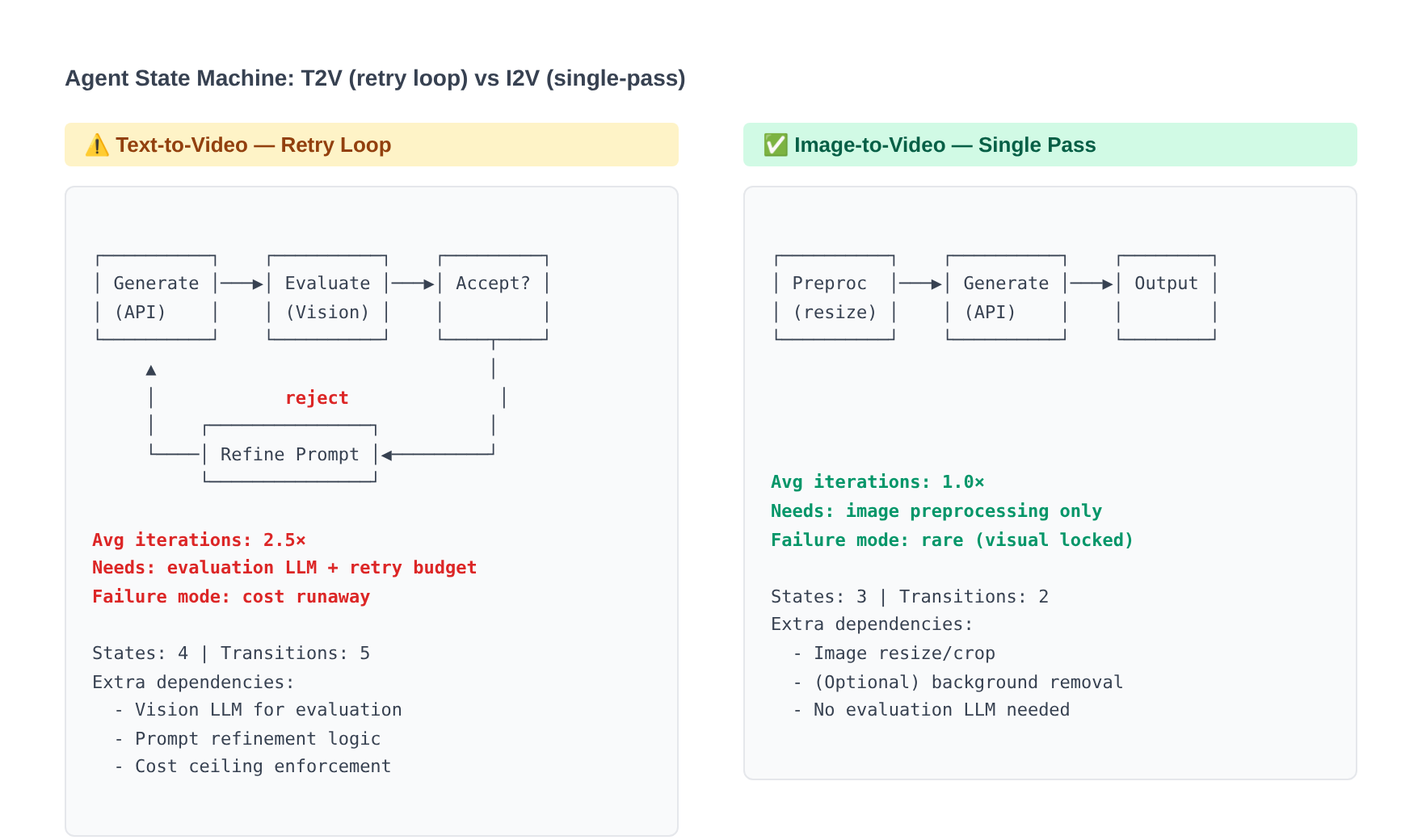 T2V requires a retry loop because output is unpredictable. I2V is almost always single-pass. This is why the cost difference isn’t just per-call price — it’s total calls.
The generation mode you choose doesn’t just affect output quality — it fundamentally changes your agent’s state machine.
T2V agent architecture: retry loop pattern
┌─────────────┐     ┌─────────────┐     ┌──────────────┐     ┌─────────┐
│ Generate     │────▶│ Evaluate    │────▶│ Accept/Reject│────▶│ Output  │
│ (API call)   │◀────│ (Vision LLM)│     │              │     │         │
└─────────────┘  ↑  └─────────────┘     └──────────────┘     └─────────┘
                 │         │ reject
                 │         ▼
                 │   ┌──────────────┐
                 └───│ Refine Prompt│
                     └──────────────┘
T2V output is unpredictable. Your agent needs:
- Evaluation step: A vision LLM (GPT-4o, Claude) to check if the output matches intent
- Retry budget: Max 3–5 attempts before falling back or alerting a human
- Prompt refinement logic: After a failed attempt, modify the prompt based on what went wrong
- Cost ceiling: Hard limit to prevent runaway spending on difficult prompts
# T2V agent state machine — retry loop
class T2VAgent:
    MAX_RETRIES = 4

    def generate(self, prompt: str, requirements: dict) -> str:
        for attempt in range(self.MAX_RETRIES):
            video_url = self.call_api(prompt)
            score = self.evaluate(video_url, requirements)
            if score >= 7:
                return video_url
            prompt = self.refine_prompt(prompt, score, attempt)
        raise MaxRetriesExceeded(f"Failed after {self.MAX_RETRIES} attempts")
I2V agent architecture: preprocessing pipeline
┌──────────────┐     ┌──────────────┐     ┌─────────────┐     ┌─────────┐
│ Source Image │────▶│ Preprocess   │────▶│ Generate     │────▶│ Output  │
│              │     │ (resize, bg) │     │ (API call)   │     │         │
└──────────────┘     └──────────────┘     └─────────────┘     └─────────┘
I2V output is predictable — but the input image must be right. Your agent needs:
- Image preprocessing: Resize to model’s optimal resolution, remove/replace background if needed
- Aspect ratio logic: Match the target platform’s ratio before generation
- No retry loop (usually): First-shot success rate is 85–95% for well-prepared images
- Batch orchestration: Since results are predictable, you can fire-and-forget 100 calls
# I2V agent state machine — preprocess then generate
class I2VAgent:
    def generate(self, image_url: str, motion_prompt: str, target_ratio: str) -> str:
        # Preprocess: resize, background removal, format check
        processed_image = self.preprocess(image_url, target_ratio)
        # Single API call — no retry loop needed
        video_url = self.call_api(processed_image, motion_prompt)
        return video_url

    def preprocess(self, image_url: str, ratio: str) -> str:
        image = self.download(image_url)
        image = self.resize_to_ratio(image, ratio)
        image = self.remove_background(image)  # optional
        return self.upload(image)
Ref2V agent architecture: reference library pattern
┌──────────────┐     ┌──────────────┐     ┌─────────────┐     ┌─────────┐
│ Reference    │────▶│ Select Best  │────▶│ Generate     │────▶│ Output  │
│ Library      │     │ Reference    │     │ (API call)   │     │         │
└──────────────┘     └──────────────┘     └─────────────┘     └─────────┘
       ▲                                         │
       │                                         │
       └─── Store approved outputs back ─────────┘
Ref2V needs a curated library of reference videos. Your agent needs:
- Reference library: Tagged collection of approved motion patterns
- Selection logic: Match the requested motion type to the best reference
- Library growth: Store approved outputs back as future references
- Metadata tracking: Which reference produced which output (for style consistency audits)
# Ref2V agent state machine — reference library
class Ref2VAgent:
    def __init__(self, reference_library: ReferenceLibrary):
        self.library = reference_library

    def generate(self, subject_prompt: str, motion_type: str) -> str:
        # Select best reference from library
        reference = self.library.find_best_match(motion_type)
        # Generate with reference
        video_url = self.call_api(reference.url, subject_prompt)
        # Optionally store output as new reference
        self.library.add_if_approved(video_url, motion_type)
        return video_url
How this affects your codebase
| Architecture concern | T2V | I2V | Ref2V |
|---|---|---|---|
| External dependencies | Vision LLM for evaluation | Image processing library (Pillow, Sharp) | Object storage for reference library |
| State management | Retry counter, prompt history | Preprocessed image cache | Reference index, metadata DB |
| Error handling | Graceful degradation after N retries | Image validation failures | Reference not found, motion mismatch |
| Cost predictability | Low — varies with retry count | High — 1 call per output | Medium — occasional retries |
| Parallelism | Limited — sequential retries per item | High — fire-and-forget batch | Medium — depends on reference selection |
Cost calculations for production agents
E-commerce agent: 100 SKU product videos
I2V approach (recommended):
- 100 SKUs × $0.20/video (Kling Turbo Pro, 5s) = $20 total
- Generation time: ~45s per video, parallelizable
- Usable outputs: ~92 first-shot, ~8 need one retry = 108 total calls = $21.60 actual
T2V approach (not recommended for this task):
- 100 SKUs × 2.5 avg iterations × $0.20 = $50 total
- Plus: need vision LLM evaluation calls (100 × 2.5 × $0.01 = $2.50)
- Plus: wasted time — 250 calls × 45s = 3.1 hours sequential vs 1.25 hours for I2V
- Total real cost: $52.50 + 2.5× longer
Savings with I2V: $30.50 per batch (58% less) + 1.85 hours saved
Campaign variant agent: 8 platform variants from one hero
Ref2V approach (recommended):
- 8 variants × $0.50/video (H3, 7s with audio) = $4.00 total
- All variants share the hero’s motion DNA
- 2 might need a retry: 10 calls × $0.50 = $5.00 actual
T2V approach (not recommended for this task):
- Must reverse-engineer the hero’s style in text
- 8 variants × 3 avg iterations × $0.30 = $7.20
- Plus evaluation cost: $0.24
- Plus: inconsistent motion feel across variants
Savings with Ref2V: $2.44 per campaign (34% less) + much better consistency
Social content ideation: 10 concept explorations
T2V approach (recommended):
- 10 concepts × 1.3 avg iterations × $0.30 (H3 with audio) = $3.90
- Or budget option: 10 × 1.3 × $0.10 (Kling Turbo Standard) = $1.30
- Full creative freedom, audio included with H3
The audio dimension: why it matters for social video
MiniMax H3 generates synchronized audio natively — ambient sounds, music, effects — as part of the video generation process. Other models (Kling, Gemini) generate silent video that requires a separate audio step.
Why this changes the calculus for social content
Social videos without audio feel unfinished. On TikTok, Instagram Reels, and YouTube Shorts, audio is 50% of the experience. If you’re generating for social:
| Workflow | Without native audio | With native audio (H3) |
|---|---|---|
| Steps to social-ready video | Generate video → Generate/find audio → Sync → Export | Generate video (audio included) → Export |
| Cost for 5s social clip | $0.20 (video) + $0.05–$0.15 (audio) = $0.25–$0.35 | $0.30 (everything) |
| Sync quality | Manual or AI sync — often slightly off | Native — generated together, always in sync |
| Creative coherence | Audio is an afterthought | Audio matches visual mood by design |
Audio comparison across modes and models
| Model | T2V audio | I2V audio | Ref2V audio |
|---|---|---|---|
| MiniMax H3 | ✅ Native stereo (ambient + effects) | ✅ Native stereo | ✅ Transfers audio mood from reference |
| Kling 3.0 | ❌ Silent | ❌ Silent | N/A (no Ref2V) |
| Gemini Omni Flash | ❌ Silent | ❌ Silent | ❌ Silent (visual style only) |
Recommendation: If your output is destined for social platforms where audio matters, H3’s native audio generation saves you a pipeline step and produces better-synced results. If audio doesn’t matter (e-commerce product pages, silent autoplay feeds), Kling’s lower price wins.
Limitations you’ll hit in production
T2V limitations
- Can’t reliably reproduce brand colors: Ask for “Pantone 485 red” and you’ll get anywhere from coral to crimson. Text descriptions of color are interpreted loosely.
- Subject identity is unstable: Generate the same “white Nike Air Max” prompt 5 times, get 5 different-looking shoes. No identity lock.
- Composition is unpredictable: You can’t guarantee where the subject will be in frame, what the background will look like exactly, or how the camera will move.
- Requires high prompt skill: Getting consistent results demands prompt engineering expertise that most teams don’t have.
I2V limitations
- Can’t add elements not in the source image: If your source photo doesn’t show the shoe sole, I2V can’t generate a sole reveal rotation. It animates what’s there.
- Motion range is limited by source: A flat-lay product photo can’t become a dramatic 360° rotation — the model doesn’t have the 3D information.
- Requires good source images: Blurry, low-resolution, or poorly-lit source images produce poor video. Garbage in, garbage out.
- Background changes are limited: The background from your source image largely persists. You can’t easily swap it during generation.
Ref2V limitations
- Motion transfer degrades on very different subjects: A human dance reference applied to a car looks awkward. The more different the reference subject is from your target subject, the worse the transfer.
- Style transfer can overpower content: If the reference has strong visual style (heavy color grading, unusual lighting), it may override your prompt instructions.
- Limited model support: Only H3 and Gemini currently support Ref2V. No Kling support.
- Reference quality ceiling: Your output can’t exceed the motion quality of your reference. Bad reference = bad output.
Universal limitations (all modes)
- Text and logos in video: All current models struggle to render readable text or recognizable logos. Plan to add these in post-production.
- Precise timing control: You can’t say “subject enters at 1.2s, turns at 2.5s, exits at 4.0s” — models don’t support frame-level timing instructions.
- Physics accuracy: Complex physics (cloth simulation, fluid dynamics, collisions) remains inconsistent.
- Duration limits: Most models cap at 5–10 seconds per generation. Longer content requires multi-shot stitching.
SandBase as the runtime layer
Through SandBase’s unified /v1/run contract, your agent switches between T2V, I2V, and Ref2V by changing one parameter — no SDK changes, no auth rotation. The same endpoint, same polling logic, same output format.
import requests, time

SANDBASE_API_KEY = "your-sandbase-api-key"
HEADERS = {
    "Authorization": f"Bearer {SANDBASE_API_KEY}",
    "Content-Type": "application/json",
}

def generate_video(mode: str, **kwargs) -> str:
    """One function handles all three modes via SandBase's unified contract."""

    # Mode only changes the model string and input parameters
    configs = {
        "t2v": {
            "model": "minimax/h3/text-to-video",
            "payload": {"prompt": kwargs["prompt"], "duration": kwargs.get("duration", 5)},
        },
        "i2v": {
            "model": "kwaivgi/kling-video/3.0/turbo-pro",
            "payload": {
                "prompt": kwargs["prompt"],
                "image": kwargs["image"],
                "duration": kwargs.get("duration", 5),
            },
        },
        "ref2v": {
            "model": "minimax/h3/reference-to-video",
            "payload": {
                "prompt": kwargs["prompt"],
                "video": kwargs["video"],
                "duration": kwargs.get("duration", 7),
            },
        },
    }

    config = configs[mode]
    submit = requests.post(
        "https://api.sandbase.ai/v1/run",
        headers=HEADERS,
        json={"model": config["model"], **config["payload"]},
    ).json()
    task_id = submit["id"]

    # Same polling logic regardless of mode
    while True:
        result = requests.get(
            f"https://api.sandbase.ai/v1/run/{task_id}",
            headers={"Authorization": f"Bearer {SANDBASE_API_KEY}"},
        ).json()
        if result["status"] in ("completed", "failed", "timeout"):
            break
        time.sleep(3)

    if result["status"] == "completed":
        return result["outputs"][0]["url"]
    raise RuntimeError(f"Generation failed: {result['status']}")


# Usage — switch modes with one parameter change:
# Creative exploration
video = generate_video("t2v", prompt="Bioluminescent jellyfish in an underwater cave")

# Product animation
video = generate_video("i2v", prompt="Slow 360° rotation", image="https://example.com/shoe.jpg")

# Campaign variant
video = generate_video("ref2v", prompt="Apply this energy to a beach scene", video="https://example.com/hero.mp4")
What this means for agent developers: Your agent’s routing logic decides T2V vs I2V vs Ref2V based on available inputs and task requirements. The API layer stays identical. You can swap models (H3 → Kling → Gemini) or modes (T2V → I2V) without touching your infrastructure code.
Decision framework
Do you have a starting image?
├── YES → Is the image exactly what you want to animate?
│   ├── YES → Use I2V (preserves the visual perfectly)
│   └── NO → Do you want to change the style significantly?
│       ├── YES → Use Ref2V with a style reference, or T2V with description
│       └── NO → Use I2V with motion instructions
└── NO → Do you have a reference video?
    ├── YES → Do you want similar motion/style?
    │   ├── YES → Use Ref2V
    │   └── NO → Use T2V (ignore the reference)
    └── NO → Use T2V (creative generation from text)

Budget-constrained?
├── Need lowest cost per usable output → I2V (fewer retries)
├── Need lowest per-call cost → Kling Turbo Standard T2V ($0.10/5s)
└── Need audio included → H3 any mode ($0.30/5s)
FAQ
1. Is I2V always cheaper than T2V?
Per-call price is identical for the same model. But I2V is cheaper per usable output because you rarely need retries. For product content: I2V averages 1.08 calls per usable video vs T2V’s 2.5 calls. At $0.20/call (Kling Turbo Pro), that’s $0.22 vs $0.50 per usable video — a 56% savings.
2. Can I use T2V and then feed the output into Ref2V for variants?
Yes — this is a powerful workflow. Use T2V to explore and find a creative direction. Once you have an output you love, use it as the reference video for Ref2V to generate consistent variants. Cost: $0.30–$0.90 for T2V exploration + $0.30–$0.50 per Ref2V variant.
3. How much does H3’s native audio save versus adding audio separately?
For social content at scale: H3 costs $0.30/5s with audio included. Silent generation ($0.20 Kling) + separate audio generation ($0.05–$0.15) + sync effort = $0.25–$0.35 + engineering time. H3 saves $0–$0.05 per video in raw cost but eliminates the audio pipeline entirely — for a 100-video batch, that’s 2–4 hours of pipeline engineering saved.
4. What’s the break-even point where I should invest in source images for I2V vs just using T2V?
If you’re generating more than 3 videos of the same subject, I2V pays for itself even if you have to commission the source image. Math: 3 videos × $0.50 (T2V with retries) = $1.50 vs. $0.50 (source image amortized) + 3 × $0.20 (I2V) = $1.10. At 10 videos: T2V = $5.00, I2V = $2.50.
5. Does Ref2V work across very different subjects (human → product, animal → vehicle)?
Partially. Motion transfer works best when source and target subjects have similar structure. Human dance → humanoid robot = excellent. Human dance → sneaker = poor (the motion doesn’t map logically). Camera motion transfer (pan, zoom, tracking) works regardless of subject. Style/color transfer also works universally. Rule of thumb: if the motion relies on body structure, keep subjects similar. If it relies on camera work or pacing, any subject works.
Related Reading
- Best AI Video Generation APIs in 2026
- Best Image to Video AI Models for Agents (2026)
- Image to Video API: Build a Product Demo Generator
- Video Generation Costs: Per-Second vs Per-Call
- H3 vs Kling 3.0 vs Gemini Omni Flash (2026)
- Build an Ad-Creative Video Agent (Tutorial)
Key takeaways
- I2V is the production workhorse — 56% cheaper per usable output than T2V for any task where you have source images. Use it for e-commerce, product content, brand animation.
- T2V is for exploration — maximum creative freedom when you have no assets and want the model to surprise you. Accept that you’ll iterate.
- Ref2V is for consistency at scale — one approved hero becomes the template for an entire campaign. Motion DNA transfers without re-prompting.
- Audio changes the social video equation — H3’s native audio eliminates a pipeline step. For social content, factor this into your mode/model choice.
- Mode choice is an architecture decision — T2V needs retry loops, I2V needs image preprocessing, Ref2V needs a reference library. Design your agent accordingly.
- The unified API makes switching free — through SandBase’s
/v1/runcontract, changing modes is one parameter. Build the routing logic, not multiple integrations. - Know the limitations — no mode handles text/logos well, precise timing control doesn’t exist yet, and Ref2V motion transfer degrades across dissimilar subjects.
For more detail on H3’s three modes, see MiniMax H3: Native 2K Stereo Video Generation. For Kling’s tier system and multi-shot capability, see Kling Video 3.0: Unified Multi-Shot Generation.