Set Up SandBase Skill / MCP for Claude Code, Cursor, and Codex
Paste one Skill line to connect Claude Code, Cursor, and Codex to SandBase models and data APIs. Browser sign-in, no API key in chat.
Claude Code, Cursor, and Codex all speak MCP, and each one stores the server in a different file. SandBase’s recommended path is one chat line, not a shell command. The agent reads the Skill, checks Node.js 20+, runs the CLI, and you approve a browser sign-in. You do not paste an API key into the chat.
set up https://www.sandbase.ai/SKILL.mdThe AI tools hero prints that line.
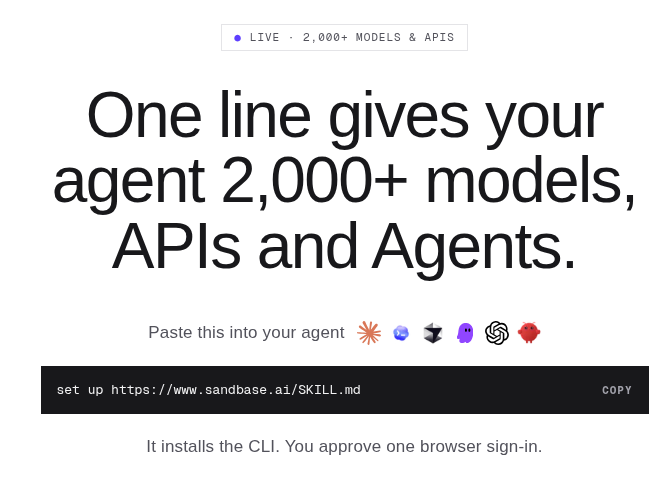 SandBase AI tools page hero with the one-line Skill setup: set up https://www.sandbase.ai/SKILL.md on 2026-11-08.
After a new session, the same balance covers catalog models and data APIs through sandbase_discover, sandbase_inspect, and sandbase_run. The other two paths are CLI connect from a terminal, and the raw MCP URL with the key kept in client secret config. All three are on the AI tools page. This article did not run connect, doctor, or a paid call.
Key takeaway
- Paste the Skill line above into the coding agent. The Skill tells that agent not to ask for an API key in chat.
- Bare
npx -y @sandbaseai/cli@latest connectwrites every supported client the CLI finds.--client claude-code,cursor, orcodexscopes one app. The Skill stays scoped unless you ask for all of them.- Discover and inspect do not spend the balance. Only
sandbase_rundoes. Poll slow jobs. Do not run them twice.- Keep a vendor MCP when you already pay that vendor or you need its tool list. Keep hand-written MCP when the client is outside the CLI list.
Three MCP configs is the wrong default
On 2026-11-08, Claude Code’s MCP docs still center on claude mcp add --transport http, an Authorization: Bearer header, and .mcp.json. Cursor’s MCP docs say to install from the Customize page or write mcp.json. Codex’s MCP docs put servers in ~/.codex/config.toml, or in .codex/config.toml for a trusted project, as [mcp_servers.<name>] tables. A Streamable HTTP server can set bearer_token_env_var. After a save, restart, then check with codex mcp list or /mcp.
Kitquarry’s three-config article, updated 2026-10-29, maps the format gaps, including Claude’s "type": "http" and the different environment-variable spellings. Still three files. Data vendors then hand you JSON for their catalog and a key to paste into the client. That is the right shape when their catalog is the product. It is the wrong shape when the key has to stay out of the transcript.
What the SandBase connection actually installs
SandBase is the catalog and the balance. It does not own Claude, Cursor, Codex, or the upstream APIs. On 2026-11-08, SKILL.md and the AI tools page both said “2,000+ models and APIs.” That is the site’s figure, not a count this article re-tallied. The API catalog said the data side spans 113 platforms. The Twitter/X API page is one of them, which is why the example later is a post search rather than an invented endpoint.
| Tool | Role | Spends the balance? |
|---|---|---|
sandbase_discover | Search. Optional type and vendor filters. | No |
sandbase_inspect | Schema, price, and an execute_as template | No |
sandbase_run | Execute the tool you just inspected | Yes |
sandbase_run_get | Status, cost, and output. Poll with this. | No, it reads status |
sandbase_runs | Recent runs and cost | No |
sandbase_account | Balance | No |
sandbase_run_cancel | Cancel an Agent Service run | Not stated as a charge |
Most data APIs return completed on sandbase_run. Long jobs, including image and video, return running and a run_id. Poll sandbase_run_get every 5–10 seconds. Calling sandbase_run again bills a second time.
Pricing that day: discovery is $0. Eligible data APIs share 100 free calls per organization per day, reset at 00:00 UTC. Models are outside that pool. A failed model or API call is not charged. Build is pay per call, no subscription. The AI tools page, not the pricing page, says eligible new accounts start with a $1 credit. Inspect shows the allowance on the tool you are about to run.
The homepage FAQ “How do I use SandBase in my agent?” prints the same line. Its one-key answer is for HTTP calls, not a secret to paste into chat.
Skill, CLI connect, or the raw MCP endpoint
| Path | When | What you type | Credential |
|---|---|---|---|
| Skill, recommended | The agent can read a URL and run a shell | The Skill line above, in chat | Browser sign-in creates a CLI Login key. No key in chat. |
| CLI | No shell in the agent, or you want every detected client | npx -y @sandbaseai/cli@latest connect, with or without --client | Same browser sign-in |
| Raw MCP | The client is not in the CLI list, or you already store keys | https://api.sandbase.ai/v1/mcp | Bearer API key in the client secret config, not in chat or git |
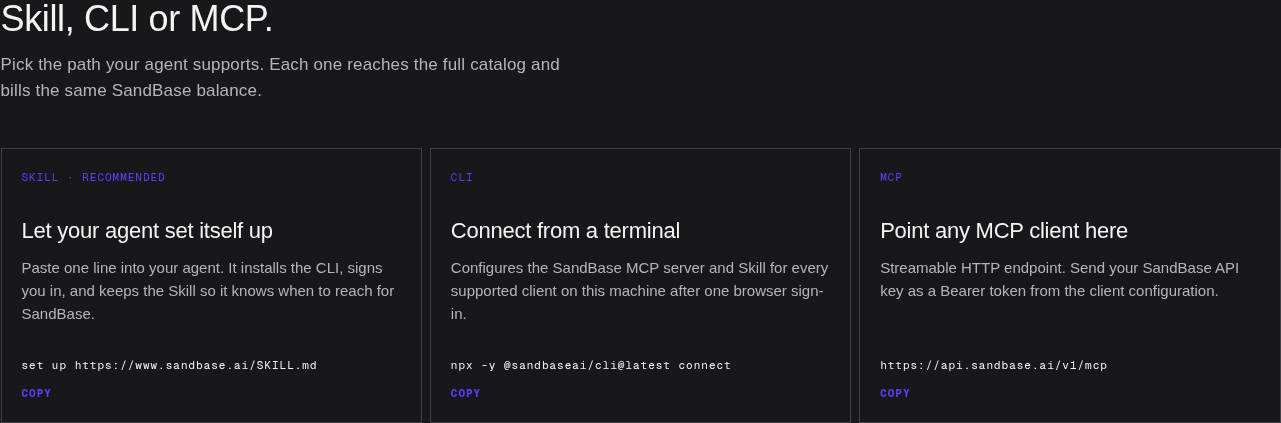 Three connection paths on SandBase — Skill, CLI connect, and the raw MCP endpoint.
Path A: paste one Skill line
In the agent’s chat, not a terminal:
set up https://www.sandbase.ai/SKILL.mdSKILL.md then tells the agent to check node --version and stop below Node.js 20, run npx -y @sandbaseai/cli@latest connect --client <client-id> for the app that is open, and wait at least five minutes for the browser approval. No browser on that machine means the CLI prints a URL. When it reports the client configured, start a new session or restart so sandbase_* tools load.
“Configured” is not “the call worked.” The Skill splits that into configured (sign-in and the client entry), tools usable (a discover or inspect in this session), and first call verified (you read a successful output). A run id is not the third. A CLI that works in another terminal does not prove this chat loaded MCP.
One client, or every client the CLI finds
SKILL.md listed 25 client ids that day, the same count as the AI tools page. The ones this article is about are claude-code, cursor, and codex. The page also names OpenCode, Windsurf, Gemini CLI, Claude Desktop, and ChatGPT, and it marks iFlow CLI as legacy. ChatGPT and Cowork are labeled account products. This article did not install the grid, so a listed name is not a personal test. The full id list is in the Skill file.
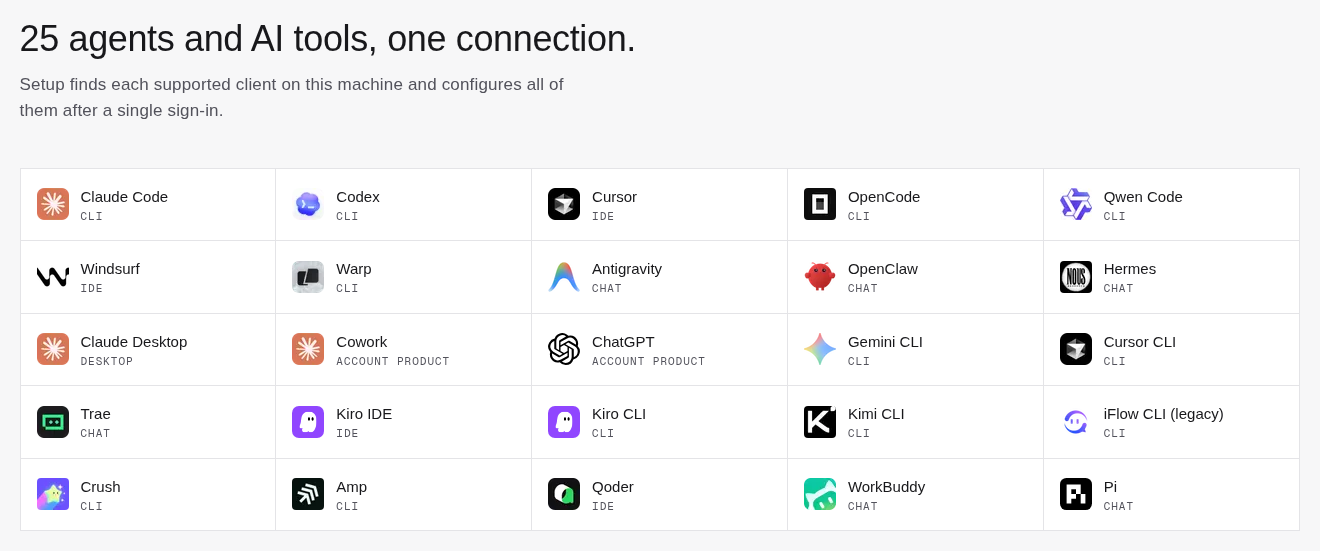 Supported agents and AI tools grid, including Claude Code, Cursor, and Codex.
The Skill tells the agent to pass --client for the open app, and to configure every installed client only when you ask. The setup docs say connect without --client writes every supported client it finds, after one sign-in. The page’s “25 agents and AI tools, one connection” line describes that machine-wide command. Pasting the Skill line into Claude Code should configure Claude Code. For Cursor and Codex as well, say so, or use Path B.
Path B: CLI from the terminal
Use this when the agent has no shell, or when you want every detected client while you watch the prompt.
npx -y @sandbaseai/cli@latest connect
npx -y @sandbaseai/cli@latest connect --client codex
curl -fsSL https://sandbase.ai/install.sh | sh -s -- --client codex
curl -fsSL https://sandbase.ai/install.sh | sh -s -- --list-agents
connect opens the browser, creates a CLI Login key for the workspace you approve, and writes only SandBase-owned configuration. Per-client notes are in sandbaseai/cli. npm listed @sandbaseai/cli 0.3.8 as latest on 2026-11-08. The docs say @latest, not a pin.
The August CLI post pins a v0.1.17 tarball and six tools. Current SKILL.md lists seven, including sandbase_run_cancel. Read that post for rollback and unregister. Do not copy its install line.
npx -y @sandbaseai/cli doctor --client codexdoctor checks the local credential, the MCP entry, and the Skill, then makes one round trip. Swap the id when you configured a different client. unregister --client codex removes only the SandBase entry. Revoke the CLI Login key in the console if you are done with it.
Path C: the raw MCP endpoint
For a client the CLI does not configure, or a machine where the key must live in a secret store you already run, the AI tools page publishes:
https://api.sandbase.ai/v1/mcp
Authorization: Bearer <SandBase API key>
Signed-in users also see that URL under Other ways to connect. The key comes from Developer, API Keys. Claude Code takes it via --header. Codex can use bearer_token_env_var. Cursor uses Customize or mcp.json. Do not commit the key, and do not paste it into chat.
The MCP servers directory is not this endpoint. On 2026-11-08 its HTML heading read “50 MCP servers,” with third-party cards such as Exa, Slack, and GitHub in the initial HTML. The same payload still has the empty-state line “No MCP servers are available yet.” A card is a listing. It is not evidence SandBase operates that server, or that this article tested it, or that the Skill installed it.
The first loop: discover, inspect, then run
One request is enough to see whether the new session loaded the tools:
Find an API that searches X posts about AI agents.
Show the schema and the price before you run anything.
If it is in the daily free allowance, run one small query.
SKILL.md’s illustration that day was sandbase_twitter_web_search_timeline with {"keyword": "AI agents"}. Copy tool_name from discover and the fields from inspect on the day you run it. A long query can miss, so read hints before you rephrase.
The 100 free data calls are shared per organization and reset at 00:00 UTC. Models, image, video, and audio are billed anyway. Start with one search term and a limit of 5–10. If status is running, poll. This article did not place the call, so it has no Activities row.
The one-key stack, the sandbox limits, and hosted Sessions are separate posts: one key, E2B, Agents API. This page is only the coding-tool door.
When not to use the Skill
SKILL.md section 4 already ranks your own tools ahead of this balance. An explicit instruction wins, then your MCP, CLI, or key, then ordinary fetch when a page is enough, then SandBase for structured data, media, or a named model. Local edits do not belong here.
Skip the Skill line without Node.js 20+. Raw MCP still works if the client can store a Bearer token. A client with neither a shell nor a manual MCP form does not gain tools because a sentence was pasted. Skip it when prompts already call TikHub, Wellbyte, or DataAndAPIs. And skip it when the thing you wanted was a Claude Code pass rate. That measurement is SandBase MCP in Claude Code: Setup and 12 Real Runs, from 2026-10-03, on one bridge version. Those tables stay there.
Paste-JSON data MCPs still have a job
Checked 2026-11-08. The counts are each vendor’s page, not a SandBase census.
| Setup | What you paste | What that page claimed | Leave it in place when |
|---|---|---|---|
| DataAndAPIs | Remote MCP. Header key, Bearer, or the key in the Claude connector URL. | Hero 128+ data APIs, title 125+. Tools search_apis, get_api, call_api. Live calls need a key. Free tier described as 500 tokens a month. | That data catalog is the one you already pay. Not a model catalog. |
| TikHub | mcp-remote stdio, SSE, or Streamable HTTP. Bearer. One server per platform. | 990+ tools, 16 platform servers. | You want that per-endpoint social list. |
| Wellbyte | @wellbyte/mcp with an API key and profile UUID, or remote URL plus Bearer. | search_endpoints, get_endpoint_schema, call_endpoint. | You already run a Wellbyte profile. |
| Hand-written MCP | Three client files | Whatever server you add | The server is not SandBase, or the CLI must not write config. |
Troubleshooting and safety
| What you see | What to do |
|---|---|
No sandbase_* tools | New session or restart, then doctor --client <id>. |
| The browser prompt sits there | The Skill’s floor is a five-minute wait. No local browser means open the printed URL. |
| HTTP 402 | Setup docs say add credit. SKILL.md splits it: a spending limit is raised on the key and is not fixed by a top-up. An insufficient balance is a top-up. Stop retrying. |
| 401 or an expired sign-in | Run connect again. Do not paste the old key into chat. |
| A slow run | Poll sandbase_run_get. Running it again bills another execution. |
| Old Node | Install Node.js 20+ and stop, as the Skill says. |
Browser sign-in creates a CLI Login key for the coding tool. Path C and your own server use a REST API key. The October Claude tutorial saw a CLI Login key scoped to mcp:invoke return HTTP 403 on the REST routes it tried, on bridge v0.1.17. Scopes were not re-tested here. Do not drop that key into SANDBASE_API_KEY until you have read that post. Keep both out of git, history, and the transcript.
FAQ
How do I set up SandBase SKILL.md in Claude Code, Cursor, or Codex?
Paste the Skill line into that agent’s chat:
set up https://www.sandbase.ai/SKILL.mdThe agent reads the Skill, checks Node.js 20+, runs npx -y @sandbaseai/cli@latest connect --client <your-client>, and asks you to approve one browser sign-in. You do not paste an API key into chat. When it reports configured, start a new session or restart the app so sandbase_* tools load. If the agent cannot run a shell, run connect yourself.
How do I give Claude Code, Cursor, and Codex live data APIs on one SandBase connection?
After Skill or CLI connect, the agent can sandbase_discover, sandbase_inspect for free, and sandbase_run. One balance covers language, image, video, and speech models plus data APIs. Eligible new accounts may get the $1 credit on the AI tools page. Eligible data APIs share 100 free calls per organization per day, and inspect shows if this tool is in that pool. Ask for an X post search, the price, then one small query. Bare connect loads every client the CLI finds.
When should I use raw SandBase MCP instead of the Skill?
Use https://api.sandbase.ai/v1/mcp with a Bearer API key when the CLI does not configure that client, or when the key already lives in client secret config. Keep it out of chat and out of committed files. For Claude Code, Cursor, and Codex, Skill or connect creates the credential in the browser. Confirm with doctor --client <id> and one safe call inside the client.
The AI tools page is the short version of the three paths. The setup docs are the command reference. Claude-only pass rates stay in the October tutorial. They are not a promise about Cursor or Codex.