SandBase MCP in Claude Code: Setup and 12 Real Runs
Set up SandBase MCP in Claude Code with the official CLI, then see 12 headless runs on Xiaohongshu, Douyin and image tasks: tool calls, pass rate, cost.
My first headless run took 19 turns and 408 seconds to compute four medians. Claude Code found the right Xiaohongshu endpoint in three tool calls. Then it fought its own permission rules: the 100 KB search result went to a file, and the agent wasn’t allowed to run the Python needed to read it. Two extra permission rules brought the same task down to 7 turns and under two minutes.
This tutorial covers the SandBase MCP Claude Code setup end to end: the official install command, what the server exposes, the permission rules that make headless runs work, and what happened in 12 graded runs (3 tasks, 2 runs each, on Claude Sonnet 5.5 and GPT-6 Luna). It’s for Claude Code users who want public social data or images without wiring each API by hand.
Key takeaway
- The official route is the open-source SandBase CLI:
connect --client claude-codeadds one stdio MCP entry to~/.claude.jsonand stores a separate CLI Login key with owner-only file permissions. Claude Code then sees six tools:sandbase_discover,sandbase_inspect,sandbase_run,sandbase_run_get,sandbase_runsandsandbase_account.- In 12 graded runs on 2026-10-03, Claude Sonnet 5.5 passed 5 of 6 and GPT-6 Luna 3 of 6. Both got the Douyin follower comparison right twice. Every image failure came from one gap: for async image runs,
sandbase_run_getreturned status and cost but no image URL.- Sonnet cost a median of $0.29 per run in model tokens at SandBase list price, Luna $0.008. Claude Code’s own
total_cost_usdoverstated Luna by about 50 times because it uses its own price table.- For headless runs, allow the six SandBase tools plus
ReadandBash(python3:*). 11 of 24sandbase_runresults were too large to stay in context and went to a file instead.
What the official setup does
SandBase documents the setup on its Connect AI tools page: pick the client in Console Setup, run the installer, approve the browser authorization, restart, then make one safe tool request. The live https://sandbase.ai/install.sh is a thin wrapper: with --client claude-code it runs npx -y @sandbaseai/cli connect --client claude-code.
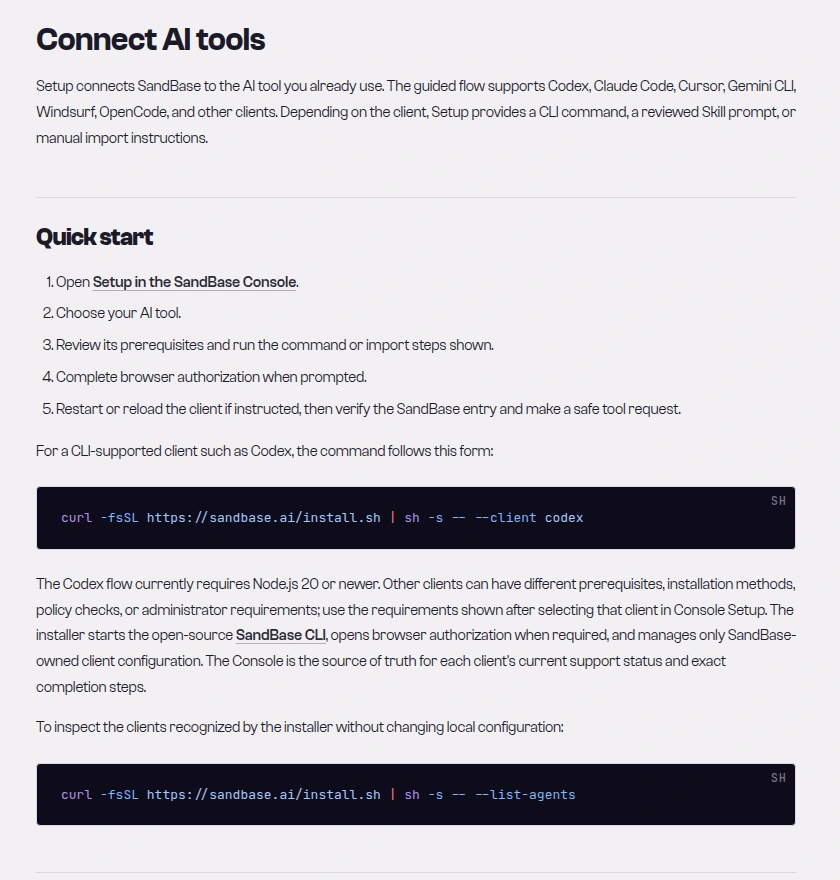 Caption: The SandBase “Connect AI tools” docs page lists the five setup steps and the install.sh command form used below (captured 2026-10-03).
# Option 1: the installer from the SandBase docs (needs Node.js 20+)
curl -fsSL https://sandbase.ai/install.sh | sh -s -- --client claude-code

# Option 2: the pinned v0.1.17 GitHub release the CLI README recommends
npx -y https://github.com/sandbaseai/cli/releases/download/v0.1.17/sandbaseai-cli-0.1.17.tgz connect --client claude-code
On 2026-10-03, npm’s latest tag for @sandbaseai/cli was still 0.1.14, so the installer gets that, while the GitHub release was v0.1.17 (2026-08-19). The CLI install notes give the pinned tarball and its SHA-256.
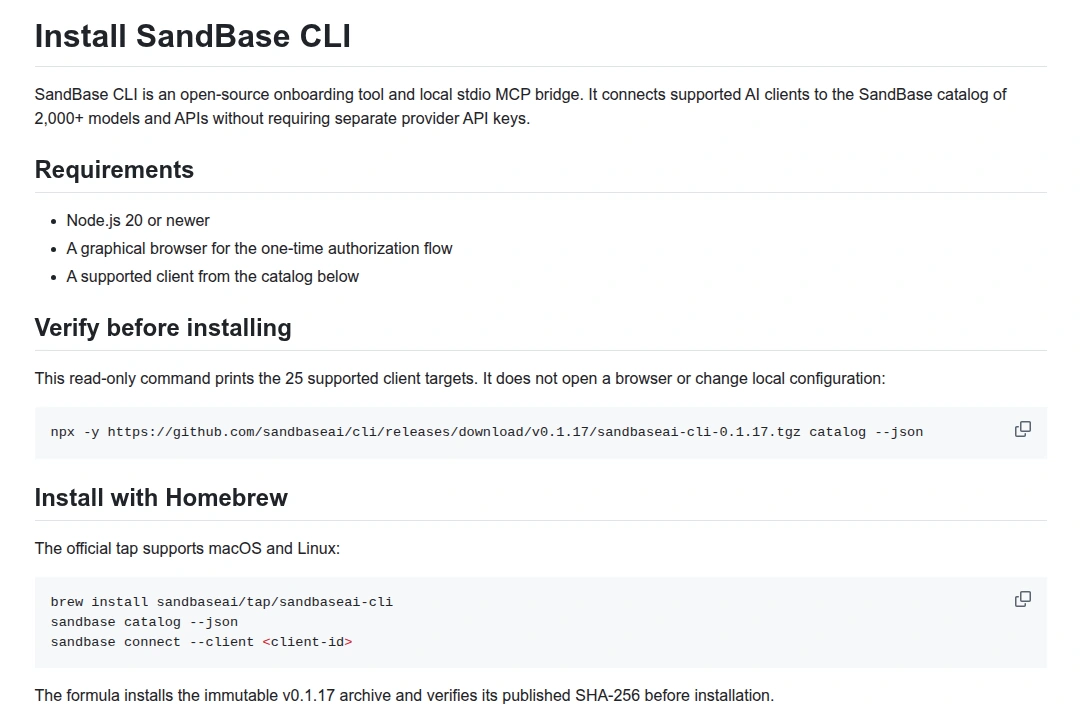 Caption: The CLI’s install notes list the requirements (Node.js 20, a browser for one-time authorization) and the pinned v0.1.17 commands (captured 2026-10-03).
After authorization, the CLI writes exactly one entry into ~/.claude.json. On my machine it looked like this (the home path is mine):
{
  "mcpServers": {
    "sandbase": {
      "command": "node",
      "args": ["/Users/liyb/.sandbase/bin/sandbase-mcp-bridge.mjs", "--client", "claude-code"],
      "env": {"SANDBASE_CLI_MANAGED": "1"}
    }
  }
}
There’s no key in that file. The bridge is a small Node script (byte-identical to the v0.1.17 source) that reads its credential from ~/.sandbase/credentials.json, mode 0600 on my machine, and forwards each MCP message to https://api.sandbase.ai/v1/mcp. There’s no documented claude mcp add one-liner. The CLI-managed entry is the supported path, and it’s what doctor and unregister recognize later.
Check it before you trust it:
npx -y https://github.com/sandbaseai/cli/releases/download/v0.1.17/sandbaseai-cli-0.1.17.tgz doctor --client claude-code
claude mcp list
I got claude-code: status=configured, mcp=configured, ... from doctor and sandbase: node .../sandbase-mcp-bridge.mjs --client claude-code - ✔ Connected from claude mcp list. To remove it, unregister --client claude-code deletes only the SandBase entry; the docs also say to revoke the CLI Login key under Developer → API Keys.
What the server exposes
A tools/list call through the bridge returned six tools. I’ve included the annotations because they matter for permissions:
| Tool | What it does | Annotation |
|---|---|---|
sandbase_discover | Search models and APIs by q, type, vendor, limit | read-only |
sandbase_inspect | Input schema, price and an execute_as template for one name | read-only |
sandbase_run | Execute a model or API with name and arguments | destructive, open-world |
sandbase_run_get | Status of an async run by run_id | read-only |
sandbase_runs | Recent calls with model, status and cost | read-only |
sandbase_account | Balance in USD | read-only |
Only sandbase_run spends money. The others are free lookups.
The three tasks and how they were graded
I ran Claude Code 2.1.246 headless, each run in a fresh temp directory with its own CLAUDE_CONFIG_DIR holding a copy of the CLI’s MCP entry. Model calls went through SandBase’s Anthropic-compatible endpoint, which takes a regular SandBase API key in ANTHROPIC_AUTH_TOKEN, separate from the bridge’s CLI Login key. The tasks:
- Xiaohongshu: find a note-search endpoint, search the sunscreen keyword (one page, one run), report the note count, median likes, saves and comments, and the number of video notes, with no author names or note text.
- Douyin: find the official accounts of Luckin Coffee and Starbucks China and compare follower counts.
- Image: find an image model, inspect at most three, pick the cheapest under $0.05 per image, generate one square product photo of a white ceramic mug, poll if async, and return the image URL.
The Xiaohongshu prompt, verbatim (the keyword is the Chinese word for sunscreen):
Use the SandBase MCP tools (sandbase_discover, sandbase_inspect, sandbase_run). Find a Xiaohongshu note-search endpoint, inspect it, then search notes for the keyword 防晒霜 (sunscreen), first page only, one run. From the notes returned, report the number of notes, median likes, median saves (collects), median comments, and the number of video notes. Do not include author names, note titles or note text in your answer. Finish with exactly one line of JSON: {"endpoint": "...", "run_id": "...", "notes": 0, "median_likes": 0, "median_saves": 0, "median_comments": 0, "video_notes": 0}Grading used the raw tool results each run received, since search results change between runs. Xiaohongshu passed if all five numbers matched my recomputation from that run’s sandbase_run result. Douyin passed if both follower counts appeared in the run’s raw results for the plain-name brand accounts. Image passed if the URL downloaded as an image and the listed price was under $0.05.
Results
| Task | Claude Sonnet 5.5 | GPT-6 Luna |
|---|---|---|
| Xiaohongshu medians | 2/2 | 1/2 |
| Douyin followers | 2/2 | 2/2 |
| Image generation | 1/2 | 0/2 |
| Total | 5/6 | 3/6 |
| Median turns (range) | 7.5 (7 to 18) | 12.5 (5 to 15) |
| Median wall time (range) | 106 s (72 to 328) | 83 s (33 to 120) |
| Model cost per run at list price, median (range) | $0.29 ($0.16 to $0.40) | $0.008 ($0.004 to $0.010) |
| Model cost, all 6 runs | $1.65 | $0.046 |
The Douyin task was the cleanest. All four runs used douyin/search/user-search-v2, and three of them also fetched douyin/app-v3/user-profile for each account. The slow Sonnet run (18 turns, 328 s) ran both profile lookups twice, checking its own run history in between. All four picked the plain-name accounts over sub-accounts such as the brands’ flagship stores. They reported about 7.37 million followers for Luckin Coffee and 11.56 million for Starbucks China, a ratio of 0.64. The counts differed by a few dozen between runs minutes apart. The profile responses carried an enterprise verification field on both accounts, a better official-account check than the name.
Xiaohongshu medians varied a lot because the search itself did: median likes came out at 113.5, 123 and 256 in the three passing runs. Every pass matched its own raw data exactly, so the variation was in the search results, not the arithmetic. Each model took a different path. Sonnet read the saved file with two python3 -c commands, one to see the structure and one to compute. Luna’s passing run failed four Read attempts and one Python heredoc before a plain python3 -c worked.
Luna’s failed Xiaohongshu run shows a real pitfall. sandbase_inspect returns an execute_as template shaped like {"name": "sandbase_run", "arguments": {"name": "<tool>", "arguments": {}}}. Luna copied that nesting into sandbase_run’s own arguments, so the endpoint got {"arguments": {...}, "name": ...} as its parameters and the call failed with MCP error -32000: capability call failed. It returned nulls instead of guessing.
Why the image task failed three times
Three of the four image runs chose alibaba/z-image-exp0622 (inspect listed $0.013 per image). It’s async: sandbase_run came back pending with a run id, and the agents polled sandbase_run_get as told. The poll moved to completed and showed the cost. It never included an output or URL. I called sandbase_run_get myself later for the same id and got the same fields. The CLI Login key also can’t reach the REST GET /v1/run/{id}: it returned HTTP 403 insufficient_scope. Each of those runs paid $0.013 for an image it couldn’t hand back. None made up a URL.
The one success, a Sonnet run, picked z-image/turbo at $0.005. It came back completed in the same sandbase_run call with the PNG URL in output, so no polling was needed. That’s odd, because the model page says async:
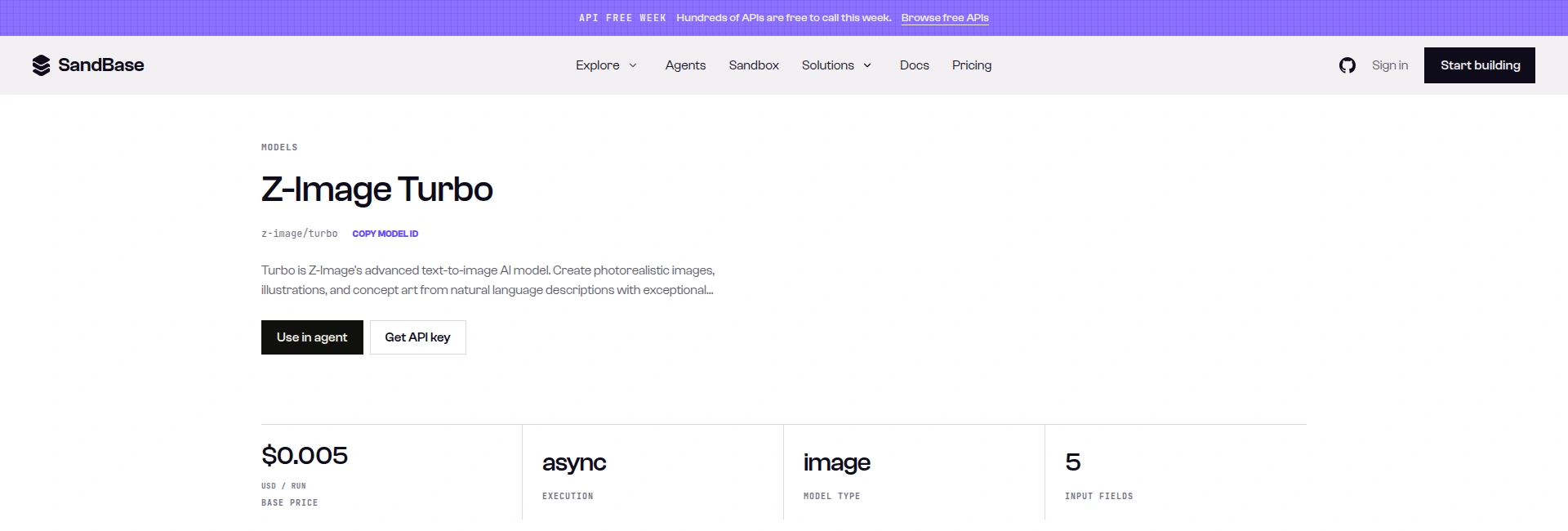 Caption: The z-image/turbo model page lists a $0.005 base price per run and async execution, although its MCP run returned the image in the first response (captured 2026-10-03; the page also showed an “API Free Week” banner).
Until async results come back through sandbase_run_get, tell the agent to prefer models whose run returns the image directly, and to stop after one poll that shows completed without output.
Tested on 2026-10-03 (UTC)
Inputs: the sunscreen keyword above, the two brand names, and a generic product-photo prompt. No private accounts. The async image response from sandbase_run (run 5ccd3dc1-192e-49b2-b94b-784ab54752fb), complete except the _meta key, which repeated the task id:
{
  "model": "alibaba/z-image-exp0622",
  "output": null,
  "pollInterval": 3000,
  "prediction_id": "5ccd3dc1-192e-49b2-b94b-784ab54752fb",
  "status": "pending",
  "statusMessage": "async result is still running; poll the task result later",
  "status_code": 202,
  "taskId": "5ccd3dc1-192e-49b2-b94b-784ab54752fb",
  "tool_name": "sandbase_alibaba_z_image_exp0622",
  "type": "capability"
}
And sandbase_run_get for the same id after it finished (one key, the upstream model label, omitted):
{
  "cost": "0.013",
  "created_at": "2026-10-03T14:39:42Z",
  "model": "alibaba/z-image-exp0622",
  "run_id": "5ccd3dc1-192e-49b2-b94b-784ab54752fb",
  "status": "completed"
}
Completed data calls had the top-level keys model, output (a list whose first item holds data), prediction_id, status, status_code and tool_name. MCP wraps results differently from the REST /v1/api responses, so treat these keys as observed-only, not a documented contract.
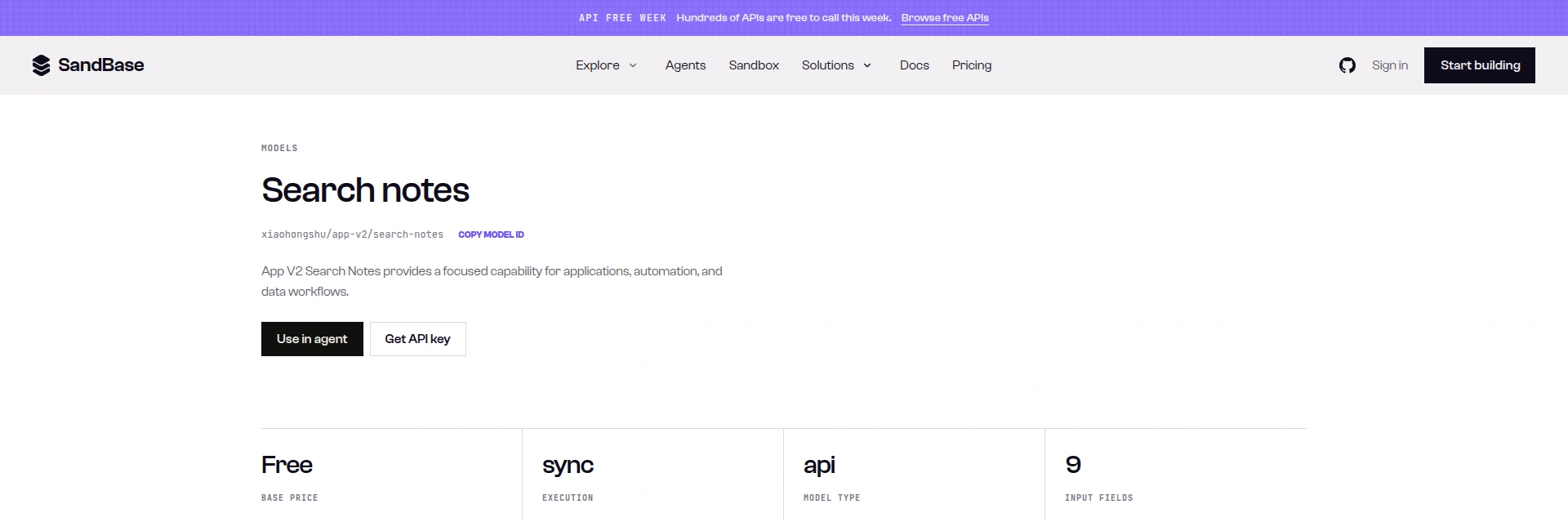 Caption: The xiaohongshu/app-v2/search-notes model page lists a Free base price, sync execution and 9 input fields, which matches the schema sandbase_inspect returned in the runs (captured 2026-10-03).
Cost: what Claude Code says and what SandBase charges
Claude Code’s result JSON includes total_cost_usd, but that comes from Claude Code’s own price table, not from SandBase. For Sonnet it was close to my list-price estimate ($1.68 against $1.65 for six runs). For Luna it reported $2.29 against $0.046, because it doesn’t know the model and prints unrecognized_model to stderr. I priced each run from its cumulative usage: input tokens at the model card price, cache writes at 1.25 times input and cache reads at 0.1 times, both multipliers taken from the model card. On 2026-10-03, GET https://api.sandbase.ai/v1/models/<id> listed Claude Sonnet 5.5 at $2/M input and $10/M output and GPT-6 Luna at $0.1/M and $0.5/M. That call needs your SandBase API key as a Bearer token. Without one, the same prices are on the public model pages. I didn’t reconcile billing per run, because /v1/messages ids don’t resolve in GET /v1/tasks/{id}/cost.
Cache traffic is most of it. Sonnet’s six runs used 1.98M cache-read and 424K cache-write tokens against 18.7K output tokens, mostly Claude Code’s system prompt and tool definitions re-read every turn. So turns drive cost: the 19-turn pilot cost $0.84, the 7-turn runs of the same task $0.18 to $0.27.
On the MCP side, the data endpoints used here (xiaohongshu/app-v2/search-notes, douyin/search/user-search-v2, douyin/app-v3/user-profile) had a base_price of 0 that day. The account balance dropped by $0.044 across the pilot and the 12 graded runs: three $0.013 async images and one $0.005 turbo image. The 20 data calls sandbase_runs listed for the pilot and the graded runs all cost $0. I picked GPT-6 Luna as the cheap comparison because it scored 51 of 51 in our model tier benchmark at about 1/20 the cost of GPT-6.1 Sol. Here it was about 35 times cheaper than Sonnet per run. Fine for lookups, less reliable when the tool contract has a trap in it.
Run it yourself
The script below is the one I ran for the last two checks (GPT-6 Luna on the Douyin prompt: 16 turns, 88 s, about $0.01 at list price; Sonnet on the Xiaohongshu prompt: 12 turns, 343 s, $0.38). It assumes you’ve done the connect step, reads your API key from the environment, and never writes it to disk.
#!/usr/bin/env bash
# Run one Claude Code task headless with the SandBase MCP server, with the model routed through SandBase.
# Usage: SANDBASE_API_KEY=... ./run_with_sandbase_mcp.sh <sandbase-model-id> "<prompt>"
set -euo pipefail
MODEL="$1"; PROMPT="$2"
: "${SANDBASE_API_KEY:?set SANDBASE_API_KEY in the environment}"
BRIDGE="$HOME/.sandbase/bin/sandbase-mcp-bridge.mjs"  # written by: connect --client claude-code
[ -f "$BRIDGE" ] || { echo "Run the SandBase CLI connect step first." >&2; exit 1; }
CFG="$(mktemp -d)"   # isolated Claude Code config; your normal ~/.claude.json is not touched
WORK="$(mktemp -d)"  # throwaway working dir; the agent may run python3 here
trap 'rm -rf "$CFG" "$WORK"' EXIT
cat > "$CFG/.claude.json" <<EOF
{"mcpServers": {"sandbase": {"command": "node", "args": ["$BRIDGE", "--client", "claude-code"], "env": {"SANDBASE_CLI_MANAGED": "1"}}}}
EOF
ALLOWED="mcp__sandbase__sandbase_discover,mcp__sandbase__sandbase_inspect,mcp__sandbase__sandbase_run"
ALLOWED="$ALLOWED,mcp__sandbase__sandbase_run_get,mcp__sandbase__sandbase_runs,mcp__sandbase__sandbase_account"
ALLOWED="$ALLOWED,Read,Bash(python3:*)"  # large MCP results are saved to a file; this lets the agent parse it
cd "$WORK"
env -u ANTHROPIC_API_KEY CLAUDE_CONFIG_DIR="$CFG" \
  ANTHROPIC_BASE_URL="https://api.sandbase.ai" ANTHROPIC_AUTH_TOKEN="$SANDBASE_API_KEY" \
  ANTHROPIC_MODEL="$MODEL" ANTHROPIC_SMALL_FAST_MODEL="$MODEL" ANTHROPIC_DEFAULT_HAIKU_MODEL="$MODEL" \
  DISABLE_TELEMETRY=1 CLAUDE_CODE_DISABLE_NONESSENTIAL_TRAFFIC=1 \
  claude -p "$PROMPT" --model "$MODEL" --output-format json --max-turns 30 \
    --allowedTools "$ALLOWED" > "$CFG/result.json"
python3 - "$CFG/result.json" <<'PY'
import json, sys
r = json.load(open(sys.argv[1]))
keys = ("subtype", "is_error", "num_turns", "duration_ms", "total_cost_usd", "usage")
print(json.dumps({k: r.get(k) for k in keys}, indent=1))
print(r.get("result"))
PY
For the Luna run it printed this summary. I’ve omitted the other usage keys (output_tokens_details, server_tool_use, service_tier, cache_creation, inference_geo, iterations, speed) and the final answer line. The total_cost_usd is Claude Code’s own figure, not SandBase’s:
{
 "subtype": "success",
 "is_error": false,
 "num_turns": 16,
 "duration_ms": 87751,
 "total_cost_usd": 0.5171187500000001,
 "usage": {
  "input_tokens": 1872,
  "cache_creation_input_tokens": 58295,
  "cache_read_input_tokens": 203130,
  "output_tokens": 1674
 }
}
With your normal Anthropic login you’d skip the ANTHROPIC_* variables and the isolated config, since connect already wrote the entry to ~/.claude.json. I didn’t test that path. For the endpoints themselves, see the search-notes API reference, and get a SandBase API key if you want to route the model through SandBase too.
Pitfalls I hit
- The server isn’t ready on turn one. In headless mode the MCP server starts as
pending. In 10 of 12 runs the model’s first call was Claude Code’sWaitForMcpServers. That added a turn but caused no failures. - Big results go to disk. 11 of 24
sandbase_runresults were replaced with a pointer to a file. With only MCP tools allowed, the pilot made 12 Bash attempts and 6 were denied. Even withBash(python3:*)allowed, Claude Code rejected some heredocs and shell expansions, so singlepython3 -ccommands worked best. sandbase_discovermatches keywords, not intent. 9 of Luna’s 15 discover calls returnedcount: 0: long natural-language queries, Chinese queries, or avendorfilter plus a long query. Short queries such as “xiaohongshu note search” worked. Sonnet had 1 empty result in 8.- Don’t copy
execute_asliterally. Pass the endpoint fields directly inarguments.
Security notes
- Two keys, two scopes. The bridge’s CLI Login key had the scope
mcp:invokeand got HTTP 403 on the REST endpoints I tried, which limits a leak. The model-routing API key is a normal key: keep it in the environment, out of.claude.json, scripts and shell history. - Permission rules are your spending limit.
sandbase_runcan call paid models. Interactively, leave it on ask. Headless, allow only what the task needs, keep--max-turnslow, and checksandbase_accountbefore a batch. Bash(python3:*)is arbitrary code. Use it only in a throwaway directory. I didn’t use--dangerously-skip-permissions.- Data boundary. The data tools read public data and need a SandBase account. SandBase isn’t an official partner of Xiaohongshu or Douyin. No private accounts, DMs, creator back-office analytics or account actions. This post reports only aggregates and brand accounts.
FAQ
Is there an official SandBase MCP server for Claude Code?
Yes. The SandBase docs and the open-source sandbaseai/cli repository document connect --client claude-code, which installs a local stdio bridge to SandBase’s remote MCP endpoint. The official MCP Registry lists it as io.github.sandbaseai/cli.
Do I need a SandBase API key in my Claude Code config?
No. The CLI stores its own CLI Login key in ~/.sandbase/credentials.json, and ~/.claude.json only holds the launcher command. You need a separate API key only if you also route Claude Code’s model through SandBase, and that key belongs in an environment variable.
Which model should drive Claude Code for data tasks?
Claude Sonnet 5.5 passed 5 of 6 at a median of $0.29 per run, GPT-6 Luna 3 of 6 at $0.008. Luna handled simple lookups but slipped on a confusing tool template. With N=2 per task, treat that as a direction, not a ranking.
Why didn’t my image come back?
In my runs, async image models reached completed in sandbase_run_get with a cost but no URL. z-image/turbo ($0.005) finished in the first sandbase_run call and returned the URL directly.
How much does a typical task cost?
The data endpoints here were Free on 2026-10-03, so model tokens are the cost: $0.16 to $0.40 per run on Sonnet and under $0.01 on Luna at list price. Price from usage, not Claude Code’s own figure.
Limits
Scope of testing: one day, Claude Code 2.1.246, CLI bridge v0.1.17, two models, three tasks, two graded runs each, plus one pilot and two script runs. That shows failure modes, not reliable pass rates. Untested: an Anthropic subscription login, interactive sessions, other image models, Windows. For a wider view of Claude Code itself, see the Claude Code complete guide. For the other 24 client targets the CLI supports, see the SandBase CLI MCP bridge post. The prompts, grading rules and aggregates are all in this article. The raw transcripts stay internal because they contain third-party post content.