Kling Turbo vs Omni vs Pro: Which Tier When
Deep comparison of Kling Video 3.0's tier system — Turbo Standard, Turbo Pro, and Omni Pro — with quality benchmarks, speed data, and cost projections at 10, 100, and 1000 videos.
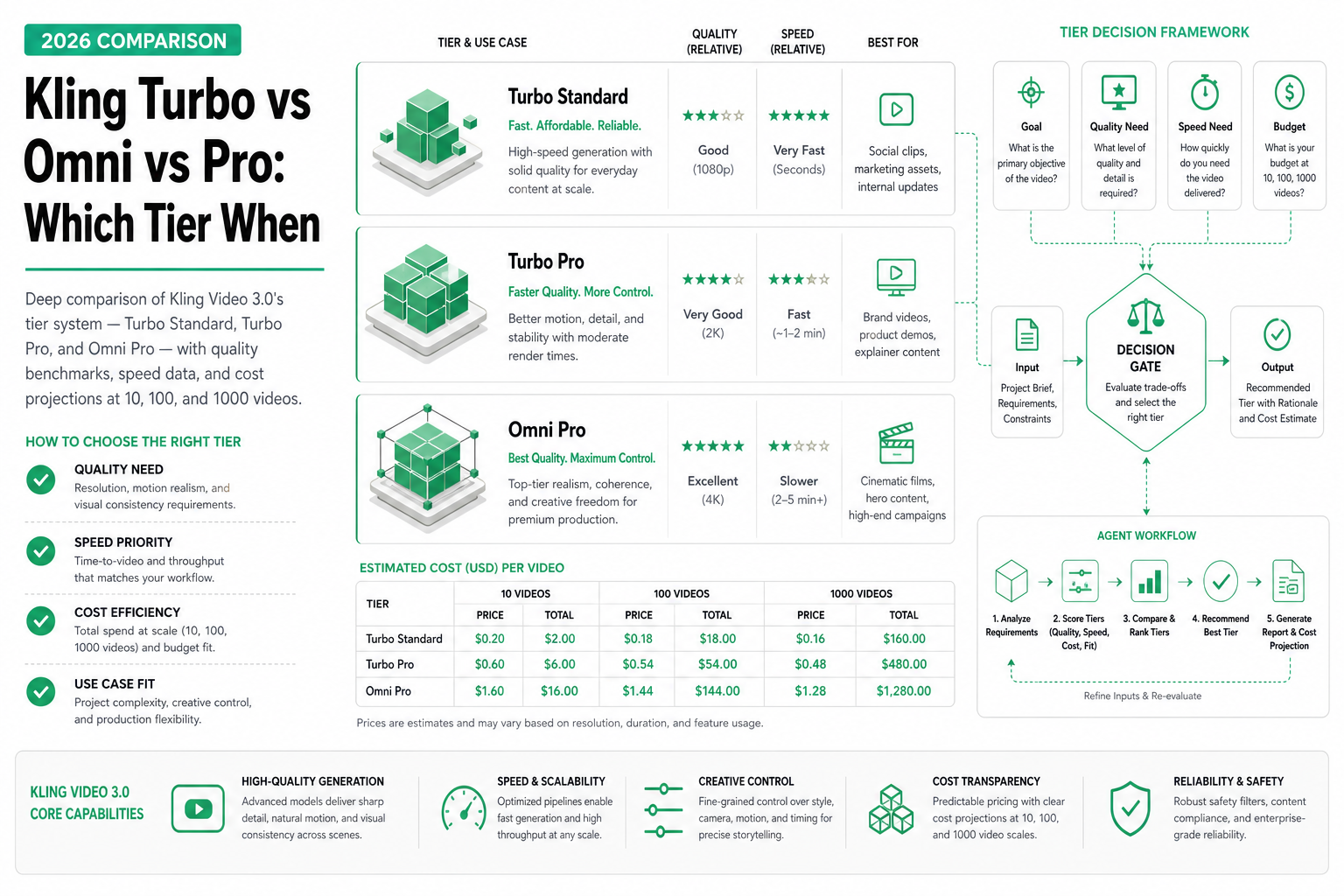
TL;DR — Kling’s three tiers serve different markets: Turbo Standard ($0.02/sec) for bulk/testing, Turbo Pro ($0.04/sec) for production social content, Omni Pro ($0.07–$0.10/sec) for premium brand work. The quality gap between tiers is real and visible. Your decision depends on where the video will be viewed, how many you need, and whether anyone will watch it full-screen.
Kling Video 3.0 doesn’t ask you to pick between “good” and “cheap” — it gives you a spectrum. Three distinct tiers with measurable differences in quality, speed, and cost. This guide helps you pick the right tier for each workflow, with real cost projections at production scale.
Tier overview
| Tier | Model ID | Resolution | Per-second | Key strength |
|---|---|---|---|---|
| Turbo Standard | kwaivgi/kling-video/3.0/turbo-standard | 720p | $0.02 | Maximum volume, minimum cost |
| Turbo Pro | kwaivgi/kling-video/3.0/turbo-pro | 1080p | $0.04 | Production quality at scale |
| Omni Pro | kwaivgi/kling-video/3.0/omni-pro | 1080p–4K | $0.07–$0.10 | Premium visual fidelity |
The naming tells you the trade-off: “Turbo” = speed-optimized, “Omni” = quality-optimized. “Standard” vs “Pro” within Turbo indicates resolution and detail level.
Quality breakdown: what you actually see
Turbo Standard (720p)
Output characteristics at 720p:
- Motion: Plausible but occasionally loops or repeats patterns
- Faces: Recognizable but simplified — fine wrinkles, pores not rendered
- Physics: Basic gravity and collision awareness, simplified fluid dynamics
- Backgrounds: Clean but lack micro-detail (individual leaves, texture variation)
- Best viewed: In-feed on mobile (small viewport, auto-play, brief attention)
Sample assessment: A “coffee being poured” clip at Turbo Standard looks like a competent stock video at mobile resolution. You’d notice the simplification if you paused and zoomed in, but at normal viewing speed in a social feed, it works.
Turbo Pro (1080p)
Output characteristics at 1080p:
- Motion: Varied and natural, rare repetition artifacts
- Faces: Consistent identity throughout the clip, visible skin texture
- Physics: Convincing particle effects (rain, smoke, sparks), better cloth simulation
- Backgrounds: Rich detail, varied textures, depth-of-field awareness
- Best viewed: Full-screen mobile, tablet, or desktop at standard distance
Sample assessment: The same “coffee being poured” clip at Turbo Pro shows individual droplets, steam turbulence, realistic glass refraction. It holds up on a phone screen at full-screen. You’d pause it and not immediately recognize it as AI-generated.
Omni Pro (1080p–4K)
Output characteristics at top quality:
- Motion: Cinematic — complex multi-element physics, natural camera shake options
- Faces: Film-quality consistency, subtle expression transitions, proper eye tracking
- Physics: Advanced fluid dynamics, realistic hair movement, cloth draping
- Backgrounds: Photorealistic depth, atmospheric effects (haze, dust motes, volumetric light)
- Best viewed: Any screen, any size, any scrutiny level
Sample assessment: The coffee clip at Omni Pro has visible steam convection currents, the glass has internal caustics, and the pour creates a realistic surface tension effect in the cup. This is content you’d put in a TV commercial.
Speed benchmarks
Generation time for a standard 10-second clip:
| Tier | Average | P50 | P95 | Max observed |
|---|---|---|---|---|
| Turbo Standard | 22s | 18s | 35s | 48s |
| Turbo Pro | 32s | 28s | 48s | 62s |
| Omni Pro | 72s | 65s | 98s | 130s |
For 5-second clips (most common for social media):
| Tier | Average | P95 |
|---|---|---|
| Turbo Standard | 14s | 22s |
| Turbo Pro | 21s | 32s |
| Omni Pro | 48s | 72s |
Practical implication: Turbo tiers are suitable for “user submits and waits” workflows. Omni Pro should be queued as a background task with status callbacks.
Cost projections at scale
10 videos per month (testing/personal)
| Tier | 5s clips | 10s clips | Mix (avg 7s) |
|---|---|---|---|
| Turbo Standard | $1.00 | $2.00 | $1.40 |
| Turbo Pro | $2.00 | $4.00 | $2.80 |
| Omni Pro | $3.50–$5.00 | $7.00–$10.00 | $4.90–$7.00 |
100 videos per month (startup/small team)
| Tier | 5s clips | 10s clips | Mix (avg 7s) |
|---|---|---|---|
| Turbo Standard | $10 | $20 | $14 |
| Turbo Pro | $20 | $40 | $28 |
| Omni Pro | $35–$50 | $70–$100 | $49–$70 |
1,000 videos per month (production scale)
| Tier | 5s clips | 10s clips | Mix (avg 7s) |
|---|---|---|---|
| Turbo Standard | $100 | $200 | $140 |
| Turbo Pro | $200 | $400 | $280 |
| Omni Pro | $350–$500 | $700–$1,000 | $490–$700 |
Mixed-tier strategy (common in production)
Most production teams don’t use a single tier. A typical split:
| Content type | Tier | Volume | Monthly cost |
|---|---|---|---|
| A/B test variants | Turbo Standard | 200 clips × 5s | $20 |
| Social media posts | Turbo Pro | 100 clips × 7s | $28 |
| Hero/ad content | Omni Pro | 20 clips × 10s | $14–$20 |
| Total | Mixed | 320 clips | $62–$68 |
This blended approach keeps total spend under $70/month while using premium quality only where it matters.
For more on video generation cost models, see Video Generation Cost Model Explained.
Decision tree by use case
Social media content
| Platform | Recommended tier | Why |
|---|---|---|
| Instagram Reels | Turbo Pro | 1080p vertical, good quality |
| TikTok | Turbo Pro | Same rationale |
| Twitter/X video | Turbo Standard | Small viewport, compressed heavily |
| Turbo Pro | Professional audience notices quality | |
| YouTube Shorts | Turbo Pro | Full-screen mobile viewing |
| YouTube long-form insert | Omni Pro | Large screen, scrutinized |
Advertising
| Ad type | Recommended tier | Why |
|---|---|---|
| Paid social (feed ads) | Turbo Pro | Good enough at feed size |
| Pre-roll video | Omni Pro | Full-screen, can’t skip immediately |
| TV commercial | Omni Pro (4K) | Broadcast quality required |
| Display banner animation | Turbo Standard | Small canvas, heavy compression |
| A/B test variants | Turbo Standard | Minimize cost during testing |
| Winner creative (scaled) | Turbo Pro or Omni Pro | Upgrade after validation |
Premium/brand
| Content type | Recommended tier | Why |
|---|---|---|
| Brand hero video | Omni Pro | Visual impression matters |
| Product launch | Omni Pro | High-scrutiny moment |
| Investor presentation | Omni Pro | Credibility signal |
| Internal demo | Turbo Standard | Nobody cares about polish |
| Sales deck video | Turbo Pro | Professional but cost-conscious |
API usage pattern
Selecting tier in your agent:
from openai import OpenAI

client = OpenAI(
    base_url="https://api.sandbase.ai/v1",
    api_key="your-sandbase-api-key"
)

def generate_video(prompt: str, tier: str = "turbo-pro", duration: int = 5):
    """Generate video at specified tier."""
    model_map = {
        "turbo-standard": "kwaivgi/kling-video/3.0/turbo-standard",
        "turbo-pro": "kwaivgi/kling-video/3.0/turbo-pro",
        "omni-pro": "kwaivgi/kling-video/3.0/omni-pro",
    }

    response = client.chat.completions.create(
        model=model_map[tier],
        messages=[{"role": "user", "content": f"{prompt} {duration} seconds."}]
    )
    return response.choices[0].message.content


# Agent logic: select tier based on context
def select_tier(content_type: str, budget_per_video: float) -> str:
    if budget_per_video < 0.15:
        return "turbo-standard"
    if content_type in ("brand", "ad_preroll", "hero"):
        return "omni-pro"
    return "turbo-pro"  # Default production tier
When to upgrade tiers
Signals that you should move up from Turbo Standard to Turbo Pro:
- Engagement metrics (watch time, CTR) are below benchmark
- Content is being viewed full-screen by audience
- You’re getting comments about video quality
- Brand guidelines require 1080p minimum
Signals that you should move up from Turbo Pro to Omni Pro:
- Content will appear on large screens (TV, projector, desktop)
- High-scrutiny context (paid ads, investor materials, product launches)
- Complex scenes with multiple people or intricate motion
- Video will be rewatched or analyzed closely
Signals that you should move DOWN a tier:
- Nobody watches more than 2 seconds (feed scroll behavior)
- Content is compressed heavily by platform anyway
- You’re in the testing/iteration phase
- Budget is the binding constraint
For Kling’s full capabilities including multi-shot, see Kling Video 3.0: Unified Multi-Shot Generation.
Related Reading
- Kling Video 3.0: Unified Multi-Shot Generation
- H3 vs Kling 3.0 vs Gemini Omni Flash (2026)
- Best AI Video Generation APIs in 2026
- Video Generation Costs: Per-Second vs Per-Call
- Text to Video vs Image to Video AI: When to Use Each
- Gemini Omni Flash: Google’s Fast Video Model
Key takeaways
- Three tiers = three price points: $0.02, $0.04, $0.07–$0.10 per second
- Quality differences are real — not marketing tiers, genuine visual quality gaps
- Turbo Standard is for volume/testing where 720p is fine
- Turbo Pro is the production workhorse — most teams use this 70%+ of the time
- Omni Pro is for high-scrutiny, premium contexts where visual quality drives results
- Mixed-tier strategy is optimal: test cheap, publish at mid-tier, hero at premium
- Per-second billing means you can precisely predict cost from video length × tier rate